
Issue an HBL or send an Arrival Notice
Guide information
Requirements
This tutorial requires the installation of the following applications/modules:
Freight Forwarder Management (installs Logistics Accounting automatically)
The House Bill of Lading (HBL) and the carrier’s Master Bill of Lading (MBL) are transport documents. Check their numbers, parties, route, cargo, containers, and sailing details against the records and instructions for the shipment before you release the HBL. For an import shipment, the Arrival Notice tells the consignee that cargo is expected and can carry other verified information your process requires. Confirm the carrier’s arrival date and free-time rules before sharing a Last Free Day. If a term below is new to you, see the Freight forwarding glossary.
Running scenario: Hai Long Logistics issues the HBL for Nhat Long Footwear’s 2 x Container 40FT HC of footwear, Hai Phong Port to Port of Los Angeles (carrier ONE Line, Incoterm CFR (Port of Los Angeles), Freight Prepaid), once both containers have sailed on the rolled-over schedule - and sends the Arrival Notice for Minh Phat Engineering’s CNC machining equipment container from Port of Shanghai (carrier COSCO SHIPPING LINES (Vietnam) Company Limited), with 7 days of free time from the actual arrival date (ATA).
These are two separate examples on two separate shipments. Choose the workflow that matches the shipment you are handling:
Export shipment: Step 1: Record the HBL No., MBL No. and Payment Term - issue and check the HBL.
Import shipment: Step 3: Check the carrier’s free-time allowance - check free time and send the Arrival Notice.
Before you start
Check only the prerequisites for the workflow you need:
For an export HBL: the booking has the final sailing, and the carrier has confirmed that the containers are on board (see Handle rolled-over and not-loaded containers and Export a full container load by sea). Print HBL has no status check, so verify the sailing before you print.
For an import Arrival Notice: the shipment is Confirmed; its HBL No., MBL No., vessel, voyage, and Notify Party are recorded (see Import a full container load by sea). Check that the consignee or another notice recipient has an email address.
For either workflow: use User: All Shipments to edit shipment details and send the Arrival Notice. User: Own Shipments can view the shipments but cannot perform these actions (see the user’s Freight access in Settings > Users & Companies > Users).
Step 1: Record the HBL No., MBL No. and Payment Term
HBL No. and MBL No. are independent free-text fields - Viindoo does not cross-check them. Get either wrong and the HBL printed in Step 2 already carries the mistake.
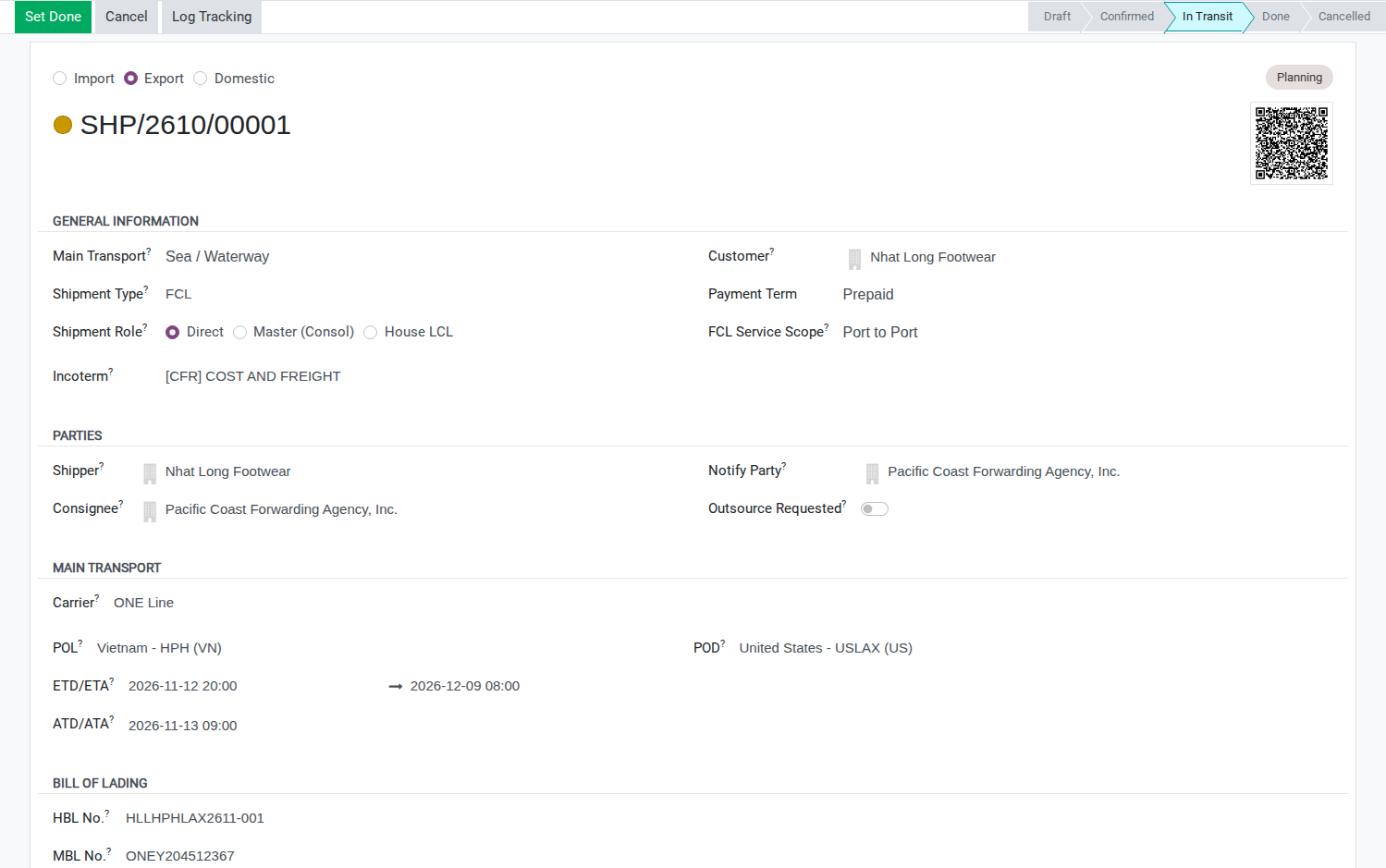
Go to and open the shipment for Nhat Long Footwear (SHP/26xx/000nn). Fill in:
HBL No. (Bill of Lading group): HLLHPHLAX2611-001.
MBL No. (Bill of Lading group): ONEY204512367.
Payment Term (General Information group, near the top of the form): Prepaid.
Warning
Both fields are plain text - Viindoo does not validate the format against ONE’s own numbering or flag a typo. Check character by character against the carrier’s own MBL copy before printing; the HBL PDF in Step 2 reads its B/L No. directly from HBL No..
Tip
Step 1 is done when:
The Bill of Lading group shows HBL No. HLLHPHLAX2611-001 and MBL No. ONEY204512367, matching the carrier’s MBL exactly.
Payment Term reads Prepaid, matching the CFR (Port of Los Angeles), Freight Prepaid Incoterm agreed with Nhat Long Footwear.
Decide the B/L release type
There is no field for this on the shipment - whichever you pick, log it in the Chatter before printing.
Option |
Use when |
What changes |
|---|---|---|
Original B/L |
Payment is by Letter of Credit, or the bank requires presenting physical originals |
The full set (3 originals) must reach the bank before the L/C presentation deadline, about 21 days after the on-board date |
Telex Release / Surrendered |
Payment is by T/T, or the buyer at destination is a trusted, repeat counterpart |
Pacific Coast Forwarding Agency, Inc. releases the cargo once the origin agent confirms the surrender - no courier wait |
Choose Original or Telex Release from the carrier’s release instructions and the customer’s contract or Letter of Credit requirements. Do not infer Telex Release from the absence of a Letter of Credit. In this example, the origin agent has confirmed surrender, so the shipment uses Telex Release.
Step 2: Print the House B/L
The HBL has to show the same containers, seals and on-board date as ONE’s MBL, or a bank or the buyer at destination can refuse the document set.
From the shipment’s header, click the gear icon (Action) and choose Print HBL.

Fill in the Print HBL window:
Ex. Rate: 26,000 (only printed on the PDF - it is not saved back to the shipment).
Prepaid at: Hai Phong, the agreed place for freight payment. This printed label does not record or verify that the customer or carrier invoice has been paid.
Payable at: leave blank - this field is for the destination port on a Collect shipment.
No. of Original B(s)/L: keep the default 3 - it only prints on the PDF and does not record the release type decided above.
Total Prepaid (National Currency): 111,800,000 (2 x USD 2,150 x 26,000 - the ocean freight only, not the THC or the D/O fee).
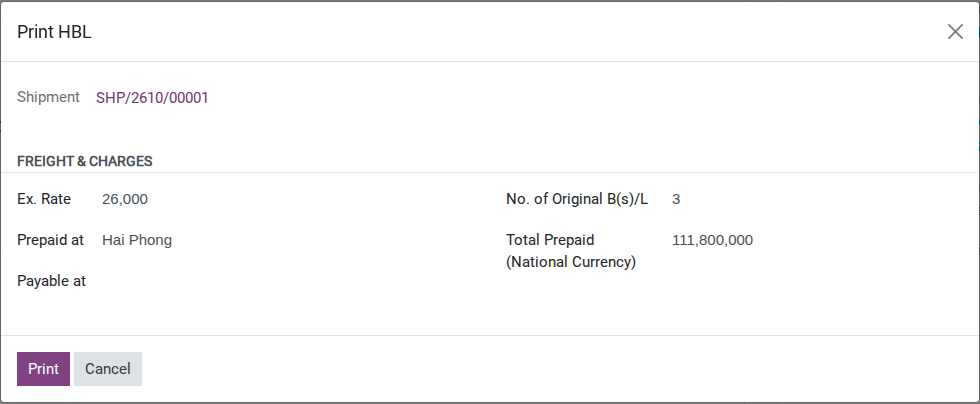
Click Print. Viindoo opens the HBL PDF - none of the values above are saved back to the shipment, so a corrected copy later means re-entering all of them from scratch.
Note
Viindoo has no field for the release type decided above. Record the agreed instruction in Chatter, for example “Release instruction: Telex Release for HBL HLLHPHLAX2611-001, destination agent Pacific Coast Forwarding Agency, Inc.” Describe the HBL as released only after the authorized party confirms release; printing a PDF alone does not confirm it.
Warning
Check the package count and issue date before sending the HBL. In this example, the current PDF shows one carton per container instead of the approved 600 cartons, and uses the shipment creation date as its issue date. Keep this copy for review until those details have been corrected.
Warning
The LADEN ON BOARD THE VESSEL date is the ETD of the Main Carriage leg - the planned departure, not the actual departure recorded by Start Transit. The rollover moved that ETD to 2026-11-12 (see Handle rolled-over and not-loaded containers), so that is the date printed. Print before the booking is updated and the HBL carries the old 2026-11-05; if the vessel sails on a later day than its ETD, update the ETD before printing.
Tip
Step 2 is done when:
The PDF shows B/L No. HLLHPHLAX2611-001, both containers with seals matching the packing list, and Prepaid marked in the Prepaid/Collect column.
The on-board date reads 2026-11-12 - not the original 2026-11-05 ETD.
Step 3: Check the carrier’s free-time allowance
The carrier’s Arrival Notice is the source for the arrival date and free-time allowance in this example. Check how COSCO counts the free days before calculating the Last Free Day, then record the date so Customer Service can include the confirmed information in its message to the consignee.
When COSCO’s Arrival Notice reaches Hai Long Logistics, use its arrival date and free-time terms - not an estimate from Viindoo - to work out the date. At this point ATA has not been recorded on the shipment yet (that comes later, see Import a full container load by sea), and even once it is, Container Free Time (Days) has no field on any form, so Free Time End and Detention Start stay empty (see Known limitations below). Arrival 2026-11-17 + 7 days of free time from COSCO = Last Free Day 2026-11-24. If the vessel berths on a different day, recompute from the actual arrival date.
Post a Chatter note on the shipment: “Last Free Day: 24/11/2026 (7 days free time from COSCO, arrival 17/11/2026).” - this is the only record of the number before it goes into the Arrival Notice in Step 4.
Tip
Step 3 is done when: the Chatter has a note stating Last Free Day 24/11/2026, posted before the Arrival Notice is sent in Step 4.
See also
Track container milestones from empty pickup to return - how Free Time Start, Free Time End and Detention Start are computed once ATA is filled in.
Decide what to add to the Arrival Notice before sending
Option |
Use when |
What changes |
|---|---|---|
Send the template as printed |
No additional information is required by your team’s process, or the details are being sent through another confirmed channel |
The message contains the template information only |
Add the Last Free Day and the local charges due |
The date and any charge amounts have been confirmed for this shipment |
The consignee receives the verified deadline and charges that your team is authorized to communicate |
Include a Last Free Day only after confirming the arrival date and carrier’s counting rule. Include a charge only after confirming that it applies to this shipment and checking its amount with Operations or Accounting. If any detail is uncertain, confirm it before sending the notice.
Step 4: Send the Arrival Notice
The Arrival Notice starts Minh Phat Engineering’s clock - sent late, or missing the Last Free Day, the consignee can run past free time without ever being warned.
On the import shipment header, click Send Arrival Notice.
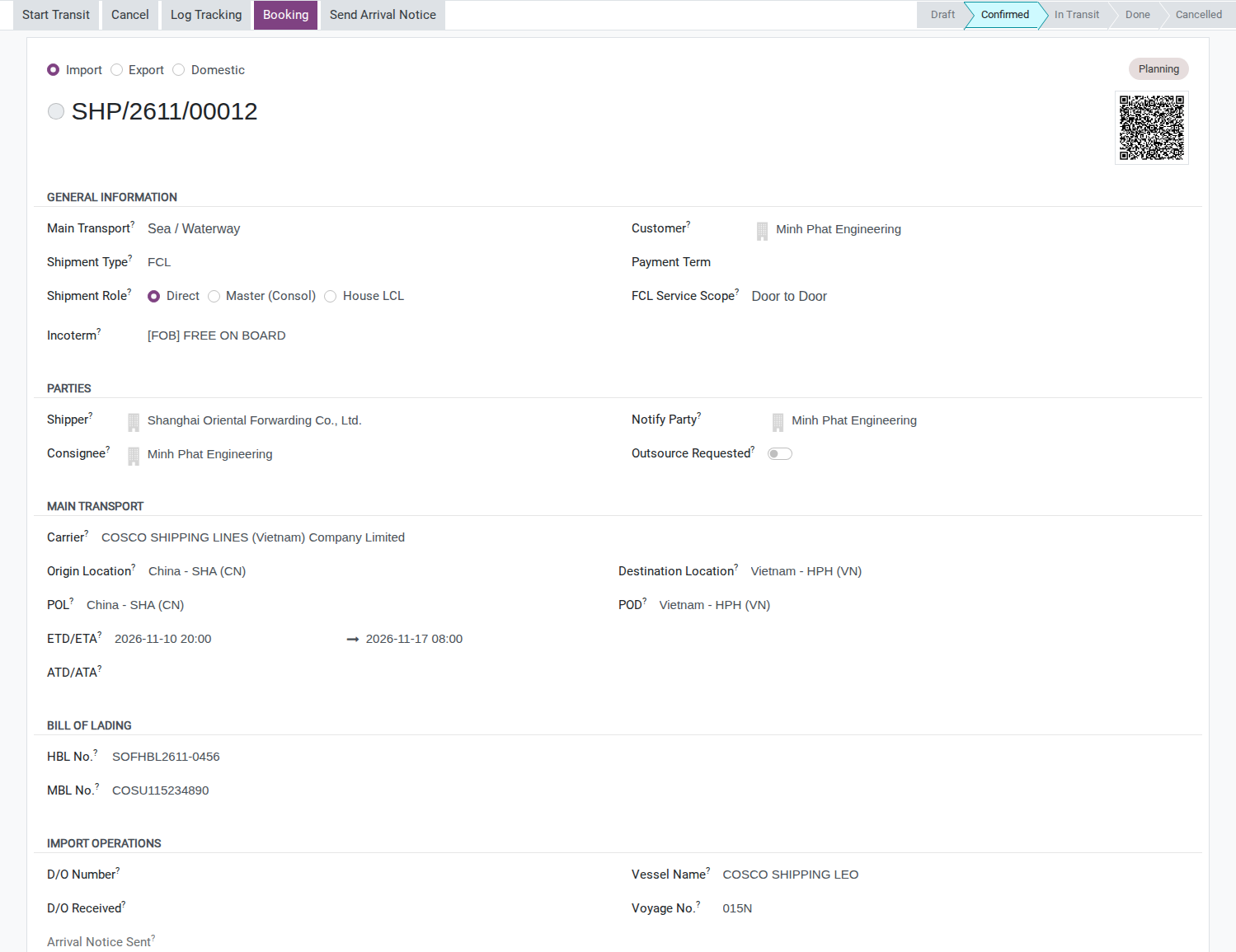
The compose window opens with:
Recipient: automatically Consignee and Notify Party - both Minh Phat Engineering here, so the partner appears once, not twice.
Subject and body pre-filled: Shipment Reference, HBL No. SOFHBL2611-0456, MBL No. COSU115234890, Port of Shanghai, Hai Phong Port and the Arrival Date.
Note
The template’s opening line reads “We are pleased to inform you that your shipment has arrived at the destination port.” This shipment sends the notice as soon as COSCO’s own Arrival Notice comes in - before the vessel has actually berthed (ETA 2026-11-17). Edit that sentence to “is expected to arrive on …” before sending; the unedited line tells Minh Phat Engineering the cargo is already there while it is still at sea.
For this FCL shipment, replace cargo pickup at the CFS with container pickup at the container terminal. Confirm the collection instructions with the carrier before sending.
Before clicking Send, type into the message body:
“Last Free Day: 24/11/2026.”
The local charges due, checked against the carrier or agent’s confirmed notice and the agreed customer prices: THC VND 3,200,000 and CIC USD 100 in this example. If these charges are already recorded in the shipment’s Charges tab, cross-check them there too (see Charges and Profitability). This notice is sent before the final charge-entry and invoicing checkpoint; do not create extra charge lines just to fill the email.
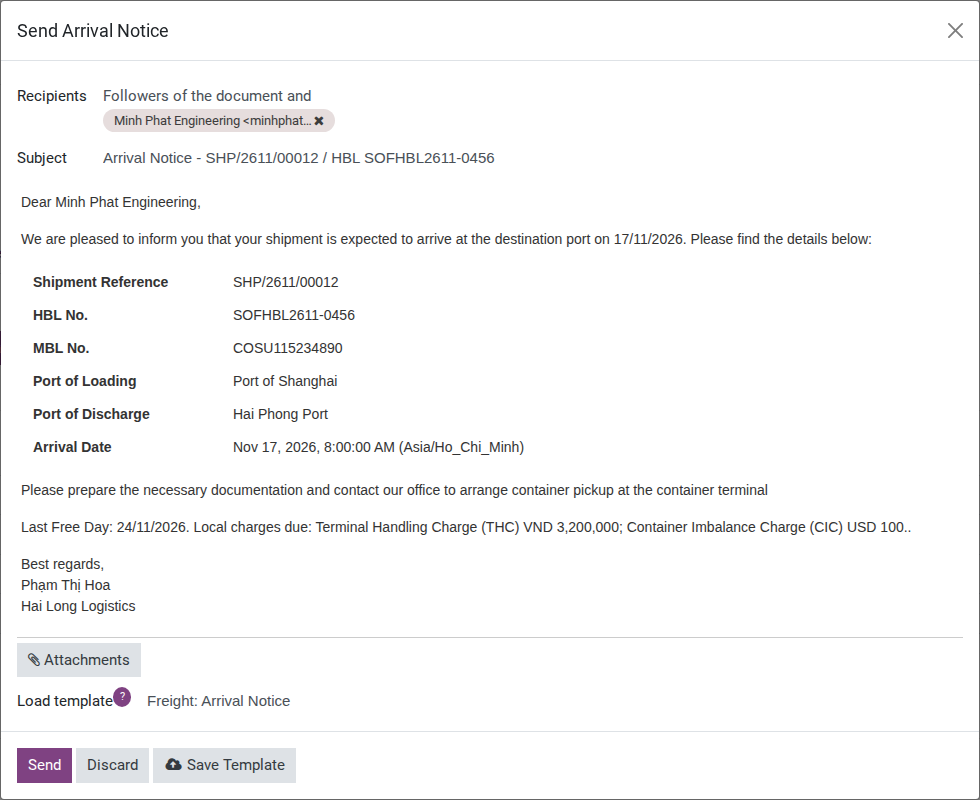
Click Send. Once delivered, Arrival Notice Sent is stamped with the current date and time and the button disappears from the header.
Warning
This button works exactly once per shipment. Send it before typing in the Last Free Day and the charges, and there is no second system Arrival Notice - the correction has to go out as an ordinary Chatter message instead (see Troubleshooting).
Tip
Step 4 is done when:
The Chatter shows an email “Arrival Notice - [shipment name] / HBL SOFHBL2611-0456” whose body includes the line Last Free Day: 24/11/2026.
Arrival Notice Sent on the shipment shows the date and time it was actually sent.
Known limitations
Step |
What Viindoo does today |
What you do instead |
|---|---|---|
Check the HBL can be issued |
Print HBL has no status check, and the on-board date printed is the Main Carriage ETD, not the actual departure |
Print only after the carrier confirms loading, and check the ETD against the carrier’s on-board date (Step 2) |
Record the B/L release type |
No field for Original B/L or Telex Release on the shipment |
Log the decision in the Chatter (Step 2) |
Pre-alert the destination agent after the HBL is issued |
No packaged pre-alert feature (HBL + invoice + packing list in one action) |
Use the Chatter or an external email, attaching the documents by hand |
Set the free-time days behind Free Time End and Detention Start |
Container Free Time (Days) has no field on any form |
Work out the Last Free Day by hand (Step 3) and log it in the Chatter |
Fill the Arrival Notice with Last Free Day and charges |
The template only carries Shipment Reference, HBL/MBL No., POL, POD and Arrival Date, and its opening line says the shipment has arrived even when sent before berthing, and its pickup instruction refers to a CFS even for FCL |
Edit the opening line and, for FCL, replace cargo pickup at the CFS with container pickup at the container terminal. Confirm collection instructions with the carrier, then type the Last Free Day and the charges into the compose window (Step 4) |
Track the consignee’s response to the Arrival Notice |
Arrival Notice Sent only stamps the send time, not a confirmation |
Create a manual Activity to remind yourself to follow up |
Troubleshooting
Send Arrival Notice does not appear, or fails on an export shipment
Symptom: “Arrival Notice is only applicable to import shipments.”
Cause: The button only works for shipments with Direction set to Import.
Fix: Use Steps 1-2 for an export shipment - Arrival Notice only applies to an import one.
Arrival Notice is refused while the shipment is Draft or has been Done too long
Symptom: “Arrival Notice can only be sent while the shipment is Confirmed, In Transit, or Done (current status: Draft).”
Cause: The button only runs while the shipment’s status is Confirmed, In Transit or Done.
Fix: Confirm the shipment first; if Draft is unexpected, check whether it was reset after cancellation.
Send Arrival Notice is clicked a second time
Symptom: “Arrival Notice has already been sent for shipment “SHP/26xx/000nn”.”
Cause: Arrival Notice Sent already carries a timestamp - Viindoo only allows this button to run once per shipment.
Fix: For a correction or a resend, use the Chatter’s Send message to email the consignee directly.
Nobody receives the Arrival Notice even though Send was clicked
Symptom: “Cannot send Arrival Notice for shipment “SHP/26xx/000nn”: no party outside your own company can be reached by email.”, followed by a line for each party and why it was skipped.
Cause: Every Consignee, Notify Party and 2nd Notify Party is missing an email or belongs to Hai Long Logistics’ own company.
Fix: Add the missing email - for Minh Phat Engineering, that is Bà Đỗ Thị Hương’s address - then click Send Arrival Notice again.
See also
Related articles
Export a full container load by sea - the export flow leading up to this HBL, including the rollover
Import a full container load by sea - the import flow leading up to this Arrival Notice
Request documents and prepare the SI and draft B/L - preparing and approving the SI and Draft B/L
Charges and Profitability - recording the THC, CIC and D/O fee
Optional modules
Freight Air - an air import shipment uses a separate Arrival Notice template