
Track on-behalf payments for customers
Guide information
Requirements
This tutorial requires the installation of the following applications/modules:
Onbehalf Payment in Freight (installs Sale On-Behalf Management and On-behalf Payments automatically - the second one is what actually records the disbursement payment in Step 2)
A forwarder regularly pays money to a customs office, a quarantine authority or a carrier that the customer - not the forwarder - actually owes. If that amount is invoiced like an ordinary service line, it picks up a service VAT rate it should not have and inflates the shipment’s gross profit with revenue the forwarder never earned. Mark On-Behalf keeps that amount out of the customer invoice and out of gross profit, and records it as a separate amount still to be collected. If a term below is new to you, see the Freight forwarding glossary.
Running scenario: on the FCL import shipment for Minh Phat Engineering (container
CSNU8123450, see Import a full container load by sea), Hai Long Logistics pays the import duty and the quarantine fee to
Cơ quan Hải quan & Kiểm dịch Hải Phòng so the container can clear customs: import duty
65,000,000 VND plus quarantine fee 13,000,000 VND, a combined 78,000,000 VND that Hai
Long must recover from Minh Phat Engineering afterwards.
Before you start
Sale On Behalf is turned on in the Freight Features section of .
The Minh Phat Engineering shipment is Confirmed and has a sale order linked to it, priced in VND. Accounting uses Create Quotation on the shipment to reuse its three existing charge lines: Ocean Freight 29,900,000 VND, THC 3,200,000 VND and CIC 100 USD converted to 2,600,000 VND at the agreed rate of 26,000. Confirm that service charges remain three and total 35,700,000 VND; do not enter the freight again. The two existing service invoices, 33,100,000 VND and 100 USD, are linked to this order; do not invoice them again. See Import a full container load by sea.
The accountant handling this combined flow can edit the shipment (User: All Shipments), access the linked order (Sales: User: All Documents) and create and post invoices and payments (Invoicing). In this example Tuan handles the existing invoiced services and the reimbursement; these access rights are required before starting. See Settings –> Users & Companies –> Users (ask your administrator).
The customs office or quarantine authority already exists as a partner record; if not, create it first ( or on the fly from the fields below).
Step 1: Mark the on-behalf amount on the sale order
Marking the line before you invoice anything is what removes it from the customer invoice and from gross profit. Adding it as an ordinary line first and fixing it later means correcting an invoice that has already gone out.
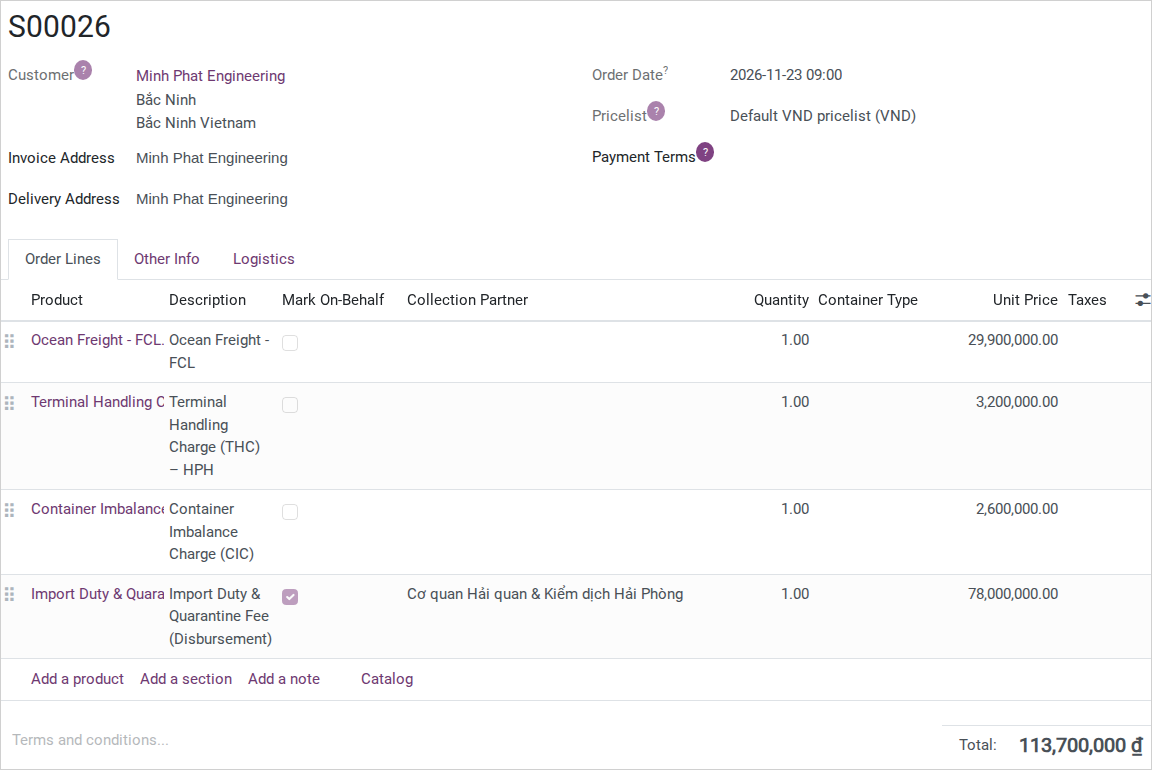
Open the sale order linked to the Minh Phat Engineering shipment.
In Order Lines, open the column options (the sliders icon at the top-right of the list) and turn on Mark On-Behalf and Collection Partner - both are hidden by default.
Add a new line:
Product: Import Duty & Quarantine Fee (Disbursement).
Mark On-Behalf: ticked.
Collection Partner: Cơ quan Hải quan & Kiểm dịch Hải Phòng - the party the duty and fee are actually owed to, not the customer.
Quantity: 1, Unit Price: 78,000,000 VND.
Warning
Ticking Collection Partner without ticking Mark On-Behalf first is rejected on save: “You cannot select a collection partner for a non-onbehalf line.” Tick Mark On-Behalf first, then fill in Collection Partner.
The Collection Partner also decides how the charge behind the line is handled, so a wrong choice later changes what the purchase side does:
A charge with an agent is an on-behalf charge. The agent follows the Collection Partner on the line: change or clear the partner and the agent changes with it.
Unticking Mark On-Behalf turns the line back into an ordinary resale line and takes the agent off its charge.
A charge cannot have both a vendor and an agent. Marking a line on-behalf is rejected while its charge still has a vendor.
An on-behalf line with no Collection Partner yet does not generate a purchase order.
After you save:
The line’s quantity to invoice drops to zero - it never appears when you click Create Invoice on this order, now or later.
The On Behalf Items panel in the shipment’s tracking sidebar shows one row for this line, with Expected 78,000,000 VND and Collected 0.00.

Tip
Step 1 is done when:
Clicking Create Invoice on the sale order does not include this line.
The On Behalf Items panel on the Minh Phat Engineering shipment shows Expected 78,000,000 VND for this line.
Step 2: Record the payment made to the customs and quarantine authority
This is money Hai Long actually pays out of its own bank account - it must be booked as a disbursement owed back by Minh Phat Engineering, not as a shipment cost, or the shipment’s cost figures will be wrong and nothing will remind Accounting to collect it back.
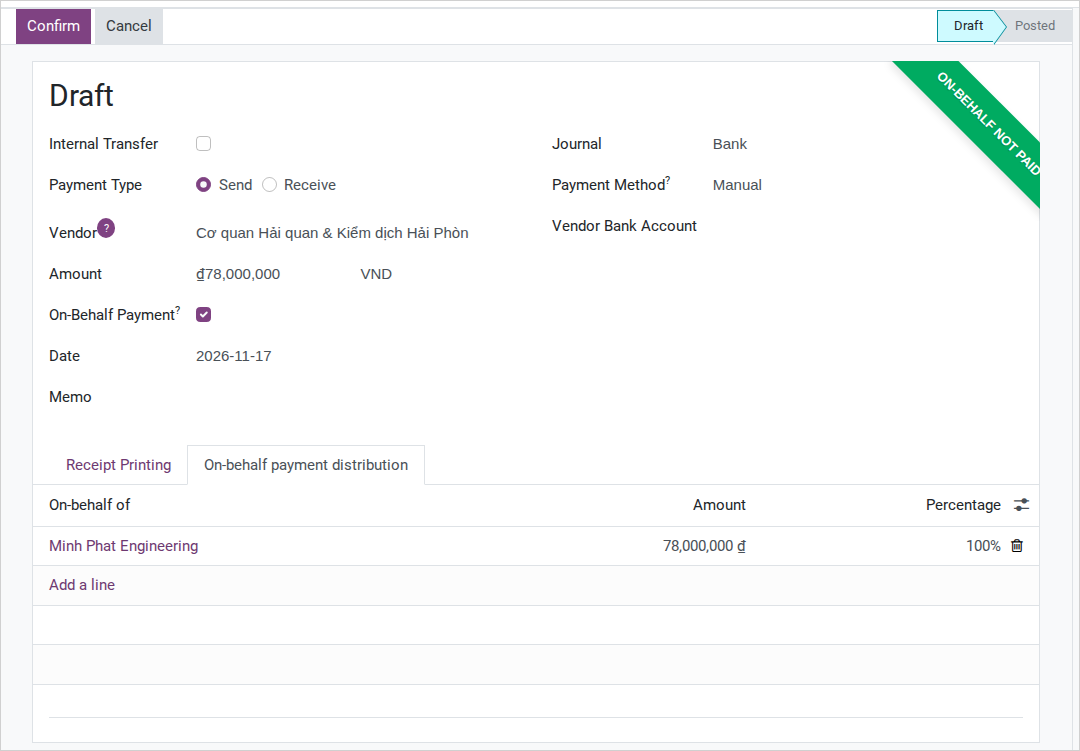
Go to and click New.
Fill in:
Payment Type: Send.
Partner Type: Vendor.
Partner: Cơ quan Hải quan & Kiểm dịch Hải Phòng.
Amount: 78,000,000 VND.
Date: 2026-11-17 - the disbursement date in this example.
Tick On-Behalf Payment, which appears right under Amount. A On-behalf payment distribution tab appears on the form.
On that tab, add a line: On-behalf of: Minh Phat Engineering, Amount: 78,000,000 VND.
Important
Nothing here reads Step 1’s 78,000,000 VND automatically - the two mechanisms are independent (see Known limitations). If the amounts do not match, no error is raised; the mismatch only shows up later as a wrong Remaining balance in Step 3.
Click Confirm.
After you confirm:
The payment posts, and the 78,000,000 VND moves out of the customs and quarantine authority’s normal payable account into an Other Payable account for it.
A matching Other Receivable entry for 78,000,000 VND is booked against Minh Phat Engineering - Accounting must verify this reimbursement balance in Step 3.
A red On-behalf Not Paid ribbon appears on the payment until Step 3 is reconciled against it.
Tip
Step 2 is done when: the payment’s journal entry shows 78,000,000 VND moved to an Other Receivable account under Minh Phat Engineering’s name, separate from any Cost account of the Minh Phat Engineering shipment.
Step 3: Collect the reimbursement from the customer
Warning
The shipment panel is not proof that the disbursement has been reimbursed. In the current combined-payment flow, a full receipt and reconciled service invoices can make Collected show 78,000,000 VND while the earlier disbursement still shows On-behalf Not Paid and its reimbursement receivable remains open. The final accounting settlement for this example is not yet verified. Keep the disbursement open and check its receivable and payback status with Accounting; do not mark it settled just because Remaining is green.
The Sales Orders field on the customer payment is what triggers the system to build the distribution for you from Step 1’s on-behalf line. A payment recorded any other way for the same amount looks identical on the bank statement but never clears the Remaining balance on the shipment. Before recording the receipt, post the two service invoices and verify that the on-behalf line is excluded from them. The customer receipt in this example covers both service charges and the reimbursement amount, using the agreed exchange rate of 26,000 VND/USD. Clearing the earlier reimbursement receivable remains unverified.
Go to and click New.
Set Date to 2026-11-23, the receipt date in this example, and use the VND bank journal.
In Sales Orders, select the sale order used in Step 1.
After you select the sale order:
Partner fills in from the order. With no earlier customer payment in this example, Amount is 113,700,000 VND: 35,700,000 for services plus 78,000,000 for reimbursement. Keep this full amount only when it matches the money actually received. Setting it to 78,000,000 would allocate only part of the payment to reimbursement, rather than recover the full 78,000,000.
On-Behalf Payment ticks itself, and the distribution line (On-behalf of: the customs and quarantine authority, Amount: 78,000,000 VND) is created for you - you do not enter it by hand.
Click Confirm.
Reconcile the service portion against the two posted service invoices. Verify both invoices have no remaining balance. Separately check the reimbursement receivable from the earlier disbursement for Minh Phat Engineering. If it remains open or the disbursement still shows On-behalf Not Paid, stop at this checkpoint and have Accounting review the settlement; the shipment panel alone does not establish reimbursement.
Tip
Step 3 is done when: the two service invoices have no residual balance, the reimbursement receivable is cleared, the earlier disbursement is fully reimbursed, and the shipment panel agrees with these records. Collected 78,000,000 VND and a green Remaining 0.00 alone are insufficient. The current test has not reached this complete checkpoint.
See also
Once this amount is settled, check the shipment’s remaining charges and overall margin: Record charges, invoice the customer, and bill vendors.
Decide how much of this to track
Option |
Use when |
What changes |
|---|---|---|
Only Step 1 (sale order line) |
You only need Ops and Sales to see the pending amount on the shipment, and Accounting will book the reconciling entry separately when the money actually moves |
The On Behalf Items panel is accurate, but no Other Receivable/Other Payable entry is created automatically |
Only Steps 2-3 (payment distribution) |
Accounting only needs the books to be correct, and no one else needs to see the pending amount on the shipment |
Posting the disbursement creates its accounting entries, but final reimbursement settlement must still be checked separately. The On Behalf Items panel never shows this amount without a sale order line. |
All three steps |
Both the books and the shipment record need to be right - the usual case for money this size |
You enter 78,000,000 VND on both the sale order and the payment; nothing in the system checks that the two match |
Use all three steps only when company procedure requires both the shipment record and the accounting entries. This flow does not check that the sale-order amount equals the distributed payment amount, so reconcile the two amounts against supporting documents before posting. If the required accounting treatment is unclear, ask Accounting which steps to use before entering the transaction.
Known limitations
Step |
What Viindoo does today |
What you do instead |
|---|---|---|
Recording the disbursement (Step 1 and 2) |
The sale order line and the payment distribution are two separate mechanisms with no link and no amount cross-check between them |
Enter the same amount on both, and note the tax/customs receipt number in the Chatter of both the sale order and the payment so the two can be traced back to each other later |
Tracking recovery (Step 3) |
The On Behalf Items panel counts an amount as Collected when it comes in through a payment linked to the order, or through a payment that matches the order’s invoice (a partial payment counts too). With several on-behalf lines for the same agent, the collected amount is shared between those lines |
Collect this money through a payment with Sales Orders set to the order used in Step 1; a payment recorded any other way for the same amount may not be read by the panel |
Field names |
Collection Partner (Step 1) and On-behalf of (Step 2-3) sound alike but point in opposite directions - the first is who the money is ultimately owed to, the second is who Hai Long is recovering it from |
Read each field’s own help text before filling it in; do not assume the two fields take the same partner |
Troubleshooting
Saving the sale order line raises “You cannot select a collection partner for a non-onbehalf line.”
Symptom: the exact message above appears when saving the order.
Cause: Collection Partner was filled in before Mark On-Behalf was ticked on the same line.
Fix: tick Mark On-Behalf first, then fill in Collection Partner again.
Confirming the payment raises “You checked the On-Behalf Payment option but did not specify a partner…”
Symptom: “You checked the On-Behalf Payment option but did not specify a partner of which the payment was made on-behalf. Please specify one.”
Cause: On-Behalf Payment is ticked, but the On-behalf payment distribution tab has no line.
Fix: add at least one distribution line with a partner and an amount before confirming.
“The total on-behalf payment amount must not be greater than the payment amount.”
Symptom: the exact message above appears when saving the payment.
Cause: the distribution lines add up to more than the payment’s own Amount - for example, 78,000,000 VND distributed against a payment of only 70,000,000 VND.
Fix: correct either the payment Amount or the distribution line’s Amount so the distribution total no longer exceeds the payment.
“The on-behalf partner ‘…’ must not be of the same commercial entity as the payment’s.”
Symptom: the exact message above appears, naming the partner on the distribution line.
Cause: the distribution line’s partner is the same company as the payment’s own partner - for example, paying the customs authority but naming the customs authority again as the party being collected on behalf of.
Fix: the payment’s own Partner and the distribution’s On-behalf of partner must be two different companies. In this scenario, the payment is to the customs and quarantine authority and the distribution is on behalf of Minh Phat Engineering.
Remaining stays red although the customer already paid
Symptom: the On Behalf Items panel on the Minh Phat Engineering shipment still shows Remaining 78,000,000 VND in red after Minh Phat Engineering’s transfer has landed.
Cause: the customer’s payment was recorded without the Sales Orders field set to Step 1’s sale order - a plain payment or one linked only to an unrelated invoice never reaches the on-behalf calculation.
Fix: cancel or adjust that payment and re-record it through with Sales Orders set to the sale order used in Step 1.
See also
Related articles