
Own and verify a page
Guide Overview
Before You Start
You need |
Why |
|---|---|
To own the page, or role Space admin in the Space, or Brain / Brain Admin on your user |
To verify the page, change its owner or choose the review interval. |
Role Viewer or higher in the Space |
To read who owns a page and when it was last verified. |
How Ownership and Review Work
Every page has an owner, by default the person who created it. The owner is the person who keeps the page correct. Under the title of every page, readers see:
Owner - the person who keeps the page correct.
Last verified - the date and the person who last confirmed the page, or “never”.
Each Space has a review interval, Re-check pages every (months), 12 by default. When that time has passed since the last verification (or since the page was created, for a page nobody verified), the page needs review. A page also needs review when an assistant changed it since its last verification.
A page that needs review is never hidden or locked: readers can still read and edit it.
Note
Daily notes, pages of a personal Space and pages restricted to one person are never asked for review.
Answer a Review Request
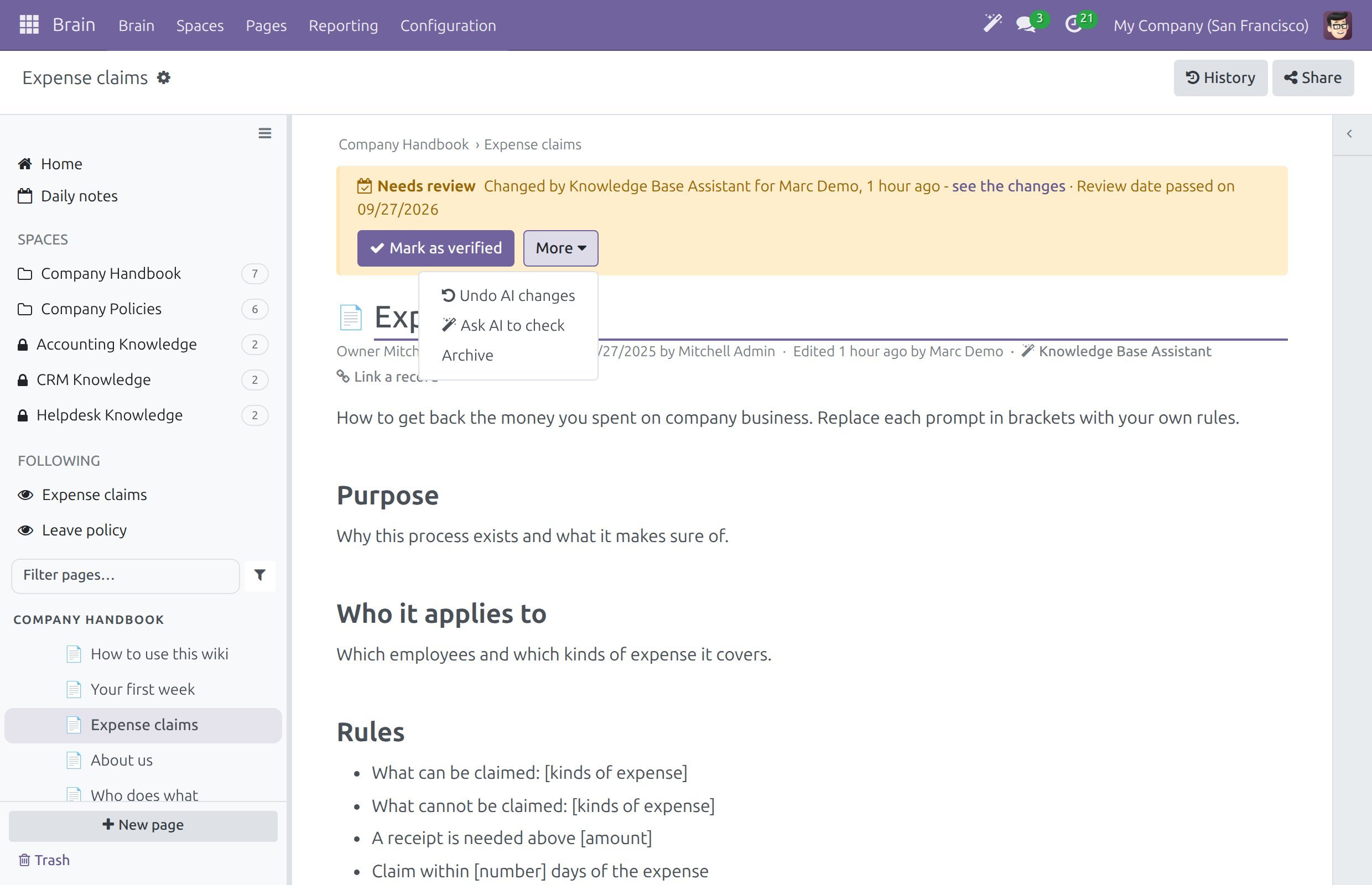
When a page needs review, its owner gets a Review page activity: “Check that this page is still correct, then mark it as verified.” The page also shows a one-line Needs review banner to its owner, to the Space admins and to the wiki admins. On the Space screen, the count “to review” in the header tells how many pages of the Space wait.
Open the page from the activity, from To review in the Waiting for you strip of Home, or from .
Read the banner. After Needs review it lists why the page needs review:
“Review date passed on <date>”, or “Never verified; review date passed on <date>”.
“Changed by <assistant> for <person>, <when> - see the changes”, when an assistant changed the page. see the changes opens the history at that change.
Read the page and correct what is out of date.
Click Mark as verified. Your name and today’s date become Last verified, the banner disappears, the review date moves one interval on and the Review page activity is closed.
The More menu of the banner holds the other actions:
Action |
What it does |
|---|---|
Archive |
Keeps the page readable but takes it out of lists and search (see Delete, restore and archive pages). |
Undo AI changes, Ask AI to check |
Appear when the AI add-on is installed and an assistant changed the page. They are described in Review AI changes and set up the wiki. |
Only the page owner, a Space admin of the Space or a wiki admin can mark a page as verified.
Set How Often Pages Are Checked
Open the Space and click the gear button in the Space header.
In the Review section, type the number of months in Re-check pages every (months).
0means pages of this Space are never checked by date.Click Save & Close.
The setting is per Space, so a Space of fast-changing procedures can be checked every 3 months and a Space of stable policies every 24.
Change the Owner
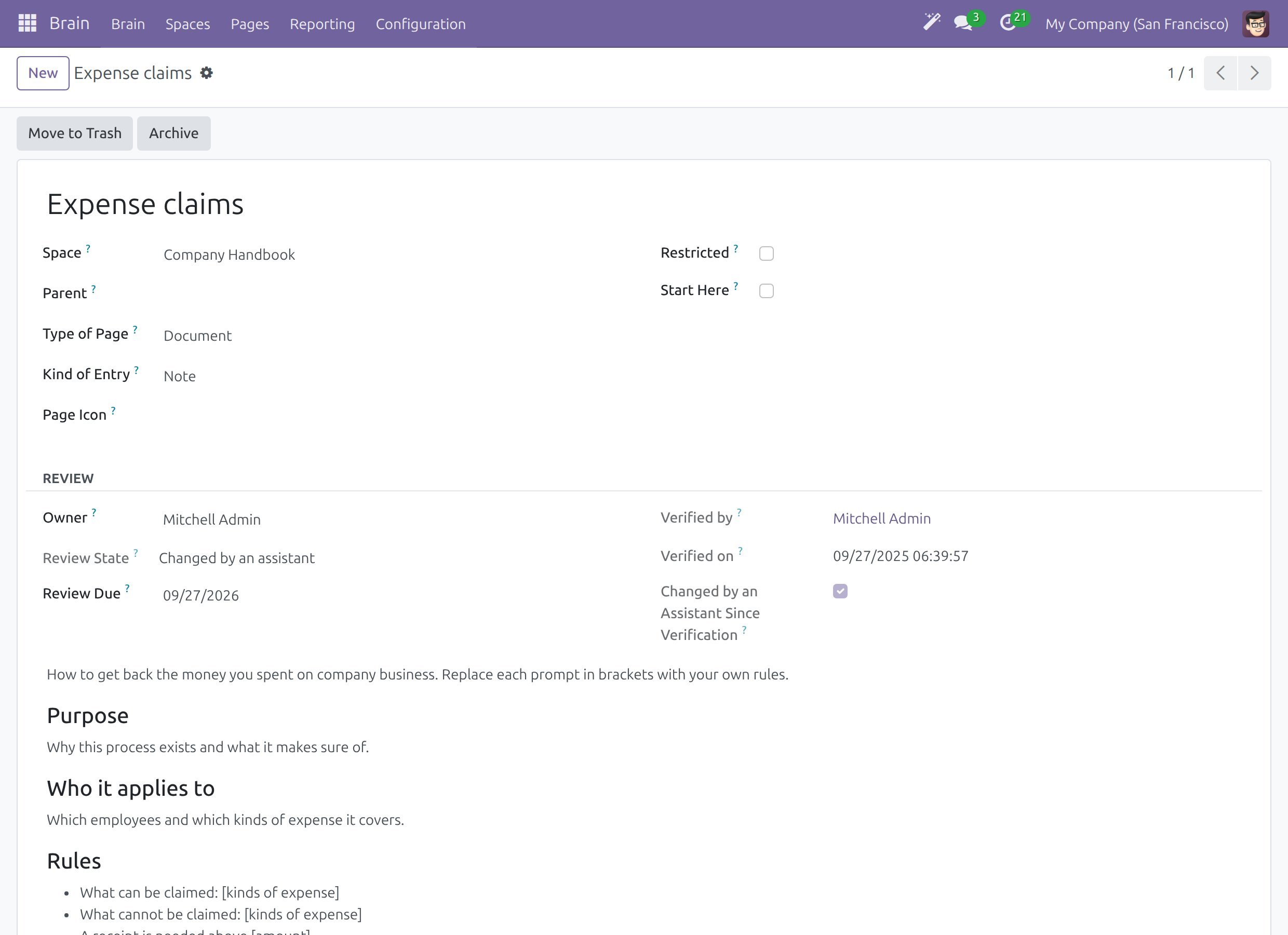
The owner is changed in the Owner field of the page form. The current owner, a Space admin of the Space and a wiki admin can change it.
Wiki admins: click the gear button next to the title and choose Open in backend. Other people open the page from .
In the Review section, pick another person in Owner.
Save the page.
The review activity of the previous owner is taken back. The new owner receives theirs the next time pages that need review are checked.
The same section shows Review State (Up to date, Needs review or Changed by an assistant), Review Due, Verified by and Verified on.
Success Checkpoint
You read Owner and Last verified under the title of any page.
A page past its review date shows Needs review to its owner.
After Mark as verified, the banner is gone and Last verified shows today’s date and your name.
After you change the owner, the page form shows the new owner.
Common Problems
Problem |
What to do |
|---|---|
I do not see the Needs review banner on a page that is old. |
The banner shows to the owner, the Space admins and the wiki admins only. Check that the Space interval is not |
Mark as verified answers that only the owner can review. |
Ask the page owner, a Space admin of the Space or a wiki admin to verify the page, or to hand it to you. |
The owner left the company. |
Ask a Space admin or a wiki admin to change the owner on the page form. |
The page needs review again soon after I verified it. |
The interval of the Space is short. Change Re-check pages every (months) in the settings of the Space. |
Next Steps
Submit and approve page changes - approval of changes in a Space.
Review AI changes and set up the wiki - review of pages an assistant changed.
Watch the health of the wiki - how wiki admins follow pages that need review.