
Review AI changes and set up the wiki
Guide Overview
Before You Start
You need |
Why |
|---|---|
To own the page, or role Space admin in its Space, or Brain / Brain Admin on your user |
To verify a page an assistant changed, undo its changes or ask it to check the page. |
Brain / Brain Admin on your user |
To open AI Contributions and to make the wiki searchable by the assistant. |
Administration / Settings on your user |
To choose the model of the wiki assistant and to look after the indexing job. |
Review a Page an Assistant Changed
A page an assistant wrote or changed is never anonymous:
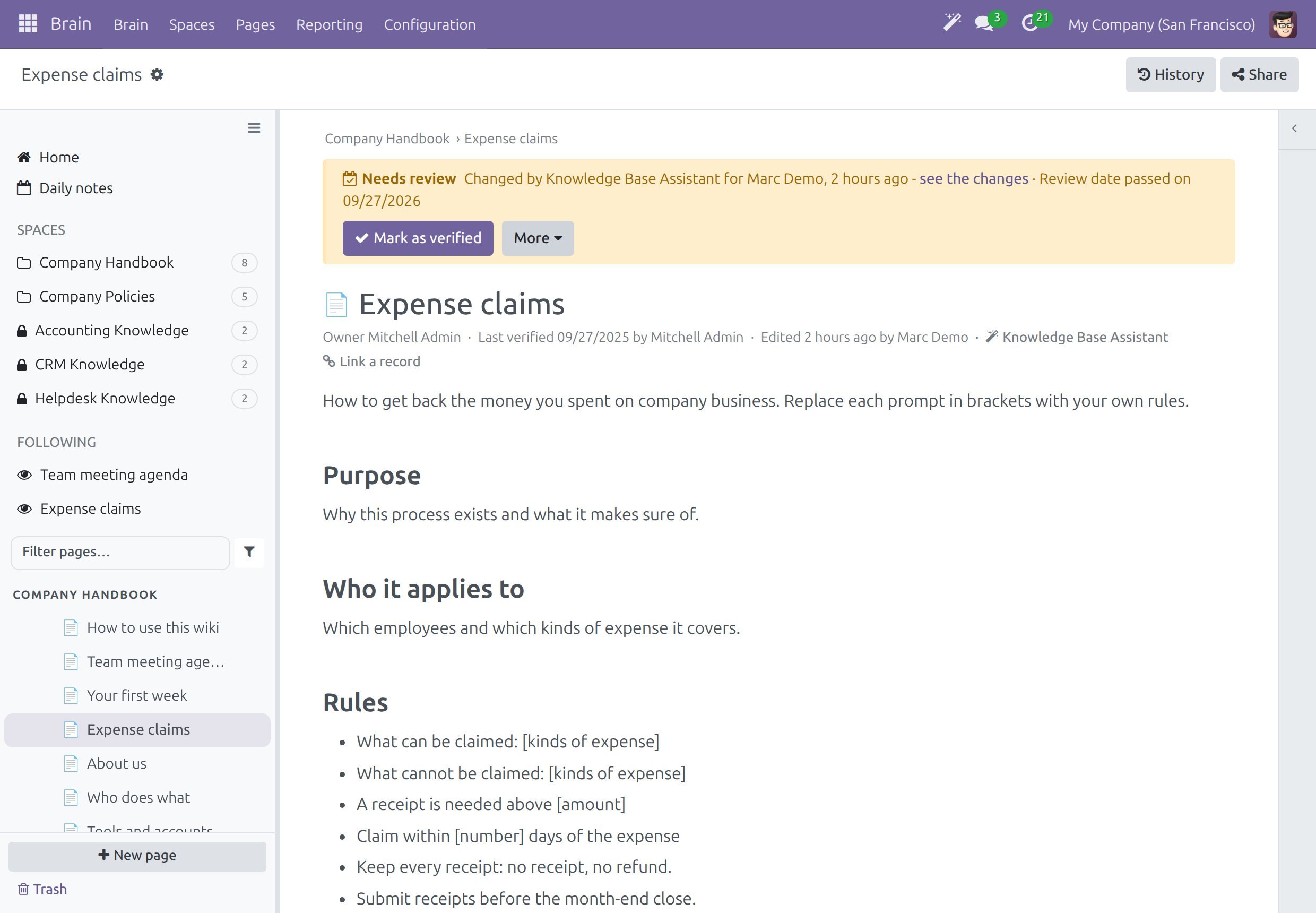
The line of details under the title names the assistant, with a magic-wand icon. Click the name to open the history at the assistant’s revision.
The History of the page has a row for the revision, naming the person who asked and the assistant.
The Activity tab of the page records that the assistant updated it, with a link to the changes.
The page shows the banner Needs review to its owner, to the Space admins and to the wiki admins, when the review rule of the Space is AI changes (the default) or All changes (see Submit and approve page changes).
Open the page, for example from To review in the Waiting for you strip of Home.
Read the banner. A line such as “Changed by <assistant> for <person>, <time> - see the changes” tells who asked and when. Click see the changes to open the history at that revision and compare it. When the page needs review for another reason too, for example a passed review date, the banner adds it on the same line.
Choose an action. Mark as verified is a button of the banner; the other actions are in its More menu.
Action
What it does
Mark as verified
The page no longer needs review. Your name and today’s date become Last verified (see Own and verify a page).
Undo AI changes
The page gets back the text it had before the assistant changed it, as a new revision. When people edited the page after the assistant, the confirmation names them, and their changes stay in the history.
Ask AI to check
Asks the assistant to check the page against the records it links to and to tell you what no longer matches.
Archive
Keeps the page readable but takes it out of lists and search (see Delete, restore and archive pages).
Only the page owner, a Space admin of the Space or a wiki admin can mark a page as verified or undo the changes of an assistant. A person’s own edit, restore or verification takes the assistant’s mark off the page.
Note
A page that an assistant changed stays published while it waits for review. Readers see the text, and the banner shows only to the people who may act on it.
See Every Page an Assistant Changed
Go to .
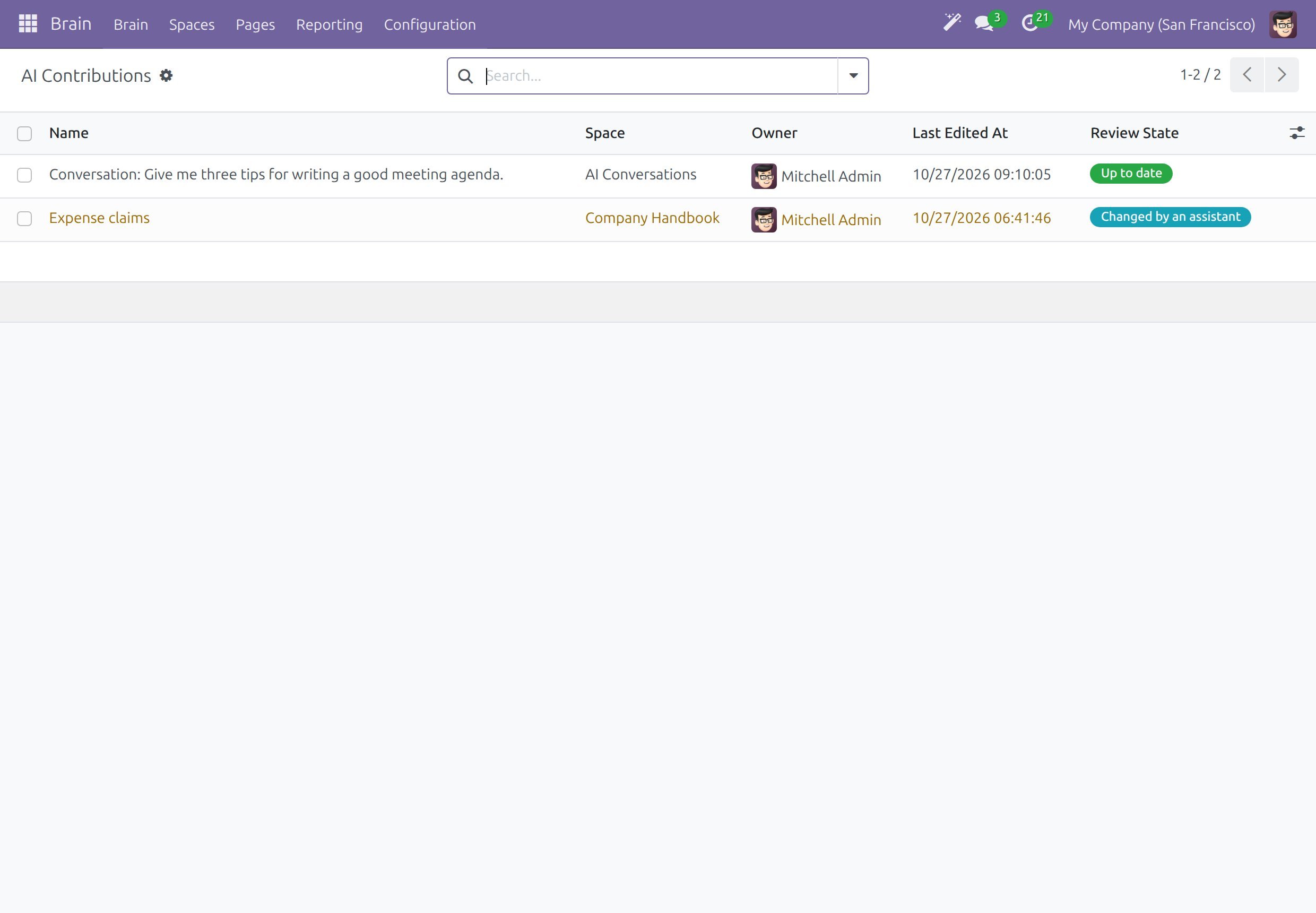
Read Review State of each page: Changed by an assistant waits for a person, Up to date was verified or does not ask for review.
Click a page to open it and use the banner.
A conversation kept with Save to Brain is listed with the state Up to date: it is private to the person who saved it and is not asked for review (see Use the AI assistant in Brain).
Make the Wiki Searchable by the Assistant
The search by meaning needs the text of the wiki to be indexed by the embedding model of the AI connection. How it starts depends on the wiki:
On a new wiki that holds only the pages shipped with the product, every Space is indexed as soon as the add-on is installed.
On a wiki where somebody already wrote pages, nothing is sent anywhere until a wiki admin agrees.
A company whose embedding model belongs to its own AI provider is indexed without this step.
When the wiki is waiting for the decision, the wiki admins see a notice on Home.
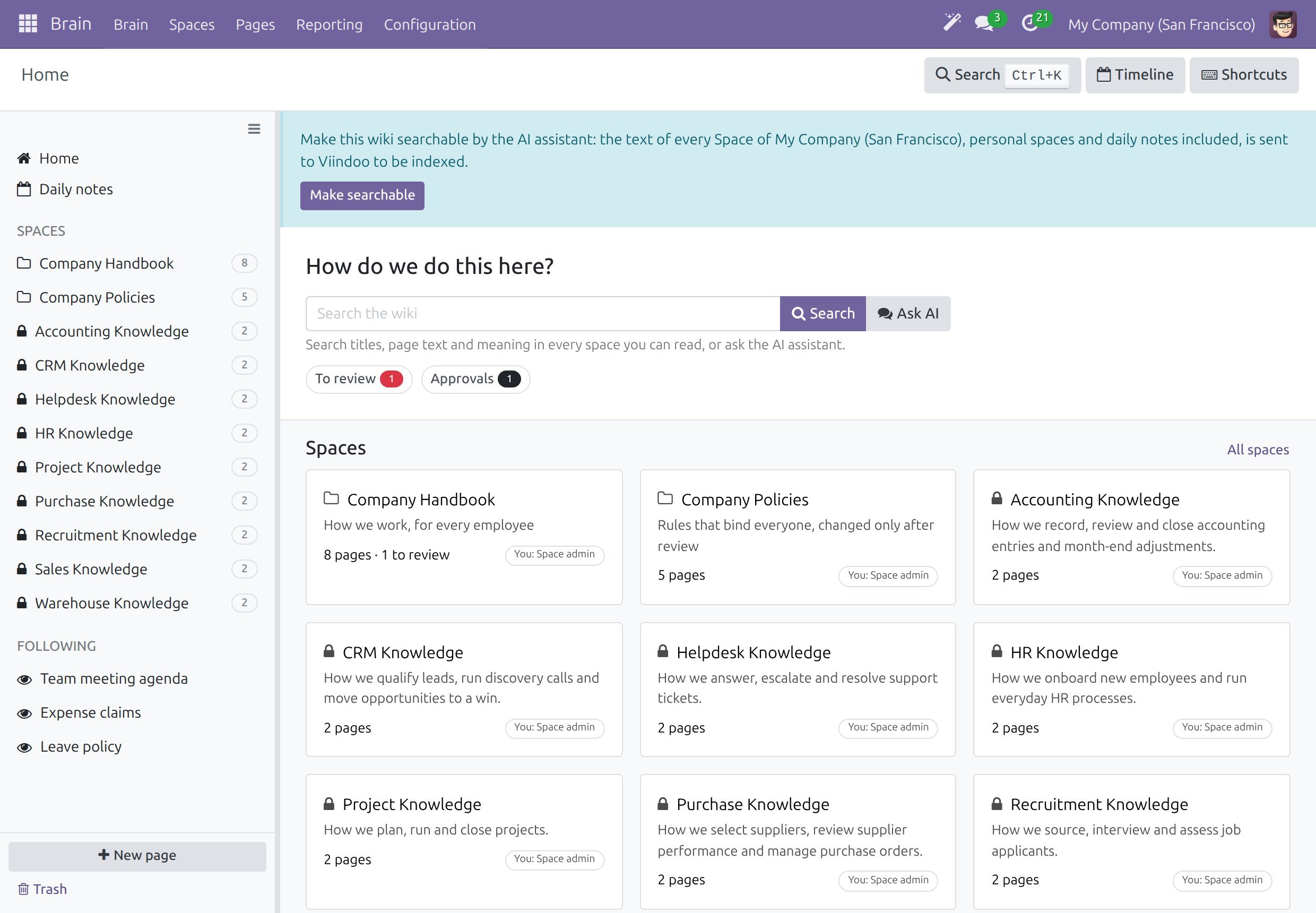
Go to as a wiki admin.
Read the notice. It says that the text of every Space of your company, personal Spaces and daily notes included, is sent to the named provider to be indexed.
Click Make searchable to agree.
The company’s choice is recorded, every Space of the company is indexed, and each Space notes “AI indexing enabled” in its chatter. The notice disappears. Only a wiki admin can click the button, and an upgrade never changes the choice.
Pages are indexed block by block, so a result points to the paragraph that answers. Saving a page refreshes that page. A page moved to Trash stops being found at once and is found again when you restore it. An archived page is still found, and the assistant is told that it is archived. A Space created later is indexed once the choice is on.
Note
The notice is not shown when the wiki is already indexed, when no embedding model is active, or to people who are not wiki admins.
Set Up the Wiki Assistant
The administrator looks after five places.
Switch the Assistant On
Go to .
In the block AI Assistant, tick Viindoo AI and Viindoo AI - Brain Bridge. The first one connects the AI assistant, the second one lets it search and write in your wiki.
Click Save.
The block is listed with the other add-on blocks of the page (see Set up Spaces, templates and access).
Choose the Model and the Relevance
Go to and open Knowledge Base Assistant.
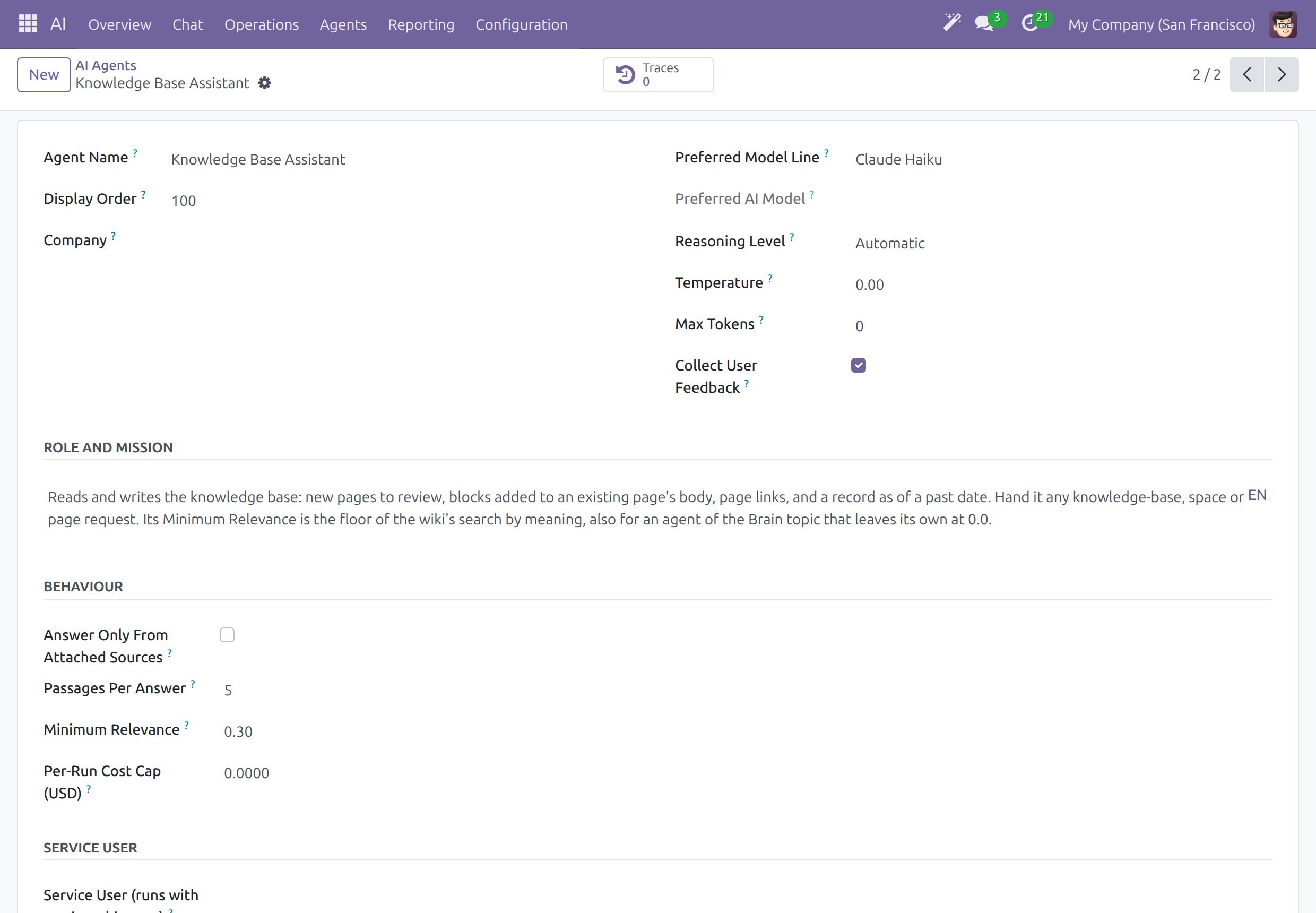
Preferred Model Line is the model the assistant starts with. The ready-made line is a default that you can change to any line your company has. Connect your own vendor first when needed (see Connect AI vendors and choose data location).
Minimum Relevance (0.30 on the ready-made assistant) is the floor of the search by meaning. A page whose best passage scores lower is not listed, so a question that means nothing to the wiki lists nothing. Raise the value to list fewer, closer pages and lower it to list more. An assistant of the topic Knowledge Base Assistant that leaves it at 0.00 uses the value of the ready-made assistant.
Save the form.
If your company removed the assistant, create an agent and give it the topic Knowledge Base Assistant. Without one, every AI button of the wiki answers with a message that says so.
Choose the Embedding Model
The search by meaning uses the active embedding model of . The provider of that model receives the text of the wiki, and the Home notice names it. With your own AI provider as the embedding provider, the text goes to that provider and the notice is not needed (see Connect AI vendors and choose data location).
Check the Indexing Job
The scheduled action Viindoo Brain AI: Index Wiki Spaces runs every hour and completes the index of every company that agreed. In developer mode, open to see when it ran last, to run it now or to switch it off.
Look After the AI Conversations Space
Every company has an AI Conversations Space, including a company created later. Answers kept with Save to Brain go into the Space of the company of the person who saved them, and each page is private to that person. Check that the Space is listed under .
What Each Right Can Do
Right |
Can |
Cannot |
|---|---|---|
Any reader or writer |
Search, ask the assistant, write with it where they may write, save answers. |
Verify or undo the changes of an assistant on a page they do not own. |
Page owner, Space admin |
Verify, undo, ask the assistant to check, archive. |
Open AI Contributions or make the wiki searchable (wiki admin only). |
Wiki admin (Brain / Brain Admin) |
All of the above, open AI Contributions, click Make searchable. |
Choose the model of the assistant. |
Administrator (Administration / Settings) |
Choose the model line, the minimum relevance and the embedding model. |
Open AI Contributions or click Make searchable, unless the user also holds Brain / Brain Admin. |
Success Checkpoint
A page an assistant changed shows its name, the AI badge and the banner Needs review to its owner.
Mark as verified removes the banner, and Undo AI changes gives back the earlier text.
AI Contributions lists the pages an assistant changed with their review state.
After Make searchable, the notice disappears and the results of a search can show Related by meaning.
Common Problems
Problem |
What to do |
|---|---|
Mark as verified or Undo AI changes is missing. |
Only the page owner, a Space admin of the Space or a wiki admin can use them. |
The Home notice Make searchable is not there. |
The wiki is already indexed, no embedding model is active or you are not a wiki admin. Ask the administrator to check . |
Related by meaning lists nothing. |
Lower Minimum Relevance of the Knowledge Base Assistant, or check that the wiki is searchable. |
The page says that the search by meaning is unavailable. |
The index or the AI connection is not reachable. Title and text matches still work. Try again later or tell the administrator. |
A page changed by an assistant is not asked for review. |
The review rule of its Space is No review, or the Space is a personal Space (see Set up Spaces, templates and access). |
Next Steps
Use the AI assistant in Brain - what the assistant offers to employees and writers.
Own and verify a page - the review of pages that are due.
Watch the health of the wiki - the reports of the wiki admins.