
Import a full container load by sea
Guide information
Requirements
This tutorial requires the installation of the following applications/modules:
Freight Forwarder Management (installs Logistics Accounting automatically)
For an import shipment, Hai Long Logistics acts as the destination agent: it receives the nomination and pre-alert from the origin agent, tells the consignee the cargo has arrived, and exchanges the Delivery Order (D/O) that lets the container leave the port. Every day the Arrival Notice or the D/O is delayed eats into the container’s free time, and once free time runs out the carrier starts billing demurrage and detention by the day. If a term below is new to you, see the Freight forwarding glossary.
Running scenario: Hai Long Logistics receives an FCL import shipment for Minh Phat
Engineering: 1 x Container 40FT HC CSNU8123450 of CNC machining equipment (HS 8457.10)
from Port of Shanghai to Hai Phong Port, carrier COSCO SHIPPING LINES (Vietnam) Company
Limited, vessel COSCO SHIPPING LEO voyage 015N, Incoterm FOB (Shanghai), and 7 days of
free time counted from the actual arrival date (ATA).
Before you start
The origin agent, Shanghai Oriental Forwarding Co., Ltd., has already issued the HBL and sent the pre-alert with the MBL copy.
The carrier, the consignee and both ports exist as records - ask your freight Administrator to create the required carrier, agent and port or CFS records before starting.
You are in the User: All Shipments group. User: Own Shipments can only view a shipment, not click its buttons - ask your freight Administrator to grant this access before starting.
Step 1: Create and confirm the shipment
Owner: Operations creates the shipment and confirms its route, parties, and shipment type.
The direction and the route are set once, at creation, and they decide which buttons appear in the header and which group of import-only fields unlocks after you confirm. Correcting the route or the shipment type later means re-checking every field that depends on it.
Go to and click New. Fill in:
Customer: Minh Phat Engineering - the party Hai Long invoices; every charge line takes its customer from this field.
Consignee: Minh Phat Engineering.
Shipper: Shanghai Oriental Forwarding Co., Ltd..
Shipment Type: FCL.
POL: search for Port of Shanghai and select China - SHA (CN).
POD: search for Hai Phong Port and select Vietnam - HPH (VN).
Carrier: COSCO SHIPPING LINES (Vietnam) Company Limited.
Incoterm: [FOB] FREE ON BOARD.
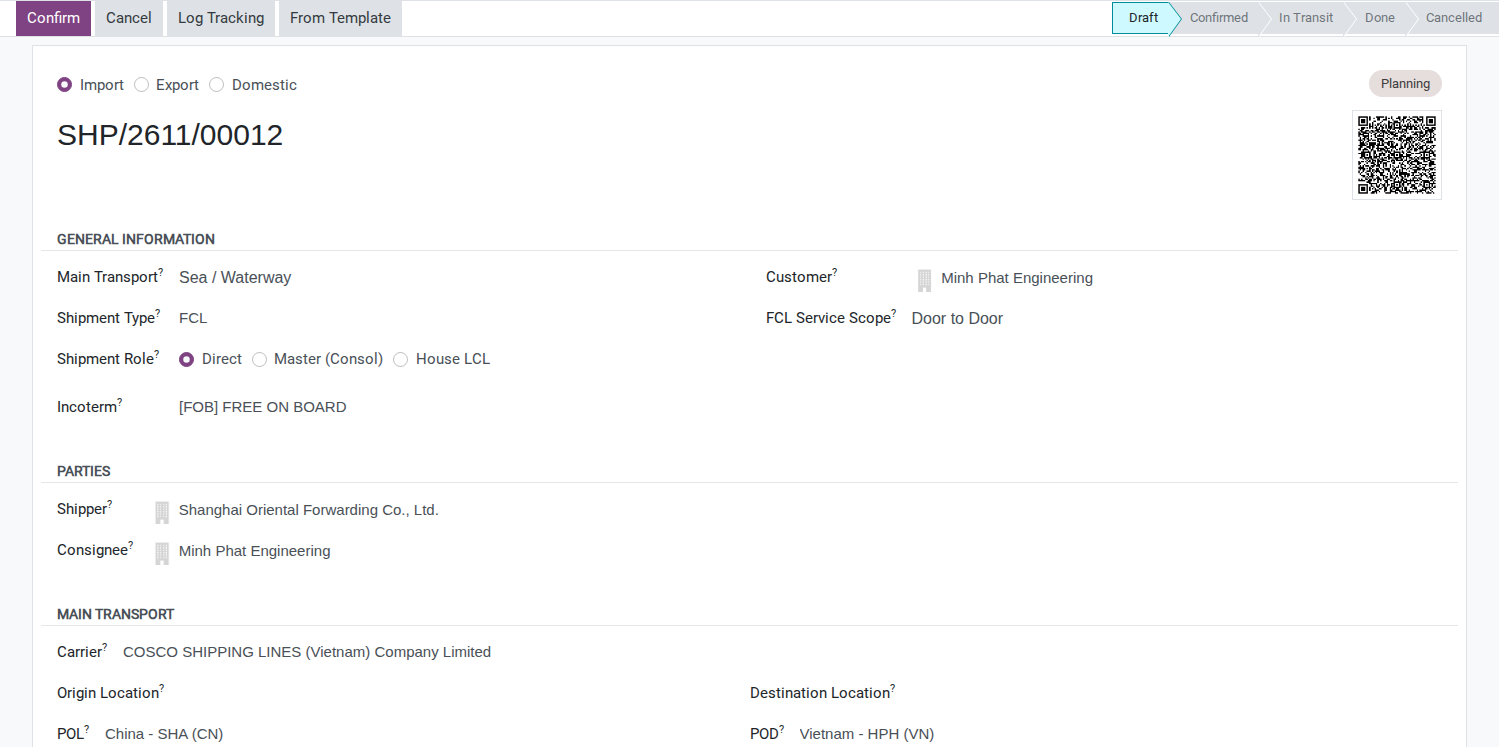
Click Confirm.
After you click Confirm, the status bar moves to Confirmed, the Bill of Lading and Import Operations groups and the Notify Party field appear, and the Send Arrival Notice button appears in the header.
Tip
Step 1 is done when:
Customer and Consignee read Minh Phat Engineering and the route reads Port of Shanghai to Hai Phong Port (shown as China - SHA (CN) to Vietnam - HPH (VN)).
The status bar shows Confirmed.
The Send Arrival Notice button is visible in the header.
Step 2: Record the bill of lading, vessel and notify party
Owner: Documentation records the carrier’s bill of lading and vessel details from the pre-alert.
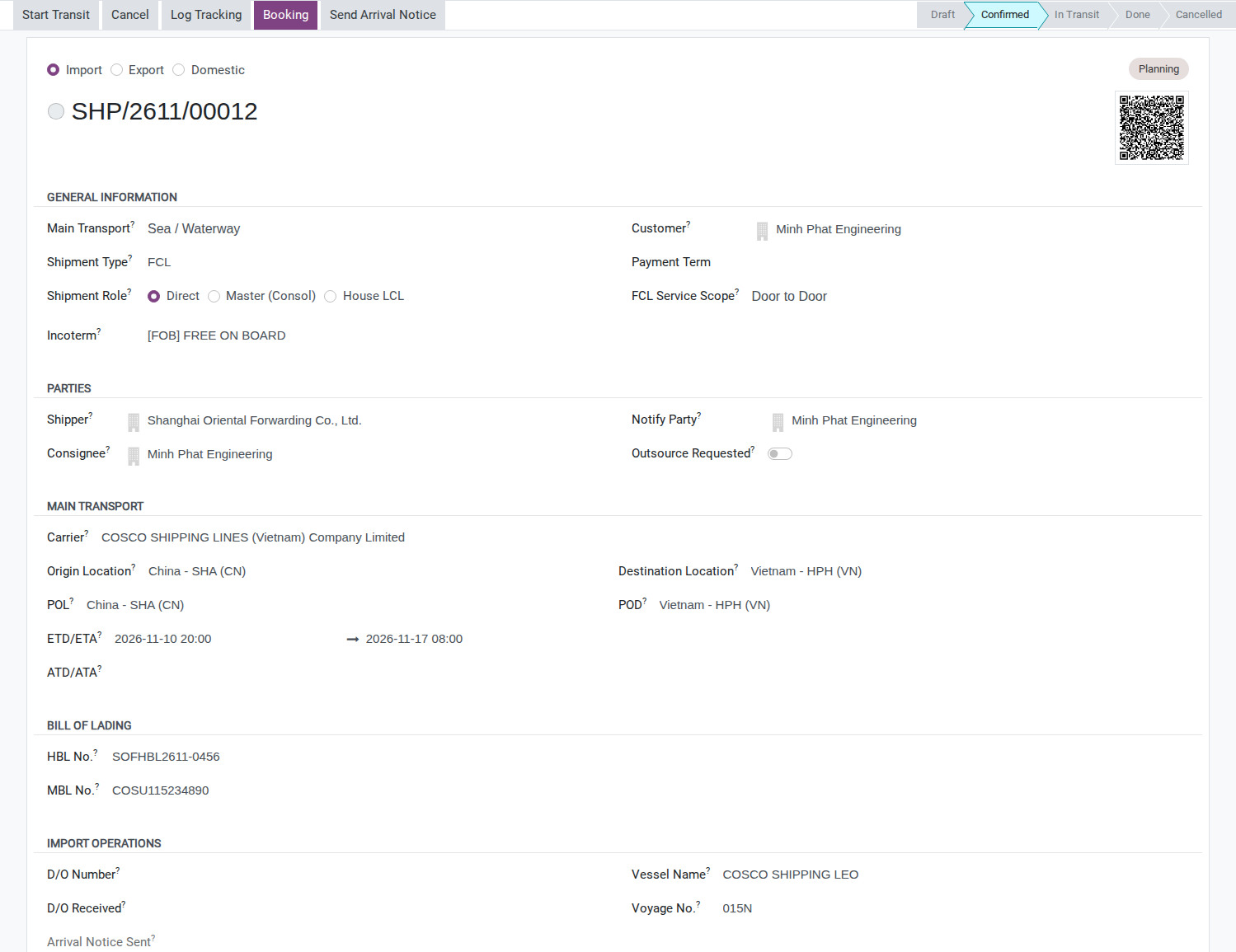
Enter the Bill of Lading numbers, the vessel and the Notify Party as soon as the pre-alert lands, so the Arrival Notice in Step 3 goes out with the right references to the right recipient.
Fill in:
HBL No.: SOFHBL2611-0456.
MBL No.: COSU115234890.
Notify Party: Minh Phat Engineering (same company as Consignee for this shipment).
Vessel Name: COSCO SHIPPING LEO.
Voyage No.: 015N.
In the shipment schedule, enter ETD/ETA: 10/11/2026 20:00 to 17/11/2026 08:00 (ICT, UTC+7). These are planned times from the pre-alert; record the actual times separately after departure and arrival are confirmed.
On the Cargo & Packages tab, add the container to the Containers list: Container Type Container 40FT HC, Container Number CSNU8123450, Seal Number CS1178342. The cargo line (CNC machining center, HS 8457.10, 9,500 kg, 28 m³) is declared the same way as on record cargo allocation, actual container numbers and seals on the Cargo & Packages tab.
Declaring cargo does not assign it to the container. Until loading items or packages are recorded, the container totals can show the container type’s empty weight and capacity. Use Load Cargo to Containers when recording the actual loading; check the assigned cargo weight and volume before using those totals.
Note
There is no field to enter the number of free days. Viindoo can calculate the end of free time, but no form, list or wizard lets you enter the free days themselves, so Free Time End and Detention Start on the container stay blank. Write COSCO’s 7-day free time from ATA in the Chatter now and work out the last free day by hand. See Known limitations.
Tip
Step 2 is done when:
HBL No. reads SOFHBL2611-0456 and MBL No. reads COSU115234890.
Notify Party reads Minh Phat Engineering.
The Containers list shows CSNU8123450, Container 40FT HC, seal CS1178342.
The Chatter has a note recording the 7-day free time from COSCO.
Decide: Original HBL or Telex Release
There is no field for the release instruction on the shipment - record the decision in the Chatter, not on a form field.
Option |
Use when |
What changes |
|---|---|---|
Original HBL |
Payment is by L/C, or the shipper insists on a full set of originals |
The consignee must bring the complete original set to Hai Long before the D/O is issued |
Telex Release |
Payment is by T/T and both sides trust each other |
An electronic release confirmation from the origin agent is enough - no courier wait |
If you are not sure, ask the origin agent or Shanghai Oriental Forwarding Co., Ltd. before promising the consignee a pickup date.
Step 3: Send the Arrival Notice
Owner: Documentation or Customer Service reviews the carrier’s notice and sends the message.
Send the notice promptly after receiving the carrier’s arrival details so the consignee can prepare its paperwork and collection. Confirm free-time dates separately against the carrier’s notice.
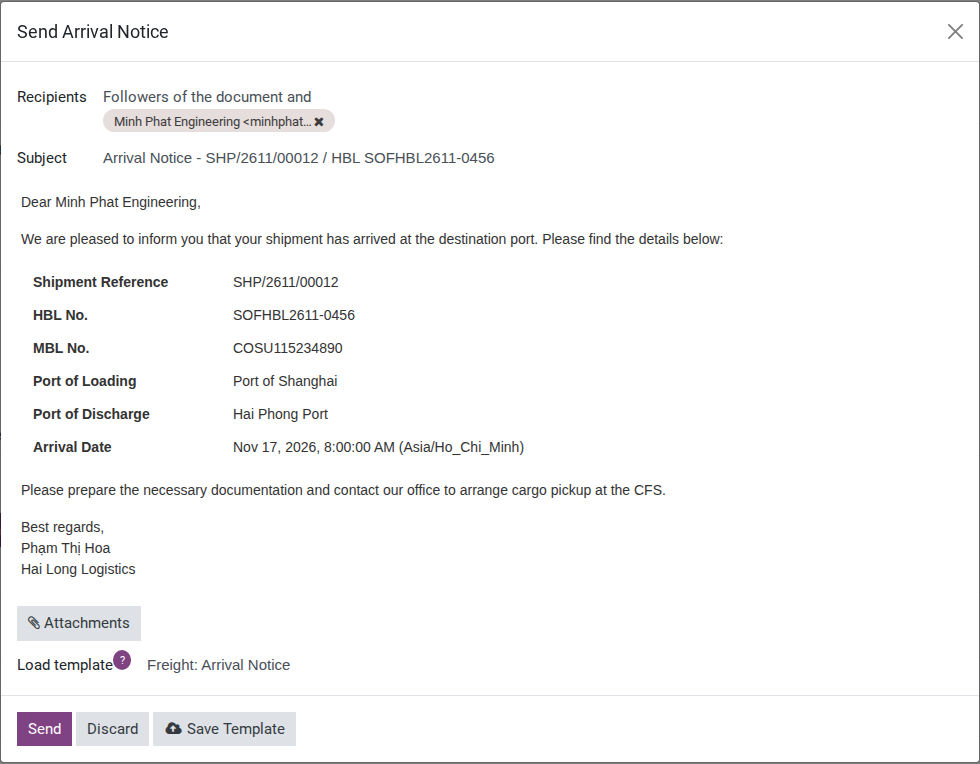
When COSCO’s Arrival Notice (on the MBL) reaches Hai Long, click Send Arrival Notice in the header.
Recipient: automatically Consignee - Minh Phat Engineering. Minh Phat Engineering is also set as Notify Party, so it appears once in the recipient list, not twice.
Review the message before sending. For this pre-arrival notice, replace the template’s has arrived wording with the expected arrival on 17/11/2026. Replace cargo pickup at the CFS with container pickup at the container terminal for this FCL shipment. Confirm the collection instructions with the carrier.
Add the confirmed Last Free Day: 24/11/2026, THC: VND 3,200,000 and CIC: USD 100, then click Send. These amounts come from the carrier’s notice and agreed customer prices; final charge entry follows in Step 5.
Warning
The button only works once. Once the message is sent, Arrival Notice Sent is stamped and the button disappears. Log any later resend, made by email, in the Chatter.
Tip
Step 3 is done when: Arrival Notice Sent on the shipment shows a date/time, and the Chatter has a matching log entry.
Step 4: Move the container from Arrived to Empty Returned
Owner: Operations updates each milestone after receiving confirmation from the carrier, broker, or trucker.
The container’s import milestones track when it arrives, clears customs, leaves the port, and
returns empty. They do not replace customs or carrier confirmation. In the Cargo & Packages tab,
on the line for container CSNU8123450:
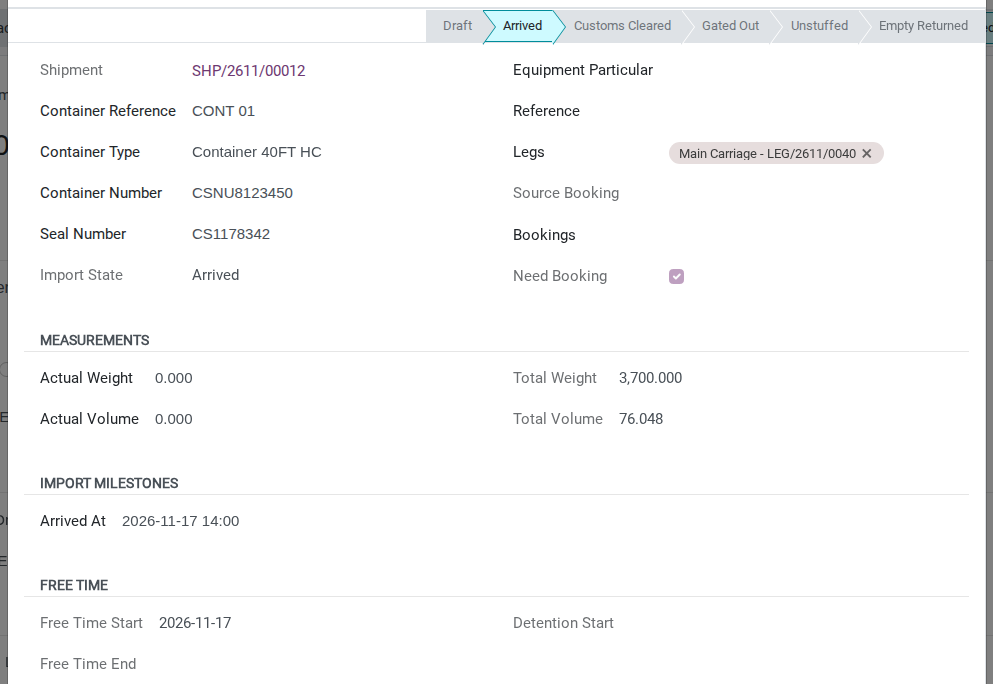
When COSCO’s vessel berths and the actual arrival is confirmed (17/11/2026 14:00), click Arrived, then also enter that same date and time as the arrival (end) date of the shipment’s ATD/ATA field, in the Main Transport group.
When COSCO’s Delivery Order reaches Hai Long, enter its D/O Number and the D/O Received date. Before releasing it to the consignee, verify the applicable payment or credit approval and, for Original HBL, receipt of the required original set (see Decide above). Recording these fields does not check payment or authorize release.
Once the customs broker confirms clearance outside Viindoo (18/11/2026), click Customs Cleared.
Once Phuong Nam Transport Co., Ltd. pulls the container out of the port (20/11/2026), click Gate Out.
Once the cargo is unloaded at Minh Phat Engineering’s factory and the empty container is returned (22/11/2026), click Empty Returned on the container’s row in the Containers list. FCL direct delivery can go straight from Gated Out to Empty Returned. Use the inline row button: the container popup only offers that action after Unstuffed.


Tip
Step 4 is done when:
The container’s status reads Empty Returned.
The shipment’s ATD/ATA shows the arrival 17/11/2026 14:00 and the container’s Free Time Start reads 17/11/2026.
D/O Number and D/O Received both have values.
Gate Out (20/11/2026) came before the last free day worked out by hand, 24/11/2026.
See also
Track every container milestone in more detail, including exceptions and rollovers: Track container milestones from empty pickup to return.
Step 5: Invoice the customer and check gross profit
Owner: Accounting checks the approved charges, prepares the customer invoice, and reviews the shipment’s gross profit.
Accounting checks the agreed sell prices and the carrier’s buy charges before billing Minh Phat Engineering. This example records charges directly on the shipment; no sales order is linked at this checkpoint. The ocean freight is billed in VND, converted from the agreed USD rate at 1 USD = 26,000 VND. Keep any on-behalf disbursement separate from these freight charges and confirm its billing route before recording it.
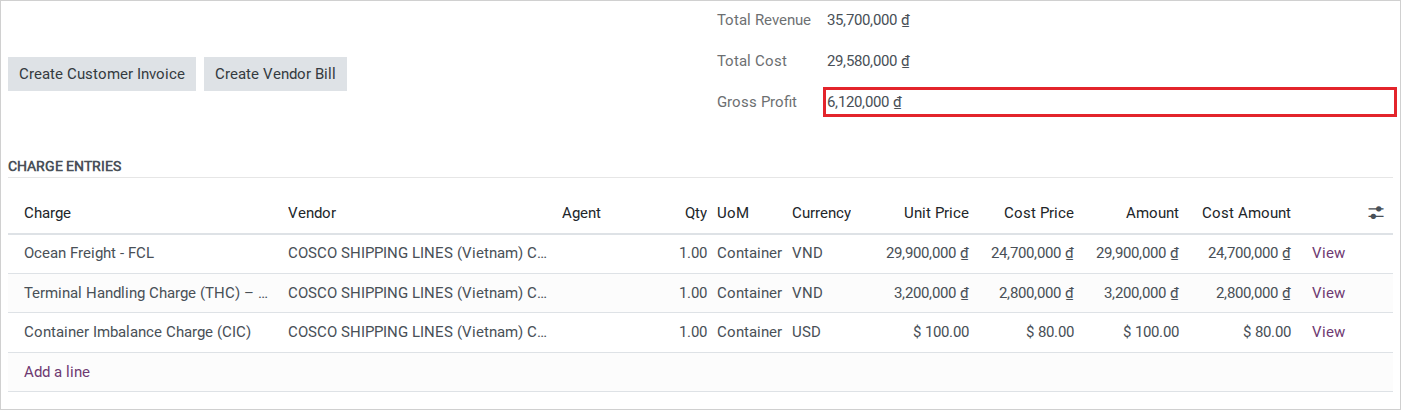
This shipment was created by hand and has no booking, so no charge line is created for you. In the Charges tab, add the three lines (how to add a line is in Charges and Profitability):
Ocean Freight - FCL: Currency VND, Qty 1, Unit Price 29,900,000 (USD 1,150 x 26,000), Cost Price 24,700,000 (USD 950 x 26,000).
THC at Hai Phong Port: Currency VND, Qty 1, Unit Price 3,200,000, Cost Price 2,800,000.
Container Imbalance Charge (CIC): Currency USD, Qty 1, Unit Price 100, Cost Price 80.
Read the totals, then click Create Customer Invoice. Viindoo groups the charges by customer and currency, so this example creates two Draft invoices: one in VND for ocean freight and THC, and one in USD for CIC. Review them before posting; creating them does not post them or record payment.
Tip
Step 5 is done when: Total Revenue reads 35,700,000 VND, Total Cost reads 29,580,000 VND and Gross Profit reads 6,120,000 VND (Ocean Freight, THC and CIC at the buy and sell rates on file, converted at 1 USD = 26,000 VND) - not counting the customs duty and quarantine fee paid on the consignee’s behalf, which is a separate collection, not a charge line.
See also
Full charge and invoicing detail: Charges and Profitability. The customs duty and quarantine fee paid on Minh Phat Engineering’s behalf (78,000,000 VND): On-Behalf Payments.
Known limitations
Step |
What Viindoo does today |
What you do instead |
|---|---|---|
Step 2 - free time |
Container Free Time (Days) has no field on the shipment form, the container form, or the Booking wizard |
Log the carrier’s free time (7 days from ATA) in the Chatter and work out the last free day by hand (here, 24/11/2026) |
Step 4 - arrival date |
Arrived (on the container) and ATD/ATA (on the shipment) are two separate, unsynced fields; only the shipment’s ATA feeds Free Time End / Detention Start |
After clicking Arrived, also enter the same date/time in the shipment’s ATD/ATA field |
Step 4 - D/O |
Only one pair of fields (D/O Number, D/O Received) exists for the whole shipment - no way to record the carrier’s D/O separately from a forwarder-issued D/O to the consignee |
Note in the Chatter which D/O (carrier or forwarder) each entry refers to |
Step 4 - customs |
No field for the customs declaration number, the clearance channel (Green/Yellow/Red) or the Port D/O - only a Customs Cleared milestone flag |
Track the VNACCS/VCIS declaration in your customs system; use Customs Cleared purely as a done/not-done flag |
Step 4 - DEM/DET |
Detention Start is a single combined clock (Free Time End + 1 day); demurrage (at the port) and detention (after Gate Out) are not tracked separately, and no field computes the surcharge amount |
Read Detention Start as the day surcharges start overall; if the carrier bills demurrage and detention separately, track the split and the amount by hand, then add a charge line |
Troubleshooting
The container will not move to Customs Cleared
Symptom: clicking Customs Cleared shows (names filled in):
Cannot move container "<container>" from <current> to <target>.
Cause: The container has not been marked Arrived yet; each import milestone can only be reached from the one immediately before it.
Fix: Click Arrived first, then Customs Cleared.
Free Time End and Detention Start stay blank
Symptom: After clicking Arrived, Free Time Start shows a date but Free Time End and Detention Start stay empty.
Cause: Container Free Time (Days) was never recorded anywhere in the system for this shipment - see Known limitations.
Fix: There is no field to fill in after the fact either. Calculate the last free day by hand from the Chatter note made in Step 2 (ATA + free days) and track it outside the shipment.
See also
Related articles
Optional modules