
Import a shipment by air
Guide information
Requirements
This tutorial requires the installation of the following applications/modules:
Freight Air Management (installs Freight Forwarder Management, Freight Sale and Logistics Accounting automatically)
Free storage at the destination depends on the airport terminal, cargo category and current tariff; do not calculate a Last Free Day from the arrival time alone. Confirm the deadline with the handling agent or terminal before advising the customer. The Arrival Notice also has to reach the right person: the Consignee who owns the cargo is not always the Notify Party who arranges customs clearance, and sending it to the wrong one can delay release. If a term below is new to you, see the Freight forwarding glossary.
Running scenario: Hai Long Logistics receives an air import shipment for Saigon Tech
Import Co., Ltd. - cosmetics samples (HS 3304.99), 300 kg gross / 2 CBM,
from ICN (Incheon International Airport) to SGN (Tan Son Nhat International Airport),
airline Vietnam Airlines, flight VN0470, MAWB 738-45217104, HAWB
HLLICNSGN2611-501. The Notify Party is Saigon Tech Import - Customs Desk, a separate
contact from the Consignee.
Before you start
Have the cargo declaration and measured packing figures ready: 300 kg / 2 CBM, HS 3304.99. See the measured goods in Cargo & Packages and the package records opened through the Packages button for cargo and package records.
Import customs clearance (VNACCS/VCIS declaration and duty payment) is filed by the consignee through its own customs broker - it happens entirely outside Viindoo and is not part of this guide.
You are in the User: All Shipments group, or you are the Responsible of the shipment with User: Own Shipments - on any other shipment Own Shipments is read-only. See What Own, All and Admin can do inside a shipment; the user’s Freight access is set in Settings > Users & Companies > Users.
Step 1: Create the import shipment
Set the direction, airports and Consignee on the draft. Notify Party and the Bill of Lading fields become available after you confirm - fixing a wrong airport after booking means cancelling and starting the schedule again.
Go to and click New. Fill in:
Direction: Import.
Main Transport: Air, Shipment Type: Loose, Shipment Role: Direct.
Customer and Consignee: Saigon Tech Import Co., Ltd.. Customer is the party Hai Long invoices.
Shipper: Seoul K-Beauty Export Co., Ltd..
Departure Airport: ICN (Incheon International Airport).
Arrival Airport: SGN (Tan Son Nhat International Airport).
In Cargo & Packages, add the cosmetics samples cargo declaration with HS 3304.99, Weight (kg) 300 and Volume 2. Click the shipment’s Packages smart button and New; enter Package Reference Cosmetics samples - 300 kg, Weight (kg) 300 and Volume (m³) 2. The package measurements supply the shipment totals and the 334 kg chargeable weight used in Step 5.
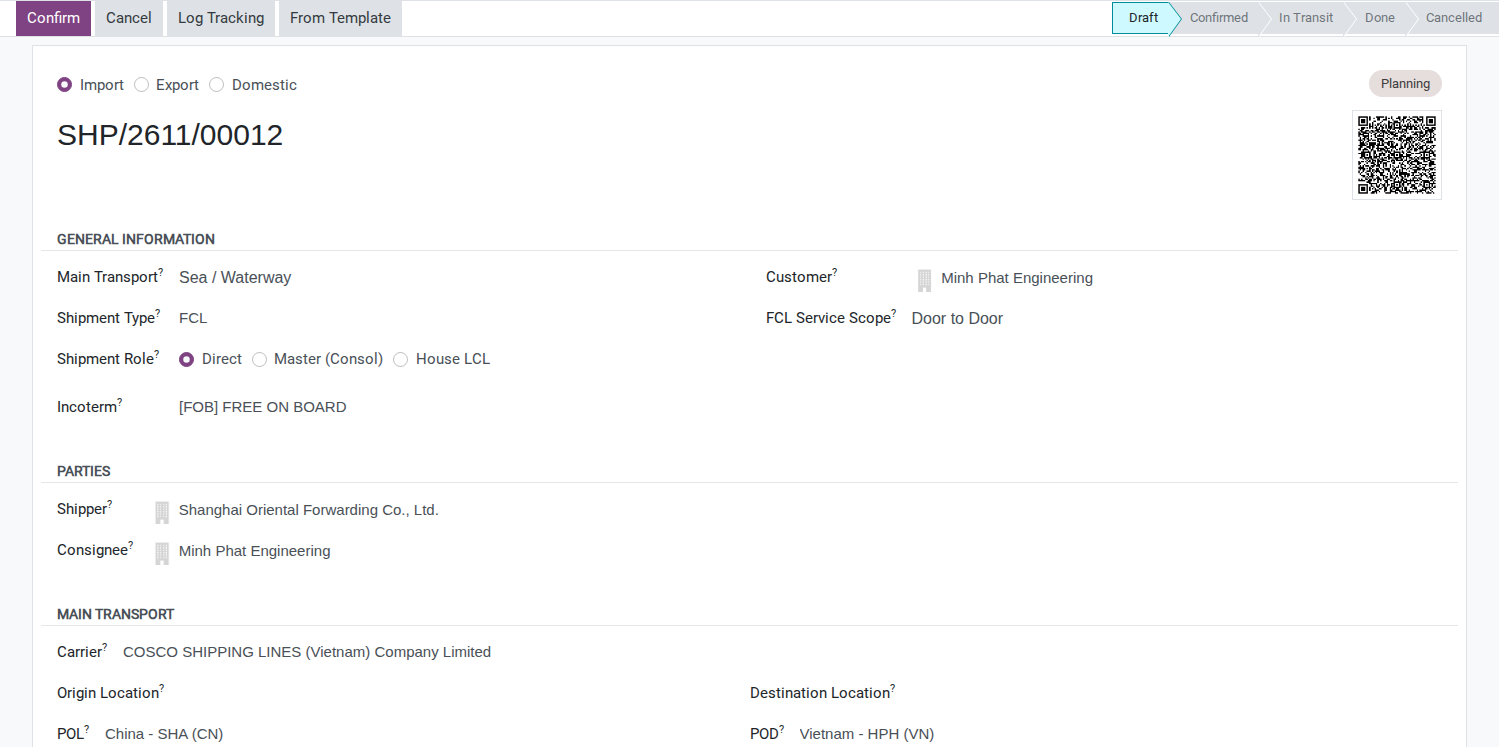
Click Confirm. After you click it: the status bar moves to Confirmed, a Bill of Lading group appears, and the Send Arrival Notice button appears in the header.
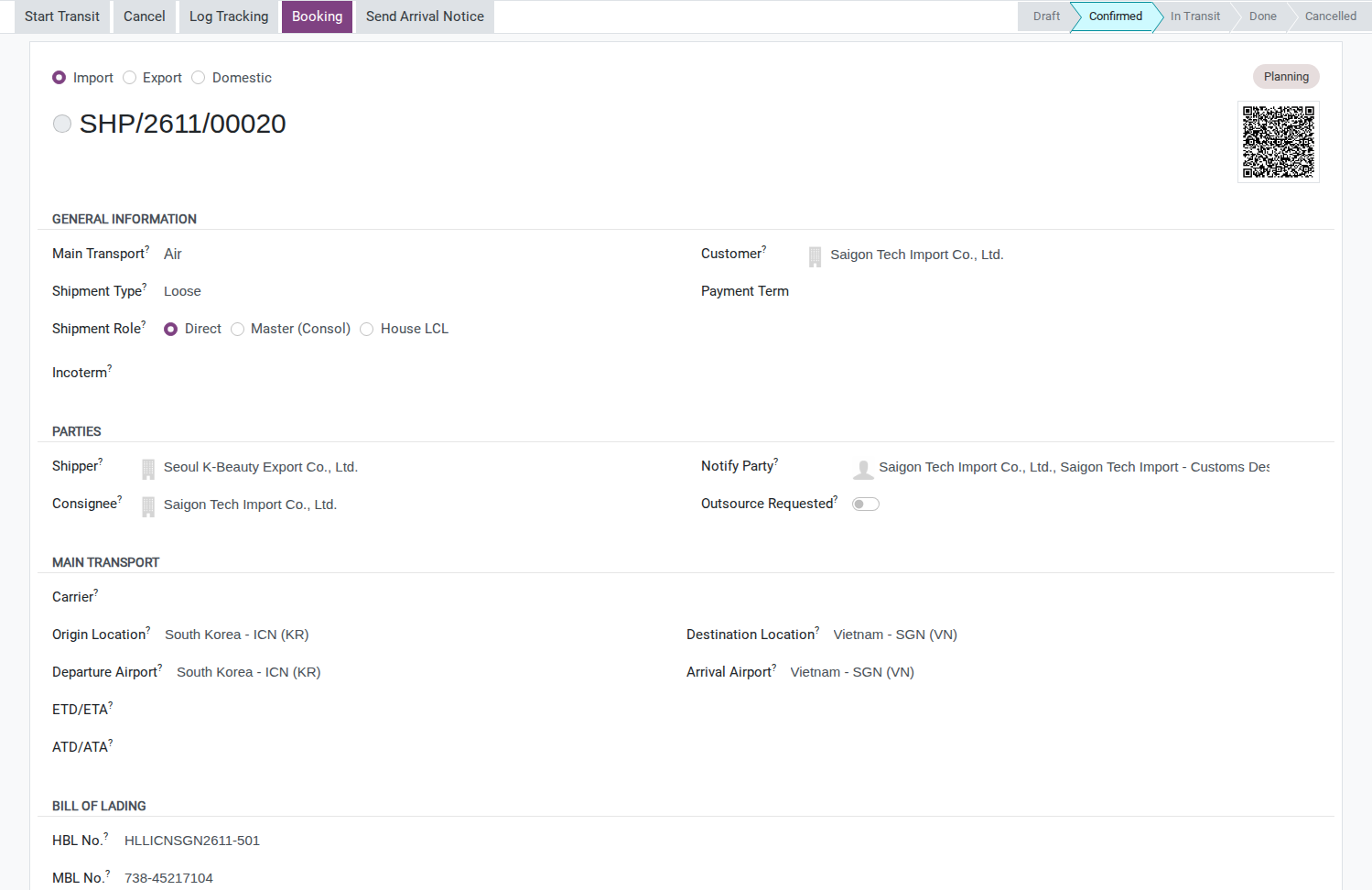
In Parties, set Notify Party to Saigon Tech Import - Customs Desk. Then fill in Bill of Lading:
HBL No.: HLLICNSGN2611-501.
MBL No.: 738-45217104.
Note
These two fields keep their sea-freight labels even on an air shipment. Viindoo does not rename HBL No. / MBL No. to HAWB/MAWB for air - use HBL No. for the House Air Waybill number and MBL No. for the Master Air Waybill number.
Tip
Step 1 is done when: the shipment shows Departure Airport ICN and Arrival Airport SGN, Notify Party and HBL No./MBL No. are recorded after Confirm.
See also
the measured goods in Cargo & Packages and the package records opened through the Packages button for how the cargo lines and the HS code behind the Chargeable Weight used in Step 5 are declared.
Step 2: Record the actual arrival and watch the free-time clock
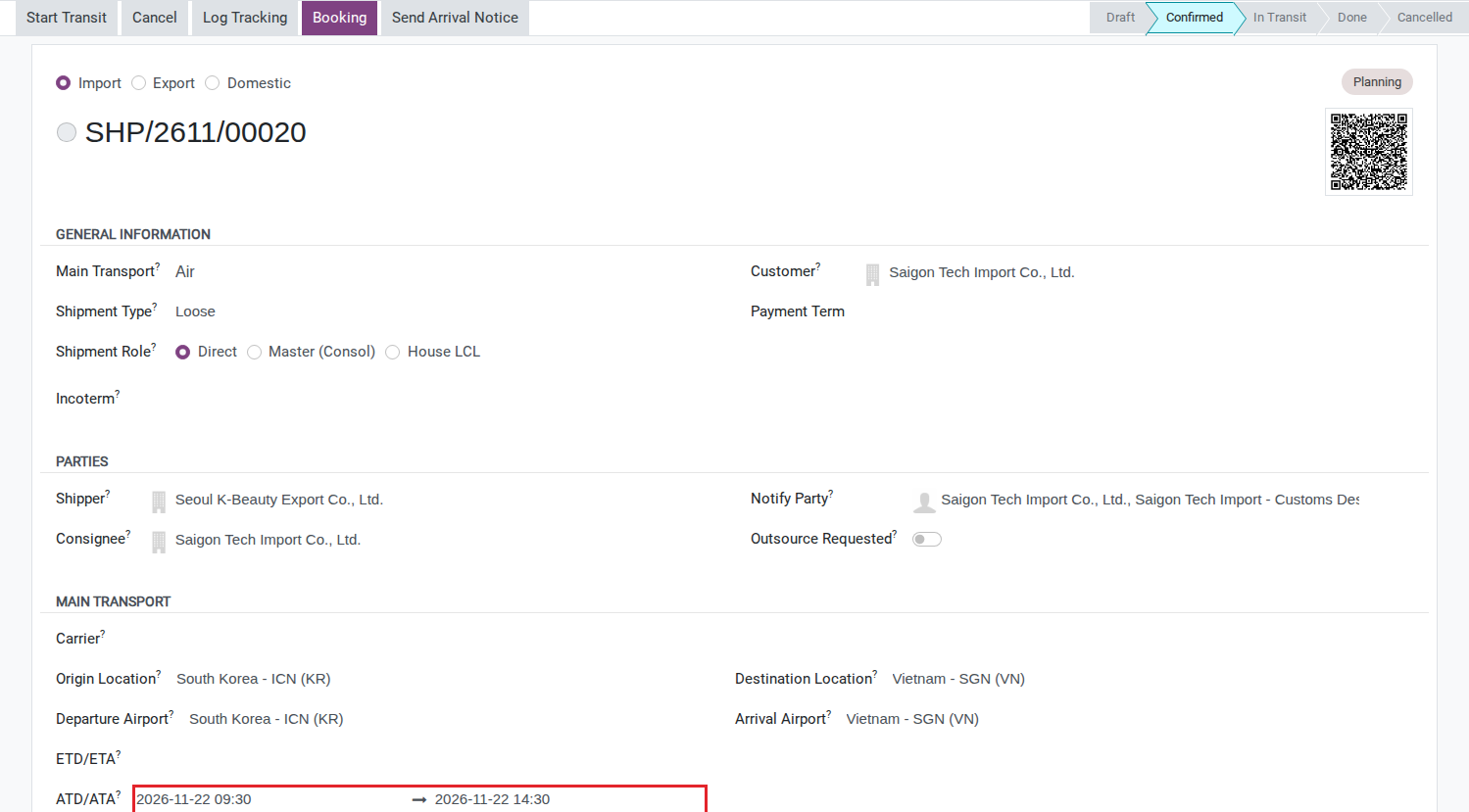
Record the actual arrival from the airline or handling agent’s notice. The terminal’s free-time rule may use calendar days, hours or cargo-specific terms, so ATA alone is not enough to determine the last free date or time.
As soon as the airline’s Cargo Arrival Notice confirms the landing, fill in ATD/ATA: 2026-11-22 14:30 (the actual landing time, not the schedule).
Warning
Viindoo does not calculate the last free date or time. Check the current tariff and arrival notice for the handling terminal and cargo category, then record the confirmed deadline, its source and the cargo location in the shipment’s Chatter. For SGN, check the SCSC Services and Charges page when SCSC is the handling terminal, and verify that its current terms apply to this shipment.
Tip
Step 2 is done when: ATD/ATA reads 2026-11-22 14:30 from the arrival notice and the Chatter records the handling terminal’s confirmed last free date/time, cargo location and source.
Step 3: Send the Arrival Notice
Send the Arrival Notice promptly so the consignee can arrange customs clearance and cargo collection. Include a storage deadline only after confirming it with the handling terminal or agent in Step 2.
Click Send Arrival Notice in the header. The compose dialog opens pre-filled with:
Recipients: Saigon Tech Import Co., Ltd. (Consignee) and Saigon Tech Import - Customs Desk (Notify Party).
Subject/body: from the “Freight: Air Arrival Notice” template, carrying the HAWB, MAWB, Departure/Arrival Airport and arrival date.
Review the message and click Send.
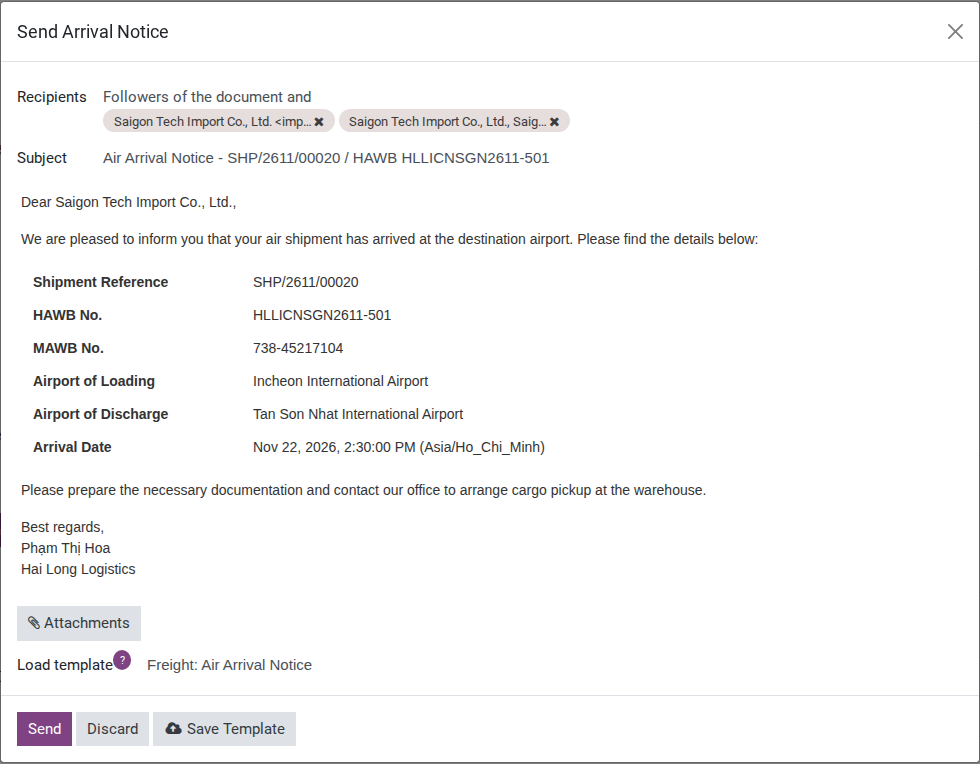
After you click Send: Arrival Notice Sent is stamped with the send time and the button disappears from the header - there is no second system Arrival Notice for a correction.
Tip
Step 3 is done when: Arrival Notice Sent shows a date/time and the Chatter has a matching log entry of the message that went out.
Decide the payment term before the D/O
Option |
Use when |
What changes |
|---|---|---|
Freight Prepaid |
The customer already paid the air freight to Hai Long at origin, or under the contract |
The Arrival Notice only needs to state local charges due, not the air freight itself |
Freight Collect |
The air freight is collected at destination (SGN) |
The Arrival Notice must state the air freight amount due, and Step 4 is where that collection is checked before the D/O is recorded |
Confirm Prepaid or Collect from the air waybill, agent instructions and customer agreement. Before recording the D/O, check the Charges tab against that confirmed payment term. If the documents do not agree, pause and ask the destination agent and Accounting; do not assume the consignee owes the freight.
Step 4: Confirm release requirements, then record the Delivery Order
Before releasing cargo, follow the payment term in the air waybill or customer agreement and your company’s approved credit and release procedure. For a collect shipment, confirm the amount due has been received or approved for release; for prepaid or credit-approved shipments, verify the corresponding payment or authorization with Accounting or the origin agent.
In this example, Hai Long collects the USD 1,002 air freight and VND 1,200,000 terminal handling from Saigon Tech Import. Enter the selling charges with their currencies and quantities as shown in Step 5 before creating the invoices. Viindoo creates one invoice per currency: check payment of both invoices with Accounting before issuing Hai Long’s D/O. Registering a payment may show In Payment until bank reconciliation, depending on the accounting setup; follow your release procedure and do not treat an uncleared payment as bank confirmation.
Note
When only the selling charges are confirmed, leave Vendor and Agent empty at this stage. In Step 5, enter the vendor together with its confirmed Cost Price. Without a booking, a line with a vendor but zero cost is treated as a purchase-only charge and is not included in customer invoicing. Do not judge gross profit while the buying costs are still pending.
When the airline’s D/O reaches Hai Long, record it on the shipment:
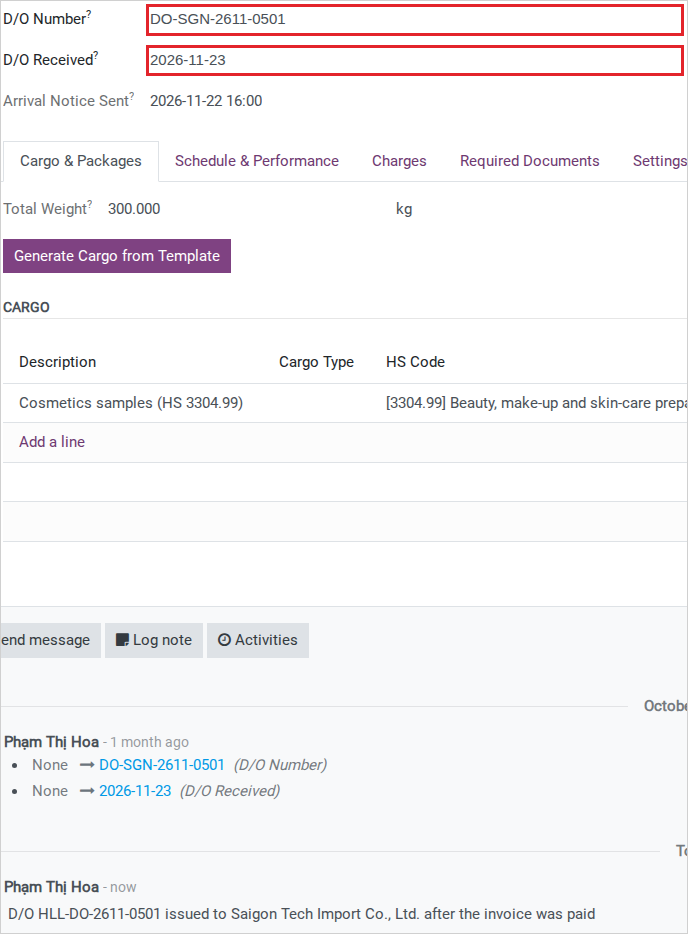
D/O Number: DO-SGN-2611-0501.
D/O Received: the date the airline’s D/O was received.
Note
This one pair of fields covers only the airline’s D/O. Viindoo does not have a separate pair for the D/O Hai Long in turn issues to Saigon Tech Import Co., Ltd. - that second D/O is logged in the Chatter (see Known limitations).
Important
Viindoo does not enforce a payment or credit check before cargo is released. Confirm the applicable payment or release approval outside the system and record its source in the Chatter before handing the consignee-facing D/O to Saigon Tech Import Co., Ltd.
Once release is authorized, issue Hai Long’s D/O to the consignee and log its number and issue date in the Chatter.
Note
Since this shipment is Direct (not a House shipment under a Master air consolidation), the header does not show an Issue Air D/O button - that button only appears for a House shipment.
Tip
Step 4 is done when: the payment or credit-release condition for this shipment is confirmed, the Chatter records its source, and the Chatter also records the consignee-facing D/O number and issue date.
Step 5: Reconcile actual revenue and cost
Gross Profit only means something once every charge line carries a real Cost Price - a charge left at its default cost understates what this shipment actually cost Hai Long.
On the Charges tab, update the two existing selling-charge lines from Step 4 with their confirmed vendors and costs. Do not add the same charges again after invoicing:
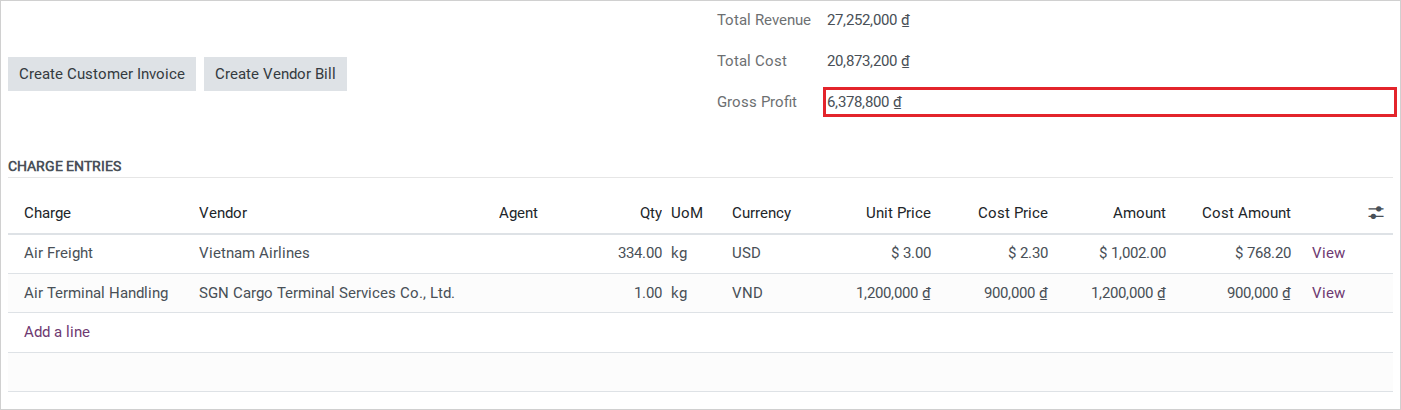
Air Freight: Currency USD, Quantity 334 (kg), Unit Price 3.00, Vendor Vietnam Airlines, Cost Price 2.30.
Air Terminal Handling: Currency VND, Quantity 1, Unit Price 1,200,000, Vendor SGN Cargo Terminal Services Co., Ltd., Cost Price 900,000.
Note
Chargeable Weight (334 kg) is not shown on any shipment view. Viindoo computes it as the higher of gross weight and volumetric weight - here max(300, 2 x 167 = 334) = 334 kg - but only prints it on the Air Cargo Manifest report of the booking. Read it from there, or recompute it, before typing the Quantity above.
Note
Choosing the Vendor on the Air Freight line does not fill Cost Price from the rate card - the lookup reads the sea port fields, which are always empty on an air shipment. Enter USD 2.30 by hand from the agreed contract rate.
Tip
Step 5 is done when: Air Freight reads Quantity 334, Unit Price USD 3.00, Cost Price USD 2.30 (not zero), Air Terminal Handling reads VND 1,200,000 / 900,000, and Gross Profit reads USD 233.80 + VND 300,000 (VND 6,378,800 at 1 USD = 26,000 VND).
See also
Record charges, invoice the customer, and bill vendors for adding charges manually, editing a posted invoice, and other charge scenarios.
Known limitations
Step |
What Viindoo does today |
What you do instead |
|---|---|---|
Step 2 - free time |
No field records the storage location or the terminal-confirmed last free date/time |
Confirm the deadline with the handling agent or current terminal tariff, then log the location, deadline and source in the Chatter |
Step 4 - payment check |
Nothing blocks issuing the D/O to the consignee while its invoice is still unpaid |
Confirm the applicable payment or credit-release authorization under the customer agreement and company procedure, then log its source before issuing the D/O |
Step 4 - two-tier D/O |
Only one pair of fields (D/O Number, D/O Received) exists for the whole shipment - no way to record the airline’s D/O separately from the D/O Hai Long issues to the consignee |
Log the consignee-facing D/O number and date in the Chatter |
Step 5 - air rate card |
Choosing a Vendor on an air charge line does not look up a cost price for the Departure/Arrival Airport pair - the lookup only reads sea POL/POD |
Enter Cost Price by hand from the agreed rate |
Cargo pickup at the airport warehouse |
No field records the date the consignee actually collected the cargo - D/O Received is the date the D/O arrived, not the pickup date |
Log the actual pickup date in the Chatter |
Troubleshooting
Cannot send the Arrival Notice
Symptom: “Cannot send Arrival Notice for shipment “SHP/26xx/000nn”: no party outside your own company can be reached by email.”, followed by one line per party, for example “Notify Party (Saigon Tech Import - Customs Desk): no email on file”.
Cause: Neither the Consignee nor the Notify Party has an email on file, or both are internal partners of your own company.
Fix: Add an email address to the Consignee’s (or Notify Party’s) Contact form, then click Send Arrival Notice again.
The Arrival Notice was already sent
Symptom: “Arrival Notice has already been sent for shipment “SHP/26xx/000nn”.”
Cause: Arrival Notice Sent already has a value - Viindoo blocks a second send from the system.
Fix: If the content needs to be re-sent (for example, after correcting the free-time date), use the Chatter’s Send message instead of looking for the button again.
The consignee says it never received the Arrival Notice
Symptom: The consignee calls asking why nothing arrived, while the system shows Arrival Notice Sent.
Cause: The email on the Consignee or Notify Party contact reaches someone who does not handle imports. The Arrival Notice only ever goes to the Consignee, the Notify Party and any 2nd Notify Party - never to the Shipper, so the Shipper will not forward it either.
Fix: Open the sent message in the Chatter to see who received it, correct the email on the right contact, and re-send the content with the Chatter’s Send message.
See also
Related articles
Export by air under a direct airway bill - the reverse operation, exporting a shipment by air
Consolidate air export shipments into one MAWB - multiple house shipments consolidated under one MAWB
Issue an HBL or send an Arrival Notice - B/L and document management
Optional modules