
LCL Import (Deconsolidation)
Guide information
Required modules
Freight Consolidation (required for LCL)
Freight Accounting (optional — required for invoicing and vendor bills)
Less Container Load (LCL) Import is the process of receiving a consolidated container from an origin co-loader or consolidator, transporting it to the destination Container Freight Station (CFS) for devanning, and then delivering each individual load to its respective consignee. Unlike FCL import, the forwarder must also perform deconsolidation, create an Outturn Report, and issue a House Delivery Order (House D/O) to each consignee.
Running scenario: Hai Long Transport Co., Ltd. receives one master 40HC container from Asia Consol Pte Ltd in Singapore. The vessel is SITC BANGKOK, voyage 025N, routing SGSIN (Singapore) → VNHPH (Hai Phong), ETD 20 May 2025, ETA 25 May 2025, MBL SITCSINHPH250508. The container holds three separate loads:
DEF Electronics Co., Ltd. — HBL ACPL-HP-2025-101, 8 pallets, 1,400 kg, 12 CBM.
GHI Precision Engineering Co., Ltd. — HBL ACPL-HP-2025-102, 4 pallets, 2,100 kg, 6 CBM.
JKL Plastics Co., Ltd. — HBL ACPL-HP-2025-103, 5 pallets, 1,200 kg, 8 CBM.
The container is trucked from the port to CFS VICONSHIP Hai Phong for devanning and individual consignee delivery.
See also
Glossary (HBL, MBL, D/O, CFS, Demurrage, Detention, Outturn Report, and more): Industry Glossary.
When to use this guide
Use this guide when your company is the destination forwarder for a Sea LCL Import and must process one master container that holds cargo for multiple consignees. If the container holds cargo for a single consignee only, use the FCL Import guide instead.
Role |
Tasks in this guide |
What to verify |
|---|---|---|
Operations Staff |
Create the master, track the container, haul to CFS, return the empty. |
Master has a complete container milestone chain from Arrived to Empty Returned. |
Documentation |
Deconsolidate the master into houses from the manifest, send Arrival Notices, and issue House D/Os to each consignee. |
Each house has an HBL, Arrival Notice, House D/O, and a Cargo Released milestone. |
Customs Broker |
Handle customs clearance for each consignee outside the system. |
Each house has a clear audit trail before cargo is collected at the CFS. |
Accounting |
Review master and house charges, create invoices and vendor bills, and verify profit. |
Draft Invoices and Draft Bills exist; master cost allocation is correct if used. |
Master and house: what each record manages
Record |
Manages |
Typical actions |
|---|---|---|
Master shipment |
Shared container, MBL, buy charges at destination, Outturn Report, and empty return. |
Record container and MBL, collect D/O master, haul to CFS, deconsolidate, create vendor bills. |
House shipment |
Each consignee’s individual load. |
Record HBL, send Arrival Notice, issue House D/O, track Cargo Released, create customer invoice. |
Process overview
An LCL import deconsolidation passes through six main stages. The first part is handled on the master; the later stages run in parallel across individual houses.
# |
Stage |
Purpose |
Responsible |
|---|---|---|---|
1 |
Create the master and record the MBL and container. |
Create the central record for the inbound container and origin manifest. |
Operations / Documentation |
2 |
Review charges, start transit, and record vessel arrival. |
Set up the buy-side financials and begin tracking Free Time. |
Operations / Sales |
3 |
Collect the master D/O, haul to CFS, and deconsolidate. |
Create individual house shipments for each consignee. |
Operations / Documentation |
4 |
Devan the container and confirm the Outturn Report. |
Record actual cargo weight and volume, and document any discrepancies. |
CFS Operations / Documentation |
5 |
Process each house: Arrival Notice, House D/O, and Cargo Released. |
Deliver cargo to the correct consignee and finalise CFS-level operations. |
Documentation / Operations |
6 |
Return the empty, set done, create invoices and vendor bills. |
Close operations and financials for both the master and all houses. |
Operations / Accounting |
Step 1: Create the master and record the MBL and container
For LCL import, the forwarder always starts with the master shipment because the cargo was consolidated at origin. The master holds the MBL, the shared container, all destination buy charges, and every operational milestone for the container. The houses are created later, at the deconsolidation step.
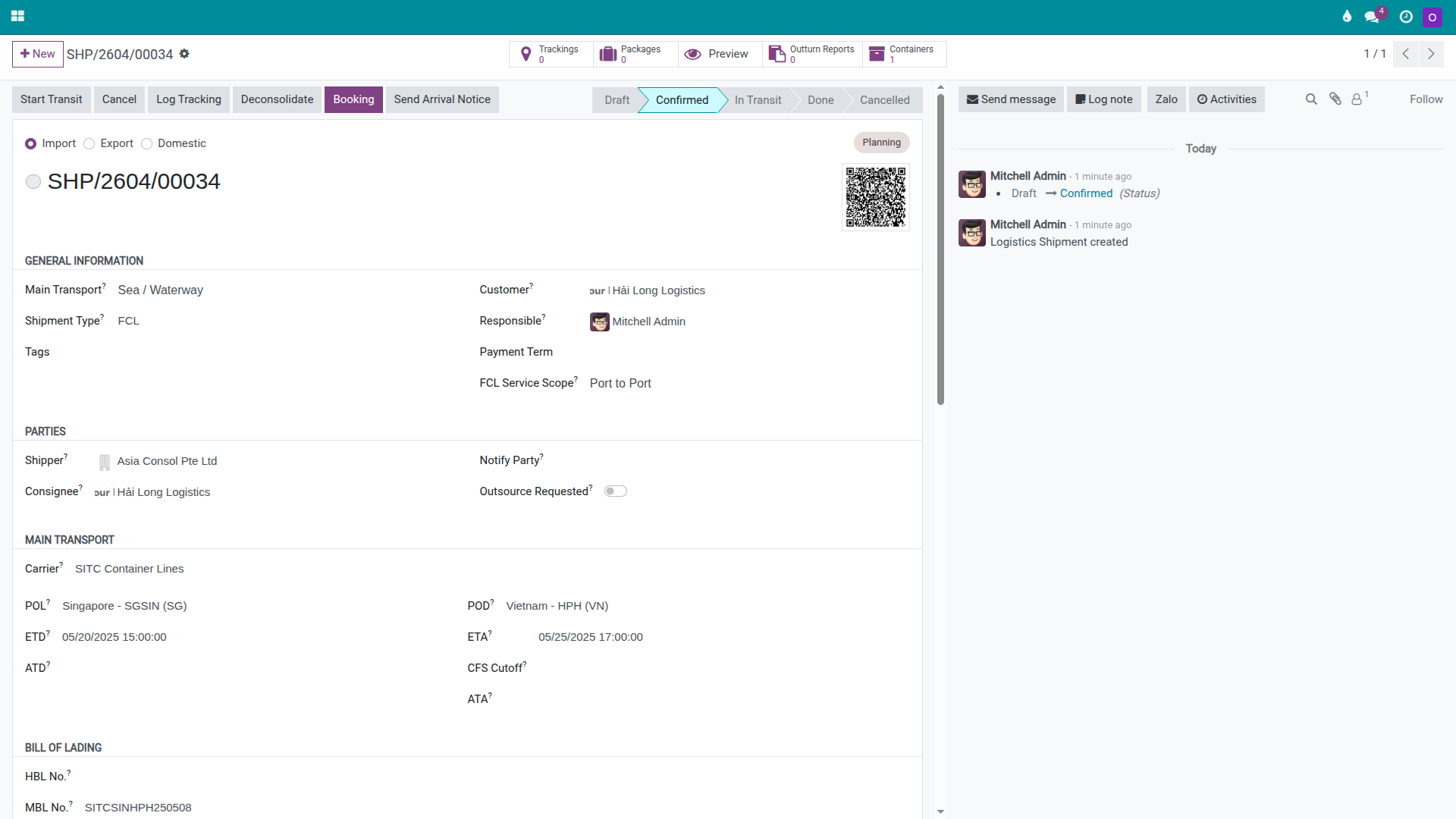
Go to and click New. Create the master with the following key details:
Shipment Type: the sea import type used to manage the master container.
Consolidation role: select Master.
Customer / Consignee on MBL: Hai Long Transport Co., Ltd..
Shipper: Asia Consol Pte Ltd.
POL / POD: SGSIN / VNHPH.
Carrier: SITC Container Lines.
ETD / ETA: 20/05/2025 / 25/05/2025.
MBL Number: SITCSINHPH250508.
Vessel Name / Voyage Number: SITC BANGKOK / 025N.
Once the key details are correct, click Confirm.
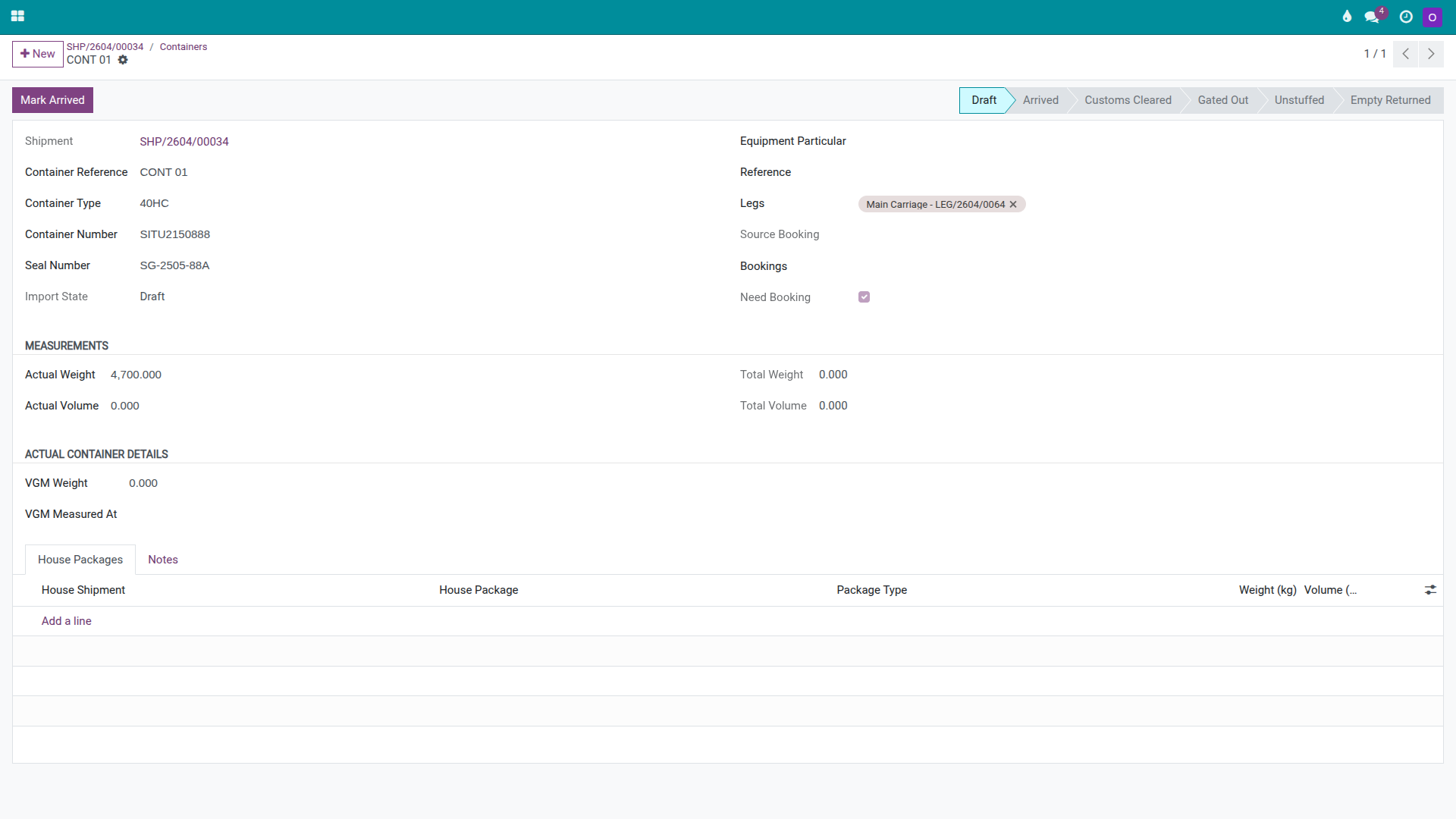
In the Cargo & Packages tab, add the container:
Package Type: 40HC.
Container Number: SITU2150888.
Seal Number: SG-2505-88A.
Actual Weight: 4,700 kg.
Upload the Pre-Alert, manifest packing list, and MBL scan into the Documents tab so they are available when creating houses at the deconsolidation step.
Warning
An incorrect MBL number or container number breaks every downstream step. Deconsolidation, the master D/O exchange, the Outturn Report, and any cargo discrepancy claim all depend on the correct container identity. Cross-check every character against the Pre-Alert before the operations team proceeds.
Tip
How to know Step 1 is correct:
Master shipment is in Confirmed status.
The shipment has an MBL Number, Vessel Name, and Carrier.
One 40HC container record exists with the container number, seal, and actual weight.
The Documents tab contains the Pre-Alert or manifest for use at the deconsolidation step.
Step 2: Review charges, start transit, and record vessel arrival
Before the vessel reaches Hai Phong, Operations and Sales should enter the main buy charges on the master so the team can see the cost profile of this load and begin monitoring the Free Time deadline. For LCL import, revenue typically sits on individual houses while the master carries the shared buy charges.
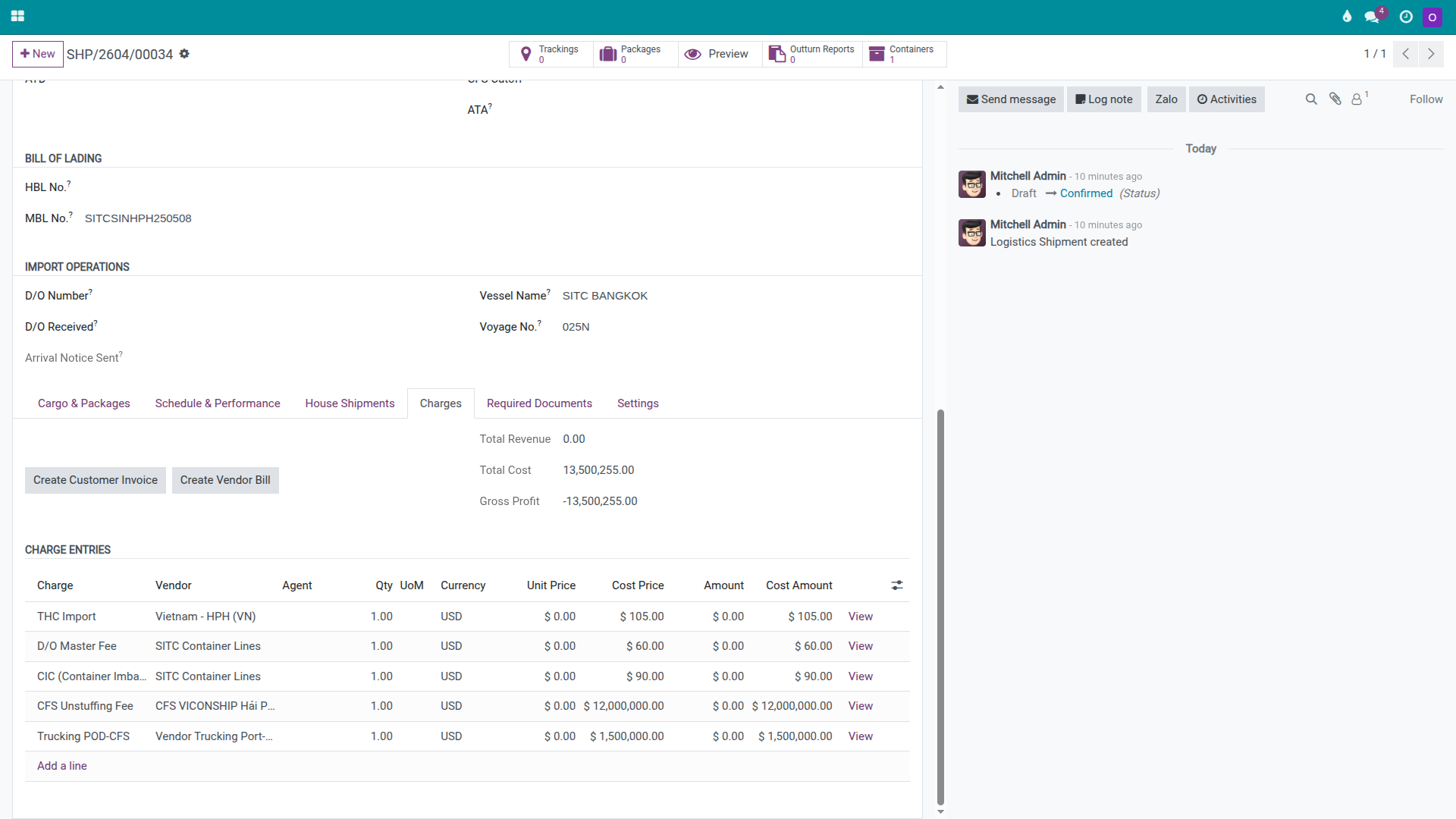
In the master’s Charges tab, add the main buy charge lines:
THC Import
D/O Master Fee
CIC (Container Imbalance Charge)
CFS Unstuffing Fee
Trucking — Port to CFS
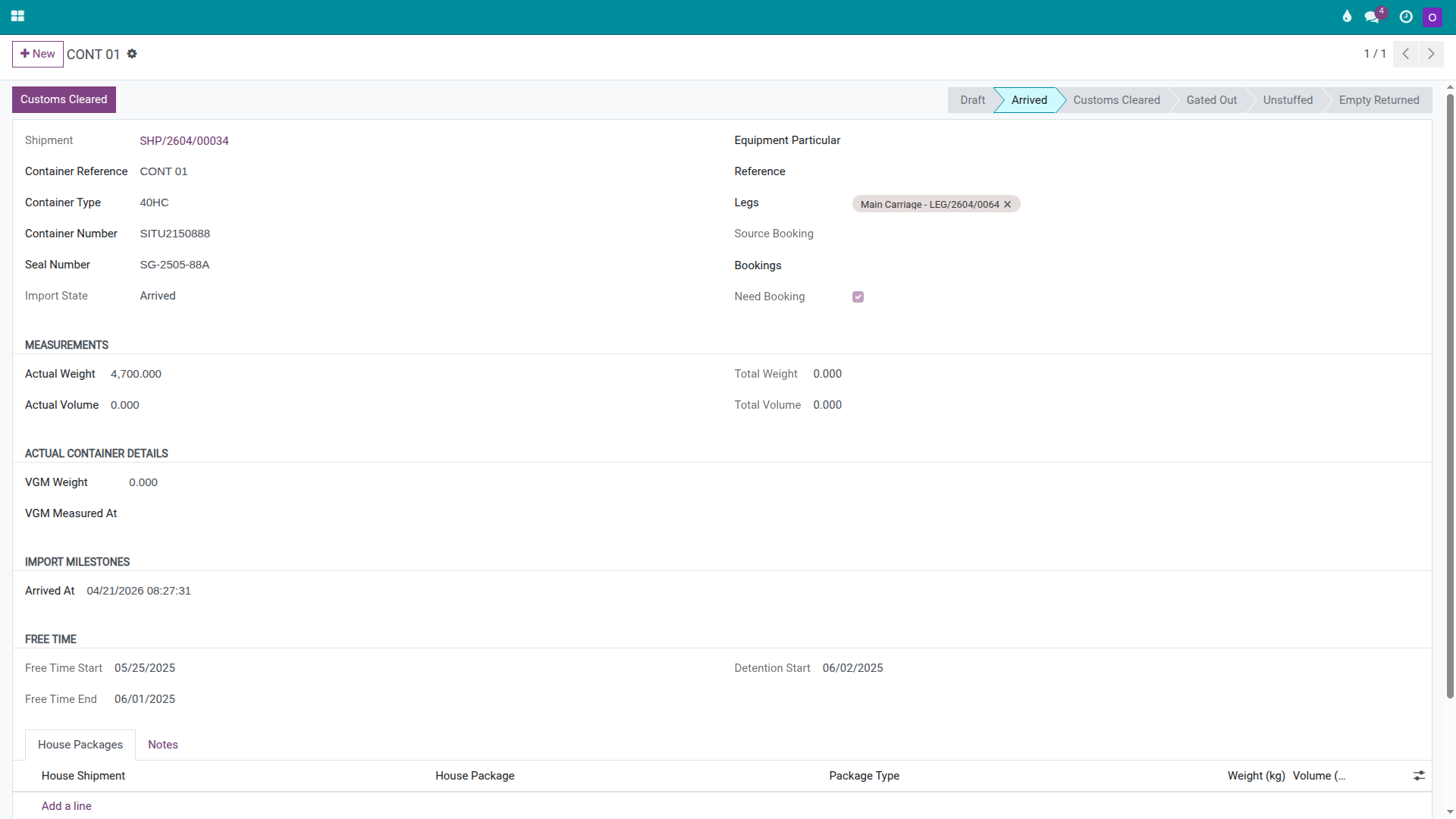
When the vessel departs Singapore, click Start Transit on the master. When the vessel berths at Hai Phong, open the Cargo & Packages tab and click Arrived on the container line to start the Free Time clock.
Warning
LCL import faces the same Free Time pressure as FCL import, but the release process is longer. The team must also devan the container, create houses, notify multiple consignees, and coordinate separate cargo pickups before returning the empty. If any single step is slow, the entire master can accumulate detention charges even when individual houses appear to be progressing normally.
Tip
How to know Step 2 is correct:
The master Charges tab has all main buy charge lines.
The master is in In Transit status after the vessel departs.
The container is recorded as Arrived when the vessel berths.
The team has noted or recorded the Free Time End date to monitor the empty-return deadline.
Step 3: Collect the master D/O, haul to the CFS, and deconsolidate
After the vessel arrives, Hai Long must exchange the master D/O with SITC before the truck can enter the port. Only after the container has reached the CFS can Documentation deconsolidate the master into individual house shipments based on the manifest.
On the master, enter:
D/O Number: SITC-HP-DO-20250528-015.
D/O Received At: 28/05/2025.
If the company tracks deconsolidation at the CFS level, add a Chatter note so all team members understand this is a multi-consignee load to be processed house by house.
On the container line, take the following actions in order:
Click Customs Cleared when the master is authorised to leave the port.
Click Gate Out when the truck has left the port with the container.
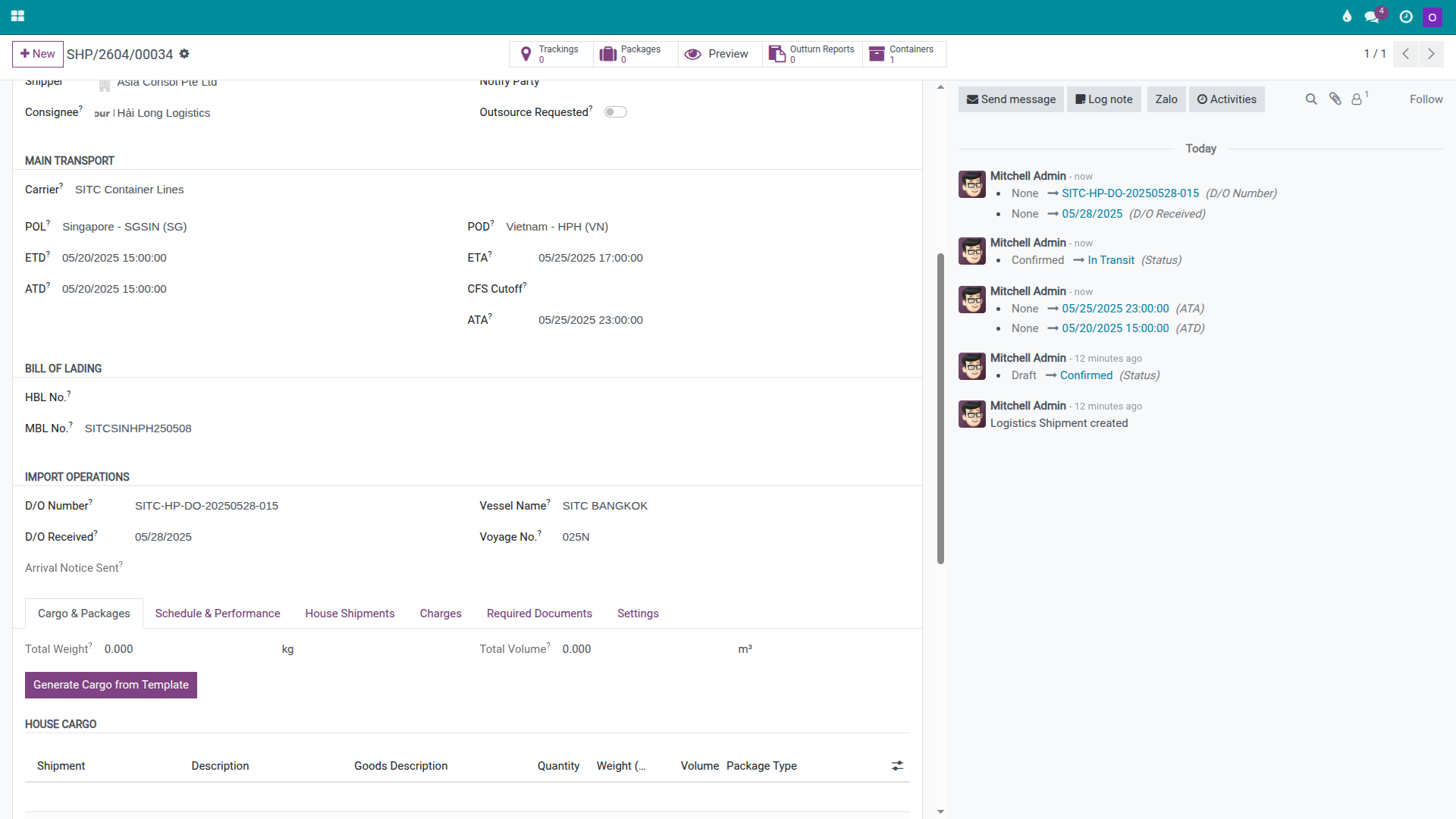
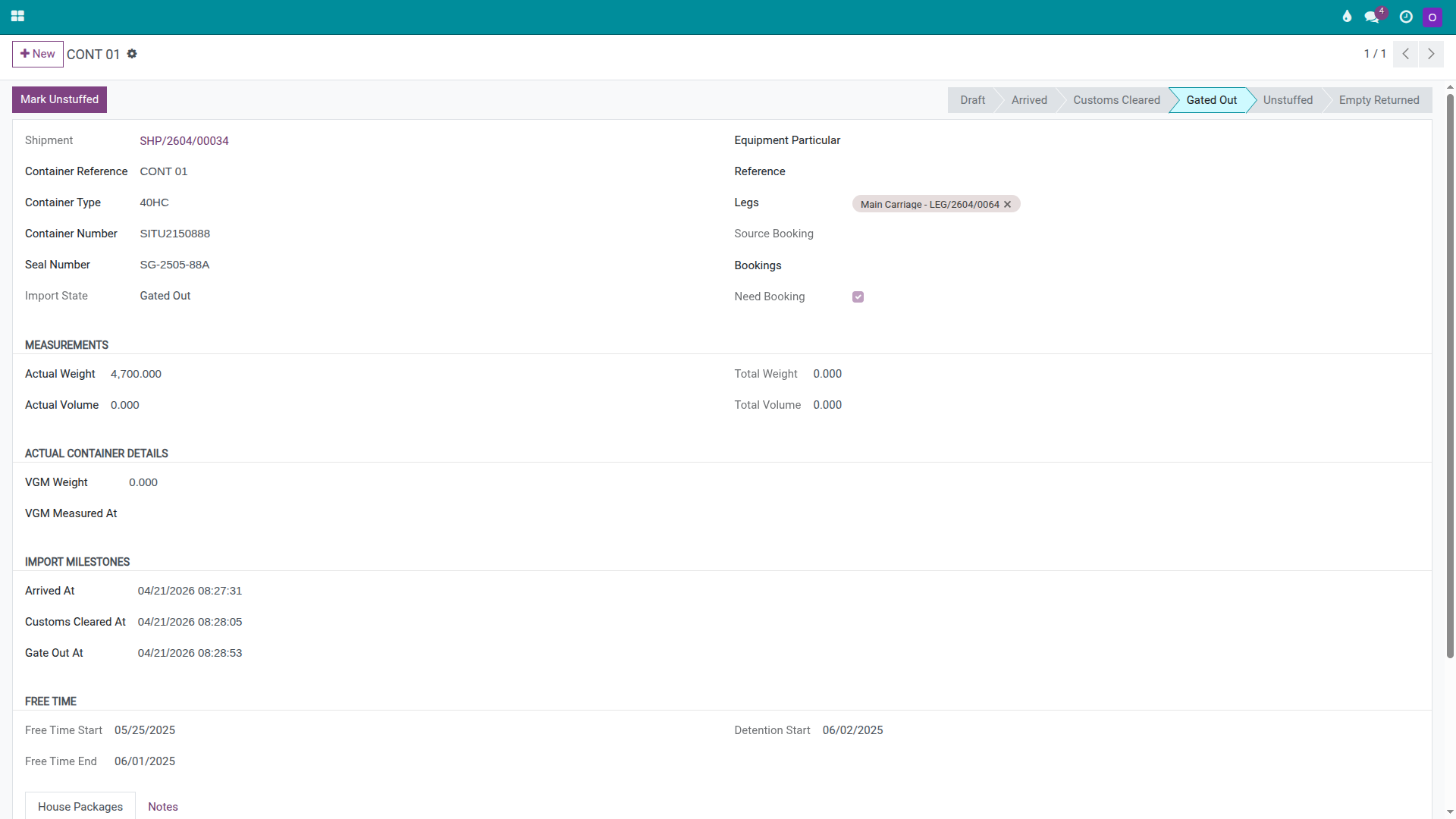
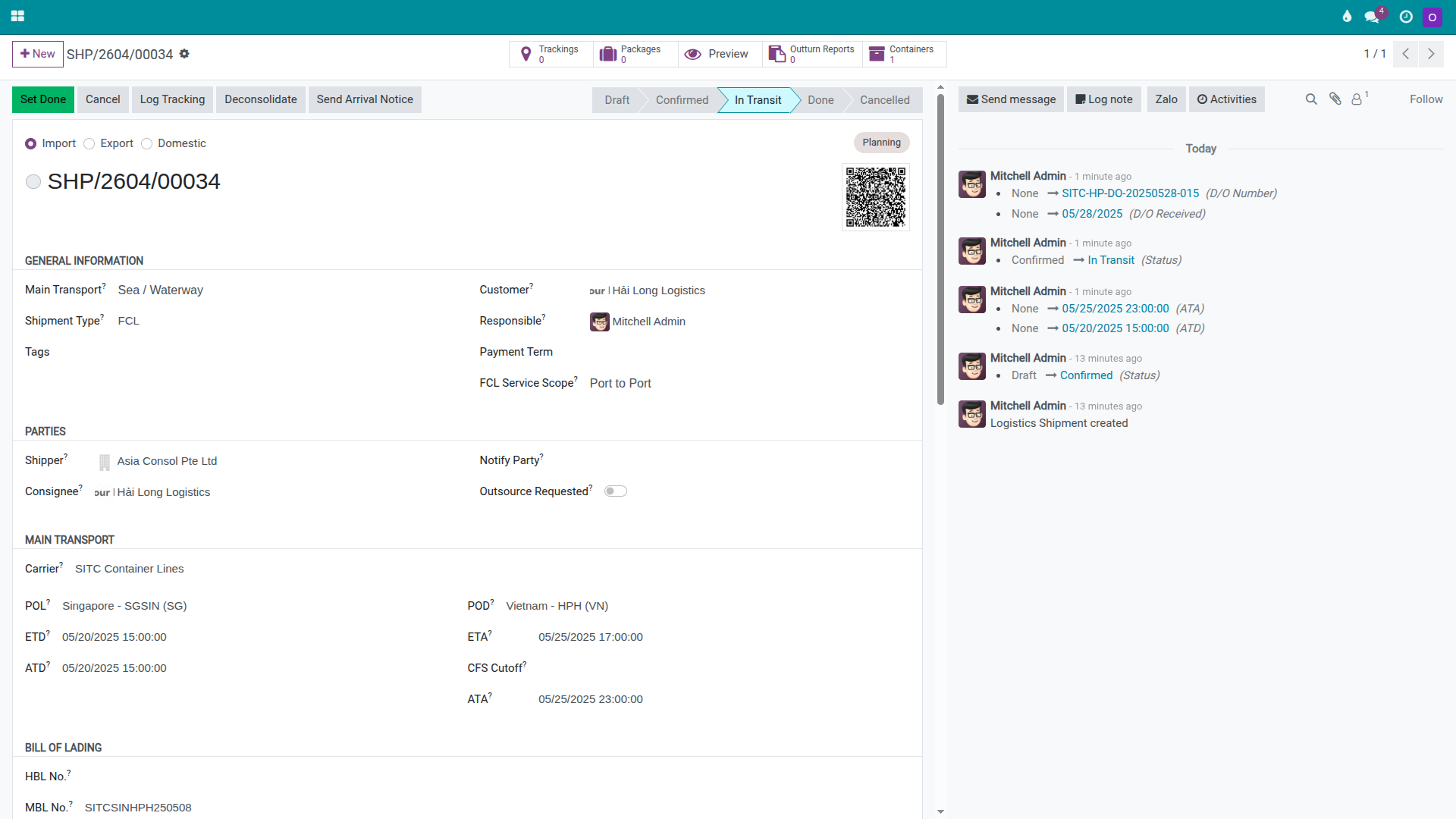
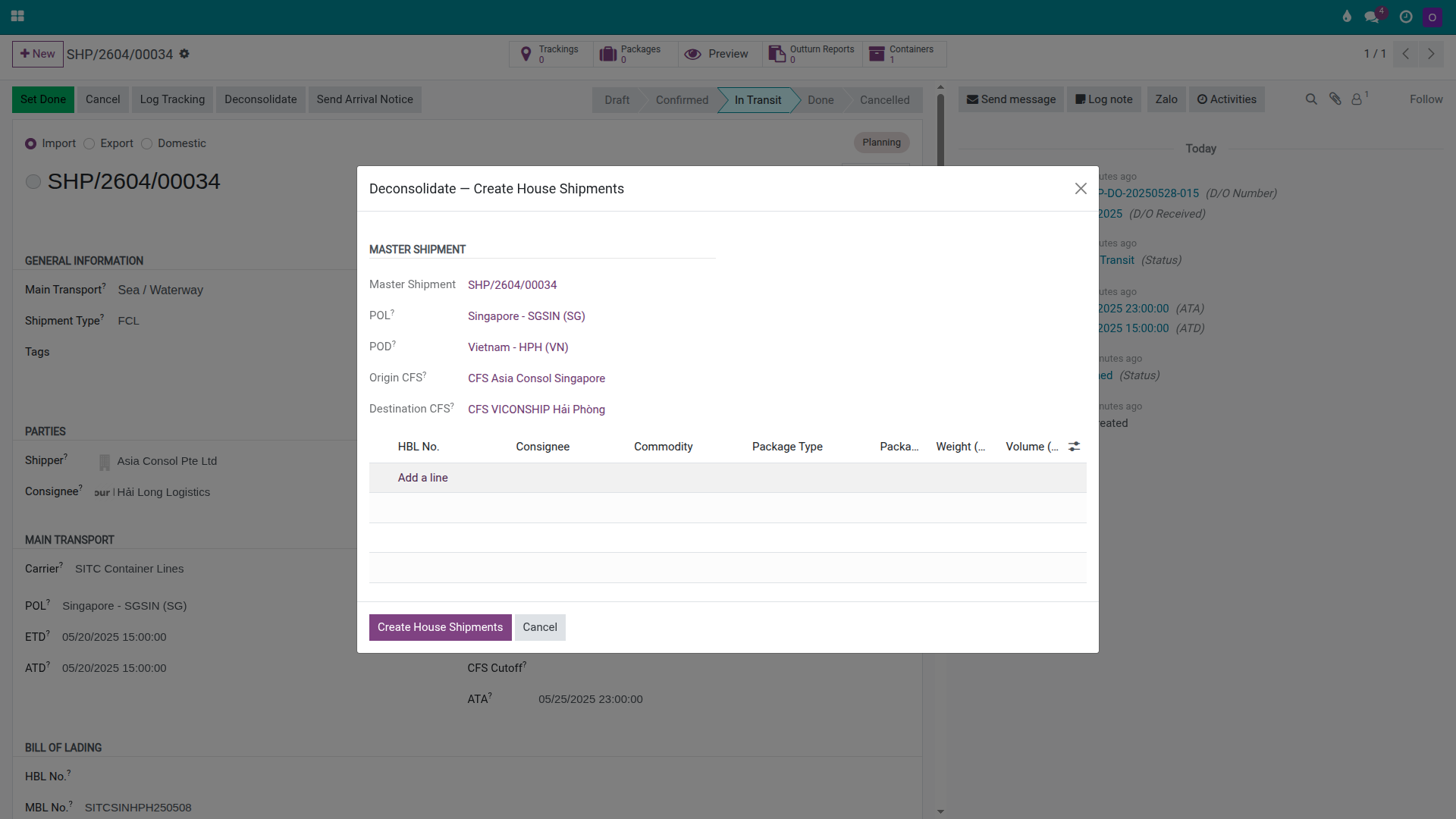
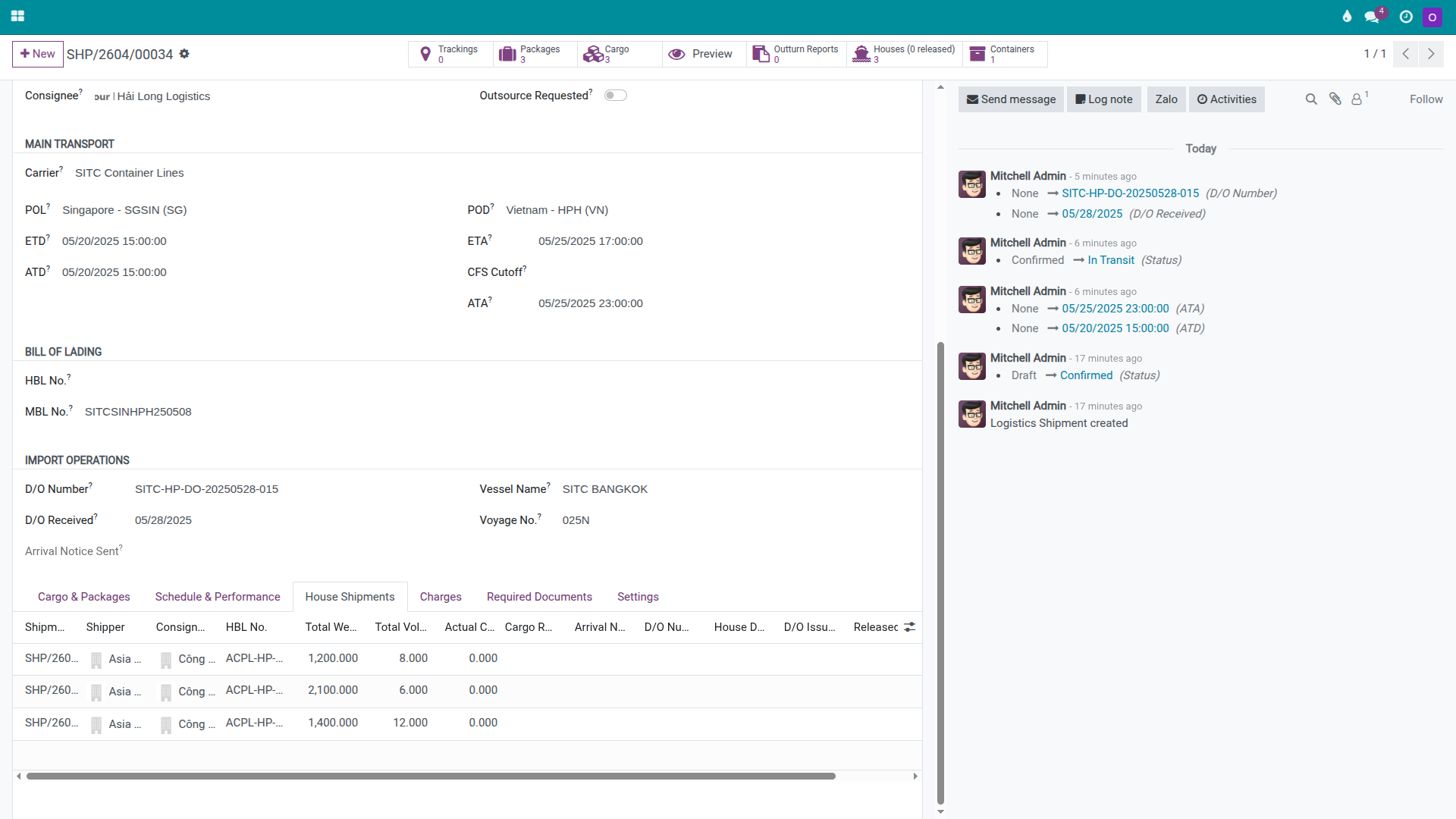
Once the container arrives at CFS VICONSHIP Hai Phong, click Deconsolidate on the master. In the deconsolidation wizard, enter three house lines from the manifest:
DEF — HBL ACPL-HP-2025-101, 8 pallets, 1,400 kg, 12 CBM.
GHI — HBL ACPL-HP-2025-102, 4 pallets, 2,100 kg, 6 CBM.
JKL — HBL ACPL-HP-2025-103, 5 pallets, 1,200 kg, 8 CBM.
Click Deconsolidate to create the three house shipments.
Warning
An incorrect HBL or consignee at the deconsolidation step is the most serious error in LCL import. From this point forward, every Arrival Notice, House D/O, and Cargo Released milestone is tied to the house records created here. An error made now can lead to issuing a D/O to the wrong party or releasing cargo to the wrong consignee.
Tip
How to know Step 3 is correct:
The master has a D/O Number and the container is Gate Out to the CFS.
The House Shipments tab shows three house records after deconsolidation.
Each house has its own HBL, consignee, package count, weight, and volume.
The total weight and volume across all three houses is consistent with the master manifest.
Step 4: Devan the container and confirm the Outturn Report
When the container arrives at the CFS, the warehouse team opens it, removes the cargo, and measures each load. This step distinguishes LCL import from FCL import: the forwarder must record the devanning result per house, not just hand over a single container.
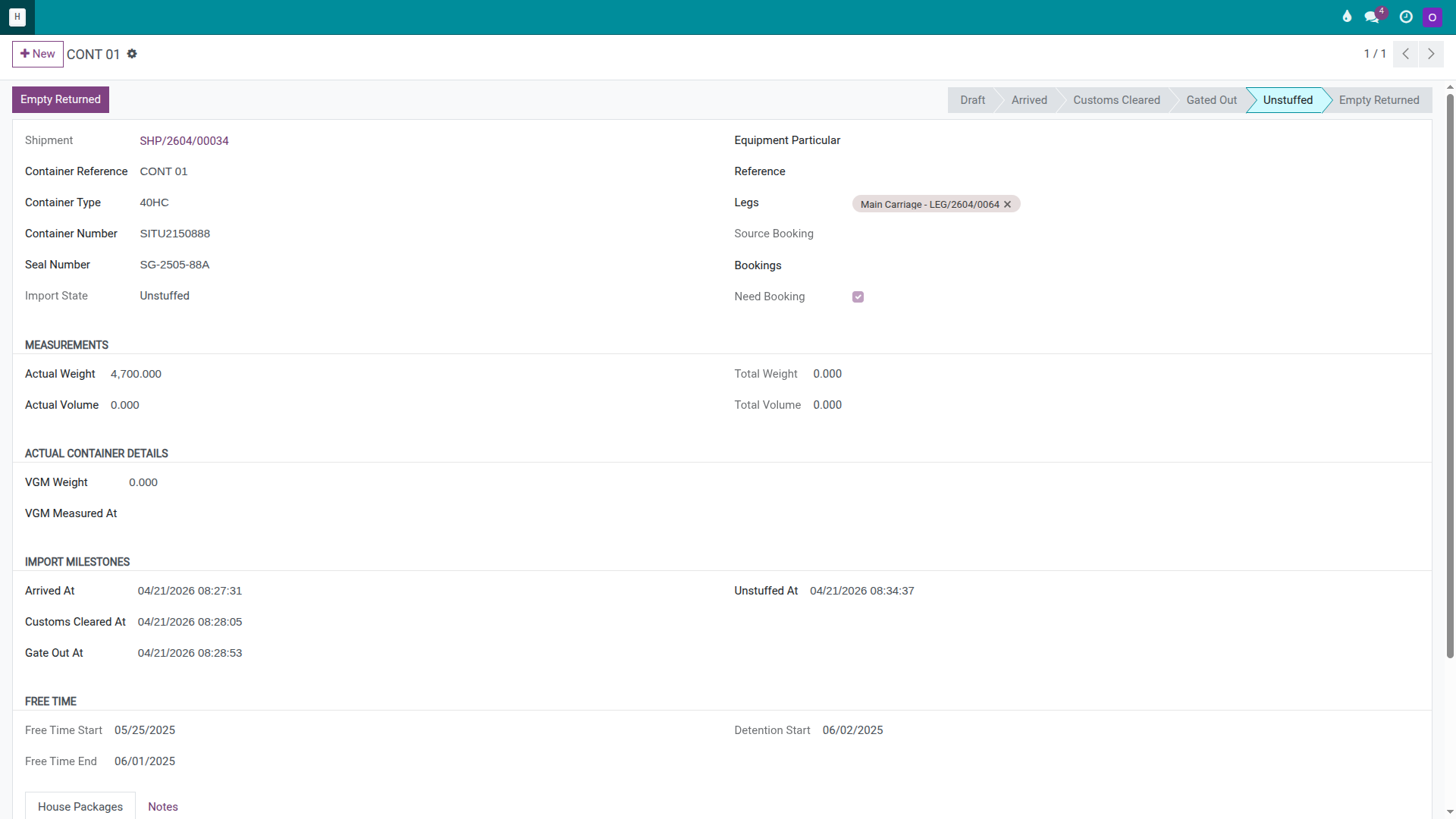
On the master container line, click Mark Unstuffed after the CFS has finished devanning.
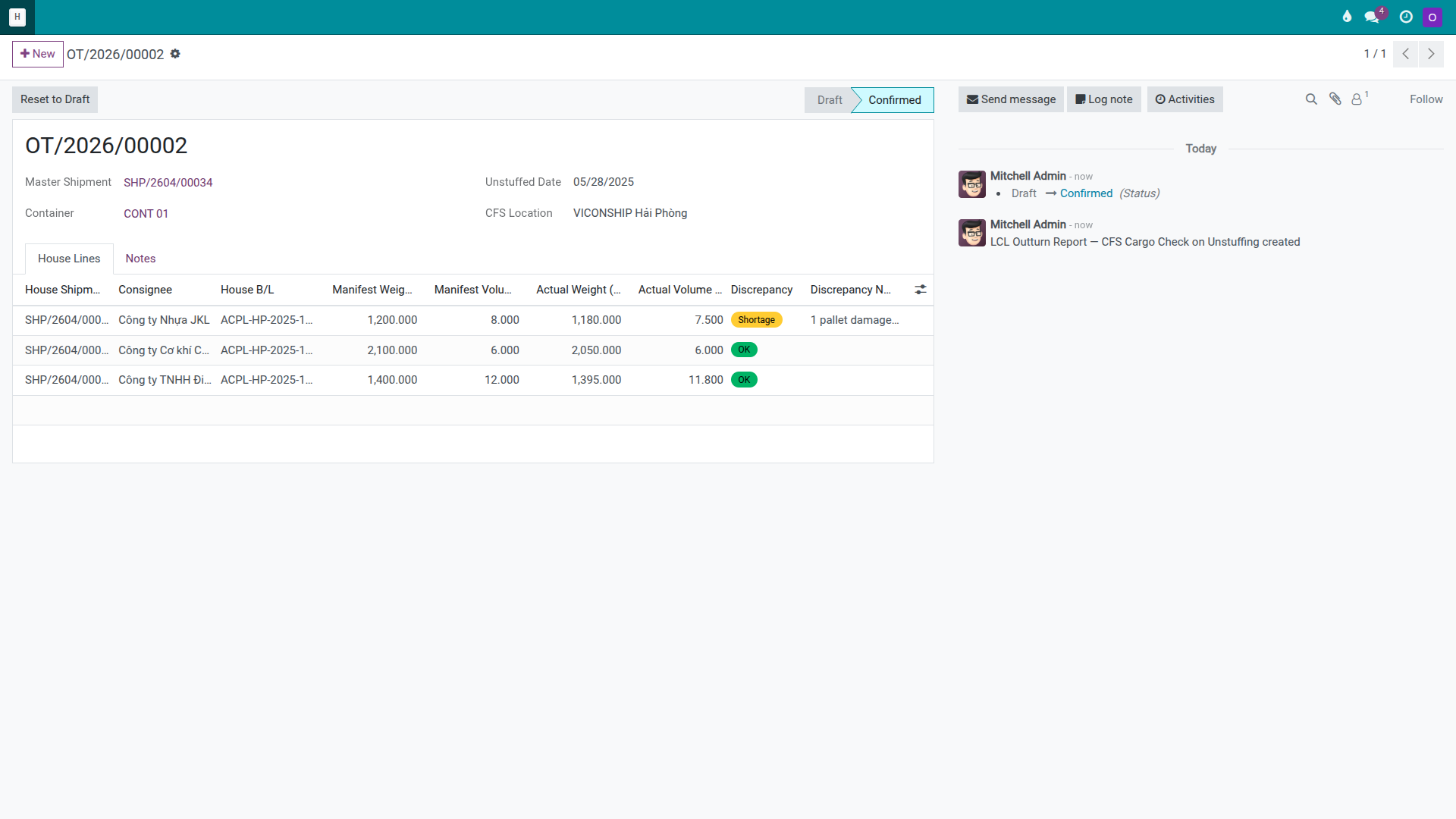
Then open Outturn Reports on the master, create a new report, and enter the actual measurements per house. For this scenario:
House |
Manifest W |
Actual W |
Manifest V |
Actual V |
Result |
|---|---|---|---|---|---|
DEF |
1,400 kg |
1,395 kg |
12 CBM |
11.8 CBM |
OK |
GHI |
2,100 kg |
2,050 kg |
6 CBM |
6 CBM |
OK |
JKL |
1,200 kg |
1,180 kg |
8 CBM |
7.5 CBM |
Shortage |
If any discrepancy exists, add a brief note in the report or the Chatter immediately so the team can follow up on the claim later. Click Confirm on the Outturn Report when done.
Warning
Discrepancies must be recorded at the time of devanning. If cargo is short or damaged and the finding is not documented while the container is still open, it becomes very difficult later to determine whether the loss occurred at origin, in transit, or during CFS handling.
Tip
How to know Step 4 is correct:
The master container is in Unstuffed status.
The Outturn Report is in Confirmed status.
Each house has actual weight and volume for reference in claims or cost allocation.
Any discrepancy is recorded with a note in the report.
Step 5: Process each house at the CFS
From this point forward, Documentation and Operations work on each house shipment individually. The three houses can be processed in parallel — none needs to wait for the others to finish.
For each house:
Click Send Arrival Notice to inform the consignee that the cargo is ready.
When the consignee has completed their import paperwork, click Issue D/O to release the House D/O.
When the consignee or their transport agent has collected the cargo from the CFS, click Cargo Released.
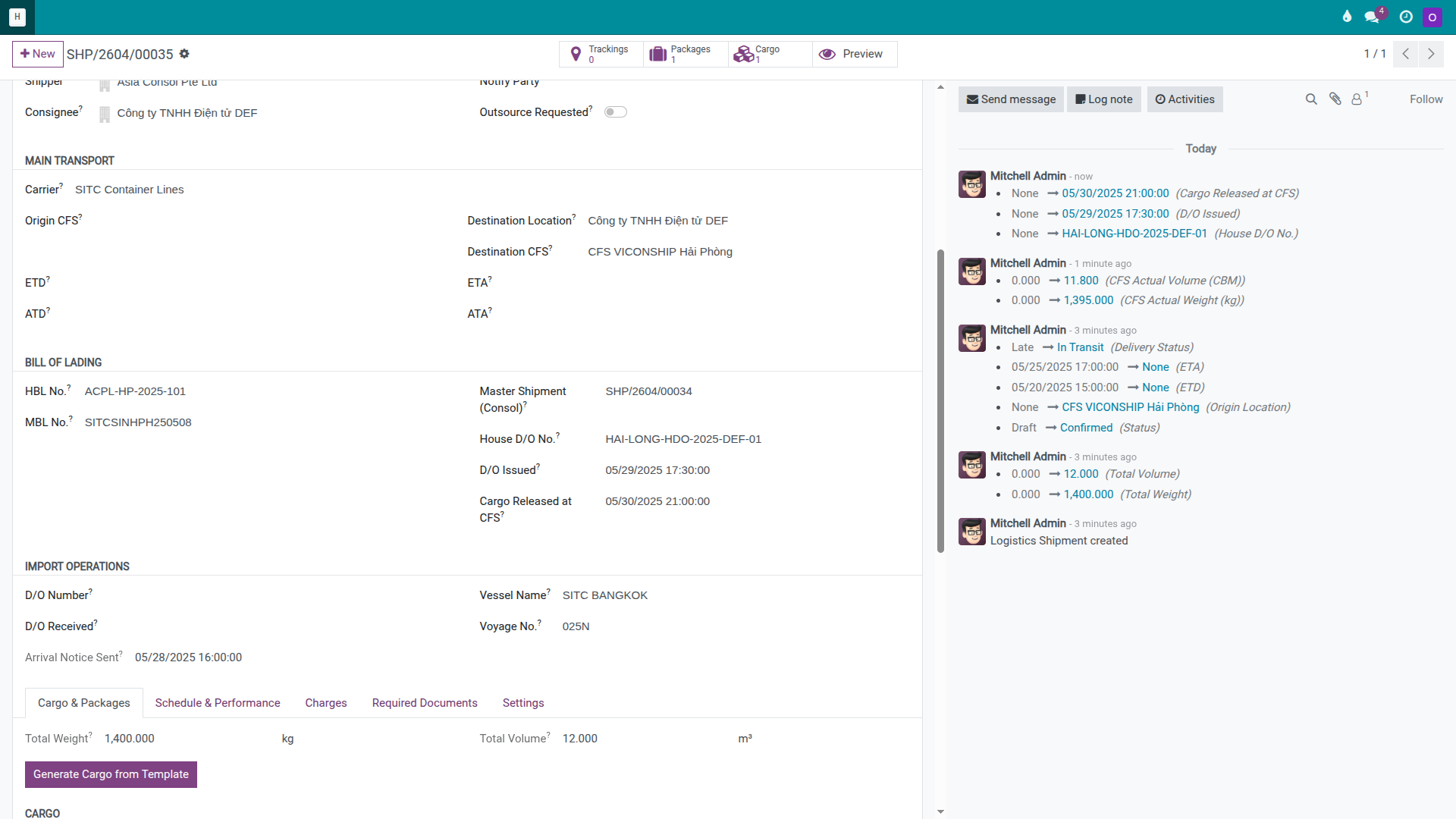
Example for the DEF house:
Arrival Notice sent after the house is created and the team is ready to communicate with DEF.
House D/O number HAI-LONG-HDO-2025-DEF-01 issued when DEF’s documentation is complete.
Cargo Released recorded when DEF’s cargo leaves the CFS.
Note
The three houses do not need to collect on the same day. DEF may collect first while GHI and JKL collect later. What matters is that the team tracks which houses have released and which are still at the CFS, so the empty-return plan for the master container is not disrupted.
Tip
How to know Step 5 is correct for each house:
The house has an Arrival Notice timestamp.
The house has a House D/O issued.
The house has a Cargo Released milestone when the cargo leaves the CFS.
The master correctly reflects the number of houses that have been released if the company uses that indicator to track progress.
Step 6: Return the empty, set done, create invoices and vendor bills
When all houses have had their cargo collected, Hai Long trucks the empty container from the CFS back to SITC’s depot and finalises the master.
On the master:
Click Mark Empty Returned when the depot confirms receipt of the empty container.
Click Set Done when there are no more open tasks on the master.
Then process the financials:
On each house, add sell charge lines such as House D/O Fee, Customs Clearance, CFS Handling, and Trucking CFS → Consignee if applicable.
On the master, retain the buy charge lines entered in Step 2 (THC, CIC, D/O Master Fee, CFS Unstuffing).
If the company allocates master costs to individual houses, click Allocate Costs on the master.
On each house, click Create Customer Invoice to generate a draft invoice for that consignee.
On the master, click Create Vendor Bill to generate draft bills for SITC, the CFS, the port, and transport vendors.
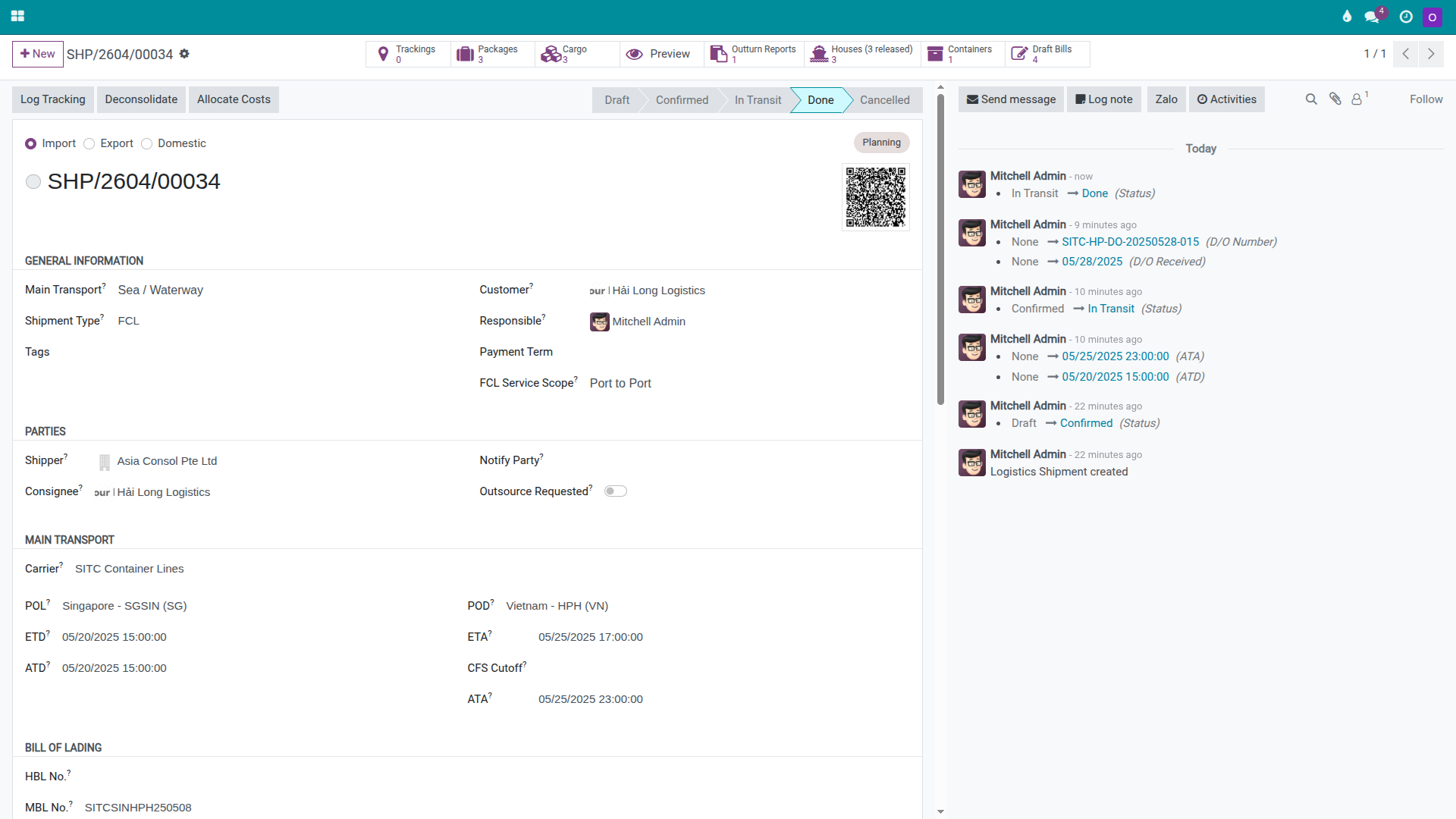
Warning
Do not create house invoices before reviewing the master charges. For LCL import, many costs — CFS handling, storage fees, trucking, and shortage handling — only become clear after the container is devanned and all consignees have collected. Creating invoices before these costs are finalised leads to either under-billing the customer or needing to issue credit notes.
Tip
How to know Step 6 is correct:
The master is in Done status and the container is Empty Returned.
All houses have Draft Invoice records or are ready to invoice.
The master has Draft Bills for all destination vendors.
If cost allocation was performed, per-house gross profit is within a reasonable range and consistent with the expected margin.
Quick decision table
Situation |
Best action |
What to avoid |
|---|---|---|
Multiple consignees in one container |
Create one master and deconsolidate into separate houses. |
Creating multiple master records for the same container. |
Container at CFS but houses not yet created |
Deconsolidate immediately from the verified manifest. |
Waiting until consignees ask before creating houses manually. |
Discrepancy found during devanning |
Record it in the Outturn Report and Chatter immediately. |
Handling it only by email and leaving the shipment data blank. |
Final house charges are not yet confirmed |
Review all charges before creating any house invoice. |
Creating invoices first and adding charges later. |
Troubleshooting common issues
Wrong HBL or consignee entered during deconsolidation
Symptom: The DEF house was created with JKL’s HBL number or vice versa.
Resolution: If no House D/O has been issued yet, correct or recreate the house immediately. If the House D/O has already been issued, update the house with correct data, add a correction note in the Chatter, and notify the affected consignees without delay.
Cargo found short or damaged on opening the container
Symptom: The Outturn Report shows a weight or volume shortfall, or a pallet is damaged or missing.
Resolution: Confirm the discrepancy at the CFS in writing, photograph the condition, and have the CFS staff sign the Outturn Report. Use the confirmed Outturn Report and supporting documents to file a claim with the origin consolidator or carrier in accordance with the company’s claims procedure.
A consignee collects late while the empty-return deadline approaches
Symptom: One house has not yet reached Cargo Released status while the other two are done, and the master container is approaching the detention deadline.
Resolution: Track the delayed house closely, communicate the cost risk to the consignee in writing, and consider moving the remaining cargo to a bonded warehouse if the company needs to return the empty container before the consignee is ready. Notify Accounting to add a potential DET charge line on the master.
Gross profit for one house is abnormally negative after cost allocation
Symptom: After allocating master costs, one house shows a strongly negative margin while another shows an unusually high positive margin.
Resolution: Check the allocation base (CBM is most common), verify the actual CBM figures from the Outturn Report, and review the sell charge lines on the house with the negative margin. The most common causes are either missing revenue (a sell charge line was not entered) or a misallocation of master cost to the wrong house.
See also
Related guides
FCL Import — FCL Import.
LCL Export (Consolidation) — LCL Export (Consolidation).
FCL Export — FCL Export.