
Rate Card Management
About this guide
Installation requirements
Freight Sale (optional — required if Sales quotes freight from a sales order)
A Rate Card is the buy price or reference price received from a carrier, agent, trucking vendor, or transport partner. When rates are entered correctly, Pricing does not need to send separate Excel files to Sales for each shipment. Sales and Ops draw from the same source when building quotations, confirming bookings, or verifying charges — and the buy rate automatically populates the Charges tab when the correct vendor is selected.
Without a rate card, every quotation starts with a phone call or email to get a price. With one, Sales sees all available carrier options side by side, with transit times and current rates, before calling the customer back.
Scenario thread: Hai Long Logistics has received a new rate from ONE (Ocean Network Express) for the lane VNHPH (Hai Phong) → USLAX (Los Angeles), container type 40HC, price USD 1,850/container, validity 01/01/2026 – 31/12/2026. The Pricing Manager needs to enter this rate so Sales can use it when quoting customers and Ops can reference it when verifying the Ocean Freight charge on sea export shipments.
When to use this guide
Use this guide when you receive a new carrier/vendor price, open a new lane, or need to renew a rate that is about to expire. For sea freight, the rate card directly affects three workflows:
Workflow |
How the rate card helps |
Who verifies |
|---|---|---|
Customer quotation |
Sales has a buy-rate baseline to compare carriers and calculate markup. |
Sales Ops / Pricing |
Carrier booking |
Booking/Ops has a reference price when selecting the vendor. |
Booking Officer / Ops |
Charges and profitability |
Accounting/Manager sees buy price, sell price, and gross profit without gaps. |
Accounting / Operations Manager |
Data required before entering a rate
A complete rate record answers: who carries, what service, which lane, which container type, at what price, in which currency, and from when to when.
Data group |
Example in this guide |
Note |
|---|---|---|
Carrier / Vendor |
ONE |
Use the partner record that will appear on bookings and charges. |
Service |
Ocean Freight FCL |
Must match the service type used by Sales/Ops. |
POL / POD |
VNHPH / USLAX |
Use standard port codes to avoid duplicate port records. |
Container / Load type |
40HC / FCL |
FCL, LCL, and trucking are priced differently. |
Price / Currency |
USD 1,850 |
Confirm whether this is the buy price, sell price, or a reference rate per your internal process. |
Validity |
01/01/2026 – 31/12/2026 |
Ocean freight rates change frequently; open-ended validity is a risk. |
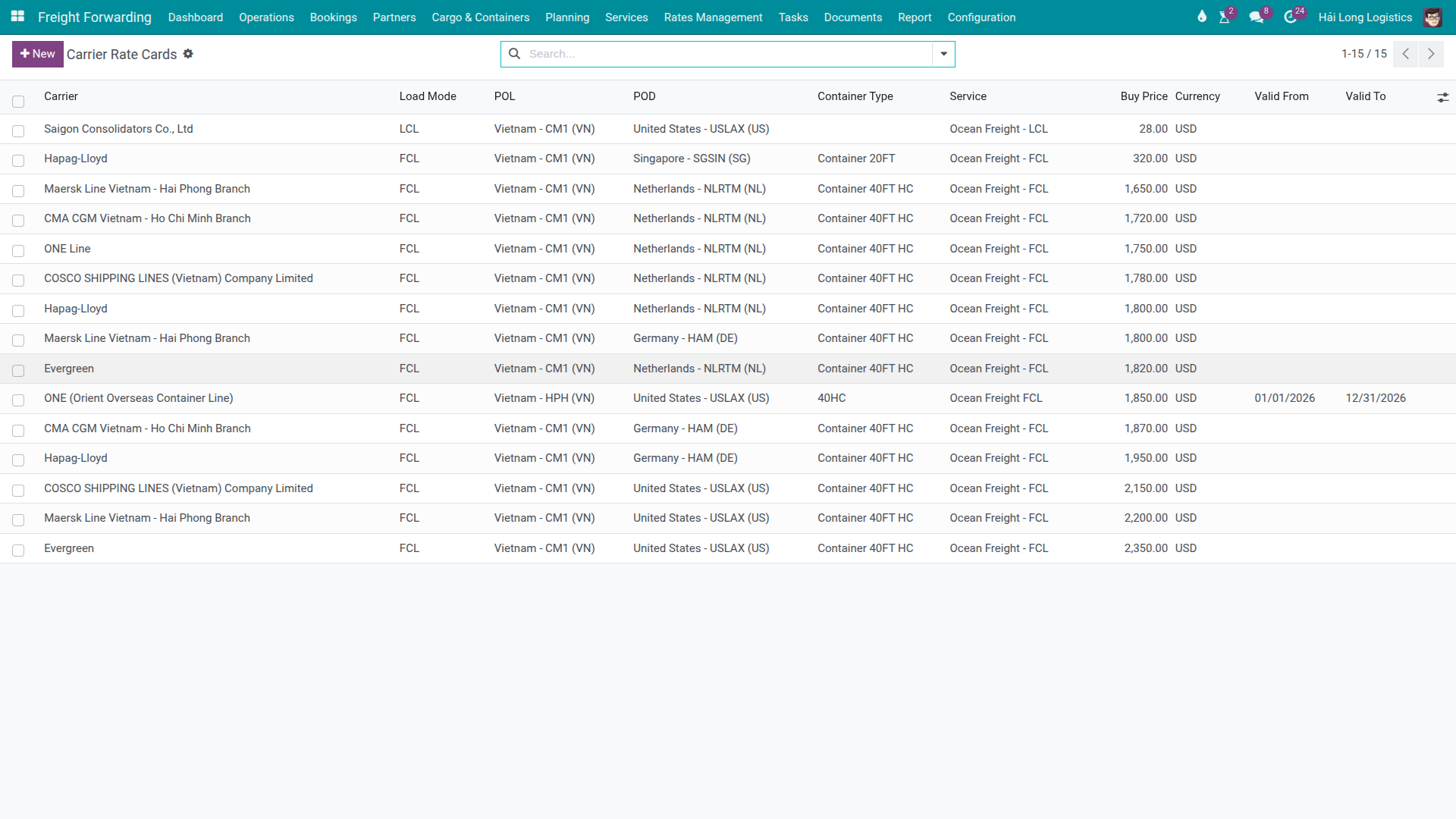
Step 1: Open the Carrier Rates list
Go to .
Before creating a new rate, search for existing records matching carrier ONE, lane VNHPH → USLAX, and container type 40HC. If an active rate already covers an overlapping validity period, update the existing record’s validity or create a successor record (see Step 5) rather than adding a duplicate.
Duplicate rates with overlapping validity for the same lane and container type cause the system to return ambiguous results when Sales or Ops looks up the rate — leading to wrong prices on quotations or charges.
Tip
Before creating a new rate, verify:
No active ONE rate for VNHPH → USLAX 40HC overlaps the intended validity period.
Carrier ONE already exists as a partner record.
Service Ocean Freight FCL is already available to select.
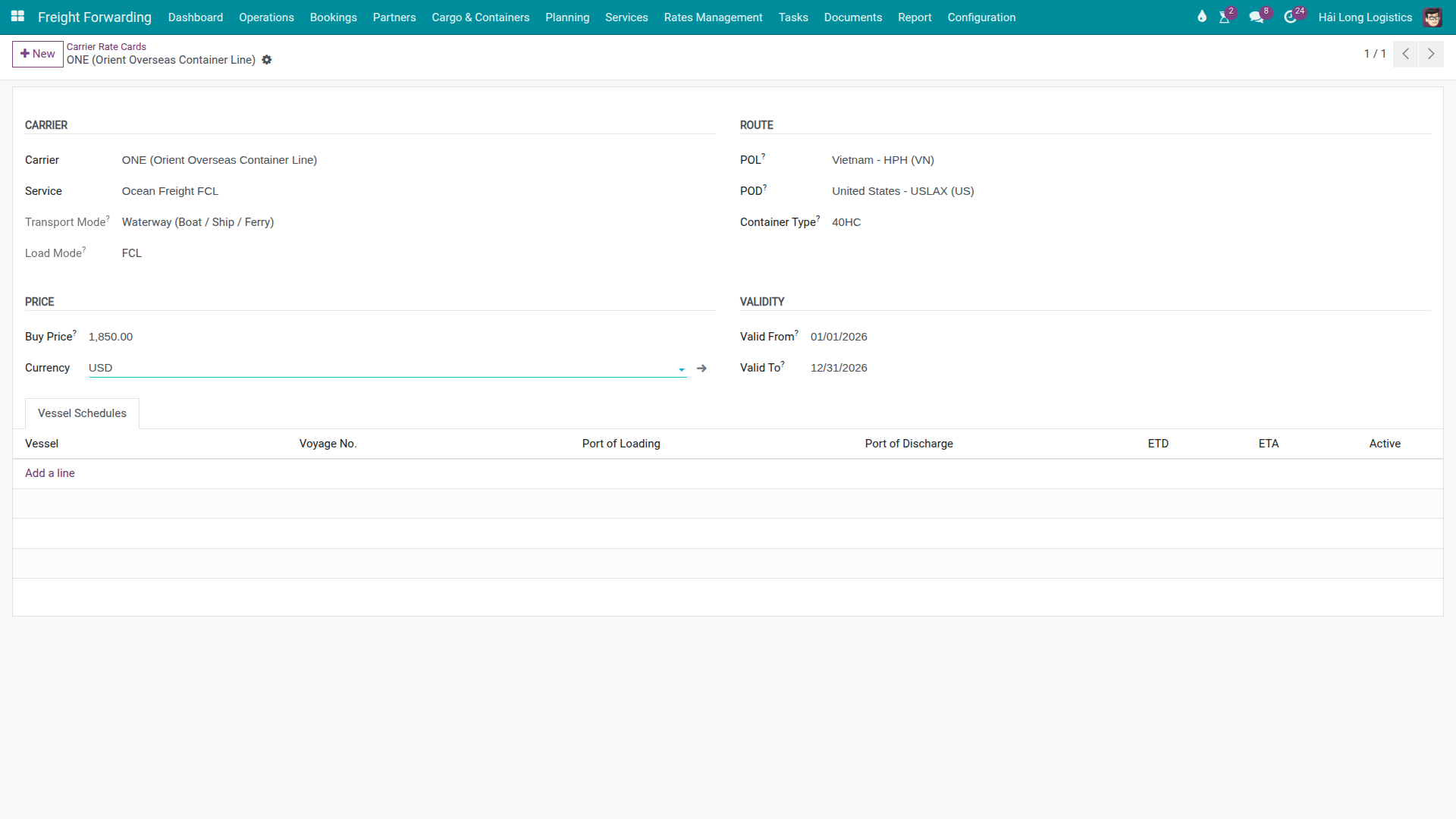
Step 2: Create the rate card
Click New and fill in the key data groups.
Carrier and Service
Carrier: ONE (Ocean Network Express).
Service: Ocean Freight FCL.
Confirm the transport mode and load type display correctly for sea freight FCL.
Route and Container
POL: Vietnam - HPH (VN) or the port record corresponding to code VNHPH.
POD: United States - USLAX (US).
Container Type: 40HC.
Price and Validity
Buy Price: 1850.
Currency: USD.
Valid From: 01/01/2026.
Valid To: 31/12/2026.
Warning
Do not leave Valid To blank for ocean freight rates. Ocean freight prices change regularly — weekly, monthly, or quarterly. A rate with no expiry date will continue to appear as available long after the carrier has updated its pricing, creating a systematic mis-pricing risk.
Tip
Step 2 is complete when:
The rate appears in the list when filtered by Carrier = ONE.
Service, POL, POD, Container Type, and Currency match the carrier’s original rate sheet.
The validity period matches the carrier’s offer.
If this is a contract rate, the original carrier quote is saved or attached per your internal document process.
Step 3: Test the rate on a shipment’s Charges tab
After entering the rate, test it immediately on a suitable shipment or booking. Do not wait for a real shipment to discover that the rate is not pulling through correctly.
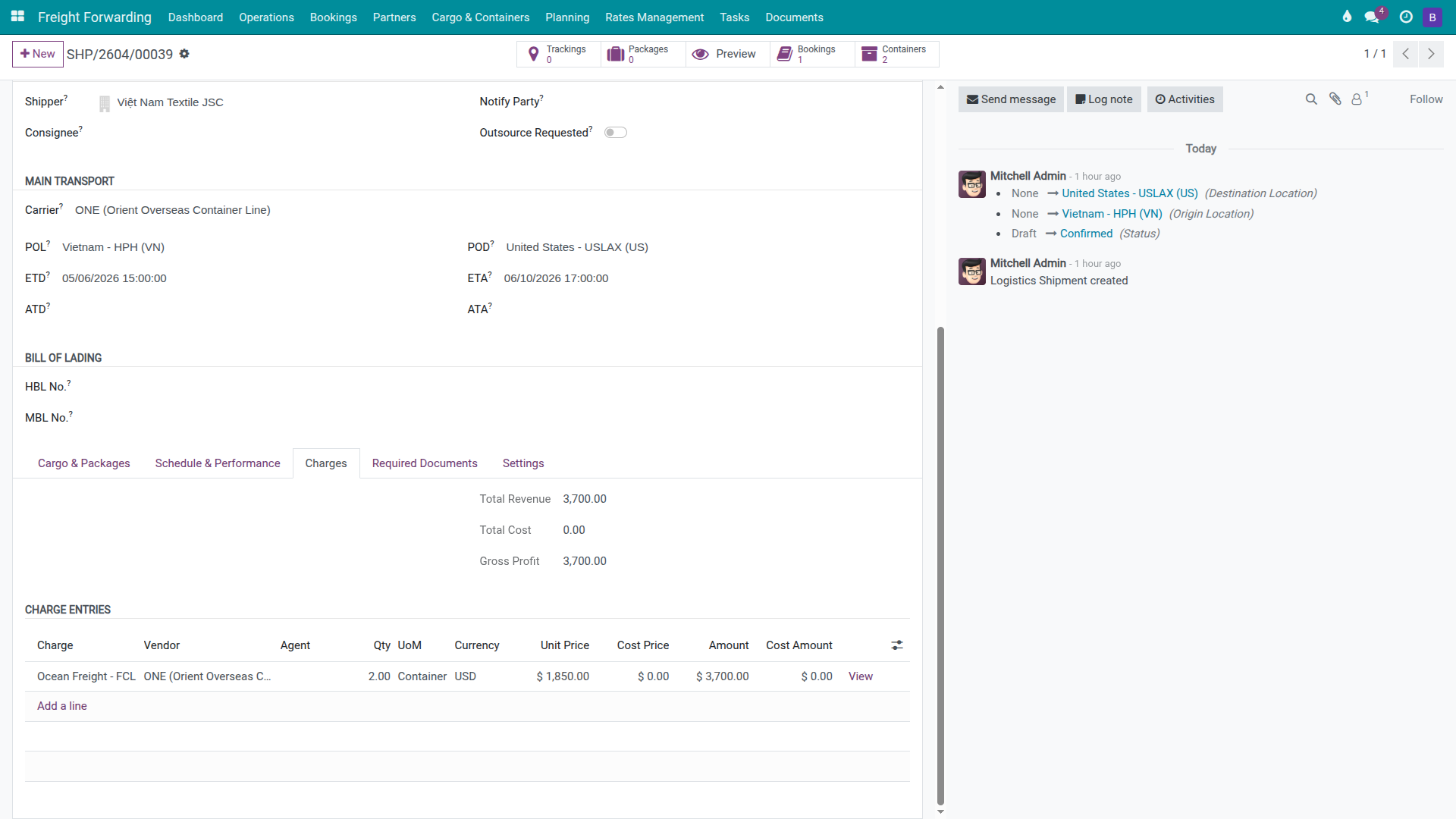
Open a shipment on the VNHPH → USLAX lane, go to the Charges tab, and add or open the Ocean Freight FCL line. Set:
Product: Ocean Freight FCL.
Vendor / Carrier: ONE.
Container type and lane on the shipment match 40HC VNHPH → USLAX.
After selecting the vendor, verify:
The price and currency populate from the rate card.
Quantity reflects the correct number of containers or billing unit.
Unit Price, Cost Price, and Gross Profit reflect your company’s pricing logic.
Warning
A rate card auto-filling a price does not mean the charge is correct. After the price populates, the responsible person must still verify Cost Price, Unit Price, currency, and markup against sales policy. Do not treat an auto-filled charge line as a verified profit calculation.
Tip
Step 3 is complete when:
The Ocean Freight FCL line shows USD 1,850 (or the price calculated per your process).
Currency is USD.
Quantity matches the number of containers or billing unit.
Gross profit is not zero or negative without a known reason.
Step 4: Test the rate in a Sales quotation
If you use the Freight Sale module, Sales can look up the rate directly from a sales order when building a freight quotation. Open a sales order on the VNHPH → USLAX lane, click Select Sailing Schedule on the freight line, and verify that carrier ONE appears in the comparison table with the correct price.
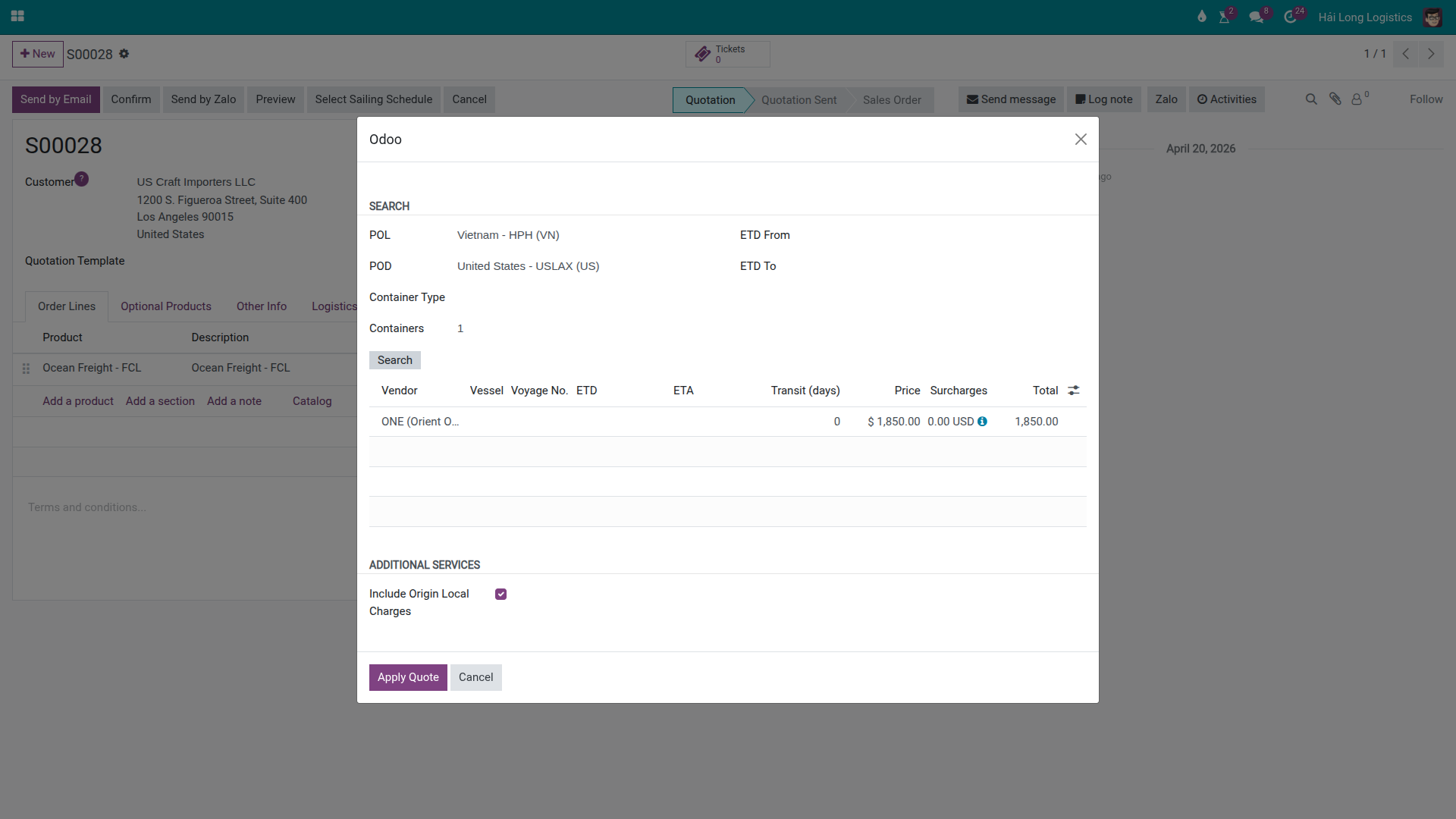
When using the rate for a customer quotation:
The carrier rate is the cost baseline — not necessarily the final selling price.
Sales must add markup, local charges, and any applicable surcharges per pricing policy.
If the rate table does not yet show a vessel, voyage number, ETD, or ETA, Sales must confirm the sailing schedule with the carrier before committing dates to the customer.
Step 5: Update rates when prices change
Carriers change ocean freight rates frequently. Select the appropriate update method below:
Situation |
How to update |
Note |
|---|---|---|
Data entry error just discovered. |
Open the current rate and correct it directly. |
Only use direct editing for input errors, not for genuine price changes. |
New price applies from the next period. |
Duplicate the old rate, change the price and validity, then close the old rate’s end date. |
Prevents two active rates for the same lane from overlapping. |
Carrier increases/decreases price mid-period. |
Set Valid To on the old rate to the last day it applies; create a new rate starting the next day. |
Preserves pricing history for reconciling vendor bills. |
Rate has expired. |
Do not delete it immediately; create the new rate for the next period. |
Keep the expired rate until all shipments from that period have been reconciled. |
Tip
At the start of each week or month, Pricing should filter for rates expiring within the next 30 days and request updated quotes from carriers before Ops creates new shipments or bookings against those lanes.
Troubleshooting common situations
Situation |
Common cause |
Resolution |
|---|---|---|
Ops selects vendor but Charges do not populate a price. |
Rate expired, validity not yet started, wrong carrier, wrong service, or wrong lane. |
Compare the carrier, service, POL/POD, container type, and validity on the rate card against the shipment. |
Price populates but does not match expectation. |
Multiple active rates for the same carrier and lane exist simultaneously. |
Close the end date on the old rate; keep one active rate per carrier/lane/container combination. |
Sales sees the carrier but no sailing schedule details. |
Rate exists but no vessel/voyage/ETD/ETA has been added. |
Confirm the sailing schedule with the carrier before committing to the customer; add the schedule to the system if your company manages it there. |
Currency is wrong on the charge. |
Rate was created with the wrong currency, or the wrong rate was matched. |
Correct on a new rate if unused; if already applied to charges, create a replacement rate and review the affected charges. |
Profit is wrong after the rate auto-fills. |
Missing cost/sell price, markup not added, or surcharges not included. |
Review the full Charges tab per the charges and profitability guide. |
Generic rate exists but a specific rate is not being used. |
The specific rate has a mismatch on one of: lane, container type, or service. |
Correct the specific rate so it matches the shipment; avoid relying on a generic rate as the primary pricing source. |
Operating principles
Each carrier quote should be entered as a rate with explicit validity dates — not edited in place whenever a price changes.
Detailed rates (specific carrier + lane + container type) take priority for sea FCL; use generic rates only as temporary placeholders.
Pricing owns the accuracy of rate data; Ops/Sales own the responsibility to verify the rate being used on a specific shipment or quotation.
When in doubt, cross-check the original carrier quote sheet before confirming prices with a customer.
See also
Related guides
Freight Quotation — Create freight quotations for customers.
Carrier Booking (Sea) — Place a booking and verify carrier/cutoff.
Charges and Profitability — Manage charges and shipment profitability.
FCL Export — Sea FCL export workflow that uses booking, charges, and rates.