
Shipment Task and Project Management
About this guide
Installation requirements
Freight Accounting (optional — required to see labor cost impact in profitability)
A sea shipment is not just a booking and a container. It involves a sequence of distinct work items: booking the carrier, arranging trucking, submitting VGM, clearing customs, preparing SI/HBL, monitoring ETA changes, issuing the invoice, processing the vendor bill, and collecting payment. Without visible tasks, the manager cannot tell who is holding which item or which shipment is waiting for action.
The Freight Project module attaches tasks directly to the shipment record, making both the operational checklist and the labor cost visible in one place.
Scenario thread: Hai Long Logistics is processing sea FCL export FCL-EXP-2025-0045 for Saigon Tech. The shipment has 1 × 40HC container, requires a COSCO booking, VGM submission, export customs clearance, B/L review, and customer invoice issuance. The Operations Manager creates tasks, assigns them to team members, and requires timesheets so that labor cost shows in the shipment’s profitability.
See also
Freight terminology (FCL, B/L, VGM, Gross Profit, DEM/DET): Industry Glossary.
When to use this guide
Need |
What Freight Project provides |
Responsible role |
|---|---|---|
Multiple people working on one shipment. |
Tasks with clear owner, deadline, and status. |
Operations Manager |
Need to account for labor cost. |
Staff log timesheets against shipment tasks. |
Ops / Docs / Booking |
Standardize the process for sea FCL/LCL. |
Use task templates per shipment type. |
Operations Manager |
Shipment done but work items still open. |
Review open tasks before closing the shipment. |
Team Lead |
Process overview
# |
Step |
Purpose |
Owner |
|---|---|---|---|
1 |
Open Tasks from the shipment. |
Keep all work items anchored to the correct shipment. |
Manager / Ops |
2 |
Create or review tasks. |
Ensure booking, VGM, customs, docs, and finance items are covered. |
Manager |
3 |
Log timesheets. |
Reflect actual hours worked as labor cost. |
The person doing the work |
4 |
Review labor cost / profitability. |
Determine whether the shipment is truly profitable after staff time. |
Manager / Accounting |
5 |
Use task templates for repeat shipments. |
Reduce manual task creation and standardize the process. |
Manager |
Step 1: Open Tasks from the shipment
Open shipment FCL-EXP-2025-0045. In the header area, click Tasks to open the task list for this shipment.
Concentrating all work items on the shipment record — rather than in a separate project board or email thread — means that anyone who opens the shipment can immediately see what is done, what is pending, and who is responsible. This is particularly important when a team member is absent and another person needs to pick up a task.
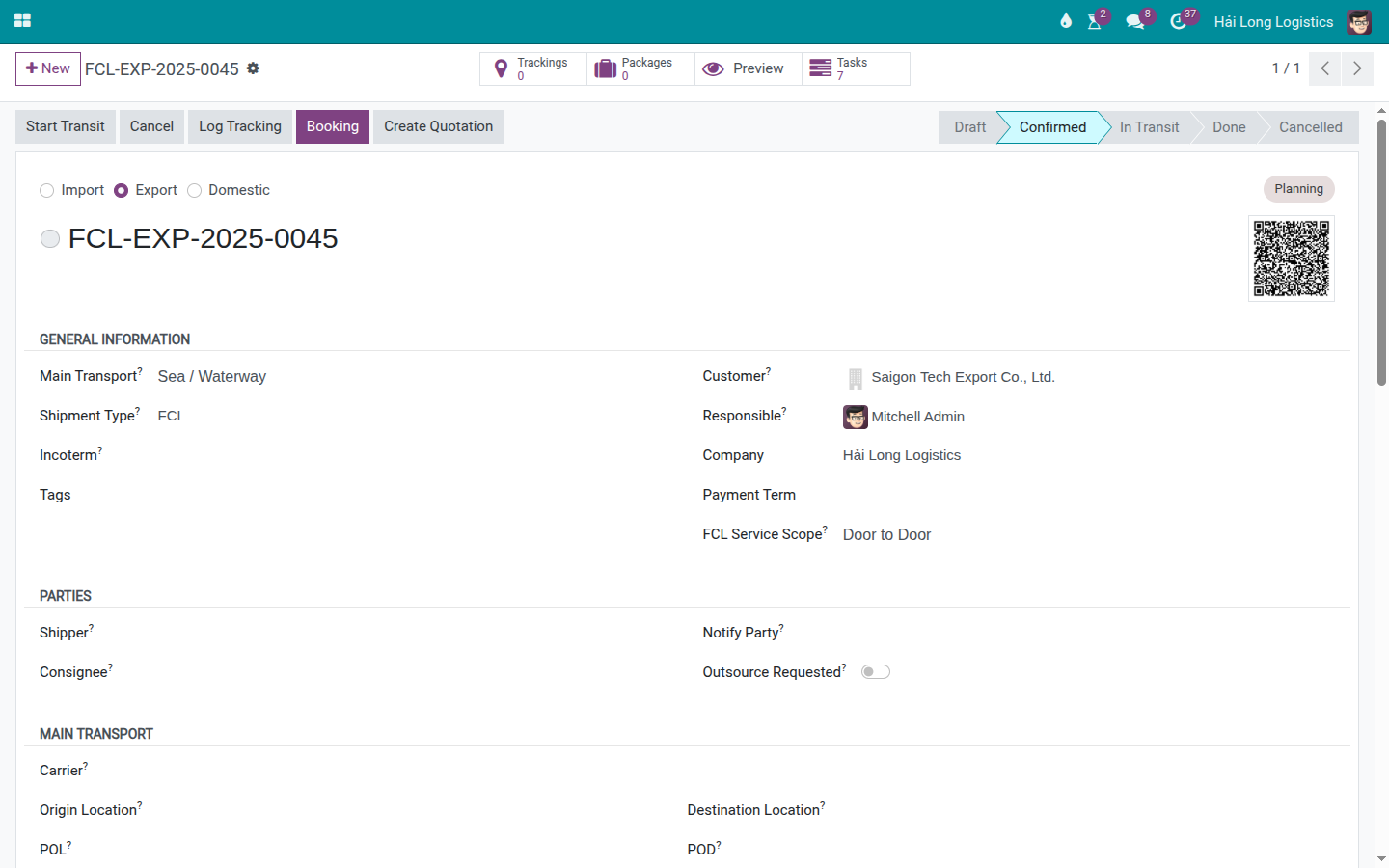
If the shipment was created from a template that already includes tasks, the task list may be pre-populated. If not, the manager creates the necessary tasks in the next step.
Tip
Step 1 is complete when:
The Tasks button opens the correct task list for the current shipment.
No tasks for this shipment are floating loose in a separate project unrelated to this record.
Step 2: Create and assign operational tasks
For a sea FCL export, create tasks that are large enough to track but narrow enough that one person owns each one. A well-scoped task has a single primary owner and a clear deadline.
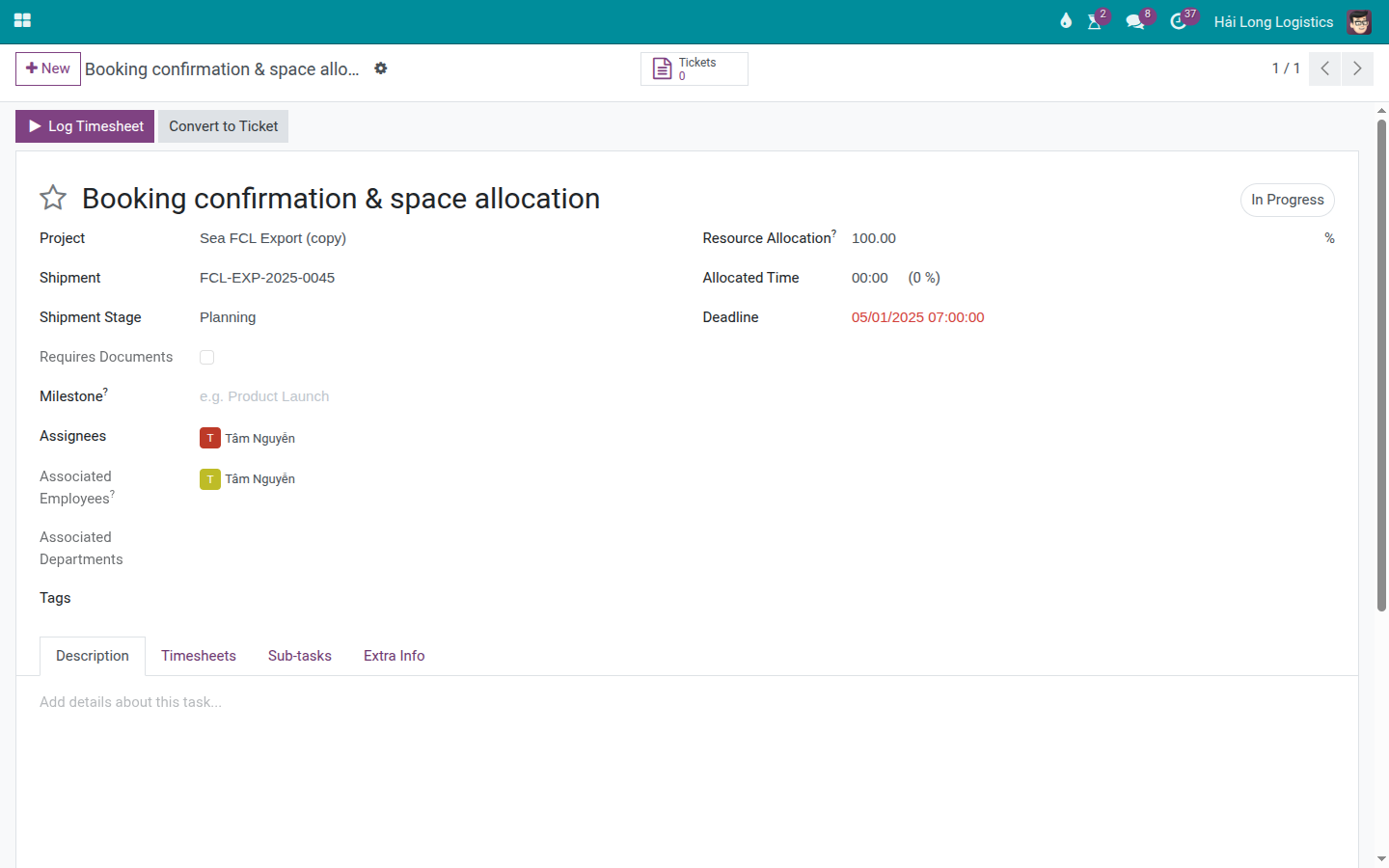
Example tasks for FCL-EXP-2025-0045:
# |
Task |
Owner |
Suggested deadline |
|---|---|---|---|
1 |
Booking confirmation & space allocation. |
Booking Officer |
Before SI/CY cutoff. |
2 |
Pre-carriage trucking & VGM submission. |
Operations Staff |
Before VGM/CY cutoff. |
3 |
Export customs declaration & clearance. |
Customs Staff |
Before gate-in or loaded milestone. |
4 |
Draft B/L review & amendment confirmation. |
Documentation Officer |
Before HBL/MBL issuance. |
5 |
Customer invoice issuance & payment follow-up. |
Accounting / Docs |
Before shipment is closed. |
Tip
Step 2 is complete when:
Every task has an assigned owner.
Every task has a deadline that aligns with a cutoff date or a customer commitment.
Task names are clear enough that the assignee knows exactly what to do.
The five core categories for a sea shipment are covered: booking, container/VGM, customs, documents, finance.
Step 3: Log timesheets on tasks
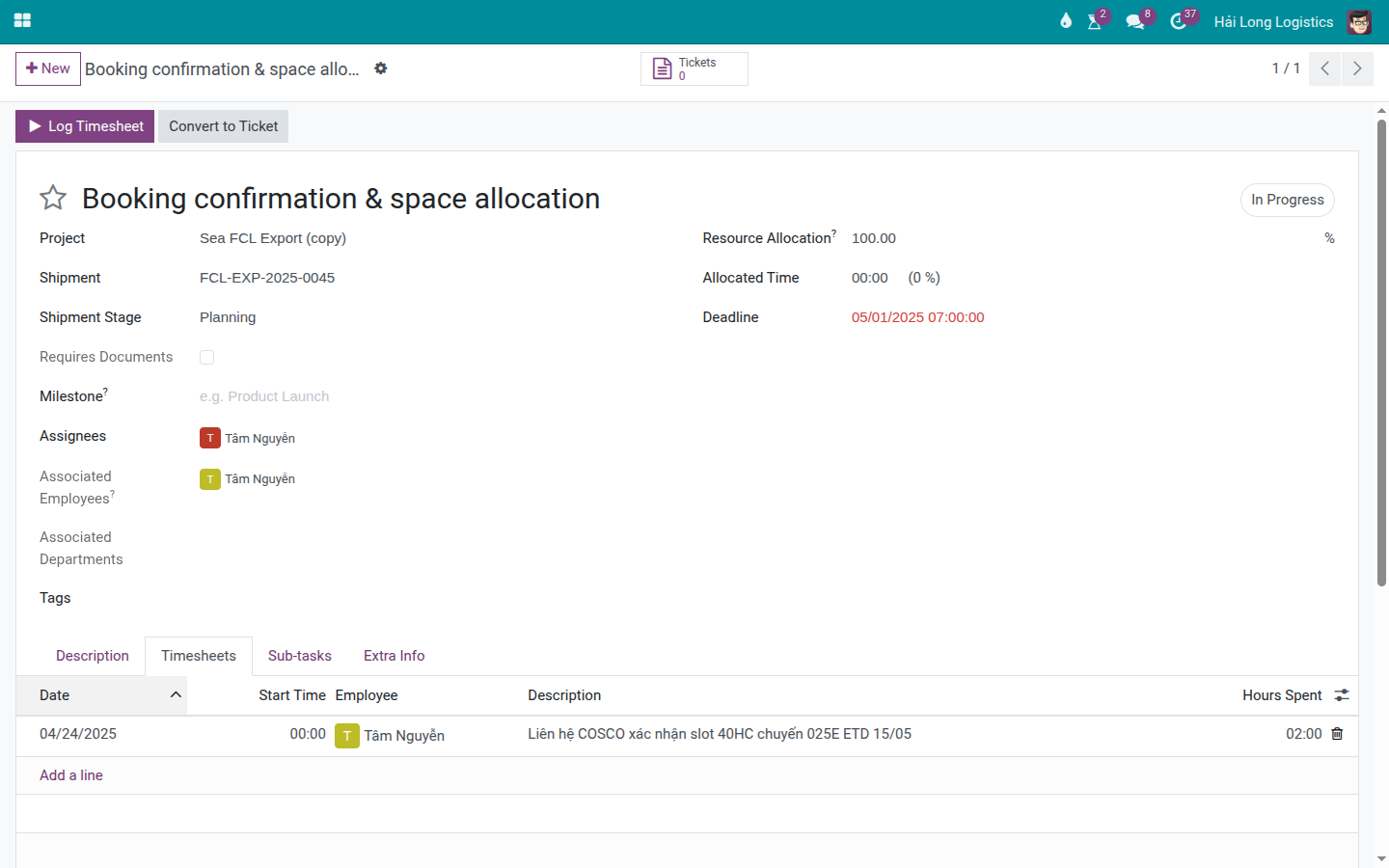
When a staff member does work on the shipment, they log a timesheet entry directly on the corresponding task. Timesheet descriptions should capture what was actually done, not just repeat the task name.
Example timesheet on the Booking confirmation & space allocation task:
Date: 24/04/2025.
Employee: Tam Nguyen.
Description: Called COSCO to confirm 40HC slot on voyage 025E, ETD 15/05.
Hours Spent: 2.0.
Further timesheet examples for this shipment:
Customs: 3.0 hours — completing the export declaration and monitoring clearance.
Ops: 1.5 hours — arranging the truck, weighing the container, and submitting VGM.
Docs: 1.0 hour — reviewing the draft B/L with the carrier and the customer.
Accounting/Docs: 0.5 hours — creating the invoice and sending it to the customer.
Warning
If no timesheets are logged, the shipment may appear more profitable than it actually is because staff labor cost is missing from the calculation. If timesheets are logged against the wrong person or with incorrect hours, both the profitability figure and individual workload reports will be skewed.
Step 4: Review labor cost in profitability
After staff have logged their timesheets, open the shipment and review the profitability section. Labor cost tells the manager whether the shipment remains profitable after accounting for internal staff time.
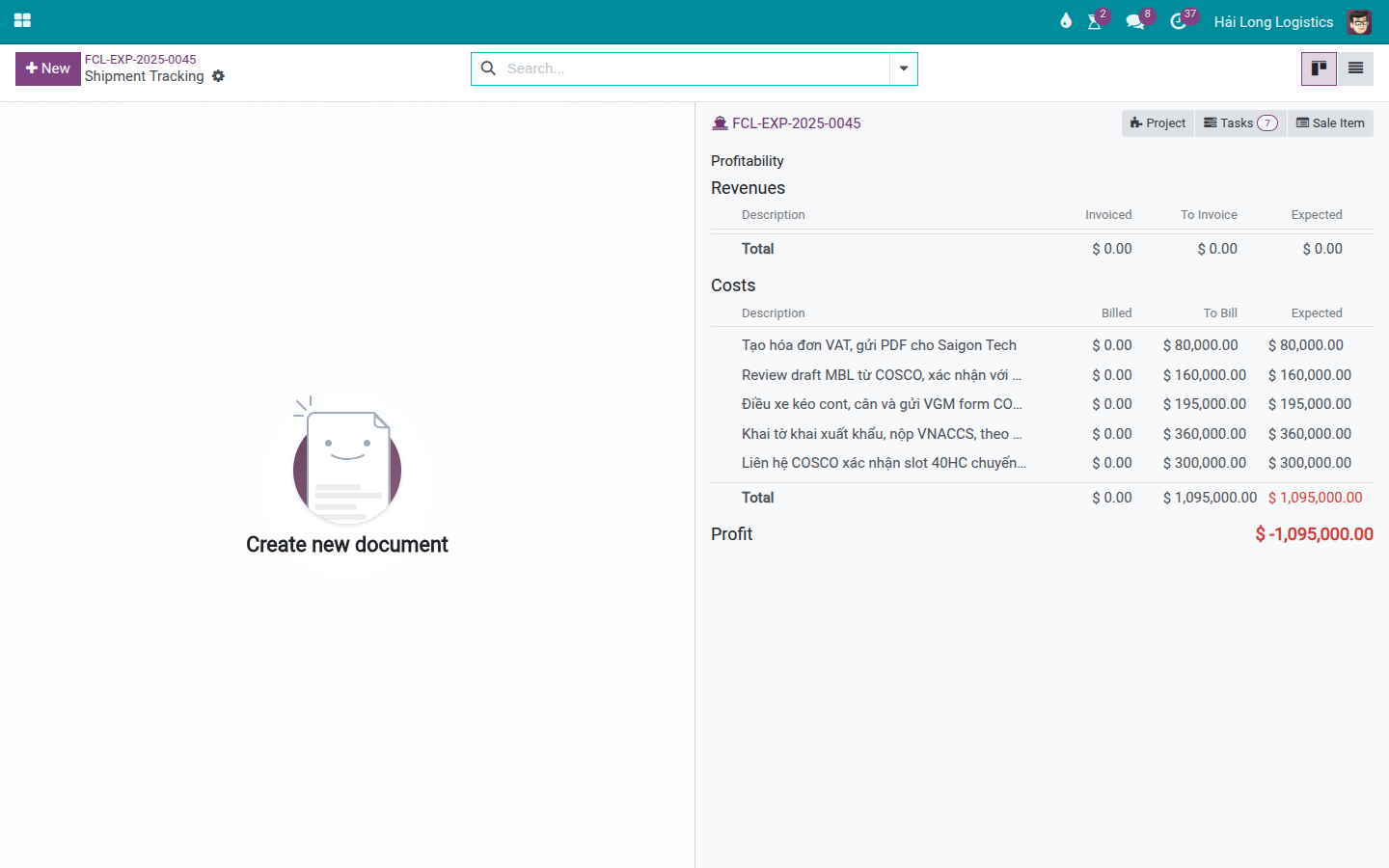
When labor cost appears unusually high, investigate:
Which task generated the most hours.
Whether staff logged correct descriptions and the correct shipment.
Whether the shipment had exceptions such as a rollover, B/L amendment, document errors, or last-minute customer changes — all of which consume hours that were not priced in.
Whether the selling rate is sufficient to cover the actual effort.
Tip
Step 4 is complete when:
Completed tasks have timesheet entries.
Profitability reflects the added labor cost if the relevant module and configuration are in place.
Shipments with low gross profit are reviewed for both charges/vendor bills and labor cost — not just one of them.
Step 5: Use task templates for repeat shipments
For sea FCL/LCL export/import shipments that recur regularly, use task templates rather than creating tasks from scratch each time. A standard template might include: booking, VGM, customs, documents, invoice, carrier settlement, and payment follow-up.
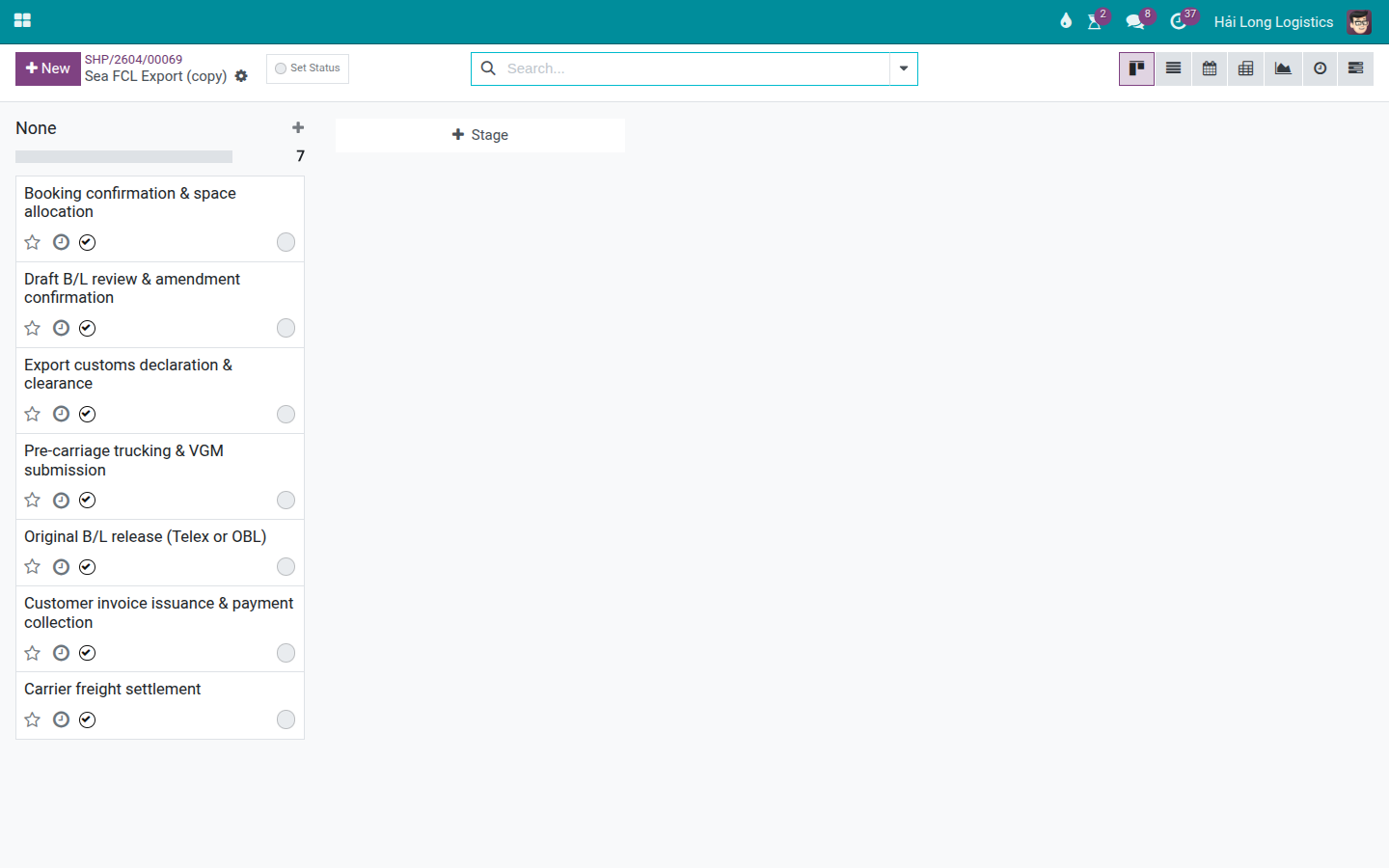
After a new shipment is created from the template:
Check that the expected number of template tasks has been created.
Assign real owners and actual deadline dates.
Remove or close tasks that do not apply to this specific shipment.
Add shipment-specific tasks if the customer, carrier, or trade lane has special requirements.
Troubleshooting common situations
Situation |
Common cause |
Resolution |
|---|---|---|
Shipment has a Tasks button but the list is empty. |
The shipment was not created from a task template and no tasks have been added. |
Create the core tasks manually, or use a shipment template that includes tasks for future shipments. |
A task has no one working on it. |
No assignee or deadline has been set. |
Assign an owner and a deadline; raise in the daily standup. |
Shipment is Done but tasks are still open. |
Tasks were forgotten or timesheets were not fully logged. |
Review each open task, add any missing timesheet entries, then close the task with the correct status. |
Labor cost does not appear. |
No timesheets logged, employee hourly cost not configured, or accounting/profitability module not enabled. |
Check timesheets first; then ask Admin/Accounting to review the related configuration. |
Labor cost is unexpectedly high. |
The shipment had many exceptions, or timesheets were logged to the wrong shipment. |
Compare timesheet descriptions with what actually happened; if accurate, use the data to review pricing and standard operating procedures. |
A task with timesheets was accidentally deleted. |
User deleted a task instead of closing it. |
Restore if possible; going forward, never delete a task that has logged hours — close or cancel it through the proper status flow. |
Final checkpoint
Before closing a shipment that used Freight Project, verify:
Core tasks have an owner and an appropriate status.
Completed tasks have timesheets if hours were worked.
Labor cost has been reviewed in profitability.
Any remaining open tasks have a documented reason for staying open.
If the same tasks were missed or forgotten repeatedly across multiple shipments, update the template to prevent recurrence.
See also
Related guides
Charges and Profitability — Review charges, cost, and gross profit.
Freight Dashboard — Manager reads workload and identifies shipments needing attention.
FCL Export — Sea FCL export flow where tasks can be used to track operations.