
Customer Shipment Tracking Portal
About this guide
Installation requirements
Customer must either have a valid portal account or have received a valid tracking link from Hai Long.
Every ops team knows the pattern: the same customer calls three times a week asking “has the cargo departed yet?” and “has ETA changed?”. Each call interrupts a booking or document task. The Customer Portal eliminates that loop — customers check their own shipment status in real time, and Ops only engages when there is something that genuinely requires a conversation.
For sea FCL/LCL shipments, customers typically want to know: has the cargo gate-in, has the vessel departed, has the ETA changed, and where is the container right now. All of this is visible on the portal once Ops keeps milestones current.
Scenario thread: Saigon Tech Export has a sea FCL export shipment SHP/202505/00080 from VNSGN (Cat Lai) to USLGB (Long Beach). The shipment is currently In Transit, ETD 10/05/2025, ETA 25/05/2025. Hai Long wants the customer to self-check progress instead of calling Ops every day.
See also
Freight terminology (ETD, ETA, ATD, ATA, POL, POD, tracking event): Industry Glossary.
When to use this guide
Use this guide when a customer needs to monitor progress on multiple shipments, or when you need to provide a tracking link for a specific shipment. This is the display layer only — the accuracy of what the customer sees depends entirely on how well Ops keeps shipment data, container milestones, tracking events, and documents current in the internal system.
Role |
Task |
Verification needed |
|---|---|---|
Operations / CS |
Grant portal access or send tracking link; update key events. |
Customer sees the correct shipment with correct milestones. |
Customer |
Log in to the portal or open the tracking link. |
View status, ETD/ETA, timeline, and shipment details. |
Operations Manager |
Review what information is visible to customers. |
No data from other customers is exposed; no internal notes are published. |
Step 1: Grant portal access to a customer
For repeat customers, create a portal account so they can see a list of all their shipments. Go to , create or open the customer’s user record, and set the user type to Portal. Link the user to the correct partner record for that customer.
This linkage is what the system uses to filter which shipments the customer sees — a portal user sees only the shipments where their partner appears as the customer.
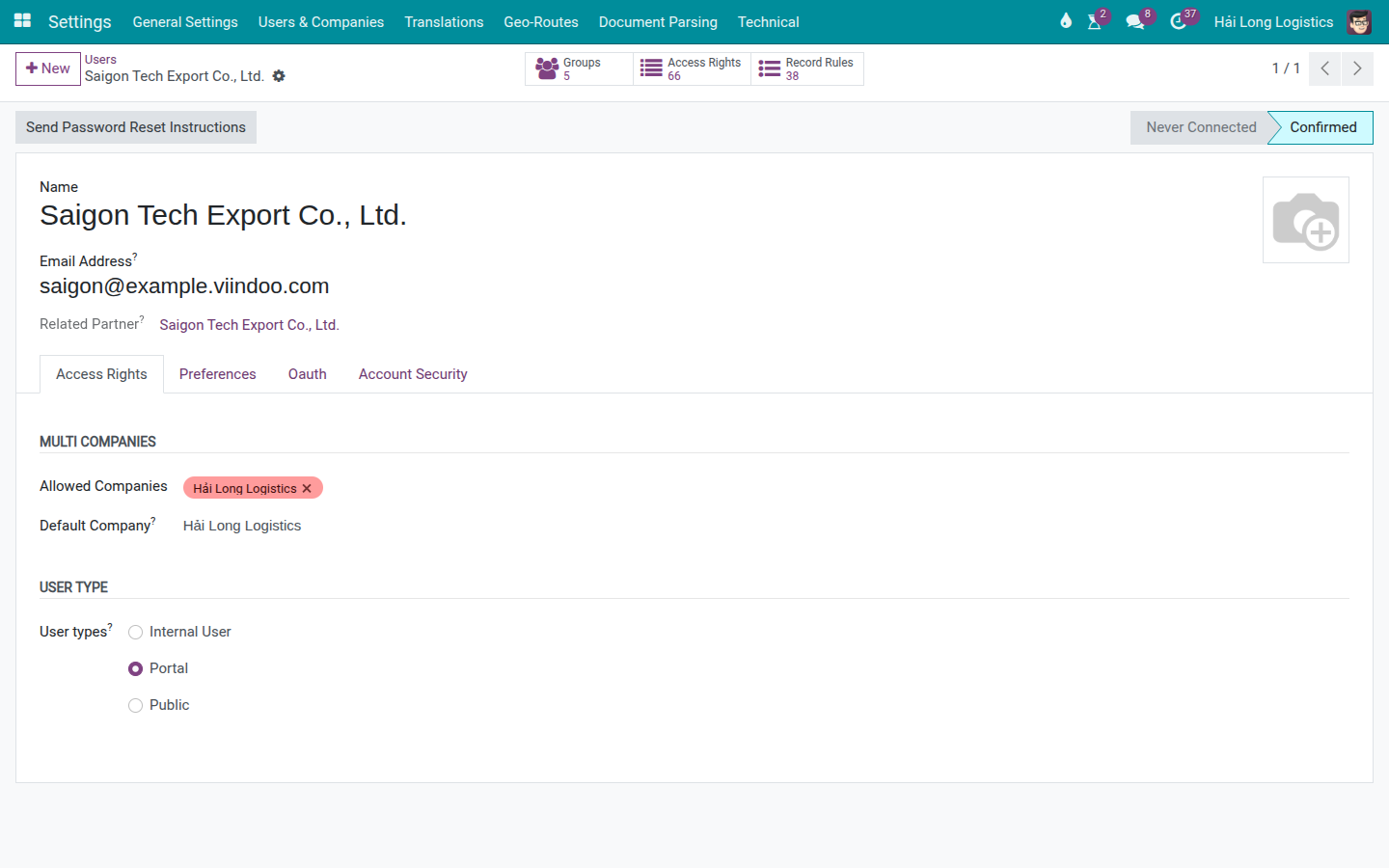
After saving, send the password-setup invitation email or guide the customer through your company’s onboarding process.
Warning
Before rolling out the portal to real customers, test with at least two portal accounts from two different customers. Confirm that each account sees only its own shipments. This is a mandatory security check — data isolation between customers must be verified before the portal becomes the primary tracking channel.
Tip
Step 1 is complete when:
The customer can log in to the portal.
The user’s partner record matches the customer on their shipments.
The customer account has no internal employee permissions.
Step 2: Customer views the shipment list
The customer logs in to Hai Long’s website, then navigates to My Logistics Shipments or the shipment list page on the portal.
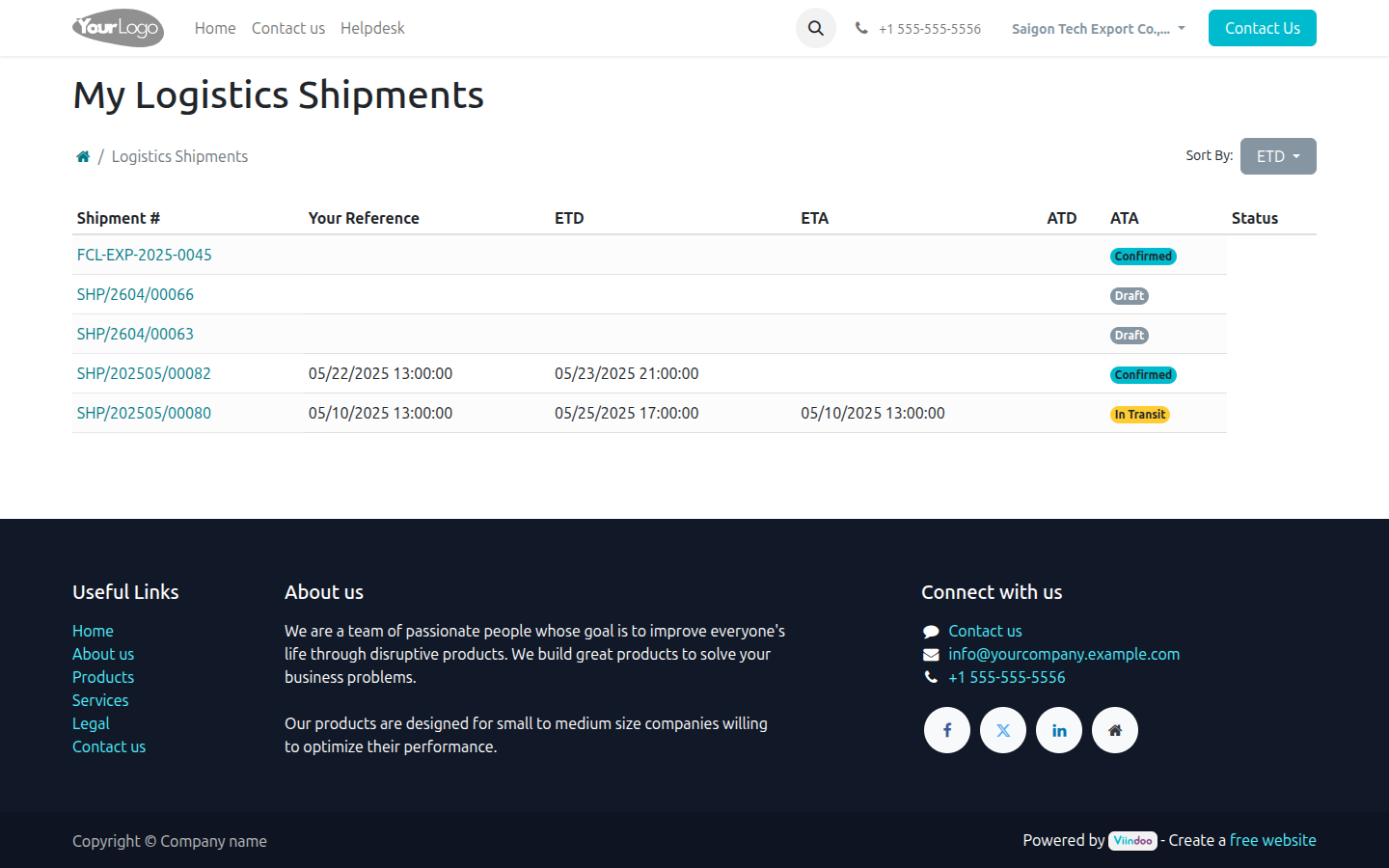
The list lets the customer quickly scan:
Shipment # — shipment reference number.
ETD / ETA — scheduled dates.
ATD / ATA — actual dates once updated by Ops.
Status — Draft, Confirmed, In Transit, Done, or Cancelled.
The customer opens SHP/202505/00080 to view full details.
Tip
Step 2 is complete when:
The customer sees shipment SHP/202505/00080 in their list.
No shipments belonging to other customers are visible.
The status shown on the portal matches what Ops manages in the backend.
Step 3: Customer views shipment details
The detail page shows the key shipment information:
Shipment reference and current status.
POL/POD or pickup/drop-off locations.
ETD, ETA, ATD (Actual Time of Departure), ATA (Actual Time of Arrival).
Weight, volume, or cargo details if populated.
Transport legs and tracking timeline if events have been recorded.
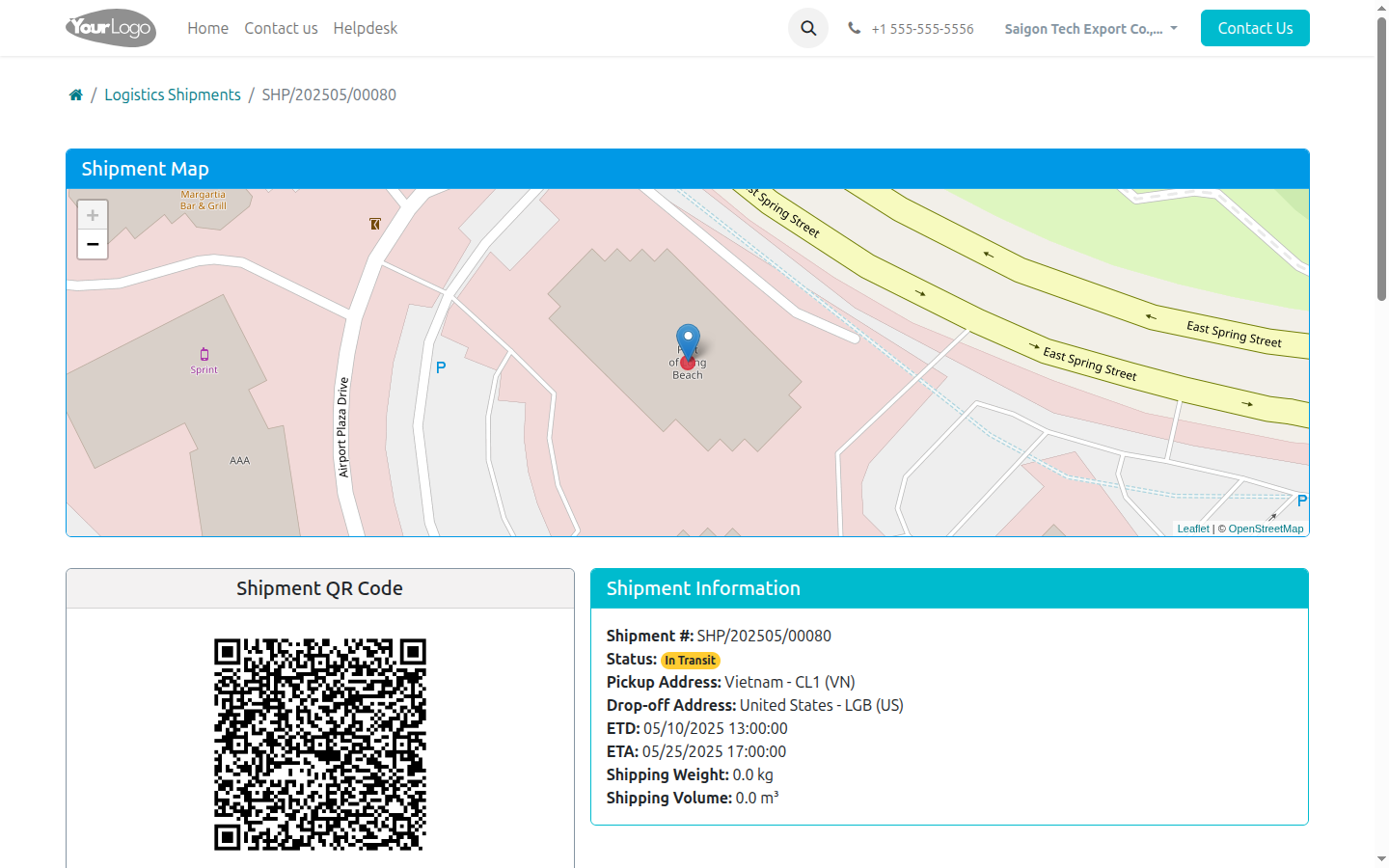
For sea export, customers typically cross-reference:
Customer’s question |
Where to find the answer |
|---|---|
Has the cargo been loaded? |
Status, ATD, and the Loaded on vessel event if Ops has updated it. |
Has the ETA changed? |
ETA field on the shipment and the latest event in the timeline. |
Where is the container now? |
Tracking timeline, container milestones, or Ops-published notes. |
When will cargo arrive at the destination port? |
ETA/ATA and any Arrival Notice distributed through your document process. |
Step 4: Ops publishes tracking events for the customer
The portal is only useful when Ops posts milestones that are meaningful to the customer. For sea FCL export, publish at minimum:
Booking confirmed.
Empty picked up or cargo received (if the customer needs visibility before gate-in).
Container stuffed.
Gate-in.
Loaded on vessel / ATD.
ETA changed (if the carrier reschedules).
Vessel arrived / ATA.
Customs cleared, gate out, or delivered — if Hai Long manages the destination leg.
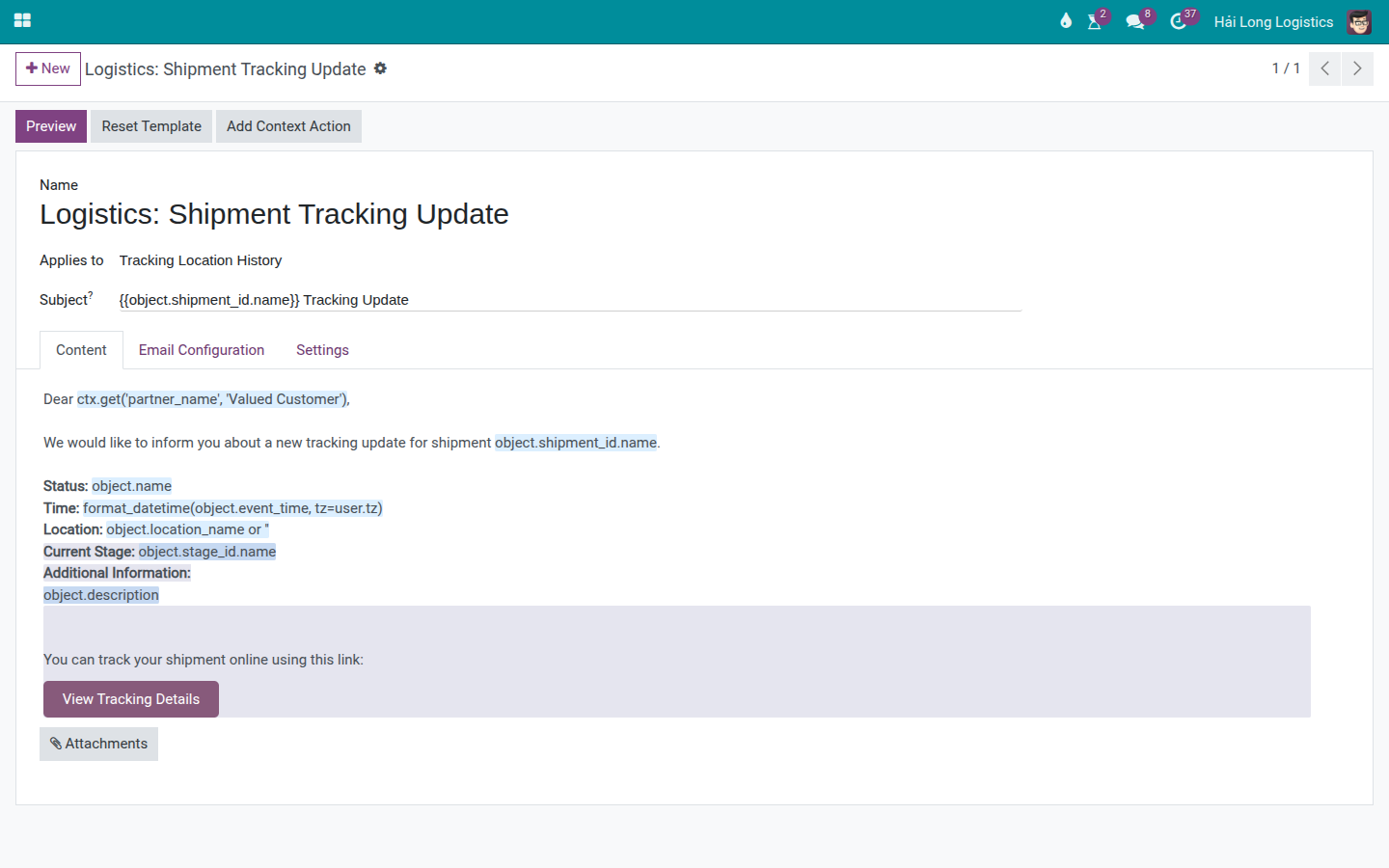
When a tracking update is sent, the system can email the customer a link to view the full shipment detail on the portal.
Warning
Never publish internal notes to the portal. Content such as fee disputes, operational errors, internal comments about the customer or carrier, or buy-rate information must stay in internal channels only.
Tracking links for customers without an account
For one-off customers or consignees who need to view a specific shipment, Ops can send a system-generated tracking link following Odoo/Viindoo’s portal sharing process. The link recipient should only be able to see the shared shipment.
When using tracking links:
Send the link to the intended recipient only.
Do not forward the link to uncontrolled group chats.
If the customer reports that the link does not open, regenerate it from the system rather than manually editing the URL.
For repeat customers, create a portal user account so they can view their full shipment history and multiple active shipments in one place.
Troubleshooting common situations
Situation |
Common cause |
Resolution |
|---|---|---|
Customer logs in but sees no shipments. |
User not linked to the correct partner, shipment has wrong customer/follower, or customer used the wrong account. |
Check the partner on the user record and the customer field on the shipment; test with a portal test account before reporting back to the customer. |
Customer sees missing tracking milestones. |
Ops has not updated the event, or the event has not been published to the portal. |
Update the key events and verify by logging in with the portal user account. |
ETA on portal differs from the email already sent to the customer. |
The shipment was updated after the email was sent, or the email used old data. |
Send a new tracking update and note the reason for the schedule change. |
Customer cannot open the tracking link. |
Link is expired, copied incompletely, or the customer is logged into the wrong account. |
Regenerate the link from the system, or create a portal user account if the customer ships frequently. |
Customer asks for documents or an invoice via the portal. |
The tracking portal does not replace the commercial document distribution process. |
Send HBL/MBL, Arrival Notice, or invoice via your document management and accounting process. |
Risk of exposing another customer’s data. |
Portal permissions or partner linkage has not been properly tested. |
Pause portal distribution, test isolation with multiple test accounts, and ask the system Admin to review access rights. |
Final checkpoint
Before using the portal for a sea shipment, verify:
The customer sees only their own shipments.
The shipment has correct ETD, ETA, and status.
Key tracking events have been updated and the content is appropriate for the customer to read.
The tracking link or portal user account is working.
Sensitive documents, buy rates, and internal notes have not been accidentally published.
See also
Related guides
Container Execution Milestones — Update container milestones before customers view the portal.
Document Management (SI, B/L, D/O) — Manage HBL/MBL, Arrival Notice, and documents sent to customers.
FCL Export — Sea FCL export flow with the milestones customers commonly track.