
Set up freight services and local charges
Guide information
Requirements
This tutorial requires the installation of the following applications/modules:
Freight Forwarder Management (installs Logistics Accounting automatically)
Every charge line on a shipment points to a product. If a freight service or a local charge is not classified correctly, the quotation wizard cannot find a rate for it and the line is priced at zero - Sales then has to work out and type the charge by hand, and a charge like a port fee is easy to forget. A local charge tied to a specific port also carries that port’s code in its own name, so invoices for different ports never look identical on a customer’s statement. If a term such as Full Container Load (FCL) or Terminal Handling Charge (THC) is new to you, see the Freight forwarding glossary.
Running scenario: Hai Long Logistics confirms the Ocean Freight - FCL service already in the system, then ties the installed Terminal Handling Charge (THC) to Hai Phong Port, before quoting and booking the FCL export for Nhat Long Footwear.
Classify a freight service
The Shipment Type you pick here decides how Viindoo prices the service later - per container for FCL, or per weight/volume for LCL and LTL - and which fields show on the product form.
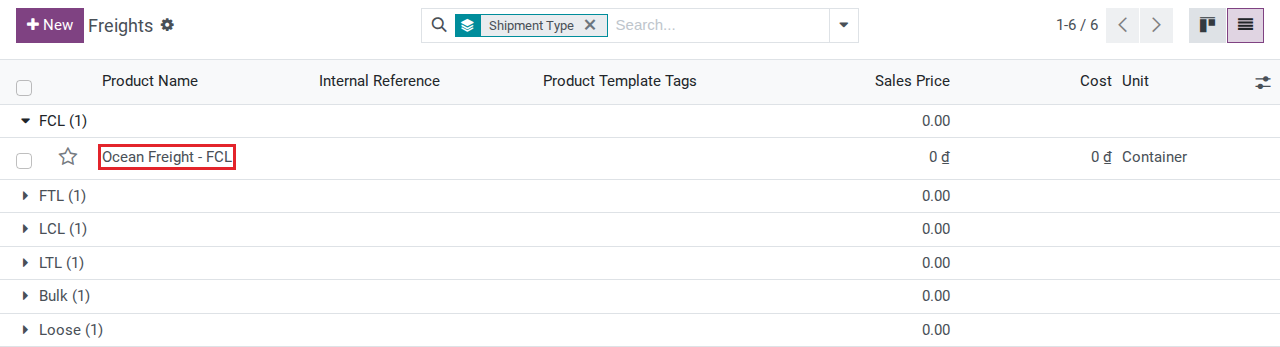
Go to . The list is already filtered to freight services and grouped by Shipment Type.
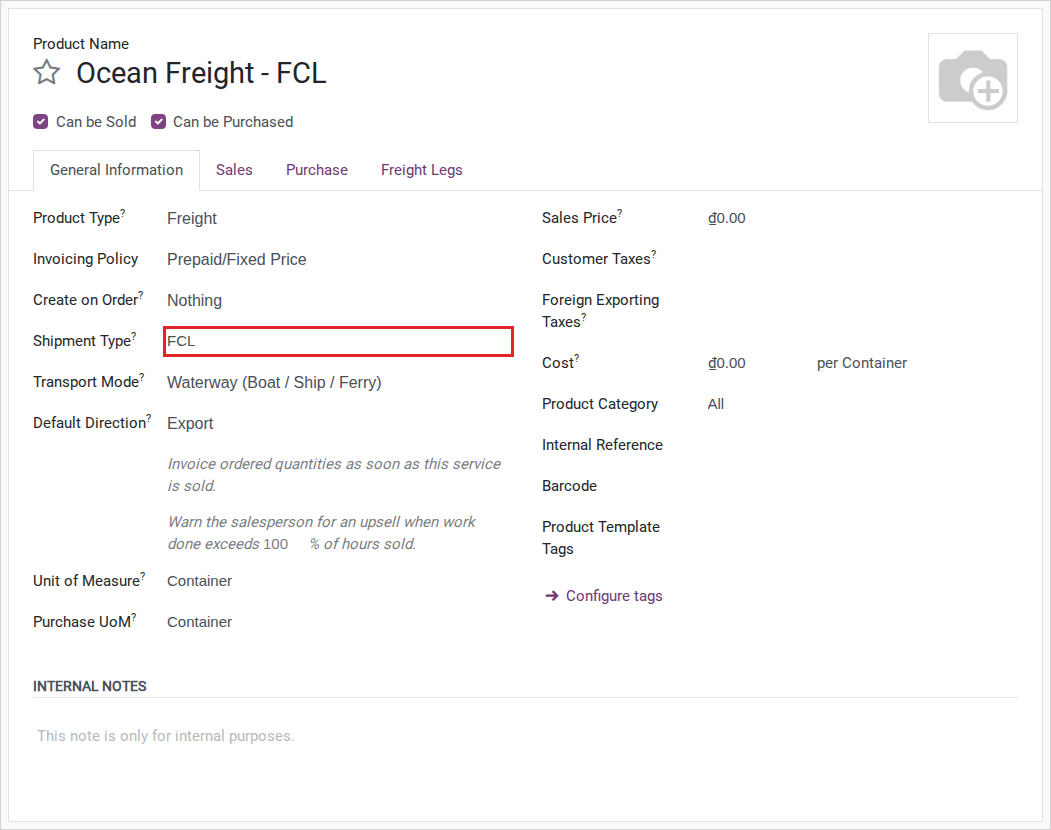
Open the existing Ocean Freight - FCL product (or click New to classify another service) and confirm:
Product Type: Freight.
Shipment Type: FCL.
Transport Mode: Waterway (Boat / Ship / Ferry) - required whenever Product Type is Freight.
Note
Viindoo does not stop you from changing Product Type away from Freight or Local Charge after a product has been classified and used on shipments - there is no save-time check for this. After editing a freight or local charge product for another reason, re-open it and confirm Product Type is still what you expect (see Known limitations).
Tip
The setup is correct when: Ocean Freight - FCL appears in the Freights list, grouped under Shipment Type FCL, and the FCL quotation wizard of Quote a full container load for sea export lists a price for it.
See also
Maintain carrier rates and vessel schedules - enter the buy and sell prices this service uses.
Link a freight service to a project template
A freight service can open a ready-made task list the moment its sales order is confirmed - the 7-task project in Run shipment tasks in a project comes from this setting on the product, not from anywhere else. Both fields below only show once Freight Project & Operations Tasks is installed.
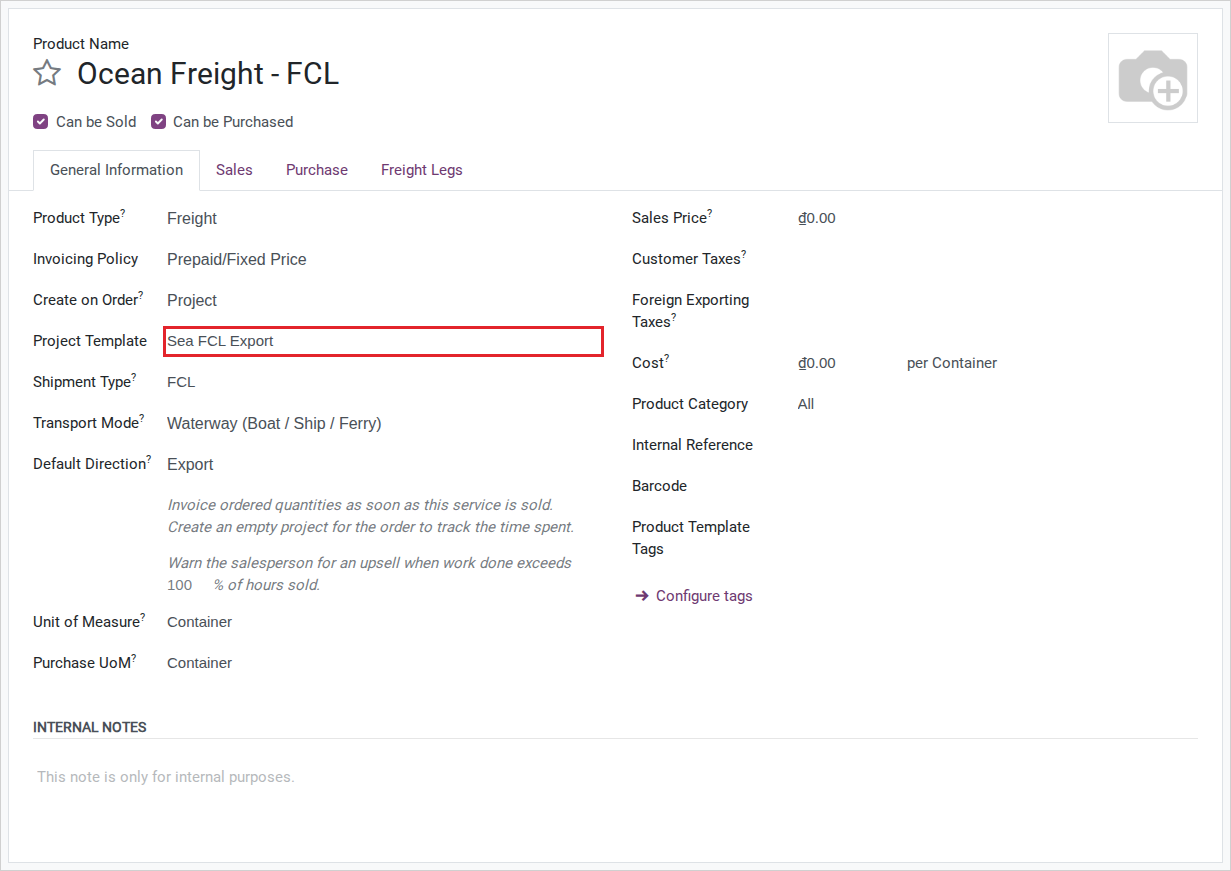
Open the Ocean Freight - FCL product (the same one classified above), tab Sales.
Set Create on Order to Project & Task.
Set Project Template to Sea FCL Export - one of the task templates Freight Project & Operations Tasks installs; it stays inactive so it never appears as a project of its own.
Note
Leaving Create on Order at its default (Nothing) is why confirming a sales order for this service does not open a project - see Run shipment tasks in a project.
See also
Run shipment tasks in a project - the task list this setting produces.
Classify a local charge tied to a port
A local charge that costs a different amount at each port needs its own product per port. The FCL quotation wizard only adds a local charge whose Port is the POL (origin charges) or the POD (destination charges) of the quote, so a local charge with no port is never added for you.
Go to .
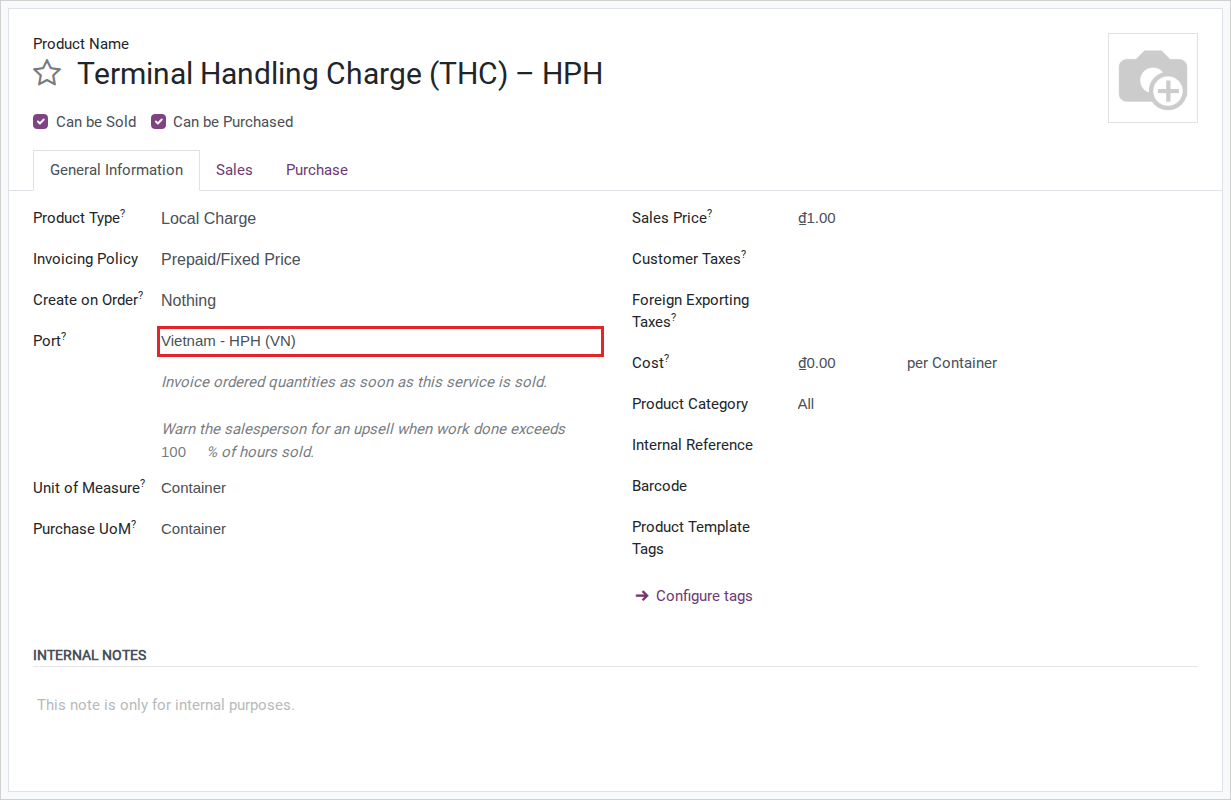
Open the existing Terminal Handling Charge (THC) product (or click New) and set:
Product Type: Local Charge.
Port: Hai Phong Port.
Note
After you set Port and save, the product name changes on its own to add the port’s short
code at the end, so Terminal Handling Charge (THC) becomes a name ending in HPH. That
code comes from the port record’s Port Code field, not from the full UN/LOCODE - Hai
Phong Port uses the code HPH, not VNHPH. Clearing Port and saving again puts the
name back to the original, unsuffixed one.
Create a local charge for a port with no existing product
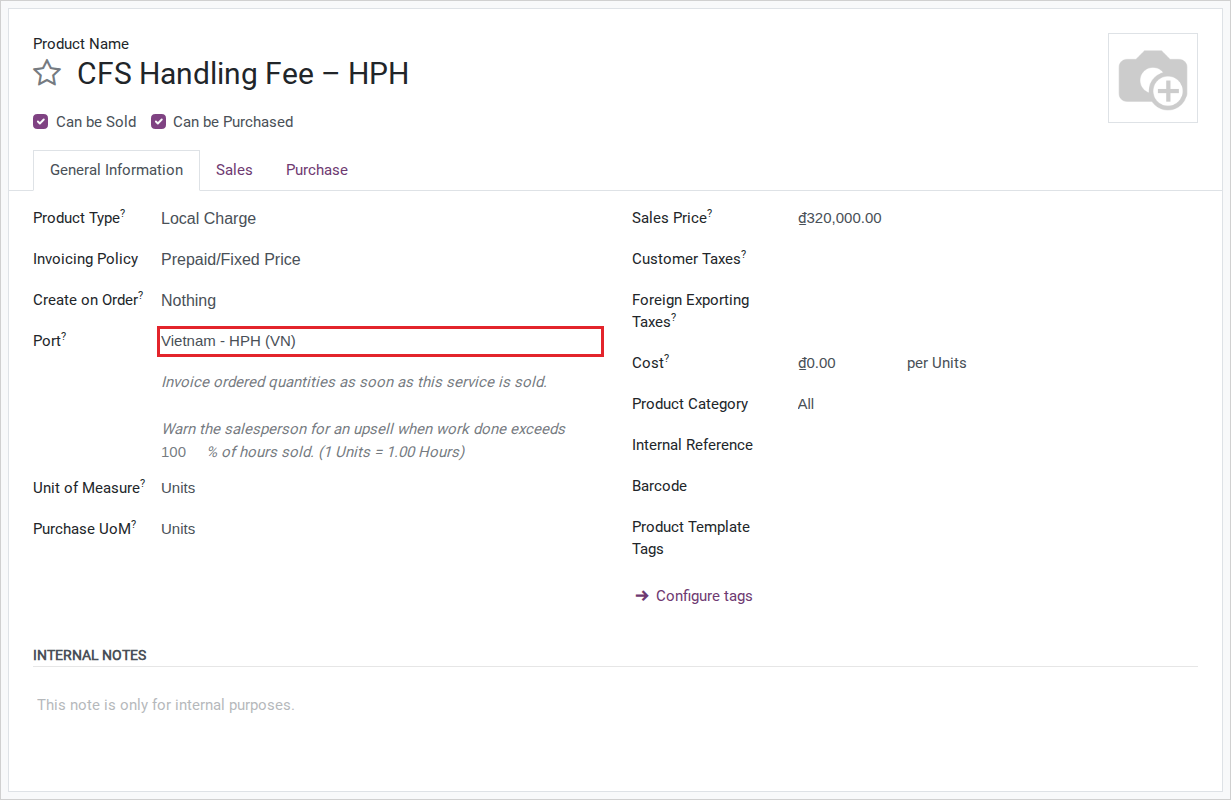
The installed CFS Handling Fee only covers Dinh Vu CFS - Hai Phong and Port of Los Angeles - quoting an LCL shipment through Hai Phong Port needs its own product, the same way as any other port the installed data does not already cover.
Go to and click New.
Set:
Name: CFS Handling Fee.
Product Type: Local Charge.
Port: Hai Phong Port.
List Price: 320,000 (VND, per CBM - the Unit of Measure copies CBM from an existing CFS Handling Fee product).
See also
Quote an LCL shipment by volume and weight - where this local charge prices the CFS handling line of an LCL quote.
Decide whether a local charge needs its own port
Option |
Use when |
What changes |
|---|---|---|
Set Port |
The charge arises at a specific port (THC, D/O fee, and similar) and you want the quotation wizard to add it |
The product name gains a port-code suffix; the FCL quotation wizard adds it when that port is the POL or the POD; you need one product per port |
Leave Port empty |
The charge is the same everywhere and Sales adds it to the quote by hand (for example, a customs declaration fee) |
The name stays as entered; one product covers every shipment, but the quotation wizard never adds it |
Set Port only when this product should be generated for that specific port and automatically added by the quotation wizard when the port matches the POL or POD. Leave it empty when the charge is not location-specific or is added manually. Confirm the product behavior with Sales/Pricing before changing a shared catalog item.
Tip
The setup is correct when: after you save with Port set to Hai Phong Port, the product name ends in HPH, and the FCL quotation wizard for Hai Phong Port to Port of Los Angeles adds it as an origin local charge (see Quote a full container load for sea export).
Known limitations
Step |
What Viindoo does today |
What you do instead |
|---|---|---|
Classify a freight service |
No constraint blocks changing Product Type away from Freight or Local Charge after the product is already in use on quotations or shipments |
Re-check Product Type yourself after any later edit to a freight or local charge product |
Troubleshooting
The local charge name does not gain the port code I expected
Symptom: After choosing Port and saving, the product name does not change, or it changes to an unexpected suffix.
Cause: The suffix comes from the port record’s Port Code field - if Port Code is
empty, Viindoo uses the port’s full name instead; if Port Code is a short code that is not the
UN/LOCODE you expected (as with Hai Phong Port, whose code is HPH rather than
VNHPH), the suffix will not match the code you assumed.
Fix:
Open the port’s record and check its Port Code before assigning it to a local charge.
Correct the port’s Port Code first if your team expects it to match a specific code, then re-open the local charge and re-save it.
A newly created freight service gets a name I did not type
Symptom: Leaving Name empty (or “/”) while creating a new freight product results in a system-generated name built from the shipment direction and route, such as the origin and destination joined by an arrow-style symbol.
Cause: Viindoo only fills the name automatically when it is left empty or as “/”; it builds the value from the product’s freight legs, shipment type and direction.
Fix: Type a clear name yourself when creating the product (for example, Ocean Freight - FCL) if you do not want the auto-generated one.
See also
Related articles