
FCL Import
Guide information
Required modules
Freight Accounting (optional — required for invoicing and profit visibility)
Full Container Load (FCL) Import is the process of receiving an entire container from the origin port and delivering it to the consignee. For FCL import, the forwarder takes over when the vessel is en route or near the destination port, monitors the Arrival Notice, collects the Delivery Order (D/O) from the carrier, hauls the container to the consignee's warehouse, and returns the empty container on time to avoid demurrage and detention charges.
Running scenario: Hai Long Transport Co., Ltd. handles an import shipment for MNO Engineering Co., Ltd.: 1 × 40-foot High Cube (40HC) container of machinery, HS 8479, routing KRPUS (Busan) → VNHPH (Hai Phong), carrier ONE (Ocean Network Express), vessel ONE COMMITMENT, voyage 012W, ETD 10 May 2025, ETA 15 May 2025, B/L issued as Telex Release.
Xem thêm
Glossary (MBL, D/O, Telex Release, Demurrage, Detention, Free Time, and more): Industry Glossary.
When to use this guide
Use this guide when your company handles a Sea FCL Import shipment directly from the shipment record. If the shipment is a consolidated load that requires house/master splitting at destination, see the LCL Deconsolidation guide instead.
Role |
Tasks in this guide |
What to verify |
|---|---|---|
Operations Staff |
Create the shipment, record the ETA, track the Arrival Notice and D/O, update container milestones. |
Shipment has the correct route, MBL, container, Arrival Notice, and D/O. |
Documentation |
Receive the B/L release, coordinate the D/O exchange, and maintain the audit trail on the shipment. |
Chatter notes confirm the release type, D/O number, and D/O receipt date. |
Customs Broker |
Handle customs clearance outside the system and report results back to Operations. |
Container is recorded as cleared before the haulage team enters the port. |
Accounting |
Review charges, create draft invoices and bills, and verify gross profit. |
Draft Invoice and Draft Bill exist; Gross Profit matches the expected margin. |
Process overview
An FCL import shipment passes through six main stages. Each stage has a checkpoint that must pass before moving forward.
# |
Stage |
Purpose |
Responsible |
|---|---|---|---|
1 |
Create and confirm the shipment. |
Create the central record for the B/L, container, D/O, charges, and documents. |
Operations |
2 |
Record the B/L, container, and cargo. |
Enter origin data so the import shipment can be tracked. |
Operations / Documentation |
3 |
Review charges and send the Arrival Notice. |
Establish the commercial picture and give the consignee early notice to prepare. |
Ops / Sales / Documentation |
4 |
Track the vessel arrival, clear customs, and collect the D/O. |
Ensure all conditions are met before the container leaves the port. |
Operations / Customs Broker / Documentation |
5 |
Pull the container and return the empty. |
Complete the physical delivery of the import shipment. |
Operations |
6 |
Create invoices and bills, and verify gross profit. |
Finalise revenue, costs, and per-shipment profit. |
Accounting |
Step 1: Create and confirm the shipment
The shipment is the central record for the entire import job. Entering the correct route and shipment type at the start means the team does not need to re-enter the customer, route, ETA, or shipment type at later steps. For FCL import, a wrong route or wrong shipment type discovered after the D/O exchange typically triggers a cascade of corrections across charges and documents.
Go to and click New. Fill in the key fields:
Shipment Type: Sea FCL Import.
Customer: MNO Engineering Co., Ltd..
Shipper: Seoul Trading Co..
Consignee: MNO Engineering Co., Ltd..
POL: KRPUS.
POD: VNHPH.
ETD: 10/05/2025.
ETA: 15/05/2025.
Incoterm: CIF.
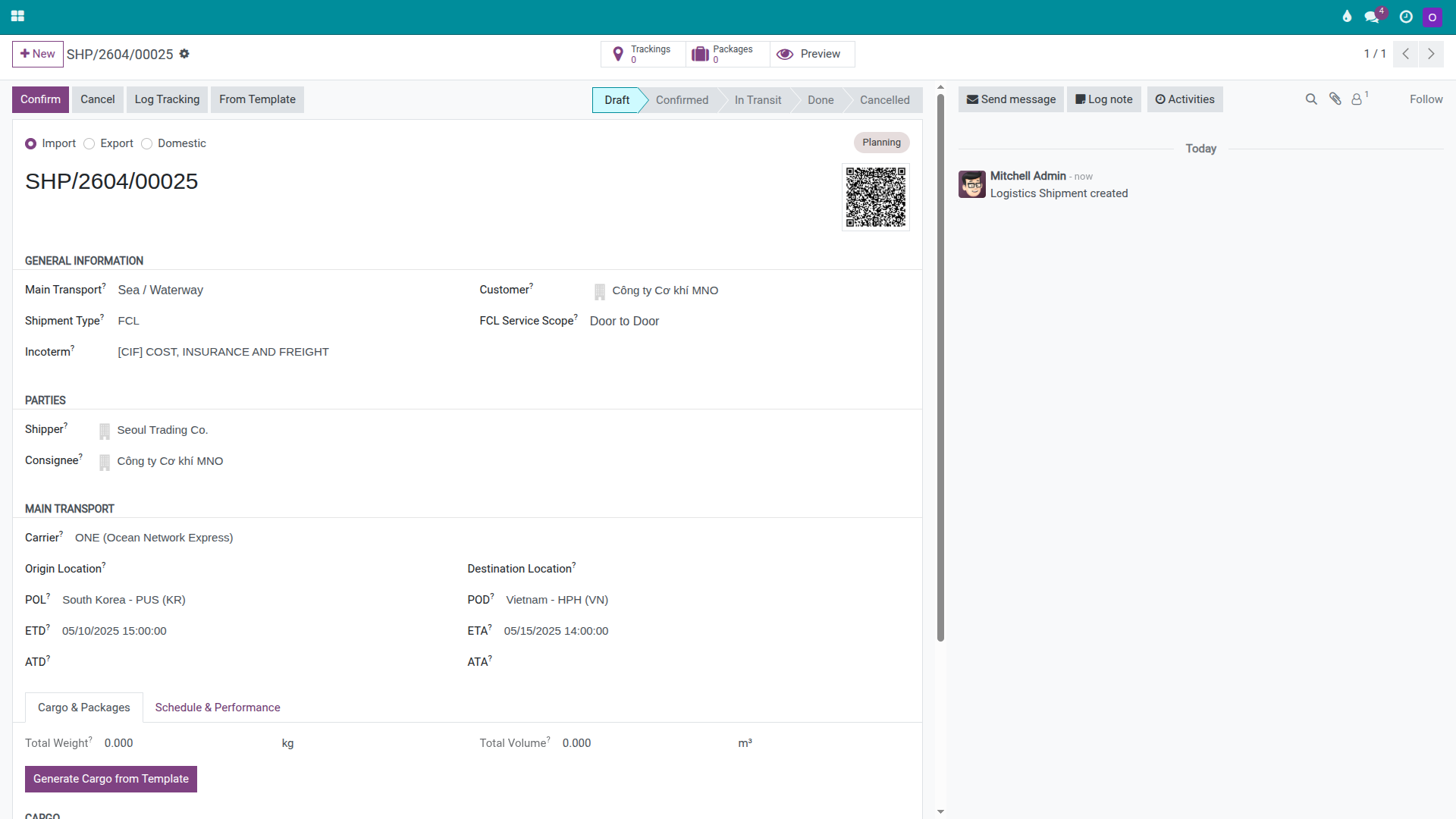
Once the route and shipment type are correct, click Confirm.
After confirming:
The status bar shows Confirmed.
The import operations section appears on the shipment form.
The Send Arrival Notice button appears in the shipment header.
All MBL data, containers, D/O information, charges, and documents are linked to this shipment.
Mẹo
How to know Step 1 is correct:
Customer is MNO Engineering Co., Ltd.
POL = KRPUS, POD = VNHPH.
Shipment Type = Sea FCL Import.
The Send Arrival Notice button is visible after confirming.
Step 2: Record the B/L, container, and cargo
For an import shipment, the forwarder does not create a carrier booking in Viindoo. Instead, the import team receives documents from the shipper or origin agent and enters the details into the shipment to track the ETA, reconcile the Arrival Notice, and exchange the D/O. Missing the Master Bill of Lading (MBL) number or entering the wrong container number can block the D/O exchange and the cargo pickup.
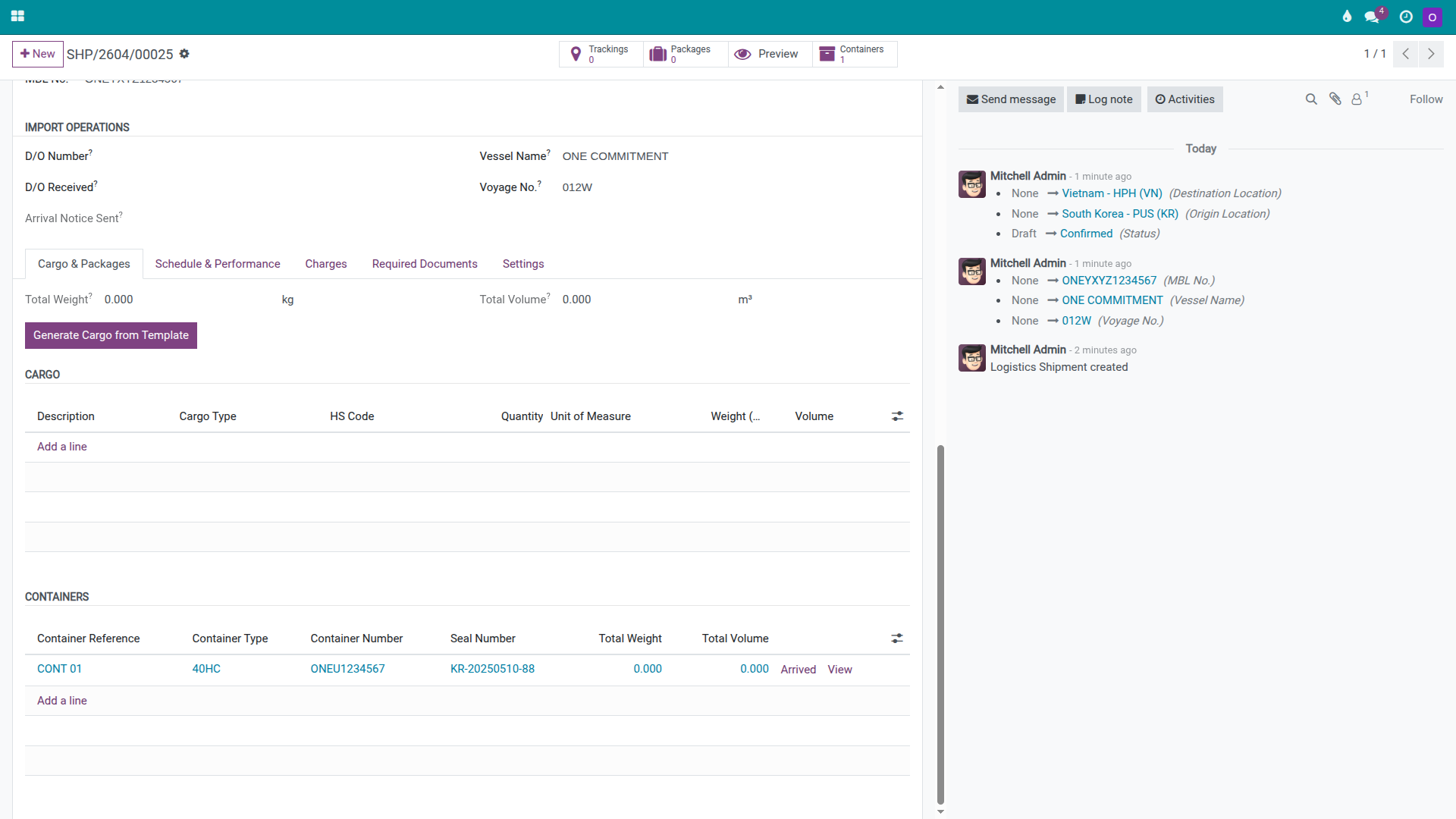
On the shipment, enter the key details from the B/L scan and packing list:
MBL Number: ONEYNL1234567.
Vessel Name: ONE COMMITMENT.
Voyage Number: 012W.
Carrier: ONE (Ocean Network Express).
If the shipment uses Telex Release, add a short note in the Chatter so Documentation and Operations can both see it. For example:
"B/L Telex Release received from Seoul Trading Co. on 11/05/2025 — ONEYNL1234567"
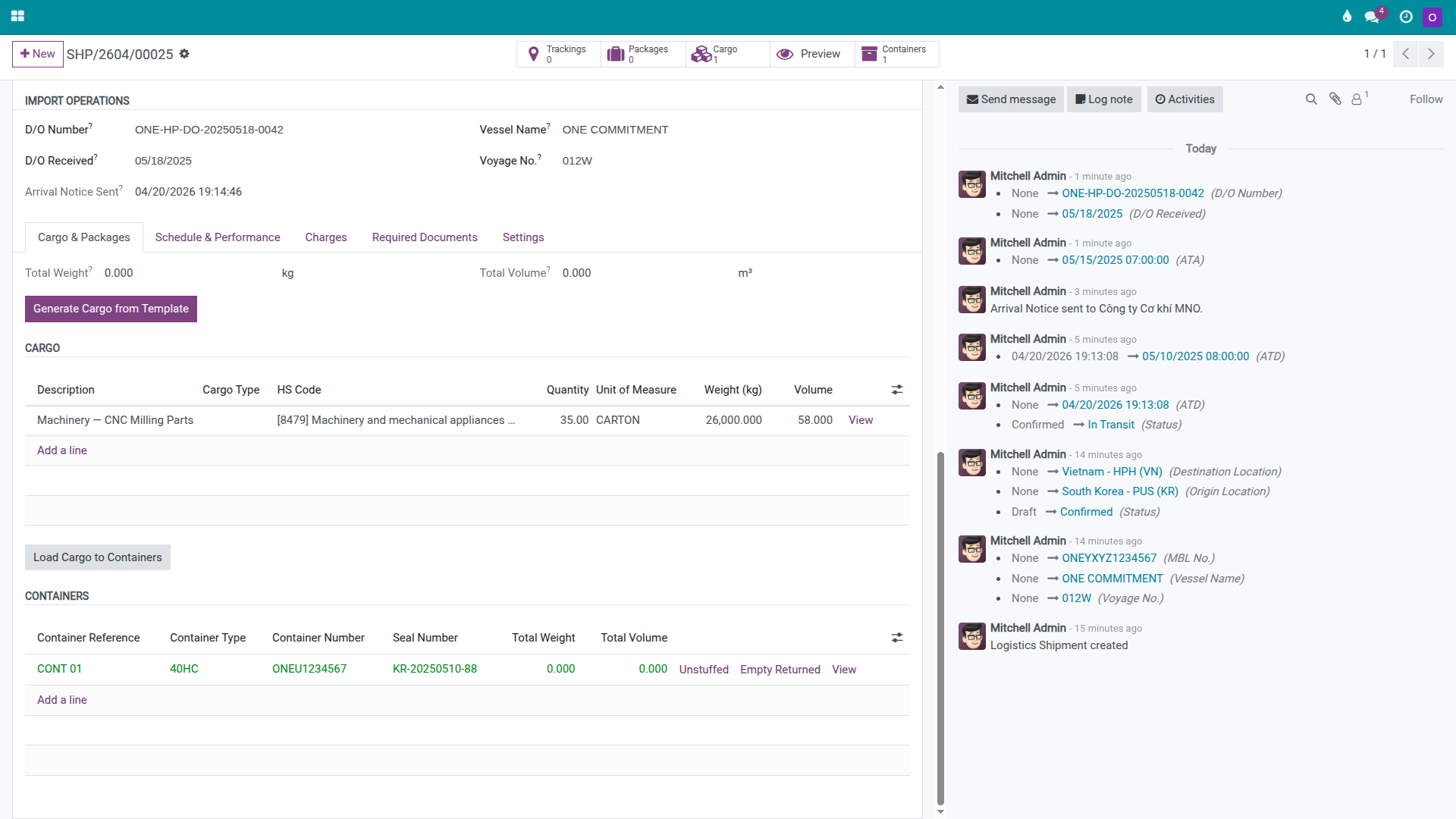
In the Cargo & Packages tab, add one container:
Package Type: 40HC.
Container Number: ONEU1234567.
Seal Number: KR-20250510-88.
Actual Weight: 26,300 kg.
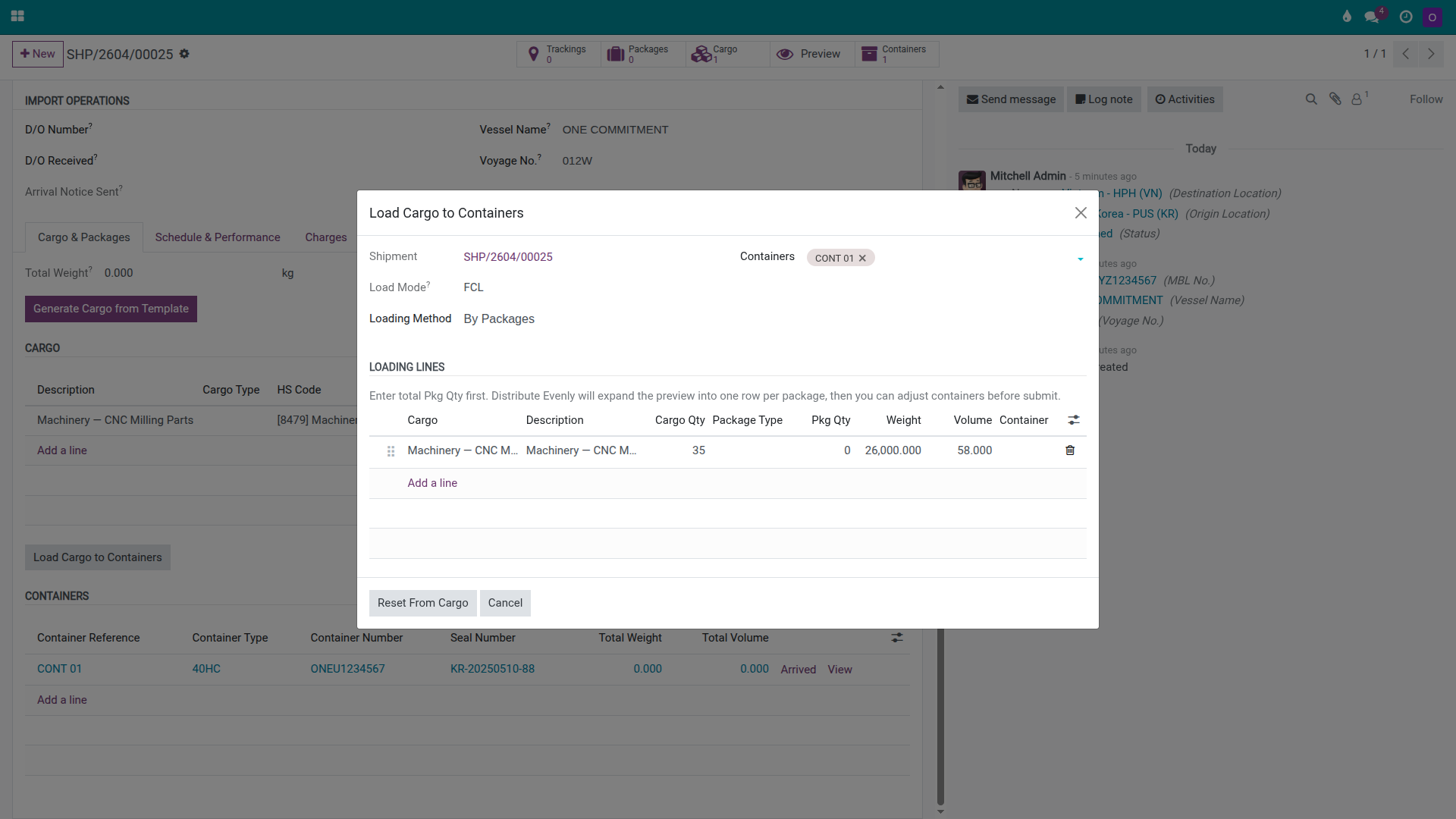
Add the main cargo:
Name: Machinery — CNC Milling Parts.
HS Code: 8479.
Quantity / UoM: 35 CARTONS.
Weight: 26,000 kg.
Volume: 58 CBM.
Click Load Cargo to Containers, select container ONEU1234567 for the cargo line, and click Confirm to link the cargo to the container.
Cảnh báo
Container number and seal number must match the origin documents exactly. A single mis-typed character on the container number can lead the carrier or port authority to request a full document review when the team attempts to exchange the D/O. On a shipment with a tight Free Time window, even a minor discrepancy can cause a delay of several hours to several days.
Mẹo
How to know Step 2 is correct:
The shipment has an MBL Number, Vessel Name, and Carrier.
One 40HC container is recorded with a container number and seal number.
Cargo Machinery has quantity, weight, and volume.
The cargo is linked to the container — not just entered as a note.
Step 3: Review charges and send the Arrival Notice
Before the vessel reaches port, Operations and Sales should finalise the charges so the team knows the margin on this shipment, and Documentation should send the Arrival Notice to the consignee so they can prepare import paperwork and schedule cargo pickup. Doing this step early reduces the risk of discovering missing documents or unconfirmed charges only after the vessel has arrived.
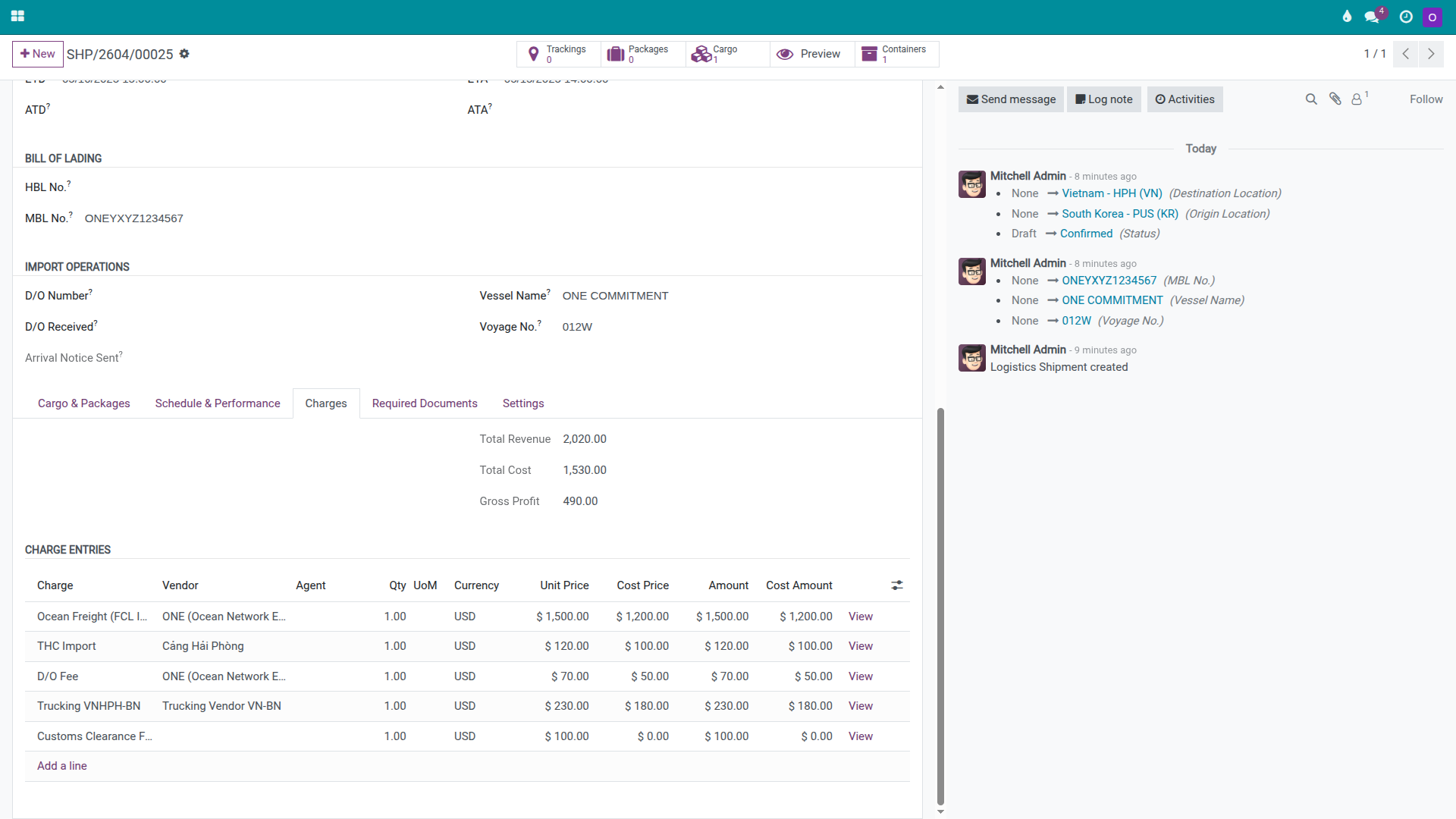
In the Charges tab, add the main charge lines for this FCL import:
Ocean Freight: Cost USD 1,200, Unit Price USD 1,500.
THC Import: Cost USD 100, Unit Price USD 120.
D/O Fee: Cost USD 50, Unit Price USD 70.
Trucking VNHPH → Bac Ninh: Cost USD 180, Unit Price USD 230.
Customs Clearance: per Hai Long's service rate.
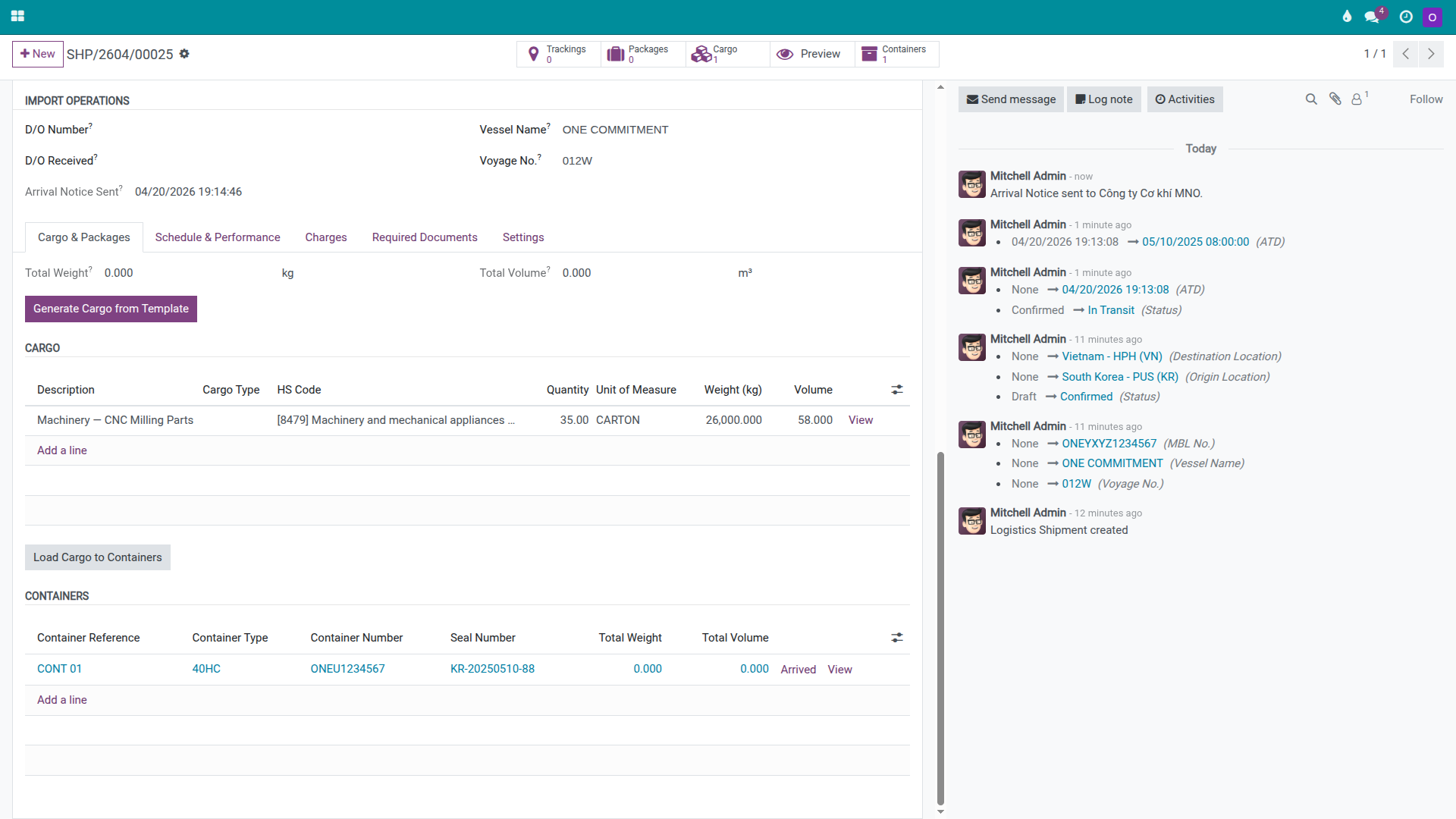
When the carrier sends the Arrival Notice, open the shipment and click Send Arrival Notice to record the timestamp. Then send the actual notification to MNO using the company's email tool or through the Chatter if the team uses that channel.
Cảnh báo
A late Arrival Notice commonly delays customs clearance. For a machinery shipment, the consignee and customs broker may need additional time to gather invoices, packing lists, certificates of origin, or industry-specific permits. If notice is given too late, the container can reach the end of its free time period before the import dossier is complete.
Mẹo
How to know Step 3 is correct:
All main sell and buy charge lines are present in the Charges tab.
Gross Profit is positive and close to the expected margin.
The shipment has a recorded Arrival Notice timestamp.
The consignee has received actual notification from the operations team.
Step 4: Track the vessel arrival, clear customs, and collect the D/O
When the vessel berths at Hai Phong, Operations must record the arrival milestone on the container, coordinate with the customs broker for clearance, and complete the D/O exchange with ONE. The D/O is the document that authorises the haulage team to enter the port and remove the container — without it, the truck cannot leave with the cargo.
In the Cargo & Packages tab, on the ONEU1234567 container line, take the following actions in order:
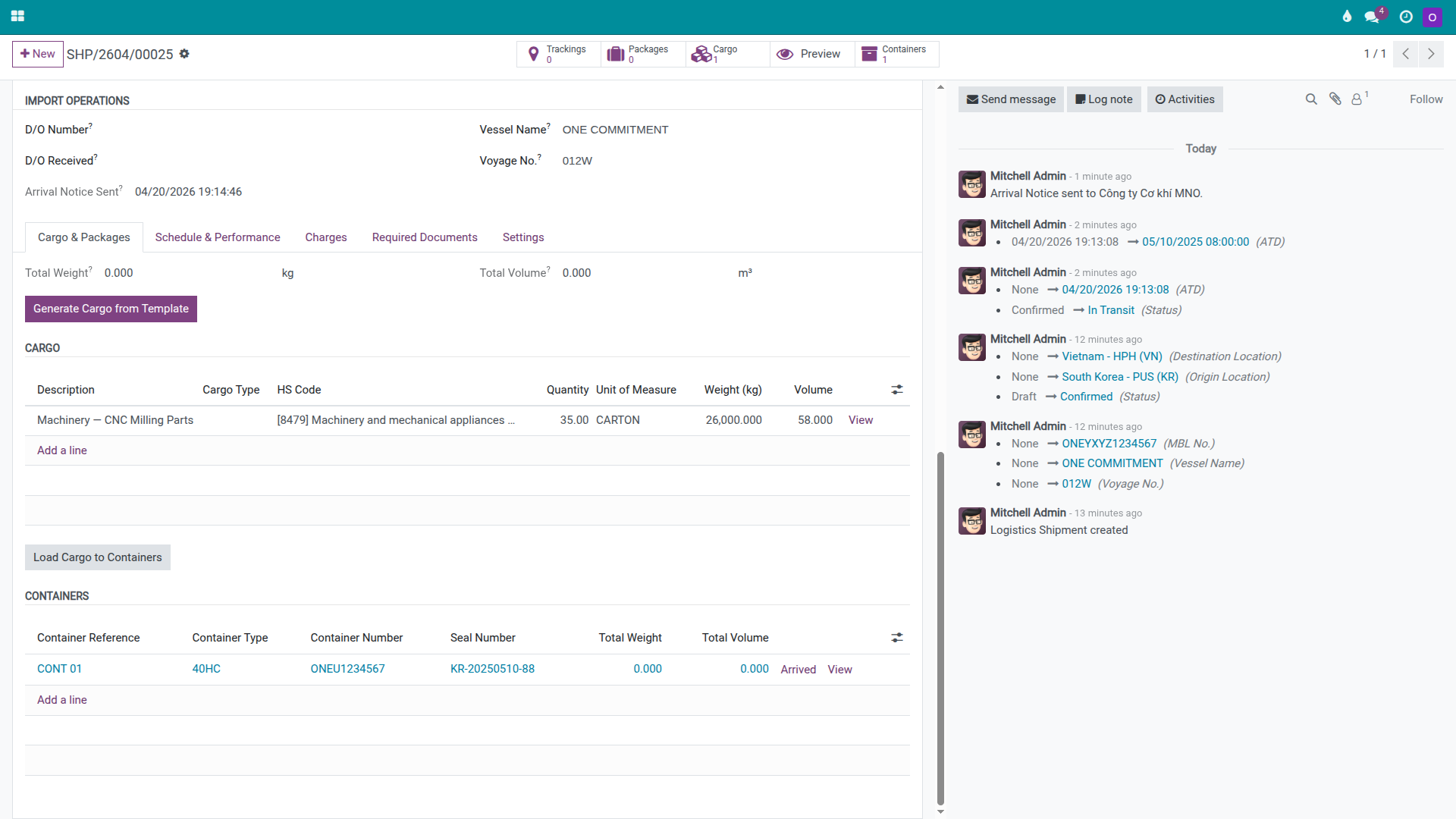
When the vessel has berthed and the container is available for discharge, click Arrived.
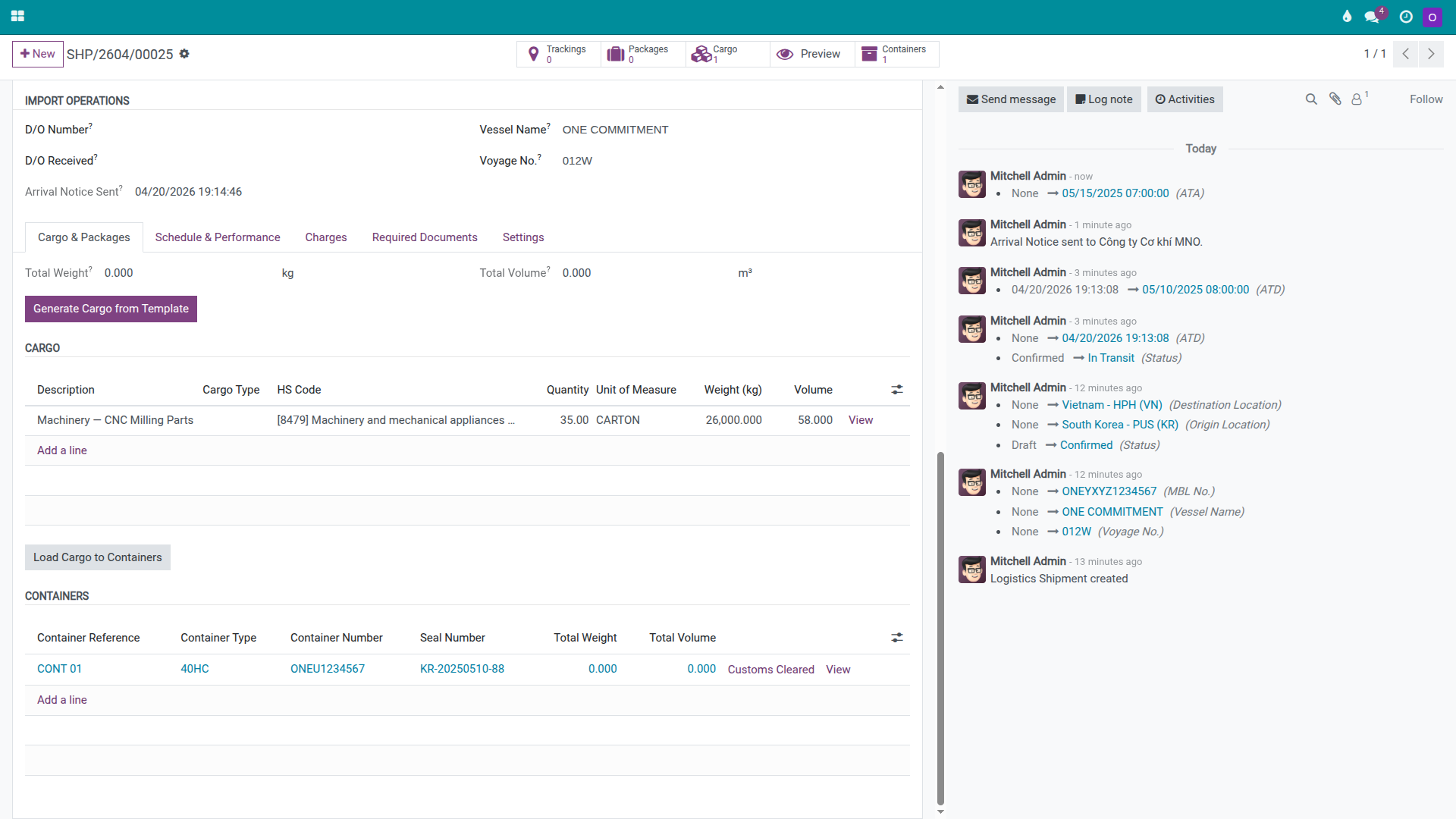
When the broker confirms that the customs declaration has been cleared, click Customs Cleared.
On the shipment form, enter the D/O details issued by ONE:
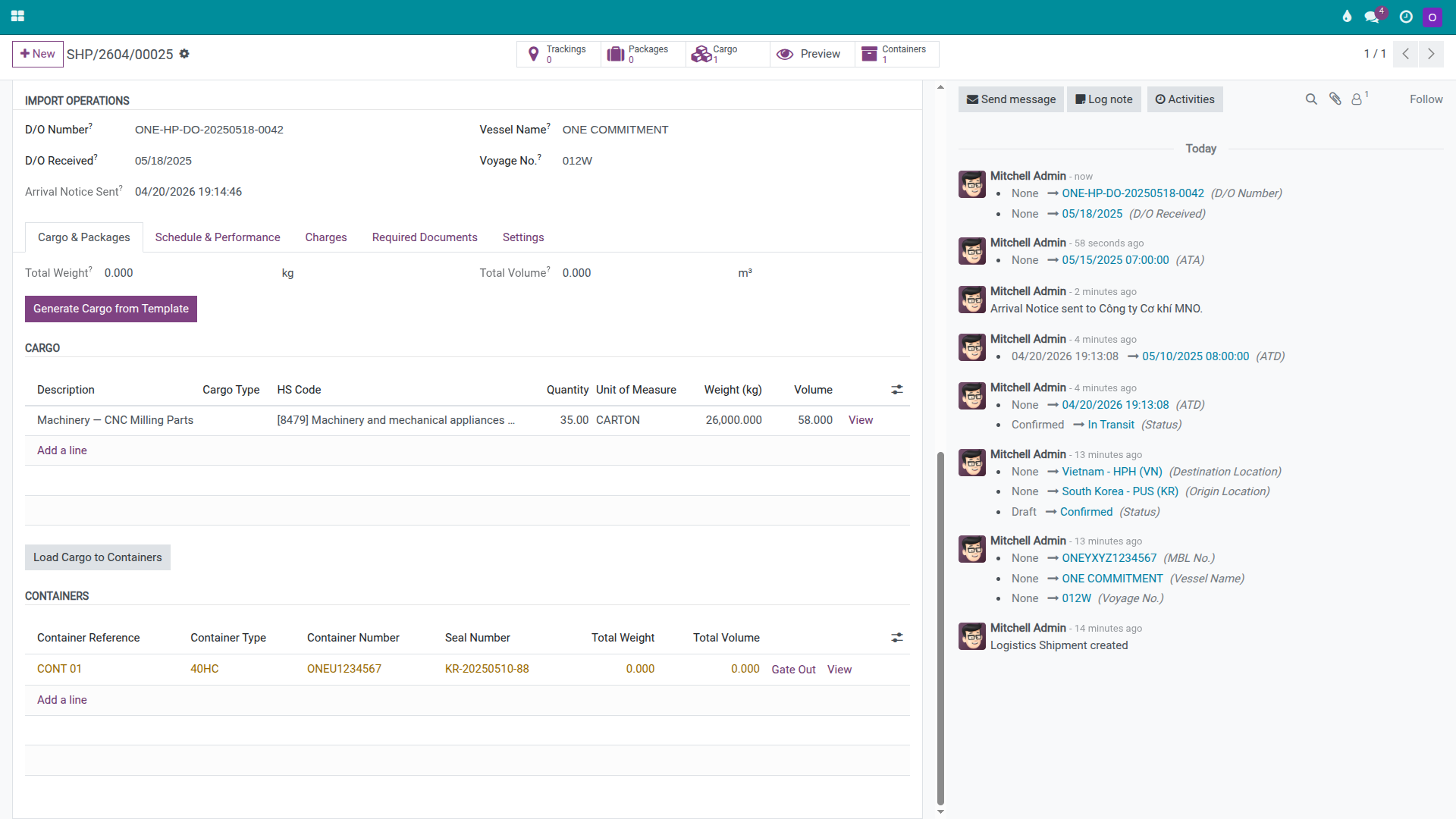
D/O Number: ONE-HP-DO-20250518-0042.
D/O Received At: 18/05/2025 10:30.
Add a Chatter note to create a permanent record:
"D/O received from ONE HP office — D/O number ONE-HP-DO-20250518-0042, Telex Release, fee USD 50"
Ghi chú
Customs clearance takes place outside Viindoo. The broker files the customs declaration in the government system and reports the result back to Operations for entry into the shipment. The purpose of recording it in Viindoo is to maintain a clear audit trail: vessel arrived, customs cleared, D/O received, container ready for pickup.
Mẹo
How to know Step 4 is correct:
The container is recorded as both Arrived and Customs Cleared, in that order.
The shipment has a D/O Number and a D/O received date.
The Chatter contains a note about the release type or D/O receipt.
The haulage team has a complete document set to present at the port gate.
Step 5: Pull the container and return the empty
Once the D/O is in hand and customs clearance is confirmed, Operations dispatches a truck to pull the container out of the port and deliver it to MNO's warehouse. After MNO unloads the cargo, the empty container must be returned to ONE's depot on time. This stage is where demurrage and detention risk is highest if milestones are not tracked closely.
In the Cargo & Packages tab, on the ONEU1234567 container line:
When the truck has pulled the container out of the port, click Gate Out.
When the empty container has been returned to ONE's depot, click Empty Returned.
Typical off-system activities at this stage:
Schedule the truck and book a port pickup slot.
Present the D/O, customs clearance documents, and company introduction letter at the gate.
Inspect the seal before leaving the port.
Unload at MNO's warehouse.
Return the empty container to ONE's depot and retain the Equipment Interchange Receipt (EIR) as proof of return.
Cảnh báo
Do not wait until end of day to update container milestones. For FCL import, the Gate Out timestamp and the Empty Returned timestamp directly affect demurrage (DEM) and detention (DET) calculations. If the system does not reflect actual events in near real time, Accounting can easily miss or under-calculate surcharges that are payable to the carrier.
Mẹo
How to know Step 5 is correct:
The container is recorded as Gate Out.
The container is recorded as Empty Returned after the depot confirms receipt.
If the company requires it, the EIR or empty-return document is uploaded in the Documents tab.
If any demurrage or detention charges arose, Accounting has been notified to add charge lines.
Step 6: Create invoices and bills, and verify gross profit
When operations are complete, Accounting finalises the financial picture for the shipment. The goals are to bill the consignee accurately, pay each vendor the right amount, and confirm that the actual gross profit on this import shipment matches the margin that was quoted.
On the shipment:
Review the Charges tab again.
If DEM, DET, D/O amendment fees, or inspection charges have arisen, add them before creating any financial documents.
Click Create Customer Invoice to generate a draft invoice for MNO.
Click Create Vendor Bill to generate draft vendor bills for ONE, the port, and any transport vendors.
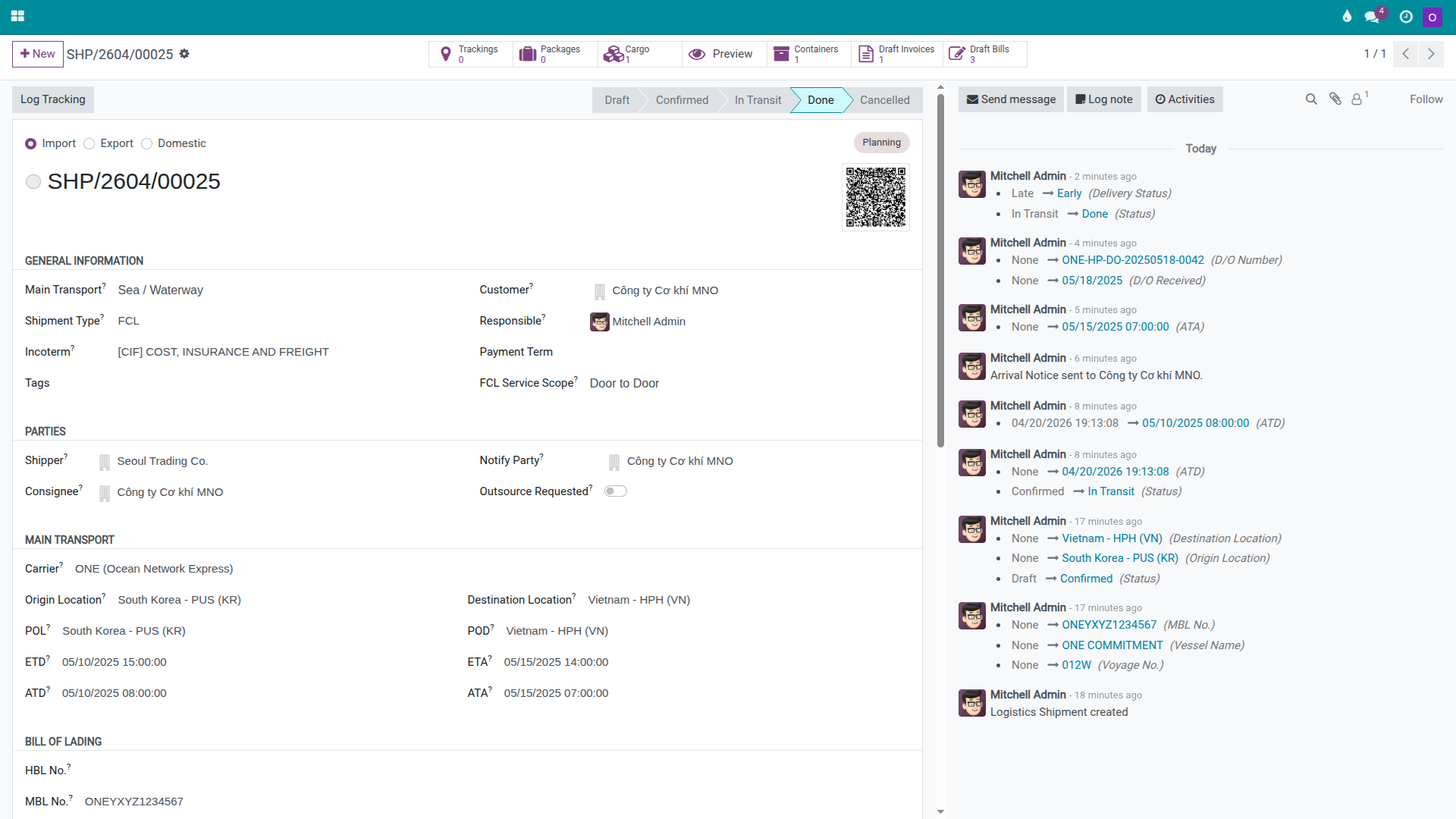
When the operations team confirms there are no outstanding tasks, click Set Done to close the shipment.
Mẹo
How to know Step 6 is correct:
The shipment is in Done status.
The Draft Invoices and Draft Bills smart buttons show counts greater than zero.
Gross Profit is close to the expected margin for this shipment.
All port charges and late-return costs have been added to Charges before the customer invoice is sent.
Quick decision table
Situation |
Best action |
What to avoid |
|---|---|---|
Shipment is a single full container to one consignee |
Use Sea FCL Import and manage the entire shipment on one record. |
Using the LCL flow or splitting one container across multiple shipments. |
Carrier sends Arrival Notice before ETA |
Forward it immediately to the consignee and broker so they can prepare import documents. |
Waiting until the vessel arrives before notifying anyone. |
D/O is in hand but the truck is not yet scheduled |
Schedule pickup while free time is still running. |
Leaving it until the free time is almost expired before dispatching the truck. |
DEM/DET charges have arisen |
Add them to Charges before creating the invoice or bill. |
Accumulating them outside the system until month-end and forgetting to update the shipment. |
Troubleshooting common issues
Arrival Notice was sent in the system but the consignee did not receive it
Symptom: The shipment shows an Arrival Notice timestamp but MNO says they received no notification.
Resolution: Check the actual email or Chatter message that was sent, then resend to the correct recipient. Use the Chatter to record the re-send if the company needs a clear audit trail.
D/O cannot be exchanged after the vessel arrives
Symptom: The vessel has berthed but ONE has not yet issued the D/O.
Resolution: Check three common causes in order: whether the Telex Release instruction has arrived at the destination office, whether the original B/L set is complete and presented, and whether any local charges or outstanding fees have been paid. Do not dispatch the truck before the D/O is ready.
Customs clearance is delayed and free time is running out
Symptom: The broker reports that the customs declaration is held, and the container is approaching the end of its free time.
Resolution: Update the consignee immediately, work with the broker to expedite the dossier, and notify Accounting early so a DEM charge line can be added if needed. The goal is to make sure that any cost that arises is tracked in the shipment, not discovered later.
Gross profit is far from the expected figure
Symptom: Gross Profit is significantly higher or lower than the quoted margin.
Resolution: Review the Charges tab, paying particular attention to Ocean Freight, Trucking, D/O Fee, THC Import, and any late-stage charges such as storage or empty-return fees. Discrepancies almost always come from a missing Cost Price on a vendor line or a forgotten surcharge added at the end of the journey.
Xem thêm
Related guides
FCL Export — FCL Export.
LCL Export (Consolidation) — LCL Export (Consolidation).
LCL Import (Deconsolidation) — LCL Import (Deconsolidation).