
How old is my stock?
Stock age is how long goods have been in the warehouse, counted from the day they arrived until today. Old stock ties up cash, takes up space and, for food or chemicals, runs out of shelf life. Viindoo answers the question in three ways, each needing a different setup.
Who |
Users with the Inventory Administrator access right. The last two ways also need accounting rights. |
App |
Inventory ‣ Reporting |
Way |
Answers |
What you must install or turn on |
|---|---|---|
Incoming Date on the Stock report |
Which goods arrived before a given date, and where they sit. |
Nothing beyond the Inventory app. |
Valuation report, pivot view |
How much quantity and value is left from each month of receipts. |
Inventory Valuation, costing method FIFO or Average Cost. |
Stock Age Report |
How much quantity and value sits in each age bucket: 0-30, 30-60, 60-90 days and beyond. |
The Stock Age Report app, on top of Inventory Valuation. |
Before you start
Install the Inventory app (see How to install Inventory and give users access to it).
The products you want to age must be storable products that track inventory.
Know how to filter and group records.
Which goods arrived before a given date?
Needs: nothing beyond the Inventory app.
Every piece of stock carries an Incoming Date. Go to , open the search panel and use the Incoming Date filter to keep only the stock that arrived in a chosen month, quarter or year, or pick Add Custom Filter for an exact range. Viindoo also adds the ready-made filters Today, Last 7 Days and Last 30 Days.
To see the oldest stock first, add Incoming Date as a custom group: the stock is then listed by the month it came in.
How the Incoming Date is set
Stock of the same product, in the same location, with the same lot, package and owner is held as one record. When new goods join that record, Viindoo keeps the oldest incoming date of the two, so the date always tells you how long the oldest goods in that spot have been there.
This is also the date the FIFO and FEFO removal strategies use to pick which goods leave first.
How much value is left from each month of receipts?
Needs: Inventory Valuation. Install the Accounting app, then in set the product categories you care about to a costing method of First In First Out (FIFO) or Average Cost (AVCO). Standard Price keeps no layer-by-layer history, so it cannot be aged.
Go to and switch to the pivot view. Each receipt, delivery and adjustment leaves a valuation layer; the measures Remaining Quantity and Remaining Value show what is still left of that layer. With the columns grouped by month, a value still sitting under an old month is stock that has not moved since.
This is a rough age view: it groups by the month the layer was created, not by a number of days.
How much stock sits in each age bucket?
Needs: the Stock Age Report app. Install
Stock Age Report (to_stock_age_report)
on top of Inventory Valuation. It reads the same valuation layers, so the same rule applies:
products costed at Standard Price are not covered.
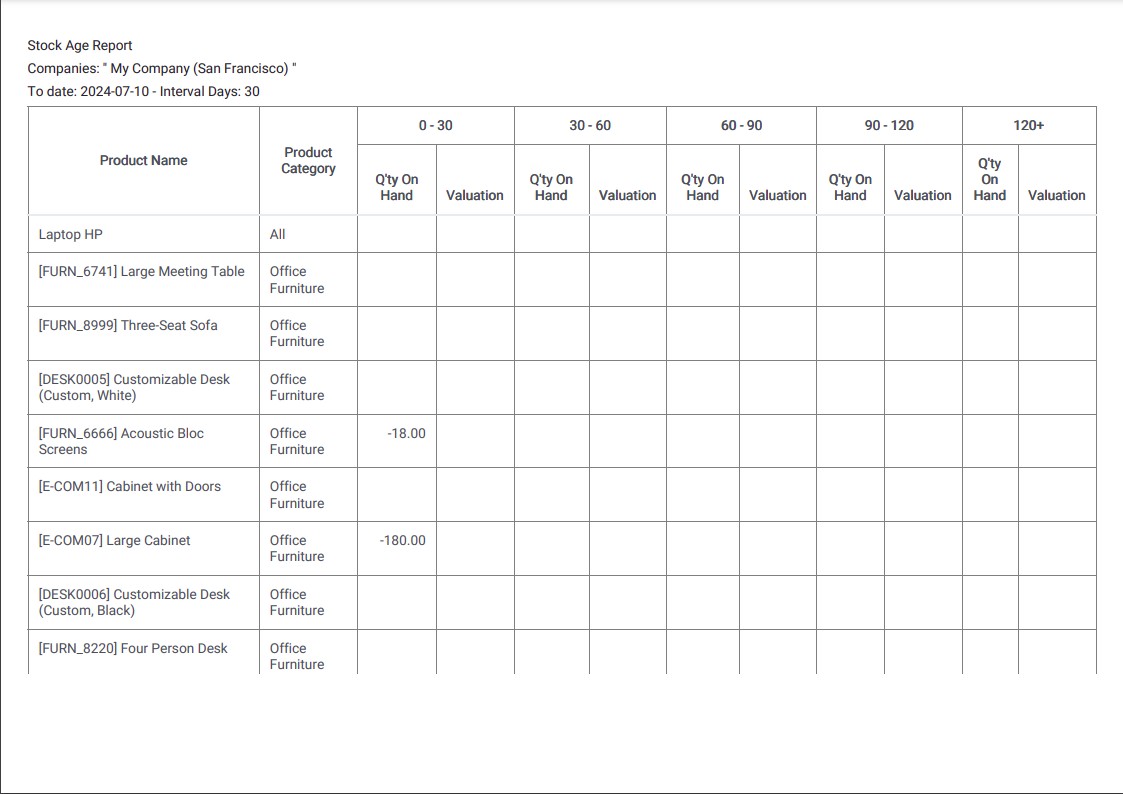
Go to . The report shows one line per product and one pair of columns per age bucket: Q’ty On Hand and Valuation.

Set up the buckets
Open the Period filter at the top:
Option |
What it does |
|---|---|
To Date |
The day the age is counted back from. Leave it empty for today. |
Period Length |
How wide each bucket is, in days. 30 gives monthly buckets, 7 gives weekly ones. |
Number of periods |
How many buckets to show. The last one is open-ended. |
With a length of 30 and 5 periods you get the columns 0-30, 30-60, 60-90, 90-120 and 120+. Both numbers must be greater than zero.
Narrow the report down
Product keeps one product or one product category.
Warehouse and Location keeps one warehouse, or one location inside it.
Companies picks the company in a multi-company database.
Print and export
Print PDF gives a printable copy and Export (XLSX) a spreadsheet, both with the buckets you set.
What should I see when it works?
The oldest goods you know you have appear in the right-hand buckets, and the total of every bucket of a product matches the quantity on hand of that product on the Stock report.
Common problems
Problem |
What to do |
|---|---|
Stock Age Report is not in the Reporting menu. |
The app is not installed, or Inventory Valuation is not set up. Install
|
A product with stock on hand shows nothing in any bucket. |
Its product category is costed at Standard Price. Change the costing method to FIFO or Average Cost, or age it with the Incoming Date filter instead. |
Every quantity falls in the 0-30 bucket after a data import. |
Opening stock entered today carries today’s incoming date. Enter opening stock with a past date so the age starts from the real arrival date. |
A bucket shows a negative quantity. |
The stock of that product went negative at some point. Run an inventory adjustment to bring it back to the real quantity. |