
Manage attendance data
Viindoo keeps two levels of attendance data. Attendance Data lists every punch received from the attendance machines. Attendances pairs these punches into one record per check in and check out, then compares each record with the working schedule of the employee: how late the employee came, how early they left and how many hours count as valid.
Who |
Users with the Attendances ‣ Administrator access right. Officers read and change the attendances of the employees they approve. |
App |
Attendances |
Before you start
Each employee has Working Hours and a Timezone in the Work Information tab, see Check-in/check-out management based on the work schedule.
To receive punches from machines, connect them first, see Biometric attendance device intergration.
Where do I find the punches of the attendance machines?
Go to Attendances ‣ Attendance Machines ‣ Attendance Data. Each line is one punch.
Column |
What it shows |
|---|---|
Timestamp |
The date and time of the punch. |
Machine User |
The user stored in the machine who punched. |
Employee |
The employee linked to the machine user. |
Attendance Machine |
The machine that recorded the punch. |
Each punch also shows what it means, read from its status code, for example [Normal Attendance] Check-in. See the status codes.
How do punches become attendances?
Every 30 minutes, a scheduled action reads the new punches of each employee in time order, activity by activity (normal attendance, overtime, break):
A check-in starts a new attendance when the previous one is closed.
A check-out closes the open attendance.
When an employee punches in several times in a row, the first check-in is kept. A check-out without an open attendance is not used.
How do I read the late, early and valid hours?
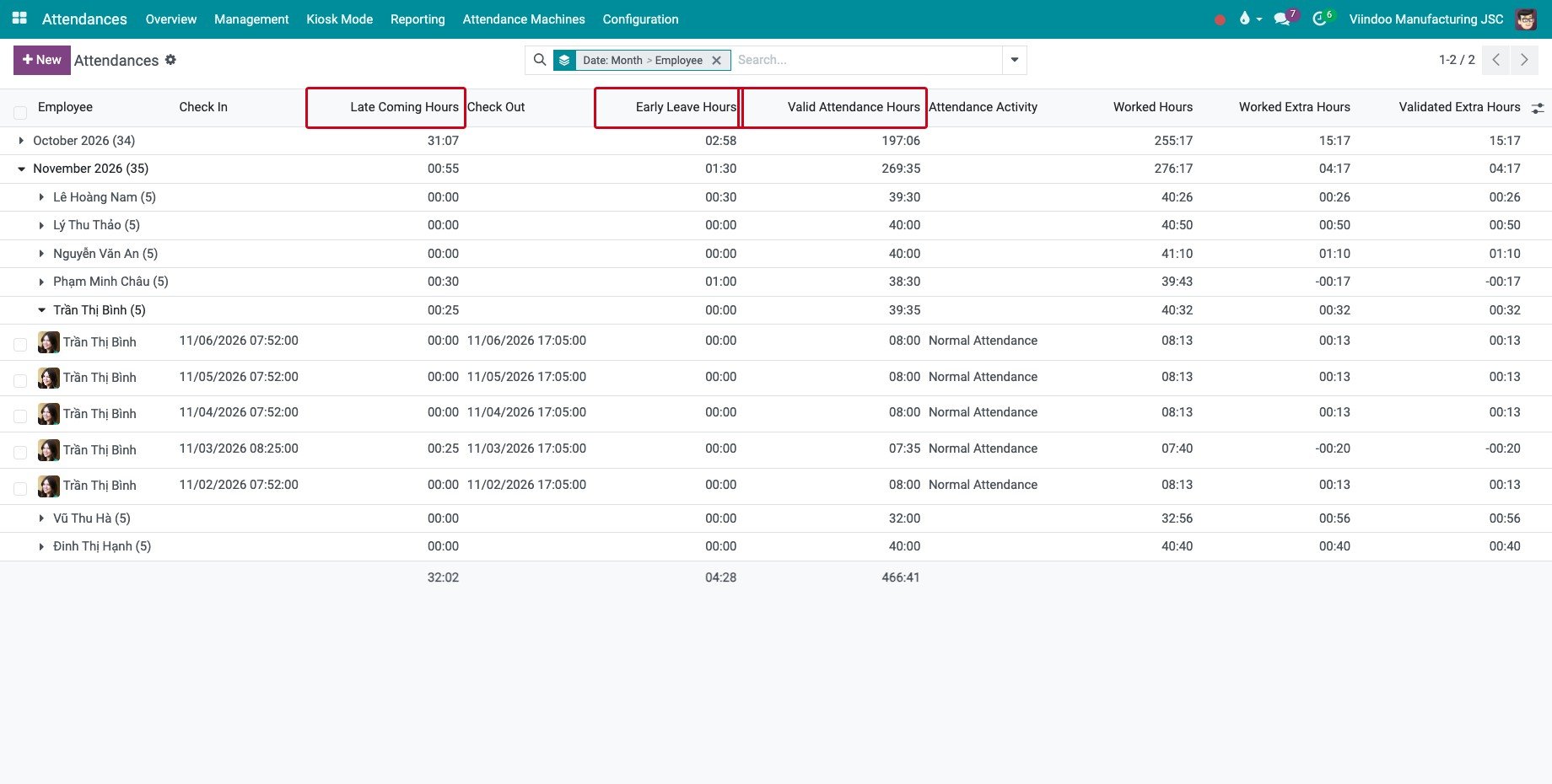
Go to Attendances ‣ Overview. The attendances are grouped by month and by employee; open a group to see its lines.
![The late coming, early leave and valid hours of the attendances of an employee]()
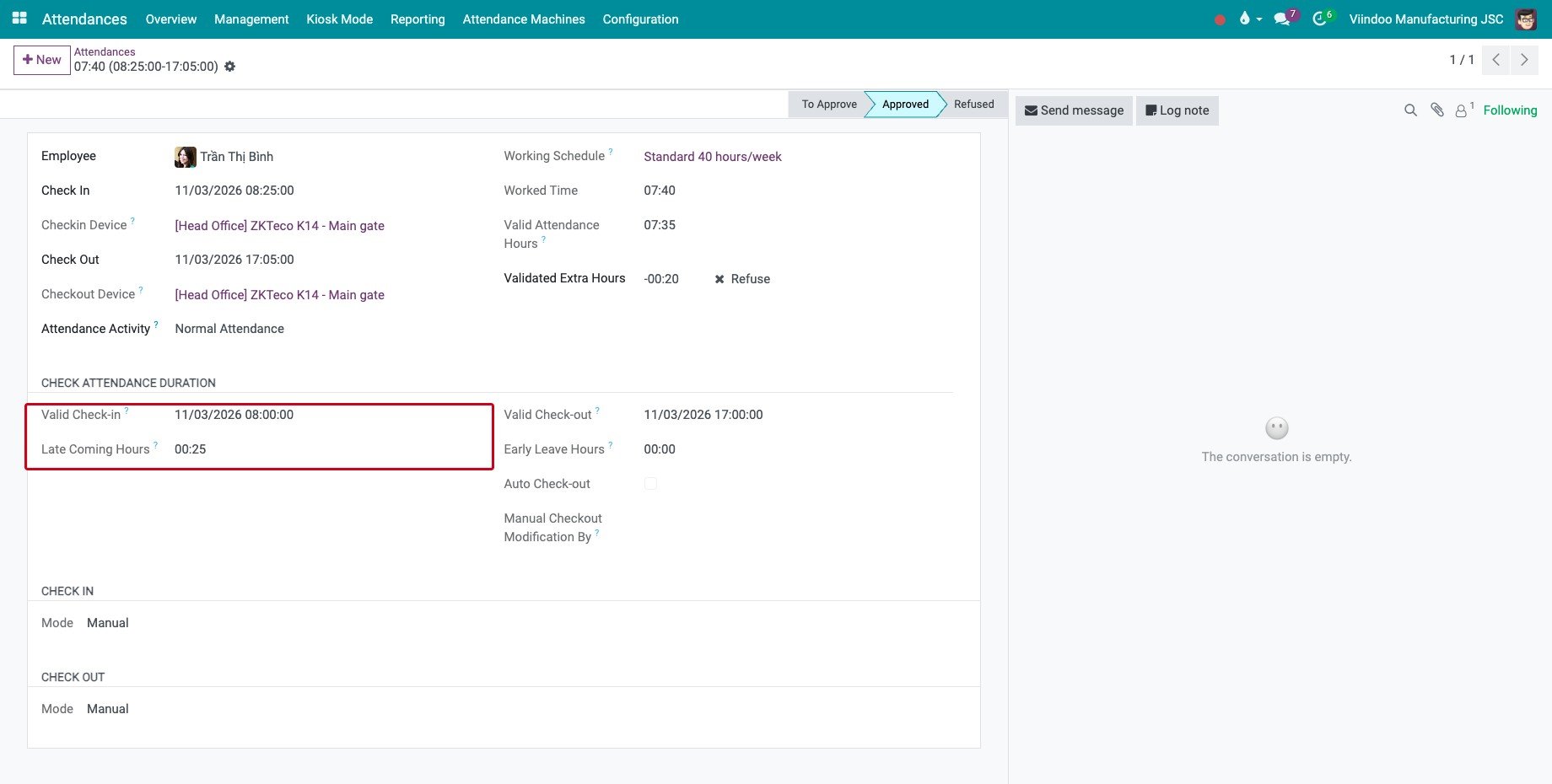
Click an attendance to open it. The Check attendance duration section shows how the hours were computed.
![An attendance with its valid check-in and its late coming hours]()
Field |
How it is computed |
|---|---|
Valid Check-in |
The start of the scheduled work period in which, or before which, the employee checked in. |
Late Coming Hours |
Check In minus Valid Check-in, when the employee checked in after the start. |
Valid Check-out |
The end of the last scheduled work period that the attendance reaches. |
Early Leave Hours |
Valid Check-out minus Check Out, when the employee checked out before the end. |
Valid Attendance Hours |
The scheduled working hours between Check In and Check Out, without time off. A break outside the scheduled periods, such as lunch, is not counted. |
Worked Hours |
Check Out minus Check In. |
Auto Check-out |
Ticked when the check out was filled automatically. |
For example, the schedule of Trần Thị Bình starts at 08:00. She checked in at 08:25, so her Late Coming Hours are 00:25 and her Valid Attendance Hours are 07:35 instead of 08:00.
How do I recompute or close attendances?
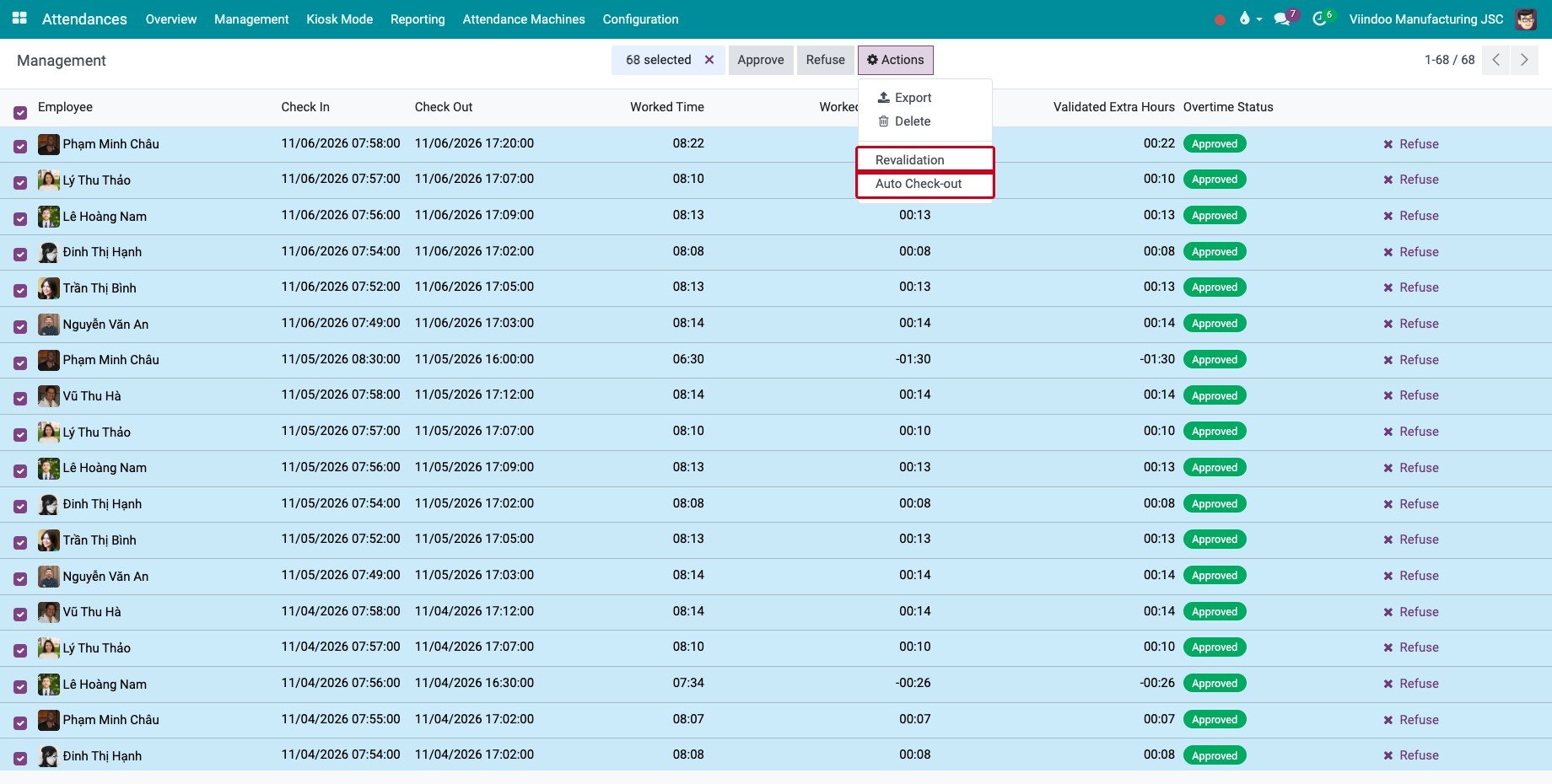
Go to Attendances ‣ Management, remove the default filters, select the attendances, then click Actions:
Revalidation recomputes the valid check-in, the valid check-out and the hours, for example after you change the working schedule or the time zone of an employee.
Auto Check-out fills the missing check out with the Valid Check-out, for the attendances that are still open more than Auto Checkout Delay Hours after the end of the scheduled work. Set this delay in Attendances ‣ Configuration ‣ Settings; it is 10 hours by default.
Note
To close open attendances without a click, an administrator activates the scheduled action HR Attendance - Auto Checkout. It is not active by default.
Common errors
Problem |
What to do |
|---|---|
A punch is in Attendance Data but no attendance was created. |
Link the machine user to an employee, see Link Attendance device users with employees in Viindoo system. The punch is used at the next synchronization. |
Valid Attendance Hours stay at 0. |
The attendance has no check out, or the employee has no working schedule on that day. |
All attendances of an employee are late by the same number of hours. |
The time zone of the employee or of the working schedule is wrong. Correct it, then use Revalidation. |
Attendance Machines is not in the menu. |
The menu is for users with the Attendances ‣ Administrator access right. |
Next steps
Check-in/check-out management based on the work schedule: use the attendances in the payslips.
Attendance Analysis Reports: analyse the hours of a period.
See also
Related articles
Optional modules