
How to create a lead from a live chat conversation
While you chat with a website visitor in Live Chat, type /lead followed by a title in the
conversation, for example /lead 10 electric motorbikes for a delivery fleet. Viindoo creates
a lead in CRM with the whole conversation in its notes, the customer if they are known, and
the source Livechat, so the request is not lost when the chat ends.
Who |
Live chat operators (they also need a Sales access right to open the lead). |
App |
Live Chat, Website and CRM |
Before you start
Install Live Chat, Website and CRM (see How to install, upgrade and uninstall apps and modules). The module that links Live Chat and CRM is installed with them.
A live chat channel is shown on your website and you are one of its operators.
How do I create a lead from a chat?
Answer the visitor in Discuss (or in the chat window that opens when a visitor writes).
When the visitor has a real need, type
/leadthen a space and a title for the lead, and press Enter.![The /lead command typed in a live chat conversation]()
Viindoo answers in the chat (only you see it) Created a new lead: with a link. Click the link to open the lead.

Typing /lead without a title only shows how to use the command.
What is saved in the lead?
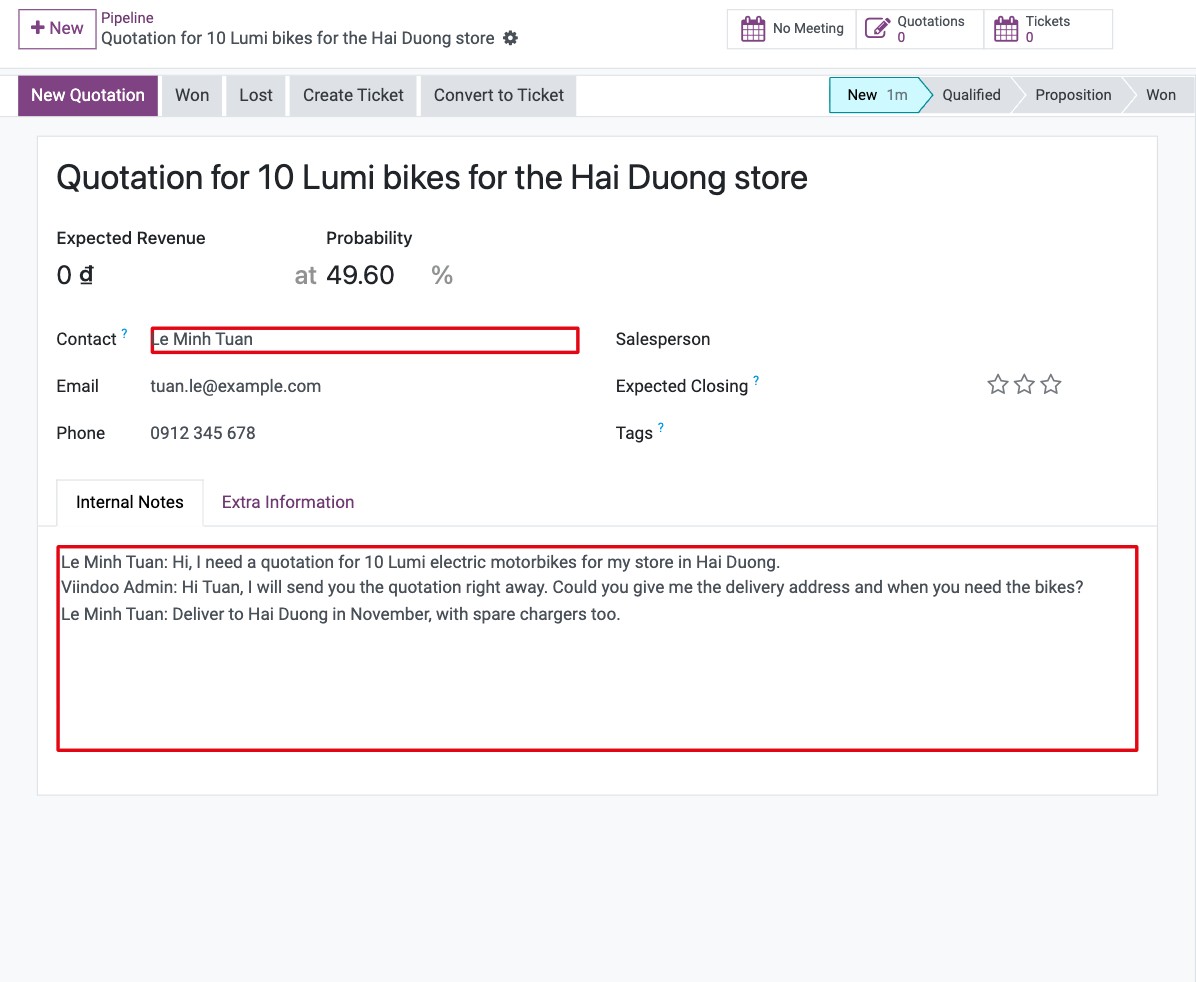
Field |
Value |
|---|---|
Title |
The text you typed after |
Customer |
The visitor, if they are signed in or already known as a contact; empty for an anonymous visitor. |
Internal Notes |
The conversation so far. |
Source (in Extra Info) |
Livechat, to compare this channel in reports. |
Referred By |
The operator who created the lead. |
Salesperson and Sales Team |
Empty: assign them yourself or let a sales manager do it. |
The lead is a lead if the Leads setting is on, otherwise an opportunity.
Common errors
Problem |
What to do |
|---|---|
|
The module linking Live Chat and CRM is not installed: install CRM and Live Chat. |
You cannot open the lead from the link. |
Your user has no Sales access right. |
The lead has no customer. |
The visitor was anonymous. Ask for their email in the chat and fill in the contact on the lead. |
Next steps
How to record a lead or an opportunity: complete and qualify the lead.
How to convert a lead into an opportunity and assign a salesperson