
How to invoice a project by milestones
Use milestone invoicing when the customer pays a share of the price at each stage of a project, for example 30% at design approval and 70% at delivery. Set the service product’s Invoicing Policy to Based on Milestones; after the sales order is confirmed, open its Milestones, give each milestone a Quantity (%), and tick Reached when a stage is accepted. The reached percentage becomes the delivered quantity of the order, which you then invoice with Create Invoice.
Who |
A Sales user sells and invoices; a Project user marks milestones as reached. |
App |
Sales, Project, Invoicing |
Before you start
Install Project, then tick Milestones in Project ‣ Configuration ‣ Settings. Without this setting, Based on Milestones is not offered on products.
Know how to create a product and a sales order.
How do I set up a milestone product?
Go to Sales ‣ Products ‣ Products and create or open the service.
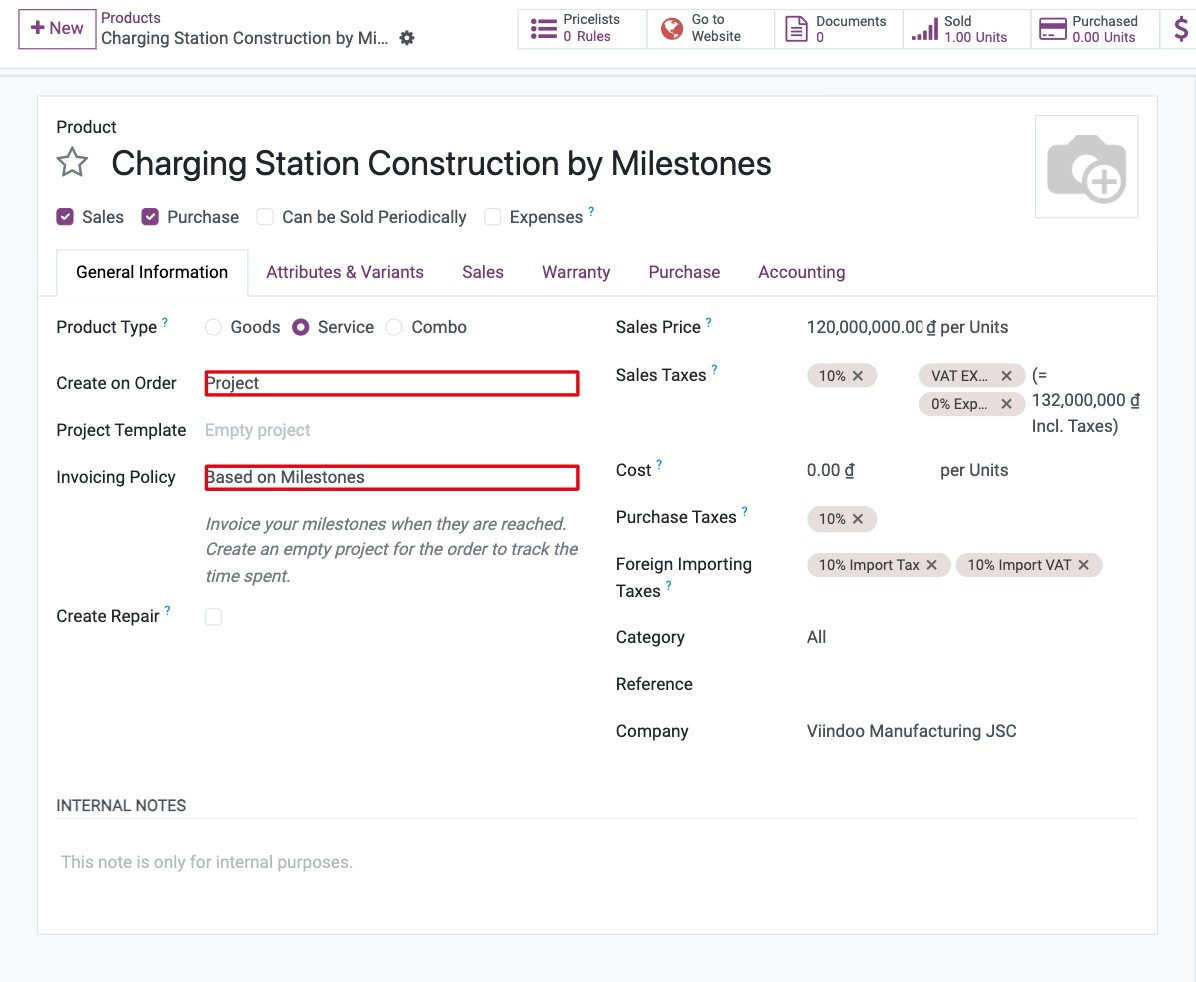
On the General Information tab, set Product Type to Service and Invoicing Policy to Based on Milestones.
In Create on Order, choose what Viindoo creates when the order is confirmed (see the table below).
![Service product with the Based on Milestones invoicing policy and the Create on Order options]()
Create on Order |
What happens when the order is confirmed |
|---|---|
Nothing |
Nothing is created. Link the order line to milestones of an existing project yourself. |
Task |
A task is created in the Project you choose on the product. |
Project & Task |
A project (from the Project Template, if set) and a task are created. |
Project |
A project is created from the Project Template, without a task for the line. |
Tip: describe the milestones in the product’s Sales Description (tab Sales) so they are printed on the quotation.
How do I invoice the milestones?
Create the quotation with the milestone product and click Confirm. The project or task is created.
On the order, click the Milestones smart button. Create one milestone per stage with its Quantity (%) (for example 30 and 70) and Deadline.
![Milestones of a sales order with their percentage and deadline]()
When a stage is accepted by the customer, tick Reached on its milestone. The Delivered quantity of the order line increases by that percentage.
![Milestone marked as reached]()
On the order, click Create Invoice (Regular invoice) and confirm the invoice. It invoices the reached share; the Invoiced column is updated.
![Order line with the delivered and invoiced quantities after invoicing a milestone]()


Repeat for each milestone. When all milestones are reached, the delivered quantity equals the ordered quantity and the last invoice closes the order. The Invoices smart button lists all milestone invoices.
Common errors
Problem |
What to do |
|---|---|
Based on Milestones is not in the Invoicing Policy list. |
Tick Milestones in Project ‣ Configuration ‣ Settings. |
The Milestones button is missing on the order. |
The order is not confirmed yet, or no project was created or linked (Create on Order is Nothing). Link the order to a project, or change Create on Order. |
Cannot create an invoice. No items are available to invoice. |
No milestone is marked Reached yet. |