
How to install, upgrade and uninstall apps and modules
To add a feature to Viindoo, open Apps, find the app or module and click Activate. To get the latest version of an installed module, open its menu (⋮) and click Upgrade; to remove it, click Uninstall. Installing also installs the modules it depends on, and uninstalling also removes the modules that depend on it and permanently deletes their data.
Who |
Users with the Administrator (Settings) access right. Other users do not see the Activate, Upgrade and Uninstall buttons. |
App |
Apps |
Before you start
You have a Viindoo instance and sign in as an Administrator.
Warning
Modules depend on each other. Activating a module also installs the modules it needs.
Uninstalling deletes data. The modules that depend on the one you remove are uninstalled too, and every document listed under Documents to Delete is deleted permanently. Try it on a copy of your database first, or contact us.
How do I find an app or a module?
From the home screen, open Apps.
The list starts with the Apps filter, which shows only main applications. To find a smaller module, remove the Apps filter in the search bar and type the module name.
![Apps filter in the search bar of the Viindoo Apps menu, with other filters available]()

Use the Installed filter to see what is already installed.
How do I install an app or a module?
One at a time: click Activate on the app card.
![App cards in the Apps menu with the Activate button]()
Several at once: switch to the list view, tick the modules to install (modules not installed yet are shown in blue) and click Activate above the list.
![Apps list view with two modules selected and the Activate button]()

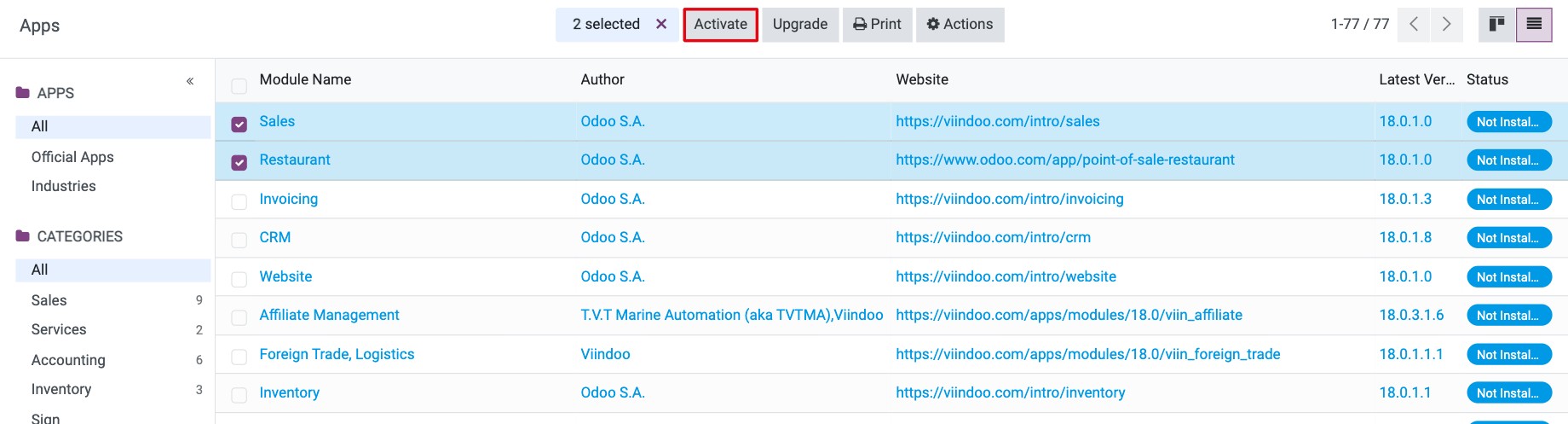
When the installation is finished, the screen reloads and the new app appears on the home screen.
How do I upgrade an installed module?
Upgrade a module after Viindoo has released a new version of it, so that its latest features and fixes are loaded.
In Apps, find the module (use the Installed filter).
Click ⋮ on its card and choose Upgrade.
![Upgrade in the menu of an installed app card]()
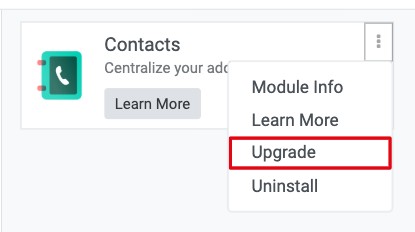
How do I uninstall an app or a module?
In Apps, click ⋮ on the card of the installed module and choose Uninstall.
![Uninstall in the menu of an installed app card]()
Read the Uninstall module window carefully:
Apps to Uninstall lists every module that will be removed with it.
Documents to Delete lists the types of documents and how many records will be deleted.
![Uninstall module window with Apps to Uninstall and Documents to Delete]()
Click Uninstall to confirm, or Discard to cancel.


Read the warning above before you confirm.
Common errors
Problem |
What to do |
|---|---|
There is no Activate button on the card. |
You are not an Administrator, or the module is already installed (the card shows Installed). |
I cannot find a module by name. |
Remove the Apps filter from the search bar; it hides modules that are not main applications. |
An app disappeared after I uninstalled another module. |
It depended on the module you removed and was uninstalled with it. Activate it again; data that was deleted cannot be restored. |
Next steps
How to add languages and change the interface language: add languages after installing your apps.
How to turn on developer mode (debug mode): show technical settings of the installed apps.
How to connect Viindoo to your own mail servers: set up email.