
How to create leads automatically from incoming emails
Give a sales team an email address (an email alias, for example sales@yourcompany.com): every email a customer sends to it becomes a new lead, or an opportunity if the team does not use leads, assigned to that team. The email text is kept in the record, so the salesperson can reply from Viindoo right away. Set the alias in CRM ‣ Configuration ‣ Sales Teams, on the team.
Who |
A Sales Administrator sets the alias; salespeople then work on the records created. |
App |
CRM |
Before you start
Your Viindoo database receives emails for your domain: an alias domain is set in Settings ‣ General Settings, or an incoming mail server is configured. See How to connect Viindoo to your own mail servers.
The sales team exists. See How to set up sales teams and sales regions.
How do I give a sales team an email address?
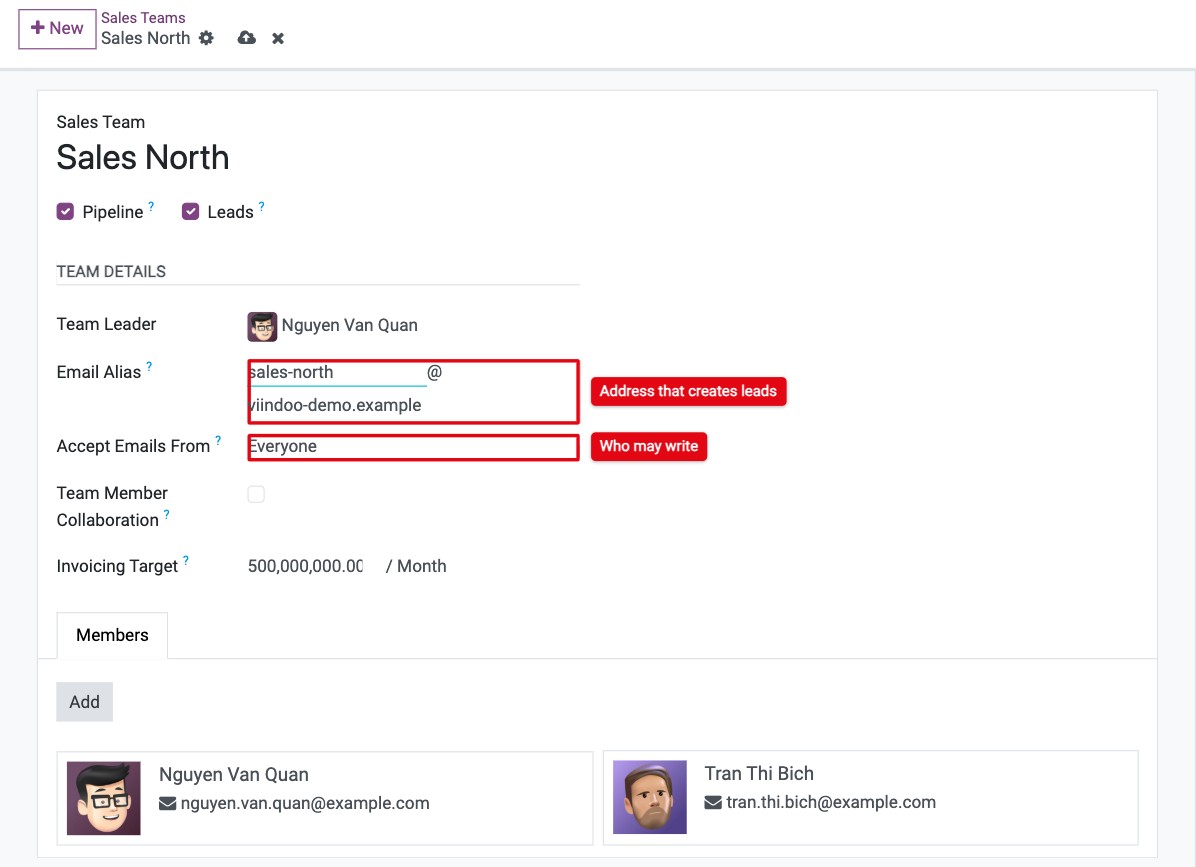
Go to CRM ‣ Configuration ‣ Sales Teams and open the team, for example Sales North.
In Email Alias, type the part before @, for example sales-north, and choose the domain after @.
In Accept Emails From, choose who can create records by writing to this address (see the table below).
![Email Alias and Accept Emails From fields on a sales team in Viindoo CRM]()
Leave the form or click the save icon (cloud).
Accept Emails From |
Who can create a lead by email |
|---|---|
Everyone |
Any sender. Use it for a public address printed on your website or catalogues. |
Authenticated Partners |
Only senders whose email already belongs to a contact in Viindoo. |
Followers only |
Only followers of the team. Rarely used for sales. |
Senders who are not allowed get an automatic reply saying that their message could not be accepted.
The Email Alias field only appears if the team uses Pipeline or Leads (the checkboxes under the team name).
What happens when a customer sends an email?
A new record is created in the sales team:
a lead in CRM ‣ Leads if the team uses Leads, otherwise an opportunity in the first stage of the team’s pipeline;
the email subject becomes the title, the sender’s address goes to Email, and the email body is posted in the chatter, with its attachments;
if the sender’s email belongs to an existing contact, that contact is set as the Customer.
Replies from the salesperson, sent from the chatter, and the customer’s answers stay in the same record.
Can an incoming mail server create leads too?
Yes. If you read a mailbox with an incoming mail server instead of an alias, set its Create a New Record field to Lead/Opportunity (see How to connect Viindoo to your own mail servers). Every email in that mailbox then creates a lead, without a sales team.
Common errors
Message or problem |
What to do |
|---|---|
Alias … is already linked with … |
Another record already uses this address. Choose another alias. |
You cannot use anything else than unaccented latin characters in the alias address … |
Remove accents and special characters, for example sales-north instead of bán-hàng. |
The customer receives The message below could not be accepted by the address … |
Accept Emails From is not Everyone and the sender is not allowed. Change the option or create the sender as a contact. |
No lead is created and the customer gets no reply. |
The email does not reach Viindoo. Check the alias domain or the incoming mail server. |
Next steps
How to record a lead or an opportunity: what to fill in on the new lead.
How to create leads from the contact form of your website: collect requests from your website.