
How to invoice a down payment on a sales order
To ask for a deposit, open the confirmed sales order, click Create Invoice, choose Down payment (percentage) or Down payment (fixed amount), enter the amount and click Create Draft. Viindoo creates the down payment invoice and adds a Down Payments section to the order. When you invoice the rest with Regular invoice, the down payments are deducted automatically.
Who |
A Sales user with access to invoices. |
App |
Sales, Invoicing |
Before you start
Confirm the sales order. A down payment can be invoiced before anything is delivered.
How do I invoice a down payment?
On the confirmed sales order, click Create Invoice.
Choose Down payment (percentage) and enter the percentage in Down Payment (for example 30), or choose Down payment (fixed amount) and enter the amount in Down Payment Amount (Fixed). Click Create Draft.
![Create invoice window with Down payment (percentage) and a 30 percent down payment]()
Check the draft invoice and click Confirm, then register the payment when the customer pays.

The order now has a Down Payments section with one line per down payment. Its Invoiced column shows what has been invoiced as down payments.

You can invoice several down payments, for example 30% at signature and 20% before delivery.
How do I invoice the rest and deduct the down payments?
Click Create Invoice, keep Regular invoice and click Create Draft. Already invoiced shows the down payments invoiced so far. If a down payment invoice is still a draft, the window warns you that the new invoice will deduct it too.
![Create invoice window with Regular invoice selected and the amount already invoiced]()
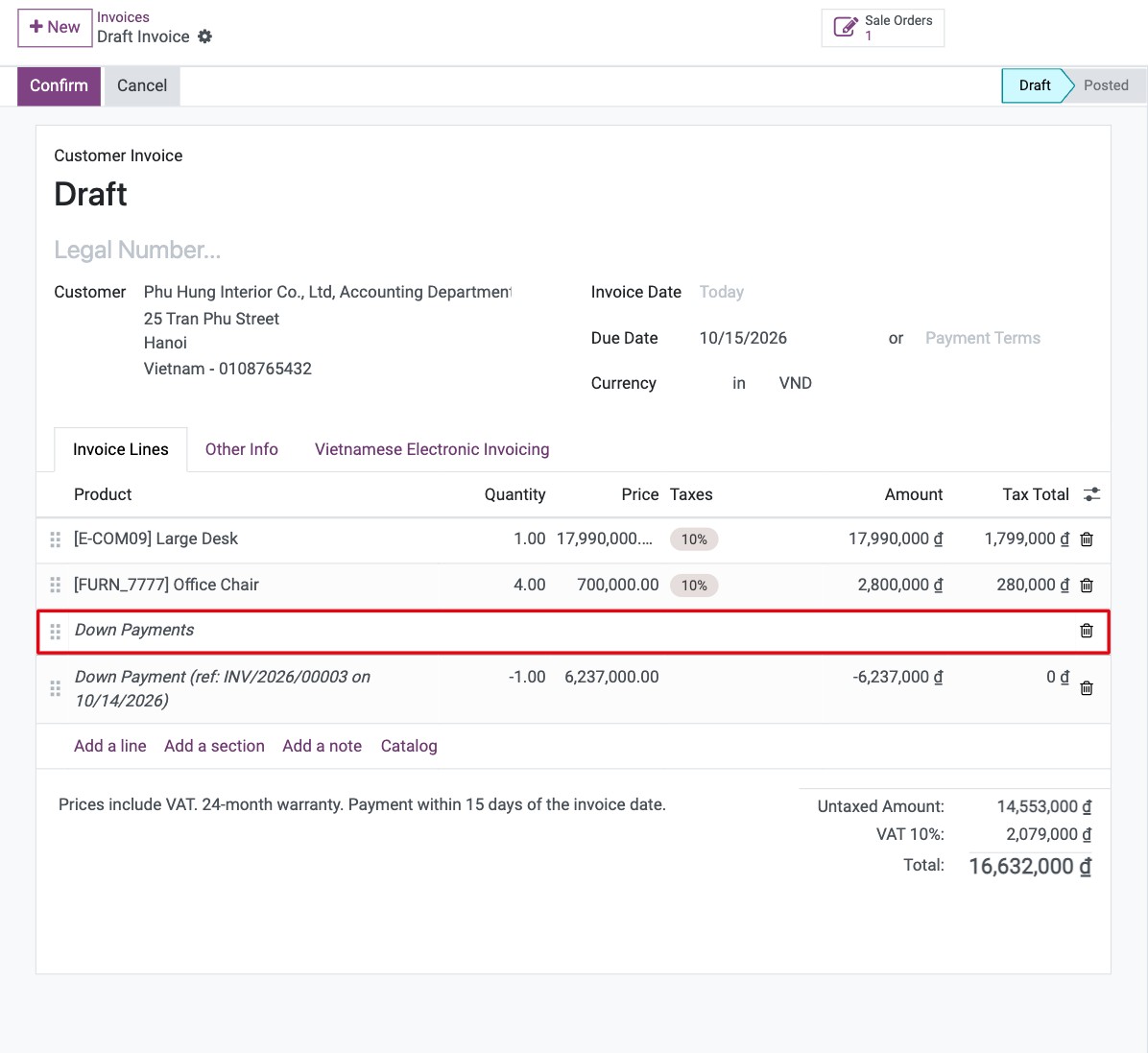
The final invoice lists the products and, under Down Payments, the down payments with a negative quantity. Its total is the order total minus the down payments.
![Final invoice with the down payments deducted]()

When everything is invoiced, Create Invoice is no longer highlighted on the order.
Which account do down payments use?
Down payment lines use the Downpayment Account of the product category (set from your chart of accounts), otherwise the income account of the products. Check it with your accountant in Invoicing ‣ Configuration ‣ Management ‣ Product Categories if down payments must go to a customer advance account.
Common errors
Problem |
What to do |
|---|---|
A down payment invoice is deducted although the customer has not paid it. |
The final invoice deducts every down payment invoiced on the order, even unpaid or draft ones. Register the payment of the down payment invoice, or cancel it before invoicing the rest. |
The down payment options are missing in the window. |
Several orders are selected. Down payments are invoiced one order at a time. |