
Post work in progress entries at period end
At the end of a period, some manufacturing orders are still running: their components have left stock and their work centers have worked, but no finished product is in stock yet. Post WIP Accounting Entry moves that value into the work in progress account on the closing date and reverses it on the next day, so the balance sheet of the period shows the unfinished production.
Who |
Cost accountants and chief accountants with the Accounting ‣ Bookkeeper access right of the Accounting & Finance app (or Show Full Accounting Features). |
App |
Manufacturing, Invoicing |
Before you start
Install the Advanced MRP Accounting module. On a Vietnamese chart of accounts, Manufacturing WIP Accounting - Vietnam installs itself, see Manufacturing accounting under Circular 99 and 133.
The products of the components use automated inventory valuation, see Production costs configuration.
The settings below need the Invoicing ‣ Administrator access right.
The example is an order of five Oak stools, still in progress on the closing date: ten Oak boards (category Raw materials, account 152) and 24 Stool screws (category Purchased goods, account 156) are recorded as used, and the work centers have run for part of the order.
Which accounts does the work in progress entry use?
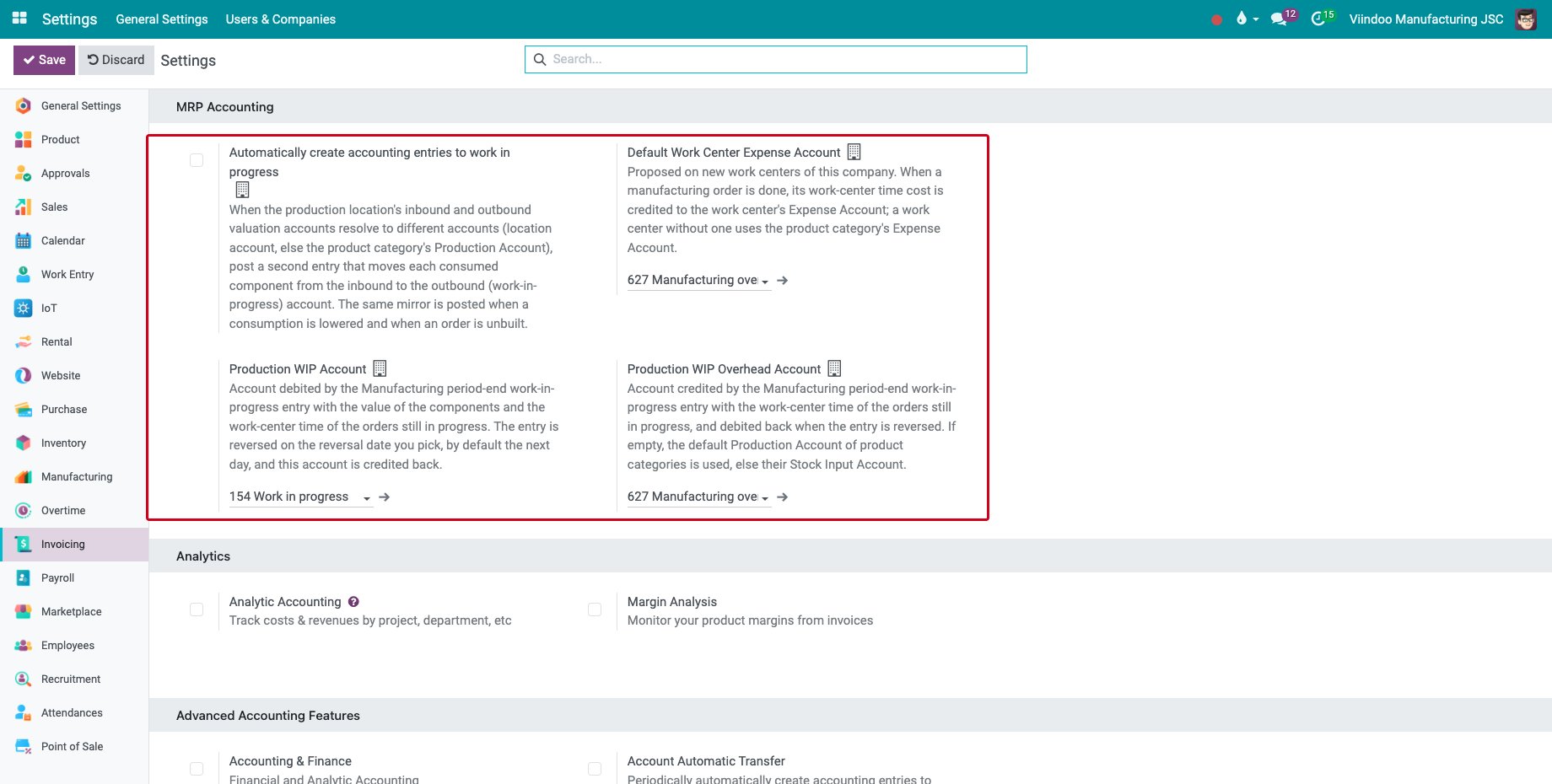
Go to Invoicing ‣ Configuration ‣ Settings, section MRP Accounting.
Setting |
What it does |
|---|---|
Production WIP Account |
Debited by the period-end entry with the value of the components and the work center time of the orders still in progress, and credited back by the reversal. |
Production WIP Overhead Account |
Credited with the work center time of the orders in progress. When it is empty, the Production Account of the product categories is used, else their Stock Input Account. |
Automatically create accounting entries to work in progress |
When the inbound and outbound accounts of the production location are different, each consumed component is also moved from the inbound to the outbound (work in progress) account. |
Default Work Center Expense Account |
Proposed on the new work centers, see Manufacturing accounting under Circular 99 and 133. |
How do I post the work in progress at the end of the period?
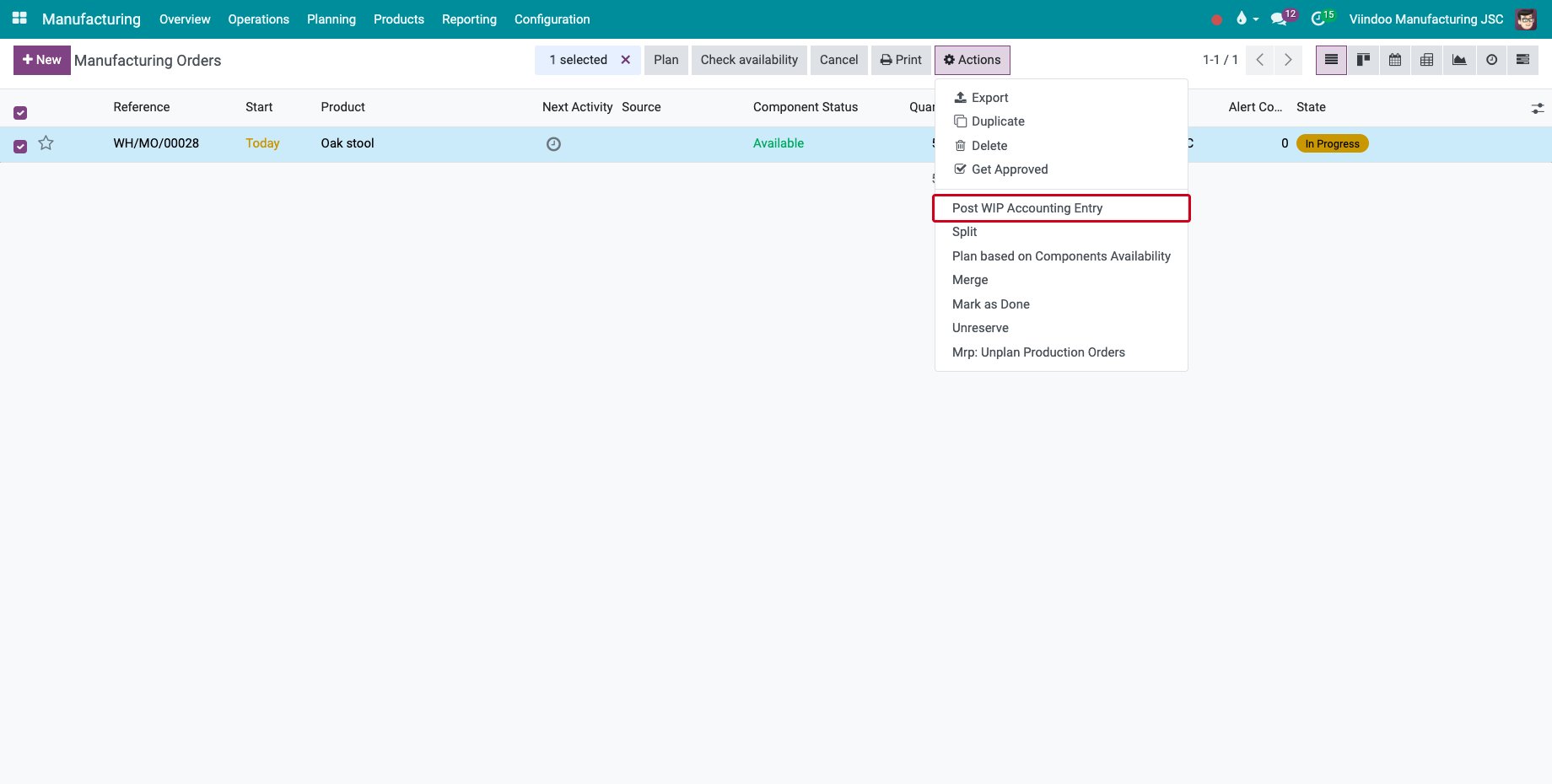
Go to Manufacturing ‣ Operations ‣ Manufacturing Orders, select the orders still open and click Actions ‣ Post WIP Accounting Entry. Orders that are confirmed, in progress or waiting to be closed are taken; the others are ignored.
![The Post WIP Accounting Entry action of the manufacturing orders]()
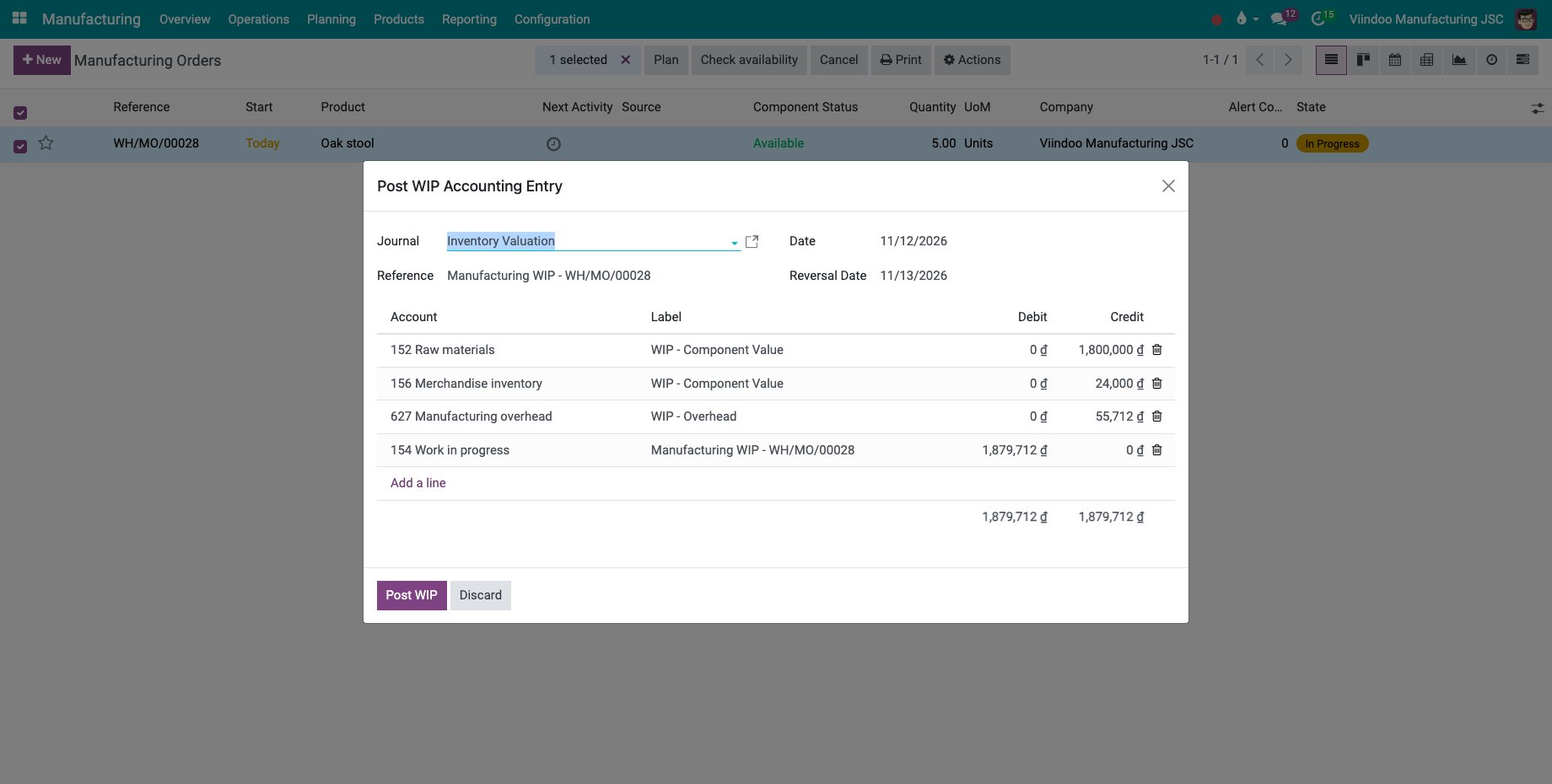
Check the Journal, the Reference, the Date of the entry (the last day of the period) and the Reversal Date, which must be after it and is the next day by default.
![The lines of the work in progress entry before posting]()
Line
Amount
WIP - Component Value
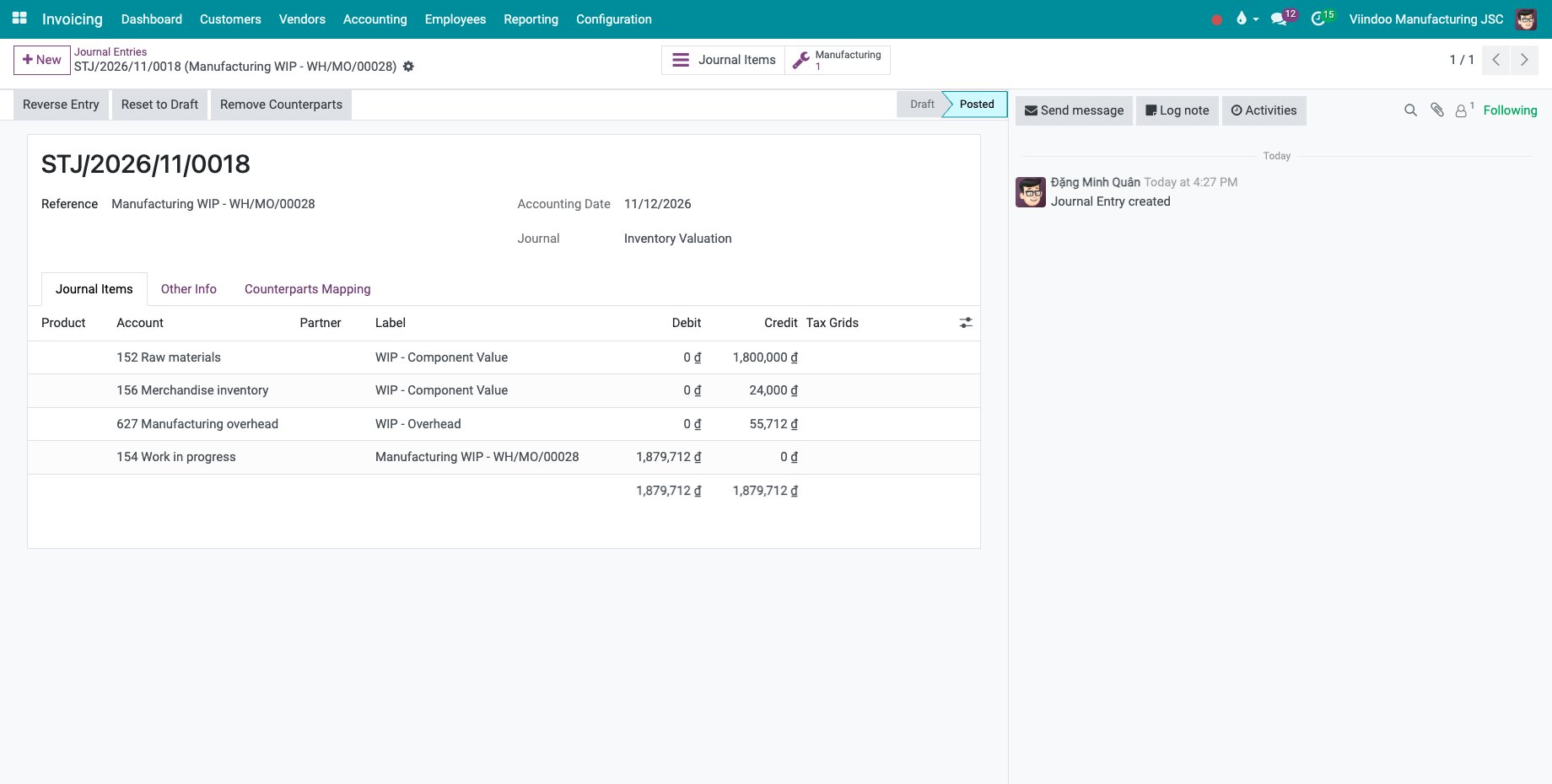
Credit: the components recorded as used by the date, at their standard cost (the lot cost for a product valued by lot). On a Vietnamese chart of accounts there is one line per stock account of the component categories, here 152 and 156.
WIP - Overhead
Credit: the cost of the work center time of the orders by the date.
Manufacturing WIP
Debit on the Production WIP Account: the total of the credits.
Change a line when needed; the total debit must equal the total credit. Click Post WIP. The entry is posted on the date and its reversal is created for the reversal date.
![The posted work in progress entry]()
![The reversal of the work in progress entry, posted automatically on the reversal date]()
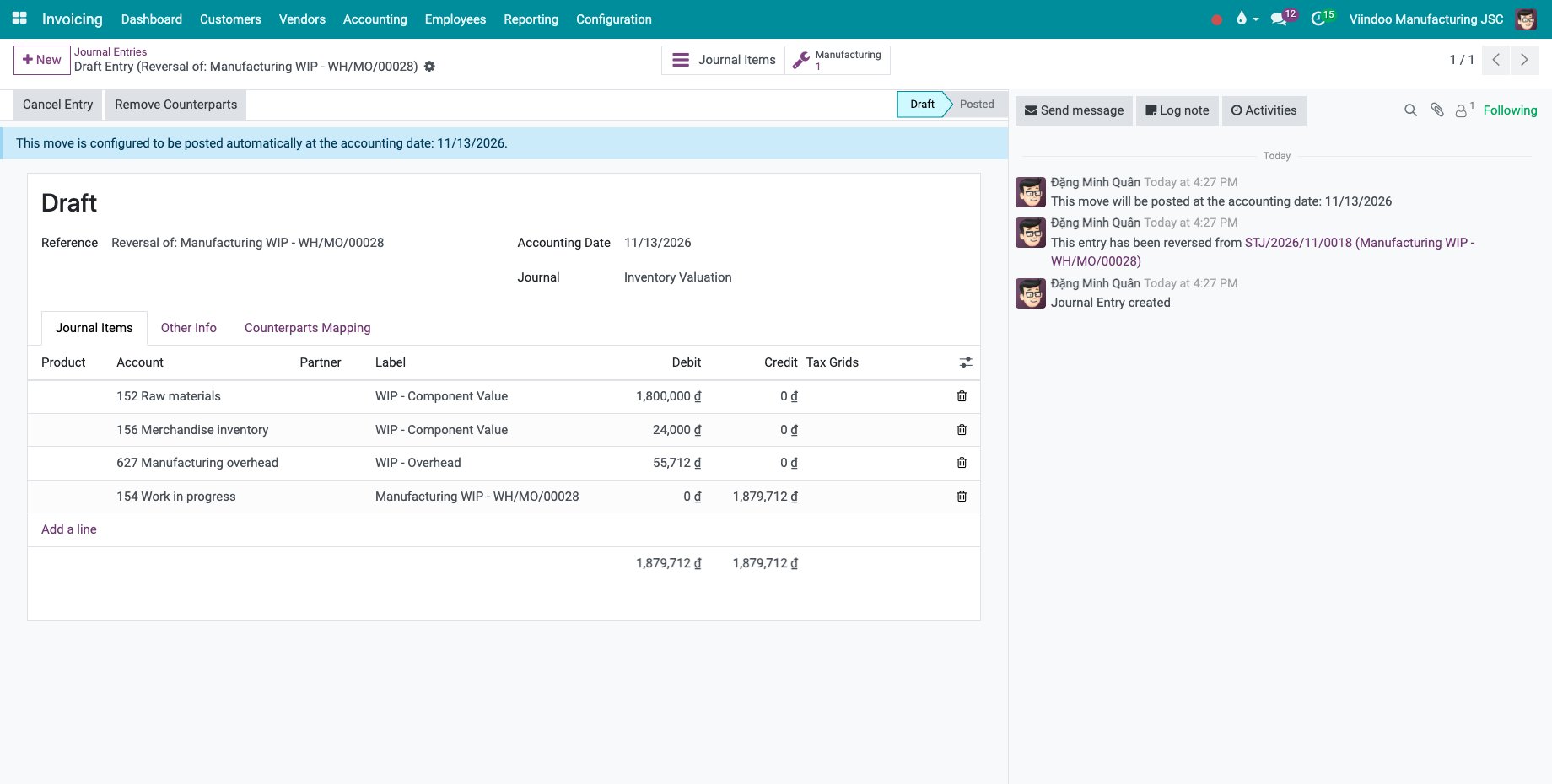
When a component was already posted with Post Consumption on its work order, its value is not counted twice: the line WIP - Posted Component Value moves the posted value into work in progress from the account that holds it.
Are subcontracted materials carried in work in progress or kept in stock?
Materials sent to a subcontractor can stay in stock until the subcontracted product is received, or leave stock and be carried in work in progress.
Go to Inventory ‣ Configuration ‣ Locations and open the subcontracting location.
In Subcontracted Materials, choose Carried in Work in Progress or Kept in Inventory. With Carried in Work in Progress, the materials sent are debited to the inbound account of the location and the goods received back credit its outbound account; use the work in progress account (154) for both, or leave both empty to use the Production Account of the product category.
![A subcontracting location whose materials are carried in work in progress]()
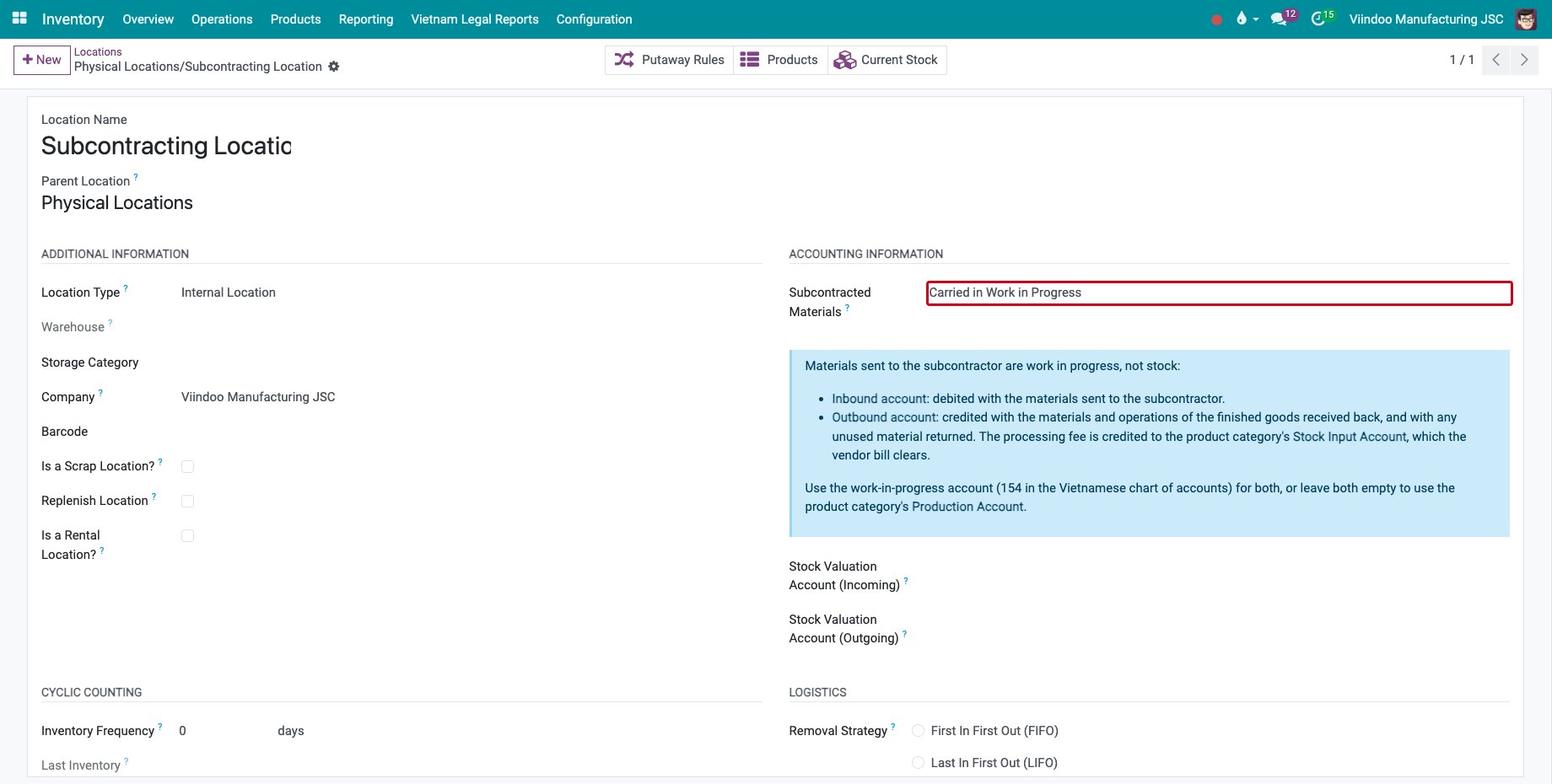
A change applies to the goods received from then on. It is refused while the location holds stock or has subcontracted receipts that are not fully billed. A new subcontracting location takes the setting of the main subcontracting location of the company. The field shows on the location when automated inventory valuation is used.
Common errors
Problem |
What to do |
|---|---|
Post WIP Accounting Entry is not in the Actions menu. |
The user needs the Accounting ‣ Bookkeeper access right (or Show Full Accounting Features). |
Please make sure the total credit amount equals the total debit amount. |
A changed line left the entry unbalanced. Correct the amounts before Post WIP. |
Reversal date must be after the posting date. |
Choose a Reversal Date after the Date. |
The setting Subcontracted Materials cannot be changed. |
Bring the stock back from the subcontractor or let them consume it, and bill or return the receipts first. |
Next steps
Manufacturing accounting under Circular 99 and 133: the Vietnamese accounts of production.
Cost accumulation and product cost report: read the cost of the finished products.
See also
Related articles