
How to print the Vietnamese warehouse vouchers
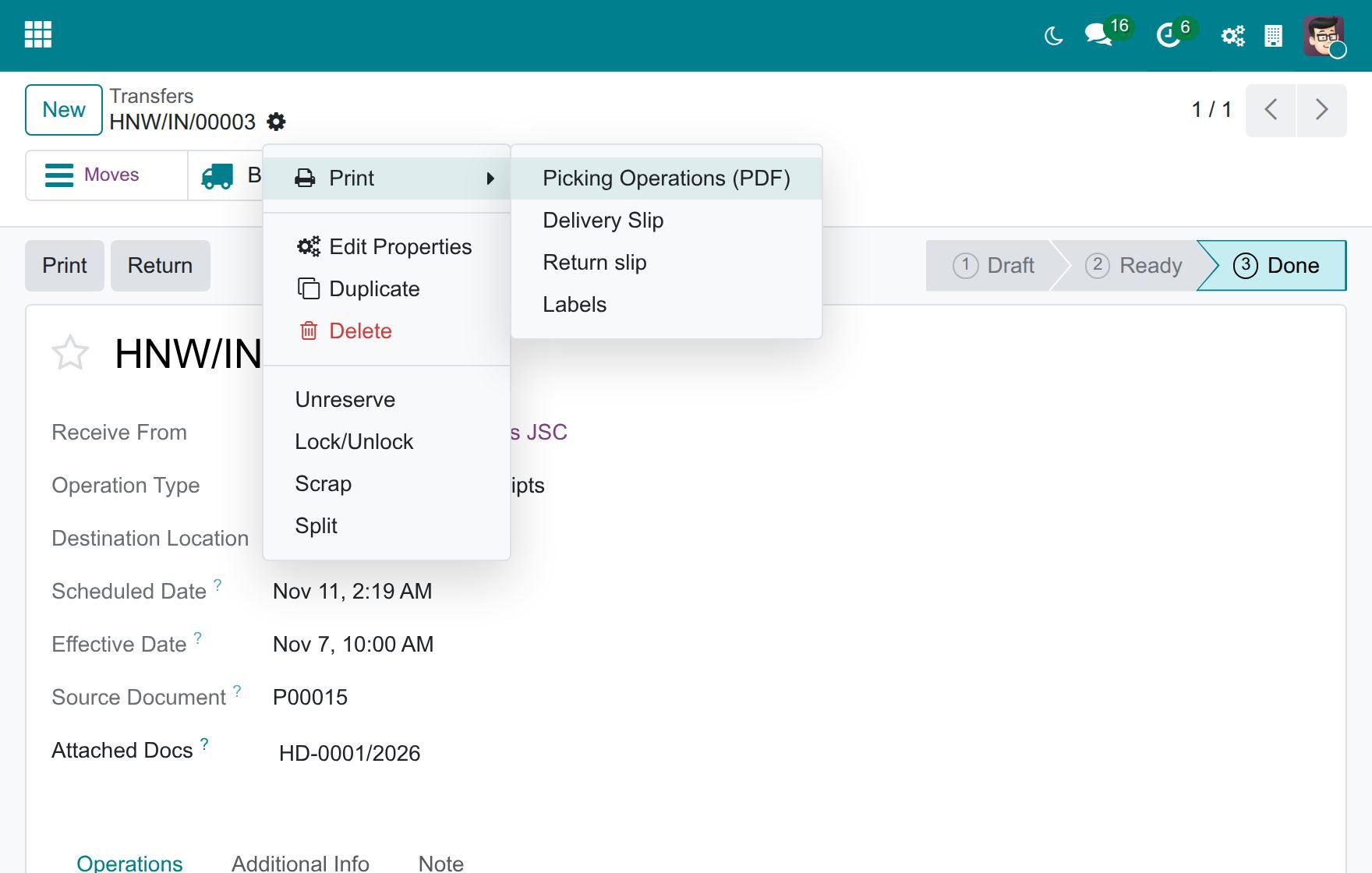
Open a transfer in , then click the actions icon, Print and choose Picking Operations (PDF). Viindoo prints the transfer on the Vietnamese voucher of its type: the receipt voucher 01-VT for a receipt, the delivery voucher 02-VT for a delivery order and the internal transfer voucher 03/XKNB for an internal transfer. The forms 01-VT and 02-VT follow Appendix I of Circular No. 99/2025/TT-BTC of the Ministry of Finance; the form 03/XKNB follows Circular No. 91/2026/TT-BTC.
Who |
Warehouse keepers, and accountants who print the vouchers for the books: users with the User access right of Inventory. |
App |
Inventory ‣ Operations ‣ Receipts, Deliveries, Internal |
Before you start
Install the Inventory app and the accounting modules for Vietnam (see How to configure Viindoo Accounting and Invoicing before using).
Install the Vietnam Receipt/Delivery Order Templates module. It is installed automatically once Sales, Purchase, Inventory and the accounting modules for Vietnam are installed; if Picking Operations (PDF) still gives the standard form, search for it in Apps and click Activate (see How to install, upgrade and uninstall apps and modules).
Click Validate on the transfer first: the actual quantities, the amounts and the debit and credit accounts of the voucher are filled from the validated transfer.
Which voucher do I get?
Transfer |
Voucher |
Regulation |
|---|---|---|
Receipt (Receipts) |
01-VT, Warehouse Receipt |
Circular No. 99/2025/TT-BTC, Appendix I |
Delivery order (Deliveries) |
02-VT, Warehouse Export |
Circular No. 99/2025/TT-BTC, Appendix I |
Internal transfer (Internal) |
03/XKNB, Warehouse Export Include Internal Transfer |
Circular No. 91/2026/TT-BTC |
How do I print a voucher?
Open , or , then open the validated transfer.
If the voucher must name the documents attached to it, type their numbers in Attached Docs. They print on the line Attached document no. of 01-VT and 02-VT.
Click the actions icon (the cog next to the transfer number), then Print and Picking Operations (PDF). The Print button next to the status of the transfer prints the standard receipt or delivery slip of Inventory, not the voucher.
What does each voucher show?
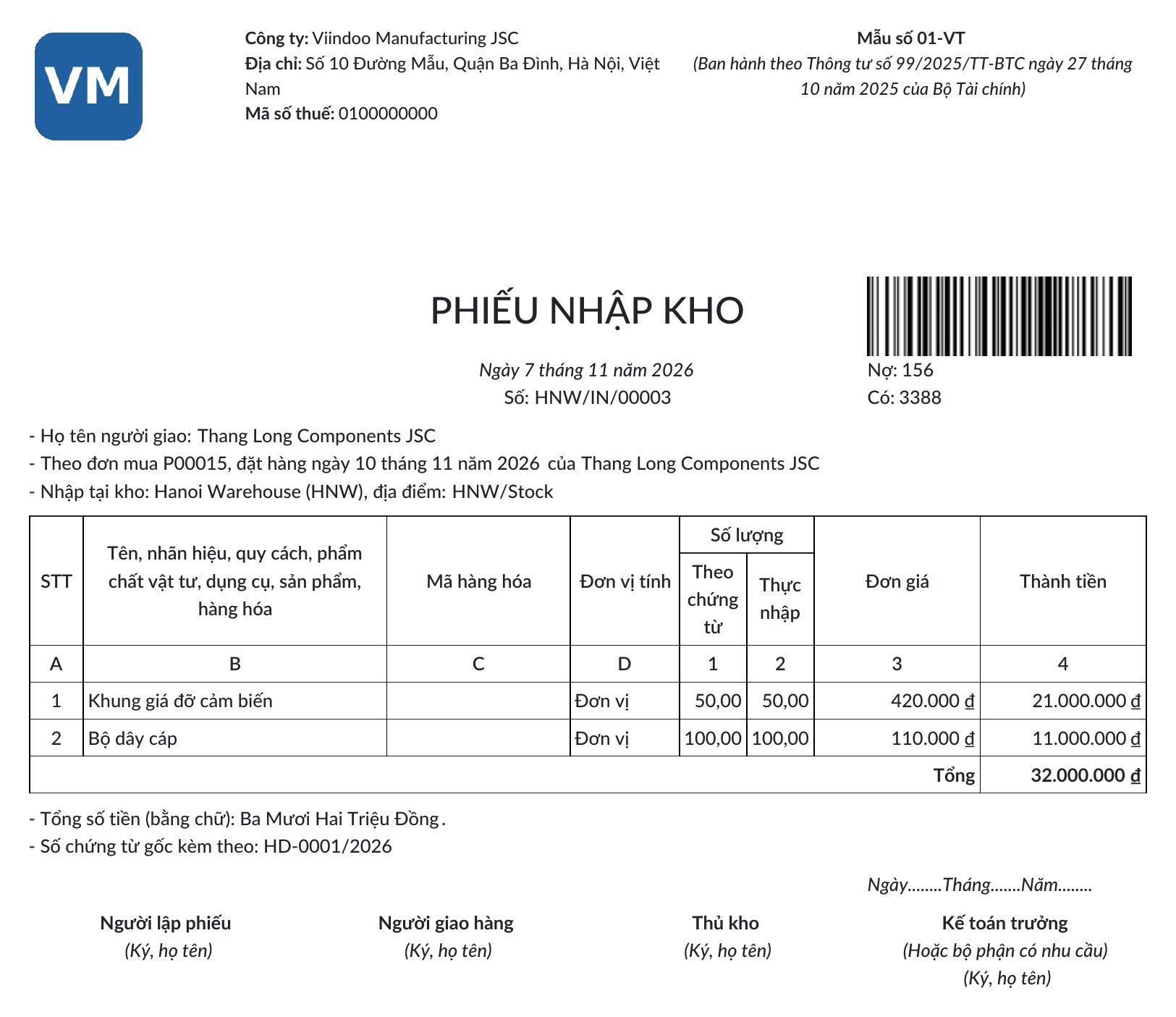
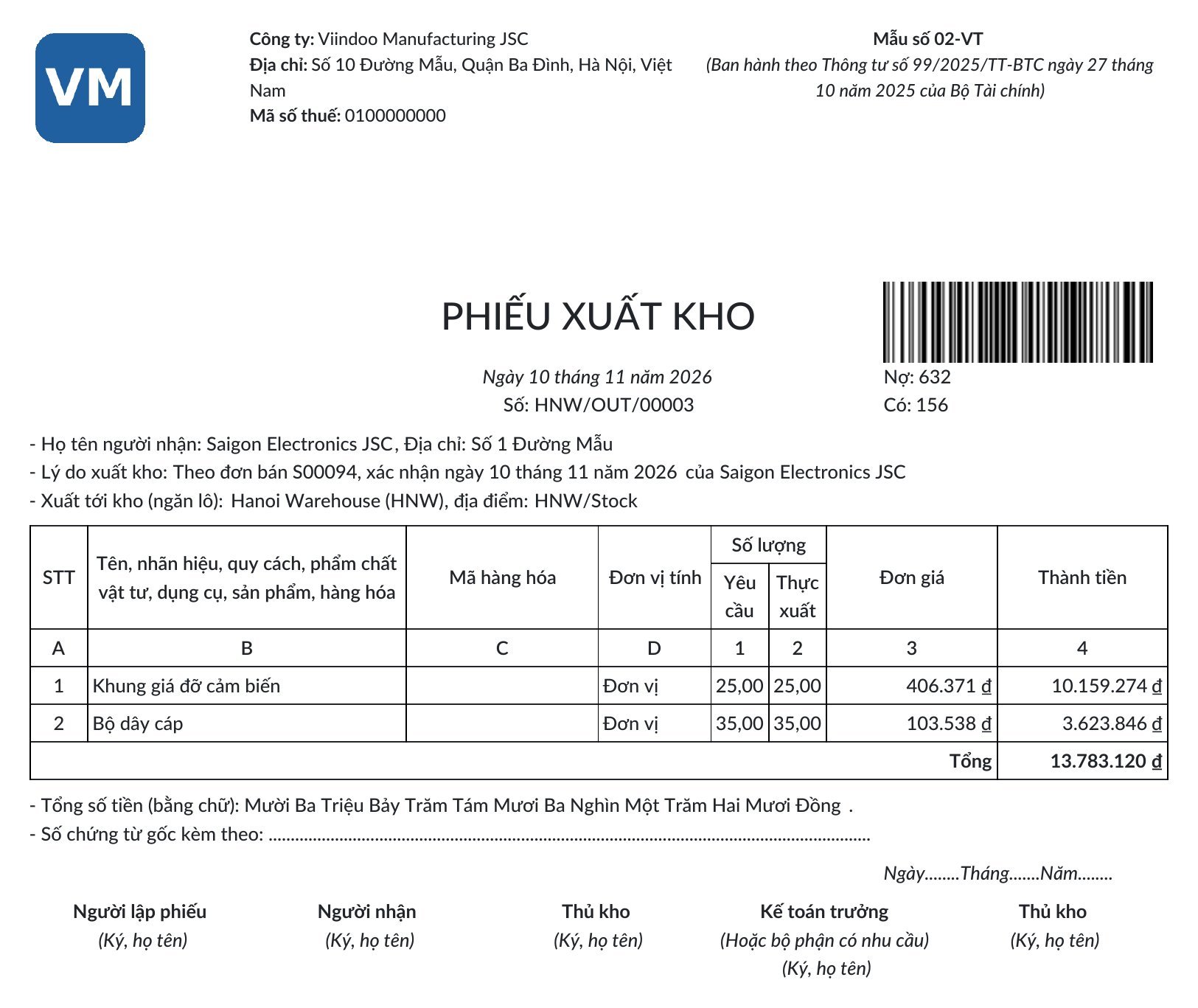
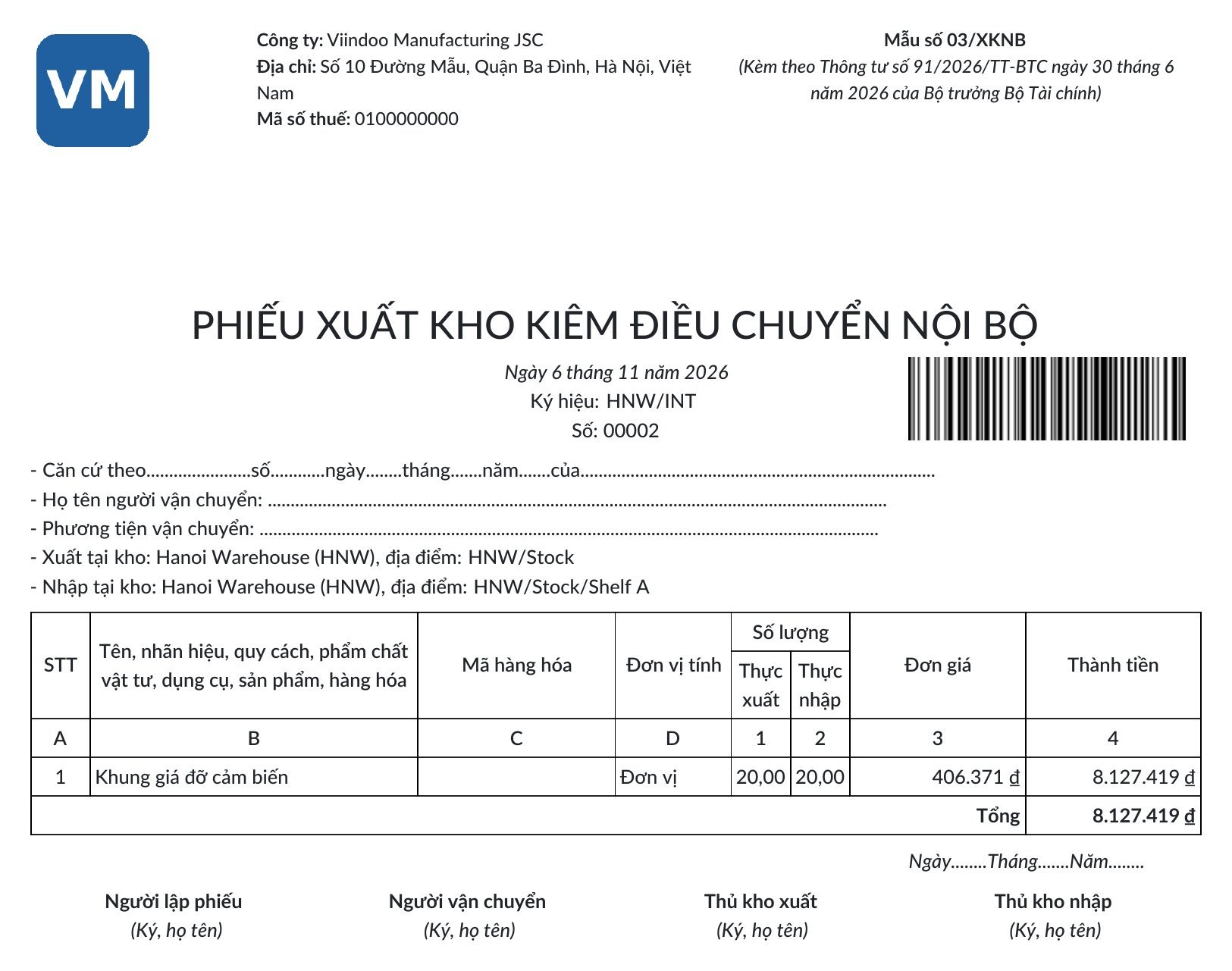
Every voucher starts with the company name, address and tax code on the left and the form number with its regulation on the right, then the title, the date, the number of the transfer and a barcode of it. The table lists the products with the unit of measure, the quantities, the unit price and the amount; the amount in words and the signature blocks follow.
01-VT, Warehouse Receipt. It names the deliverer, the document the receipt is based on and the warehouse and location that receive the goods. The quantity columns are According to document and Actual import. The debit and credit accounts of the receipt print at the top right.
02-VT, Warehouse Export. It names the receiver with the address, the reason of the delivery and the warehouse and location the goods leave. The quantity columns are Demand and Actual export. The debit and credit accounts of the delivery print at the top right.
03/XKNB, Warehouse Export Include Internal Transfer. It shows the symbol and the number of the transfer, the carrier and the vehicle to fill in by hand, and the warehouse and location the goods leave and reach. The quantity columns are Actual export and Actual import. Its header reads (Kèm theo Thông tư số 91/2026/TT-BTC ngày 30 tháng 6 năm 2026 của Bộ trưởng Bộ Tài chính), the legal text of the form.
How are the addresses printed?
The company address in the header and the address of the receiver on 02-VT list only the parts that exist, separated by commas: a partner with a street and no city prints just the street, with no stray comma. In the example of 02-VT above, the receiver has only a street, so the line reads Address: Số 1 Đường Mẫu.
Which language does the voucher print in?
The vouchers are Vietnamese statutory forms: they print in Vietnamese whenever the Vietnamese language is installed, whatever the language of the user who prints them. When Vietnamese is not installed, the voucher prints in the language of the partner of the transfer, or in the language of the user when the transfer has no partner. The amount in words follows the same language. When the transfer comes from a purchase or sales order, the reason line quotes that order.
What should I see when it works?
A PDF page with the form number and its regulation at the top right, the lines of the transfer with their quantities and amounts, and the signature blocks at the bottom.
Common problems
Message or problem |
What to do |
|---|---|
The standard slip prints, not the Vietnamese voucher. |
Use Print ‣ Picking Operations (PDF) from the actions menu, and install the Vietnam Receipt/Delivery Order Templates module and its accounting modules. |
The quantity column Actual is 0. |
The transfer is not validated yet: click Validate, then print again. |
The debit and credit accounts are empty. |
The voucher prints the accounts of the accounting entries of the validated transfer. A transfer without entries has none: check that the product category uses the Perpetual (at invoicing) inventory valuation and that the Stock Valuation Account is set on the location the goods come from or go to, for example the Vendors and Customers locations of the warehouse (). |
Next steps
How to print the Vietnamese legal stock reports: print the legal stock reports (S10-DN, S11-DN, S12-DN) of the same warehouses.
How to print the payment receipts 01-TT, 02-TT: print the payment receipts 01-TT and 02-TT.