
Accounting date of back-dated stock operations
This page is for accountants who check the stock journal entries of operations that were recorded after they happened. An inventory count made on Thursday and entered on Wednesday of the next week, a manufacturing order finished on Friday and marked as done the following Wednesday: Viindoo books the journal entry in the accounting period of the day the operation really took place, never in the period in which somebody got to the keyboard. A period that is already locked never receives a new entry: the entry is moved out of it, as the last section explains.
Who |
Accountants, and anyone who has to explain a stock entry to them. |
App |
Accounting, with Inventory and Manufacturing as the source of the entries. |
Warning
Recording operations on a past date is not recommended in day-to-day work. It makes it easier to record incorrect data, deliberately or not, and it can discourage people from recording operations at the moment they happen. The feature is designed mainly for the initial implementation, when a company needs to enter operations that took place before it started using Viindoo.
Before you start
The products are stored and valued automatically: the Inventory Valuation of their product category is Perpetual (at invoicing). Products valued periodically create no entry when they are counted, scrapped or produced.
The modules Inventory Backdate and Stock Account Backdate are installed. Stock Account Backdate installs itself together with Inventory Backdate when the inventory valuation (the Accounting app together with Inventory) is installed. For the labour entry of a manufacturing order, tick Manufacturing Accounting Backdate in Settings ‣ Backdate Operations. See Record operations on a past date.
Your user can open Journal Entries and see their lines (full accounting access).
Which back-dated operations create a journal entry?
A stock movement creates a journal entry only when it goes to or comes from a location that has an accounting account: the Loss Account of the Inventory adjustment location, the Cost of Production of the Production location. Inventory counts, scraps and manufacturing orders qualify. Receipts and deliveries do not: they are valued through vendor bills and customer invoices.
Operation on a past date |
Entries it creates |
Accounting date |
|---|---|---|
Inventory count |
One entry for the stock value that the count adds or removes |
The Accounting Date of the count window |
Scrap |
One entry for the stock value of the scrap |
The day of the date given for the scrap |
Manufacturing order |
The components, the finished product and the labour |
The day of the Date Done |
Receipt or delivery |
None at the dock |
Not applicable |
All these entries go to the stock journal of the company, Inventory Valuation. Their number comes
from the month of their accounting date, so an entry dated 29 October is numbered STJ/2026/10/...
even when it was created in November. The date and time at which the entry was created stay real: only
the accounting date moves, so the audit trail still shows when somebody entered the operation.
How is the accounting date decided?
The day is the day in the user’s time zone. A person enters the date and time of the operation in their own time zone, and the accounting date is the calendar day of that moment in the same time zone. A count made at 5 PM on 29 October in Bangkok is booked on 29 October.
It is never in the future. Every window that asks for a date refuses a later date than the current moment.
Count. A line of the count that carries its own Accounting Date keeps it. Otherwise the entry takes the Accounting Date of the count window, which proposes the day of the Counting Date. When the person clears it, the entry takes the day of the Counting Date. The window shows the field only for products valued automatically.
Manufacturing order. The entries of the components, of the finished product and of the labour all take the day of the Date Done. Without Manufacturing Accounting Backdate the labour entry would be dated on the day somebody clicked Produce All, and the cost of one order could be split between two periods.
An operation recorded without a past date takes the day it is recorded, as usual.
How do I check the entry of a back-dated count?
Open Invoicing ‣ Accounting ‣ Journal Entries.
Search the Reference: it is the reason given in the count window, by default Physical Inventory.
Open the entry of the journal Inventory Valuation and check its Accounting Date.
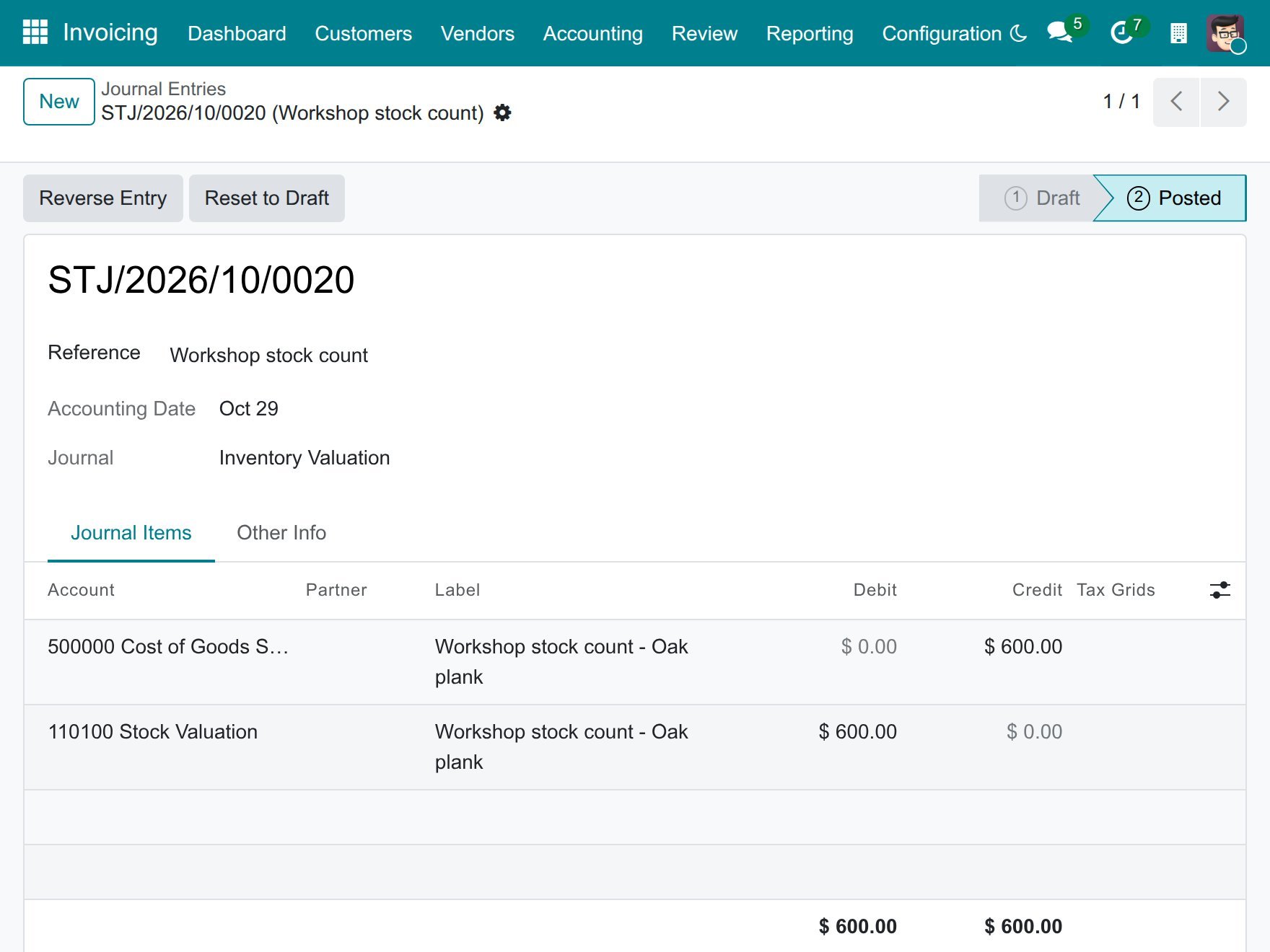
For a surplus, the entry debits the stock valuation account and credits the Loss Account of the Inventory adjustment location; for a shortage it is the reverse. A count is valued at the cost in force on the day it is recorded, not at the cost of the counting day.
How do I check the entries of a back-dated manufacturing order?
Open Invoicing ‣ Accounting ‣ Journal Entries.
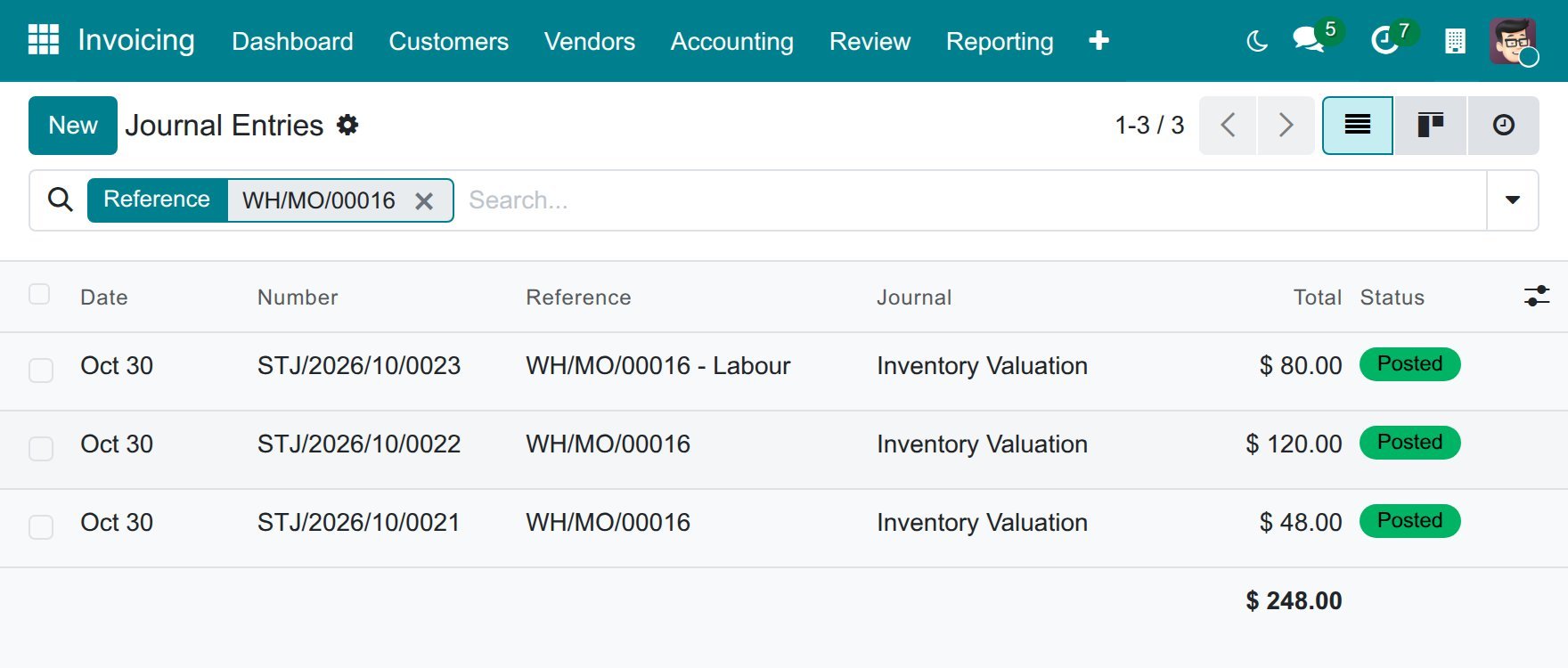
Search the Reference for the number of the manufacturing order. The entry of the labour has the same reference followed by - Labour.
Check the Date column: the three entries carry the same day.
Open the entry whose reference ends with - Labour. It debits the Cost of Production account and credits the expense account of the work centre.
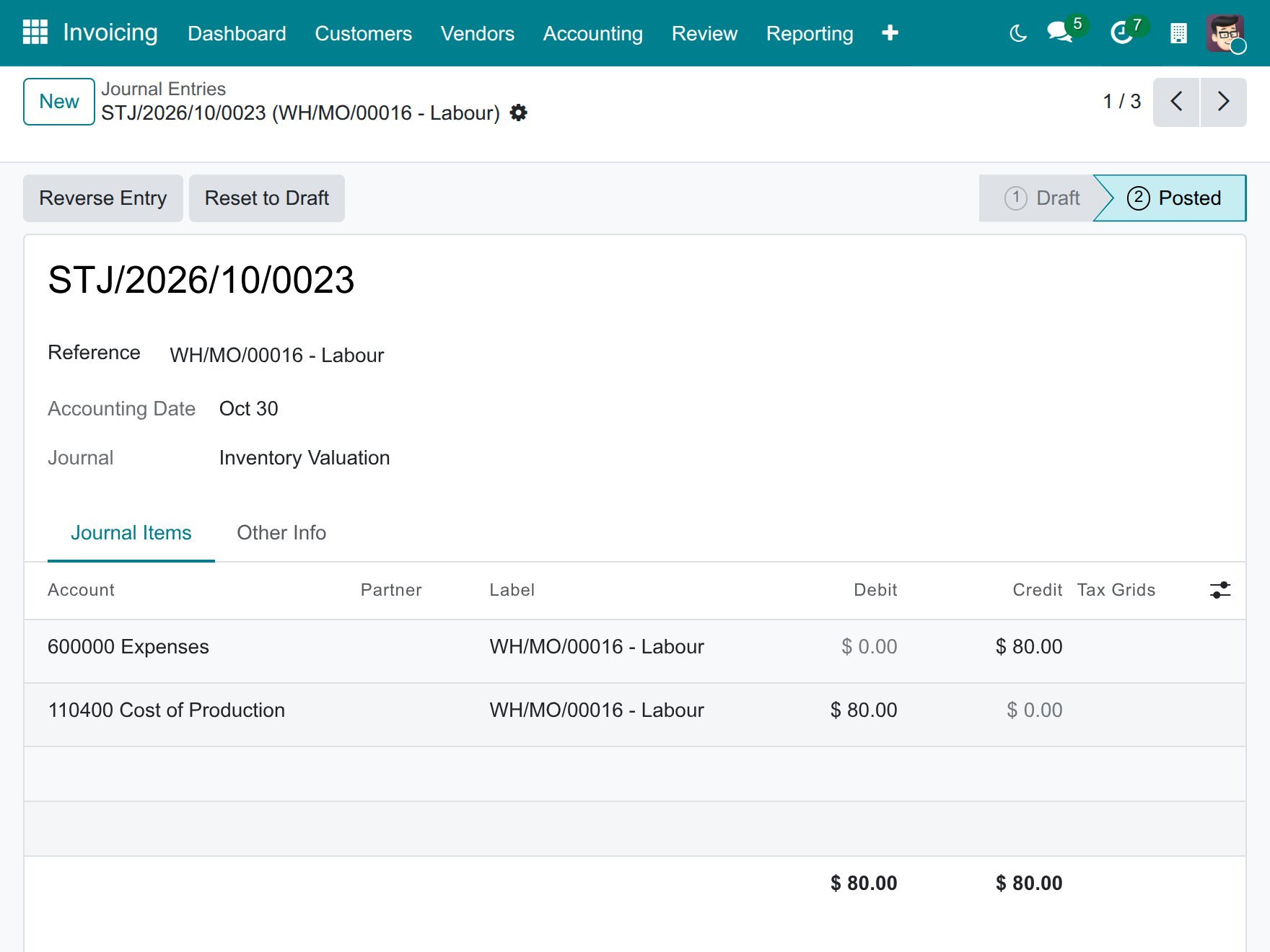
The labour cost is the time recorded on each work order multiplied by the Cost per hour of its work centre. No labour entry is created when the cost is zero, or when the Production location has no account in Cost of Production.
How do I read the stock value at a past date?
Open Inventory ‣ Reporting ‣ Stock and click Inventory at Date.
Enter the date and time, for example the end of the day, and click Confirm.
Search for the product.
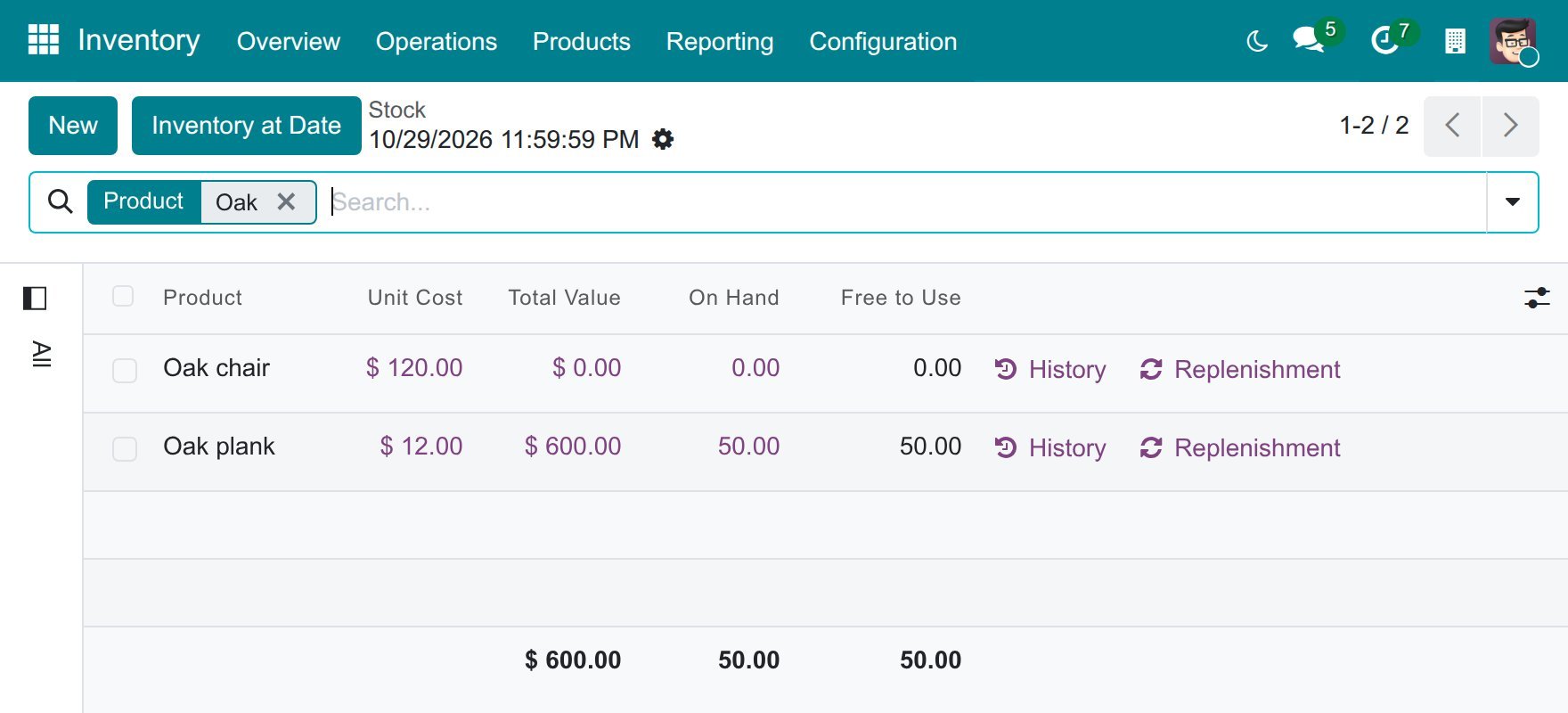
The report follows the dates of the stock movements. A count dated 29 October and entered on 4 November is already in the stock value at the end of 29 October.
What does a locked accounting period do?
A period is locked by the Global Lock Date or the Hard Lock Date of the company. The sales, purchase and tax lock dates do not apply to stock entries. The two kinds of operation behave differently.
Operation |
What happens when its date is in a locked period |
|---|---|
Transfer (receipt, delivery, internal transfer) |
Viindoo refuses it with the message You cannot modify the scheduled date of operation … because it falls within a locked fiscal period. Nothing is recorded. Choose a date after the lock, or ask the person in charge of the lock. |
Inventory count, scrap, manufacturing order |
Viindoo records it. The stock movement keeps its date, and the journal entry is moved out of the locked period. |
The entry of a count, a scrap or a manufacturing order, labour included, is booked outside the locked period, on a date that depends on how the stock journal is numbered:
In a journal numbered per month, such as Inventory Valuation, the entry takes the last day of the first open month when that month is over, and today otherwise.
In a journal numbered per year, it takes 31 December of that year when that year is over, and today otherwise.
For example, with a lock date of 29 October, a count dated 24 October entered on 4 November gets an entry dated 31 October. The stock movement stays dated 24 October.
Warning
For a period that is closed after the fact, the stock value and the general ledger differ. The report Inventory at Date follows the movement dates and shows the count on 24 October, while the ledger carries its entry on 31 October. Take this into account when you reconcile the stock account for the closed period.
Note
For a transfer, Viindoo compares the lock date with the day of the transfer in UTC. For a user whose time zone is ahead of UTC, a transfer dated in the early morning of the day after the lock date can still be refused.
Good to know
Outgoing movements that were already valued are not valued again when an earlier receipt is recorded afterwards. The closing entries adjust the stock value.
A back-dated operation never reopens a closed period.
Common problems
Problem |
What to do |
|---|---|
A count of an automatically valued product creates no entry. |
Check the Loss Account of the Inventory adjustment location, in Inventory ‣ Configuration ‣ Warehouse Management ‣ Locations. |
The count window shows no Accounting Date. |
The product category is valued periodically: no entry is created at the count. |
The labour entry of a manufacturing order is missing. |
Check the Cost per hour of the work centre, the time recorded on the work orders and the Cost of Production account of the Production location. |
The labour entry is dated today. |
Manufacturing Accounting Backdate is not ticked, or the order was marked as done without a past date. |
An entry is dated later than the operation. |
The accounting date of the operation is in a locked period: the entry was moved out of the locked period. |
A transfer is refused as falling in a locked period. |
Choose a date after the lock date. |