
How to send SMS messages with your Twilio account
Viindoo sends its SMS messages, such as the texts you send to your contacts, through a Twilio account that you own. You pay Twilio for the messages and keep control of your sender numbers. The setup has two parts: get your credentials and a phone number in Twilio, then enter them in Viindoo and send a test SMS.
Who |
Users with the Administration ‣ Settings access right, who enter the Twilio credentials. Every user can then send SMS from the records they can open. |
App |
Settings |
Before you start
You need a Twilio account, which you create on the website of Twilio. Twilio, not Viindoo, bills each SMS and the phone numbers.
The web address of your Viindoo database must be reachable from the internet. Twilio calls it back to report whether each SMS was delivered.
How do I get the credentials in Twilio?
This part happens in Twilio, not in Viindoo. The screens of Twilio can change: see the documentation of Twilio for the current steps.
Sign in to the Twilio Console with your account. If you have no account, create one on the website of Twilio.
Copy the Account SID and the Auth Token that the Console shows for your account. The Account SID starts with AC and has 34 characters. Keep the Auth Token secret.
Get a phone number that can send SMS messages in your Twilio account. This is the number that your customers see as the sender.
Note
With a Twilio trial account, Twilio only sends SMS to the numbers that you have verified in your Twilio account, and limits the messages. Upgrade the account to send to any number.
How do I connect Twilio to Viindoo?
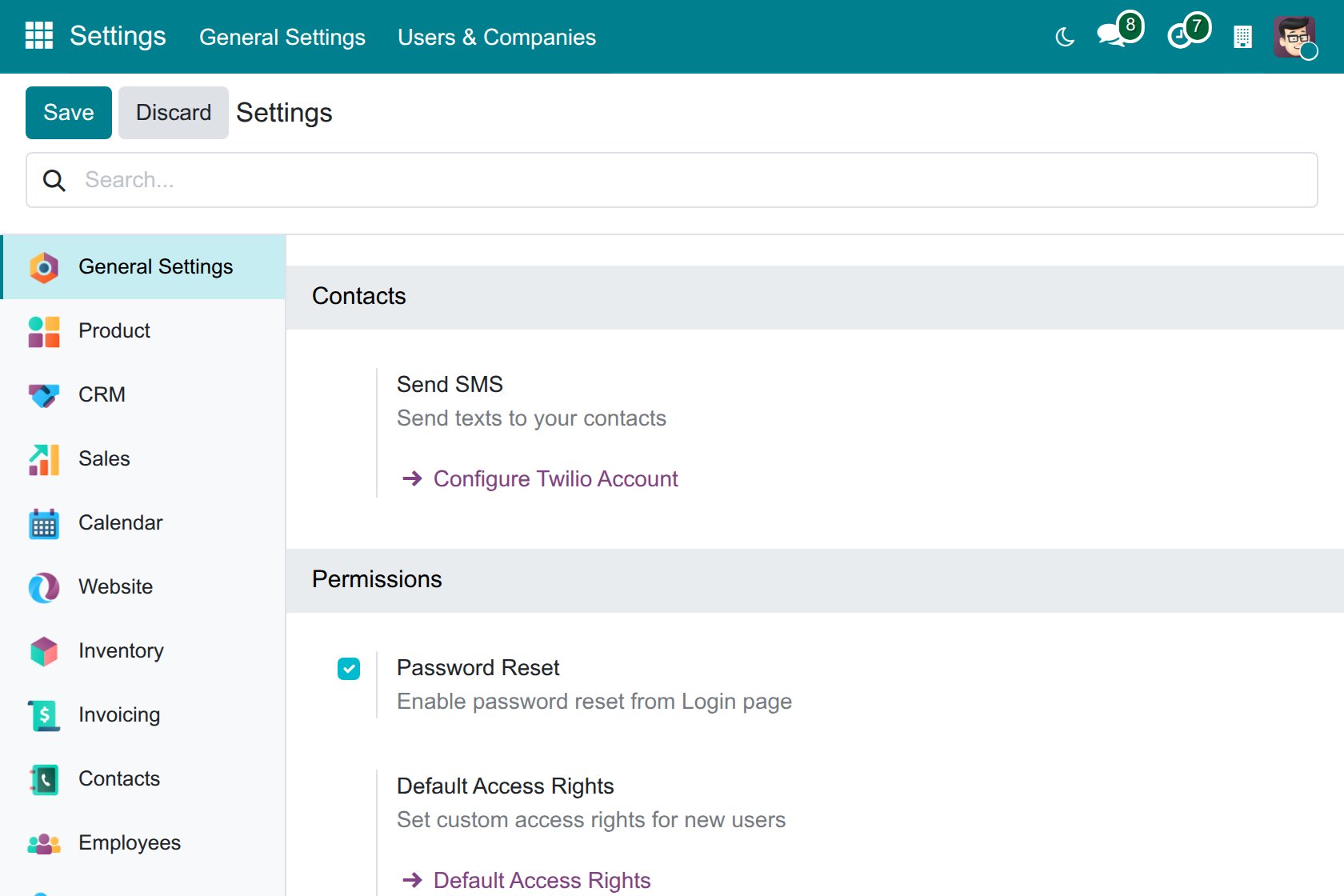
Go to Settings ‣ General Settings and find the Contacts section. The Send SMS setting has a Configure Twilio Account button.
![The Send SMS setting with the Configure Twilio Account button]()
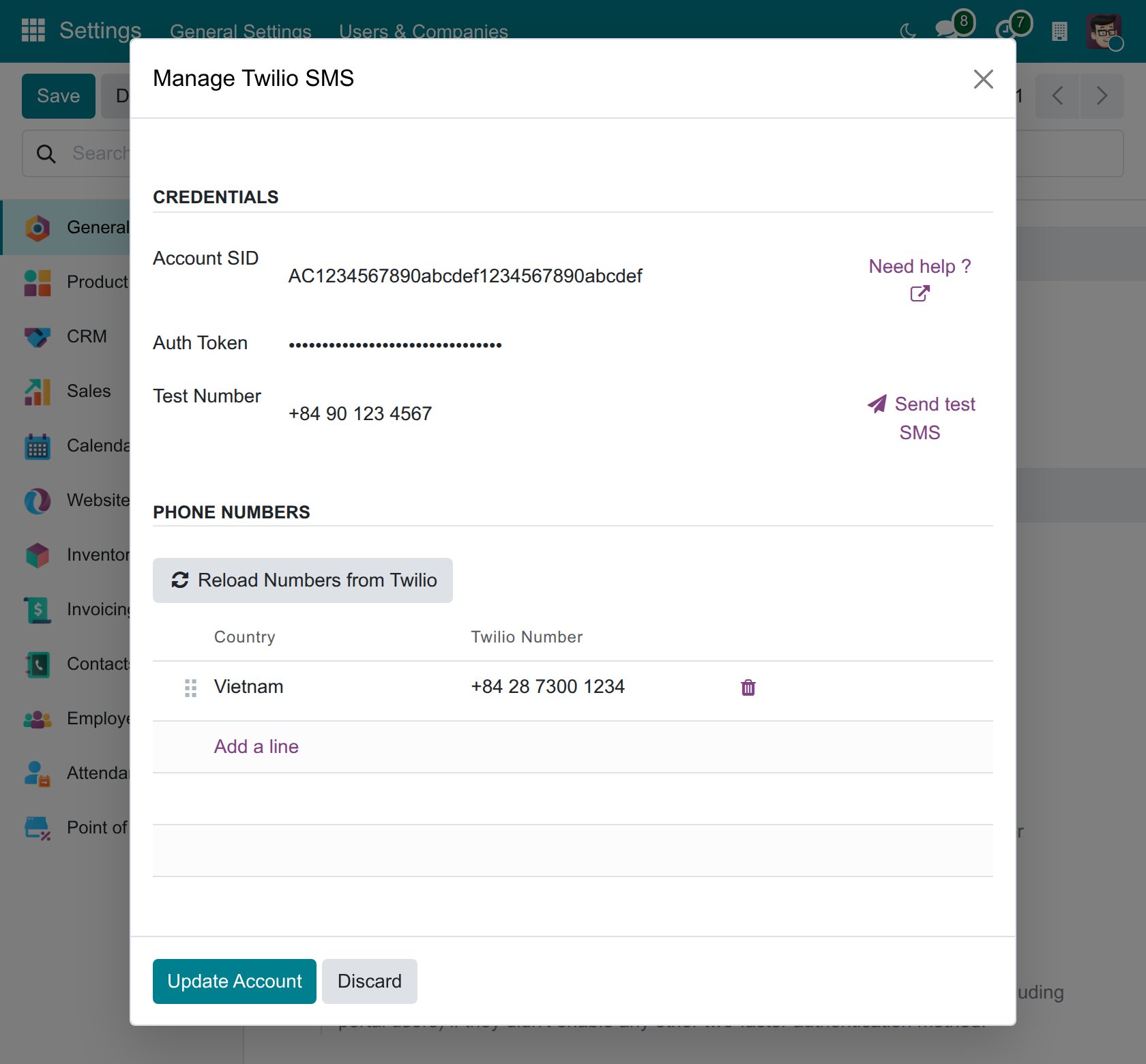
Click Configure Twilio Account. In the Credentials group, type the Account SID and the Auth Token. The token stays hidden on the screen.
In the Phone Numbers group, click Reload Numbers from Twilio to import the phone numbers of your Twilio account: it replaces the lines already in the list. You can also click Add a line, choose the Country and type the Twilio Number with its country code.
![The Manage Twilio SMS window with the credentials and the Twilio numbers]()
Click Update Account.
Viindoo picks the sender of each SMS among your numbers: the first number of the Country of the recipient, otherwise the first number of the list. Drag the handle of a line to change the order.
How do I send a test SMS?
In the Manage Twilio SMS window, type a phone number in Test Number, with its country code, for example +84 90 123 4567.
Click Send test SMS. A message tells you from which number the SMS was sent, or why it failed.
Then send an SMS the way your users do, for example with the SMS button next to a phone number of a contact.
Costs and delivery
Twilio bills each SMS and each phone number to your Twilio account. Viindoo adds no fee.
After the SMS leaves Viindoo, Twilio reports its progress and Viindoo updates the status of the SMS.
Common problems
Message |
What to do |
|---|---|
SMS sending is not configured for … |
The company has no Account SID, Auth Token and phone number. An administrator enters them as above: the Open Settings button of the message goes to the settings. |
Invalid Twilio Account SID: must start with ‘AC’ and be 34 characters long. |
Copy the Account SID again from the Twilio Console, without spaces. |
Twilio Authentication Error |
The Auth Token is wrong or has been changed in Twilio. Enter the current one. |
A ‘From’ number is required to send a message |
Add a phone number in the Phone Numbers group. |
‘To’ and ‘From’ numbers cannot be the same |
Send the test to another number than your Twilio number. |
Unverified recipient on Trial Account or Trial Account Limitation |
Verify the recipient in Twilio, or upgrade the Twilio account. |
The number you’re trying to reach is not correctly formatted |
Write the number with its country code, for example +84 90 123 4567. |
Twilio StatusCallback URL is incorrect |
Twilio cannot reach the web address of your database. Make it reachable from the internet. |
Please set the number to which you want to send a test SMS. |
Type a number in Test Number before you click Send test SMS. |