Choosing task management software usually starts with a feature list: which tool has the nicer board, the better mobile app, the lower price. Those lists are useful, and this article includes one: 15 tools in three groups, from team platforms to project trackers to personal to-do apps. But the same tool works well for one company for years and is abandoned by another after three months, and the difference rarely lies in the product.
It lies in how work is assigned and where it comes from. So before the list, two short sections: what a task tool has to hold for delegation to actually work, and four questions that tell you which group of tools your work belongs to. If you are looking at the wider picture of running a company, see also business management software.
Why work still slips after you buy task management software
Most teams start with spreadsheets and chat groups. A manager posts a request, someone reacts with a thumbs-up, and two weeks later it turns out the task was understood differently from day one. Moving the same habit into an app changes the screen, not the habit. Delegation is not one sentence; it is a closed loop with four beats, and it only closes when all four have happened.
Request
What is needed, and what counts as done
Agreement
The receiver confirms scope and deadline
Execution
Progress visible without asking
Acceptance
Someone confirms it passed
Each company tends to break the loop at one fixed beat, and a task tool only helps if it holds that beat in a record instead of in someone's memory. Three more breaks show up in almost every business, whatever software it runs:
Work without authority
If people get the responsibility but not the right to decide, they come back to ask. Delegating authority has to be written down, not implied.
Informed is not responsible
A request posted to a group of forty informs forty people and obliges none. A chat group cannot name one owner.
Work fails at the handover
Every department reports its part done and the order is still late. The work handover belongs to no row of the assignment chart.
Good task management software is not the one with the most views. It is the one that keeps all four beats on record, so nobody has to remember them.
Four questions to answer before comparing task management tools
Work comes in two kinds. Project work is defined by an output before it starts: a website, a training course, a product launch. Operational work is created by a business event: an order is confirmed, a shipment is booked, a machine breaks, an invoice falls due. The two are coordinated differently, which is why one tool rarely serves both well. Four questions tell them apart, as explained in when a standalone task app is enough.
1. Where does the work come from?
If someone decides it is needed and types it in, any board will do. If it already exists in an order or a ticket, typing it again creates a second copy that drifts.
2. Does its cost have to go somewhere?
If nobody needs to know what the work cost, a list is enough. If hours must reach an invoice or a project margin, they cannot live in a separate tool.
3. How often does it repeat?
A launch happens once a quarter; a delivery happens forty times a day. Work that repeats at operating frequency should be created automatically.
4. Who outside the team needs to see it?
If only the team looks, any board works. If sales, accounting and the customer need the same status, it must sit on the record they already open.
| Your situation | Group of tools that fits | In this list |
|---|---|---|
| One person organising their own day | Personal to-do app | Group 3 |
| A team running project-shaped work, cost not tracked per task | Standalone team or project tool | Groups 1 and 2 |
| Work created by orders, with hours that must reach invoices and margins | Work management inside the system that holds orders and accounting | Viindoo Project (group 2) |
Most companies have both kinds of work in different departments. That is a normal result, not a problem: the mistake is using a standalone app for operational work and then blaming the team for lack of discipline when the board goes stale.
5 task management platforms for teams and internal processes
These tools suit teams that want to design their own workflow: they are flexible and broad, and they reward someone willing to set them up. Features and plans change often, so check each vendor's own website for current pricing.
Airtable
Airtable combines a spreadsheet with a database: each table holds records with typed fields, shown as a grid, kanban, calendar or timeline. Teams build small apps for their own processes on top of it, with automations and integrations with other tools.

Airtable: bases built for different processes (vendor interface)
Best fit: your team likes to design its own data structure and the process is still changing.
Asana
Asana organises work into projects and tasks with subtasks, dependencies, timelines and rules that automate routine steps. It also links day-to-day tasks to company goals, so teams can see which work serves which objective.

Asana: personal priorities and projects on one home screen
Best fit: several departments coordinate on projects such as marketing campaigns or office operations.
Wrike
Wrike targets organisations with many teams: Gantt charts, kanban boards, workload views to balance people, request forms and review of creative files. Its strength is visibility across many parallel projects.

Wrike: workload per person on a timeline (vendor interface)
Best fit: an agency, a marketing department or a project office runs many projects at once.
Quickbase
Quickbase is a low-code platform for building business applications on company data, used for operational processes such as project tracking in construction and manufacturing. It is closer to an app builder than to a ready-made task list.

Quickbase: dashboards built on company data (vendor image)
Best fit: you have someone responsible for building and maintaining internal applications.
Miro
Miro is an online whiteboard for brainstorming, mapping processes and planning together, with sticky notes, diagrams and simple kanban boards. It is not task management software in the narrow sense, but many teams plan in Miro and then track in another tool it integrates with.

Miro: a retrospective board with sticky notes (vendor interface)
Best fit: the team needs a shared space to think and plan before the work is broken into tasks.
5 task management software tools for projects and progress
This group tracks work against time: stages, deadlines, dependencies and who is doing what. The first entry differs from the others in one respect, which is where its tasks come from and where their cost goes. For more tools in this group, see project management software and work planning software.
Viindoo Project
Viindoo Project can run on its own for project-shaped work: stages and boards, personal stages for each user, subtasks, dependencies between tasks, recurring tasks, milestones, tags, allocated hours and customer ratings, with kanban, list, calendar, pivot and graph views. A team with no orders or invoices behind its tasks can use just that.
The difference appears when work comes from business documents. As task management software, Viindoo shares one set of data with projects, employees, sales and accounting, so the four beats of delegation are kept on the same records the rest of the company reads. The clip below is the execution part of a project: each person's own task board, time logged on site, questions asked on the task itself, and repeating work handed to automation rules.
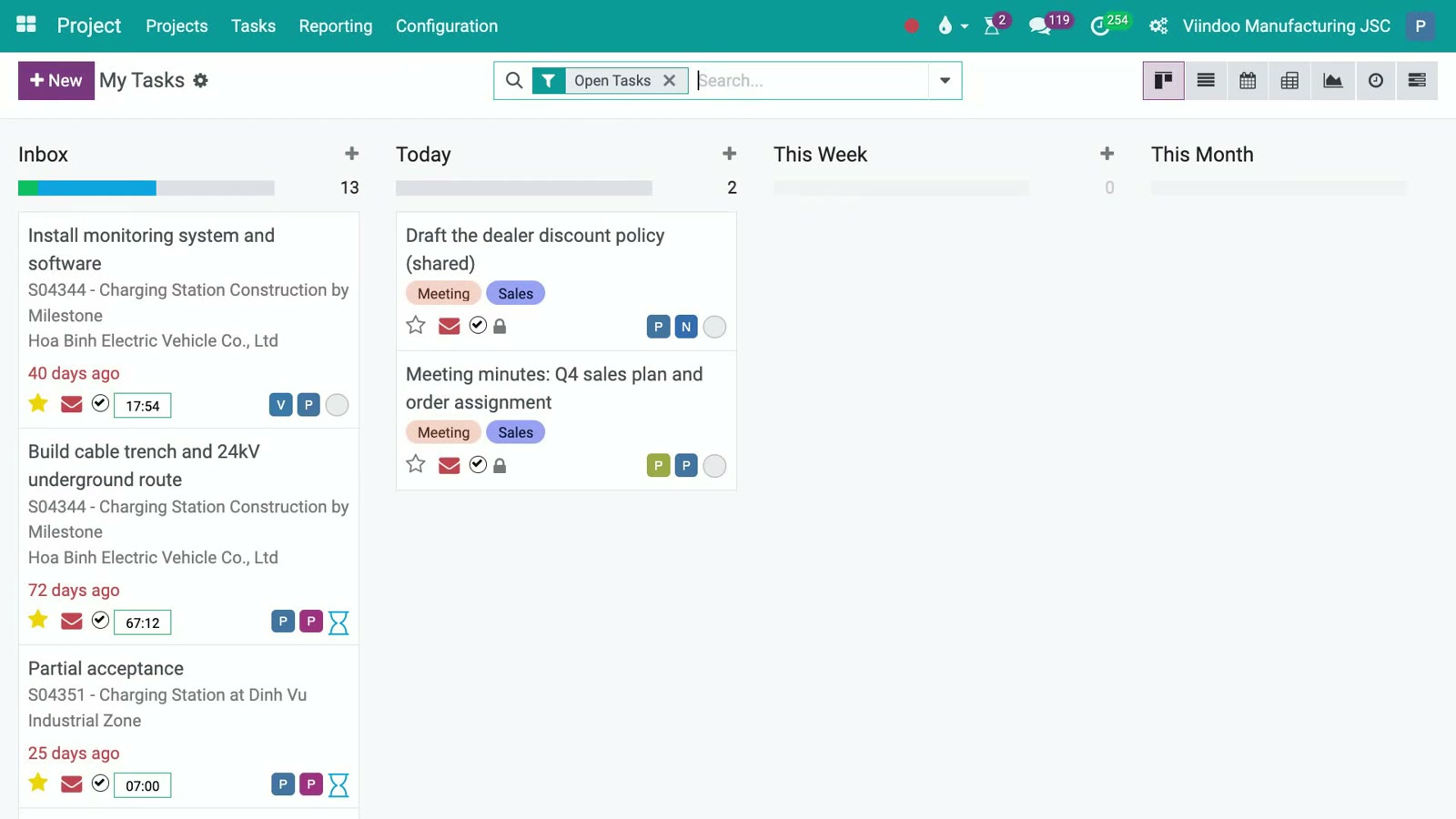
Execution in Viindoo Project: own task board, time logging, conversation on the task, automation rules
Execution in Viindoo Project: own task board, time logging, conversation on the task, automation rules
- Request and agreement on one record. Each task carries its assignees, deadline, allocated hours and description; every reply is kept in the task's own message thread, not in a chat group.
- Execution visible without asking. My Tasks gathers one person's tasks from every project; a Log Timesheet button on the task records hours as the work is done, against the hours allocated.
- Acceptance as a stage, not a memory. Stages such as acceptance are part of the task's life, and automation rules can act when a task reaches a stage, passes a date or changes owner.
- Overlaps caught before they become delays. With Project Scheduling, the Gantt view flags a person booked on overlapping tasks, even across different projects.
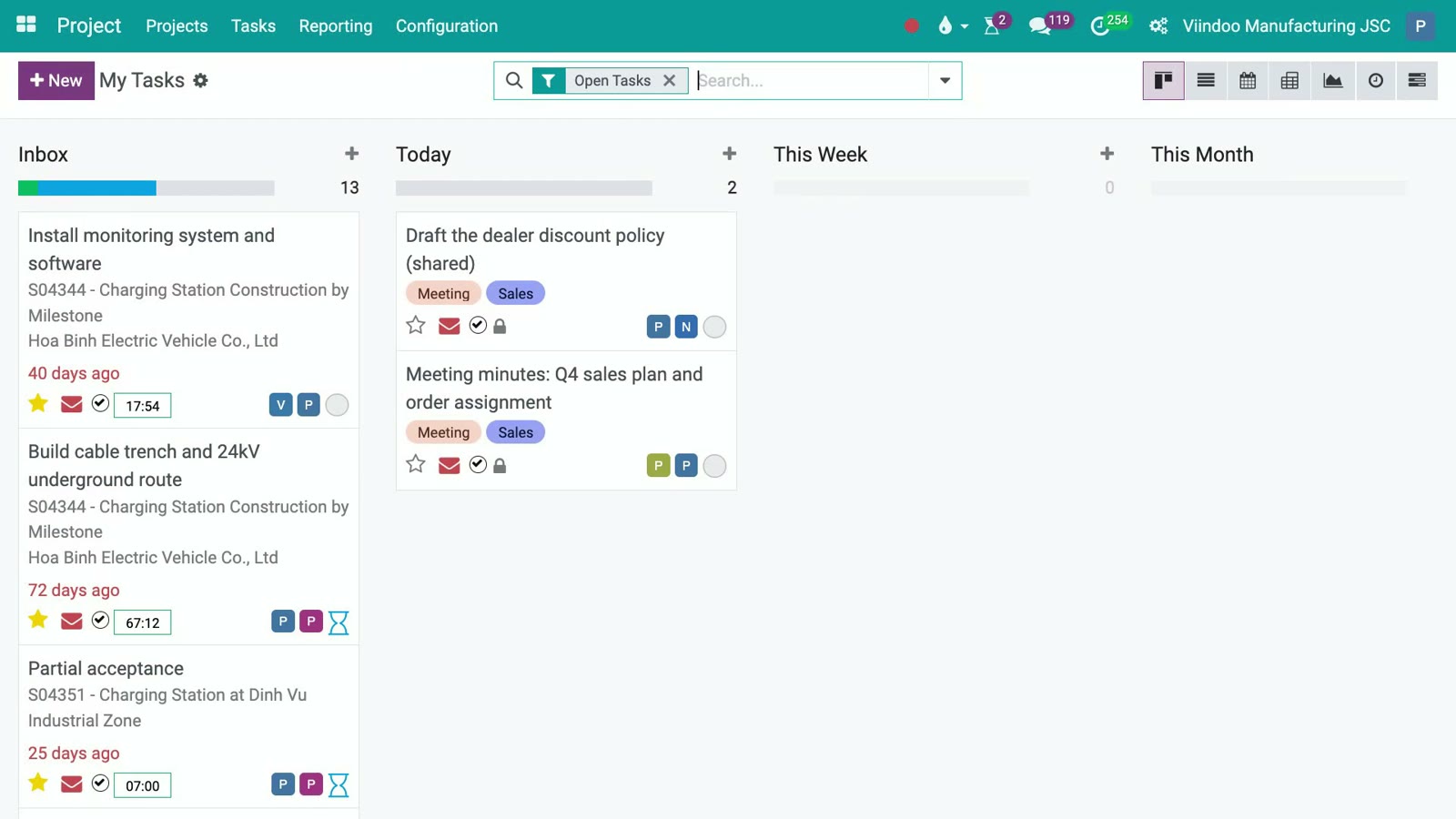
My Tasks: one person's work from several projects, sorted into their own stages
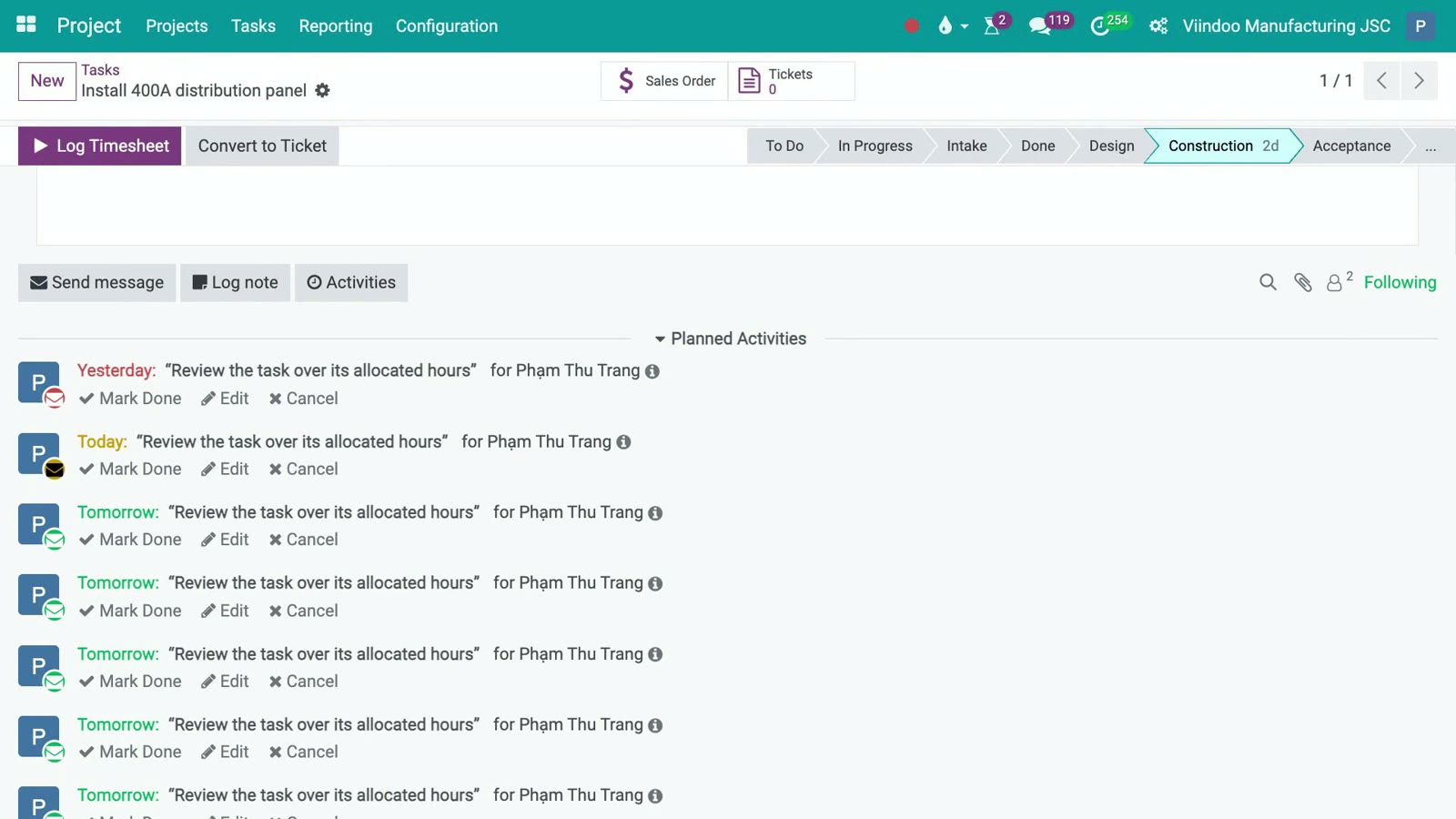
Open a task: the timesheet button sits on the task, with its own messages and activities underneath
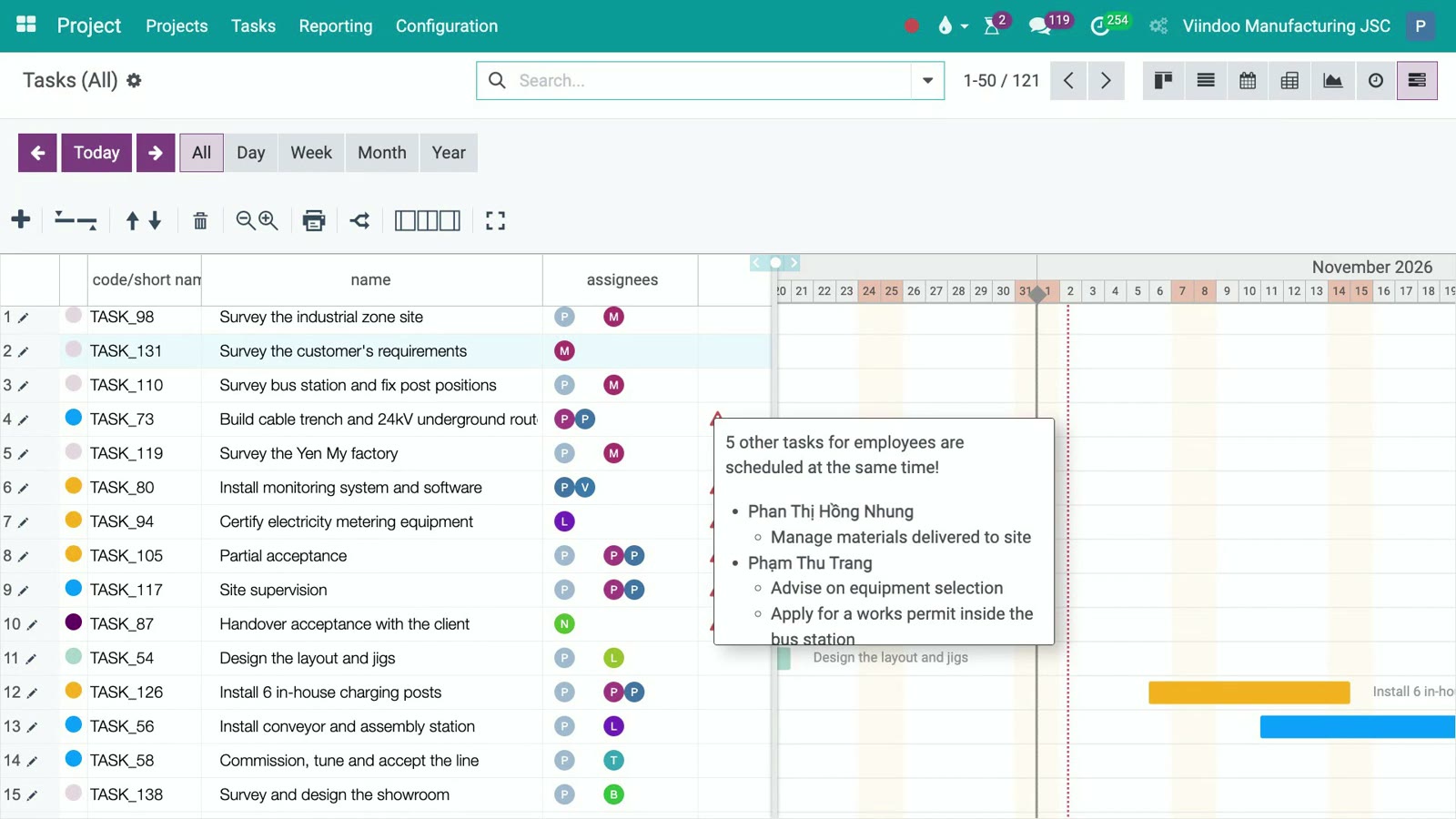
Gantt: the warning names the people and the other tasks booked at the same time
Delegating authority has a place to live as well. In OmniApproval, each approval type defines its approvers by person, job position, department or related record, and an approval step can be configured to apply only under a condition, so routine decisions do not all have to come back to the director.
When work starts from a sale, the chain continues. A service product decides what a confirmed sales order creates: a task, a project and tasks, or a project. The task keeps a link to its order line, milestones or logged hours drive what can be invoiced, and the project shows revenue and costs from real documents: invoices, vendor bills, purchase orders and timesheets valued at each employee's hourly cost. Customers can follow their project through the portal when you choose to share it.
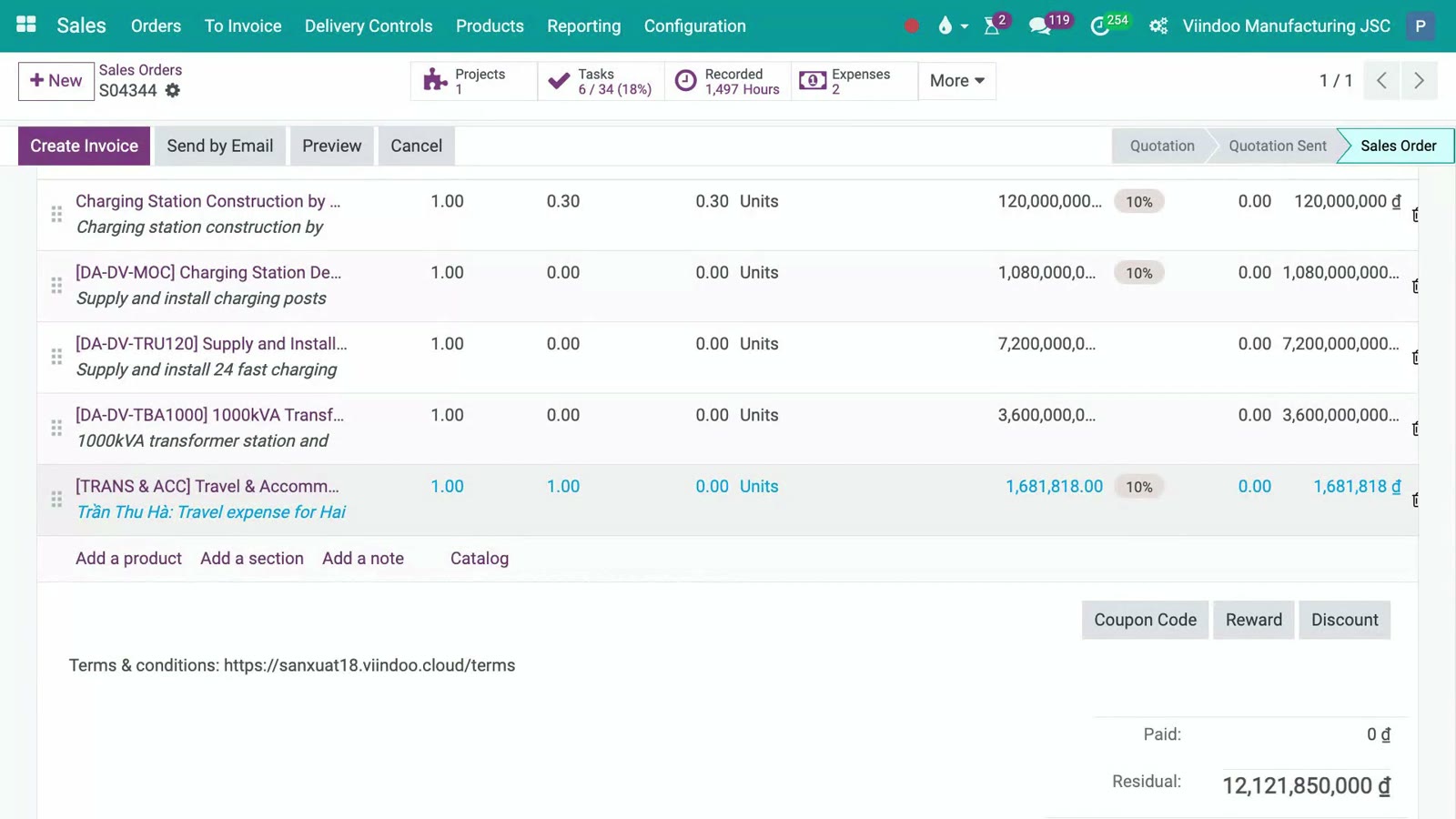
A sales order whose lines created the project work; the first line is delivered by milestone
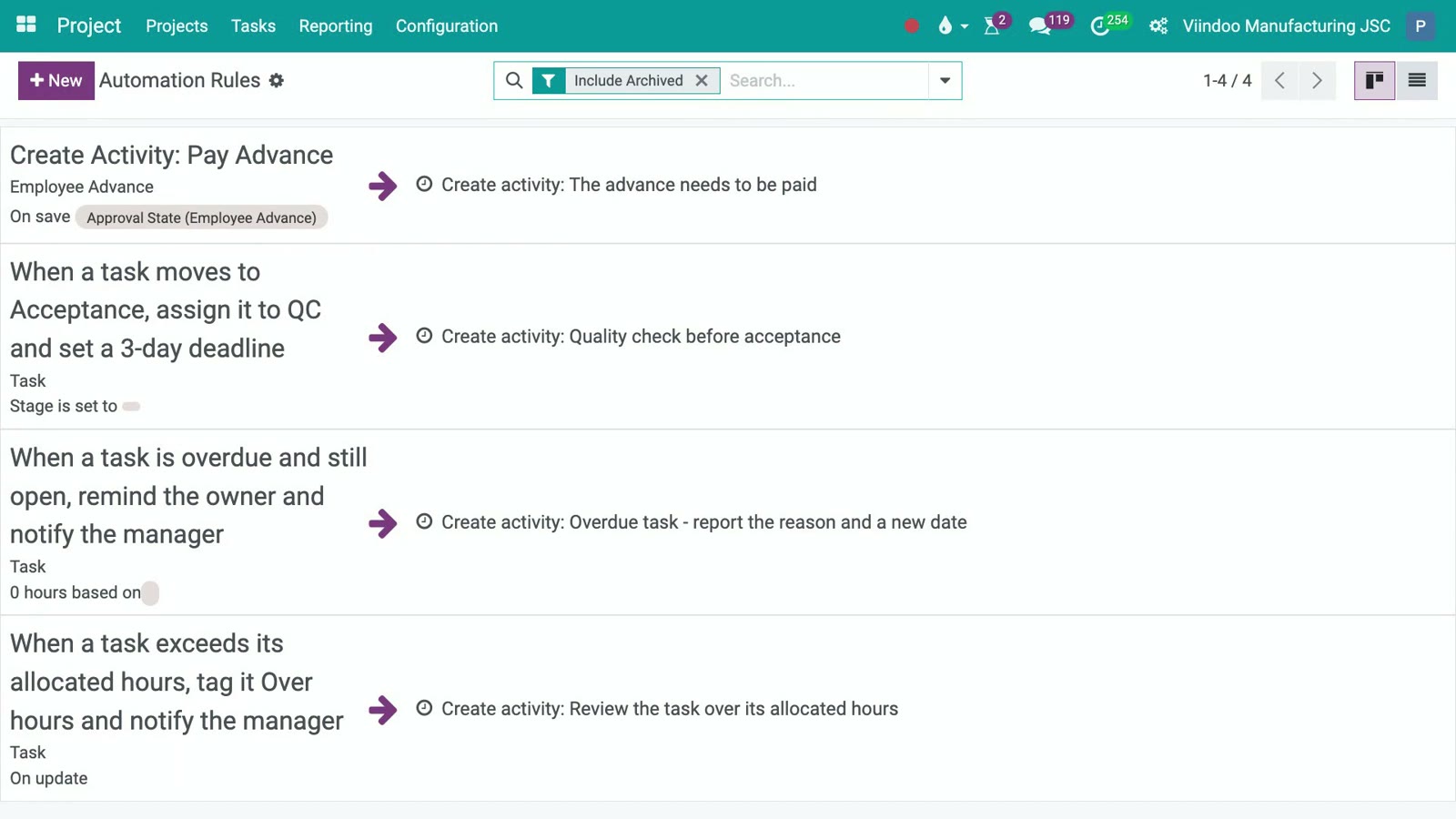
Automation rules set up for a project team: hand over at acceptance, follow up overdue tasks, flag hours over budget
See Viindoo Project as part of the whole system: hours per task, project costs and revenue in one place, without reconciling spreadsheets.
Best fit: work starts from orders or contracts, hours have to reach invoices or project margins, and several departments need the same status. For purely project-shaped work in a small team, the Project app alone is enough.
Trello
Trello, from Atlassian, is the classic kanban board: lists of cards that move from left to right, with checklists, due dates, labels and add-ons called Power-Ups. Built-in automation handles simple repeated moves.

Trello: To do, Doing, Done (vendor interface)
Best fit: a small team wants a visual board it can start using the same day.
ClickUp
ClickUp tries to put everything in one workspace: tasks, documents, goals, chat and many views of the same data, from lists and boards to tables and timelines. The breadth is its appeal, and also the reason it takes time to configure well.

ClickUp: tasks shown as a table with statuses (vendor interface)
Best fit: the team wants one highly customisable tool and has time to shape it.
monday.com
monday.com builds work around colourful boards where each row is an item and each column a status, owner, date or number, with automations and dashboards on top. The same platform also offers separate products for CRM and software teams.

monday.com: monthly planning boards and a project overview (vendor image)
Best fit: managers want a quick visual overview across teams with little setup.
Jira
Jira, also from Atlassian, is built around issues, backlogs and sprints for software teams working with Scrum or Kanban, with detailed workflows and reporting. Business teams use it too, but its vocabulary and depth come from software development.

Jira: a timeline of work items across sprints (vendor interface)
Best fit: you run software development or IT work with sprints and releases.
5 daily to-do apps for individuals
Personal apps are the lightest kind of task management software: they hold one person's commitments well. They are not built to hold an obligation between two people, so they work best alongside a team tool rather than instead of it. More options are compared in task management apps for busy people and task reminder software; for office teams, see office management software.
Todoist
Todoist is a cross-platform to-do list known for quick capture: typing a task with a date in plain words sets the due date. Projects, labels and priorities keep a personal list in order, and lists can be shared with a small team.

Todoist: activity across projects (vendor interface)
Best fit: you want a fast personal list on every device.
Microsoft To Do
Microsoft To Do is a free personal list tied to a Microsoft account, with a My Day view for planning today. Within Microsoft 365, tasks flagged in Outlook and tasks assigned in Planner can appear in it.

Microsoft To Do: the My Day list (vendor interface)
Best fit: your company already works in Microsoft 365.
Apple Reminders
Apple Reminders is built into iPhone, iPad and Mac. It supports lists, tags, smart lists and shared lists in which a reminder can be assigned to one of the people sharing it.

Apple Reminders: lists and smart lists on Mac (vendor interface)
Best fit: everyone involved uses Apple devices and the work is simple.
Google Tasks
Google Tasks is a simple list that lives beside Gmail and Google Calendar: an email can become a task, and tasks with dates show up on the calendar. It has few features by design.
Best fit: your day already runs through Gmail and Google Calendar.
fTodolist (Fastdo)
fTodolist is a Vietnamese daily work app from Fastdo, part of its FASTDOWORK suite. Staff plan their day and report at the end of it, and managers follow each member's plan and report.

fTodolist: a daily plan with priorities and times (vendor interface)
Best fit: you want daily plans and end-of-day reports in Vietnamese. See also work reporting software.
How to choose task management software that will still be used in a year
Start from the work, not from the tool. Take one real flow, for example an order that becomes work for three departments, or one project your team is running, and test each candidate against it:
- Does every task have exactly one person accountable, and a written definition of done?
- Can the receiver confirm or renegotiate the task on the record, instead of in a chat?
- Is the decision limit written somewhere, so people know what they may decide without asking?
- When one person finishes, does the next person see it without being told?
- Will anyone have to type the same work twice, once in an order and once in the task tool?
- Do the hours need to reach an invoice, a cost or a margin?
If the last two answers are no, standalone task management software from the lists above is the cheaper, faster choice, and many vendors offer a free plan or a trial to test it on real work. If they are yes, look at task management that sits inside the same system as orders and accounting. Teams that want to compare more collaboration tools can read teamwork software and workflow management software.
Task management as a discipline is broader than any app: Wikipedia's overview of task management covers the planning, tracking and reporting side in general terms.
Frequently asked questions
There is no single best one. A personal app suits one person's day, a standalone team tool suits project-shaped work, and work created by orders, with costs that must reach invoices, needs task management inside the system that holds those orders.
Several tools in this list have a free plan or are included with an account you already have, such as Microsoft To Do, Apple Reminders and Google Tasks. Plans and limits change, so check each vendor's pricing page.
Yes, for conversation. The rule that works is simple: a chat message can announce something, but a task exists only when it has one named owner and a deadline on a record.
No. A fifteen-person workshop whose work comes from orders needs its tasks tied to those orders. A two-hundred-person service firm working in projects may not. Size decides how many boards you need, not which kind.
Yes. The Project app on its own covers stages, subtasks, dependencies, recurring tasks, milestones and several views. Sales, timesheets and accounting can be added later when work starts coming from orders.
Related articles
- Delegation Is a Closed Loop. Where Does Yours Break?
- Delegating Work Without Delegating Authority: Why Your People Keep Coming Back to Ask
- When a Standalone Task App Is Enough, and When It Is Not
- Work Does Not Fail in One Person's Hands. It Fails at the Handover
- 8 Project management software to effectively track operation progress