Viindoo Project - many projects, one pool of resources
Schedule, money and resources of every project on one data foundation: from the contract, estimate, assignments and timesheets to acceptance, invoices and the profit of each project.

The project software sits inside the whole Viindoo system
Viindoo Project does not stand alone. Projects share one data foundation with sales, purchasing, inventory, accounting, HR, manufacturing and maintenance, so purchase orders, stock moves, timesheets and invoices land on the right project where they happen, with no retyping.








Turn on what you need. Start with projects and expand later... see the whole Viindoo system
Follow the full lifecycle of a project portfolio
From the signed contract to final settlement, filmed on a live system. The figures in the clip are illustrative demo data.
Follow the full lifecycle of a project portfolio
From the signed contract to final settlement, filmed on a live system. The figures in the clip are illustrative demo data.

Where running many projects at once usually gets stuck
Schedule
- One task slips a day and the whole project misses its date, with nobody seeing in advance which task decides the finish.
- A customer calls about progress and the project manager has to ask each person before answering.
Money
- The project finishes on time and still closes at a loss, and nobody knows when the loss began.
- The project reports a profit, yet at month end the company is short of cash for wages and suppliers.
Resources
- Two projects need the same person in the same week, and you find out only once things are late.
- The project is done and you still do not know what it cost in labour and machines.
A project is not a to-do list
Project management stands on three legs. All three have to be read from the same set of figures; lose one and the whole portfolio wobbles.
How far the work has got
Assignments, allocated against used hours, acceptance milestones, risk updates.
Money in and out of each project
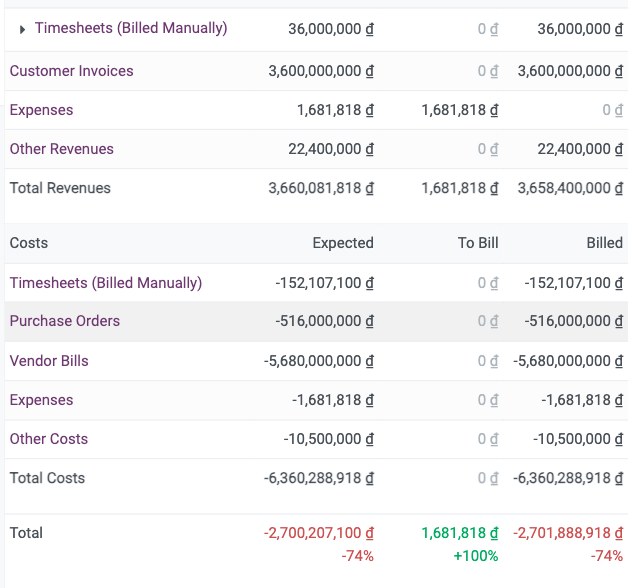
Estimate, budget, cost booked and cost still to pay, revenue by milestone, profit.
People, machines and materials across projects
Who is double-booked, where the hours go, shared machines charged to the right project.
A project's lifecycle, from contract to settlement
Five stages on one data foundation. Each stage reuses the figures of the one before; nobody retypes them.
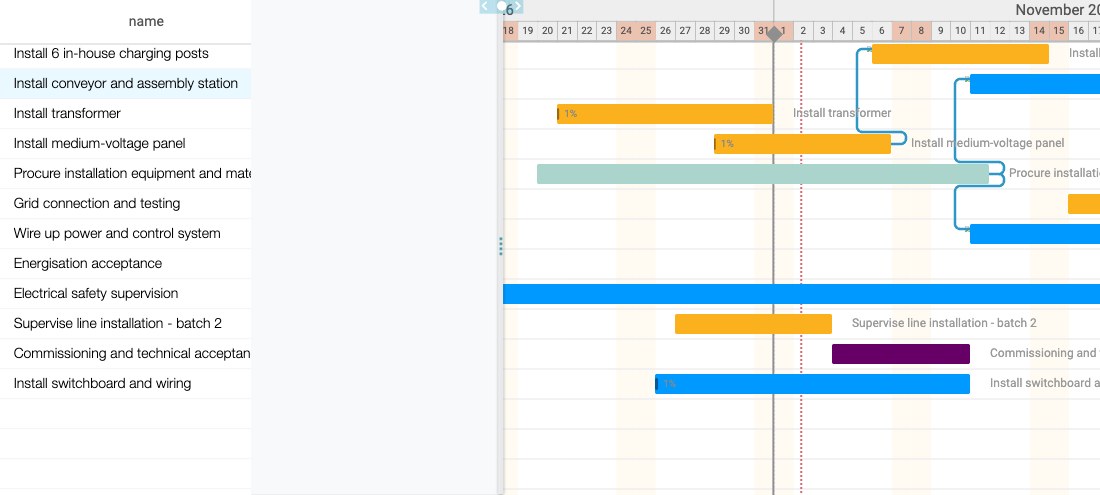
- 1Planning - the signed contract opens the project directly; the estimate rolls up per line item and becomes a budget; the schedule is drawn on a Gantt chart with the critical path.
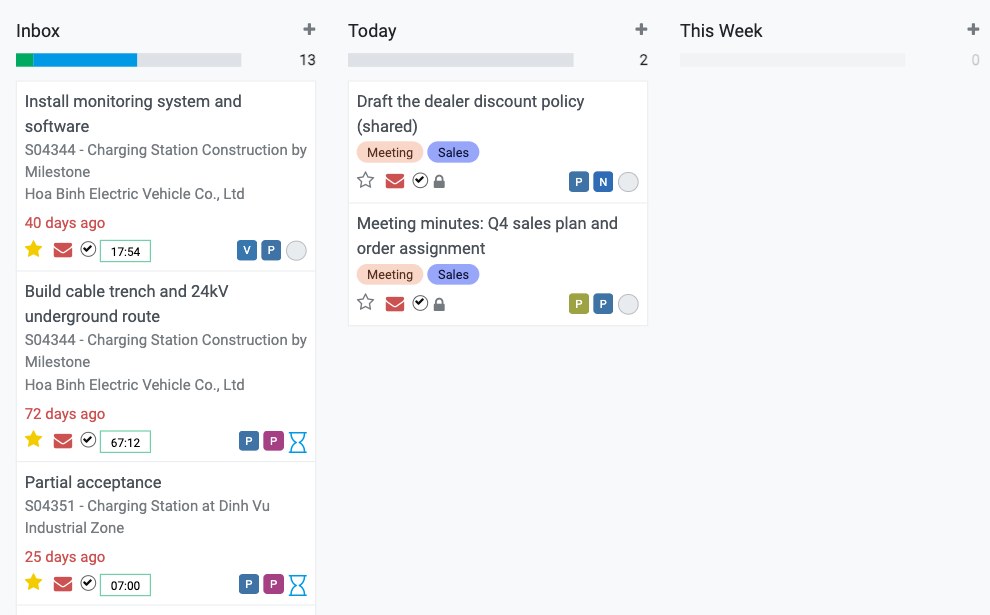
- 2Execution - one task board per person, gathering work from every project; hours logged on the task itself; the conversation stays with the task instead of drifting in a chat group.
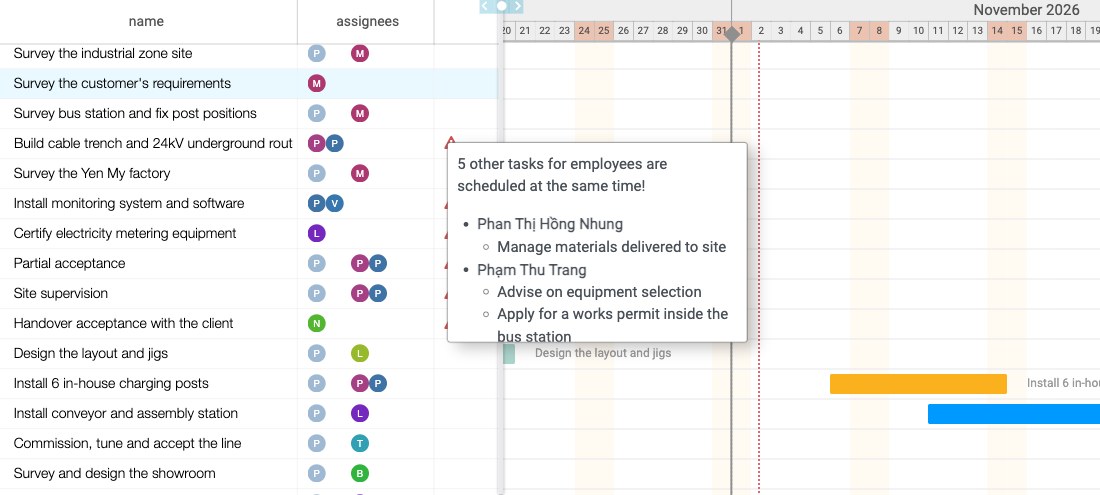
- 3Control - a person booked on two projects at the same time gets flagged before it turns into delay; repeating work goes to automation rules; one status update the whole company sees.
- 4Acceptance and revenue - acceptance milestones are tied to contract lines, so reaching one makes that part invoiceable; a vendor bill posted changes the project cost on the spot.
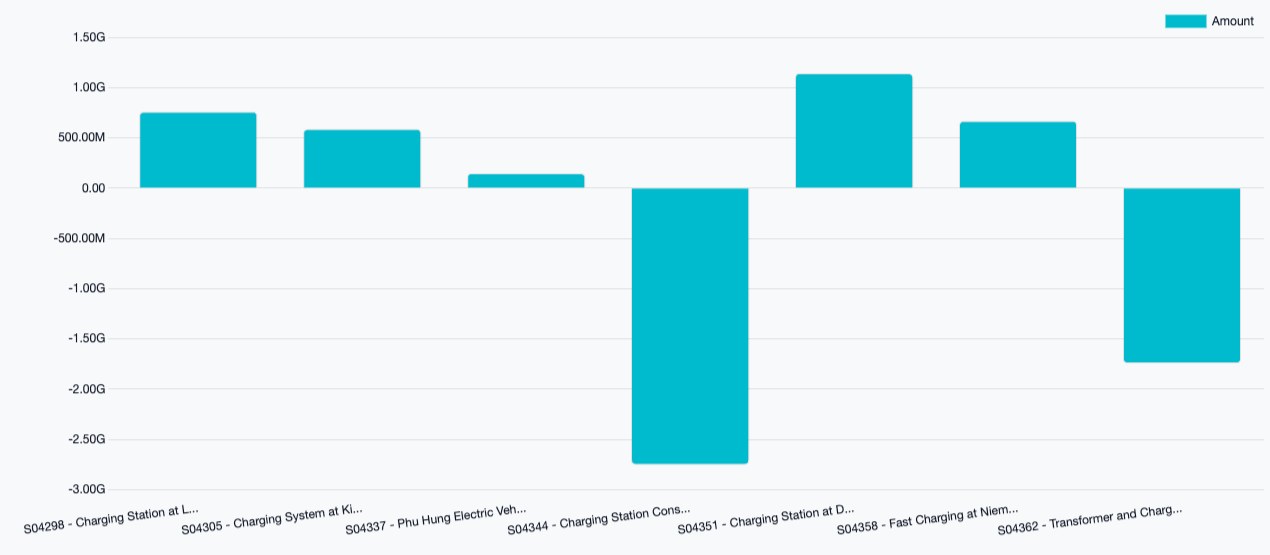
- 5Settlement - the profit of each project and of the whole portfolio on one chart; labour cost from the hourly rate on each person's record; shared machines depreciate into the right project.
For the demo, bring: your list of running projects and one month of staff assignments.
What makes this different from a task tool
Task management tools do assigning and deadlines well. The difference is whether money and resources move together with the schedule.
A task management tool
- Tells you the task is done, not whether the project still makes money.
- One board per project, so you cannot see one person held by two projects.
- Cost and cash mean exporting a spreadsheet and retyping it into accounting, where one wrong cell throws off the period.
- When the customer asks about progress, the project manager compiles it by hand.
Only this far


Viindoo Project
- Schedule, money and resources of every project on one set of figures.
- Every project's timeline on one Gantt chart, with a warning when a person is double-booked.
- Purchase, inventory and revenue figures of a project come straight from posted accounting documents.
- Customers follow progress on a page of their own, and you decide whether to open it.
Schedule
Projects Scheduling
 Timesheets
Money
 Estimates
 Budgets
Accounting
Resources
Employees Assets
Purchase
To be fair about it: if you only need to assign work and chase deadlines, a task management tool is enough. This difference only earns its price when many projects share the same people, machines and cash.
What customers see, what stays internal
Each project picks a visibility level. Whether customers can look in is your decision.
Invited people only
Only employees added to the project can see it and its tasks.
All employees
The whole company sees the project, which suits internal projects or work that needs broad coordination.
Customers through the portal
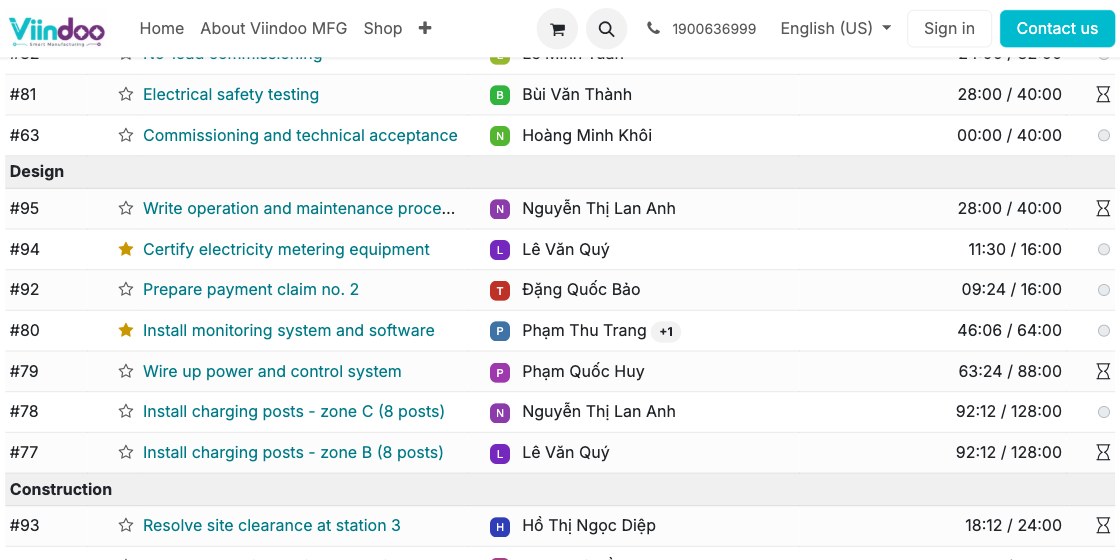
Invited customers get a page of their own: tasks by stage, acceptance milestones, completion, and the conversation and attachments on each task.
Cost and profit
The project profitability panel shows only to internal users of the Project application. Customers on the portal have no way into it.
To be plain about it: if timesheets are on, customers see who worked on each task and for how many hours. If a project should not reveal that, do not open the portal for it.
Two things you get from Viindoo
You set the rules
Task stages, automation rules, how milestone revenue is recognised and each person's hourly rate are all yours to declare, not something the software imposes. The way your company runs projects stays your way.
Built for Vietnamese business
Books kept on the Vietnamese chart of accounts, with e-invoice connections. A project's purchase, inventory and revenue figures come out of those same documents, so there are no two sets of figures to reconcile.
Price and trial
Try it before you decide. How it is charged and the billing questions are all public.
A demo on one of your own projects
Bring one running contract, its estimate and one month of staff assignments. We rebuild that project on Viindoo so you see schedule, cost and people on the same screen.
Tell us where it hurts most
Pick what is stuck today and we will shape the demo around exactly that.
Frequently asked questions
No. On the portal a customer sees only the project's tasks by stage, acceptance milestones, completion, the hours logged on each task if you use timesheets, and the conversation and attachments. If the project is tied to a sales order, they also see what has been invoiced and what they still owe. The project profitability panel is for internal users only and customers have no way into it. The portal does not open by itself either: you choose each project's visibility, and customers have to be invited. Note that customers will see who worked and for how many hours, so do not open the portal for a project that should not reveal that.
Yes. On the Gantt chart you link each task to the one it waits for; the planned end date is computed from the start date, the planned hours and the assignee's working schedule. Switch on the critical path view to see the chain of dependent tasks that decides the project's finish. When one person is booked on two overlapping tasks, even in two different projects, the chart shows a warning, and hovering over it names the person and the clashing task. The software flags it; which task moves is the project manager's call.
An estimate has cost lines and income lines and totals the cost, the income and the expected profit. A large project can be split into child estimates per line item; once a child estimate is confirmed, its lines roll up into the parent. The estimate is linked to the project, and a budget can be created from it to track actual spending against the plan for the life of the project.
Yes. For a contract line billed by milestones, each acceptance milestone of the project is tied to that line with a share of the quantity. Marking a milestone as reached counts that share as delivered, and that exact part can be invoiced. Revenue follows acceptance step by step.
Each time hours are logged on a task, the software multiplies them by the hourly rate on that person's employee record and adds the result to the project cost. Hours add up by project, by department and by person. To be clear: the hourly rate is a figure you declare and it does not automatically include every cost of employing someone. For a close figure, set each position's rate from its real cost.
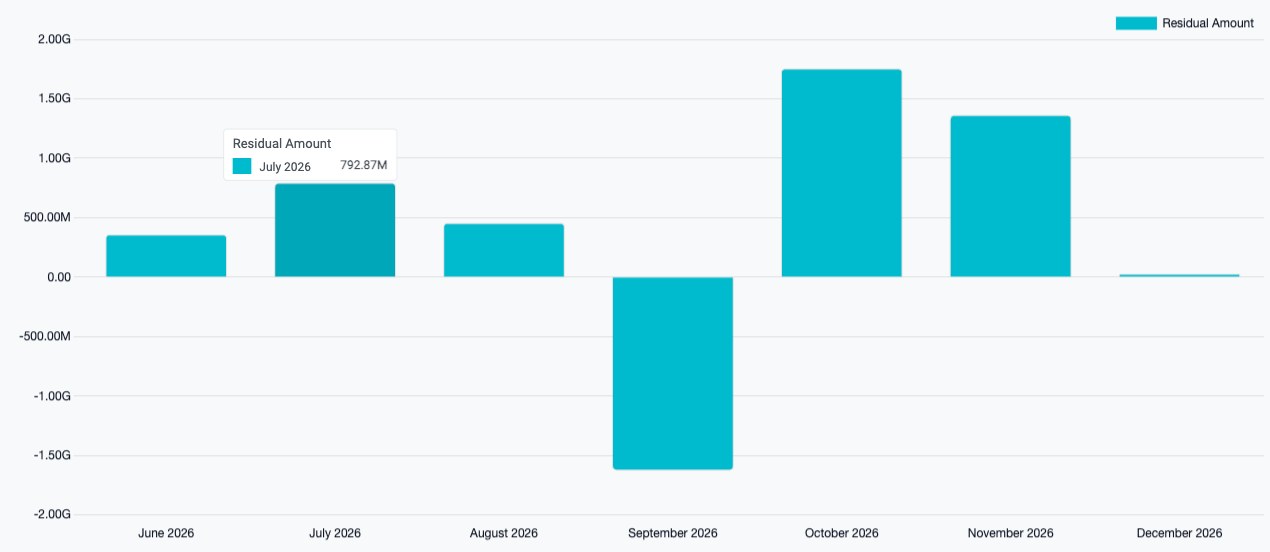
Yes, within the documents already raised. Customer receivables and supplier payables line up by due month on one chart, so a month that pays out more than it takes in shows at once. Purchase orders placed for the project but not yet billed can be filtered too, so you know the spend still to come and not only what is booked. To be plain: Viindoo does not yet forecast the cost to complete a project, so work without documents still needs the project manager's own estimate.
Start with one project you are running now
You do not have to move the whole portfolio at once. Take one running project and rebuild it on Viindoo with its real estimate, people and acceptance milestones. Wherever it diverges tells you where to start.