A project's totals can still look healthy while the tasks underneath are already late, and AI in project management helps you see that. In the records of a test company, a paint-line upgrade had used 242 of its 400 budgeted hours, comfortably within budget. When asked about hours and deadlines, the AI identified four tasks that had exceeded their own estimates by a total of 42 hours. One was already four days overdue, and a test run could not begin until two of those tasks were completed.
Internal projects in a manufacturing company, such as developing a new model, upgrading a production line or fulfilling a large order for one customer, are often managed with spreadsheets and group chats. The schedule is in one file, working hours in another, and the latest status depends on whoever was last asked for an update. For a director or a project manager, the useful questions are which project questions AI can answer, what the project records must contain for those answers to be reliable, and who may see which project.
Two kinds of AI in project management, and where to start
Project management involves leading a team to achieve a project's goals within its agreed scope, time and budget. AI is offered for two different parts of that work. The first kind works with documents: it drafts plans, summarises meetings or writes progress update emails. The second works with records the company already keeps, including projects, tasks, deadlines, the people responsible, estimated hours and logged hours. It uses these records to answer questions and prepares the next step for a person to approve.
| AI that works with documents | AI that answers questions from project records | |
|---|---|---|
| What it reads | Notes, briefs, meeting minutes | Projects, tasks, deadlines, estimated and logged hours |
| Work it reduces | Drafting documents | Compiling and cross-checking figures before a decision |
| Typical request | "Write a progress update email for the customer" | "Which project will miss its deadline?" |
This article is about the second kind. It saves the most time spent chasing people for updates, but its mistakes can also cost the most, because a wrong answer can send people and money to the wrong project.
The weekly questions AI in project management should help answer
The information needed to answer these questions is already recorded, but it is scattered across projects, task lists and timesheets. Each question means opening several screens, exporting data and adding up the figures.
The director
Which project is at risk of missing its deadline, and why? Which tasks are exceeding their estimated hours?
The project manager
Who has the heaviest workload over the next two weeks? Which tasks are waiting for other work to finish, and which have stayed at the same stage for a month?
The team member
Which of my tasks are due soon, and what other work must be finished before I can start?
The person responsible for the customer
What still needs to be done before handover, and is anything falling behind?
AI in project management: the results of ten requests we tested
We tested these requests with the AI on Viindoo, using the records of a test company that assembles electric bikes and employs 229 people. Each request was run twice. The first time, the company had no projects of its own and no hours logged against tasks. The second time, it had four projects, 28 tasks and 194 timesheet entries from September to November. The questions were asked from three roles: the director, a project manager and a technician with limited access rights. The people, projects and figures all belong to that test company. The figures we checked against the records matched, with the exceptions described below.
| Request | AI response |
|---|---|
| "Which projects are running, and how many tasks are open or overdue?" | 5 projects, including the built-in internal project; 25 open tasks, 1 of them overdue |
| "Which project may miss its deadline, and why?" | Two projects at high risk of missing their deadlines, each with supporting figures and a first action |
| "Comparing estimated and logged hours, which project is over?" | No project over its total hours; six tasks over their estimates, by 42 and 24 hours in total in two projects |
| "Who has the heaviest workload up to 8 December?" | Identified one technician, but left out an overdue task |
| "Which open tasks have no one responsible, no deadline or no estimated hours?" | 4 tasks, with the missing information shown for each |
| "How many hours were logged last week, by person and by project?" | 100 hours in total, with three people logging 63, 26 and 11 hours |
| "Which tasks are waiting for other work, or have stayed too long at one stage?" | 6 tasks waiting for other work, with the tasks holding them up; 7 tasks at the same stage for over 30 days |
| "Create a test-ride task. Let me see it first." | A draft shown on a confirmation card; the task was not created |
| "What stage has the customer delivery project reached?" | Assembly in progress, 4 tasks still to follow, 1 of them with no one assigned |
| A technician: "Show me the team's hours and the V10 project" | No hours other than his own, no V10 project, no figures |
When the AI answers from project records, the Sources list at the end names the records it used, limited to those the reader is allowed to open, so the project manager can check them before acting. In the second run, each question took 10 to 41 seconds to answer and cost about 0.04 to 0.18 USD in fees paid to the AI provider the company had connected.
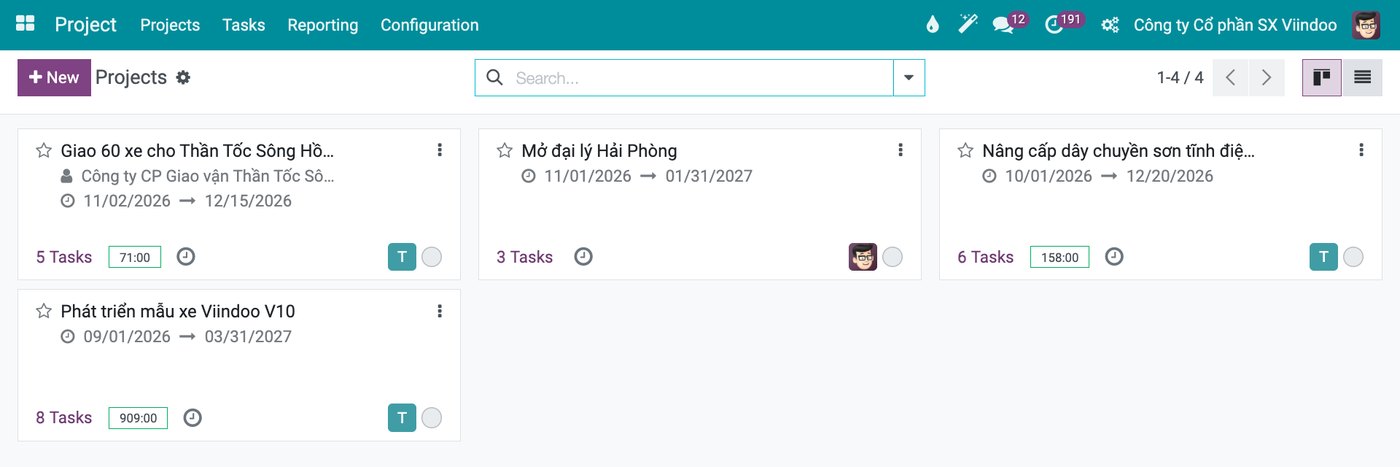
The test company's projects: developing a new model, upgrading a paint line, fulfilling a 60-bike order for one customer and opening a new dealership.
AI in project management in practice: six situations from our test
Each situation shows the request, the AI's answer, the next step on Viindoo and how to apply it in your company. The answers are shortened excerpts.
Situation 1: which project is at risk of missing its deadline?
Request typed by the director: "Which project is at risk of missing its deadline? Give me the reasons in figures and what to do first."
What came back, in 41 seconds. The AI identified two projects at high risk. The paint-line upgrade was due on 20 December. Of its 80 planned days, 54 had passed, but only 2 of its 8 tasks had been completed. The electrical and compressed-air connection was four days overdue and had used 58 of its 40 estimated hours. The paint booth installation had used 131 of its 120 hours. The test run of three paint batches could not begin until both were finished. The 60-bike order was due on 15 December: only 1 of its 6 tasks had been completed, 90 hours of work remained, and no one had been assigned to the vehicle registration papers. The AI also noted that no project had a recorded status update, so the risk levels were its own assessment, not information stored in the system.
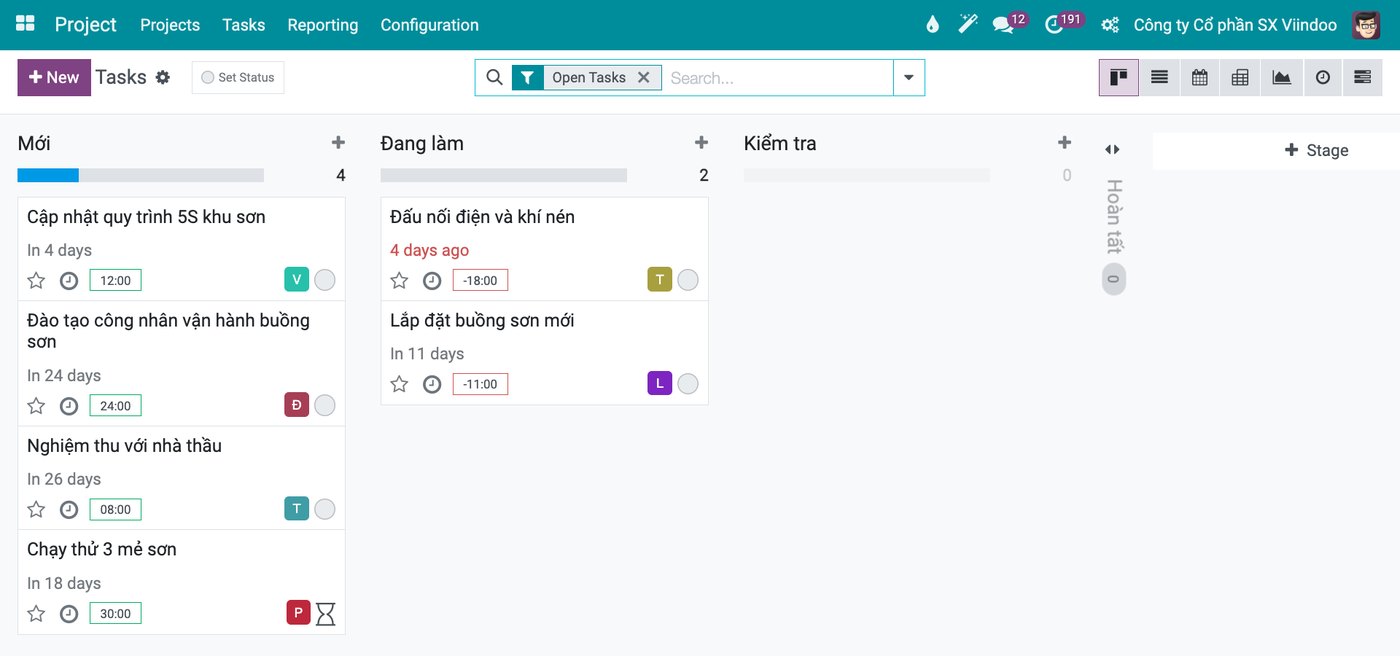
The same project on screen: -18:00 and -11:00 mean two tasks have gone over their estimates by 18 and 11 hours.
Next step on Viindoo. The project manager opens the overdue task, agrees a new deadline with the person responsible and updates the project's status. The next answer can then rely on a status the project manager has recorded rather than on the AI's own assessment.
What to apply in your company. A project can fall behind long before its end date, as soon as the tasks that other work depends on are late. Ask first about the tasks holding up other work, and look at the project's total hours last, not first.
Situation 2: comparing estimated and logged hours
Request typed: "Compare estimated and logged hours for each project. Which project is running over, and by how much?"
What came back, in 24 seconds. No project had exceeded its total hours: the new model had logged 291 of 1,200 hours, the paint line 242 of 400 and the customer order 49 of 120. The AI then checked the individual tasks without being asked. Four paint-line tasks had exceeded their estimates by 42 hours in total, the largest overrun being the electrical connection at 18 hours; two finished tasks of the new model had exceeded theirs by 24 hours in total. It also found that the estimated hours of the tasks in the customer order added up to 140, against 120 allocated to the project, so the planned work already exceeded the project's allocated hours.
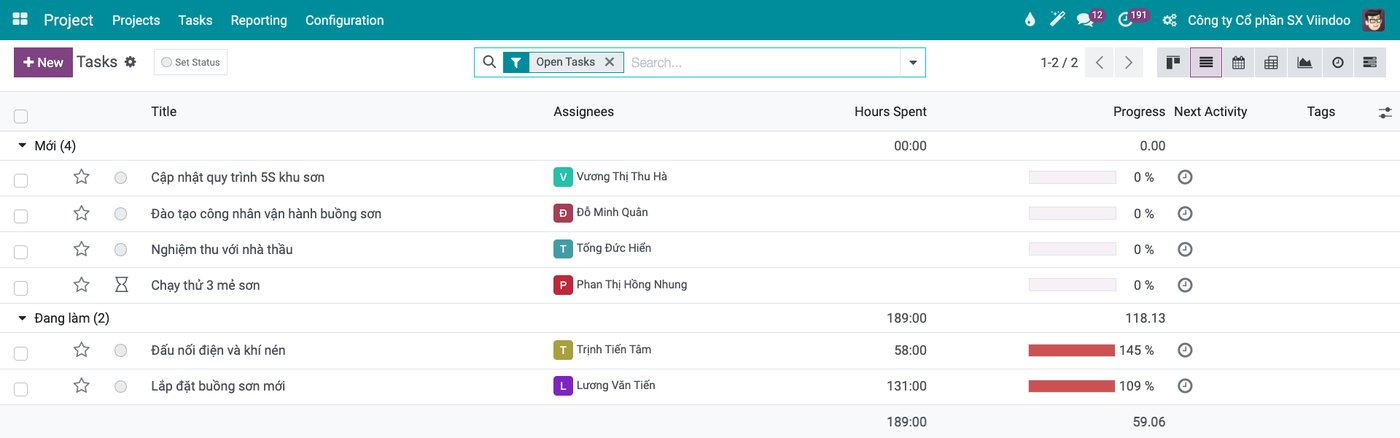
Hours are logged against each task, so overruns show task by task: here, two tasks have used 145% and 109% of their estimated hours.
Next step on Viindoo. Each task holds its allocated hours. The Timesheets app records every hour worked against a task, so hours spent, hours remaining and progress are calculated on the task itself. Without hours logged against tasks, there are no figures to compare with the estimates.
What to apply in your company. Compare estimated and logged hours for each task, not only for the project as a whole. A project total can hide several overruns behind tasks that have not started yet, and those are exactly the tasks that will need the hours later. More on resource allocation in project management.
Situation 3: tasks waiting for other work, and tasks that have stayed at the same stage
Request typed by the project manager: "Which tasks are blocked waiting for other work, or have sat too long in one stage? Who owns them?"
What came back, in 25 seconds. Six tasks were in the Waiting state. For each one, the AI listed the tasks that had to be finished first and the people responsible for them. Building 20 prototype bikes was waiting for the choice of 72V battery supplier and the front-panel mould; the test run of three paint batches was waiting for the electrical connection and the booth installation. One technician was responsible for most of the tasks holding up other work. As no threshold for "too long" had been given, the AI chose 30 days without a change of stage and named seven tasks. The oldest was an update of the 5S workplace organisation rules for the paint area, unchanged since 5 October and due on 28 November.
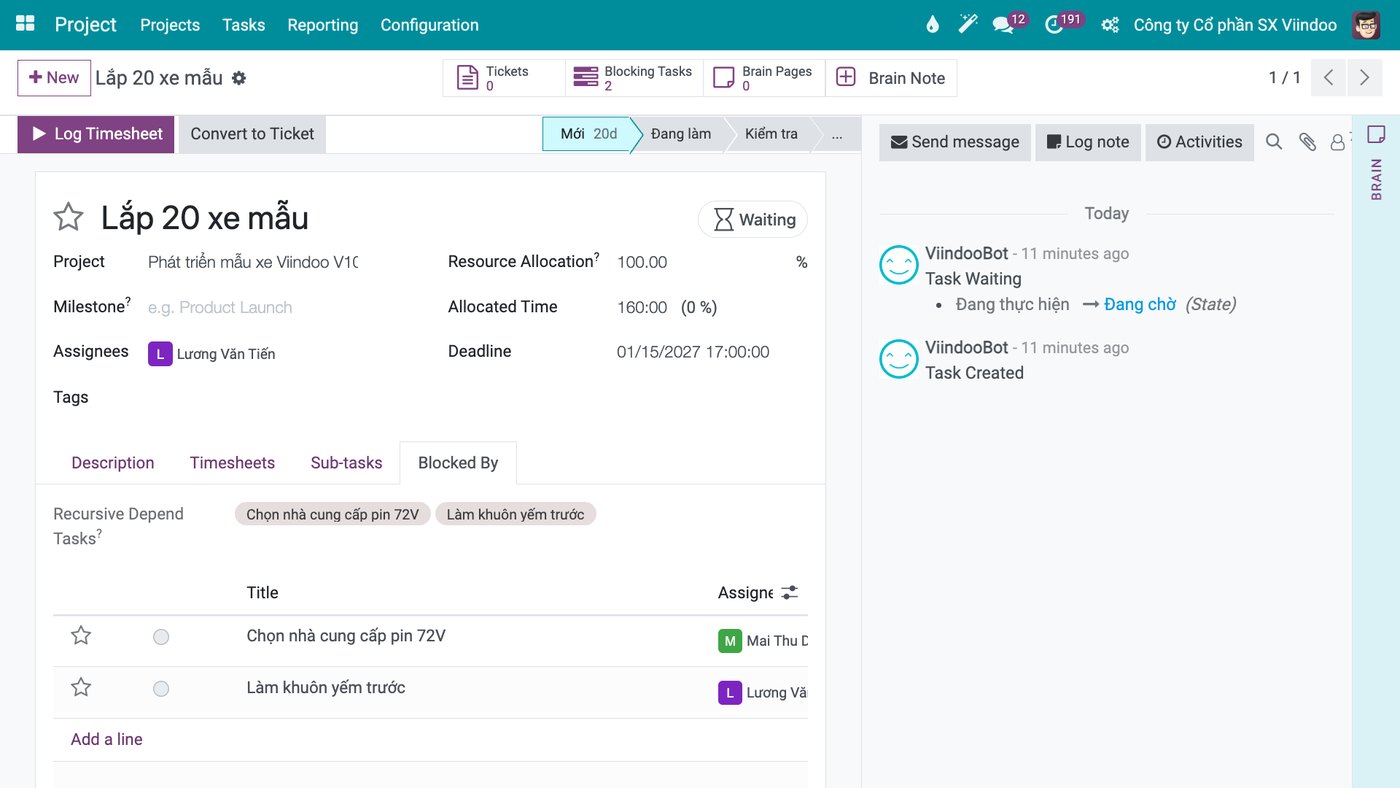
Each task records which tasks must be finished before it can start, which is what lets AI in project management say which tasks are holding up others.
What to apply in your company. Record which tasks depend on others when the plan is made, not when a task is already late. A task that waits for another but is not linked to it looks ready to start on every list. More on this in the article on project dependencies.
Situation 4: hours logged last week by person and by project
Request typed by the project manager: "Last week, from 16 to 22 November 2026, how many hours did the project team log, by person and by project?"
What came back, in 10 seconds. 100 hours in total. One technician logged 63 hours across all three projects, and two others logged 26 and 11. By project, 43 hours went to the paint line, 35 to the new model and 22 to the customer order. Every figure in the breakdown by person and project matched the timesheet entries. In the first run, before hours were logged against tasks, the AI said it could not answer. It also declined to use the work log kept for payroll instead, because those hours are not split by project.
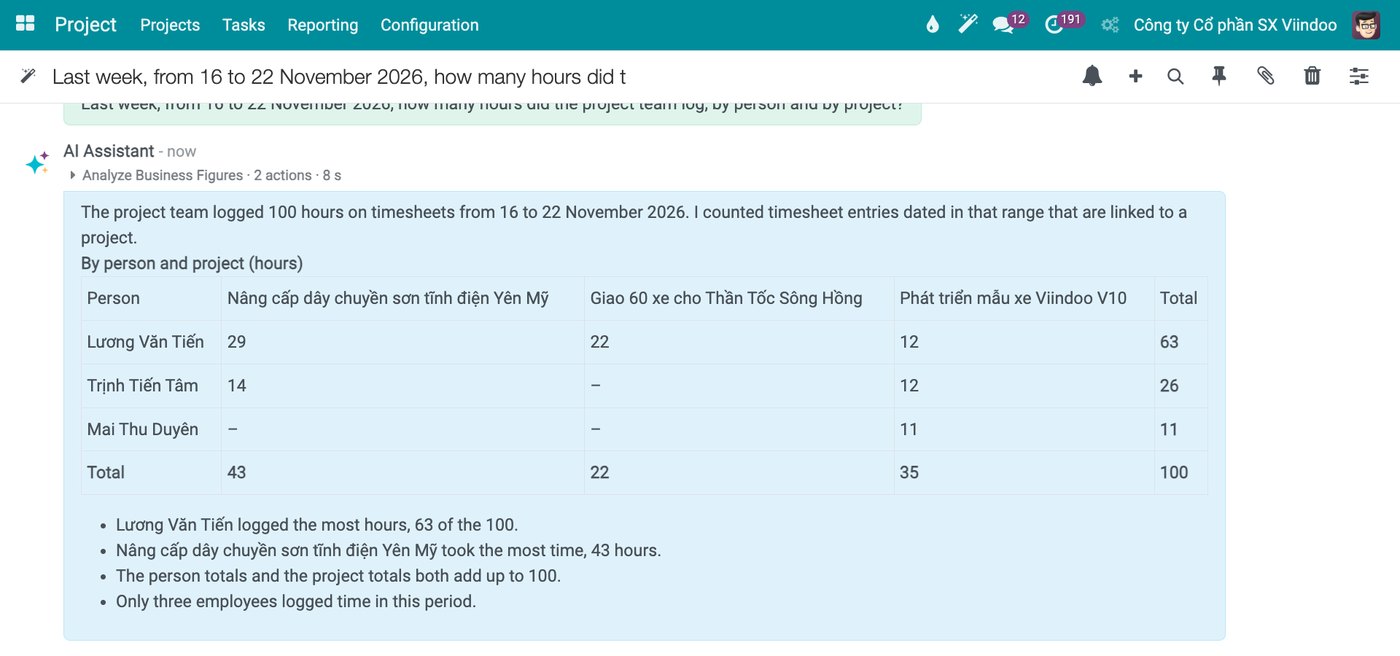
The same question asked in the chat window: the totals by person and by project both add up to 100 hours.
What to apply in your company. One person logging 63 of the team's 100 hours across three projects is a reason to talk about workload, not a judgement on that person. Read this figure alongside who is responsible for the tasks holding up other work, as in situation 3.
Situation 5: work remaining before handover to the customer
Request typed by the director: "Where is the customer delivery project? What must be done before handover, and what is slipping?"
What came back, in 27 seconds. The AI identified the project without being given its exact name: the 60-bike order for a logistics customer, at the assembly stage. The configuration had been confirmed, and assembly was in progress with a deadline of 8 December. Applying the customer's logo and the final inspection were both waiting for assembly. No one had been assigned to the registration papers. Delivery and driver training were due on 15 December. Nothing was overdue yet. The AI then raised a point nobody had asked about: the delivery task was not linked to the inspection or the papers, so the system would not warn anyone if the bikes were due to leave before either was done.
What to apply in your company. Link the handover task to every task that must be finished before it: inspection, documentation and payment if needed. Then "what is left before handover" has a single answer: the one the system shows.
Situation 6: a new task prepared for confirmation, not yet created
Request typed by the project manager: "Create the task 'Test-ride 20 prototype bikes on the test track' in the new model project, assign it to whoever has the least work in that project, deadline 15 December 2026. Let me see it before it is created."
What came back, in 10 seconds. No task was created. The AI found the project, filled in the task name, the deadline and the person responsible, and stopped at a confirmation card. It chose the project manager himself and gave its reason on the card: he had no open tasks in that project. That reading of "least work" is reasonable, but it may not be what the manager meant, and that is the point of the card: the person approving sees the AI's choice before anything is recorded in the system.
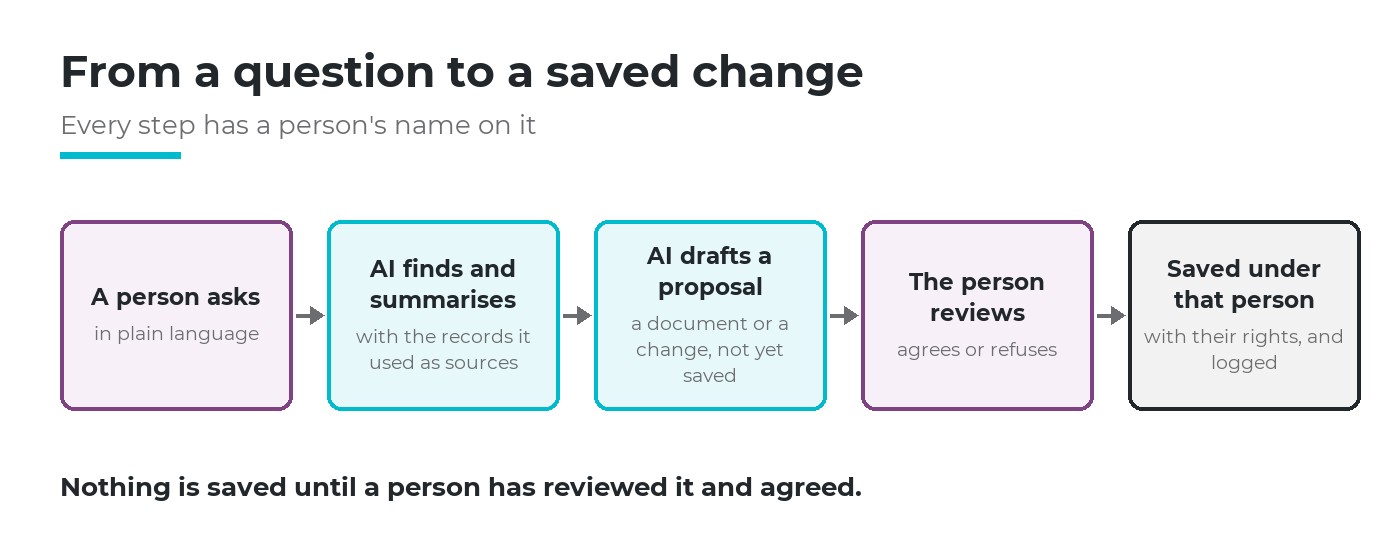
AI handles the middle steps: finding information, summarising it and preparing drafts. A person starts the process and gives the final confirmation.
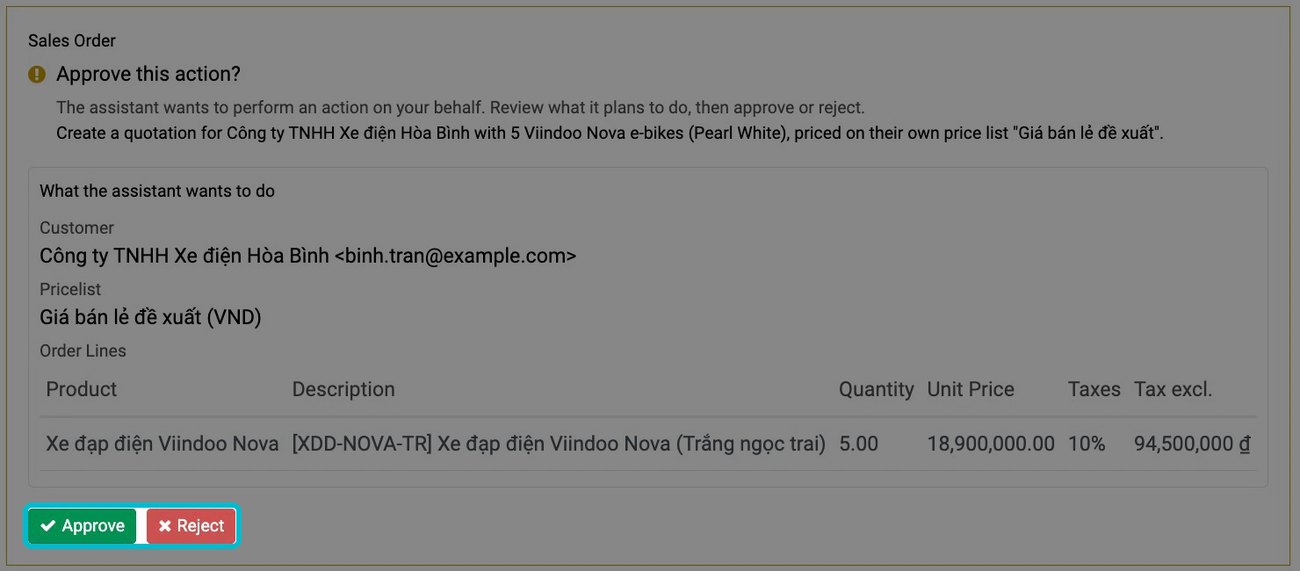
From an earlier run with the same test company: the same kind of confirmation card, here for a quotation. The action is carried out only after a person approves it.
What to apply in your company. When you give AI a rule such as "least work", say how to measure it: the number of open tasks, the remaining hours or the tasks due in the next two weeks. A different rule gives a different answer.
When project records are incomplete, AI in project management says so
Across both runs, the most useful behaviour was not speed but the AI's habit of naming what was missing instead of filling the gap with a plausible-sounding answer.
| What the AI found | What it said |
|---|---|
| No hours logged against tasks (first run) | Cannot compare estimated with logged hours; the app may not be installed, or the account may lack the access rights |
| No project matching "new model" or "delivery" (first run) | Listed the projects it could see, without picking another project as a substitute |
| Open tasks with no one responsible, no deadline or no estimated hours (second run) | 4 tasks, including the registration file for the new model, which was missing all three |
| A project with no estimated hours at all (second run) | Not enough data to assess its risk |
| No recorded status update on any project (second run) | The risk levels are its own assessment |
The new dealer project shows why this matters: it had three open tasks, two with no one responsible and no deadline, and none with estimated hours. Any statement about its progress would have been a guess, and the AI did not make one.
The project records AI in project management needs to answer correctly
Every caveat above comes back to how the records are kept, not to the AI. It works only with what has been entered: it can point out a task with no one responsible or no deadline, but a task agreed in a meeting and never entered does not exist for it.
1. A person responsible, a deadline and estimated hours on every open task
A task with no one responsible is left out of every workload count. A task without estimated hours is left out of every comparison with logged hours.
2. Hours logged against tasks every week
If hours are logged only at month end, or not against a task, nobody can see which task is going over its estimate.
3. Links between dependent tasks recorded
Only a recorded link to the task it depends on puts a task in the Waiting state and lets everyone, AI included, see what it is waiting for.
4. Stages updated as work progresses
If tasks stay in the New stage while work is already under way, "stuck for 30 days" means nothing.
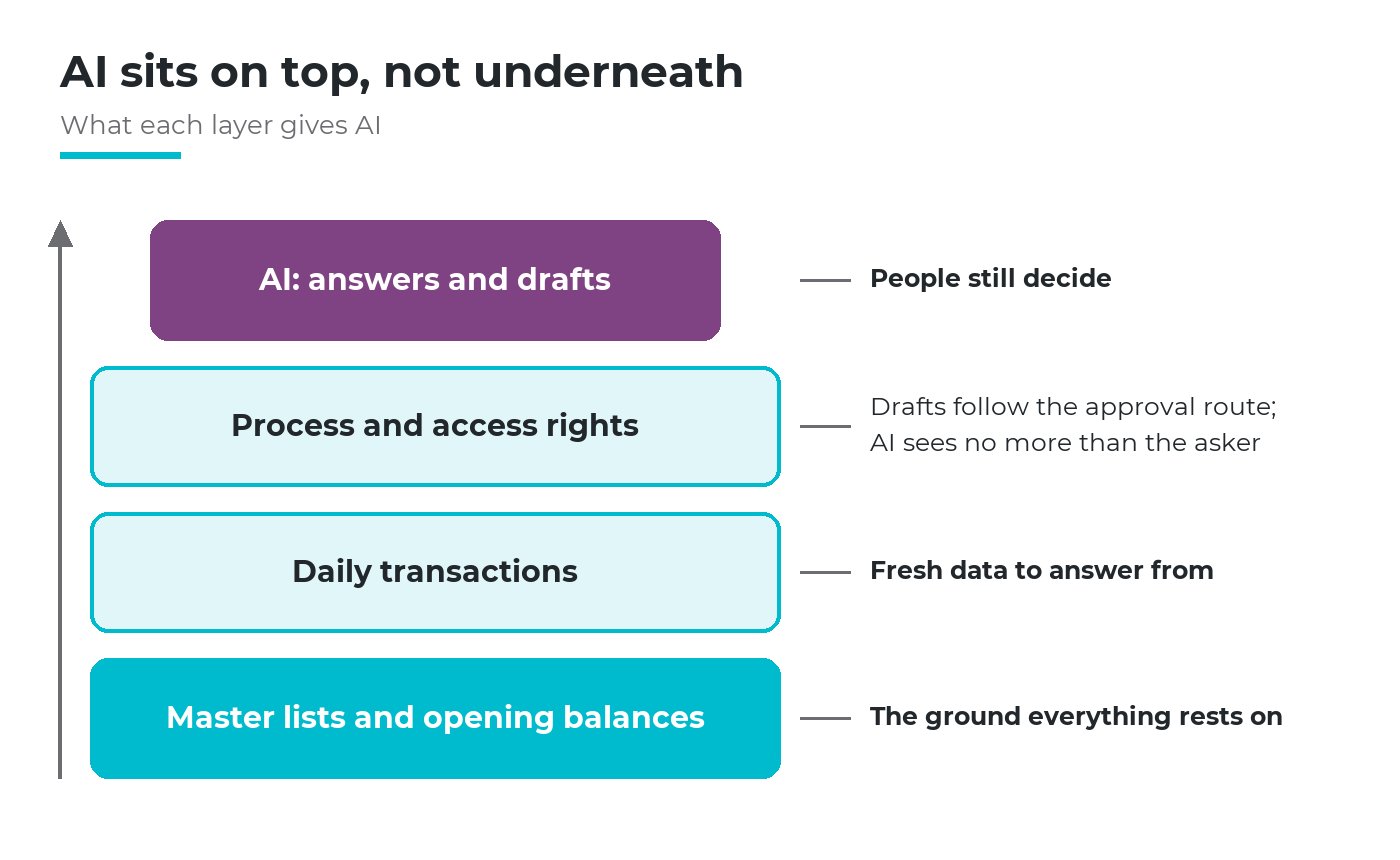
Without records of tasks, deadlines and logged hours, the AI's answers may be fluent but have nothing to rest on.
Viindoo's project management features, from tasks to timesheets, are described on the project management page.
Access rights, approval and cost: not everyone can see every project
AI sees only what the person asking may see
A technician asked for the whole team's November hours and the progress of the new model project, which is set to invited users only and to which he had not been invited. As he could view only his own timesheets, the AI found no hours other than his own, and he had logged none. It found no project by that name and gave no figure: "The V10 project may use another name, be archived, or be a private project you are not allowed to see."
The same question gave a different answer earlier in our test. Installing the Timesheets app had given every existing internal user the Timesheets administrator role, and with it the right to read employee records. While the technician still had that role, the AI returned the team's 282 hours for November, including 103 hours on the private project he could not open. The AI did nothing wrong in either case: it has no rights of its own, so whatever the rights leave open, it can read.
What to apply in your company. Review rights after every new app is installed, not only before switching AI on. Check who can read timesheets, private projects and employee records, as discussed in the article on AI data governance.
By default, every change needs a person's approval
Answering a question changes no data. When the AI is asked to create a record, assign a task, schedule work or send something, by default it stops at a confirmation card, as in situation 6. The company decides, action by action, which actions must ask first.
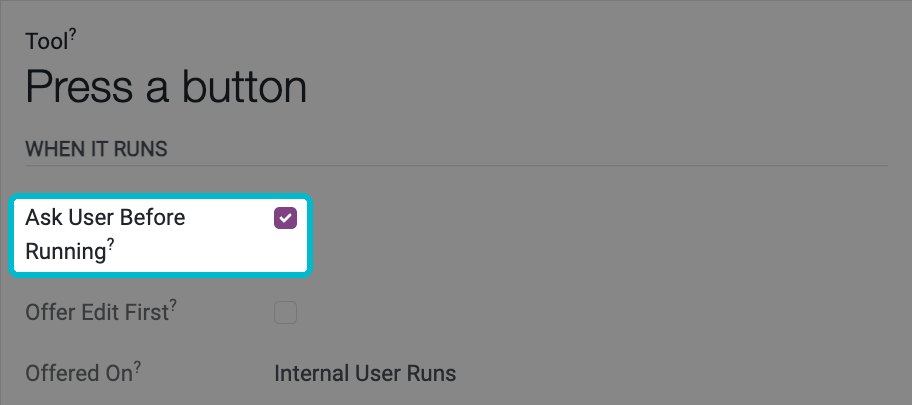
Example: the setting that makes an AI action wait for a person's approval.
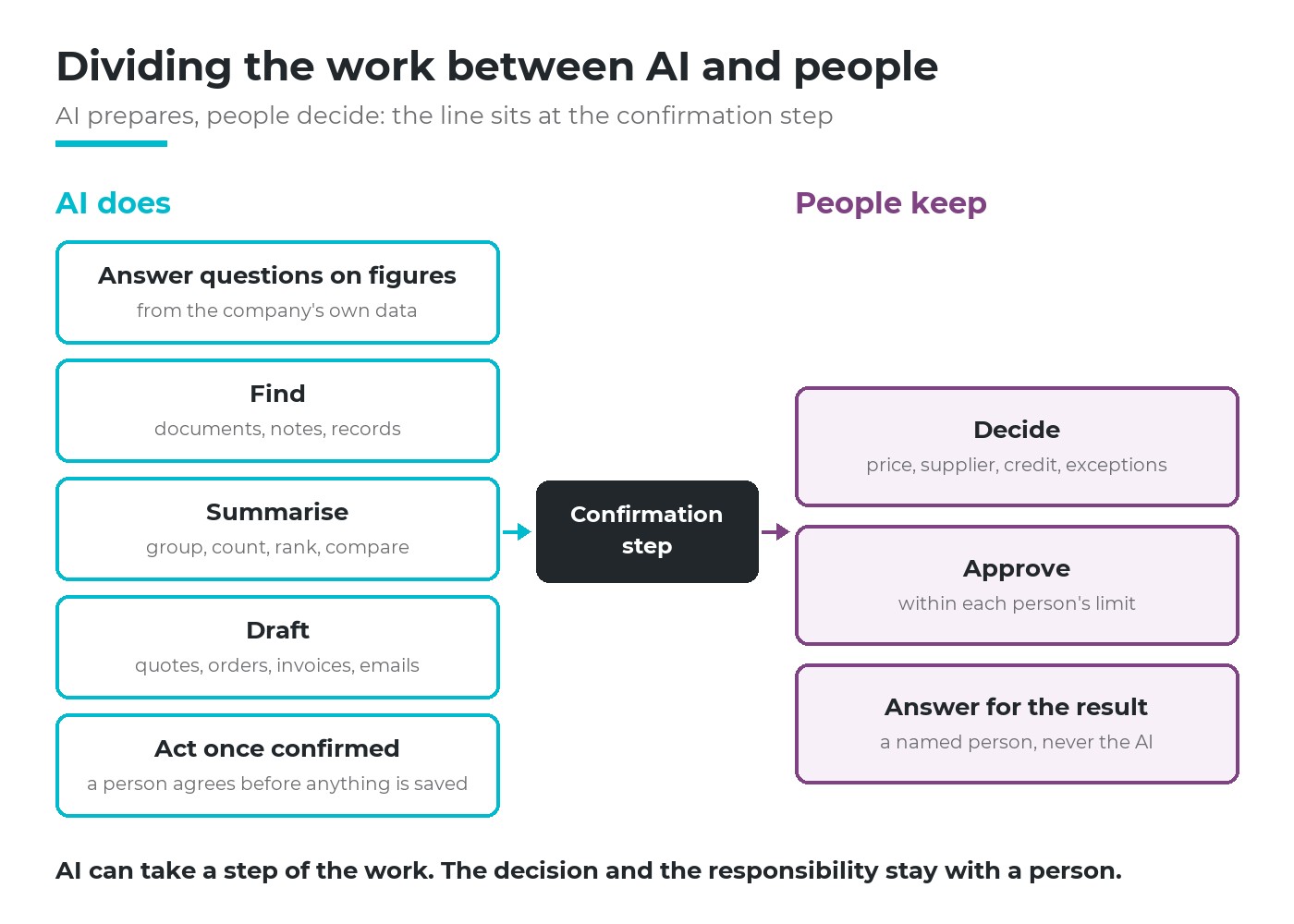
In project management, the decisions on the right include new deadlines, reassigned tasks, extra hours and what to tell the customer.
Cost caps and a record of each AI request
The company sets caps on AI spending per person, for the whole company and per question, with an alert before a cap is reached. Each request is logged with the user, the cost and its status.
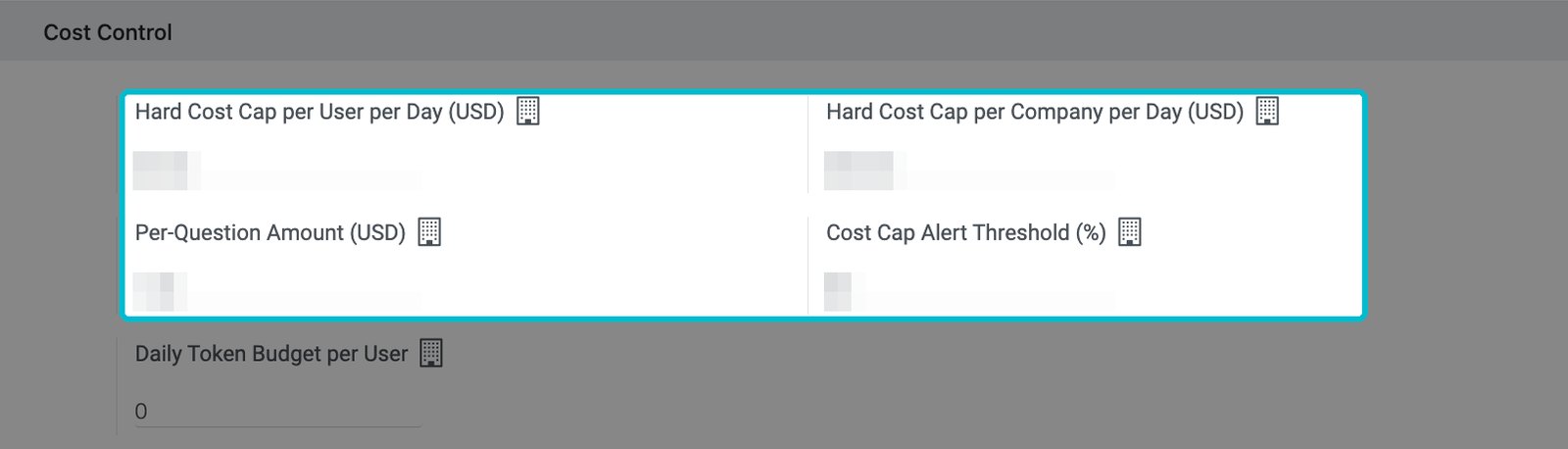
The cost control settings, with the amounts hidden: each cap is set by the company.
What AI in project management does not do
- Planning and rescheduling were outside our test. We did not ask the AI to build or change a schedule, so we make no claim about it. Decisions on new dates, reassignments and extra hours remain with the project manager.
- It reads the dates the system holds, planned or not. When a task is created, the scheduling view sets its planned start to that moment and calculates a planned end from the estimated hours. Nobody had adjusted these dates in our test, and in two answers the AI pointed out "conflicts" between them. If you do not plan in the scheduling view, base your questions on deadlines instead.
- AI in project management is not always right. Asked who had the heaviest workload up to 8 December, the AI counted only tasks due from the day of the question onwards, so it left out a task already four days overdue. It also added a negative remaining value of -11 hours into a total. The other figures we checked matched, but the project manager should review any answer about workload before relying on it.
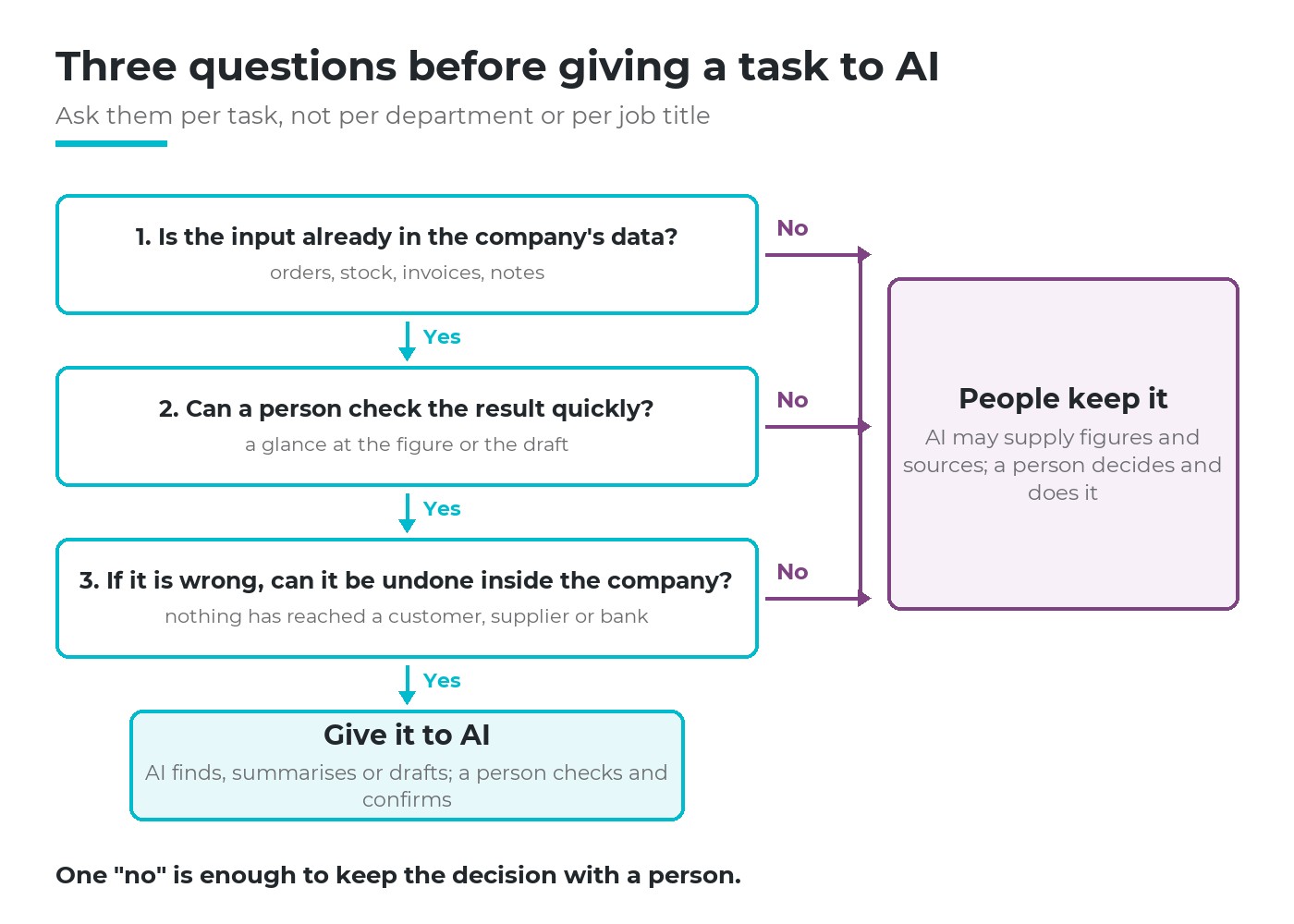
Applied to projects: listing tasks that are waiting for other work passes all three tests; telling the customer about a new date fails the third, so a person confirms it.
Where a project team should start with AI in project management
1. Pick one project that hurts
A project with a customer delivery date or a launch date, where delays cost money.
2. Complete the details of every open task
The person responsible, the deadline and the estimated hours, plus links to the tasks it waits for.
3. Log hours against tasks weekly
Do not wait until month end, and do not log hours against the project as a whole.
4. Ask three questions a week
Which project is at risk, which tasks are waiting for other work, and where hours are running over. The project manager reviews each answer.
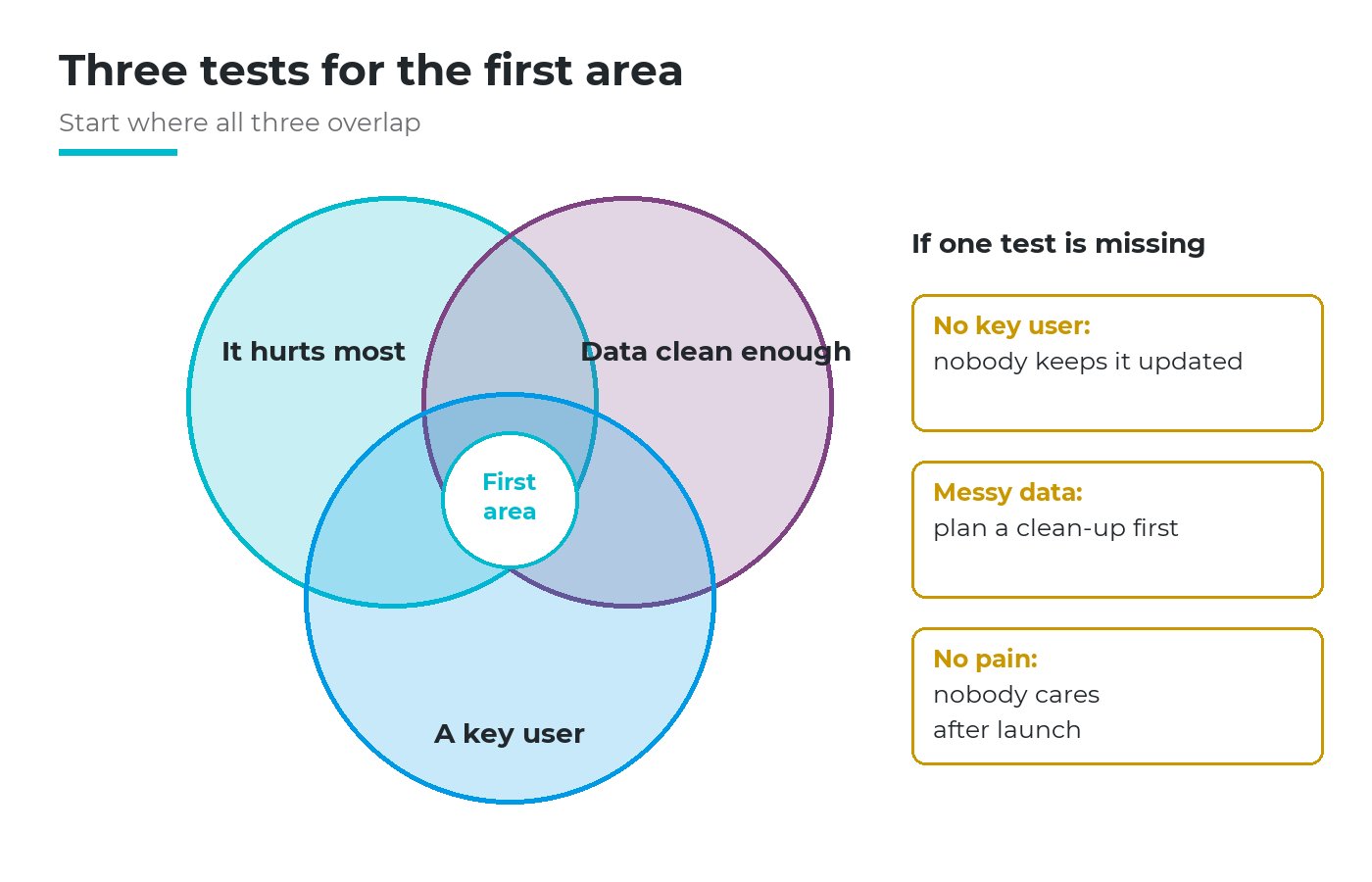
In many companies, a customer project with a fixed delivery date is the first to pass all three: the pain is a missed date, and the data needed is a short task list.
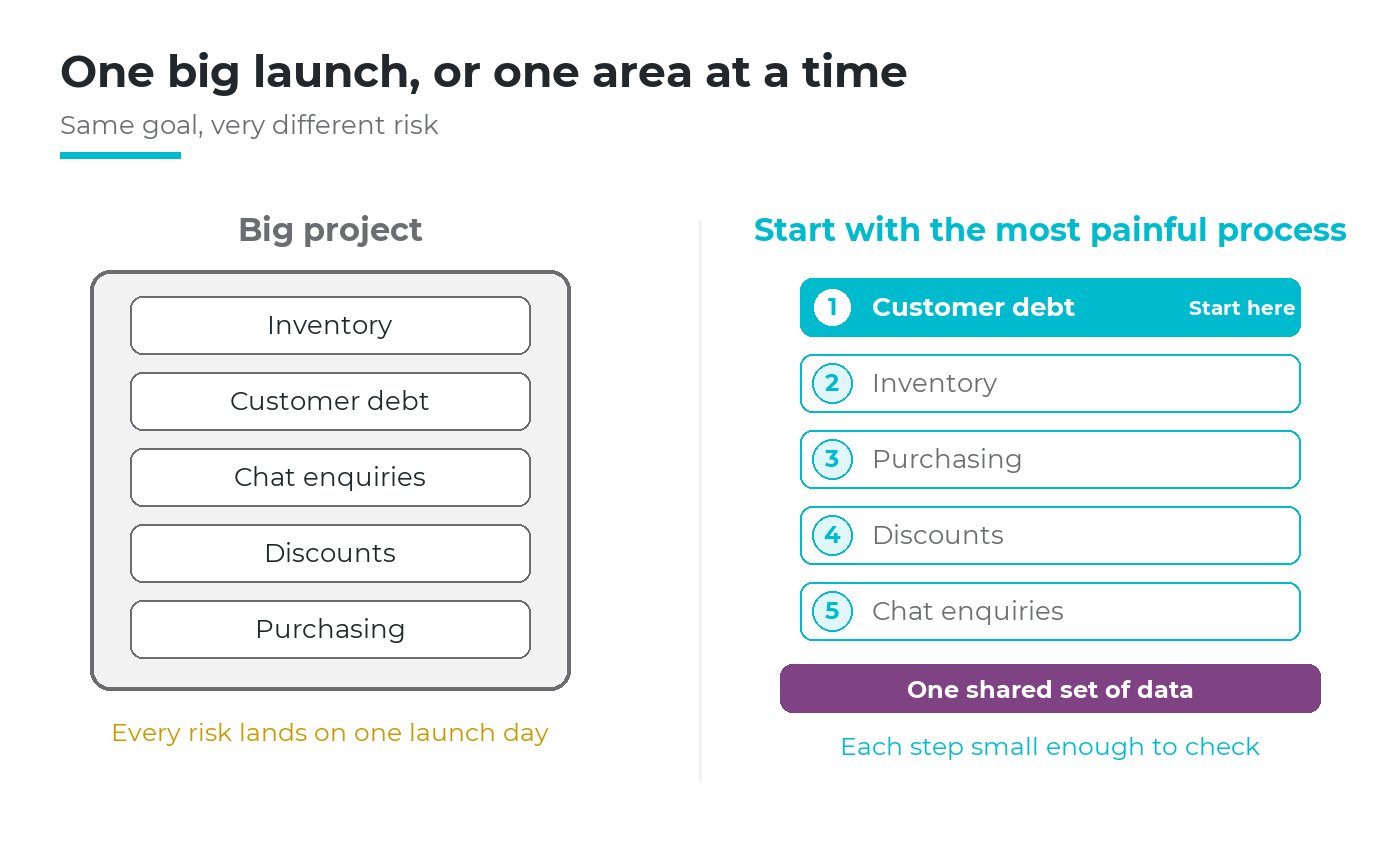
Start with the most painful project, then add the next one on the same set of data.
If you are still comparing tools, see the overview of project management software. What agentic AI is, and whose access rights it uses, is explained in the article on what agentic AI is.
Would you like to see AI answer questions about your own company's projects, deadlines and logged hours? Tell us where it hurts most. Book a consultation and bring your list of projects due for completion this quarter, or see the costs first.
Frequently asked questions about AI in project management
This article makes no such claim. In our test, the AI compiled figures, made comparisons and flagged problems; decisions on new dates, reassignments and anything sent to a customer stayed with people, and every change waited for confirmation.
Not for every question. Without hours logged against tasks, the AI could still report on tasks, deadlines and the people responsible, but it could not compare estimated with logged hours or say which tasks were taking up people's time.
Only if their rights already allow it. The AI reads with the rights of the person asking. In our test, a technician who could view only his own timesheets saw no one else's hours and no private project; with broader timesheet rights, he could see the hours logged on that project.
To the AI provider your company connects with its own access key. Each connection shows the region where its data are stored, and you pay the provider directly. Viindoo does not resell AI services.
Related articles
- What Is Agentic AI, and How Does It Work Inside a Business Management System?
- Build Business Software with AI, or Use a Platform with AI Built In?
- Separate Software Plus Spreadsheets, or One Platform for the Whole Business?
- AI for Manufacturing Companies: What Agentic AI Can Do from Order to Shop Floor
- AI for Accounting: What Agentic AI Can Do from Receivables to Reports
- AI in Sales: What Agentic AI Can Do from Opportunity to Quotation
- AI in Inventory Management: What Agentic AI Can Do from Stock to Delivery
- AI in HR Management: What Agentic AI Can Do from Headcount to Hiring
- AI in Procurement: What Agentic AI Can Do from Late Deliveries to Unbilled Goods
- 8 Project management software to effectively track operation progress