Purchase approval limits are usually the first thing a director asks about when spending feels out of control: who is allowed to commit how much, and who checks the bill before it is paid? In many growing companies the honest answer is: it depends on who is in the office that day.
The short answer: let every purchase start from a written need, either a request from a department or a minimum stock rule. Approve before anything is ordered, by amount, with the levels written down once. And pay a vendor bill only after it matches both the purchase order and what the warehouse actually received.
A purchase order is the company's written commitment to a vendor. Once it is sent, the money is effectively promised, so control has to happen before that moment, not when the bill arrives.
Why purchasing slips: gaps in design, not careless buyers
When a bill turns up for goods nobody remembers approving, the reflex is to ask who ordered it. That rarely finds the cause. People work around a process when the process leaves a gap; the gap is usually one of four.
Nobody owns the reorder
The warehouse sees the shelf, purchasing sees the vendors, and each assumes the other will act. Stock runs out, then an urgent order skips every check.
Approval by habit, not by amount
Small items wait for the director while a large contract goes through on a phone call, because no limit was ever written down.
Approval after the fact
The order is placed first and the signature is collected later. At that point approval can only confirm, never stop.
Bills checked against memory
Accounting compares the bill with an email or a phone note, without seeing what the warehouse actually received.
Each gap is a design choice. Fixing them in order gives one chain: a written need, an approval set by purchase approval limits, an order created from that approval, a receipt, and a bill matched against both.
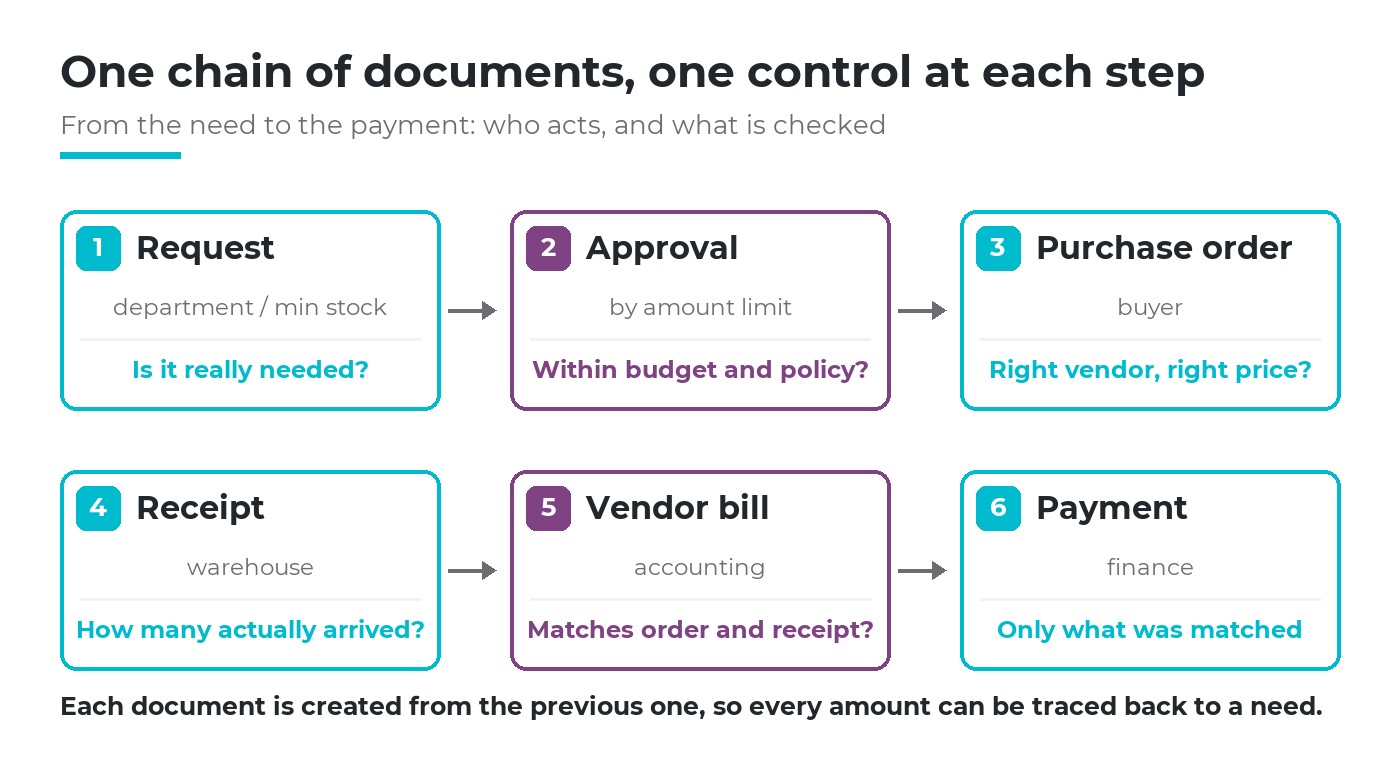
Six documents, each created from the previous one, each with one person and one question.
Who orders when stock runs low
There are two legitimate ways into purchasing, and both should leave a written trace. Anything else, an order from a phone call or a chat message, is the exception the process should make unnecessary.
Route 1: a purchase request from a department
For things that are not kept in stock, such as tools, equipment or materials for a new job, the department fills in a purchase request (Purchase Requisition): what, how many, for which warehouse, needed by when. The request is not an order; it is a need waiting for a decision. The difference matters, and is explained well in purchase requisition versus purchase order.
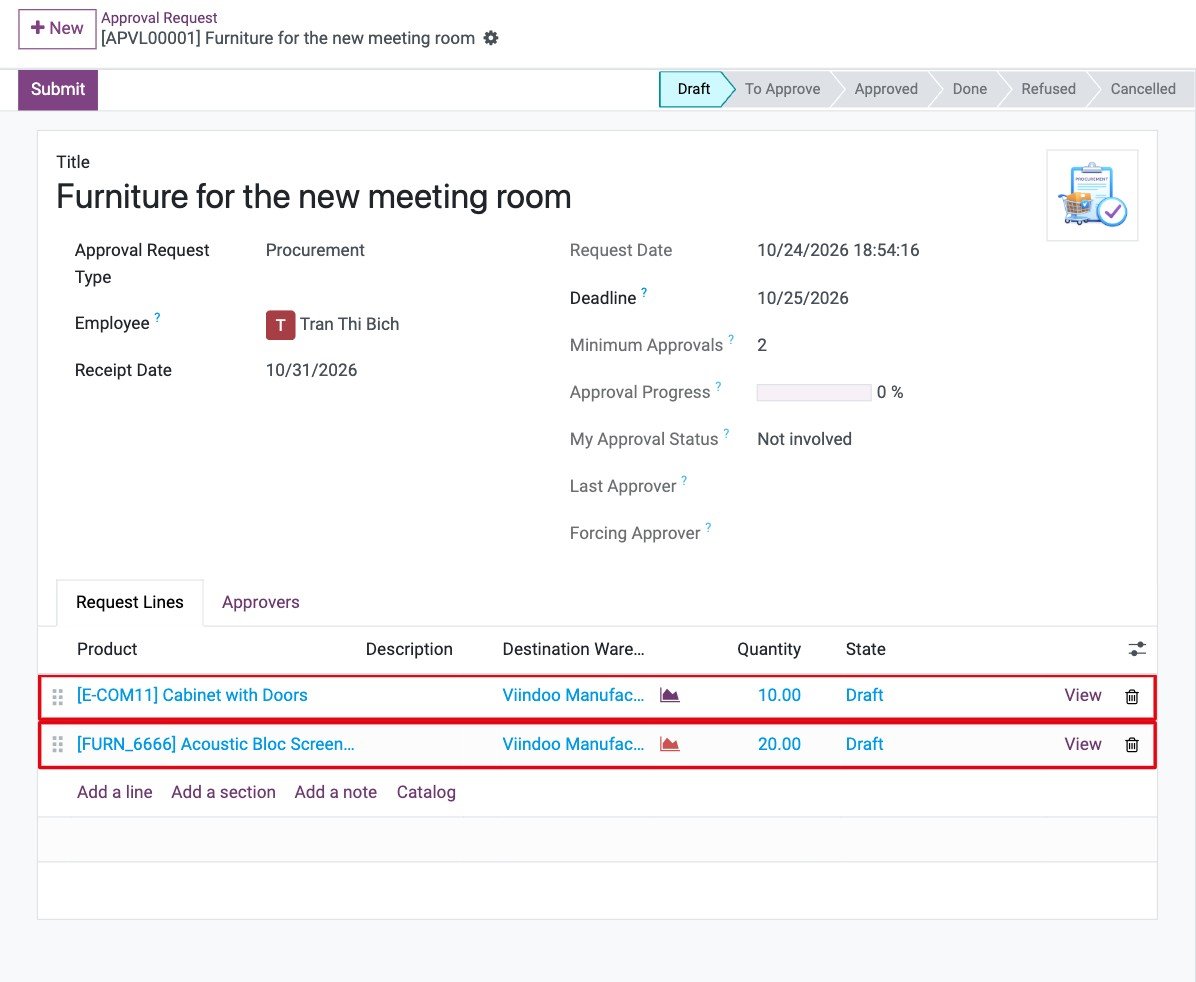
Example: a procurement request lists each product, the quantity and the destination warehouse, and shows how many approvals it needs.
Route 2: a minimum stock rule
For items bought again and again, nobody should have to notice the empty shelf. A minimum stock rule sets two numbers per product and warehouse: below the minimum, reorder up to the maximum. The rule turns a daily judgement into a policy decided once, and the reorder point is where that policy starts.
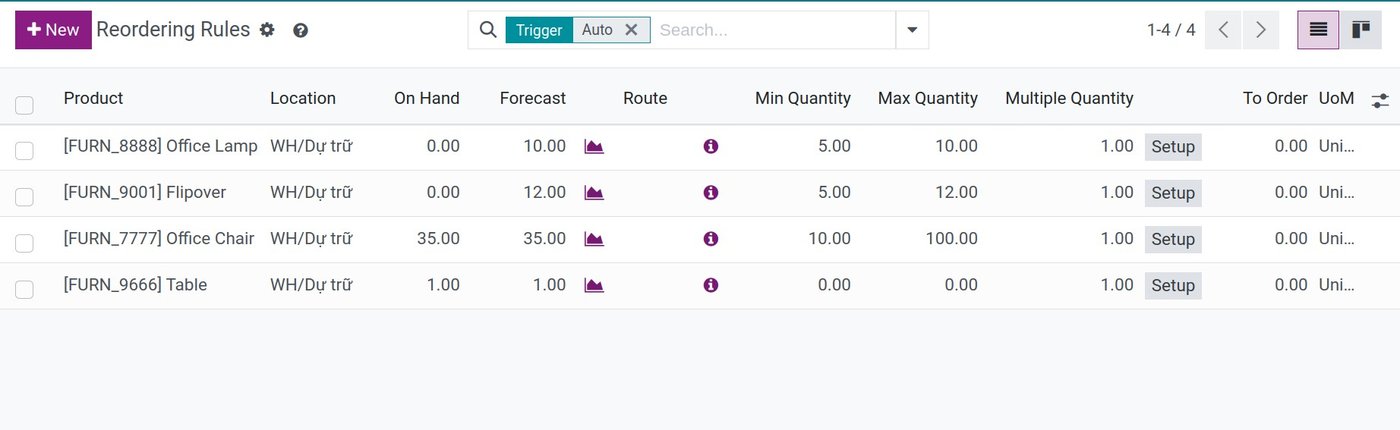
Example: each reordering rule holds a minimum, a maximum and an order multiple for one product in one location.
A rule produces a draft request for quotation, not a confirmed order. That is deliberate: the buyer still checks price and vendor, and the draft still goes through the same purchase approval limits as any other order.
How to approve: you set the rule, by amount
Purchase approval limits answer one question in advance: for an order of this size, who must say yes? Written as a small table, the rule is easy to read, easy to audit and easy to change when the company grows.
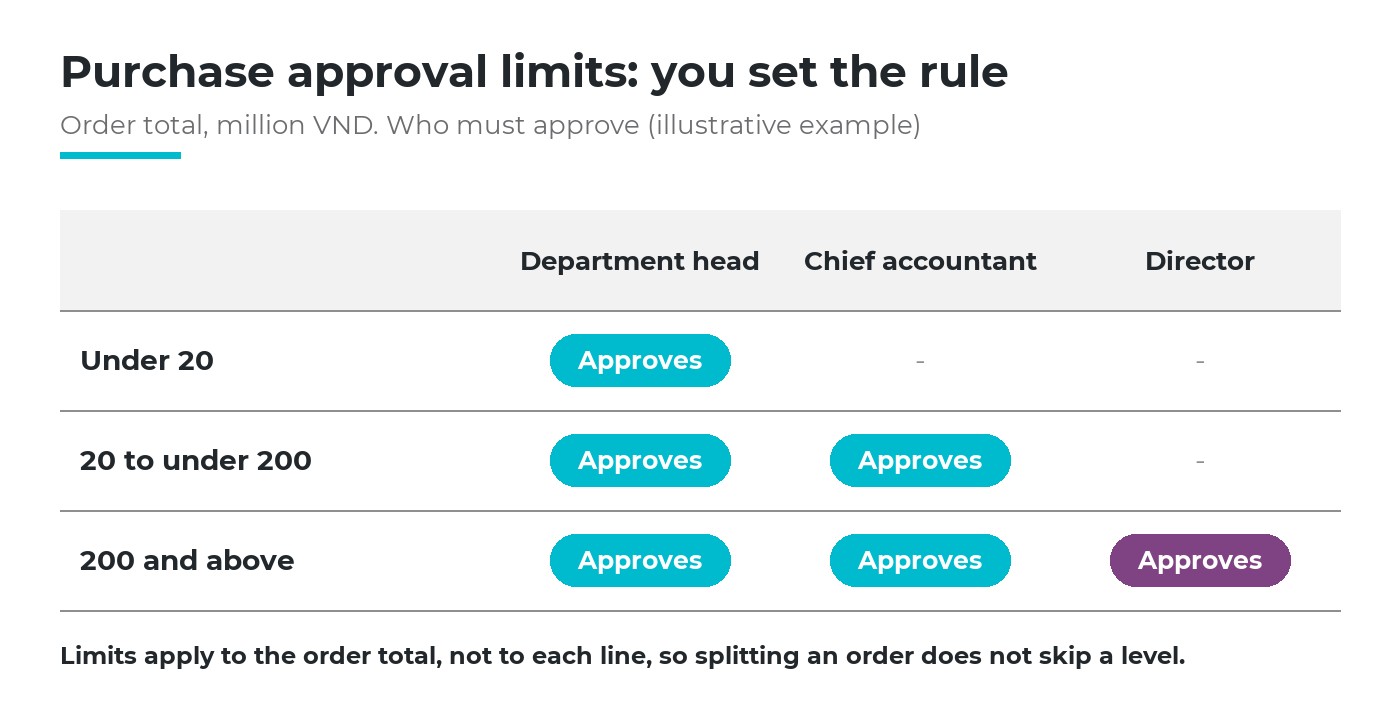
Three bands and three approvers. The numbers are yours to choose (illustrative example).
The numbers in the table are a business decision. What makes the rule work is a handful of principles that apply whatever the numbers are.
Approve before ordering
The order is sent to the vendor only after the last required approval.
Limit on the order total
Count the whole order, so splitting it into small orders does not skip a level.
Requester is not approver
The person who asks for the purchase does not approve it.
A deadline for each step
An approval that waits a week pushes people back to phone calls.
One more rule protects the others: if the order changes after it has been approved, the approval no longer covers it. A higher price or an extra line goes back for approval, and the change is recorded. The procurement approval process describes the classic steps; the point here is that the limits, not the people on duty, decide the route.
An approval is worth something only if it can still say no. Put it before the order, and write the limits down.
Does the bill match? Order, receipt and bill side by side
Three-way matching (3-way match) compares three documents line by line: what was ordered, what the warehouse received and what the vendor billed. The bill is paid only for what passes all three. Two-way matching, order against bill, misses the most common problem: goods billed in full but delivered short.
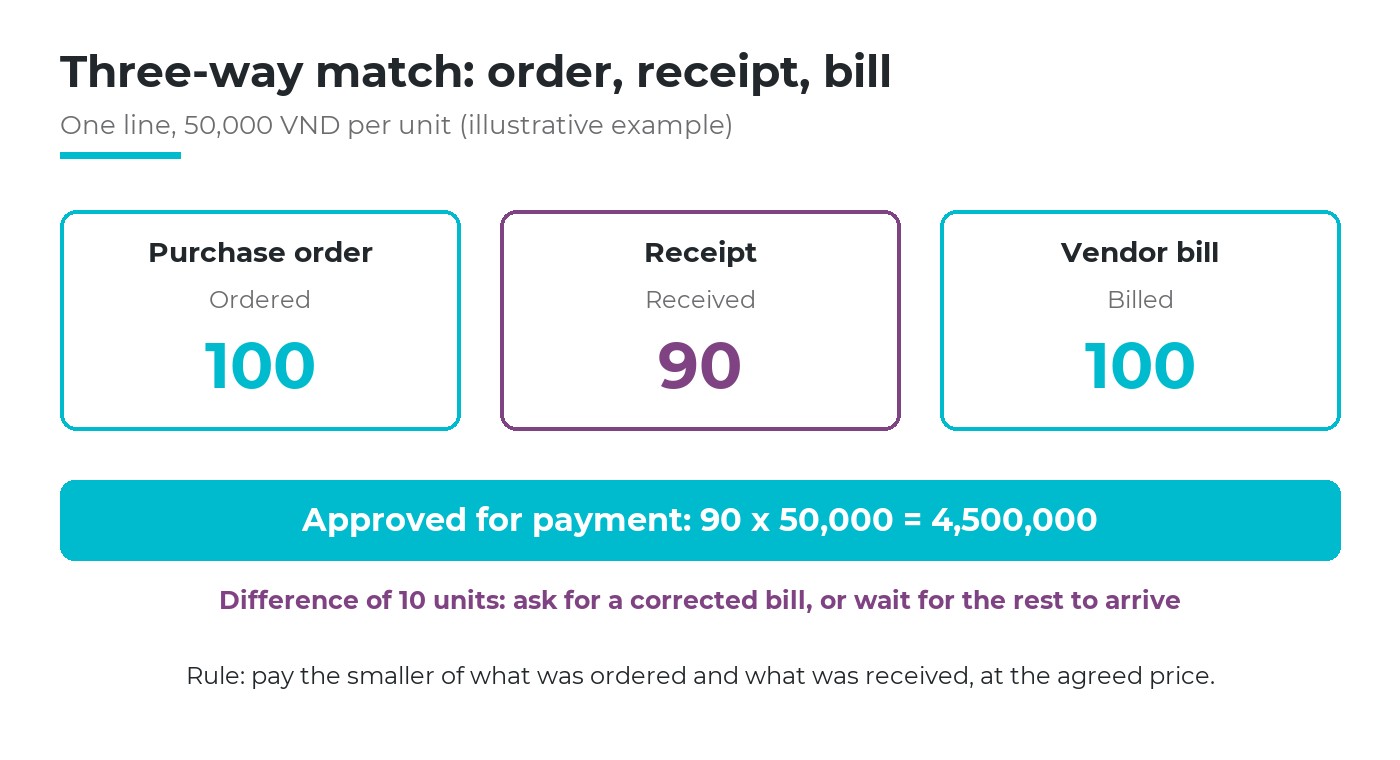
Ordered 100, received 90, billed 100: only 90 should be recorded for payment (illustrative example).
The policy to decide first is when a bill may be recorded. For physical goods, bill on received quantities: the warehouse receipt comes first, the bill follows. For services, where there is nothing to receive, bill on ordered quantities and let the requester confirm the work was done. The distinction between the two documents is covered in purchase order versus invoice.
Price differences need an owner too. A small tolerance, agreed in advance, can be accepted by accounting; anything above it goes back to the buyer who negotiated the price. And when the bill is an e-invoice, checking that it is valid on the tax authority's lookup page belongs in the same step, before the bill is recorded, not at the end of the quarter.
How software helps, and where it stops
Software carries what depends on memory: turning a request into a draft order, routing it by amount, keeping who approved what and when, and showing received and billed quantities on the same line. It does not choose the limits, the tolerance or the vendor. Write those down first; then the configuration is a copy of decisions already made.
Purchase approval limits in Viindoo
In Viindoo, requests, approvals, purchasing, inventory and accounting share one set of data, so each document in the chain is created from the one before. What it gives for each question in this article:
| Question | What Viindoo does |
|---|---|
| Who orders when stock runs low? | Reordering rules with a minimum and maximum per product and location; on Auto, the daily scheduler creates a draft request for quotation for the product's vendor; on Manual, the line waits in Replenishment for a person to order |
| A request from a department? | A procurement request in the Approval app lists products, quantities and warehouse; once approved, Viindoo launches the supply once, for example a draft request for quotation, and links it back to the request |
| One amount threshold? | Purchase Order Approval with a Minimum Amount: an order at or above it goes to To Approve when a purchase user confirms it, and only a Purchase Administrator can approve it |
| Several levels? | Approval types with steps resolved by named person, job position or department manager; sequential approval, minimum number of approvals and days to approve; each step can carry a condition such as the total above an amount, set up by the approval administrator |
| Approval log? | Each approver's action is stored with its time; if the source document changes after submission, the request shows a warning and a note is posted; purchase orders can be filtered by approval status |
| Does the bill match? | Bill control per product, on ordered or on received quantities; each order line shows Received and Billed; Create Bill takes only what may still be billed; the order shows its billing status |
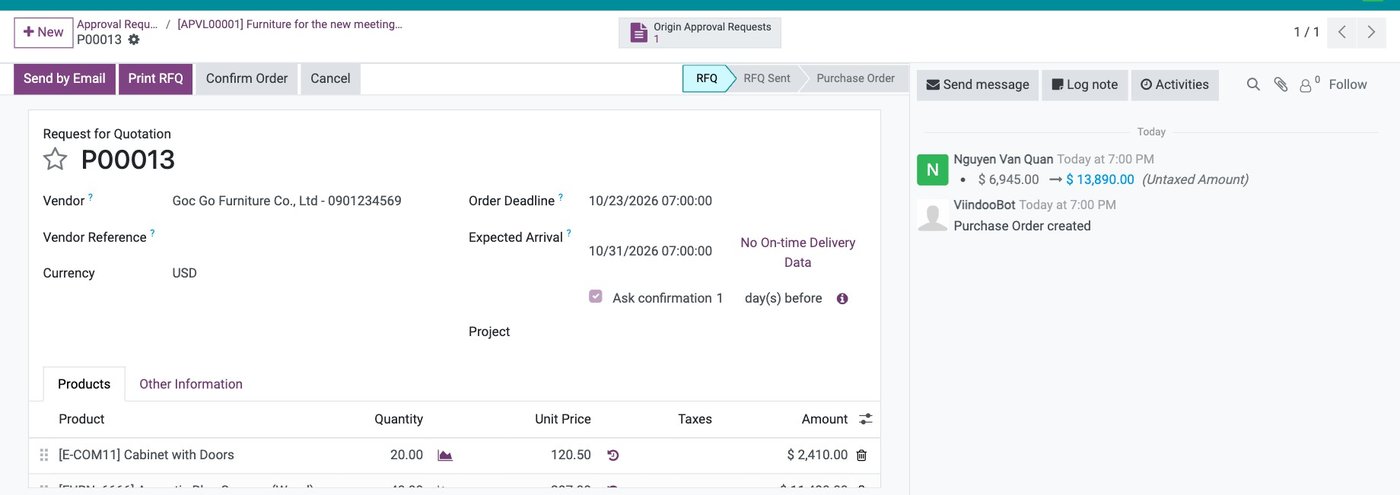
Example: the request for quotation created after approval keeps a link to its source approval request, so the order can be traced back to the need.
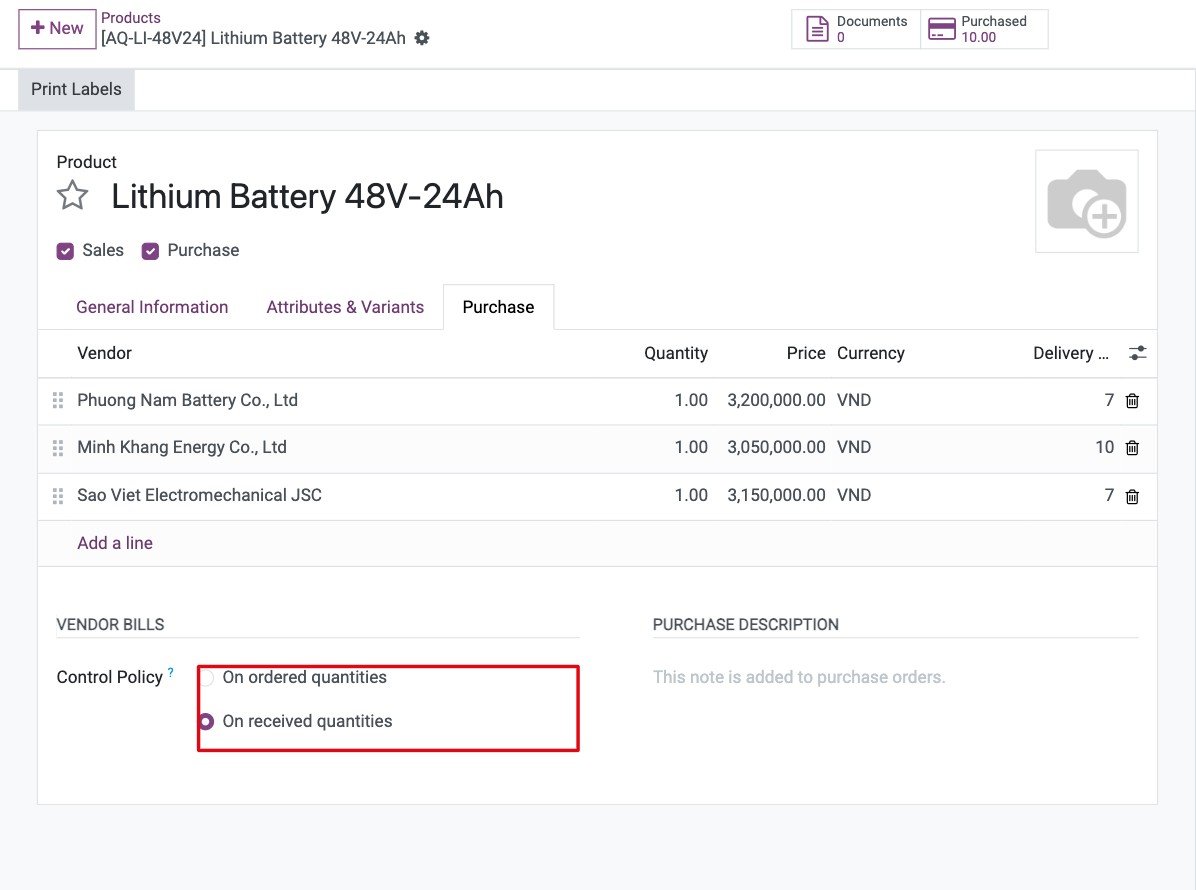
Example: on the product's Purchase tab, bill control is set to received quantities.
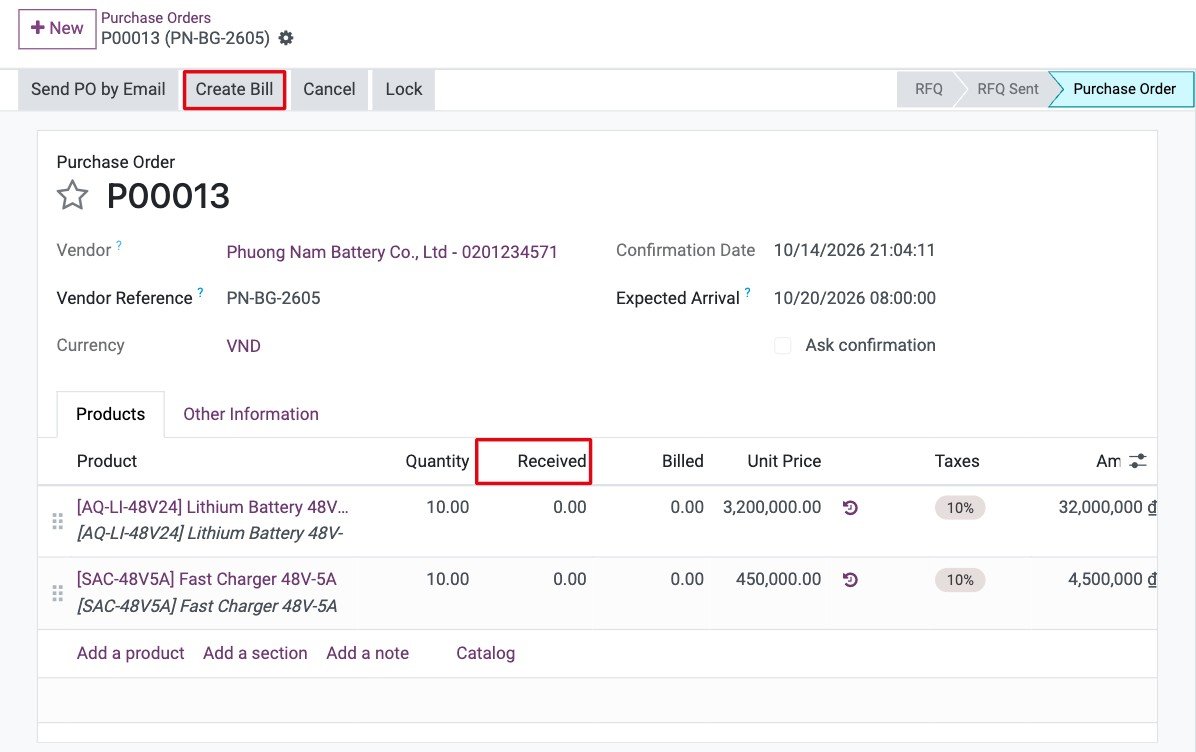
Example: each purchase order line shows the quantity ordered, received and billed, the three numbers of the match.

Example: with bill control on received quantities, a bill cannot be created before the goods are received.
What you can ask the AI assistant
Viindoo's AI assistant answers questions in plain language from the company's own purchasing and inventory data, with links to the source records: "Which vendor did we buy the most from this month?", "What price and lead time does vendor X give for item Y?" or "Which items have less than 10 available?". It only sees what the person asking is allowed to see.
Asked to, the assistant can prepare a draft request for quotation; nothing is written until you review the proposal card and accept it, under your own name and rights, and it is logged. Confirming the order still follows the approval route and the purchase approval limits your company set.
Six questions to check your purchase approval limits
Written limits
Could a new buyer find, in one page, who approves an order of any given size?
Before, not after
In the last month, was any order sent to a vendor before its approval?
Stock owner
For your ten most-bought items, is there a minimum and maximum, and a named owner?
Split orders
Would anyone notice three orders to the same vendor, each just under a limit?
Receipt first
Can accounting record a bill for goods the warehouse has not received?
Trace back
From any paid bill, can you reach the request and the approver in two clicks?
Two or more uncomfortable answers usually point to the same first step: write the purchase approval limits as a table and move approval before the order. Matching the bill becomes much easier once every order has a clear origin.
Frequently asked questions
Usually three bands of purchase approval limits are enough: small purchases approved by the department head, medium ones adding finance, large ones adding the director. More levels slow everything down without adding much control.
Define the exception in advance: who may approve an urgent order, up to what amount, and that it is reviewed afterwards. A written exception keeps urgency from becoming the normal route.
Record only what was received, at the agreed price, and ask the vendor for an adjusted bill or the missing quantity. Paying in full and chasing the shortage later rarely ends well.
Not sure where your purchasing loses control? Tell us where it hurts most. Book a consultation and we will walk through one purchase with you, from request to paid bill, or see the costs first.