The question is not which tool is best
Companies comparing work-management tools usually start from the product: which standalone task app has the better board, the better mobile client, the better price. Comparisons answer that question well and still produce the two outcomes seen most often - a team that has used the same tool productively for years, and a team that abandoned theirs after three months.
The difference between the two rarely lies in the product. It lies in the nature of the work each team was trying to manage. Work that can be defined by its output before it starts behaves differently from work that is generated by business documents and has to account for its cost afterwards.
This article sets out the criteria that separate the two, states plainly when a standalone task app is the correct choice, and identifies the three signals that a company has moved past it.
Project work and operational work
The distinction is not about industry or headcount. It is about how the work is specified and what it is attached to.
Project work
The output can be described before the work starts: a website, a training course, a product launch, an audit. Coordination happens by standardising the output - the team agrees what finished looks like and organises itself to get there.
Operational work
The work is produced by a business event: an order is confirmed, a shipment is booked, a machine goes down, an invoice falls due. It is repetitive, it crosses departments, and it carries a cost that has to land somewhere.
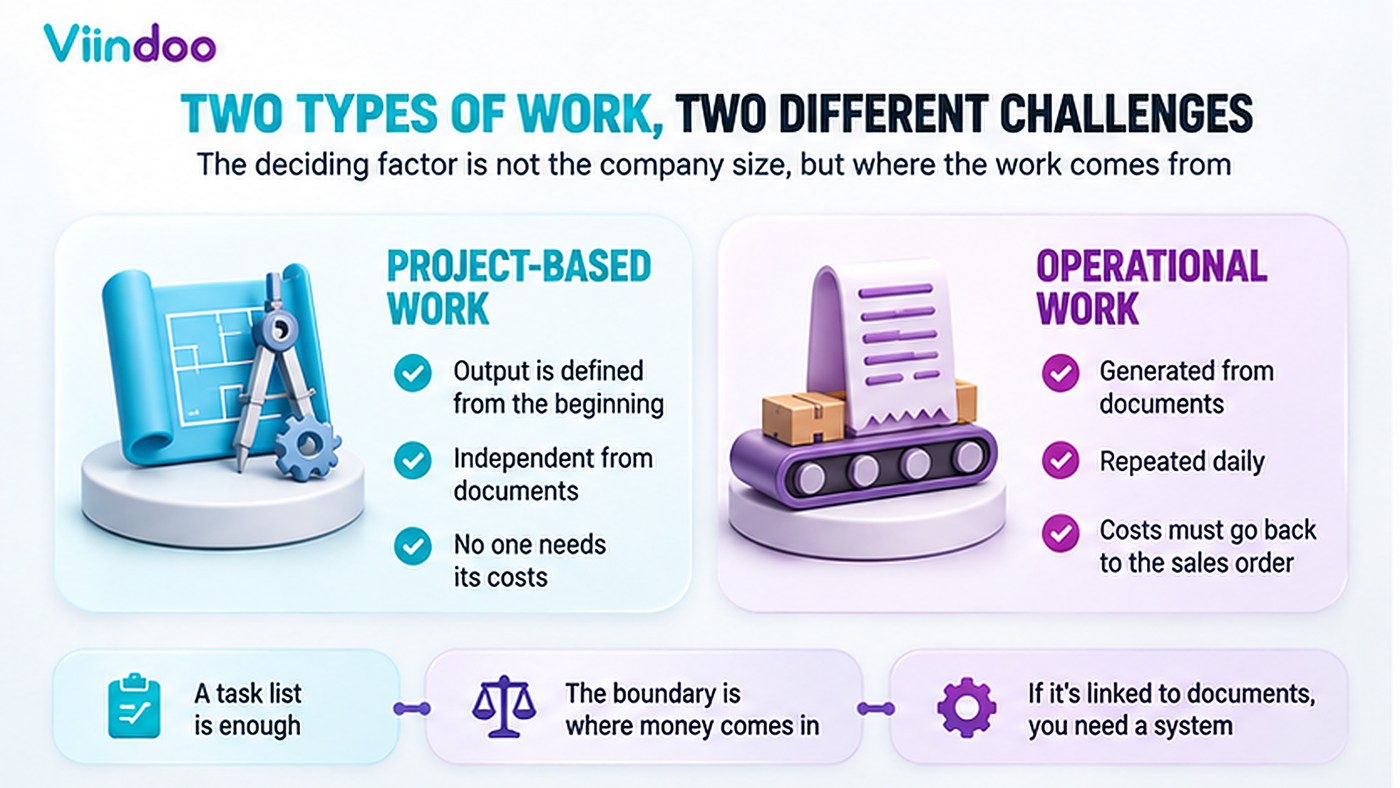
The split is by the nature of the work, not by the size of the company.
The two categories do not merely differ in content; they are coordinated by different mechanisms, which is why one tool cannot serve both well.
The first category is coordinated by standardising the output, one of the coordination mechanisms described by Henry Mintzberg.
The second category is coordinated by the document itself. The order, the shipment and the production order are not descriptions of the work - they are the record every department already reads, writes to and is measured on. Any board created beside them becomes a second statement of the same facts.
Two statements of the same fact do not stay equal. They diverge the moment one is updated and the other is not, and the cost is not the duplicated typing. The cost is the reconciliation afterwards, and the decisions taken in between on whichever copy the decider happened to open.
Most companies run both. The error is not using a standalone task app; the error is using one for the second category and concluding that the team lacks discipline when the result disappoints.
Four criteria that separate the two
Where the work originates
Project work is entered by a person who decided it was needed. Operational work already exists in a document before anyone types it into a task list.
Whether the cost has to come back
If nobody needs to know what a piece of work cost, or which order it was billed to, a task list is sufficient. If the hours have to reach an invoice or a cost price, they cannot stay in a separate tool.
How often the same shape repeats
A launch happens once a quarter; a delivery happens forty times a day. Work that repeats at operational frequency is worth generating automatically rather than typing.
Who outside the team needs to see it
If only the team needs visibility, any board works. If sales, accounting and the customer all need the same status, the status has to live on the document everyone else already uses.
Each criterion is written so that the answer settles something: work that already exists in a document should be generated rather than retyped; hours that must reach an invoice cannot be recorded outside the system that issues it; a shape that repeats forty times a day is worth automating; and a status several departments depend on belongs on the record they all open.
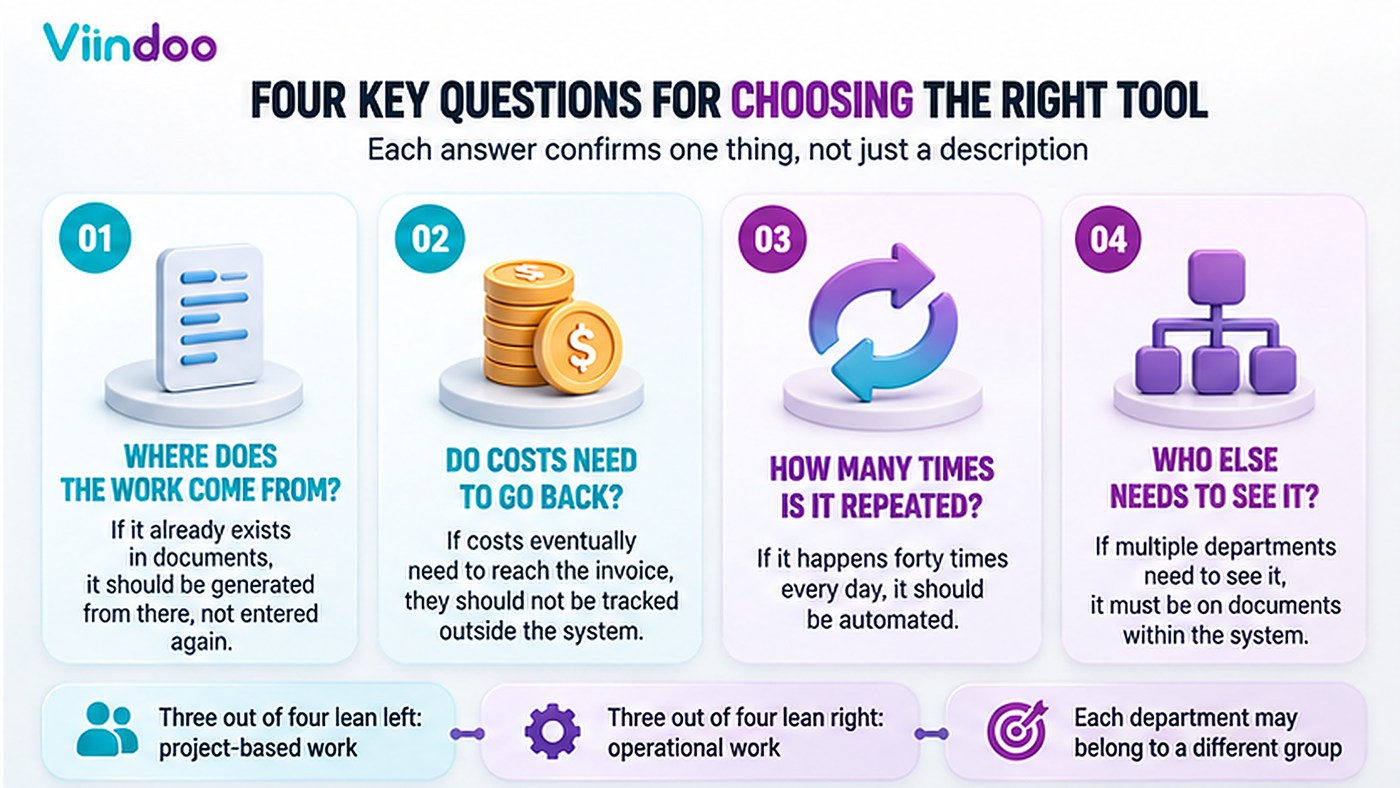
Each question settles one thing; four answers settle the choice.
Three or four answers on the left-hand side describe project work. Three or four on the right-hand side describe operational work. Most companies find that one department sits on each side, which is a normal result and not a problem to solve.
When a standalone task app is the right choice
Four conditions together make a standalone task app not merely acceptable but preferable.
The work is defined by its output
Deliverables are agreed up front and the team is judged on them, not on the steps taken.
It is not attached to documents
No order, invoice, stock move or production order depends on the state of these tasks.
Nobody needs the cost of it
Hours are not billed, not capitalised, and not used in a cost price.
The team is small and stable
Everyone involved sees the same board, and onboarding a newcomer takes a conversation.
Under those conditions, buying an ERP to manage the work is the more expensive mistake. A lightweight tool with boards, sub-tasks, dependencies and due dates covers the requirement, costs little and takes a day to adopt.
The reverse case is worth stating as plainly. Moving project work out of a standalone task app and into a large system imposes costs that the work does not repay: configuration before the first task, access rights to maintain, and a longer path for a team that only needed a shared board. Where none of the four conditions is broken, that trade is a loss.
The same is true inside Viindoo. The Project application installed on its own provides stages and boards, personal stages, sub-tasks, task dependencies, recurring tasks, milestones, tags, allocated time, customer ratings and the kanban, list, calendar, pivot and graph views - without any accounting or sales module behind it. A company whose work is project-shaped can run on that alone, and several do.
Three signals the company has outgrown it
The transition is rarely announced. It shows up as three recurring symptoms.
Work is typed twice
The order already records the customer, the quantity and the delivery date. Somebody opens a second tool and types a card containing the same facts. From that moment the card and the order are two records that drift apart.
Nobody can answer what it cost
The hours are recorded in one system and the invoice is produced in another, so the margin on a job is reconstructed in a spreadsheet after the fact, if at all.
The status is invisible where it matters
Sales promises a date, accounting asks whether it can invoice, the customer asks where the order stands - and the answer lives on a board none of them opens.
All three have the same origin: the work was separated from the document that produced it. No amount of discipline inside the task app closes that gap, because the gap is between two systems rather than inside one.
The category Viindoo is built for
Viindoo is built for the second category: work that originates in a document and whose cost has to return to one. The chain runs in one direction - order, work, measured progress, invoice - and the cost runs back along the same identifier. Three mechanisms hold it together, and the invariant behind all three is that the work and the money reference the same record rather than two copies of it.
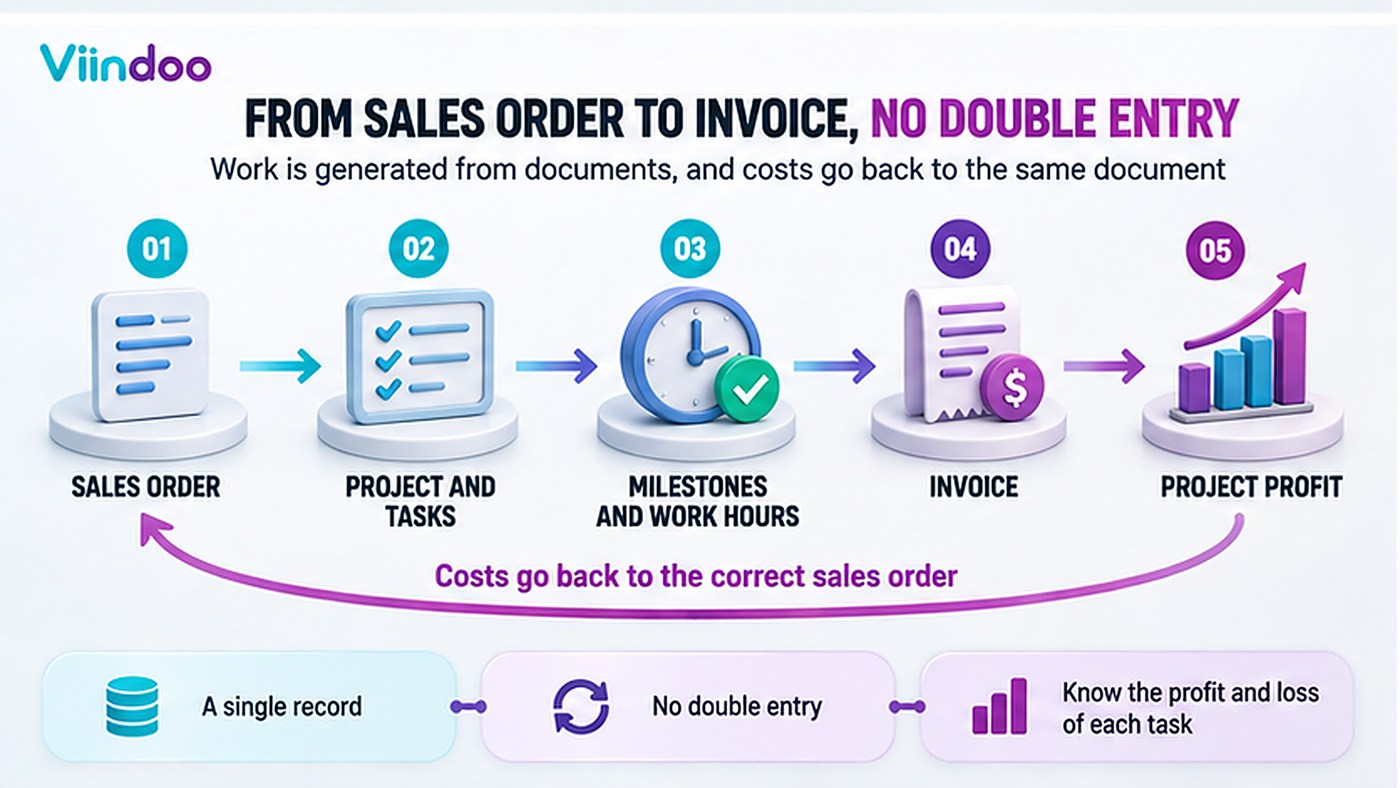
One direction for the work, the reverse direction for the cost.
Work is generated by the document, with a link in both directions
On a service product, the field Create on Order takes one of three values - Task, Project & Task, or Project. Confirming the sales order then creates them, writes the order and the order line onto each task, and posts a note on the task stating which order it came from. The order form gains a button that opens its projects, and the project carries the order line it belongs to.
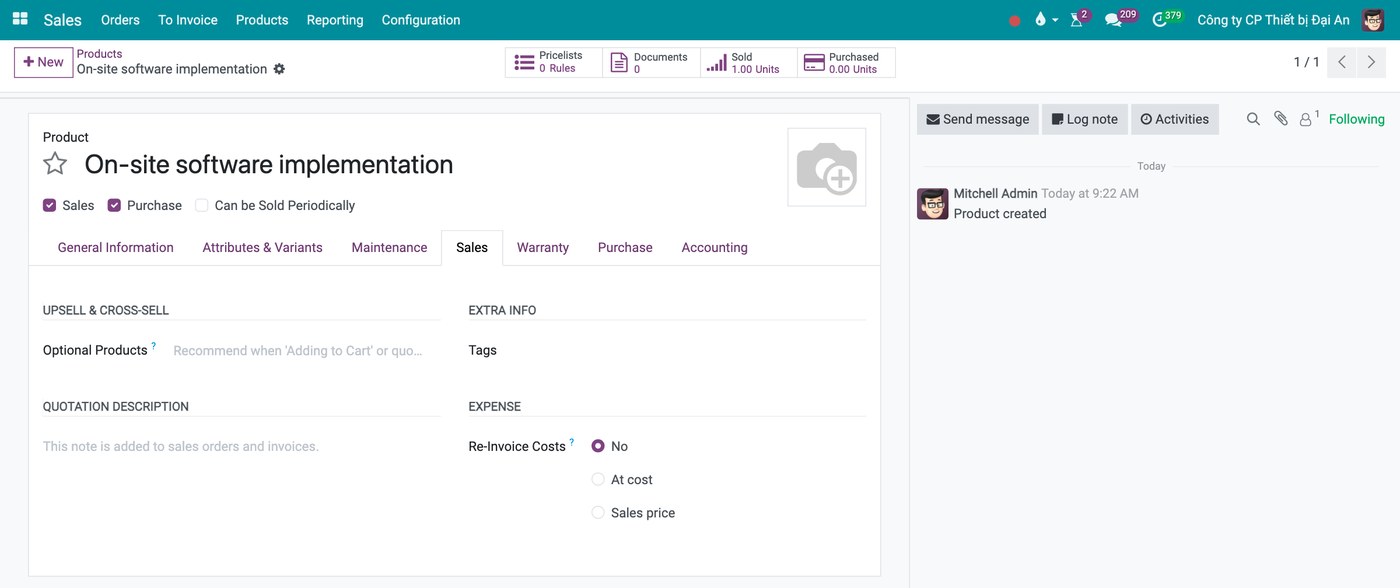
The product decides what the order will create.
Nothing is retyped, and the two records cannot drift apart because there is only one of them.
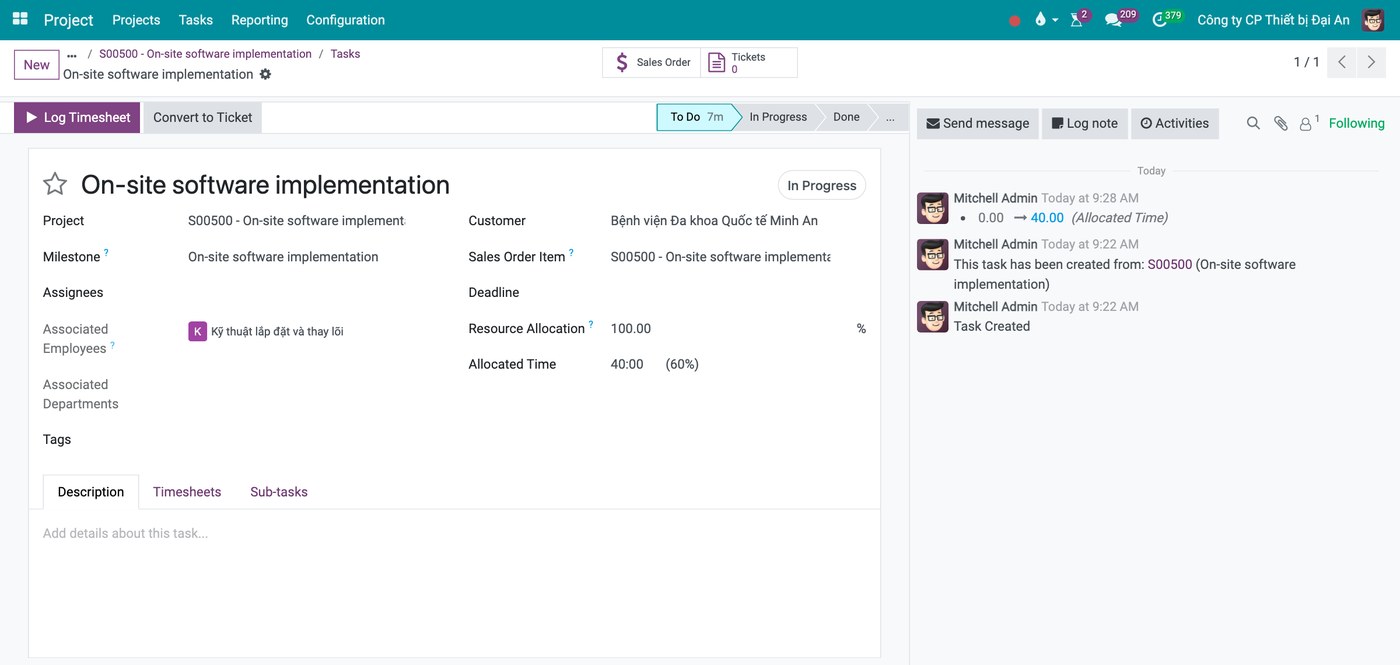
The task records which order line it belongs to, and the history states where it came from.
Progress converts into an invoice
A service product carries an Invoicing Policy: fixed price, delivered quantity, based on milestones, or based on timesheets. With milestones, each milestone holds a percentage of the order line; marking it reached raises the delivered quantity and the order becomes invoiceable for that share. With timesheets, every logged hour is attached to its order line, and issuing the invoice stamps those hours so the same time cannot be billed twice.
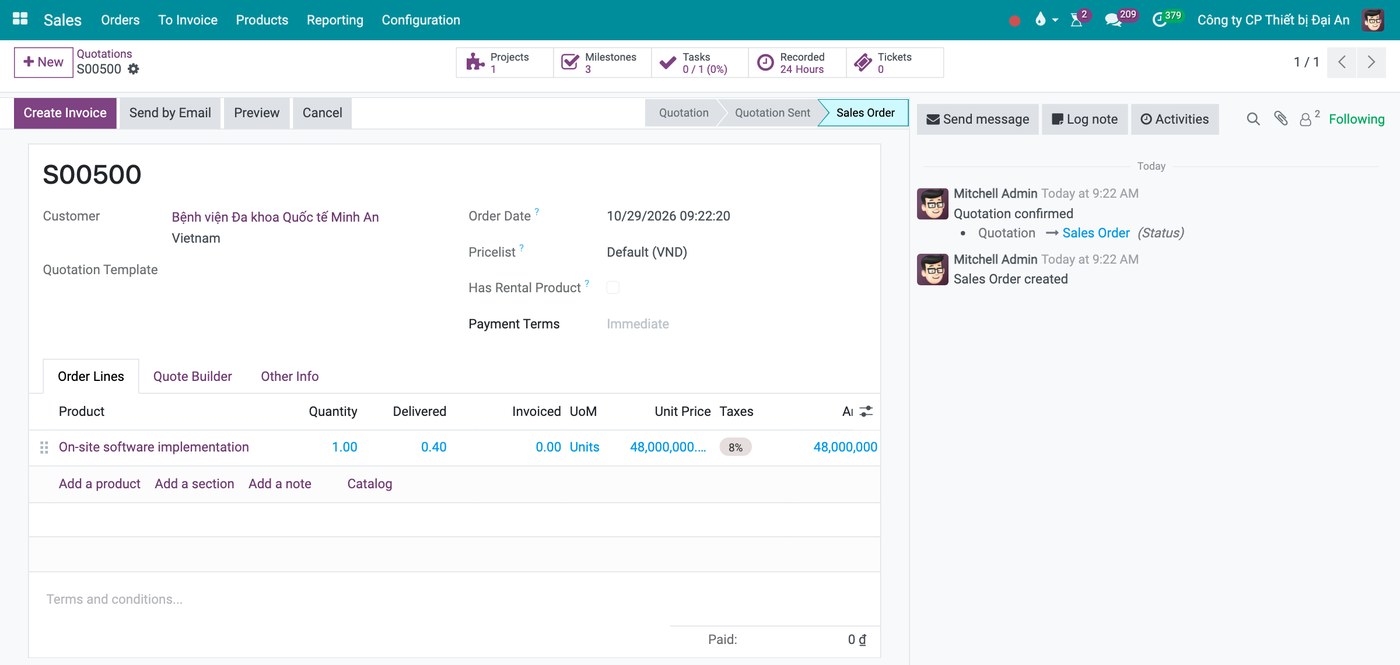
Reaching the first milestone raised the delivered quantity to 0.40 of the order line.
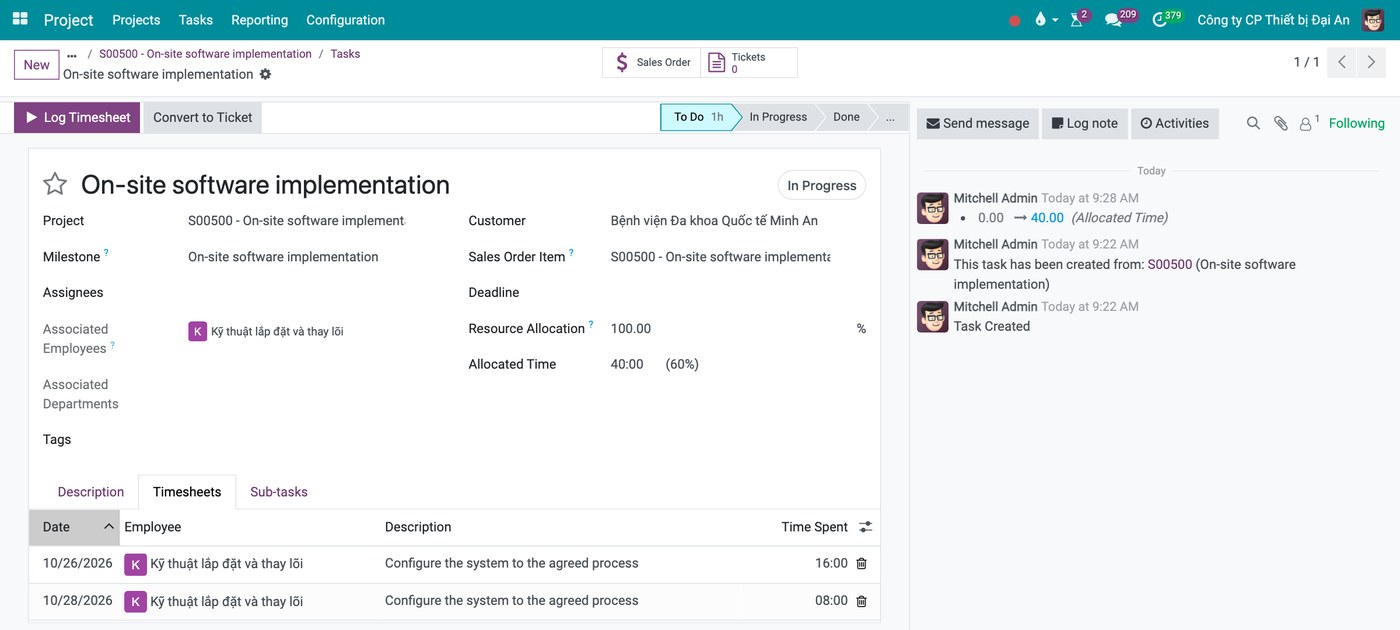
Hours are logged on the task and attached to the order line behind it.
Cost and revenue return to the project
Each project carries an analytic account, and the panel beside it shows Profitability in two columns, revenue and cost. The rows are drawn from real documents: customer invoices, vendor bills, purchase orders, manufacturing orders, employee expenses, materials, and timesheets split by how they are billed. Every row opens the document behind it. Purchase order lines pick up the project's analytic account automatically, and the cost of an hour is the employee's hourly cost.
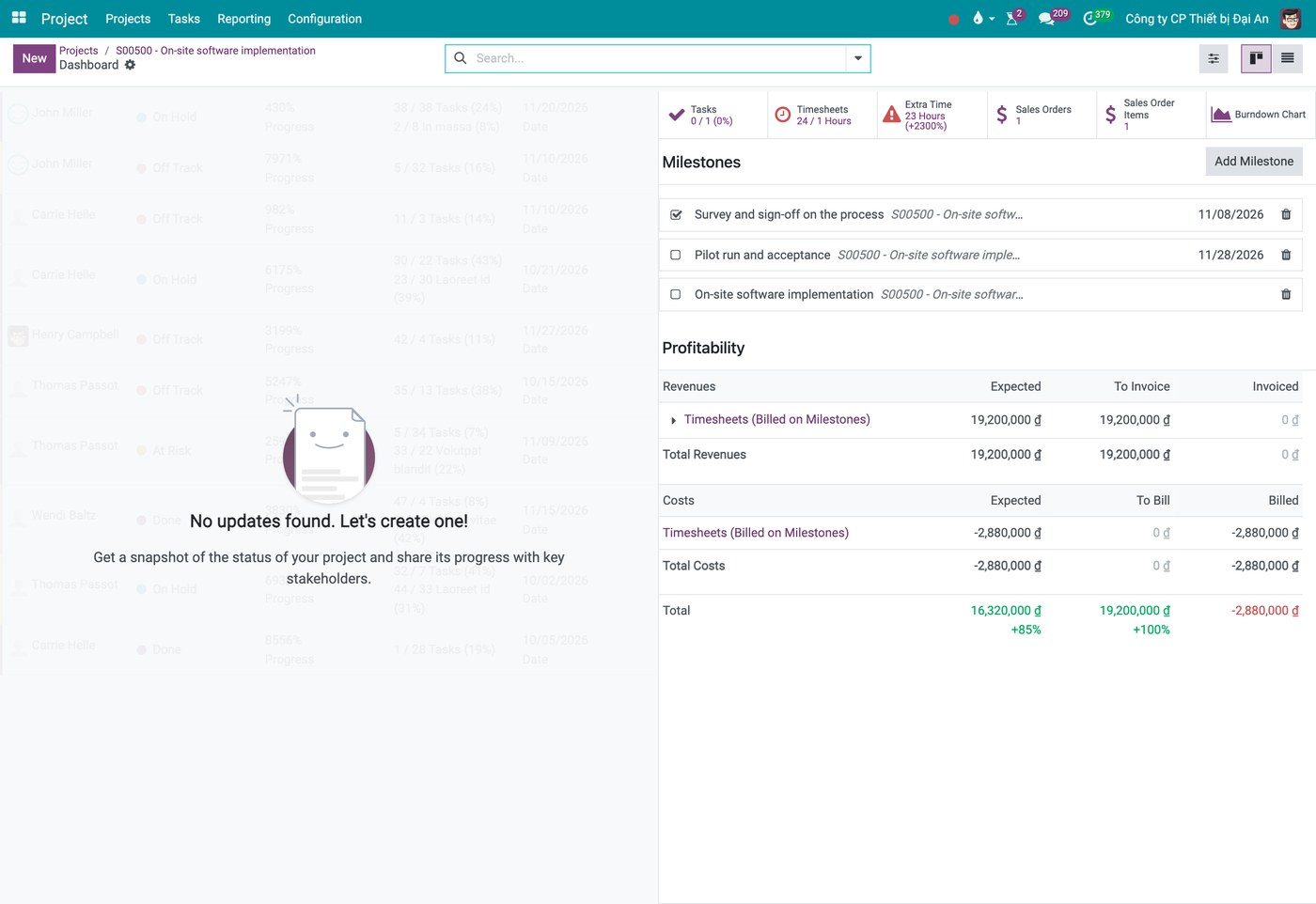
Revenue and cost of the project, each line opening the document behind it.
For services sold by the hour, the rate can be set per project, per task or per employee, with a table mapping each employee to the order line they bill against.
Three limits belong in the same paragraph, because a decision made without them is made on incomplete information.
Manufacturing and purchase orders do not generate tasks
They can be linked to a project and their cost appears in profitability, but no task is created from them. Only sales orders generate work automatically.
Maintenance requests have no task link
Maintenance runs in its own application; work arising from it is created by hand if the team wants it on a project board.
Payroll cost does not flow into the project
The cost of an hour comes from the employee's hourly cost, not from the payroll run. Payroll is allocated analytically through the contract instead.
Four questions to assess the current state
- Of the tasks created last week, how many already existed in a document before somebody typed them?
- For the last completed job, how long did it take to work out what it cost, and where did that number come from?
- When a customer asks where their order stands, who can answer without opening the task board?
- Which department's work is genuinely project-shaped, and would be worse off inside a larger system?
Frequently asked questions
Not for the work it suits. The question is narrower: is any of your work generated by documents, and does any of its cost need to reach an invoice? If the answer is no for a given department, leave that department where it is.
Yes, and it is a common arrangement: operational work inside the system that holds the documents, project work in whichever tool the team prefers. The condition is that the boundary is drawn by type of work and not by department politics.
Duplicate entry. The team is asked to maintain a board that repeats what the order, the ticket or the production plan already says, with no benefit flowing back to them. Updating stops first, then the board stops being read.
No. A fifteen-person workshop whose work comes from orders needs the document chain. A two-hundred-person agency delivering projects may not. Size changes how many boards you need, not which kind of tool fits.
At the point where money or a commitment to a customer enters the work. Up to that point a board is enough; past it the work needs to sit on the document.
Next in this series: work rarely fails inside one person's hands. It fails at the handover between two, and that gap has no owner on any assignment chart.
Assessing it on your own work
The criteria above are quicker to apply to a real case than to read about. Send one workflow - an order that turns into work, or a project your team runs today - and we will map it against the four criteria and say which side it falls on, including the cases where a standalone task app is the better answer.