Separate software or one platform: which should a growing company run on? Many companies use an accounting program, a sales program, and spreadsheets and chat messages to connect them. That works well up to a point. Past that point, people spend more time moving figures between programs than using them.
This article does not say that separate software is wrong. It explains why companies start that way, the signs that it has begun to cost too much, when it is still the right choice, and how to move to one platform step by step.
Why most companies start with separate software and spreadsheets
Nobody plans to run a company on five disconnected programs. It happens one sensible decision at a time.
Each department solves its own problem first
Accounting needs to file tax reports, so it buys accounting software. Sales needs to follow customers, so it picks its own tool. Each choice is right for that department.
The cost of each program looks small
One program for one job costs little and is quick to start. Nobody adds up the cost of connecting them, because that cost is paid in people's time.
Spreadsheets fill every gap
Whatever the programs do not cover goes into a spreadsheet. It is flexible and everyone knows how to use it, so the gaps never feel urgent.
Separate software or one platform: four signs the cost has become too high
The question of separate software or one platform becomes real when these signs appear. One sign is a warning. Three or four mean the company is already paying for it every week.
1. The same figure differs between departments
Sales reports one revenue figure and accounting reports another, because each counts from its own program at a different moment. Meetings begin with an argument about whose figure is right.
2. The same data is typed in several times
An order is entered in the sales tool, typed again for the warehouse, and typed a third time for the invoice. Each retyping takes time and is a chance for a mistake.
3. Nobody can answer a customer without asking around
A customer asks when the goods will arrive. The salesperson has to call the warehouse and then accounting before answering.
4. Profit is known late
To know whether the month made money, someone has to collect files from every department and add them up. The answer arrives weeks later, when it is too late to act.
A quick way to check: ask three people in different departments for the same figure, such as last month's revenue or the stock of your best-selling product, and compare the answers and the time it took to get them.
| What you observe | What it usually means |
|---|---|
| Three different answers | Each department counts from its own program at its own time |
| The same answer, but after an hour | The figure exists, but someone has to assemble it by hand |
| "Ask the person who keeps that file" | The company depends on one person to know its own figures |
| The same answer within minutes | Your current setup is still working well for this figure |
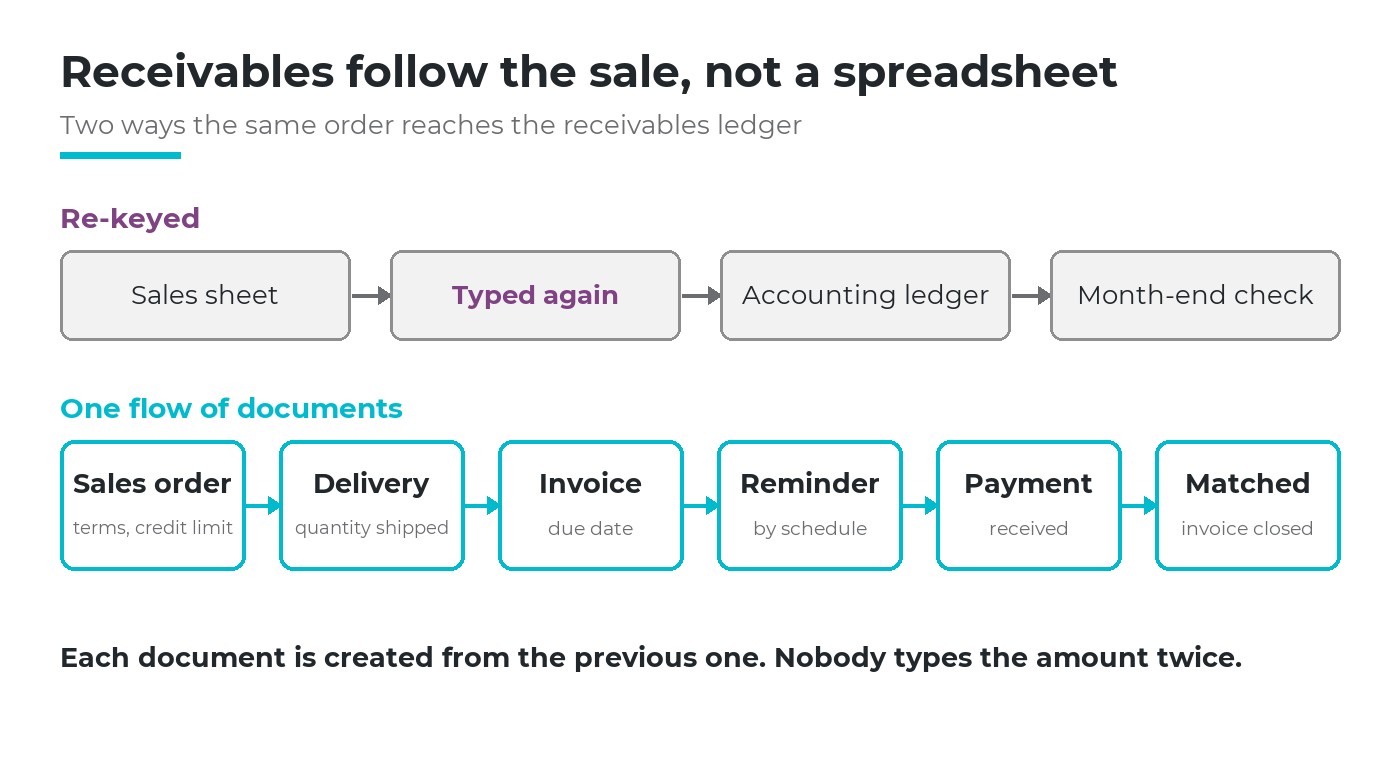
Two ways the same order reaches the receivables ledger. In the second, each document is created from the previous one.
The hidden costs of keeping several separate programs
These costs do not appear on any invoice, which is why they are easy to miss.
| Hidden cost | How it shows up in daily work |
|---|---|
| Time spent moving data | Staff export, copy and paste between programs every day, and check that the copies match |
| Errors from retyping | A wrong quantity or price is found only when the customer complains or the stock count does not match |
| Decisions made on old figures | The manager decides on last week's report because this week's is not ready |
| Dependence on one person | Only one employee knows how the files connect; when that person is away, the work stops |
| AI that cannot see the whole picture | An AI tool connected to one program answers from that program only |
An illustrative example shows how quickly these costs add up. Suppose three staff each spend one hour a day exporting, copying and checking data between programs. Over 22 working days that is 66 hours a month, more than eight full working days, spent only on moving figures that already exist (illustrative figures).
Try this in your own company. For one week, ask each person who works between programs to note how long they spend moving or checking data. Multiply by the number of weeks in a year. The result is the time your company spends each year because of separate software, a cost that never appears on an invoice.
What changes when the whole business runs on one platform
On one platform, often called ERP, every department works on the same set of data. The clearest way to see the difference is to follow one order.
Quotation
Sales prepares it once.
Sales order
Created from the quotation, not retyped.
Delivery
The warehouse sees the order at once.
Invoice
Created from what was delivered.
Payment
Customer debt updates by itself.
Along this chain, each department sees what it needs without asking another department:
- Sales sees whether the goods have left the warehouse and whether the customer has paid, so it can answer the customer straight away.
- The warehouse receives the order to deliver as soon as sales confirms it, without waiting for a message or a printed list.
- Accounting invoices from what was actually delivered and follows customer debt from the same documents, so there is nothing to retype.
- The director reads revenue, debt and stock from one set of data, so the figures in the meeting are the same for everyone.
On Viindoo, each document in this chain is created from the one before it. The salesperson can see on the order how much has been delivered and how much has been invoiced, without calling anyone.
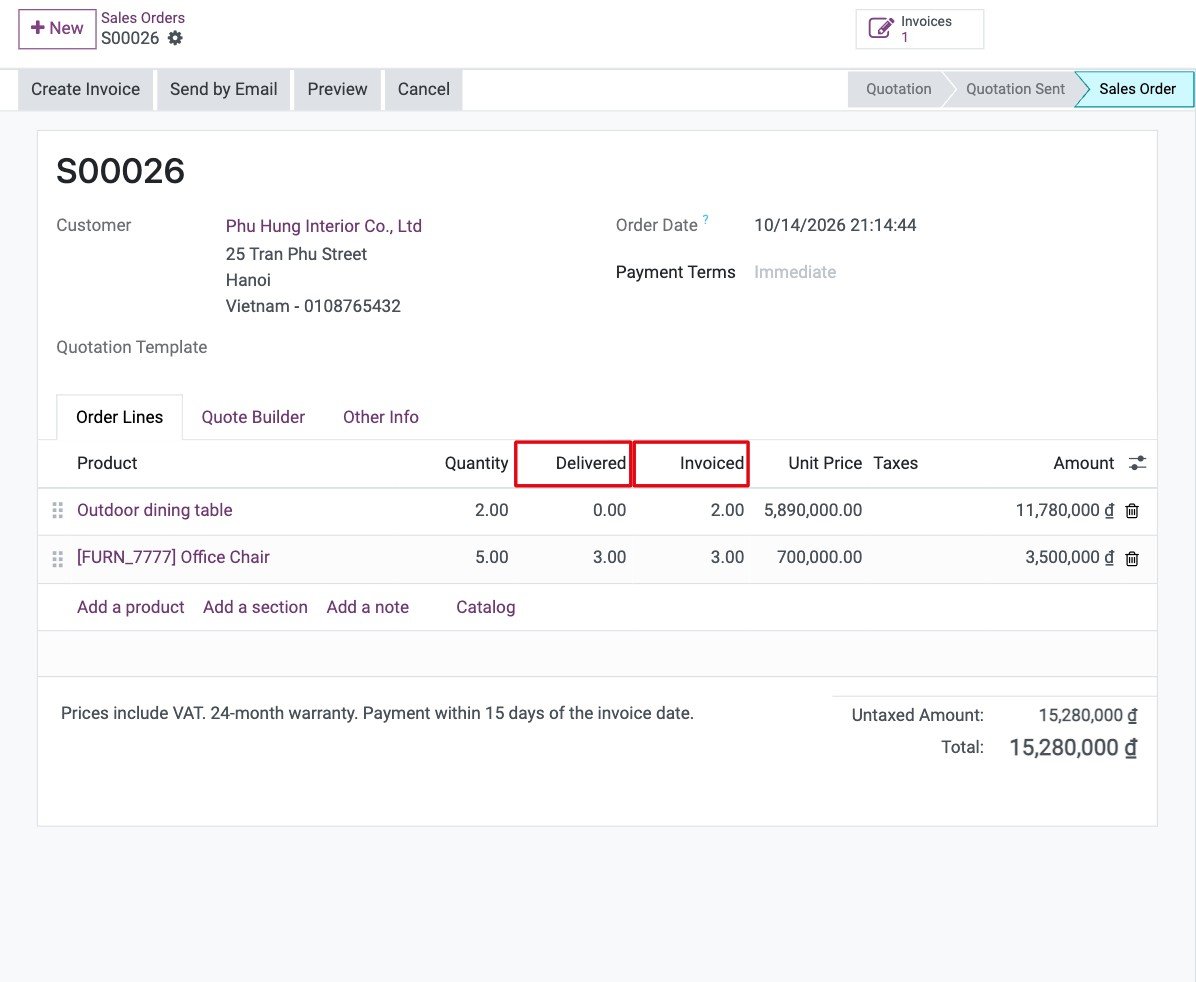
Example: on the sales order, the Delivered and Invoiced columns sit side by side.
The same holds on the buying side. A rule keeps a minimum stock for each product, a purchase request is raised when stock runs low, and the order, the receipt, the supplier's bill and the payment follow from one another.
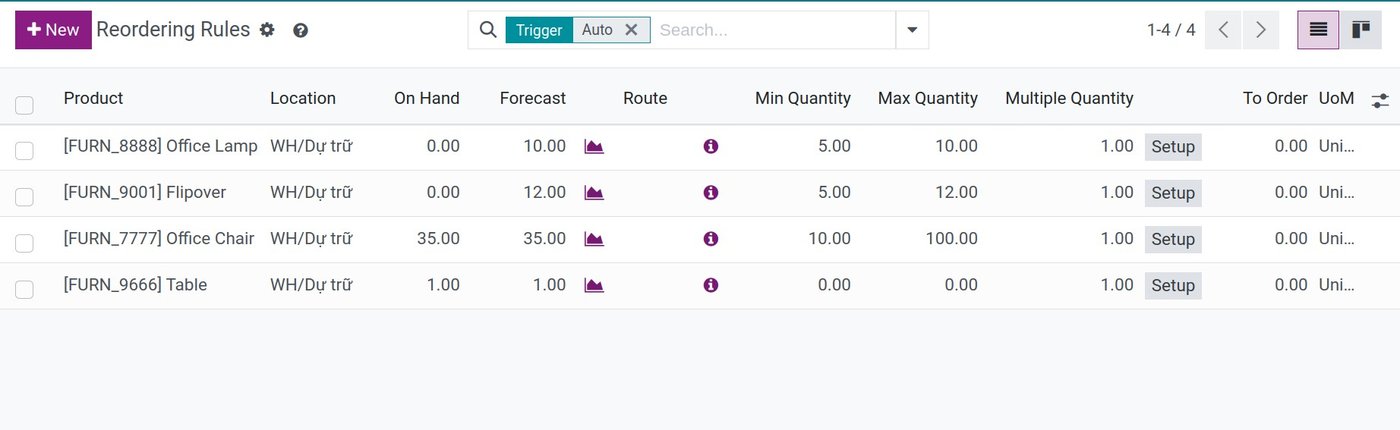
Example: each reordering rule holds a minimum, a maximum and an order multiple for one product in one location.
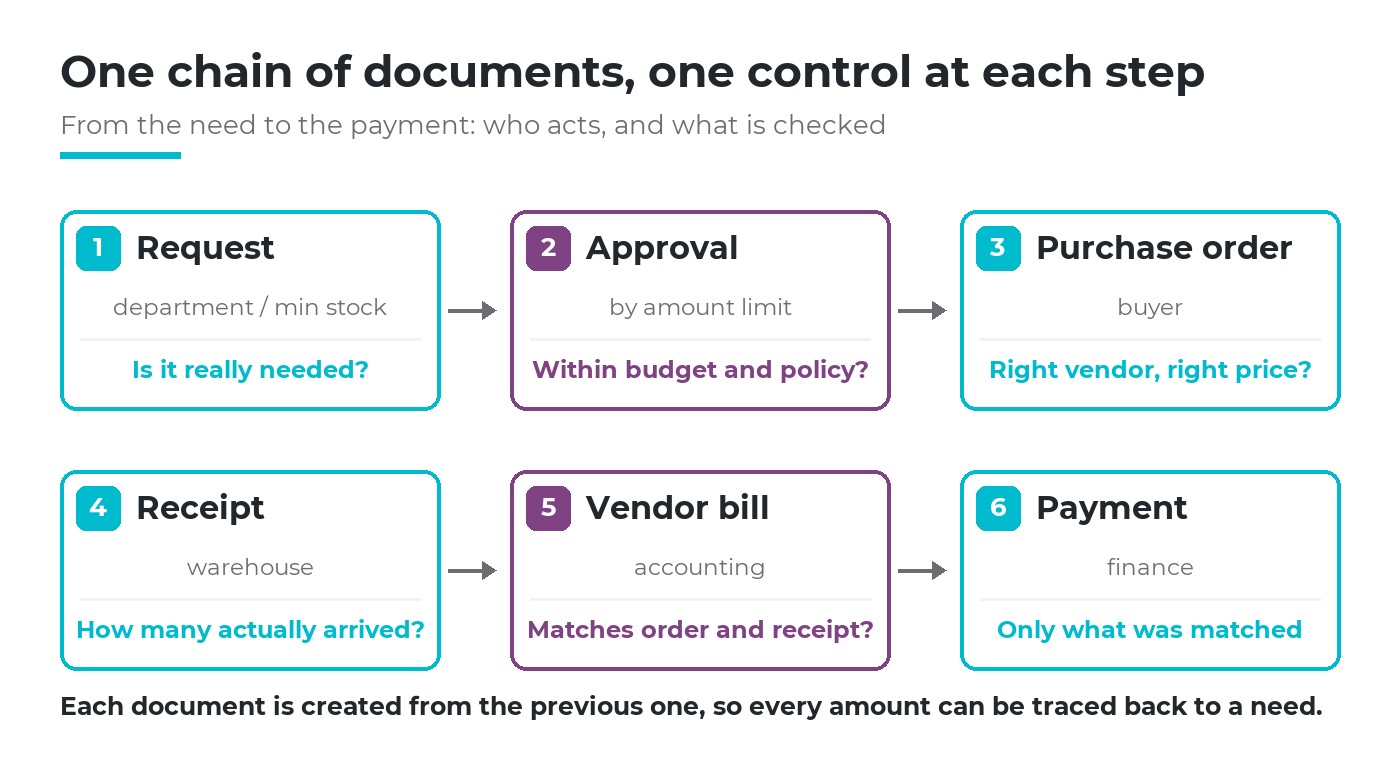
Six documents, each created from the previous one.
A worked example: three moments in one company's month
Principles are easier to judge on a real case. Take a company that makes and distributes electrical equipment, with about 45 staff (an illustrative example). It keeps its books in accounting software, its sales team uses a separate sales tool, the warehouse tracks stock in a spreadsheet, and urgent questions go through chat messages. Below are three moments that happen every month, how they are handled today, and how they are handled when everything runs on one platform.
Where we show what the AI answered, the answers come from our test on Viindoo with the data of a different, test company that assembles electric bikes, not the example company above. Those figures only show what an answer looks like.
Moment 1: a customer asks when the goods will arrive
| Today, with separate software | On one platform | |
|---|---|---|
| Who is involved | Salesperson, warehouse keeper, sometimes accounting | Salesperson only |
| What happens | The salesperson calls the warehouse, the keeper checks the spreadsheet and the shelf, then calls back. The customer waits for a reply. | The salesperson opens the order and sees how much has been delivered and invoiced, or asks the AI which orders are not fully delivered and why. |
| Typical risk | The spreadsheet is a day old, so the promised date is wrong | Stock not yet recorded is invisible, so receipts must be entered the same day |
In our test, the question "Are there confirmed sales orders not fully delivered, and which items are short?" returned 35 orders and a table of short items. The AI also warned that it had added up the demand of all orders for each item and had not counted goods still arriving, so a date should be checked before it is promised.
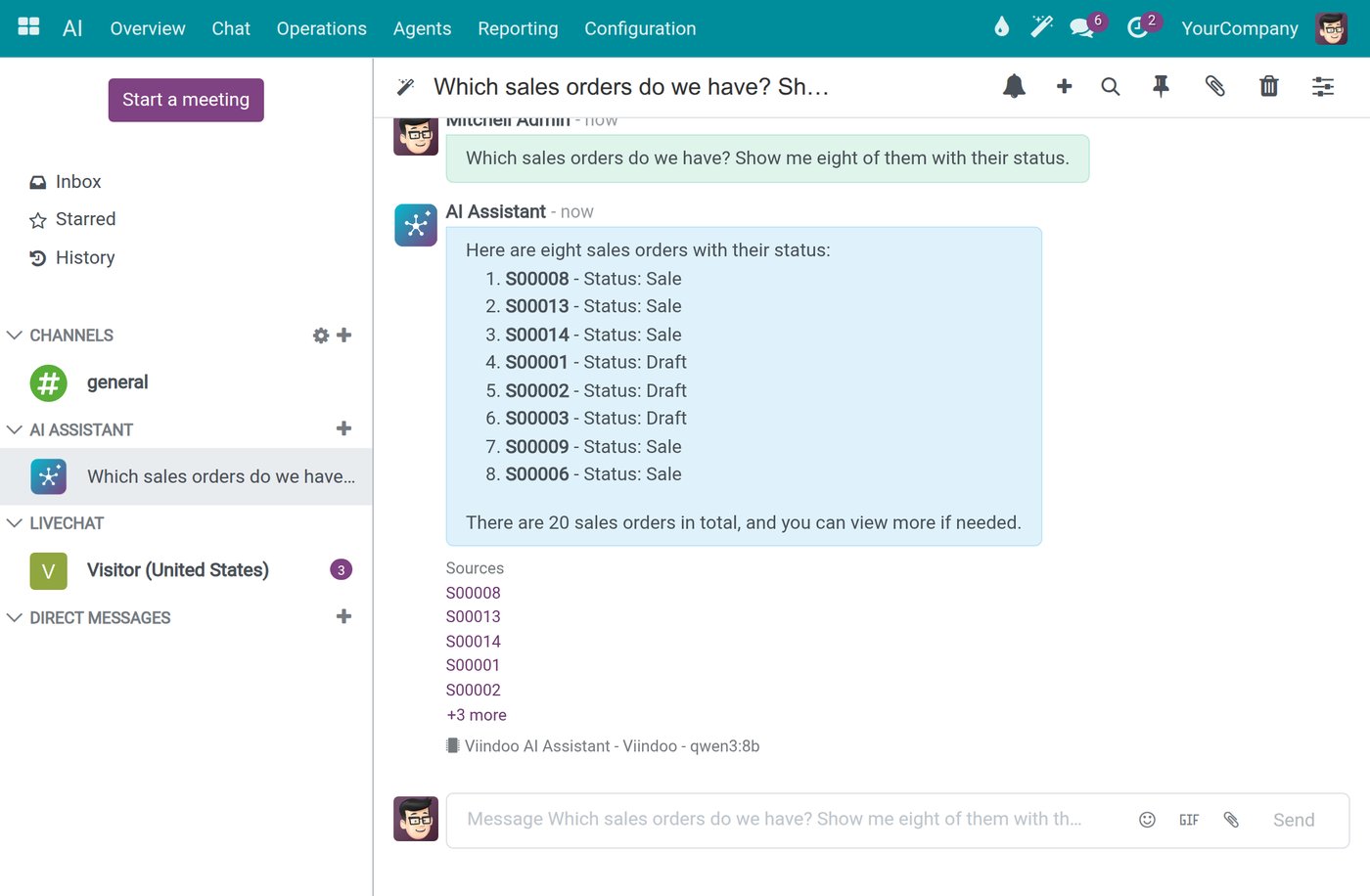
Example: the AI answers with a Sources list; clicking an order number opens the order.
Moment 2: chasing overdue customer debt at the end of the month
| Today, with separate software | On one platform | |
|---|---|---|
| Who is involved | Accountant and the head of sales | Accountant, with the head of sales reading the same list |
| What happens | Accounting exports unpaid invoices, sales sends its own order list, and both sit down to match them. Payments received but not yet matched cause arguments. | Invoices are created from deliveries and payments are matched to invoices, so the aged receivables report is ready. The head of sales asks the AI who to call first. |
In our test, the question "Which sales invoices are overdue? Which customer should I call first, and why?" took 28 seconds. The AI found 75 overdue invoices from 39 customers and ranked the calls: six customers made up about 88% of the overdue amount, so calling them first would help cash flow far more than calling dozens of small dealers. It then flagged one invoice overdue for more than 1,000 days and advised asking accounting before calling, because it was probably an old balance or a dispute. Finally, it said what it had not looked at: contact history, payment promises and credit limits.
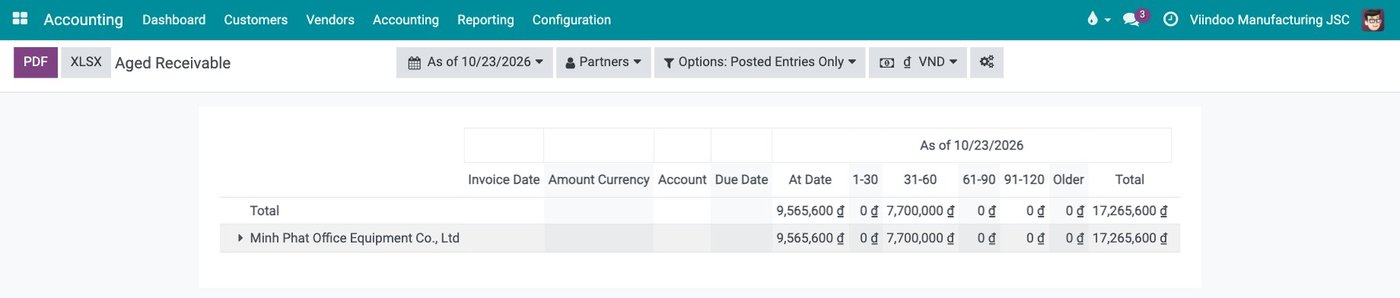
Example: the aged receivables report splits what each customer owes into not yet due and overdue bands.
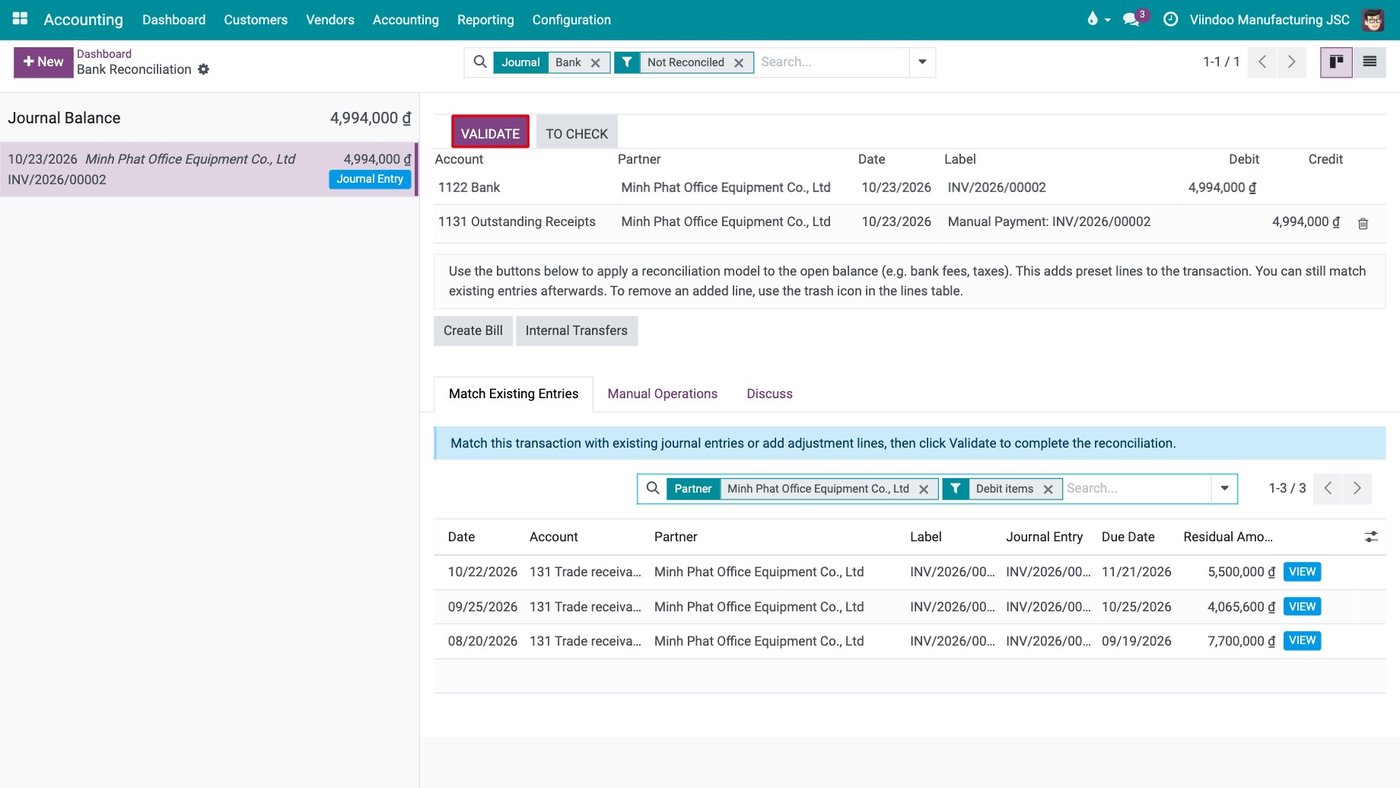
Example: when reconciling the bank statement, the customer's open receivables are listed with their due dates, ready to be matched.
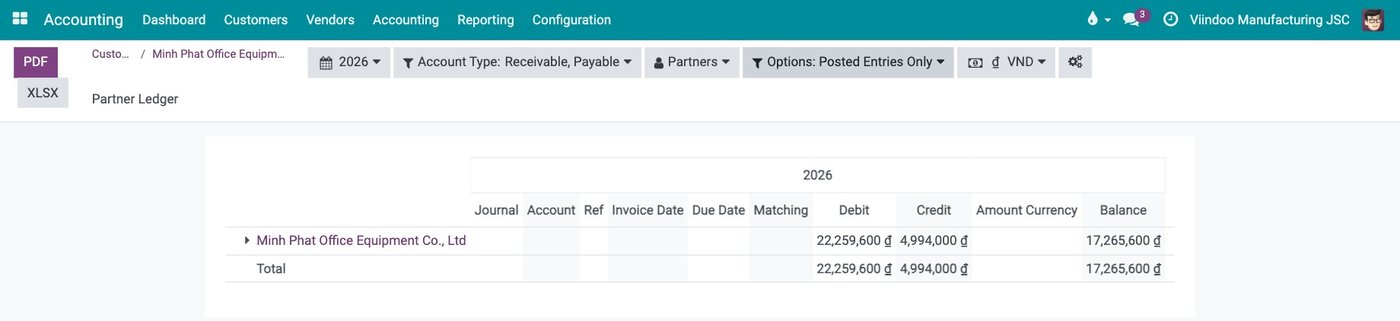
Example: the customer ledger shows the total invoiced, the total collected and the balance still owed, ready to send for a balance confirmation.
Moment 3: knowing which products made money last month
| Today, with separate software | On one platform | |
|---|---|---|
| When the answer arrives | Two to three weeks after month end, once every file is collected | As soon as the month's documents are recorded |
| What it is based on | Sales figures from one tool, costs from another, adjusted by hand | Revenue and cost of goods from the same documents |
In our test, asked for cost and gross profit by bike model, the AI returned a table for three models with gross margins between about 45% and 54%. It also explained a limit of its own calculation: it had used each product's current cost, not the cost at the time of sale, so its figures could differ from the sales margin report. That kind of note tells a director which figure to trust for which decision.
What the three moments have in common. In each case the slow part today is not the work itself but collecting and matching figures from several places. On one platform that part disappears, and the AI can answer across departments because the data is already in one place.
When keeping separate software is still the right choice
You need only one function
A company that only needs to keep its books and file taxes is well served by accounting software alone.
The company is very small
When a handful of people sit in one room and everyone knows every order, there is little to connect.
A specialised tool does something unique
Design software or machine control software has no equivalent in a management platform. Keep it, and connect it where it matters.
How to move to one platform without a large project
Even when the answer to separate software or one platform is clear, the fear of a big, risky project keeps many companies where they are. The move does not have to be made in one go.
- Start with the area that hurts most. Pick one area, for example customer debt or inventory, where the loss is clearest.
- Put that area into daily use. Run it on the platform until the people doing the work rely on it.
- Add the next area. Each new area connects to the ones already running, so the benefit grows with every step.
- Keep the old program until the new one is proven. Retire a separate program only when its work has fully moved.
The move plan for the example company
For the company above, the order of the move follows where it hurts most. This is one reasonable order, not a fixed recipe.
| Step | Area | Why this order | What to measure |
|---|---|---|---|
| 1 | Sales and inventory | Answering customers is the most frequent pain, and it needs orders and stock together | Time to answer a delivery question |
| 2 | Invoicing and customer debt | Invoices can then be created from deliveries instead of retyped | Hours spent matching debt at month end |
| 3 | Purchasing | Purchases follow stock levels already in the system | Orders delayed by missing stock |
| 4 | Full accounting | Moved at the start of a financial year, when the change is simplest | Days to close the month |
| 5 | AI on the data already in use | The AI is useful once the areas it reads are recorded every day | Questions answered without asking another department |
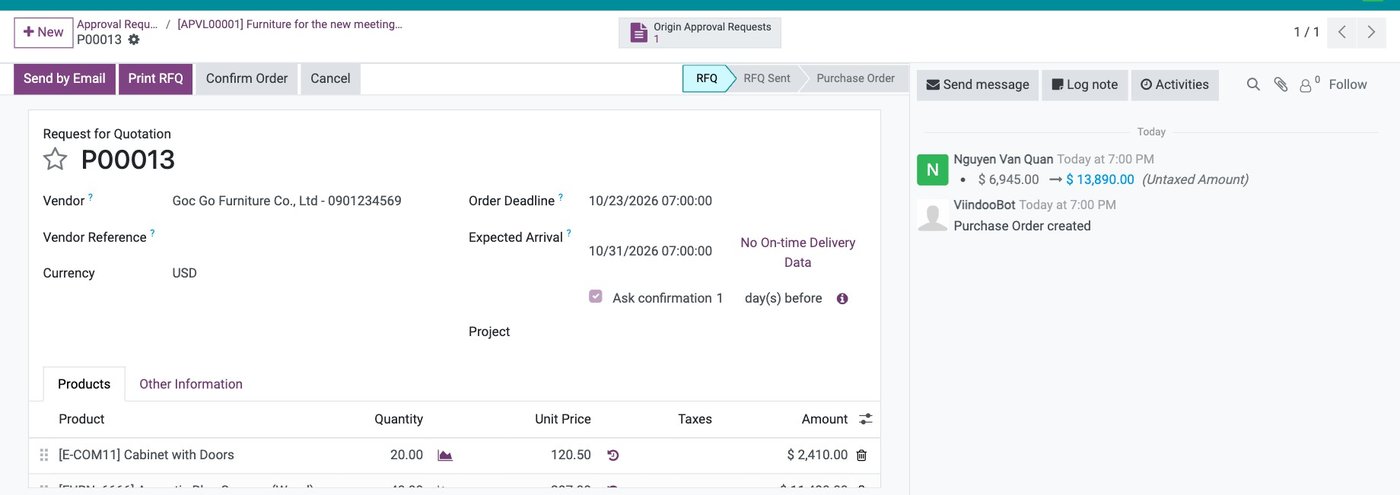
Example for step 3: the request for quotation keeps a link to the approved request, so each purchase can be traced back to its need.
What to prepare for the first area
- The lists the area uses: customers, products, suppliers or employees, depending on the area. Clean them before moving them, because errors move too.
- The opening position: stock on hand, open orders or unpaid invoices on the day you start, so the new system begins from the real situation.
- One key user: a person from that department who knows the work, has time to test, and will help colleagues in the first weeks.
How to know the first area has worked
Measure the same things before and after, for that one area: the hours spent moving data each week, the number of errors that reached a customer, and how long it takes to answer a common question. If all three improve, move on to the next area. If not, fix the first one before adding more.
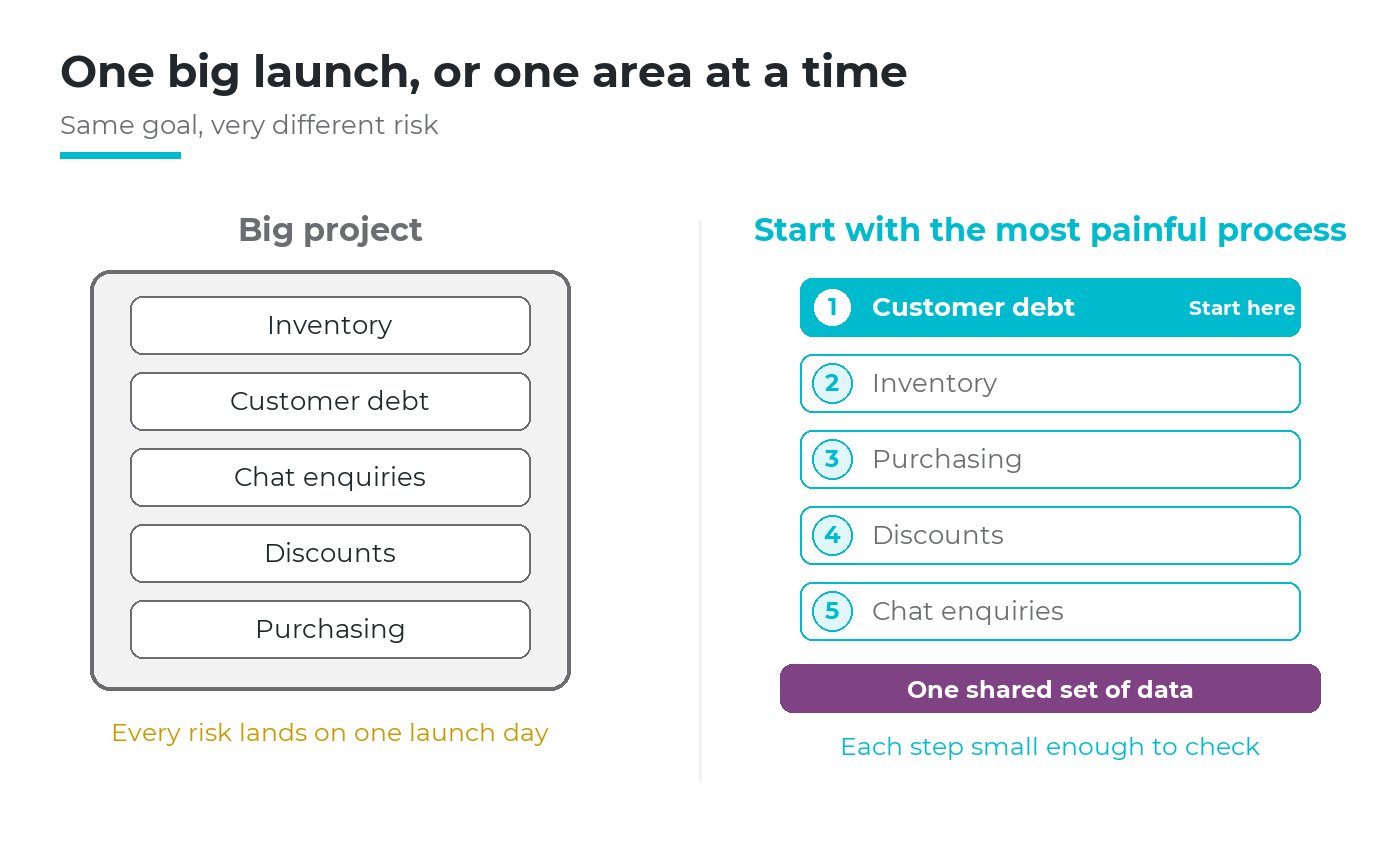
A large project carries every risk at once. Starting with one area keeps each step small enough to check (order of areas is an illustrative example).
How to choose the first area is covered in the article on starting with the process that hurts most.
Questions to ask before you choose a platform
Whichever platform you consider, these questions separate one that fits a growing Vietnamese company from one that only looks complete in a demonstration.
| Question | Why it matters |
|---|---|
| Does it follow Vietnamese accounting rules and issue e-invoices? | Otherwise accounting stays in a separate program and the gap remains |
| Can we start with one area and add others later? | A platform that must be installed all at once brings back the large project |
| Can each person see only what their role allows? | One set of data is only safe if access rights hold in every screen and report |
| Can we export our data at any time? | The data belongs to the company, not to the supplier |
| Who supports us, in our language, during and after the move? | Most problems appear in the first months of daily use |
| Can AI work across all areas, with our own AI provider? | This decides whether AI can answer questions that cross departments |
Why this choice also decides what AI can do for you
AI can only work with the data it can read. Connected to one separate program, it knows the orders but not the stock, or the invoices but not the deliveries. On one platform, the same assistant can answer a question that crosses departments, such as which orders are not fully delivered and which items are short.
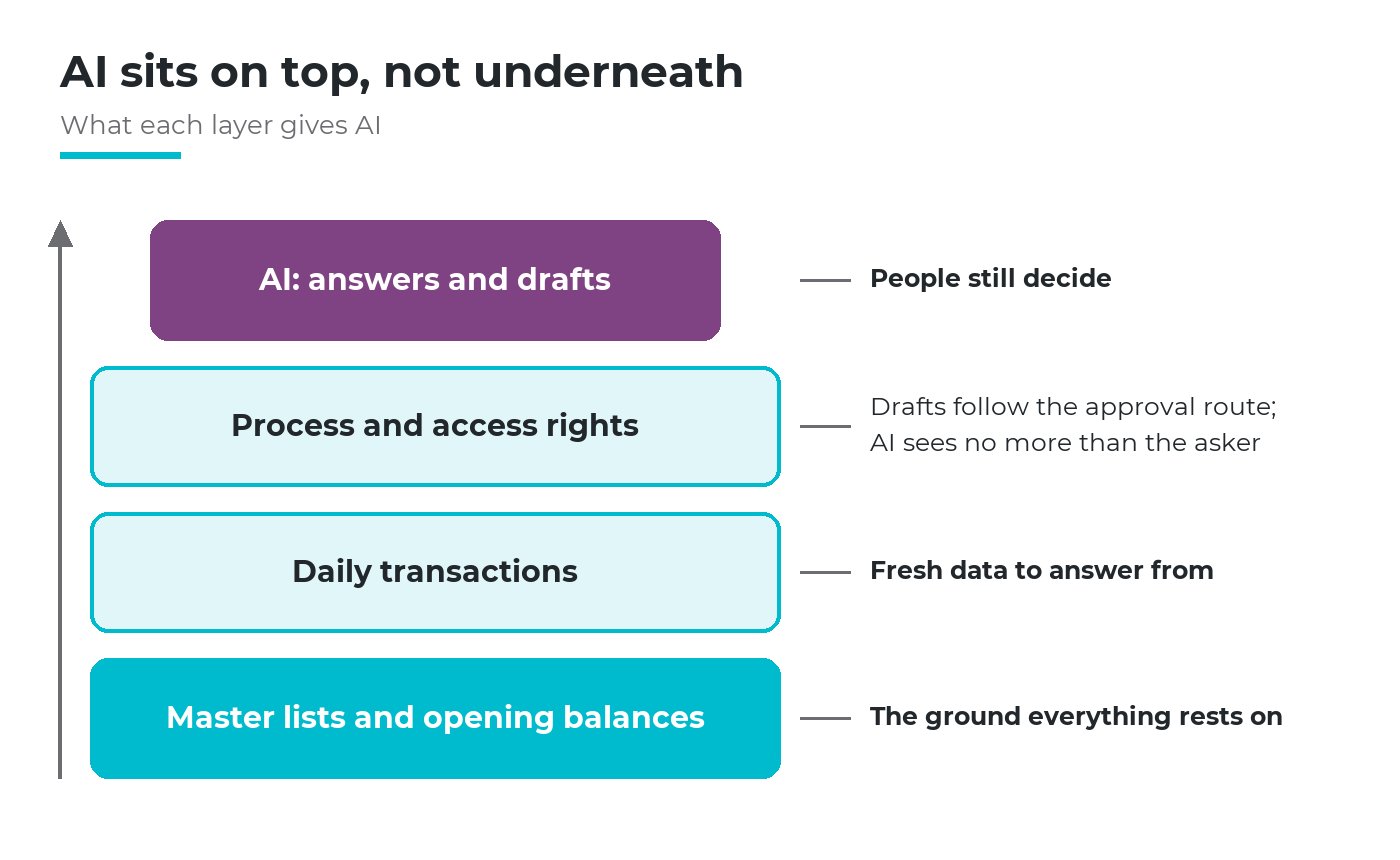
AI sits on the top layer. Without the layers beneath it, its answers are fluent but have nothing to rest on.
What this kind of AI is and what it needs is explained in the article on what agentic AI is. If you are considering writing your own tools with AI instead, see the article on building business software with AI.
The question is not separate software or one platform for everything. It is which work must share the same data.
Not sure whether your company has reached that point? Tell us where it hurts most. Book a consultation and we will look at your current setup with you, or see the costs first.
Frequently asked questions
No. Many companies begin with sales, inventory or purchasing and keep their accounting software for a while. Accounting moves when the team is ready and a new financial year makes the change simple.
No. The signs in this article appear in companies of a few dozen people. What matters is how many departments must work on the same order, not the headcount.
Lists such as customers, products and opening balances are imported into the platform. Old spreadsheets can be kept for reference; the daily work simply stops happening in them.
It depends on the area, the number of users and how clean the existing lists are. A fair estimate can only be given after looking at your data and your way of working, which is what the first consultation is for.
Count the hours your staff spend each week moving and checking data between programs, turn them into labour cost, and note the errors that reached a customer. Compare that with the cost of the platform over three years.
Related articles
- Build Business Software with AI, or Use a Platform with AI Built In?
- What Is Agentic AI, and How Does It Work Inside a Business Management System?
- Where to Start Bringing AI into Operations: Pick the Process That Hurts Most
- AI for Manufacturing Companies: What Agentic AI Can Do from Order to Shop Floor
- How Many AIs Does Your Company Have?
- AI for Accounting: What Agentic AI Can Do from Receivables to Reports
- AI in Sales: What Agentic AI Can Do from Opportunity to Quotation
- AI in Inventory Management: What Agentic AI Can Do from Stock to Delivery