To bring AI into operations without a big, risky project, start with the most painful process: one area where the loss is visible, the data is clean enough and one person owns the daily work. Get that area running well, then open the next one.
AI cannot fix a process that is not in the system. It can only answer, draft and suggest on the data and the process already recorded there. So the first question is not "which AI should we use", but "which area should go into the system first".
"Not ready" and "not ready to spend": both reasons to wait make sense
Business owners who delay software and AI usually give one of two reasons. The first is "we are not ready": data sits in spreadsheets, chat groups and notebooks, every department works its own way, and putting all of that into software seems likely to expose the mess rather than fix it.
The second is "we do not want to spend yet". Cash goes to orders, stock and payroll first, and a company-wide software project looks like a large bet with a vague result.
Both reasons are sound if you picture software and AI as one large project for every department at once. The problem lies in that picture, not in the company.
Common signs: the company collects requirements from every department, the list grows with each meeting, and the project waits until "everything is clear". Meanwhile the problem that hurts most, such as overdue customer debt, keeps costing money every week.
What research says about large projects and AI without ready data
The fear of large projects has a basis. Bent Flyvbjerg and Alexander Budzier studied 1,471 IT projects and published the results in Harvard Business Review in 2011. The average cost overrun was 27%. The average hides the real risk: about one project in six overran its cost by 200% on average and its schedule by almost 70%.
AI adds a second risk: data. In February 2025 the research firm Gartner predicted that through 2026, organisations will abandon 60% of AI projects that are not supported by data ready for AI. This is a forecast, not a measured result, but it states plainly what many companies find: AI does not make up for data that is scattered or out of date.
Both sources describe large organisations worldwide, not Vietnamese SMEs. Still, they point the same way: risk grows with scope, and AI fails where data is not ready. That is also why many strategic risks of digital transformation come from doing too much at once.
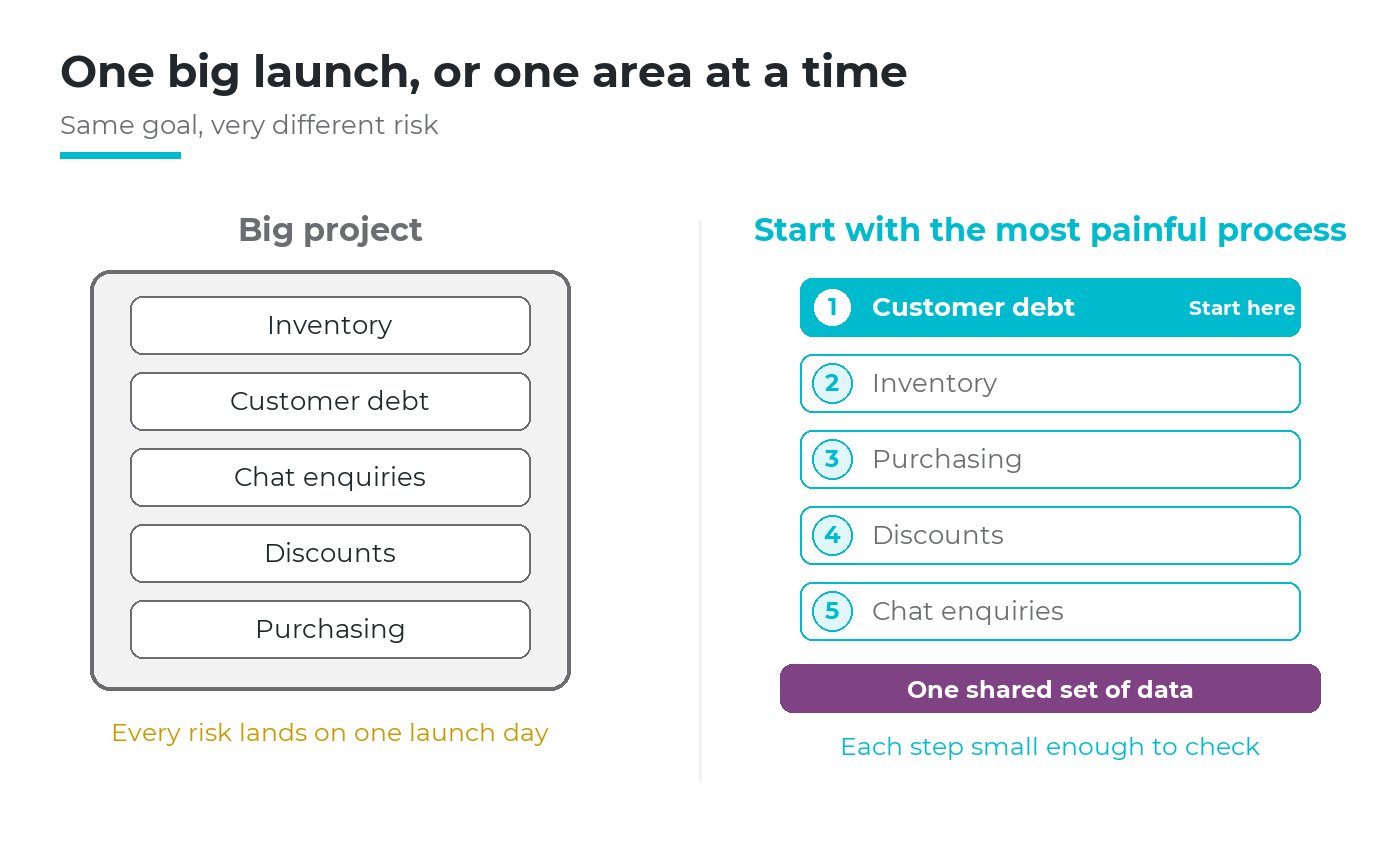
A large project carries every risk at once. Starting with one area keeps each step small enough to check (order of areas is an illustrative example).
Change the question: start with the most painful process, not with everything
Which technology to adopt first, ERP or a warehouse system, is a question of its own, covered in the article on ERP, WMS, MES and IoT. This article answers a narrower one: in daily operations, which area should go into the system first.
In most companies a few problems cause most of the loss, the pattern known as the Pareto principle. To start with the most painful process is to put the first effort where the loss is concentrated. It also starts where people already want change, because they feel the pain every week.
"Painful" here means a loss you can measure: money not collected, customers lost, hours spent reconciling, orders delivered late. An area that is merely annoying but costs little is not the place to begin.
Do not ask whether the company is ready for AI. Ask which area is ready, and which area hurts most.
Three criteria to start with the most painful process
Pain alone is not enough. The first area must pass three tests at once.
1. It hurts most
The loss can be put in money, customers or hours each month, and the management team agrees on it without a long debate.
2. Data is clean enough
The basic lists (customers, items, suppliers) exist in one place, with few duplicates, and opening balances can be counted or confirmed.
3. There is a key user
One named person does this work every day, feels the pain, and will keep the system up to date.
Each criterion blocks a different failure. Pain with messy data means a clean-up to plan first. Pain with no key user means a system nobody updates. Clean data with no pain means nobody cares after launch.
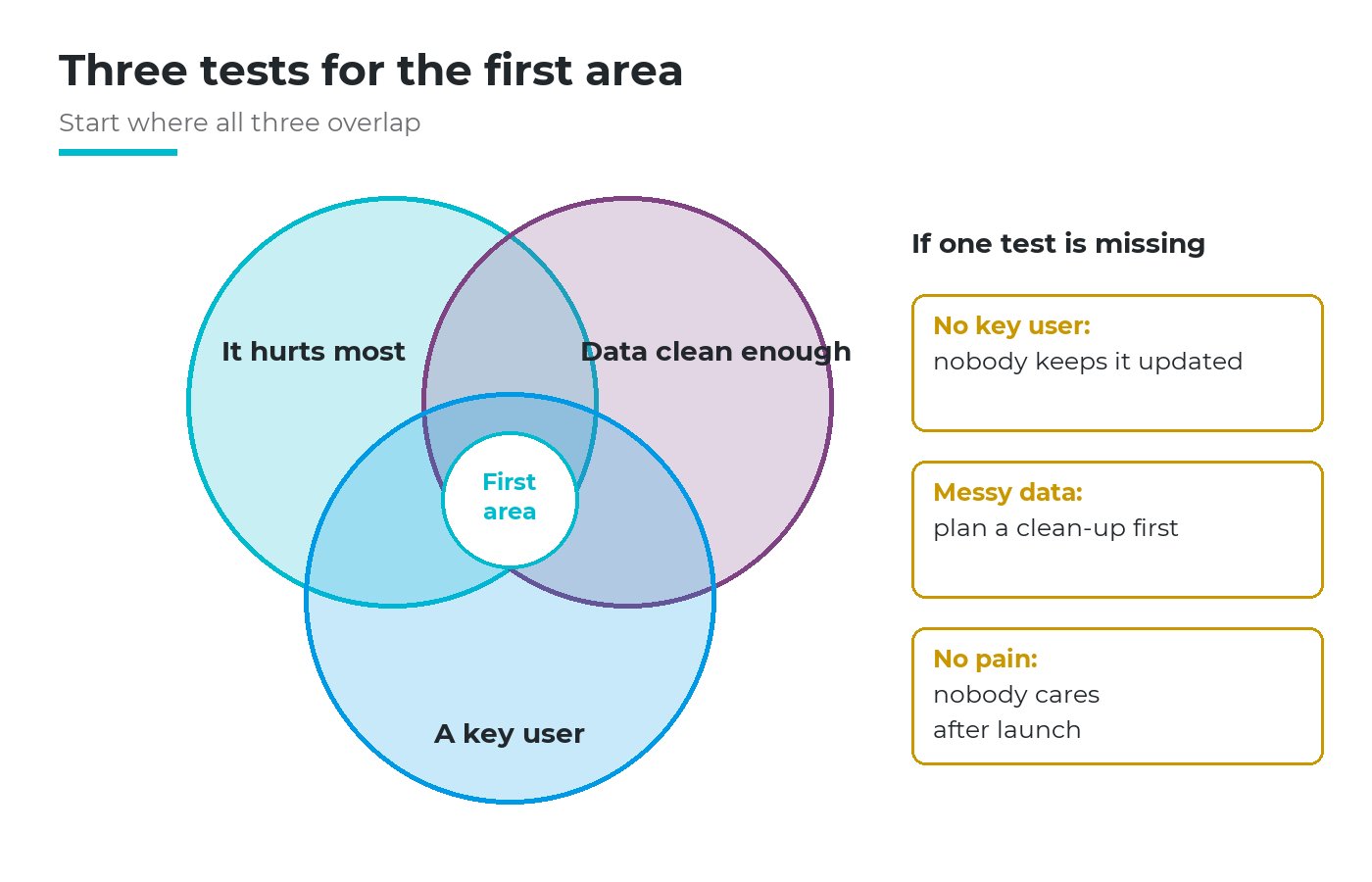
The first area sits where all three overlap. Missing one criterion shows which risk to plan for.
Scoring the usual candidates
For a trading or manufacturing company of this size, five areas come up most often. The table shows how the pain usually appears and how to measure it.
| Area | How the pain shows | What to measure |
|---|---|---|
| Inventory | Books and shelves disagree; goods "in stock" cannot be found | Value of adjustments per count |
| Customer debt | Nobody knows who is overdue until month end | Overdue amount and days |
| Customers on chat apps | Enquiries and quotes scattered across phones | Enquiries with no follow-up |
| Discount approval | Discounts above the limit approved by message, margin unclear | Orders below the floor price |
| Purchase approval | Orders placed before approval; bills that do not match orders | Bills needing manual matching |
Give each area 1 to 3 points per criterion and add them up; on a tie, choose the clearer key user. The conversation matters more than the score: to start with the most painful process, the management team must first agree, in figures, on what hurts.
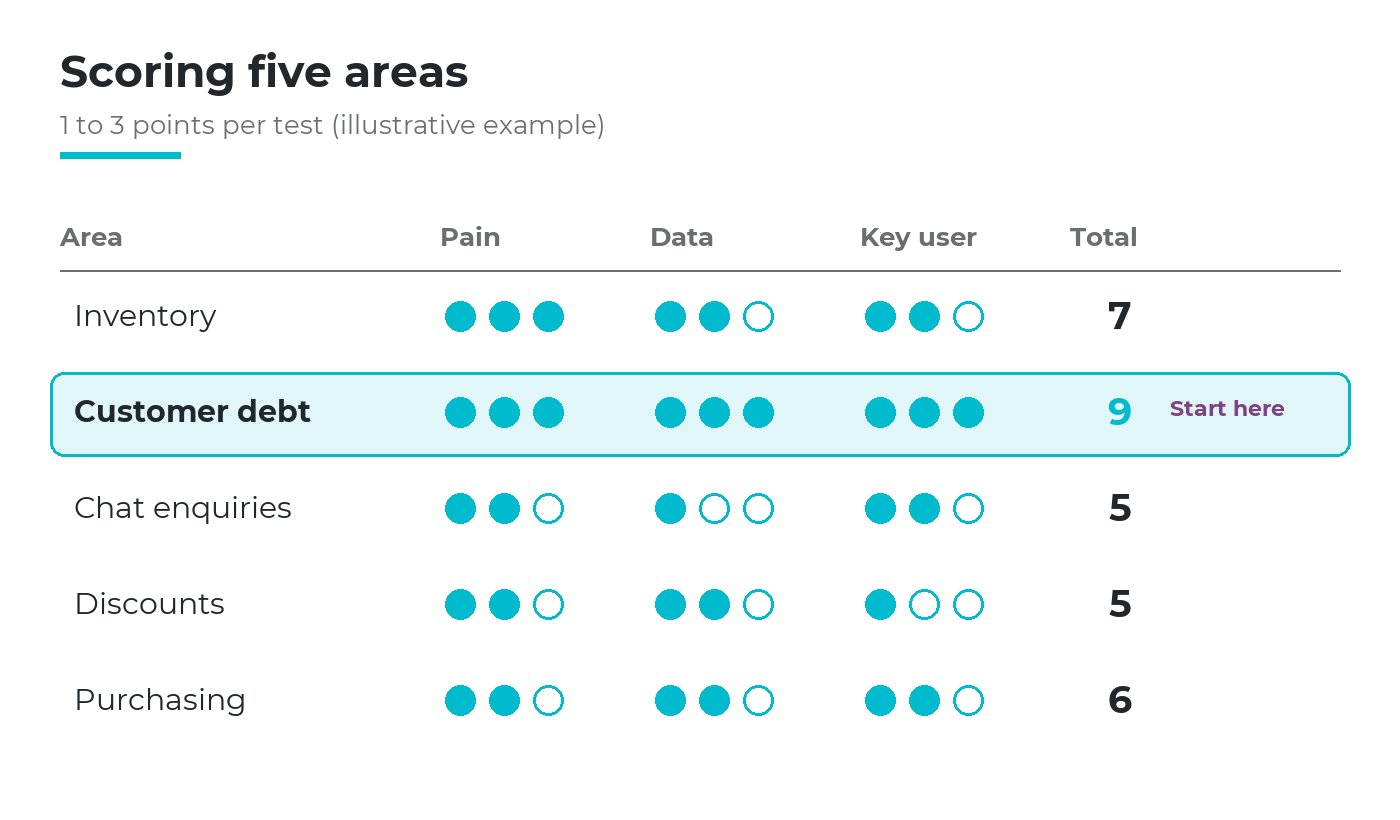
In this illustrative example, customer debt scores highest because the loss is clear, the invoice list exists and the receivables accountant owns it.
The next articles in this series look at each of these five areas in turn: stock that does not match the books, customer debt, customers who ask through chat apps, discounts above the limit, and purchase approval.
What data to prepare for the area you chose
"Clean enough" does not mean perfect. For one area the data falls into three groups: master lists, opening balances and rules. Old transaction history rarely needs moving in full.
| Area | Master lists | Opening balances | Rules |
|---|---|---|---|
| Inventory | Items, units of measure, storage locations | Counted stock per item and location | Who may receive, issue, write off |
| Customer debt | Customers, payment terms | Open invoices with due dates | Credit limits, who chases payment |
| Customers on chat apps | Customers, contacts, lead sources | Open enquiries and quotes | Price list, sales stages |
| Discount approval | Products, price lists | Quotes awaiting a decision | Discount limits by role, approval route |
| Purchase approval | Suppliers, items bought often | Open purchase orders | Approval limits by value, approvers |
Three habits keep it on track: each master list has one owner, duplicates are cleaned before entry, and opening balances are fixed on one known date so old and new figures never mix.
If the chosen area fails this check badly, clean the data first or take the next area on the list. When the picture across the company is unclear, start from a digital maturity assessment.
Why AI helps only when the area's data and process are in the system
AI answers from what has been recorded. If unpaid invoices live in one accountant's spreadsheet, AI cannot say which customers are overdue. If discounts are approved by chat message, an AI draft has no limit or approval route to follow.
A system gives AI three things it cannot invent: data to answer from, a process for its drafts to go through, and access rights so that it never sees more than the person asking. The last point is a topic of its own, covered in the article on AI data governance.
Choose one area
Three tests
Put it in the system
Master lists, balances, rules
Use it every day
Data gets cleaner
Let AI work on it
Answers and drafts, people decide
Open the next area
On the same data
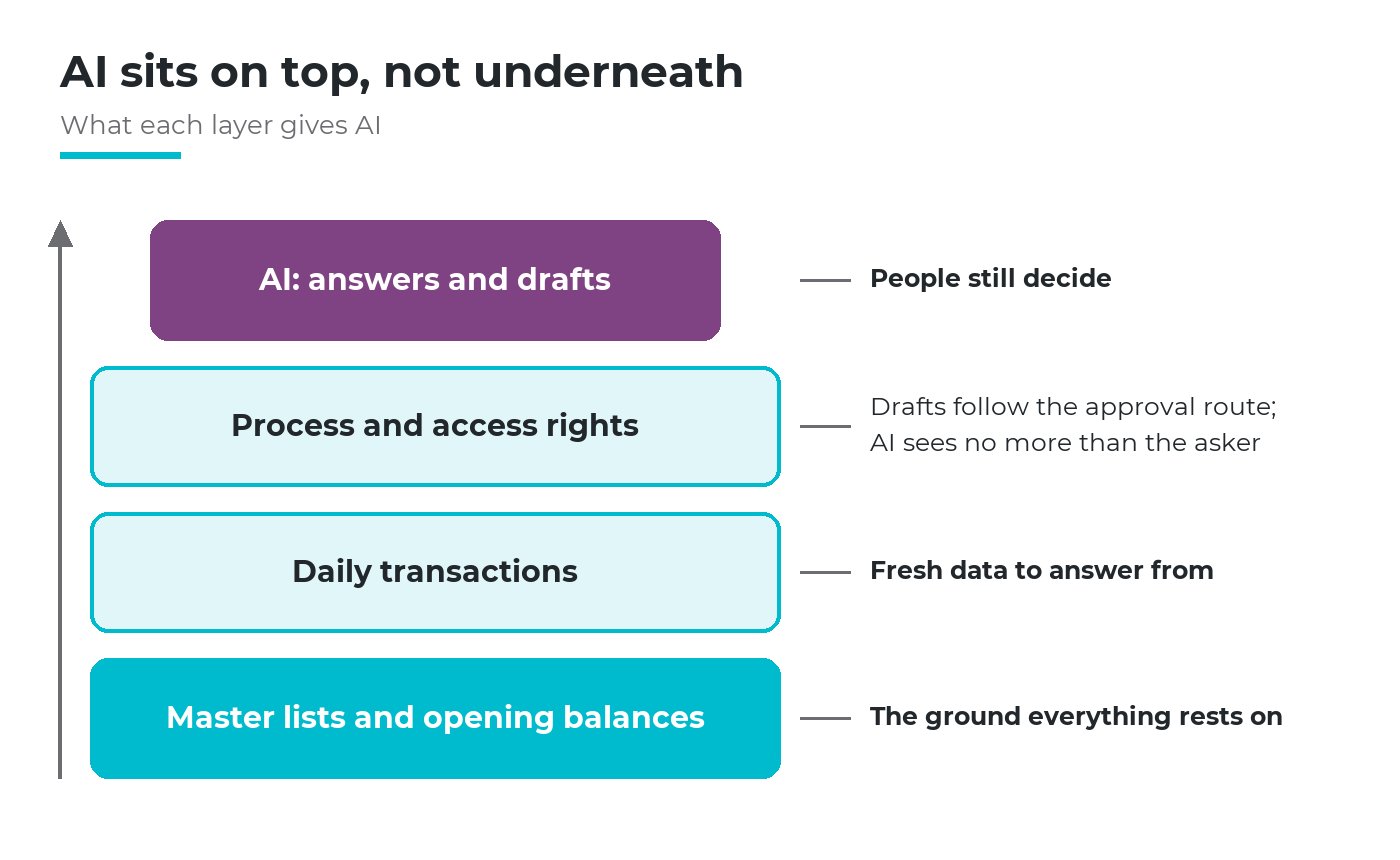
AI sits on the top layer. Without the layers beneath it, its answers are fluent but have nothing to rest on.
That is why the order is: start with the most painful process, put it in daily use, then add AI. The data people enter every day becomes answers and drafts they can check.
Three ways the first step goes wrong
Even when you start with the most painful process, the first step can still go wrong in three ways.
Choosing the easiest area instead of the most painful one. It goes live without trouble, but nobody notices a difference, and the budget for the next step is harder to justify.
Changing the process and the tool at once, with no key user. When staff return to spreadsheets, the cause is rarely the staff but a design that makes them enter data twice.
Treating "one area" as "one separate tool". Starting small is about scope, not about buying a different tool for each area. Otherwise every step adds a new island of data that AI cannot see as a whole.
The direction Viindoo has chosen
Viindoo follows the same order. Every area runs on one platform and one set of data. The all-inclusive Express implementation package is sold by hours, so a company can put those hours into the area it chose first, start with the most painful process, and extend to other areas later on the same data instead of adding new systems. AI works within the authority the company gives it: you ask in your own language and AI answers from the company's own sales, purchasing, inventory and accounting data, with sources you can click to open; it sees only what the person asking is allowed to see; it drafts quotations, requests for quotation and invoices, and nothing is saved until the user reviews the proposal card and clicks Approve, under that user's own name and rights. Every request is logged, AI spending has a daily cap per user and per company, and you choose the AI provider and use your own key.
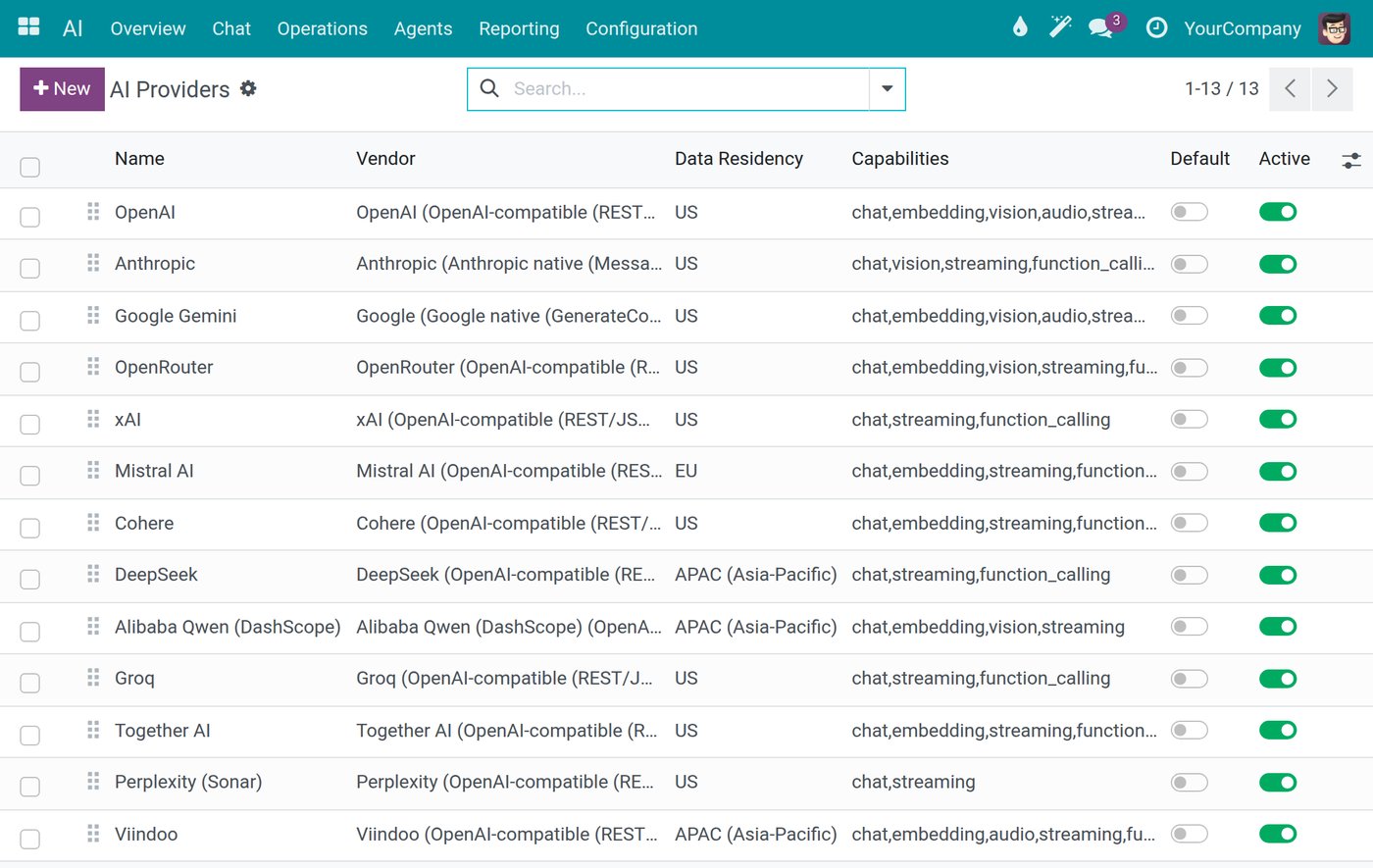
Example: the company chooses which AI provider to connect; each connection shows its data residency region.
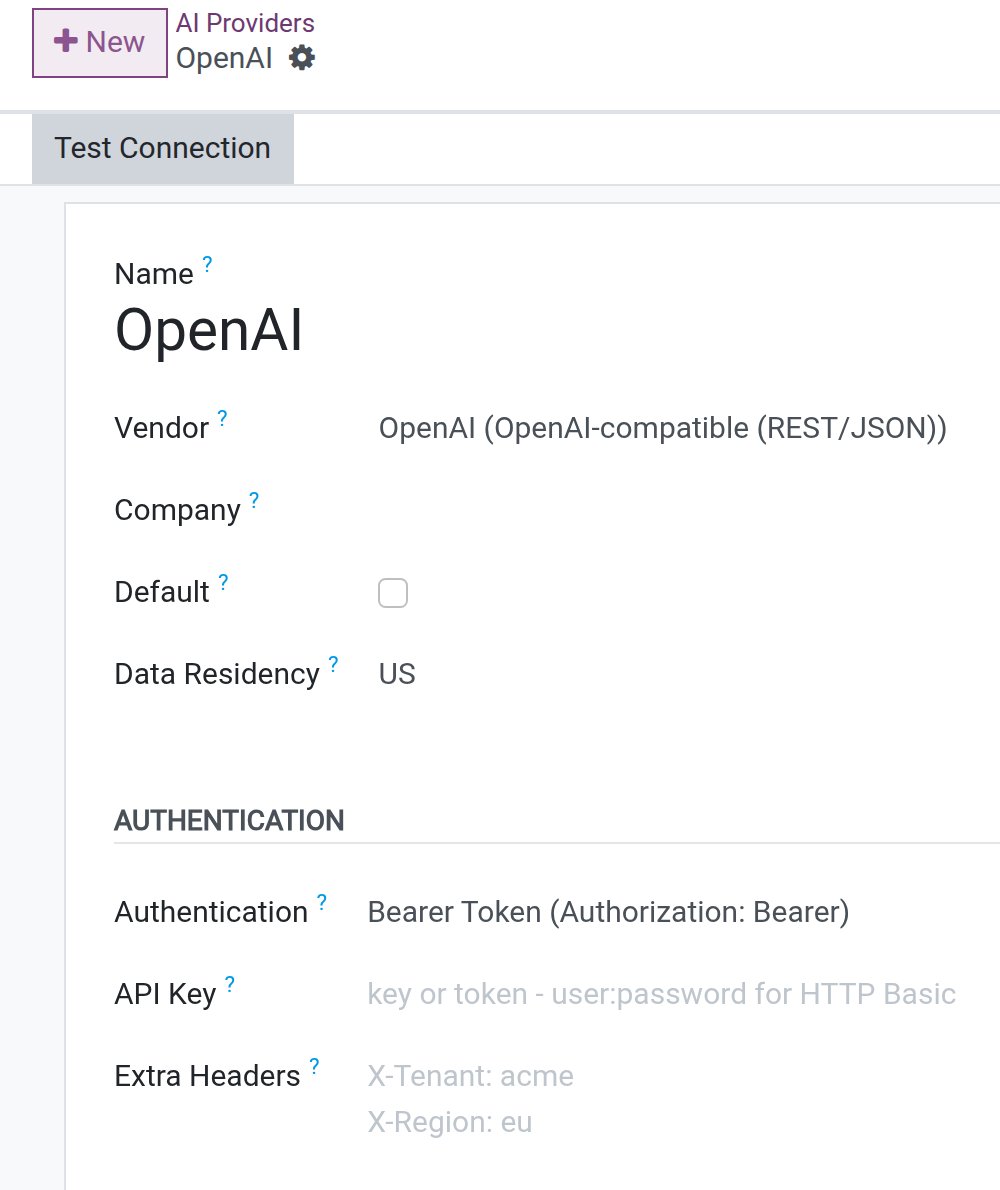
Example: an AI connection takes the company's own API key.
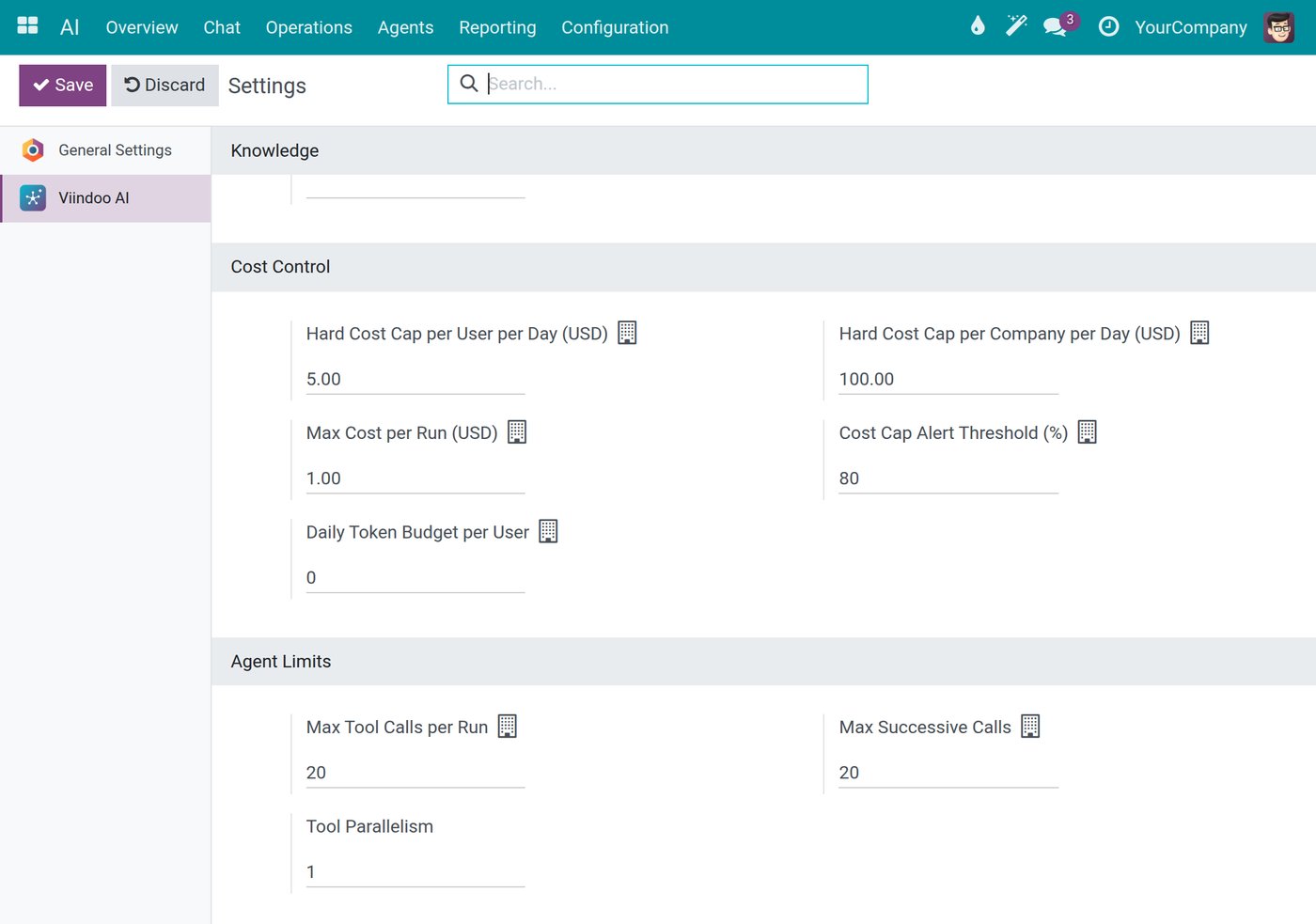
Example: AI cost caps per user and per company each day, with a warning threshold.
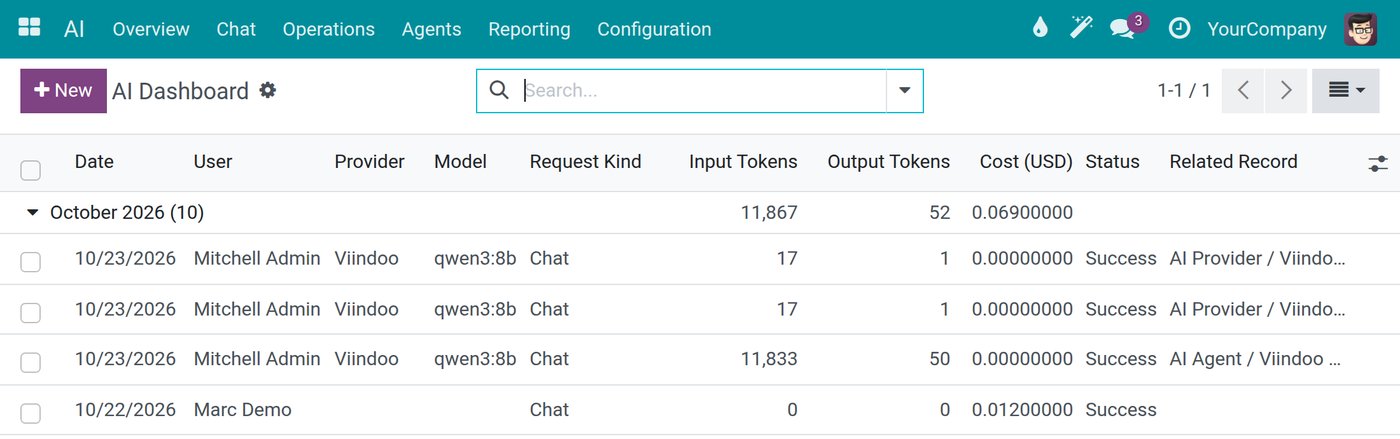
Example: each AI request is logged with date, user, model and cost.
Frequently asked questions
Yes. A spreadsheet is data. What matters is whether the master lists of the chosen area are in one place and reasonably free of duplicates. Clean those for one area, not for the whole company.
Only if each area gets its own separate tool. If later areas join the same platform and data, starting with the most painful process is the first piece of one system, not a patch.
Turn AI on for an area once its data is entered every day. Start with questions about that data, and hand AI drafts to confirm once people trust the numbers. A person still approves every change.
Not sure which area to start with? Tell us where it hurts most. Book a consultation and we will score your candidate areas with you, or see the cost of the Express package, focused on one area first.
Sources
- Flyvbjerg, B., & Budzier, A. (2011). Why Your IT Project May Be Riskier Than You Think. Harvard Business Review, 89(9), 23-25. Sample of 1,471 IT projects.
- Gartner (26 February 2025). Lack of AI-Ready Data Puts AI Projects at Risk. Press release.
Related articles
- ERP, WMS, MES, IoT: Where Should Businesses Begin?
- Digital Maturity Framework: Mapping Readiness Before the Transformation Journey
- 10 Strategic Risks of Digital Transformation when Poorly Executed in Enterprises
- Digital Transformation vs. ERP Implementation: What's the Difference?
- The Smarter the AI, the Harder It Is to Control?