Helpdesk & Odoo Version
by Viindoo
| Lines of Code | 425 |
| Technical name | viin_helpdesk_odoo_version |
| License | OPL-1 |
| Website | https://viindoo.com/apps/modules/19.0/viin_helpdesk_odoo_version |
| Read description for | v 15.0 v 16.0 v 17.0 v 18.0 |
| Required Apps | Discuss (mail) |
| Included Dependencies | Helpdesk Viindoo Base Odoo Versions Management Config Management |
| Extensions | Helpdesk & Odoo Module |

Know which Odoo release a request is about before you answer it
For support teams that help people who run Odoo
The Odoo version on every ticket
Odoo 19.0 · Community and Enterprise · OPL-1
Extends Helpdesk: its tickets record the Odoo version they concern.
What changes for your team
The version is recorded once, where everyone reads it
The release a customer runs is buried in the description or asked again in a reply, and each agent who picks up the ticket looks for it.
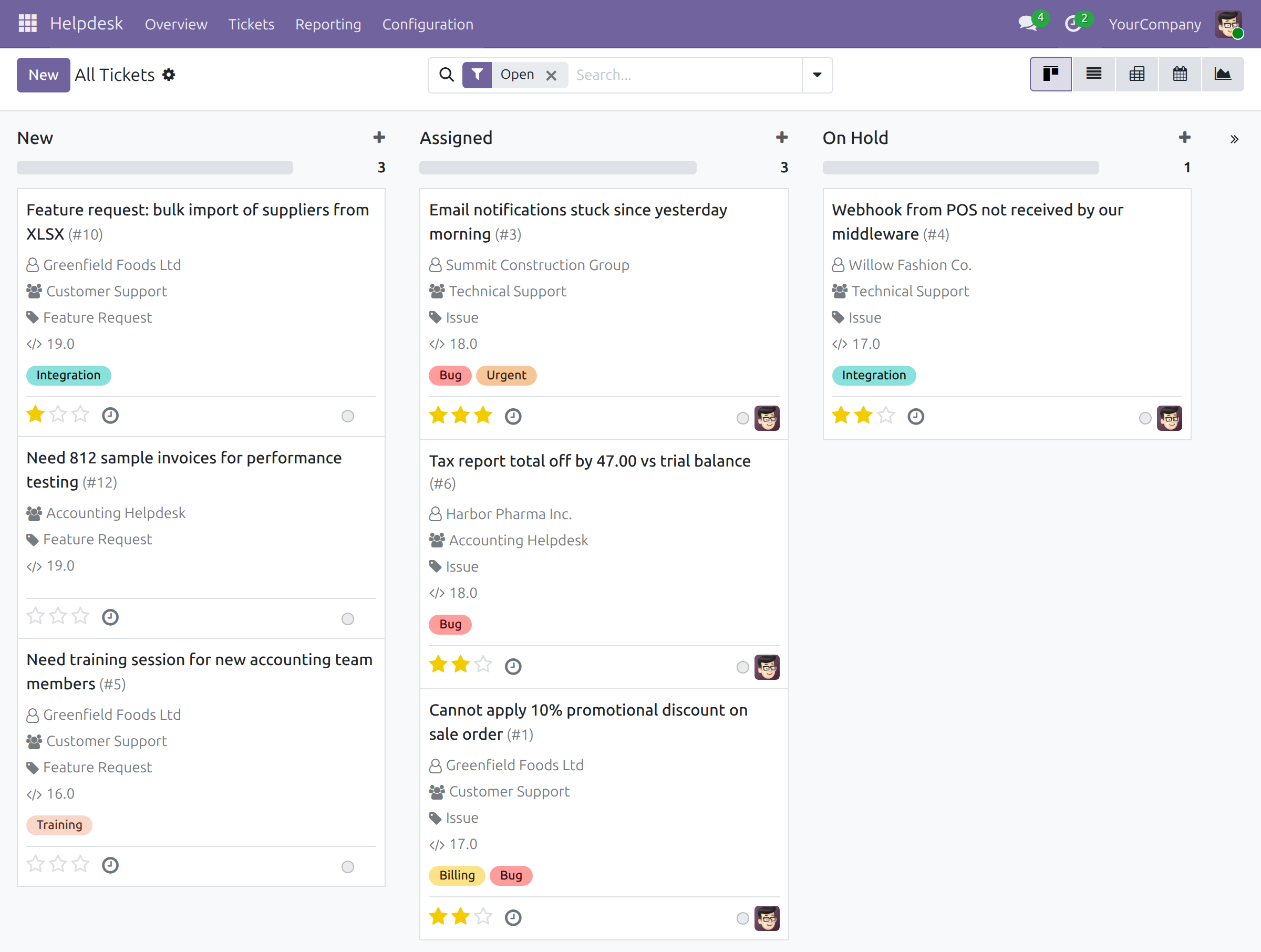
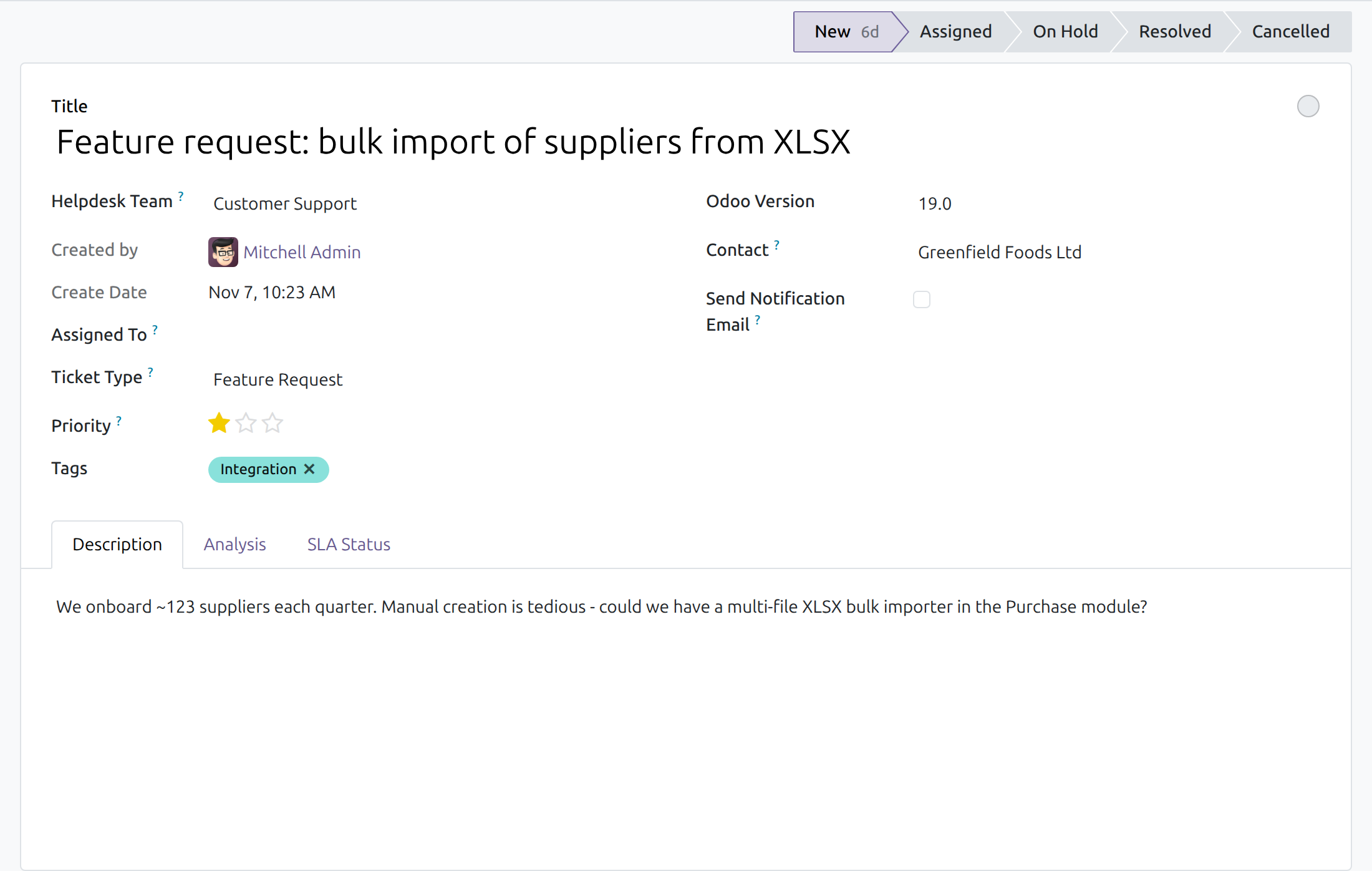
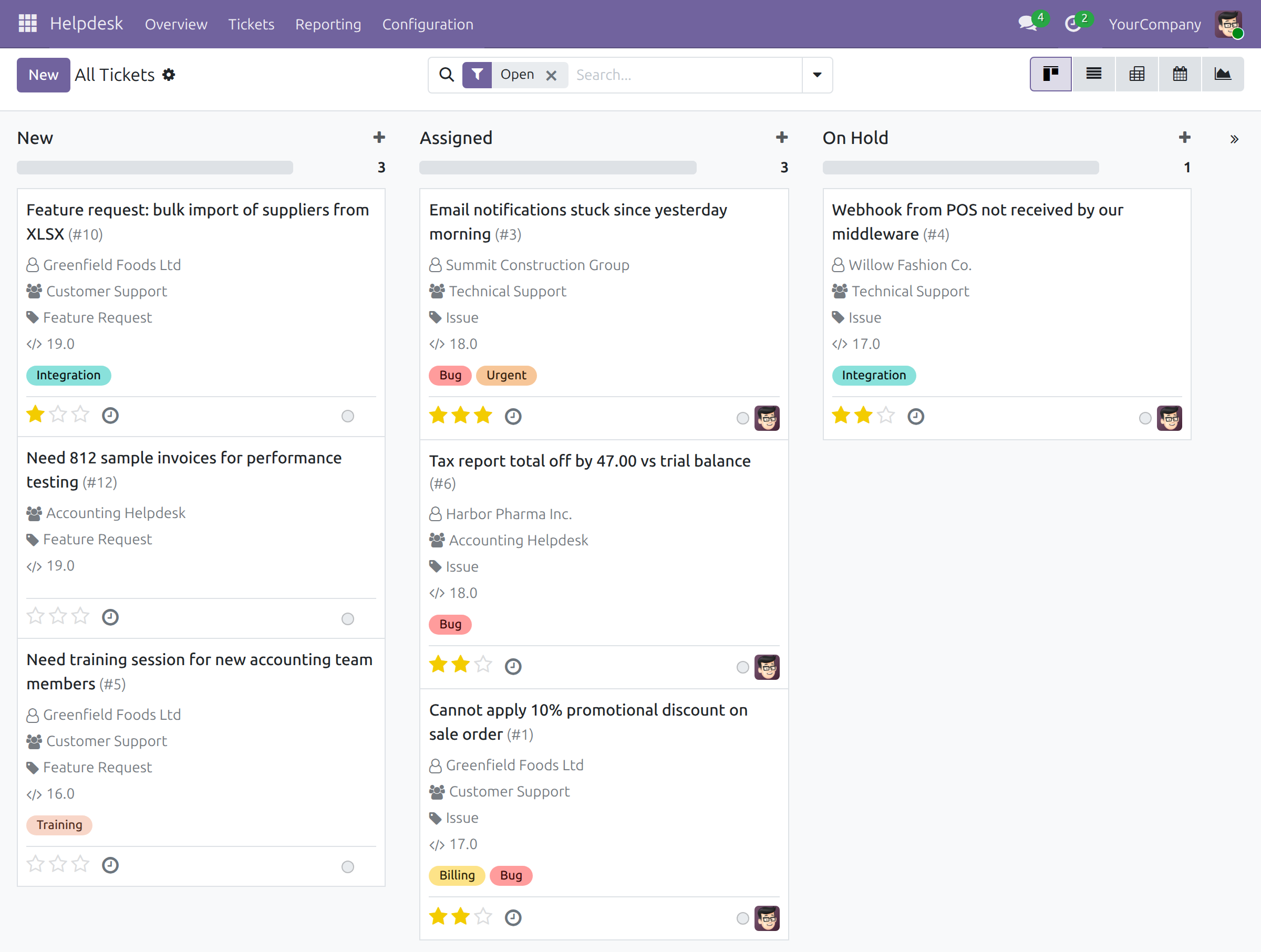
→ Odoo Version is a choice from a ready list on the ticket form and on the quick-create card. It shows on the ticket card of the board, and every change is logged in the chatter.
Every request about one release, in one list
Finding the tickets about one release means searching their text and hoping the version was written down.
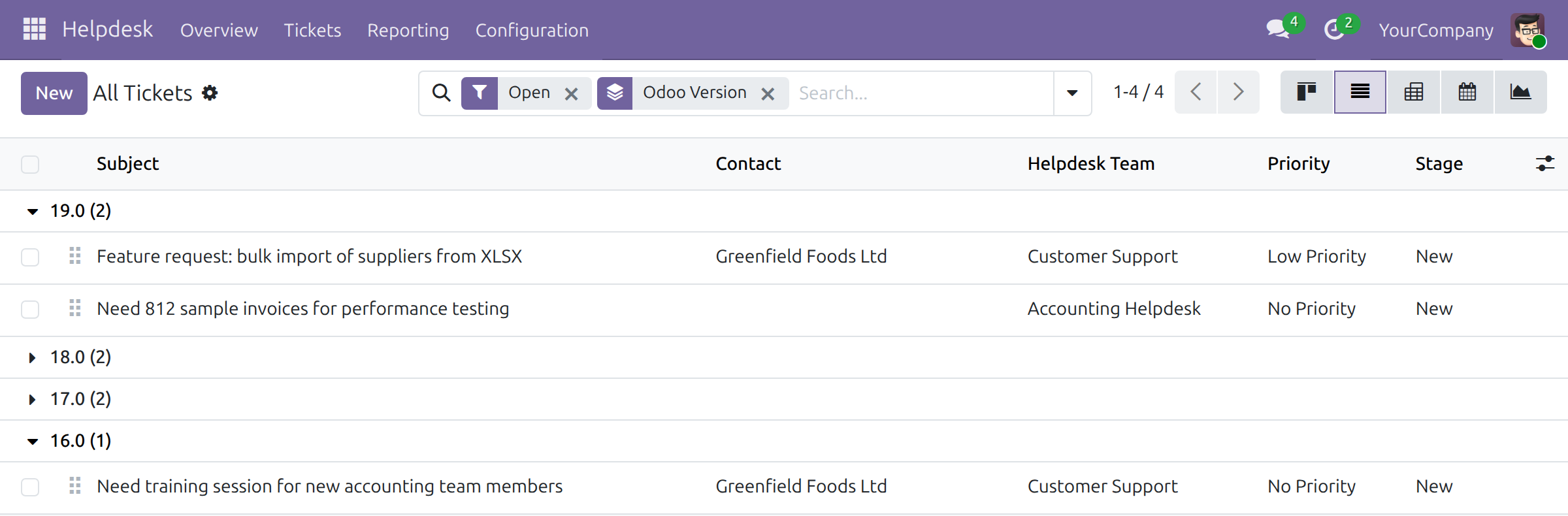
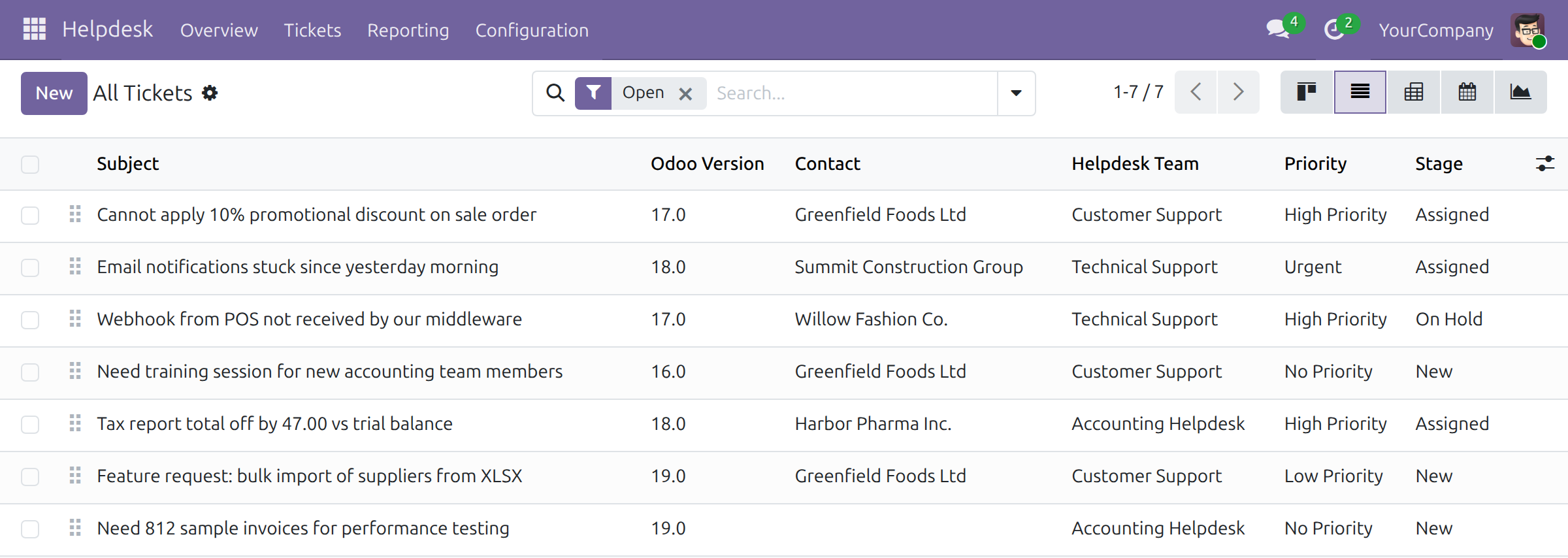
→ Search tickets by Odoo version, or group the list by it; an optional column shows the version next to the subject.
Managers see the support load per release
How many requests each release generates is counted by hand when someone needs the figure.
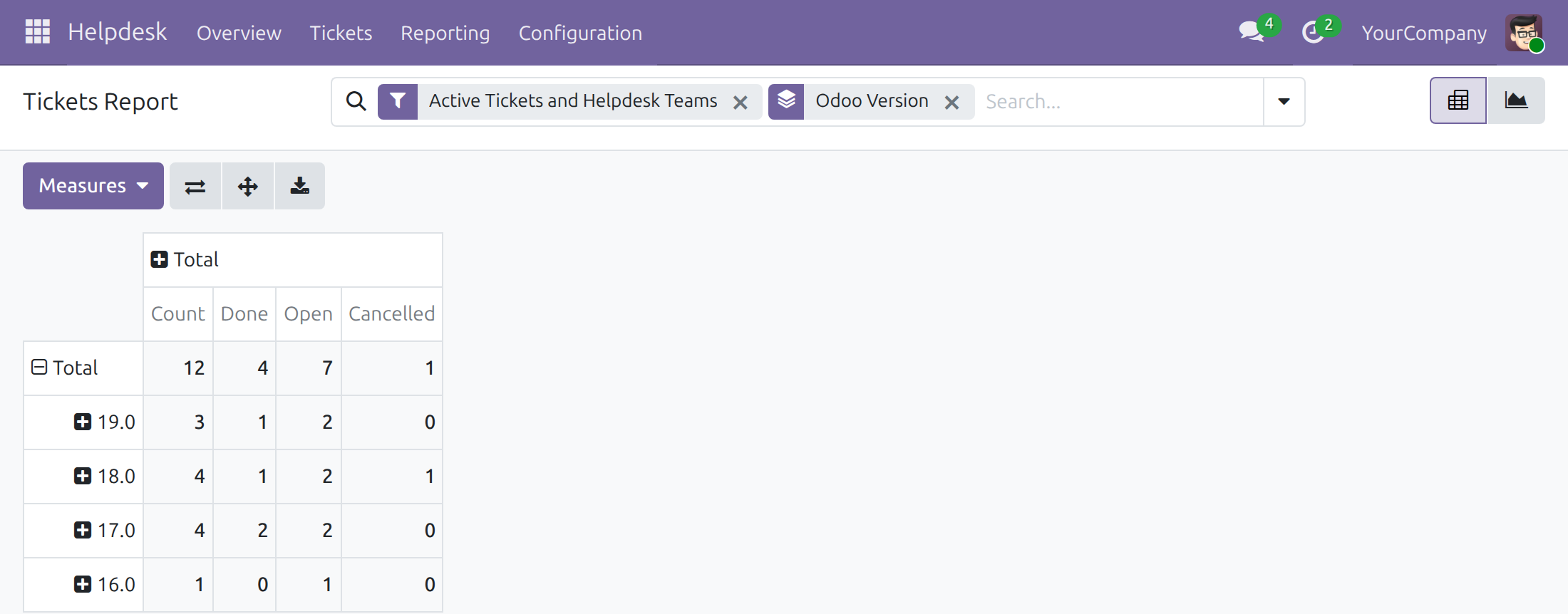
→ The Helpdesk Tickets Report groups and searches by Odoo version: per release, how many tickets arrived, in which stage, and how many are done.
Ready on day one
Installs itself
Once Helpdesk and Odoo Versions Management are both installed, this module is installed with them.
The versions are already there
The list agents choose from ships with the Odoo releases from 8.0 onward.
What you set up first
Nothing. A user with the right to manage Odoo versions adds a new release to the list when it comes out.
What is included
The Odoo version on the ticket form, the quick-create card, the board card and the ticket list, as a search option and a Group By entry, and as a dimension of the Tickets Report. Teams, stages and assignment come from Helpdesk; the list of versions comes from Odoo Versions Management.
Optional extension
Helpdesk & Odoo Module
Records, next to the version, which Odoo module a ticket is about and its module category.
Before you decide
Must agents fill in the version?
No. The field is optional; a ticket without a version is handled like any other and appears under None when you group by version. Tickets that exist at installation start without one.
Who sees the version and the report?
Everyone who can open a ticket sees its version. The Tickets Report is in the Reporting menu, which Helpdesk shows to its administrators.
Can a version that tickets use be deleted?
No. A version stays in the list while any ticket refers to it, so past tickets keep their version.
Can we record a version that is not in the list?
Agents choose from the list; a user with the right to manage Odoo versions adds the missing one first.
Which languages does it ship?
English and Vietnamese.
Try it, then ask us
The Documentation tab walks the support agent and the helpdesk manager through daily use; Live Preview opens a demo database.
Pre-sales & partnership
viindoo.com/contactusTechnical support
viindoo.com/ticketTechnical requirements
- Odoo version: 19.0
- Editions: Community, Enterprise
- Required modules: Helpdesk, Odoo Versions Management
- License: OPL-1
- Languages: English, Vietnamese
Helpdesk and Odoo Version
Note
This guide is for support agents who handle tickets and for helpdesk managers who follow the results.
Note
Extends viin_helpdesk - see its documentation for tickets, teams and stages.
Overview
Requests about Odoo are easier to answer when you know which version the customer runs. This module adds an Odoo Version to every ticket, so the version is recorded once, is visible on the board and in the list, and can be used to search, group and report. The module is installed automatically together with Helpdesk and the Odoo versions it relies on.
| Role | What they do | Access right to assign |
|---|---|---|
| Support agent | Sets the Odoo version of a ticket and finds tickets by version. | User, in the Helpdesk field of the user |
| Helpdesk manager | Everything an agent does, and analyses tickets by version in the Tickets Report. | Administrator, in the Helpdesk field of the user |
Setup
The module needs no setup. The versions you can choose from (from 8.0 to the latest release) are provided by the Odoo Version list that the module relies on; a user with the right to manage that list keeps it up to date.
Support agent: record and find the Odoo version
All Tickets opens with the Open filter on, so it lists open tickets only. Click the x of that filter to list Resolved and Cancelled tickets as well.
Set the Odoo version of a ticket
- Go to Helpdesk ‣ Tickets ‣ All Tickets and open a ticket.
- In the Odoo Version field, above the Contact, choose the version the request is about.
- The change is saved with the ticket and is recorded in its chatter.
When you create a ticket from a kanban column with the + button, the quick-create card also offers the Odoo Version field.
Read the version on the board and in the list
On the kanban view of All Tickets, each ticket that has a version shows it on its own line of the card, after the ticket type, next to a code icon. Without the Open filter the Resolved and Cancelled columns appear folded; click a folded column to unfold it.
On the list view, open the optional columns menu at the right end of the header and tick Odoo Version to show the column.
Search and group tickets by version
- In the search bar of All Tickets, type a version, for example 18.0, and choose Search Odoo Version for: 18.0. Only the tickets about that version remain.
- To see every version at once, open the search options and, under Group By, choose Odoo Version. Click a group to unfold its tickets.
Helpdesk manager: analyse tickets by version
- Go to Helpdesk ‣ Reporting ‣ Tickets Report.
- Open the search options and, under Group By, choose Odoo Version. Each row is a version; the columns show the number of tickets (Count) and how many are Done. Open Measures and tick Open and Cancelled to add those two.
- To search the report for one version, type it in the search bar and choose Search Odoo Version for.
A ticket without a version appears in the group None.
This software and associated files (the "Software") may only be used (executed, modified, executed after modifications) if you have purchased a valid license from the authors, typically via Odoo Apps, or if you have received a written agreement from the authors of the Software (see the COPYRIGHT file).
You may develop Odoo modules that use the Software as a library (typically by depending on it, importing it and using its resources), but without copying any source code or material from the Software. You may distribute those modules under the license of your choice, provided that this license is compatible with the terms of the Odoo Proprietary License (For example: LGPL, MIT, or proprietary licenses similar to this one).
It is forbidden to publish, distribute, sublicense, or sell copies of the Software or modified copies of the Software.
The above copyright notice and this permission notice must be included in all copies or substantial portions of the Software.
THE SOFTWARE IS PROVIDED "AS IS", WITHOUT WARRANTY OF ANY KIND, EXPRESS OR IMPLIED, INCLUDING BUT NOT LIMITED TO THE WARRANTIES OF MERCHANTABILITY, FITNESS FOR A PARTICULAR PURPOSE AND NONINFRINGEMENT. IN NO EVENT SHALL THE AUTHORS OR COPYRIGHT HOLDERS BE LIABLE FOR ANY CLAIM, DAMAGES OR OTHER LIABILITY, WHETHER IN AN ACTION OF CONTRACT, TORT OR OTHERWISE, ARISING FROM, OUT OF OR IN CONNECTION WITH THE SOFTWARE OR THE USE OR OTHER DEALINGS IN THE SOFTWARE.