Vietnam - Payroll for Meal Orders with Accounting
| Lines of Code | 412 |
| Technical name | l10n_vn_viin_hr_payroll_meal_account |
| License | OPL-1 |
| Website | https://viindoo.com/apps/modules/18.0/l10n_vn_viin_hr_payroll_meal_account |
| Read description for | v 13.0 v 14.0 v 15.0 v 16.0 v 17.0 |
| Required Apps | Time Off (hr_holidays) Invoicing (account) Discuss (mail) Employees (hr) Calendar (calendar) Employee Contracts (hr_contract) |
| Included Dependencies | Payroll HR Payroll Accounting Vietnam - Payroll Vietnam Payroll - Accounting Integration Employee Relatives Meal Orders Viindoo Base Accounting Foundation Vietnam Chart of Accounts - Circular 99 and 133 Advanced HR Management HR Contracts (Viindoo) Work Entry Work Entry - Contract HR Meal Order & Payroll Integration HR Accounting Base Addendum Viin Time-Off Viin - Holiday Work Entry Vietnam - HR Accounting Viindoo Holiday & WorkDay Manager |

Vietnam - Payroll for Meal Orders with Accounting
Automate accounting for Vietnamese meal order payroll rules
Key Features
Built natively on Odoo/Viindoo to streamline real business operations:
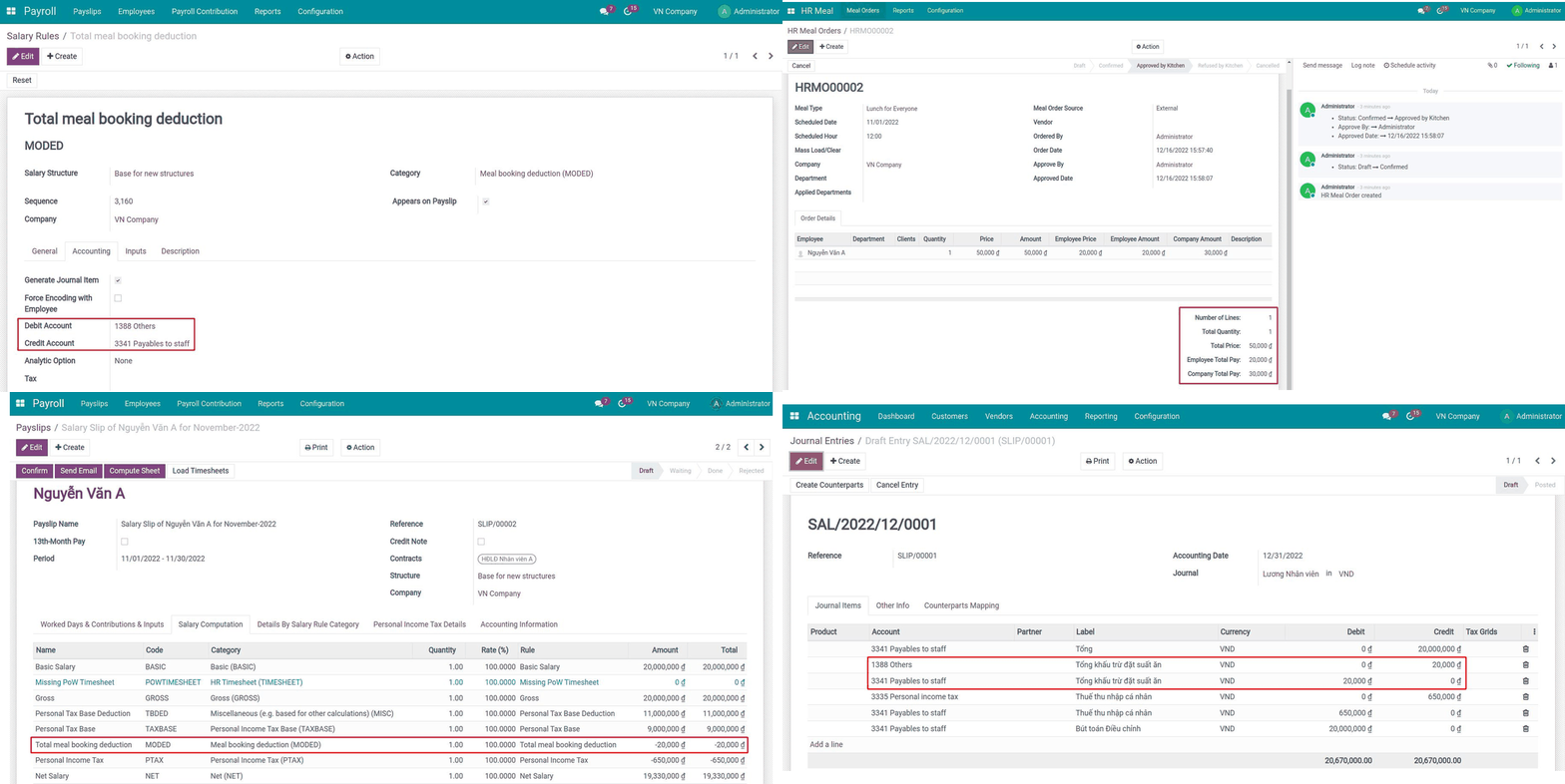
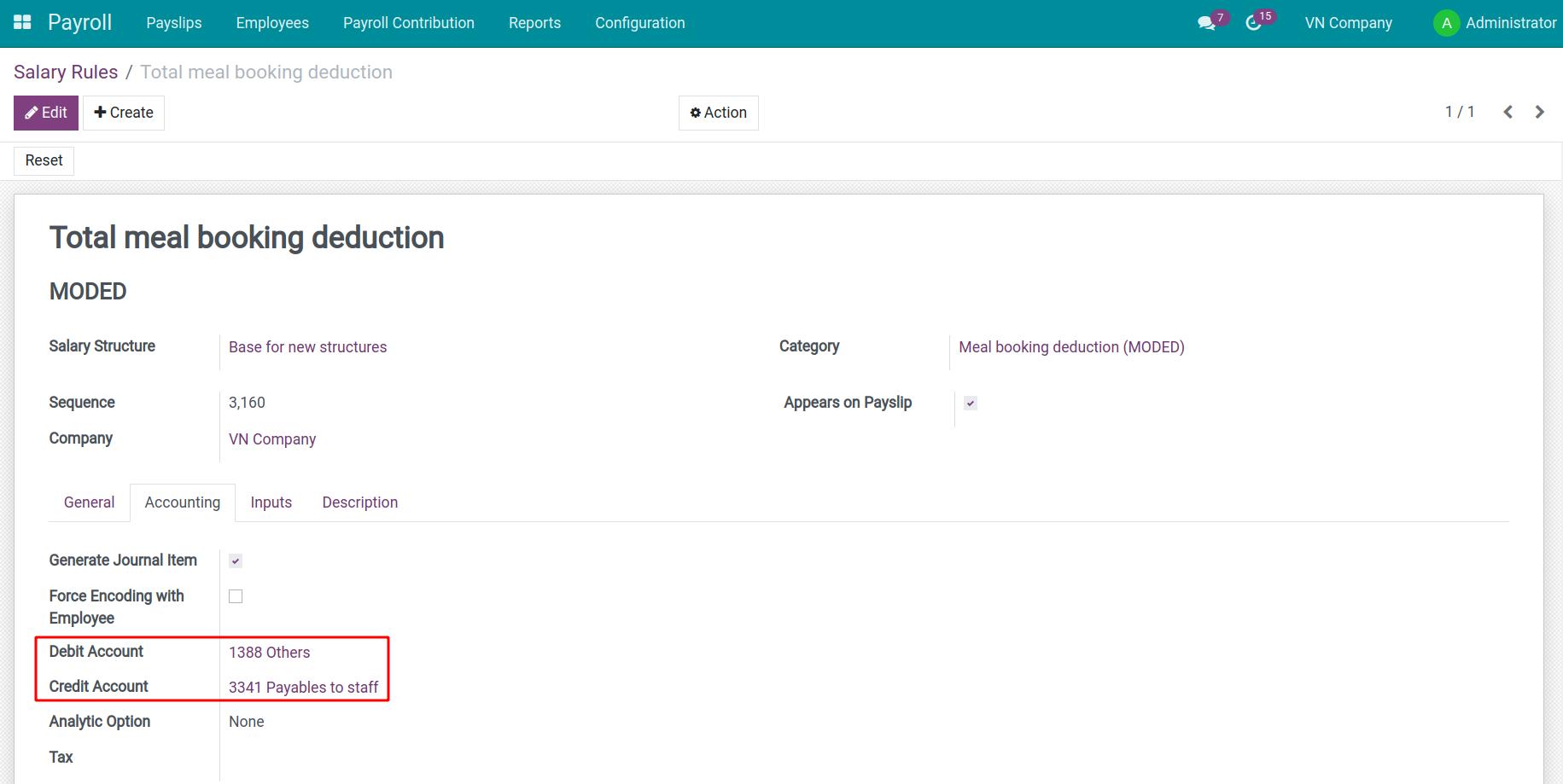
This module sets the default accounting account for the salary rule Total deduction for meal orders according to Vietnamese accounting standards
Benefits
- Automatically aligns meal order payroll rules with Vietnam's accounting regulations.
- Reduces the risk of non-compliance in handling meal order deductions.
- Automates the process of tracking and recording meal order expenses.
- Eliminates manual journal entry, saving time and ensuring accuracy.
- Provides a clear separation of employee contributions (deductions from salary) and company expenses.
- Enables detailed financial reporting for meal order-related expenses.
Add default accounting account for Total deduction for meal orders rule
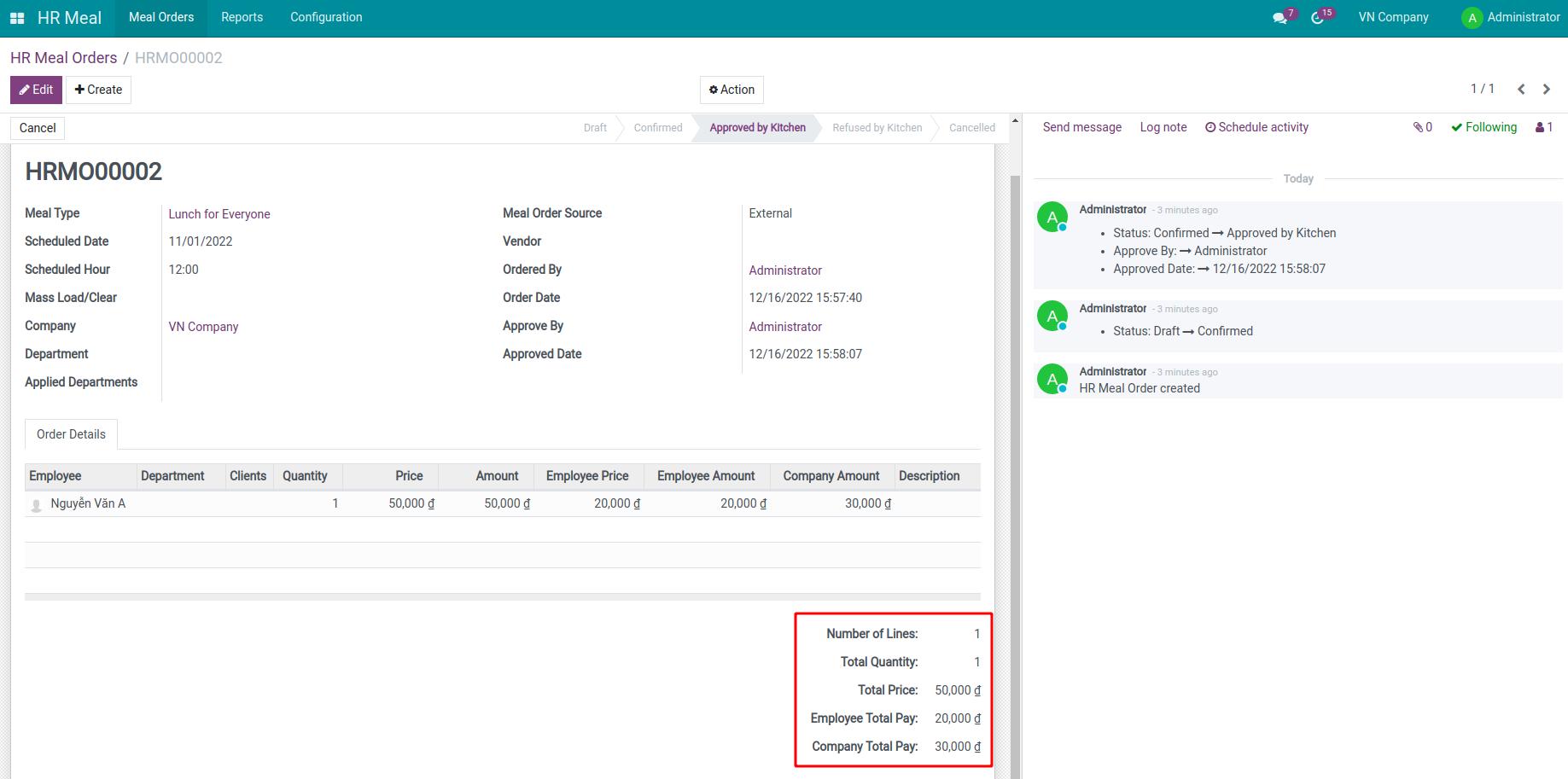
Meal Orders
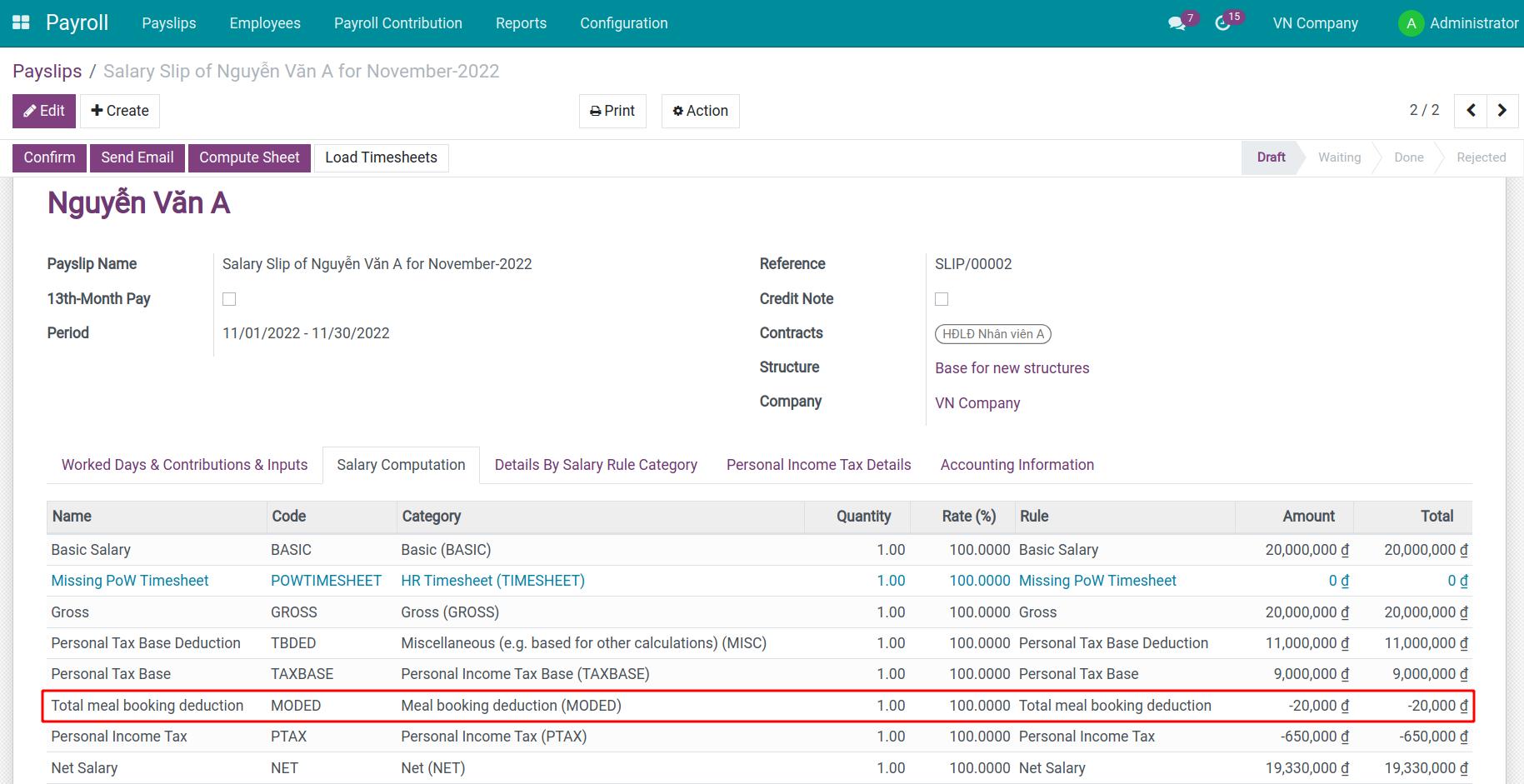
Meal deduction on payroll
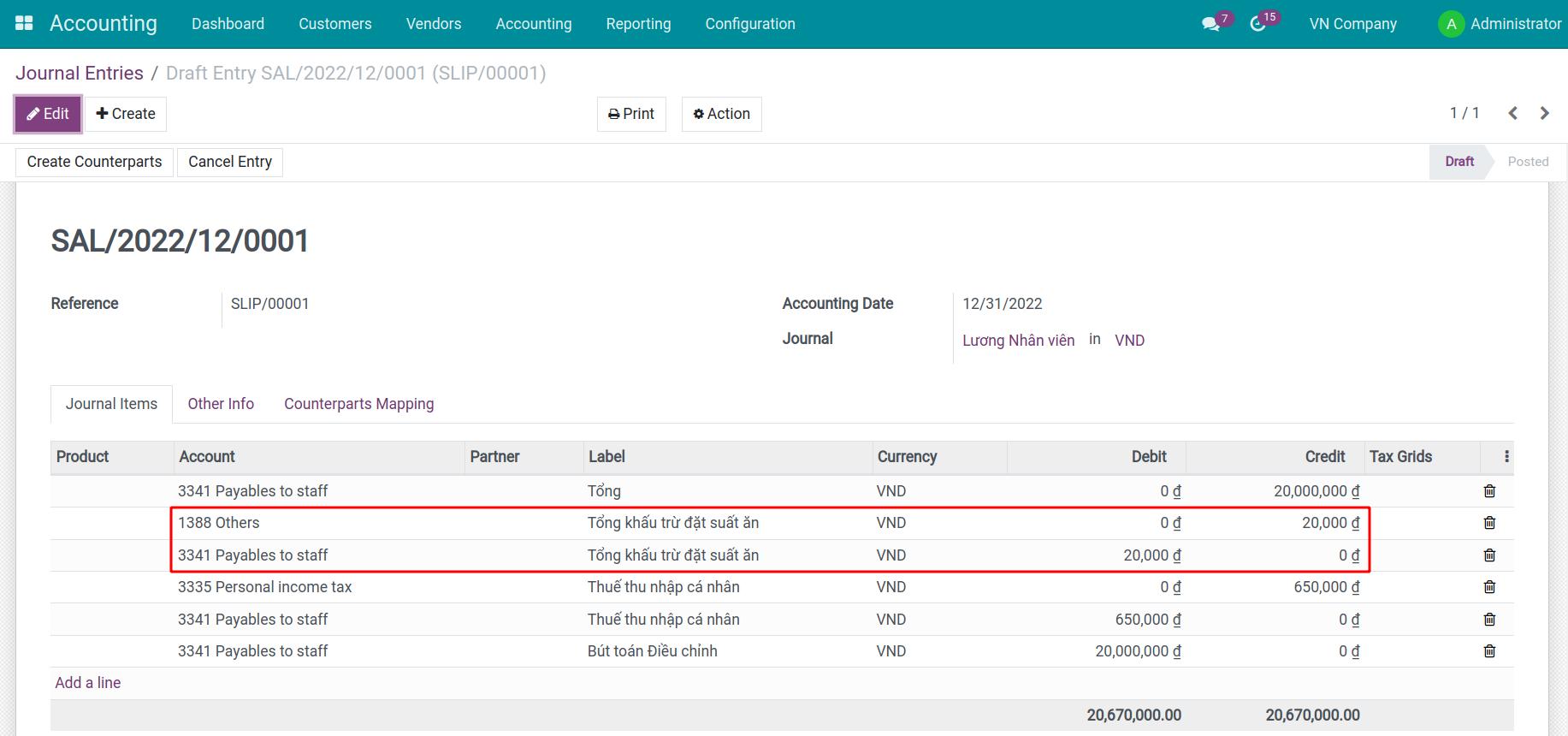
Accounting entries to account for meal deductions
See Vietnam - Payroll for Meal Orders with Accounting in Action
See how this module solves real business problems in a working Viindoo environment.
Need help with Vietnam - Payroll for Meal Orders with Accounting?
For questions, implementation support, or consulting services, contact Viindoo.
Pre-Sales & Partnership
sales@viindoo.comWhen contacting us, please include:
- Odoo/Viindoo version (CE/EE).
- Number of users and business scope.
- Other modules currently in use.
Technical Support
apps.support@viindoo.comFor faster troubleshooting, please provide:
- Order number or app reference.
- Odoo/Viindoo version & edition.
- Steps to reproduce the issue.
- Screenshots/logs if available.
Technical Requirement
Who Should Use This Module?
Built for teams that need this capability fully integrated into their Odoo/Viindoo stack.
Vietnamese Enterprises Supporting Meal Orders
- Suitable for companies offering meal order benefits to employees.
- Ideal for businesses managing meal order payroll deductions and expenses.
HR and Accounting Teams
- Perfect for HR professionals and accountants needing automated tools for payroll deductions.
- Beneficial for teams aiming to reduce manual accounting tasks.
Organizations Focused on Accuracy and Compliance
- Best for businesses prioritizing compliance with Vietnamese accounting standards.
- Suitable for companies seeking transparent and accurate financial reporting.
Installation
- Navigate to Apps.
- Search with keyword l10n_vn_viin_hr_payroll_meal_account.
- Press Install.
Instruction
Instruction video: Vietnam - Meal Order Payroll with Accounting
General Settings
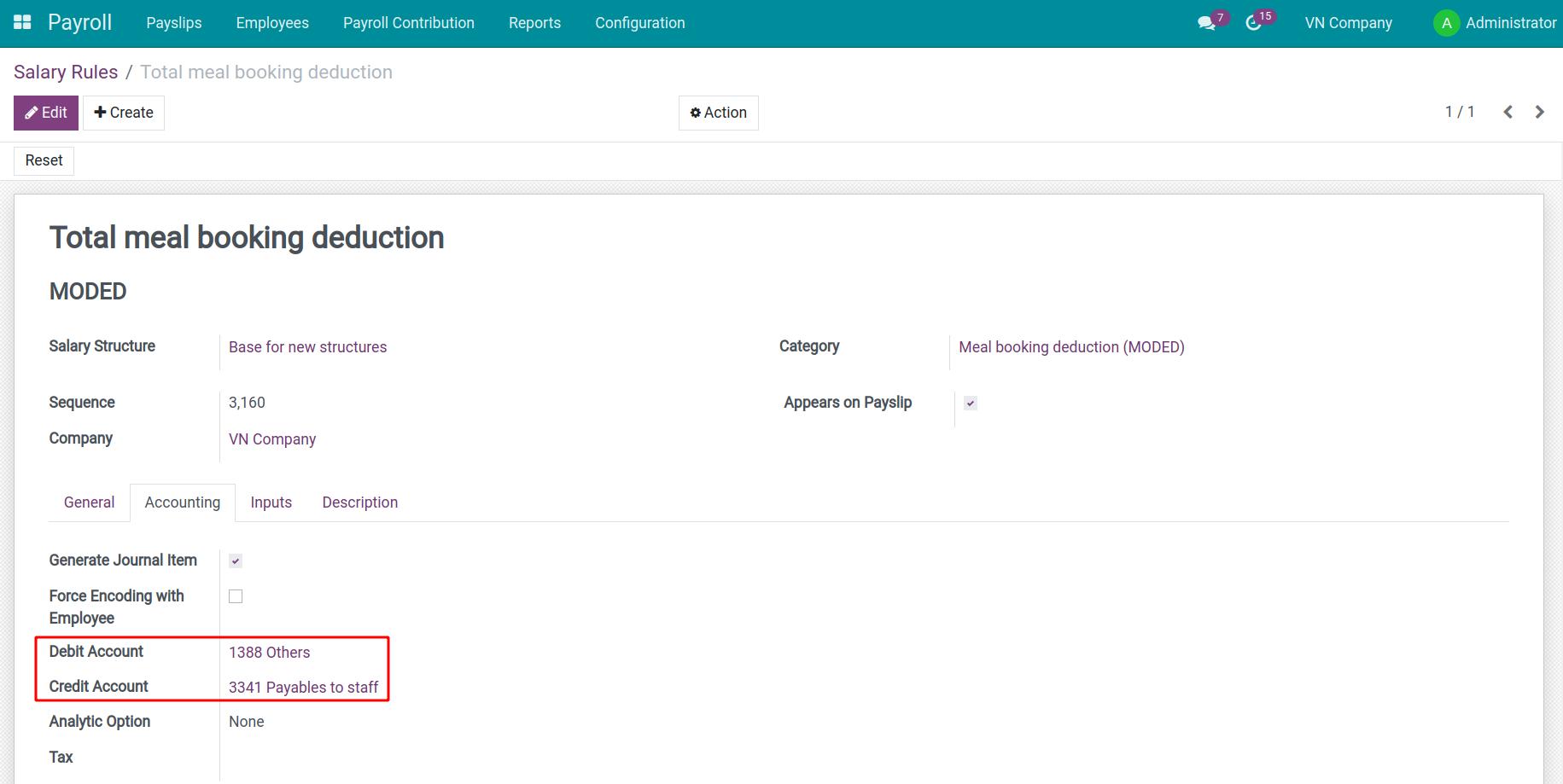
After installing, the Payroll app will set the default accounting information for the salary rule Total deduction for meal orders according to Vietnamese Accounting Standards.
Navigate to Payroll > Configuration > Salary Rules, remove the default filter, select the salary rule Total deduction for meal orders and navigate to tab Accounting, check Generate Journal Item will show more default information including:
- Debit account: 1388 - Others;
- Credit account: 3341 - Payables to staff.
Usages
Accounting occurrences
Assuming, the enterprise organizes meals together but only supports employees with part of the price, at the end of the month the company will pay off the debt to the meal vendor and the employee will have to refund a part to the company by deduction from salary.
For example:
1 day employee salary: 200.000đ
Meal: 50.000đ ( Company pays: 30:000đ, employee pay: 20.000đ)
Accounts payable to vendors and receivables from employees:
- Debit 642: 30.000 VND
- Debit 1388: 20.000 VND
- Credit 331: 50.000 VND
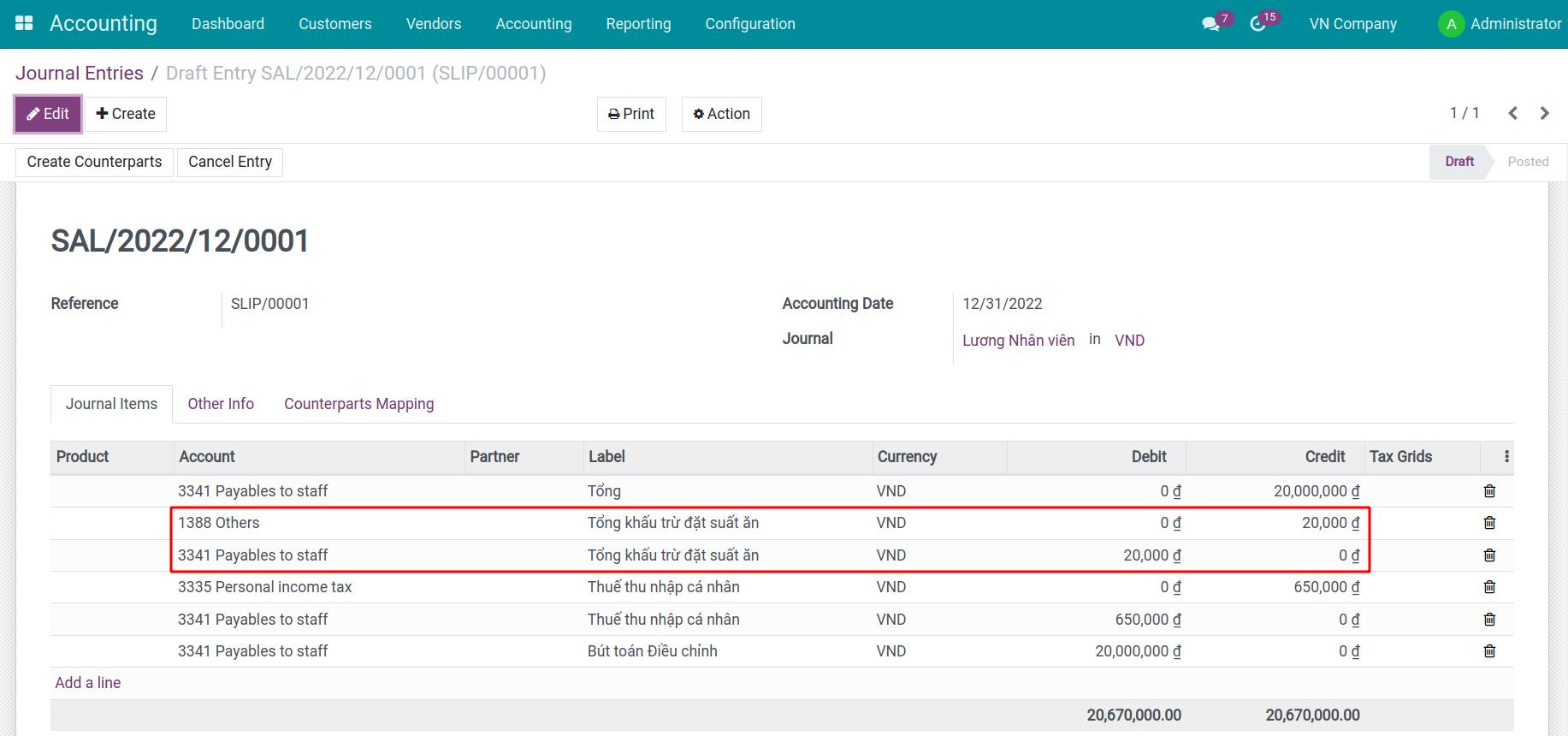
Accounts meal deductions:
- Debit TK 3341: 20.000 VND
- Credit TK 1388: 20.000 VND
Steps to operate on the software
Create a meal order
The person in charge of the meal will navigate to HR Meal > Meal Orders > Create to create Meal Orders , at Order Details tab, you declare the amount the employee will pay.
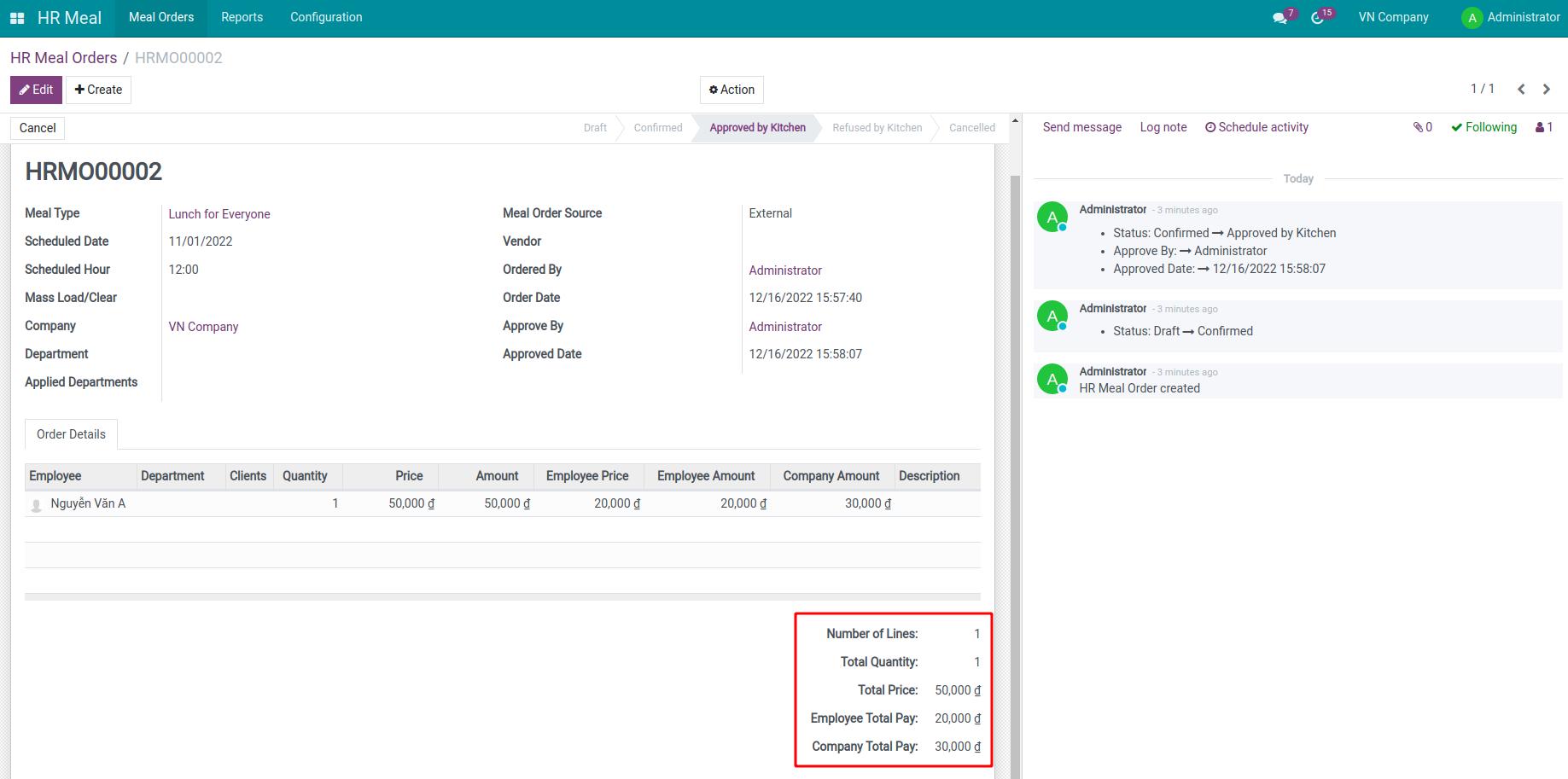
After completing the information click Confirm. The meal manager checks the information and proceeds Approve meal orders to finalize the number of meals delivered to the supplier.
Create a payslip and confirm
After checking the information on the payslip and confirming it, the employee will have the meal deducted right on the payslip.
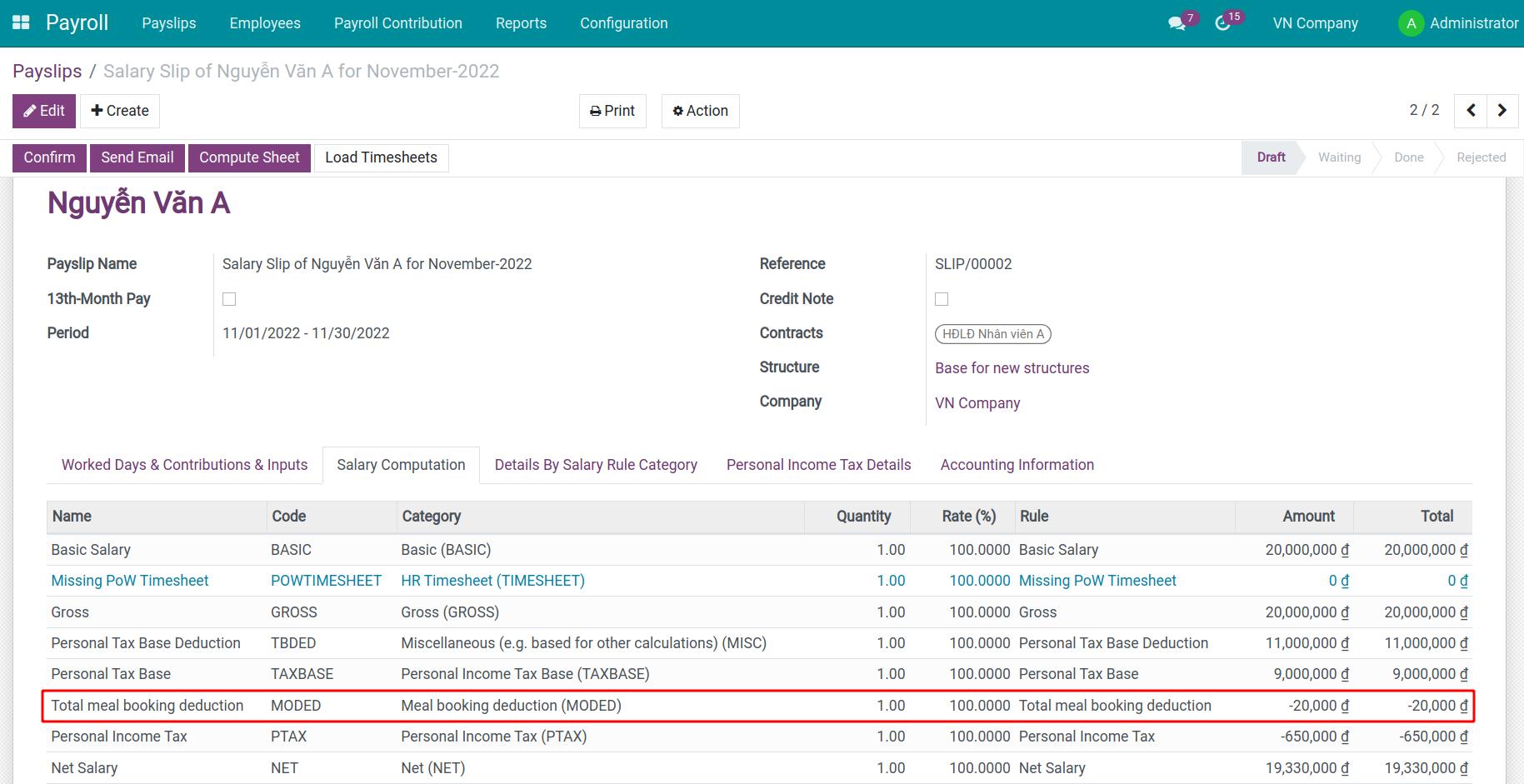
At the same time, the system will generate a draft accounting entry for this payslip. Switch to Accounting Information tab, select Journal Items to view details.
This software and associated files (the "Software") may only be used (executed, modified, executed after modifications) if you have purchased a valid license from the authors, typically via Odoo Apps, or if you have received a written agreement from the authors of the Software (see the COPYRIGHT file).
You may develop Odoo modules that use the Software as a library (typically by depending on it, importing it and using its resources), but without copying any source code or material from the Software. You may distribute those modules under the license of your choice, provided that this license is compatible with the terms of the Odoo Proprietary License (For example: LGPL, MIT, or proprietary licenses similar to this one).
It is forbidden to publish, distribute, sublicense, or sell copies of the Software or modified copies of the Software.
The above copyright notice and this permission notice must be included in all copies or substantial portions of the Software.
THE SOFTWARE IS PROVIDED "AS IS", WITHOUT WARRANTY OF ANY KIND, EXPRESS OR IMPLIED, INCLUDING BUT NOT LIMITED TO THE WARRANTIES OF MERCHANTABILITY, FITNESS FOR A PARTICULAR PURPOSE AND NONINFRINGEMENT. IN NO EVENT SHALL THE AUTHORS OR COPYRIGHT HOLDERS BE LIABLE FOR ANY CLAIM, DAMAGES OR OTHER LIABILITY, WHETHER IN AN ACTION OF CONTRACT, TORT OR OTHERWISE, ARISING FROM, OUT OF OR IN CONNECTION WITH THE SOFTWARE OR THE USE OR OTHER DEALINGS IN THE SOFTWARE.