Advanced HR Management
by Viindoo
| Lines of Code | 1906 |
| Technical name | viin_hr |
| License | OPL-1 |
| Website | https://viindoo.com/apps/modules/18.0/viin_hr |
| Read description for | v 13.0 v 14.0 v 15.0 v 16.0 v 17.0 v 19.0 v 20.0 |
| Required Apps | Discuss (mail) Employees (hr) |
| Extensions | Payroll Fleet Booking & Trip Management Meal Orders OmniApproval™: One platform. Every approval. Objectives & Key Results - OKR Work Entry Project & HR Integration HR Accounting Retirement Age HR Multi Position Recognition & Discipline (HR) Appraisal (HR) HR Employee Rank HR Management Tier |

The management chain Odoo HR leaves implicit - made explicit, and searchable
Every employee carries their whole line of superiors, every department carries the managers above it, a department head stops being their own manager, and the employee file finally has room for the memberships and identifiers HR is asked for.
Advanced HR Management (technical name viin_hr) is an Odoo 18.0 app for Odoo Community and Odoo Enterprise and Viindoo Cloud, built for hr, managers, implementers, everyone.
At a Glance
The facts of Advanced HR Management, version 0.1.6, in one place. Published by Viindoo.
Key Features
Odoo knows an employee's manager. It does not know their manager's manager, and it cannot answer "everyone below me, at any depth" in a domain - which is the question every approval rule, every record rule and every team filter actually asks. This app computes that chain and makes it searchable: Superiors on the employee, Superiors on the department, and all descendant departments on the department. It also fixes the thing that quietly breaks the chart in every real company: in core Odoo the manager of a department becomes their own manager, because everyone in the department points at the department head. Here the head points at the next real superior up the tree. On top of the hierarchy, the employee file gains the fields HR is asked for and Odoo does not ship: personal tax code kept in step with the work contact, place of origin, and membership of professional bodies, unions or works councils with the card number, position and dates.
Departments at a glance
Headcount and open requests per department, with the tree behind it.
The whole directory
Every employee with their department, manager and job - the base every HR app on this shelf builds on.
Memberships per organisation
Open an organisation and see who belongs to it, with their card numbers and dates.
Personal file
Place of origin, personal tax code and memberships, all under HR access rights.
How It Works
Three things it changes, on the screens you already use.
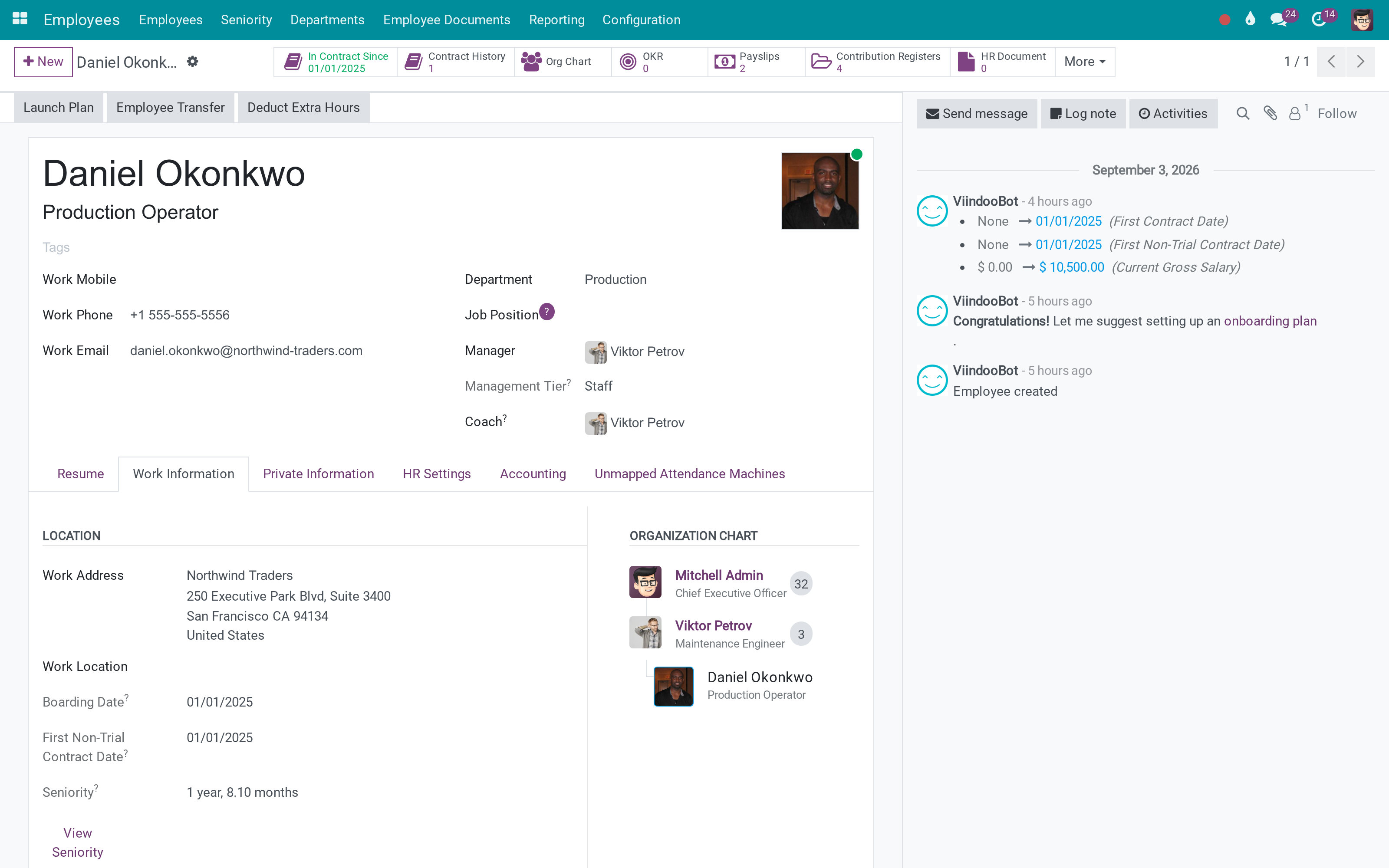
The chart tells the truth
The employee's manager, coach and org chart read the way the company actually reports. Behind them, Superiors holds the full chain - the field a domain can search, which is what makes hierarchy-aware rules possible at all.
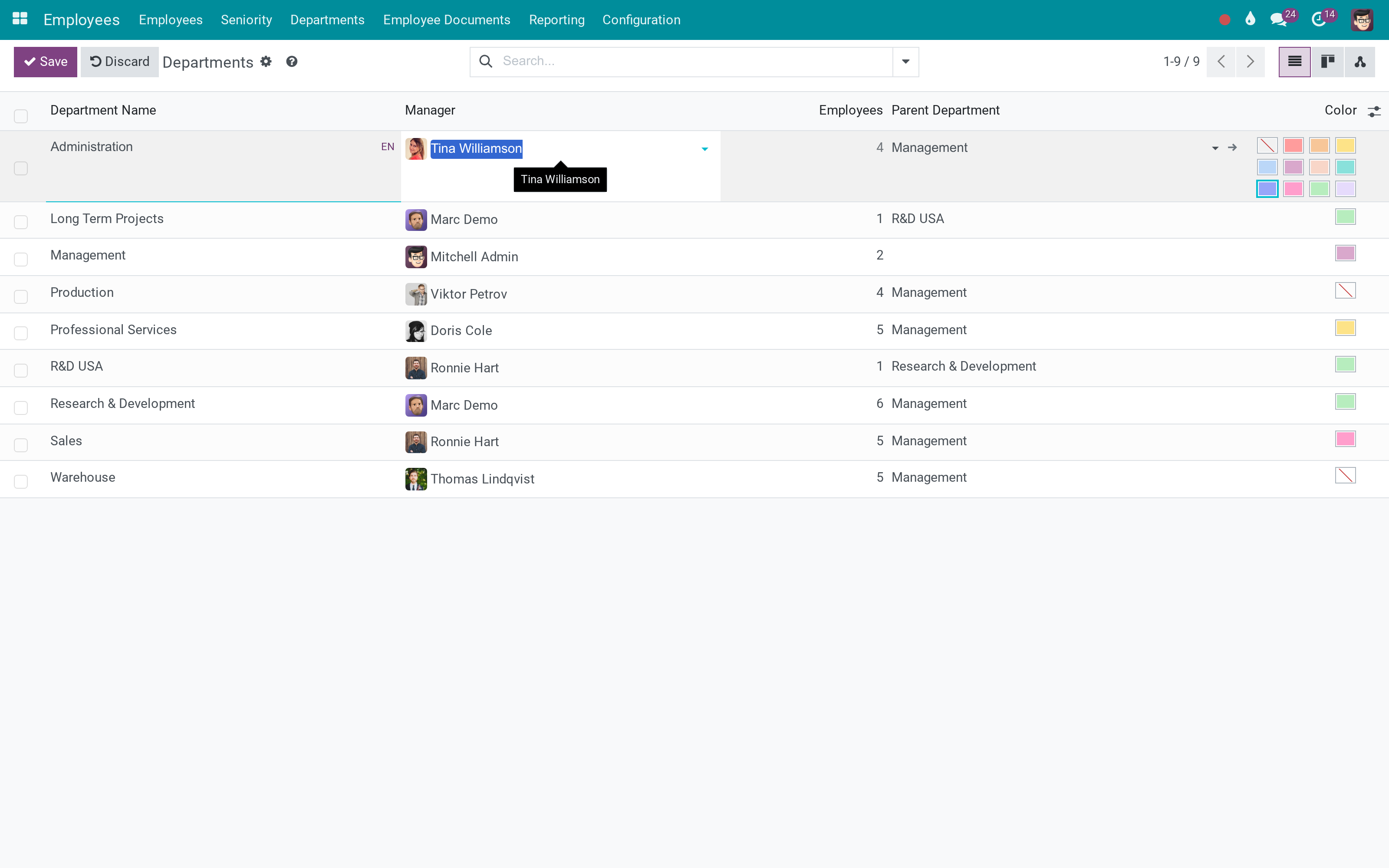
Departments carry their own charter and their own chain
Functions and Tasks say what the department is for, in the department record rather than in an induction deck. Superiors and descendant departments come from the tree, so a rule can say "this branch" without anyone maintaining a list.
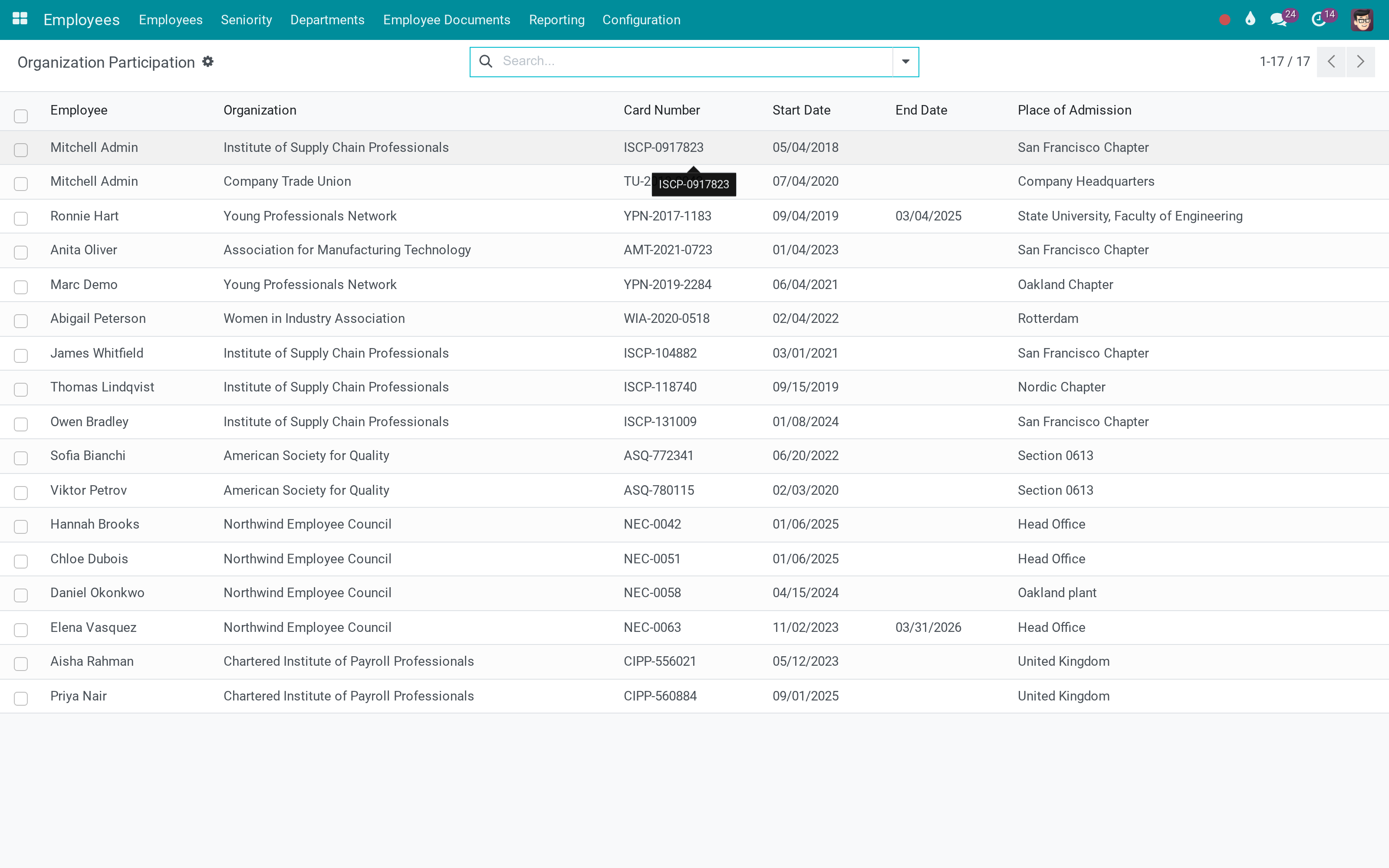
The file holds what HR is actually asked for
Professional bodies, unions, works councils: who belongs to what, since when, with which card, and whether it has lapsed - on the employee and in one list for the whole company.
What You Get
Superiors: the direct manager and every manager above them, computed and searchable in a domain
Department superiors: the department's own manager plus the managers of every parent department
All descendant departments on a department, so "this branch of the company" is one field
A department manager is no longer their own manager - the chain walks up to the next real superior
Is Department Manager as a searchable flag, and a count of how many superiors a person has
Professional and union memberships on the employee file: organisation, card number, position, admitted where, from and to
Personal tax code that stays in step with the work contact, and place of origin
Department charter: what the department is for and what it is responsible for, written on the department itself
Short department names in dropdowns instead of the full Parent / Child / Grandchild path
More Screens
Everything below was taken on a database seeded with real business data, on this series - not a mock-up and not a screenshot from an older version.
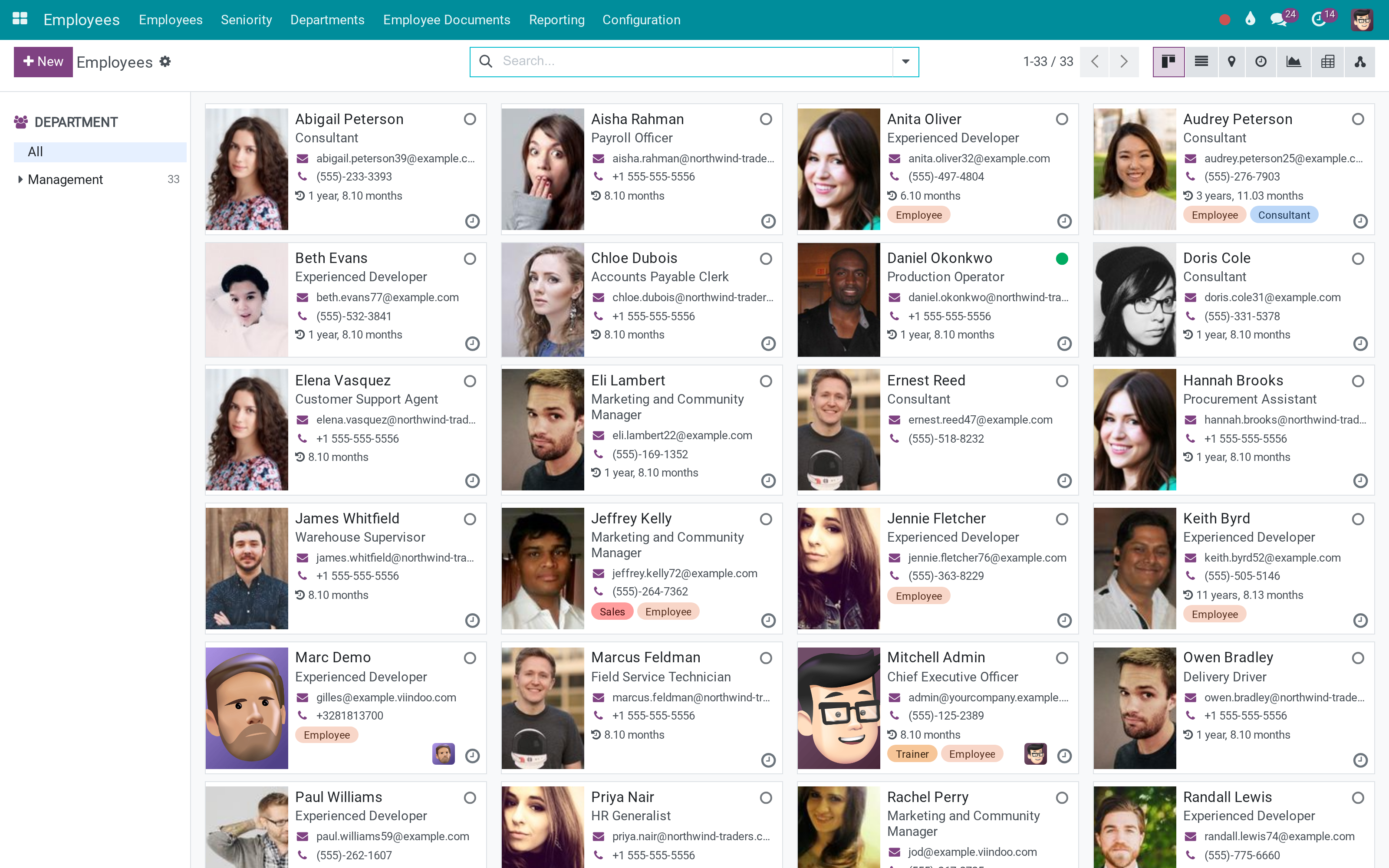
The employee directory
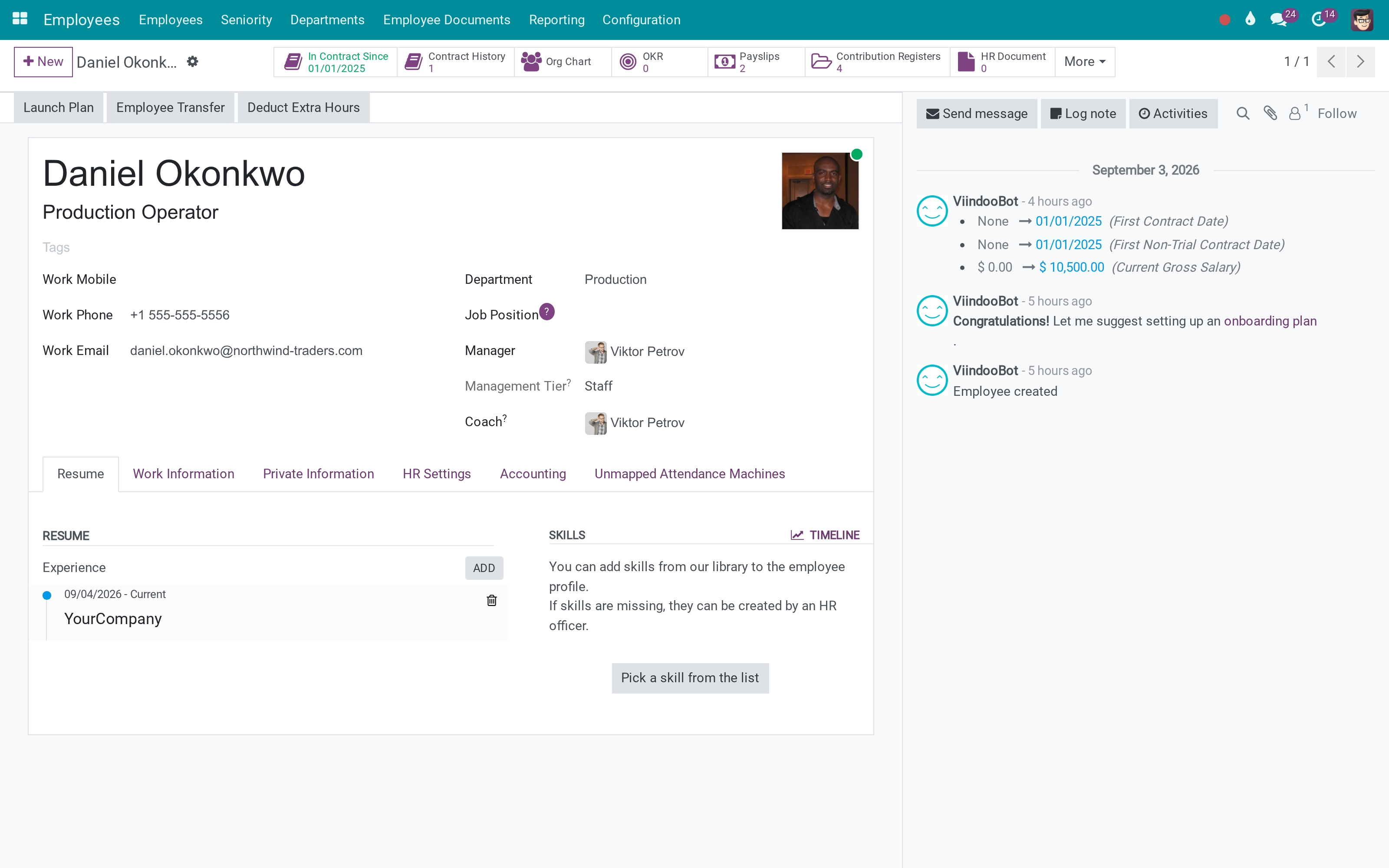
An employee with manager, coach and org chart
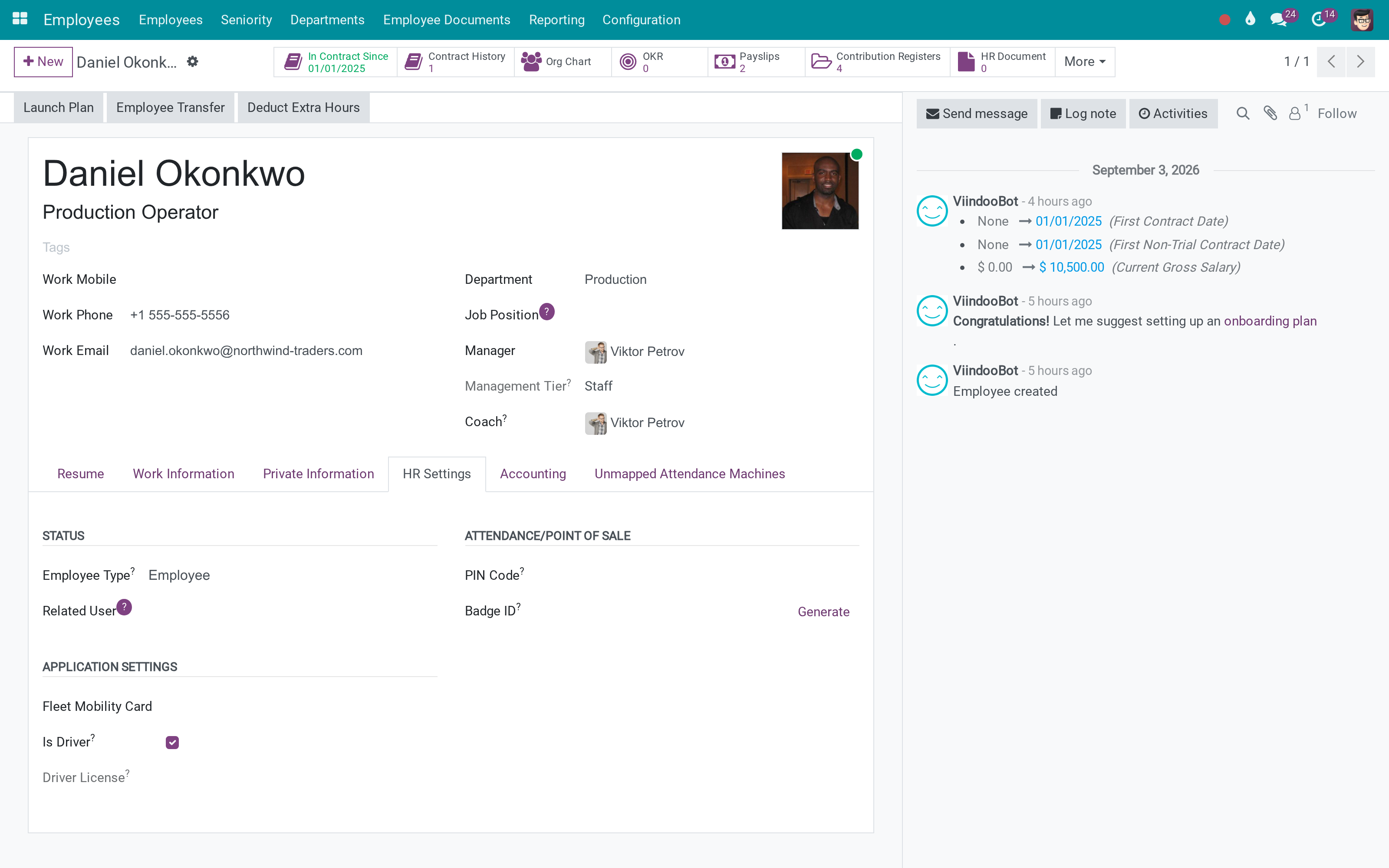
HR settings on the employee
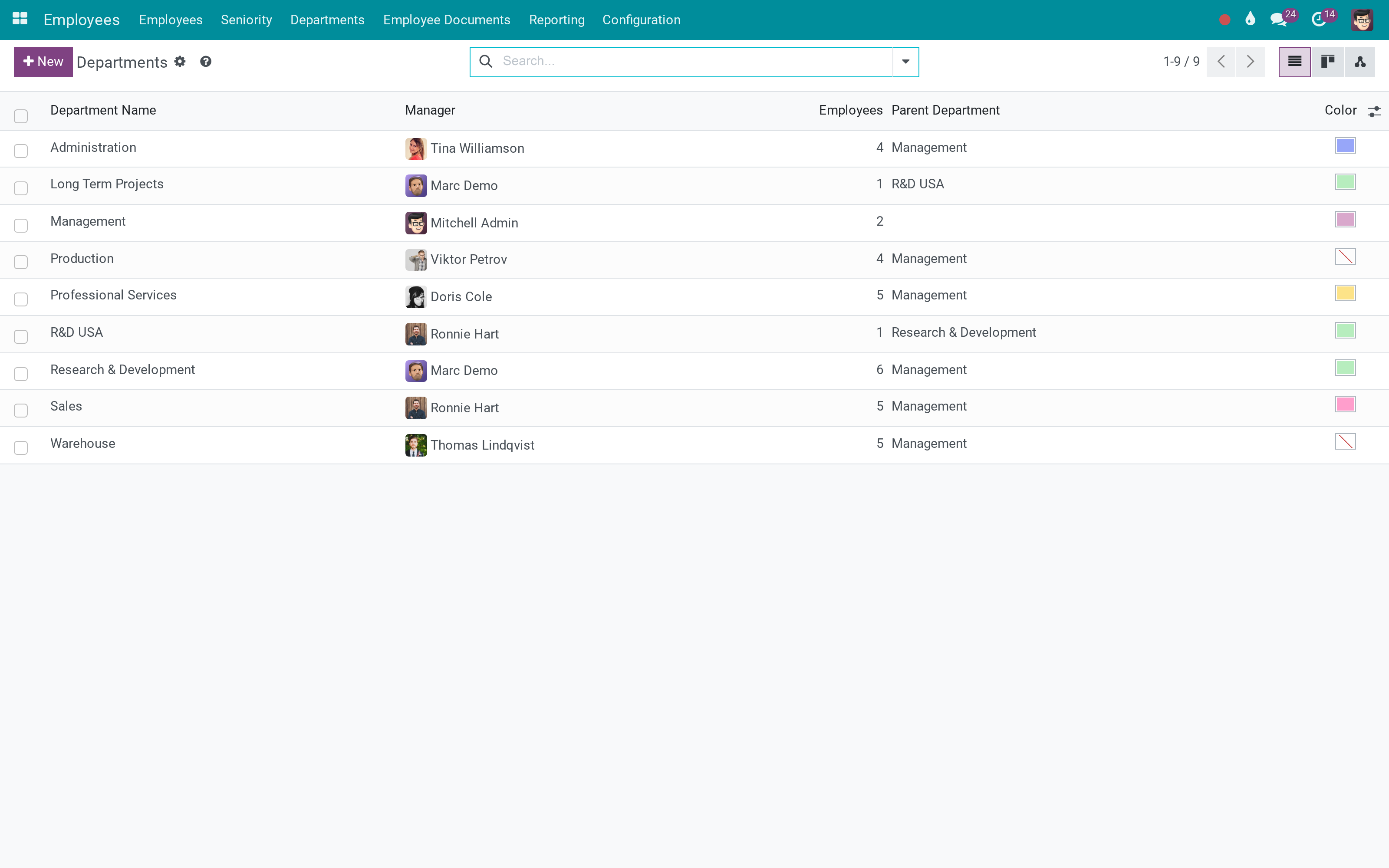
Departments with their managers and parents
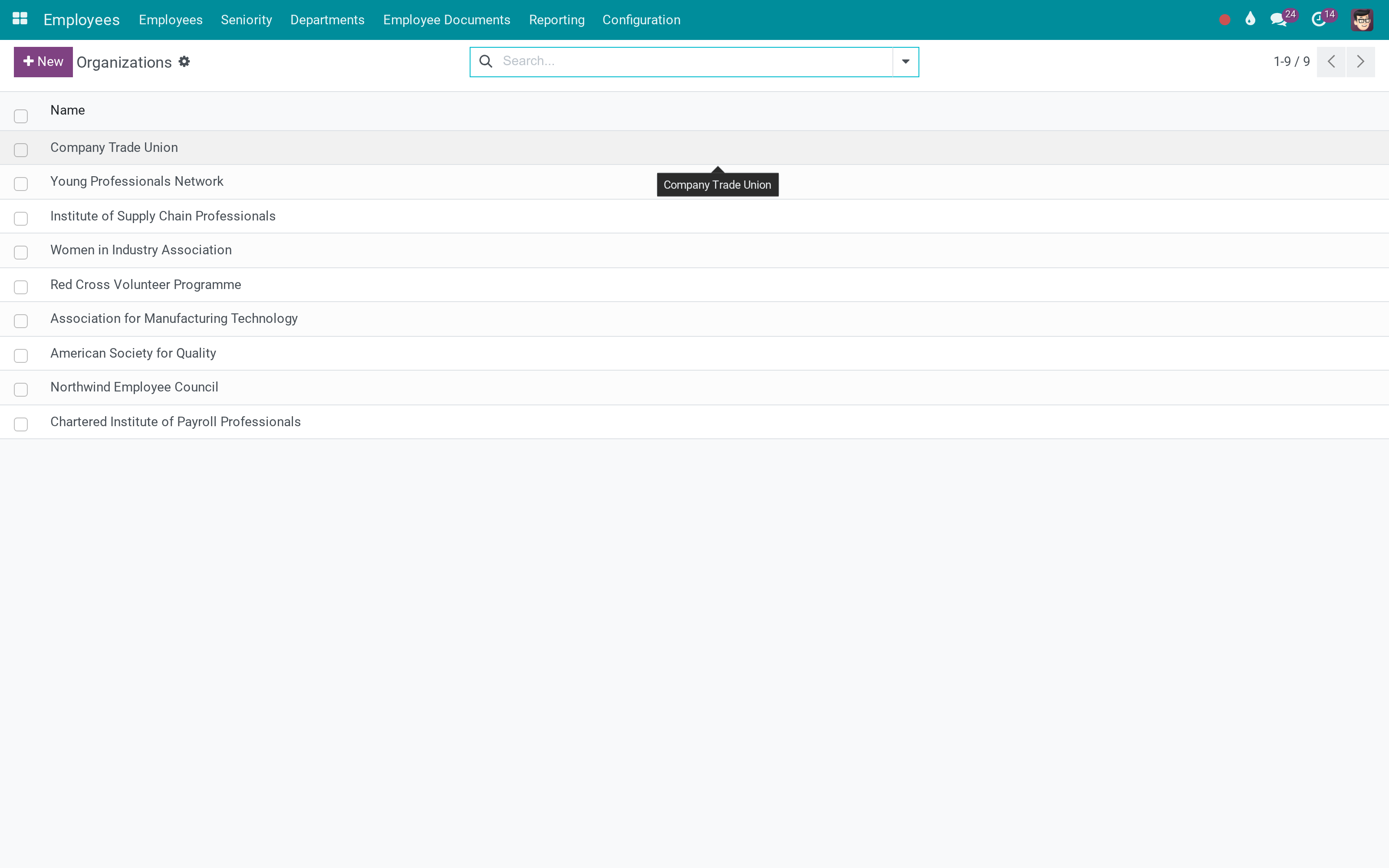
The organisations employees belong to
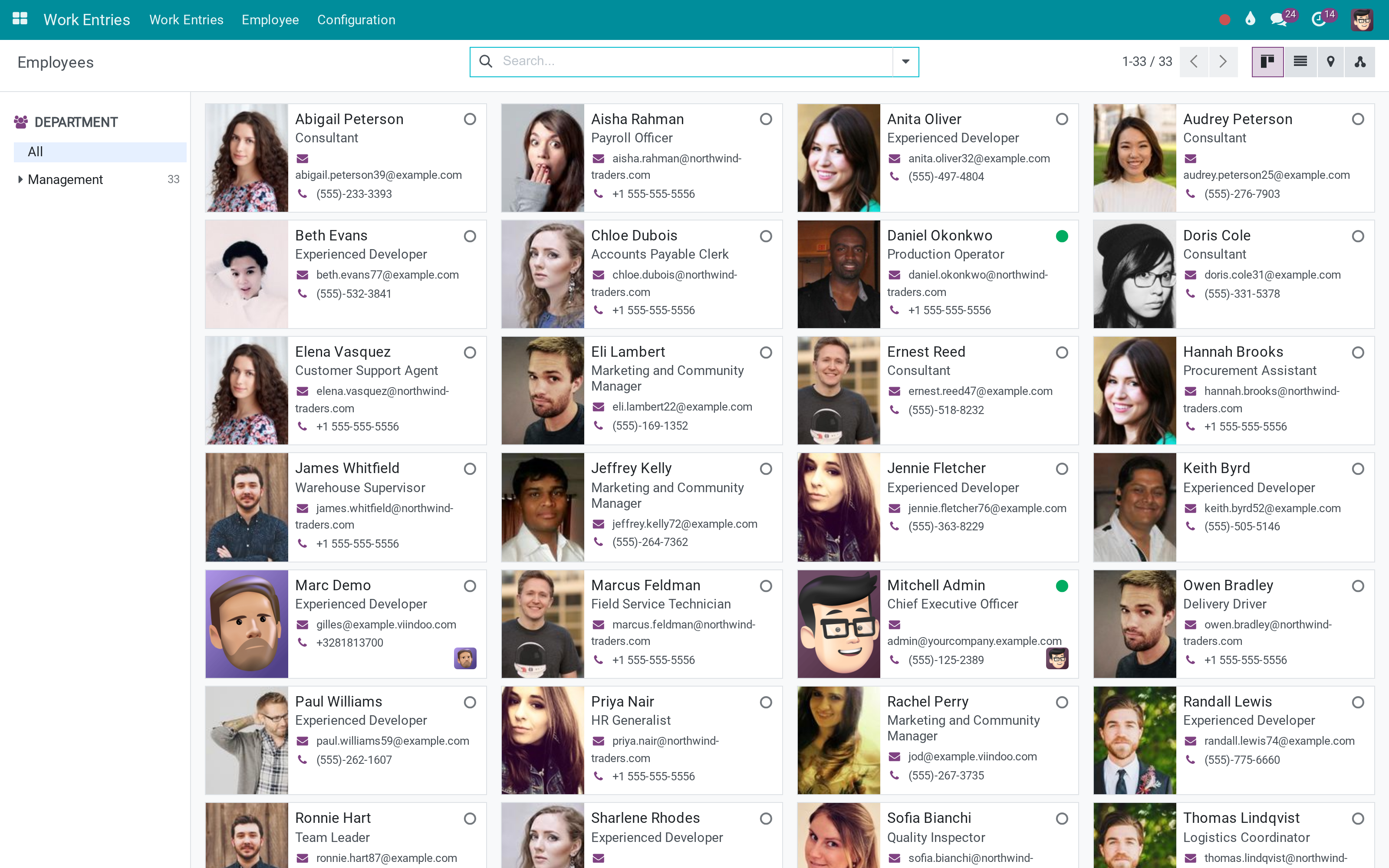
The public directory colleagues see
What This App Does Not Do
Read this before you buy. Everything below is something the app deliberately leaves to another app or to you.
They exist to be searched and used in rules, filters and other apps. There is no separate hierarchy report; the org chart is Odoo's own.
One employee, one job. Multiple concurrent positions, ranks and management tiers are separate apps that build on this one.
This is the employee and hierarchy layer those apps stand on - each is bought separately.
There is no renewal reminder or approval on a membership; it is the register HR keeps, and it is searchable.
Works Well With
Apps from the same stack, built to fit this one:
OmniApproval
Routes approvals up a real chain instead of one hard-coded manager field.
OmniApproval™: One platform. Every approval.OKR
Department objectives need a department manager with an account - which this app keeps honest.
Objectives & Key Results - OKRWho Should Use Advanced HR Management?
HR
Keeps the org chart, the charters and the memberships in one place instead of a spreadsheet.
Managers
See their whole branch, not just direct reports - and so do the filters they use.
Implementers
Write record rules and approval routes against a real hierarchy field instead of hand-rolled recursion.
Everyone
Reads a chart that shows the actual reporting line, because the department head is no longer their own boss.
Frequently Asked Questions
What does Advanced HR Management do?
Every employee carries their whole line of superiors, every department carries the managers above it, a department head stops being their own manager, and the employee file finally has room for the memberships and identifiers HR is asked for.
What does Advanced HR Management not do?
Superiors and department chains are fields, not screens. They exist to be searched and used in rules, filters and other apps. There is no separate hierarchy report; the org chart is Odoo's own. It does not manage positions or grades. One employee, one job. Multiple concurrent positions, ranks and management tiers are separate apps that build on this one. It is not payroll, attendance or appraisal. This is the employee and hierarchy layer those apps stand on - each is bought separately. Memberships are records, not workflow. There is no renewal reminder or approval on a membership; it is the register HR keeps, and it is searchable.
Who is Advanced HR Management for?
HR: Keeps the org chart, the charters and the memberships in one place instead of a spreadsheet. Managers: See their whole branch, not just direct reports - and so do the filters they use. Implementers: Write record rules and approval routes against a real hierarchy field instead of hand-rolled recursion. Everyone: Reads a chart that shows the actual reporting line, because the department head is no longer their own boss.
Which Odoo version and editions does it support?
Odoo 18.0 - Odoo Community, Odoo Enterprise, Viindoo Cloud. Upgrades to a newer Odoo series are a separate purchase for that series.
What does it depend on?
It installs on top of: hr, hr_org_chart. Odoo installs them with it.
How do I set it up?
Three things it changes, on the screens you already use.
What works well with it?
Payroll (to_hr_payroll): Runs on this employee layer, and uses the manager chain for who signs what. OmniApproval (viin_approval): Routes approvals up a real chain instead of one hard-coded manager field. OKR (to_okr): Department objectives need a department manager with an account - which this app keeps honest. Multiple Positions (viin_hr_multi_position): When one person holds two jobs in two departments at once.
Can I try it before buying?
Yes - the Live Preview button at the top of this page opens the module's own screen on a working database.
How do I get support?
Write to apps.support@viindoo.com with your Odoo version and the technical name viin_hr; pre-sales questions go to sales@viindoo.com.
See Advanced HR Management in Action
Live demo: v18demo-int.viindoo.com/web#action=hr.open_view_employee_list_my
Need help with Advanced HR Management?
For questions, implementation support or a custom feature, contact Viindoo.
Pre-Sales & Partnership
sales@viindoo.comUpgrades to a newer Odoo series are a separate purchase for that series.
All Viindoo apps: Viindoo Apps
Technical Requirement
Changes log
0.1.5 - Latest on the 17.0 line
- The superiors chain no longer costs a query per employee - opening a large directory is a single batch.
- Superiors recompute correctly when a manager changes anywhere above you, not only when your own department changes.
- Fixed an access error opening an employee profile as a user without HR rights.
- Department names show short in dropdowns; the full path is still available where it is needed.
This software and associated files (the "Software") may only be used (executed, modified, executed after modifications) if you have purchased a valid license from the authors, typically via Odoo Apps, or if you have received a written agreement from the authors of the Software (see the COPYRIGHT file).
You may develop Odoo modules that use the Software as a library (typically by depending on it, importing it and using its resources), but without copying any source code or material from the Software. You may distribute those modules under the license of your choice, provided that this license is compatible with the terms of the Odoo Proprietary License (For example: LGPL, MIT, or proprietary licenses similar to this one).
It is forbidden to publish, distribute, sublicense, or sell copies of the Software or modified copies of the Software.
The above copyright notice and this permission notice must be included in all copies or substantial portions of the Software.
THE SOFTWARE IS PROVIDED "AS IS", WITHOUT WARRANTY OF ANY KIND, EXPRESS OR IMPLIED, INCLUDING BUT NOT LIMITED TO THE WARRANTIES OF MERCHANTABILITY, FITNESS FOR A PARTICULAR PURPOSE AND NONINFRINGEMENT. IN NO EVENT SHALL THE AUTHORS OR COPYRIGHT HOLDERS BE LIABLE FOR ANY CLAIM, DAMAGES OR OTHER LIABILITY, WHETHER IN AN ACTION OF CONTRACT, TORT OR OTHERWISE, ARISING FROM, OUT OF OR IN CONNECTION WITH THE SOFTWARE OR THE USE OR OTHER DEALINGS IN THE SOFTWARE.