

Vietnam - Foreign Trade
| Lines of Code | 434 |
| Technical name | l10n_vn_viin_foreign_trade |
| License | OPL-1 |
| Website | https://viindoo.com/apps/modules/19.0/l10n_vn_viin_foreign_trade |
| Read description for | v 10.0 v 11.0 v 12.0 v 13.0 v 14.0 v 15.0 v 16.0 v 17.0 v 18.0 |
| Required Apps | Invoicing (account) Purchase (purchase) Discuss (mail) Inventory (stock) |
| Included Dependencies | Foreign Trade, Logistics Viindoo Base Vietnam Chart of Accounts - Circular 99 and 133 Accounting Foundation Payment with Payment Lines |

Customs duties and import VAT on the right Vietnamese accounts, from the first declaration
For Vietnamese companies that import or export goods, on the Circular 99 or Circular 133 chart of accounts
Foreign Trade & Logistics, ready for Vietnamese customs: accounts, taxes and payment term included.
Works with Foreign Trade, Logistics: see its page for the import and export flow itself.
Is this you?
Every new company means creating the customs accounts and taxes by hand.
Import duty, import VAT and export duty land on the wrong account, and the chief accountant finds out at month end.
Customs taxes sit among the ordinary taxes, one wrong pick away from a vendor bill or an invoice.
Declarations default to a generic 30-day payment term, yet customs duties are paid before the goods are cleared.
Nobody can show quickly which account owes what to customs, and when it is due.
What changes
Creating accounts by hand
→ Start with import duty, import VAT and export duty already set up on the Circular 99 and Circular 133 charts.
The wrong account
→ Post each customs tax to its own pair of Vietnamese accounts: 632 and 3333 for import duty, 1331 and 33312 for import VAT, 3333 and 511 for export duty.
The wrong pick
→ Keep customs taxes out of bills, invoices and imported documents: only customs declarations post them.
A generic 30-day term
→ Get Immediate Payment as the default for new Vietnamese companies, with the optional 275 Net days term still available.
No clear view of what is owed
→ Read one voucher per customs tax in its own journal, with its due date, on payable accounts that a payment closes.
How it works
Set-up
The administrator installs the app, checks the default payment term and gives each person their access right. The chief accountant takes over.
Review
The chief accountant checks the customs taxes, the accounts they post to and the payment terms. The import/export specialist takes over.
Declare
The import/export specialist prepares the customs declaration from the order, and confirms the clearance. An accountant with the Invoicing rights pays the taxes, and the chief accountant takes over.
Check postings
The chief accountant reads the journal items of the customs vouchers and of the payment.
Key Features
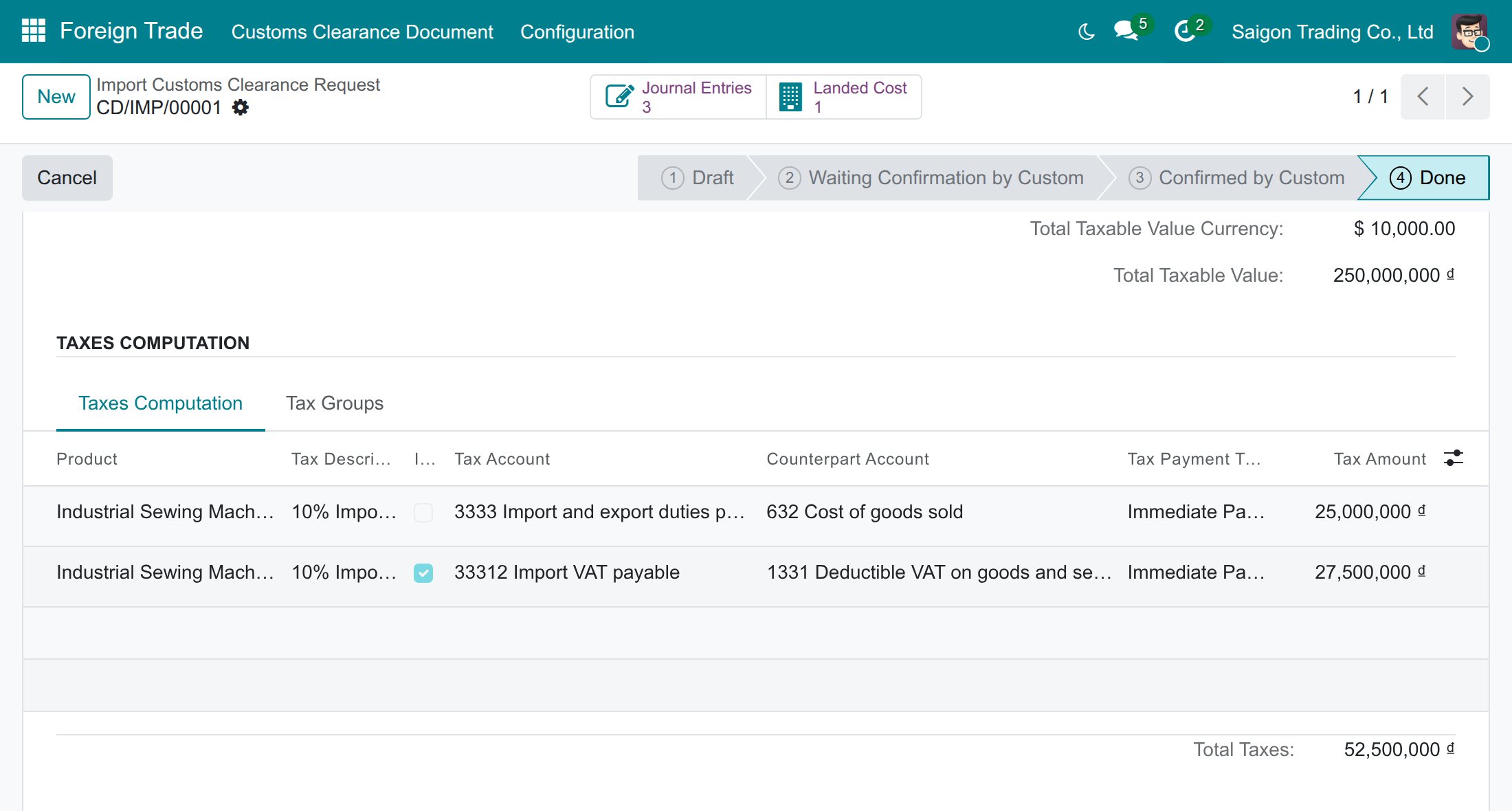
Default Import/Export Tax Payment Term
A new Vietnamese company pays customs taxes on the clearance date (Immediate Payment) without any set-up, and an accountant's own term is never overwritten.
275 Net days payment term
Keeps the former 275-day deferral available for the cases that still qualify, due 275 days after the clearance date.
Vietnamese customs taxes
Import duty, import VAT and export duty come ready on Circular 99 and Circular 133 charts, each posting its payable and its expense, deductible or revenue side on the right VN account.
Customs Declarations fiscal position
Customs taxes stay out of vendor bills, customer invoices and imported documents, and are posted by customs declarations only.
Customs payable accounts 3333 and 33312
Customs duties and import VAT are owed on reconcilable payable accounts, so each payment closes the amount owed to customs.
Customs declaration postings on a VN company
One voucher per customs tax with the right VN accounts and due date, no manual journal entry.
Who it is for
Chief accountant
Tired of finding customs taxes on the wrong account. Gets each tax on its Vietnamese account with the right due date.
Import/export specialist
Wants a declaration that already knows the taxes and the payment term. Confirms the clearance without touching accounts.
Administrator or implementation partner
Wants a one-off set-up. The app installs itself with its prerequisites and leaves one setting to check.
Best for: Vietnamese companies on the Circular 99 or Circular 133 chart that declare imports or exports.
Immediate Payment by default
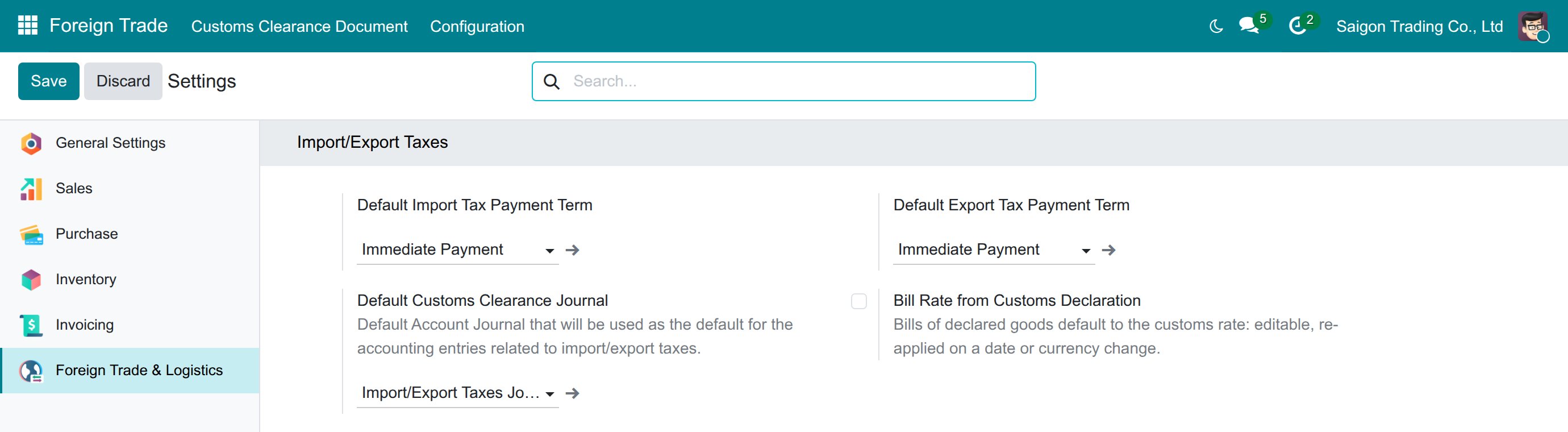
Customs taxes ready on Vietnamese accounts
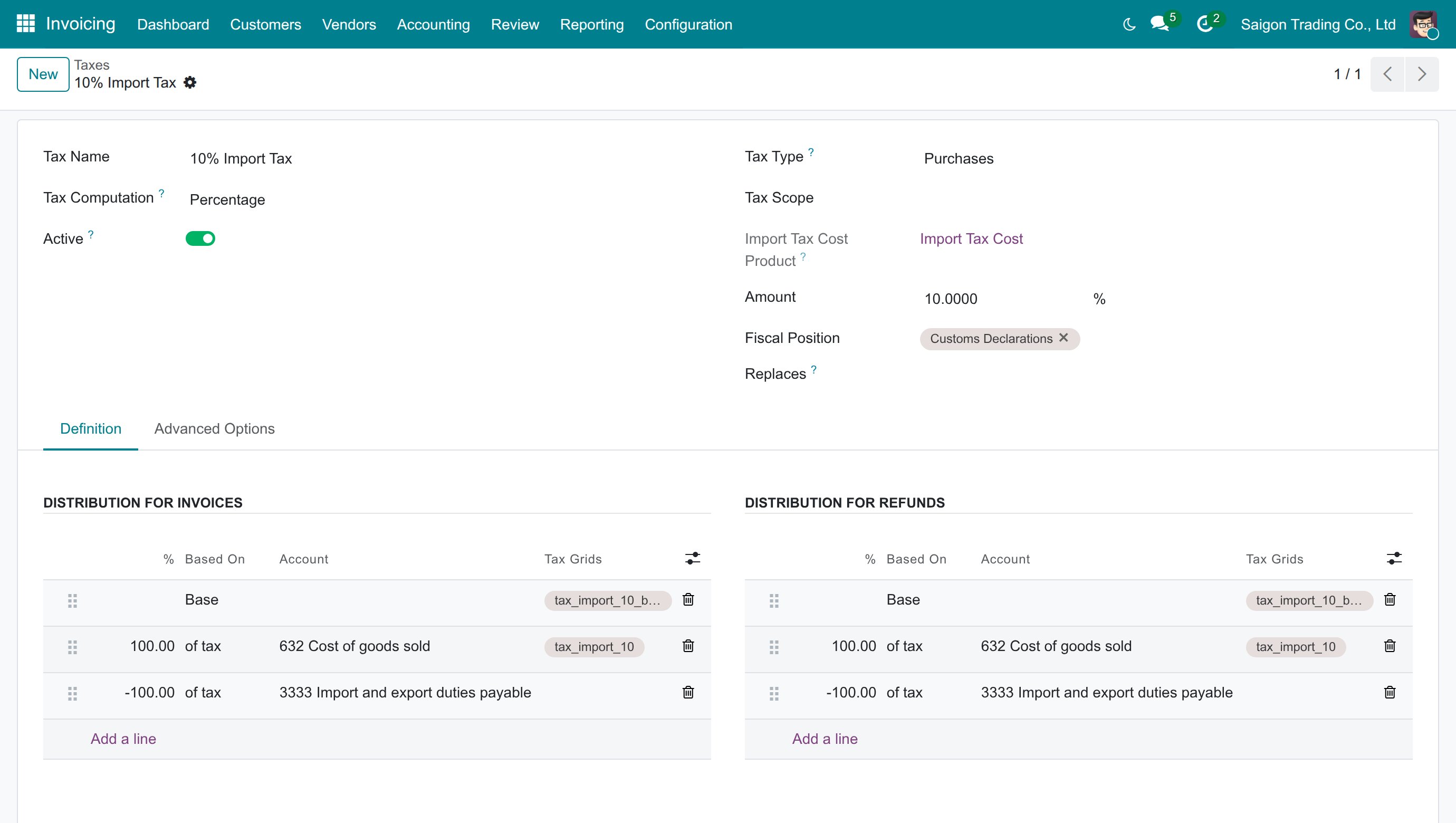
Customs taxes kept off your invoices
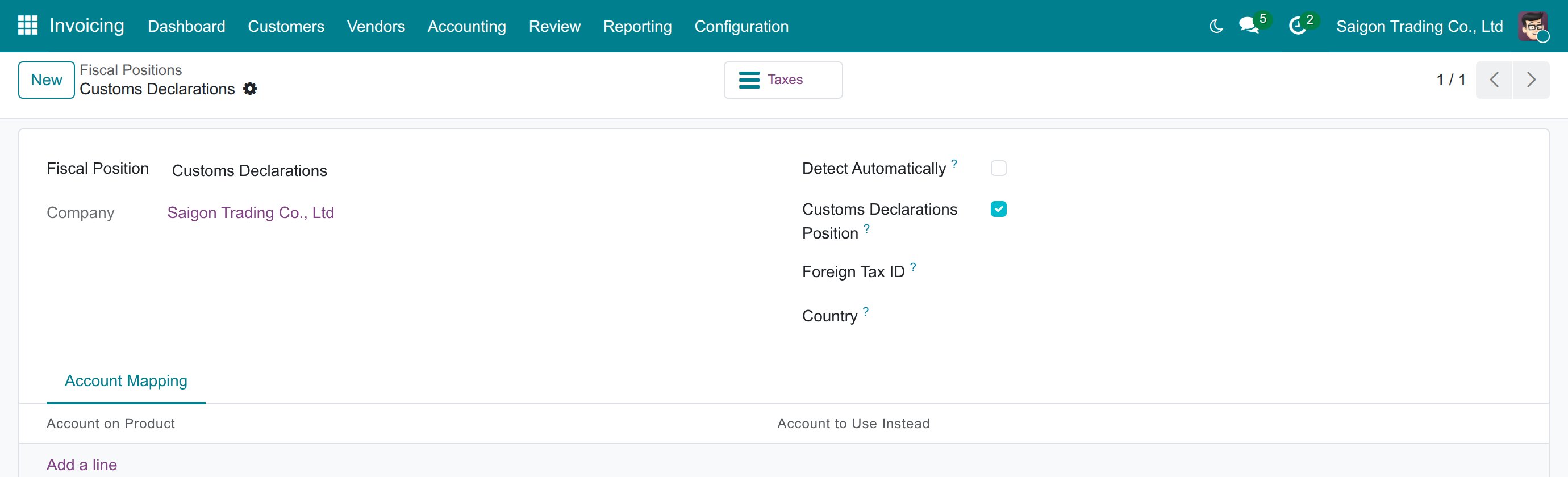
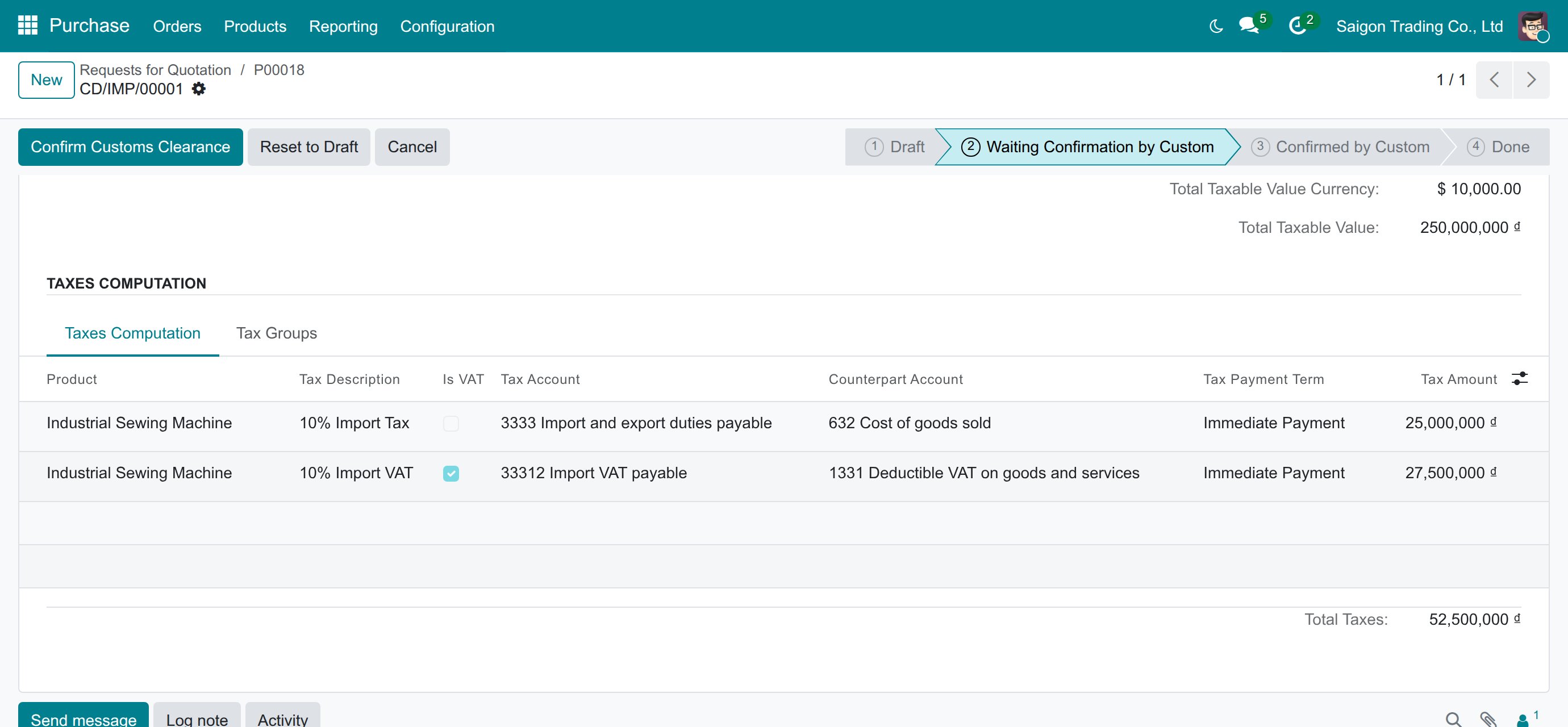
Taxes computed on the customs declaration
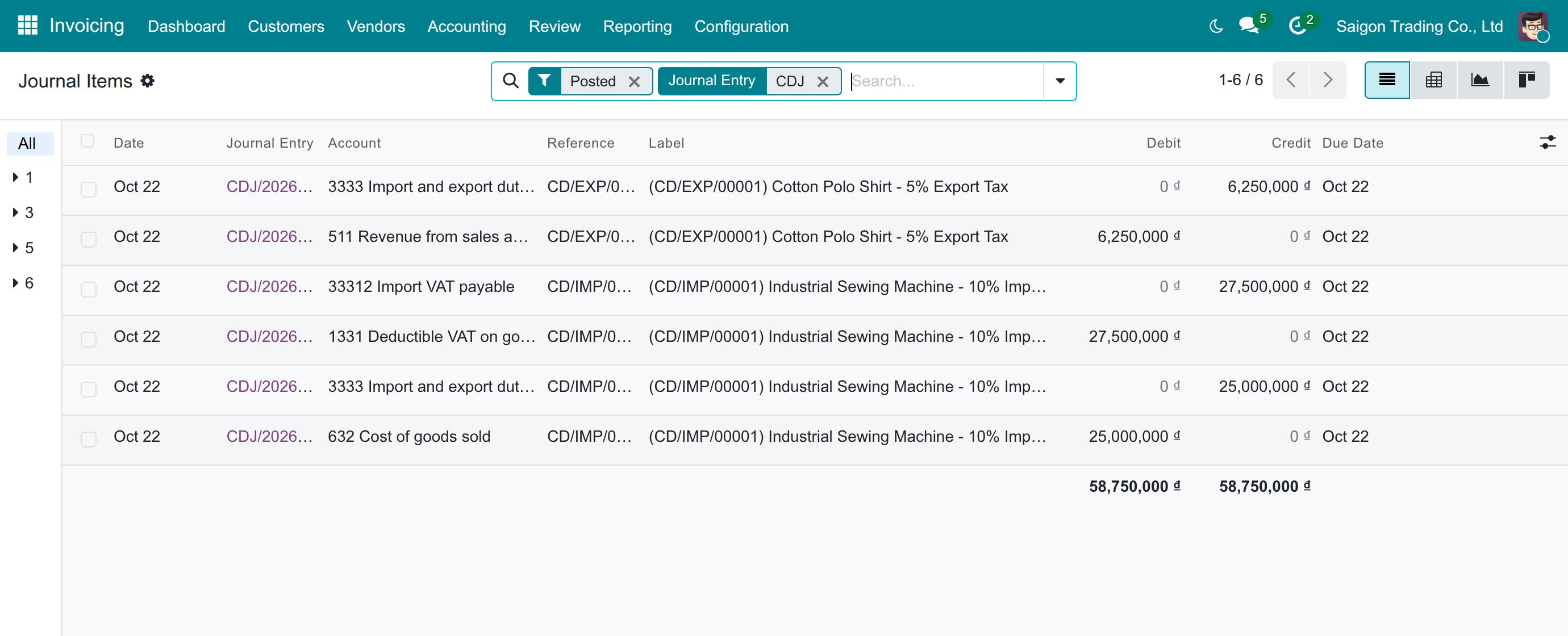
Customs vouchers posted on the right accounts
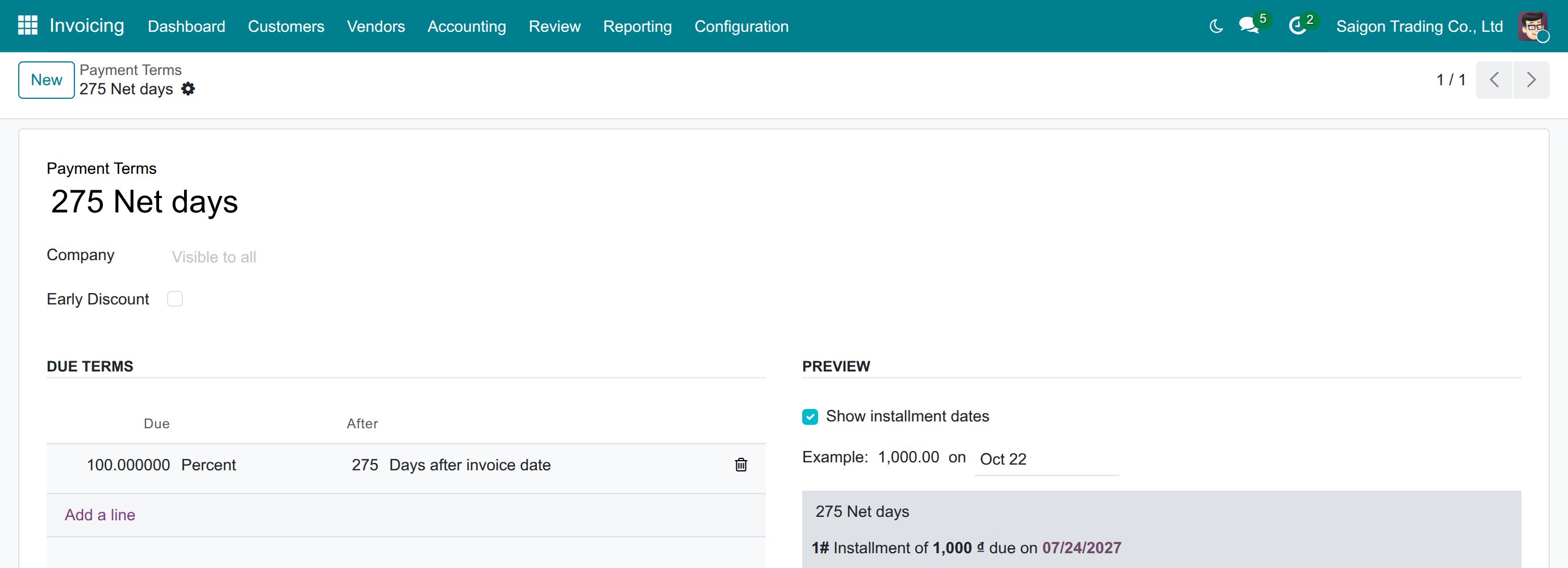
The optional 275 Net days term
Frequently Asked Questions
Will the app overwrite a payment term I already set?
No. A term already set on a company is never changed, even when the chart of accounts is reloaded.
Does it work on Circular 133 as well as Circular 99?
Yes. The same customs taxes and payment terms come with both charts, on each chart's own accounts.
Will customs taxes show up on my vendor bills and invoices?
No. They belong to a "Customs Declarations" fiscal position that is never applied automatically, so only customs declarations post them.
What is the 275 Net days term?
An optional payment term due 275 days after the clearance date. It is not selected by default; choose it only when your case still qualifies.
What do I need installed?
Foreign Trade, Logistics, the Vietnamese chart of accounts (Circular 99 and 133) and Accounting Foundation. The app then installs itself.
Need help with Vietnam - Foreign Trade?
For questions, implementation support, or consulting services, contact Viindoo.
Pre-Sales & Partnership
sales@viindoo.comWhen contacting us, please include the Odoo/Viindoo version and edition, the number of users and the other modules in use.
Technical Support
apps.support@viindoo.comFor faster troubleshooting, please provide the order number, the version and edition, the steps to reproduce the issue and screenshots if you have them.
Technical Requirement
- Odoo version: 19.0
- Editions: Community Edition and Enterprise Edition
- Required modules: Foreign Trade, Logistics; Vietnam Chart of Accounts - Circular 99 and 133; Accounting Foundation
- License: OPL-1
Vietnam - Foreign Trade
Who this guide is for: the chief accountant and the accountants of a Vietnamese company, the import/export specialists who prepare customs declarations, and the administrator who sets the company up.
Note
Extends Foreign Trade, Logistics - see its documentation. The step-by-step import and export flow is in the guides of Foreign Trade Import, Logistics and Foreign Trade Export, Logistics; this guide covers only what the Vietnamese charts of accounts add to it.
Overview
When goods cross the border, the customs authority collects import duty, import VAT and, for some goods, export duty. Your books must show each of them on the right Vietnamese account, as an amount owed to customs until it is paid, with the right due date. Without this app you would create the accounts, the taxes and the payment term yourself, and a declaration would default to the generic 30 Days term.
On a company that uses the Circular 99 or the Circular 133 chart of accounts, this app gives you:
- Customs taxes that are ready to use - import duty, import VAT and export duty, each posting its two sides on the right Vietnamese accounts (for example 3333 and 33312 for the amount owed to customs).
- A "Customs Declarations" fiscal position that keeps these taxes off vendor bills and customer invoices: only customs declarations post them.
- Immediate Payment as the default tax payment term, because customs duties and taxes are paid before the goods are cleared. The module cites Law on Export and Import Duties 107/2016/QH13 (Article 9) and Law on Tax Administration 38/2019/QH14 (Article 55, clause 3) as its basis. A term you have already set is never changed.
- The optional "275 Net days" term, due 275 days after the clearance date, for the cases that still qualify under the former 275-day rule (Law 78/2006/QH11, Article 42, clause 3, repealed on 2016-09-01 according to the module description).
The work is shared between three people:
| Stage | Who | What happens |
|---|---|---|
| Stage 1: Set-up | Administrator | Installs the app, checks the default tax payment term and gives each person their access right. |
| Stage 2: Review | Chief accountant | Checks the customs taxes, the accounts they post to, the Customs Declarations fiscal position and the payment terms. |
| Stage 3: Declare | Import/export specialist | Prepares the customs declaration from the order and confirms the customs clearance. An accountant with the Invoicing rights pays the taxes. |
| Stage 4: Check postings | Chief accountant | Reads the journal items of the customs vouchers and the payment. |
| Role | What they do | Access right to assign |
|---|---|---|
| Administrator | Installs the app, checks the default tax payment term, assigns access rights. | Role / Administrator (and Foreign Trade / Administrator to see the Foreign Trade settings) |
| Chief accountant | Reviews customs taxes, accounts, fiscal position and payment terms; reads the postings. | Accounting / Administrator |
| Import/export specialist | Prepares and confirms customs declarations. | Foreign Trade / User |
Setup (for the Administrator)
Install the app
- Go to Apps.
- Search for Vietnam - Foreign Trade.
- Press Install.
The app installs itself when Foreign Trade, Logistics, Vietnam Chart of Accounts - Circular 99 and 133 and Accounting Foundation are all installed, so you rarely need to do this by hand.
Make sure the company uses a Vietnamese chart of accounts: the app acts only on companies whose chart of accounts is Circular 99 or Circular 133. Companies on another chart keep the standard behaviour of Foreign Trade, Logistics.
Check the default tax payment term
- Go to Foreign Trade ‣ Configuration ‣ Settings.
- In the block Import/Export Taxes, read Default Import Tax Payment Term and Default Export Tax Payment Term.
A company whose Vietnamese chart of accounts is loaded after this app is installed shows Immediate Payment in both fields. A company that was set up before the app was installed keeps the term it already had (30 Days by default): the app never changes a term that is already set. If you want the Vietnamese default on such a company, choose Immediate Payment yourself in these two fields and press Save.
Choose the 275 Net days term only when it applies
The term 275 Net days is available in every company but is not selected by default. Select it in Default Import Tax Payment Term or Default Export Tax Payment Term only when your case still qualifies, or choose it on a single customs declaration.
Give each person their access right
- Go to Settings ‣ Users & Companies ‣ Users and open the user.
- In the access rights, set the right shown in the table of the Overview: Accounting / Administrator for the chief accountant, Foreign Trade / User for the import/export specialists.
- Press Save.
Chief accountant: review the customs set-up
The examples below come from a company named Saigon Trading Co., Ltd on the Circular 99 chart of accounts, with amounts in Vietnamese dong.
Check the customs payable accounts
- Go to Invoicing ‣ Configuration ‣ Accounting ‣ Chart of Accounts.
- Search the codes 3333 and 33312.
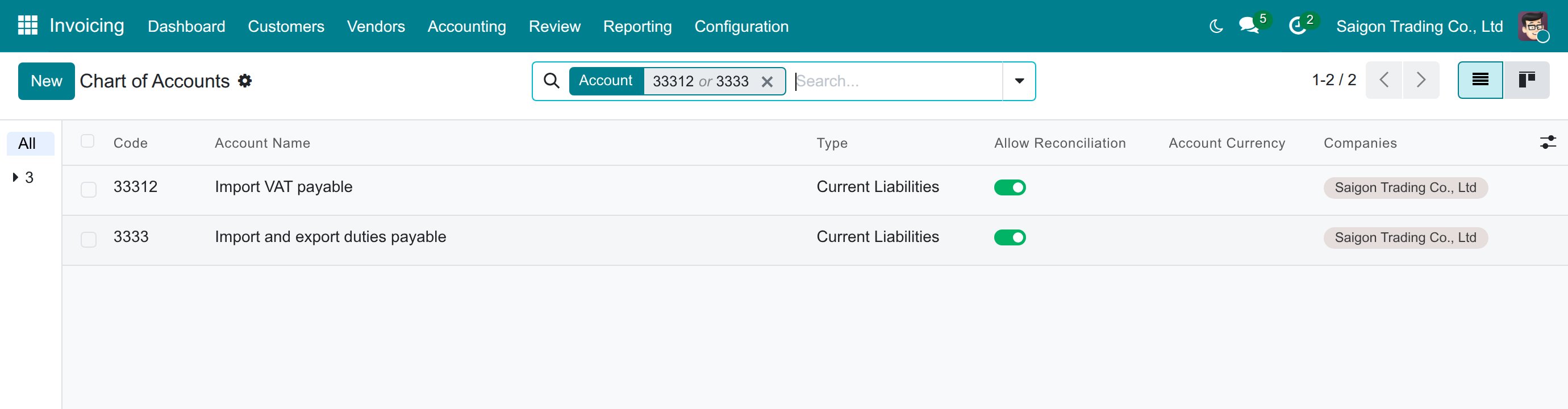
Account 3333 holds the import and export duties owed to customs and account 33312 the import VAT owed to customs. Both allow reconciliation, so a payment to customs closes the amount owed.
Check the customs taxes and where they post
- Go to Invoicing ‣ Configuration ‣ Accounting ‣ Taxes.
- Search Import or Export, and open a customs tax.
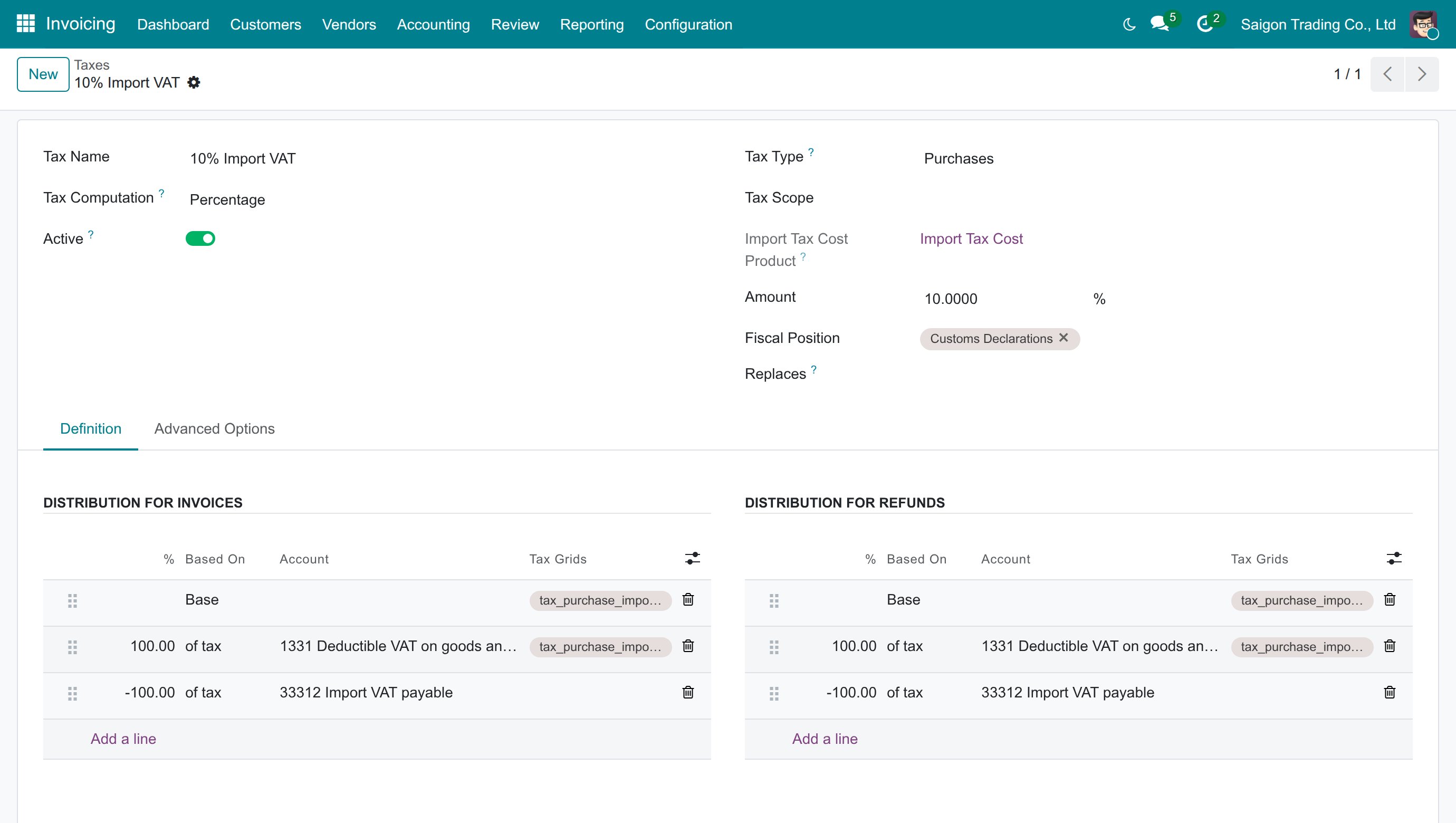
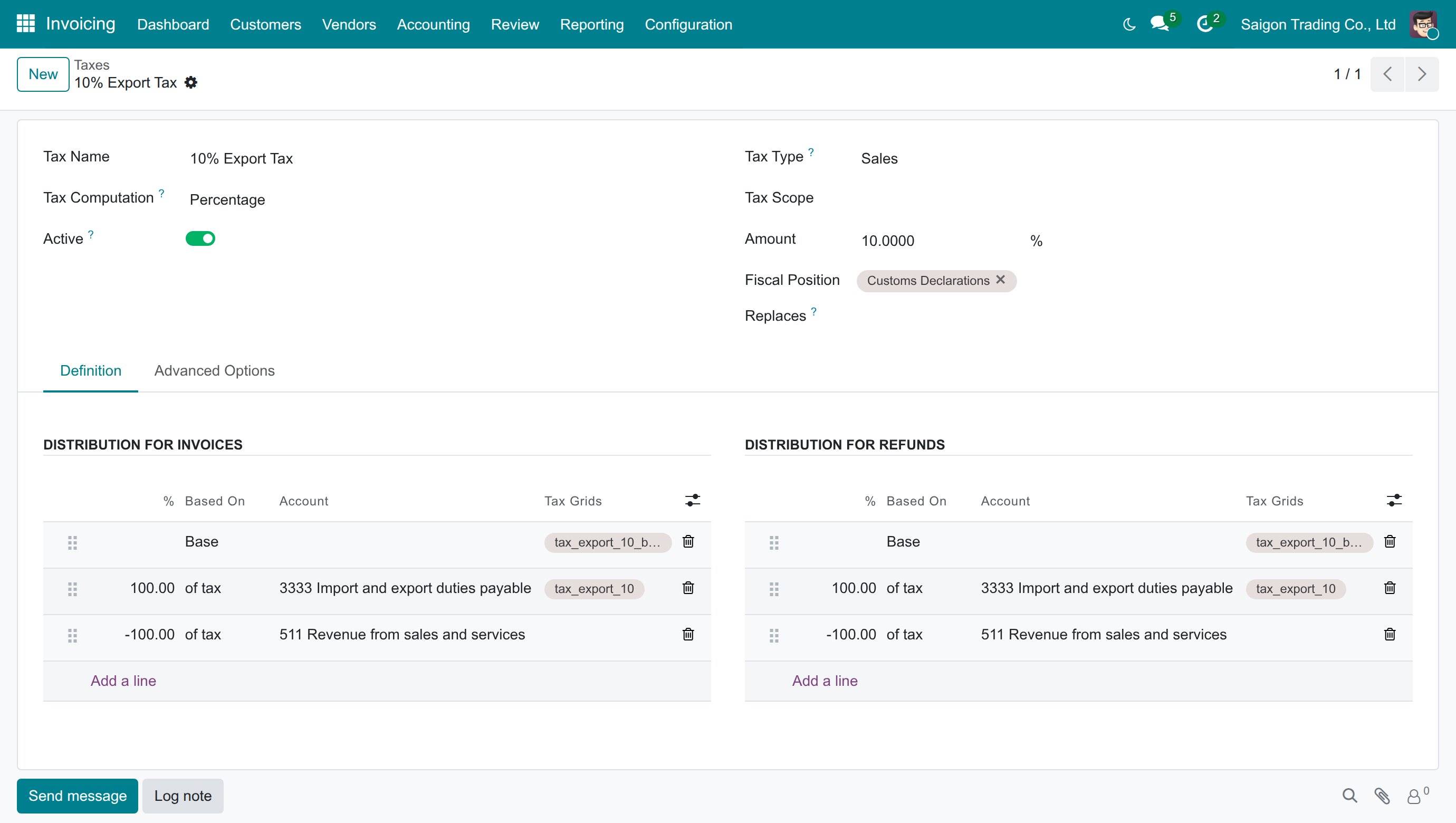
- On the tab Definition, read the two lines of Distribution for invoices.
Each customs tax has a pair of lines: one at +100% and one at -100%. On a customs declaration each tax posts exactly these two lines: the +100% line is the account a purchase document debits (or a sale document credits), the -100% line is the other side. On the Circular 99 chart:
| Customs tax | Line at +100% | Line at -100% |
|---|---|---|
| Import duty (10% Import Tax, 5% Import Tax, 0% Import Tax) | 632 Cost of goods sold | 3333 Import and export duties payable |
| Import VAT (10% Import VAT, 8% Import VAT, 5% Import VAT) | 1331 Deductible VAT on goods and services | 33312 Import VAT payable |
| Export duty (10% Export Tax, 5% Export Tax, 0% Export Tax) | 3333 Import and export duties payable | 511 Revenue from sales and services |
On the Circular 133 chart the same pairs use that chart's accounts: 632 Costs of goods sold, 3333 Import and export tax, 1331 VAT on purchase of goods and services, 33312 VAT on imported goods, and, for the export duty, 5111 Revenue from sales of merchandises instead of 511.
A company whose chart was loaded by the standard Vietnamese localization before the Circular 99 and Circular 133 chart was installed gets the same pairs on its import VAT when that chart is installed or updated, computed after the import duty and named as in the chart (for example 10% Import VAT), and its VAT tax groups are marked Is VAT. A tax whose lines the bookkeeper already changed keeps them, a tax keeps a name the bookkeeper gave it, and a tax or tax group keeps the order the bookkeeper gave it.
The import duty is added to the amount on which import VAT is computed. For example, on goods with a customs value of 250,000,000 dong, a 10% import duty is 25,000,000 dong and the 10% import VAT is 27,500,000 dong (10% of 275,000,000).
Note
The 0% Import VAT comes without accounts on its two lines. A declaration refuses a customs tax whose lines have no account, so give it its accounts (as on the 10% Import VAT) before you use it on a declaration.
Check the Customs Declarations fiscal position
- Go to Invoicing ‣ Configuration ‣ Accounting ‣ Fiscal Positions.
- Open Customs Declarations.
The customs taxes of the chart sit on this position. It is never applied automatically (Detect Automatically is cleared), so:
- the customs taxes are not offered in the tax field of vendor bills and customer invoices;
- an order or an invoice imported from an electronic document never picks them: a 10% line of an imported bill takes the domestic 10% VAT;
- a customs declaration uses them, as the product's foreign importing or exporting taxes.
A customs tax you create yourself is treated the same way once you put it on a fiscal position with Customs Declarations Position ticked. A customs tax that you had already put on a fiscal position of your own keeps it and is not moved to Customs Declarations. The position is created when the company's Vietnamese chart is loaded or when this app is installed; if you delete it later it is not recreated, and if you untick Customs Declarations Position it is not ticked again.
Check the payment terms
- Go to Invoicing ‣ Configuration ‣ Invoicing ‣ Payment Terms.
- Open 275 Net days.
The term has one line: 100% due 275 days after the date, with no rounding to the end of the month. On a customs declaration the date counted from is the clearance date (the request date while the clearance date is empty), so a customs tax cleared on 19 October 2026 is due on 21 July 2027 with 275 Net days, and on 19 October 2026 itself with Immediate Payment.
Read the postings of a declaration
- Go to Invoicing ‣ Review ‣ Control ‣ Journal Items.
- Search the journal entry CDJ (the Import/Export Taxes Journal).
Confirming a customs clearance posts one voucher per customs tax, in the Import/Export Taxes Journal, due on the date given by the tax payment term. The example shows an import declaration (goods worth 250,000,000 dong, 10% import duty and 10% import VAT) and an export declaration (goods worth 125,000,000 dong, 5% export duty):
| Declaration | Account | Debit (dong) | Credit (dong) |
|---|---|---|---|
| Import, import duty | 632 Cost of goods sold | 25,000,000 | |
| 3333 Import and export duties payable | 25,000,000 | ||
| Import, import VAT | 1331 Deductible VAT on goods and services | 27,500,000 | |
| 33312 Import VAT payable | 27,500,000 | ||
| Export, export duty | 511 Revenue from sales and services | 6,250,000 | |
| 3333 Import and export duties payable | 6,250,000 |
Two more entries follow, as the Import and Export guides explain. When the import declaration is confirmed, the import duty is added to the stock value of the goods (debit stock account, credit 632 for 25,000,000), so cost of goods sold carries it only when the goods are sold. When you pay the taxes, the payment debits 3333 and 33312 for the amounts paid and credits the bank's outstanding payments account (52,500,000 for the import, 6,250,000 for the export); paying the last open amount closes the declaration.
Import/export specialist: declare goods on a Vietnamese company
Follow the step-by-step flow in the Foreign Trade Import and Foreign Trade Export guides (linked at the top of this guide). On a company with a Vietnamese chart of accounts, you will notice the following.
Create the declaration and check its tax payment term
- Open the confirmed purchase order (import) or sales order (export) and press Create Customs Clearance Request.
- Choose the Customs Authority if it is empty and save, then check the Tax Payment Term: it is the default of the company, Immediate Payment on a Vietnamese company set up as described above.
- Press Open.
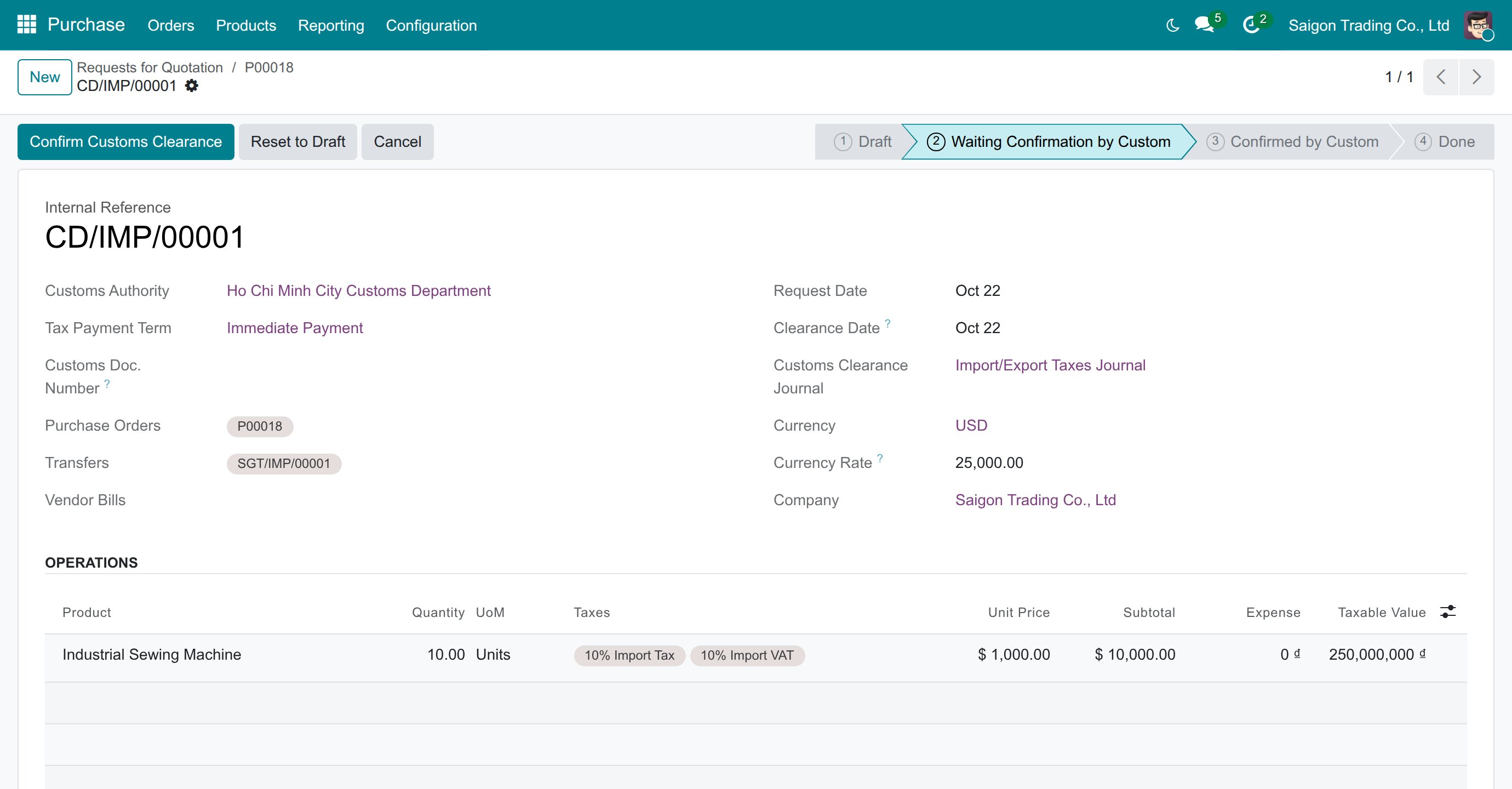
You can choose another term on the declaration, for example 275 Net days, before you confirm the customs clearance.
Check the taxes computed from the Vietnamese charts
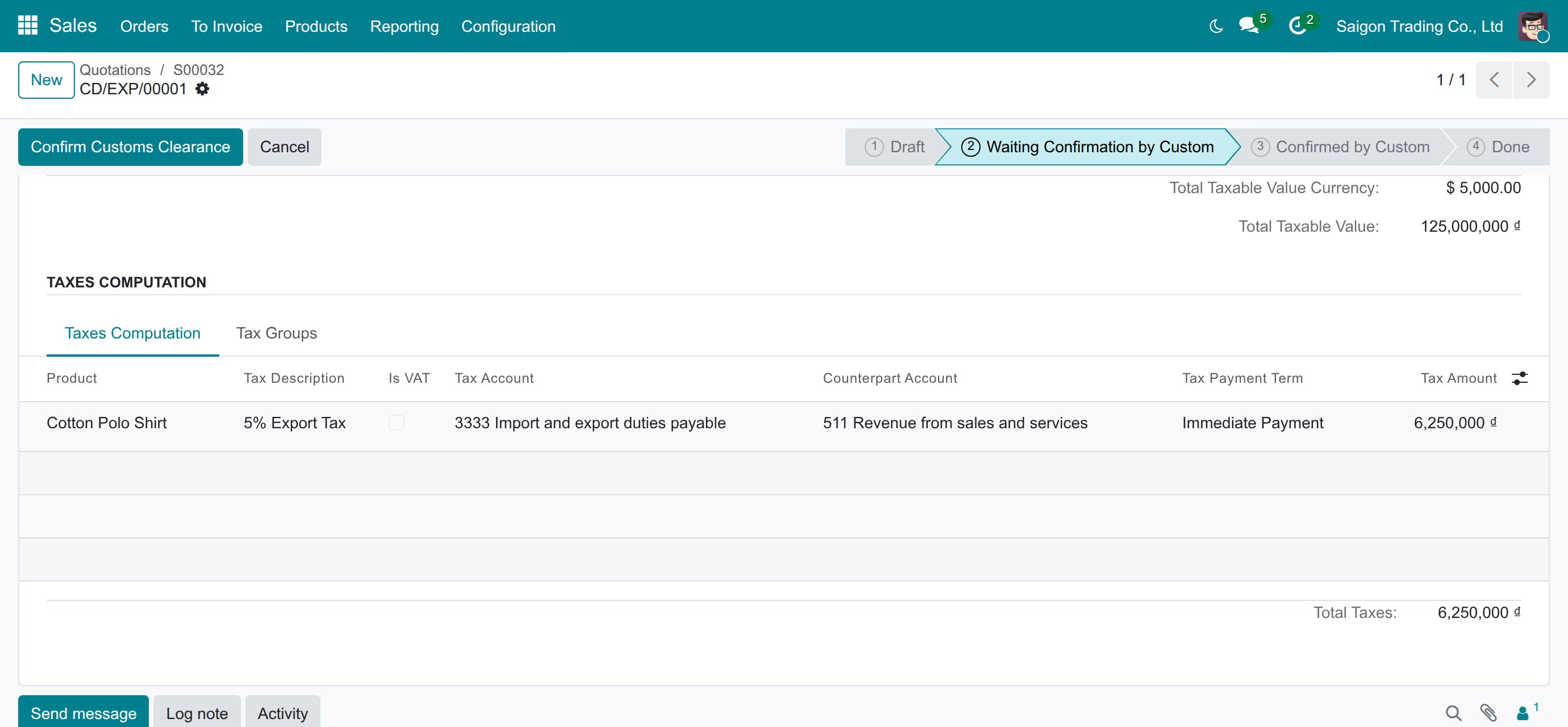
On the declaration, scroll to Taxes Computation. Each customs tax has a row with the Tax Account (the amount owed to customs, or the account to pay), the Counterpart Account, the Tax Payment Term and the Tax Amount.
For an export declaration the row of the export duty reads 3333 as the Tax Account and 511 as the Counterpart Account.
Confirm and pay
- Press Confirm Customs Clearance: the vouchers of the taxes are posted (see the postings above).
- Press Taxes Payment, then Pay: the payment is posted and the declaration moves to Done by itself.
Troubleshooting
- A new declaration shows 30 Days instead of Immediate Payment.
- The company was set up before this app was installed, so it kept its term. Choose Immediate Payment in Foreign Trade ‣ Configuration ‣ Settings; declarations that exist keep their own term, which you can change on each declaration before you confirm it.
- A customs tax is missing from the tax field of a vendor bill or an invoice.
- This is intended: customs taxes belong to the Customs Declarations fiscal position, which is not applied to invoices. Customs duties and import VAT are posted by the customs declaration only.
- The declaration refuses a tax because its lines need an account.
- Open the tax and give an account to each of its two lines in Distribution for invoices, the same way as the 10% Import VAT (see the note above about the 0% Import VAT).
- My own customs tax is offered on invoices.
- Put it on a fiscal position with Customs Declarations Position ticked, for example Customs Declarations.
FAQ
- Does the app change a payment term I have already chosen?
- No. A term set on a company is kept when the chart of accounts is reloaded or re-synchronised; only an empty term is filled with Immediate Payment.
- From which date is the 275 Net days term counted?
- From the clearance date of the customs declaration; while the clearance date is empty, from the request date.
- Does it work on the Circular 133 chart?
- Yes: the same customs taxes, pairs and payment terms exist, on the Circular 133 accounts listed above.
- Why is the import duty first debited to 632?
- The customs voucher debits the duty to the account the tax defines. The import app then adds the duty to the stock value of the goods and credits 632, so the duty ends up in the value of the goods. See the Import guide.
This software and associated files (the "Software") may only be used (executed, modified, executed after modifications) if you have purchased a valid license from the authors, typically via Odoo Apps, or if you have received a written agreement from the authors of the Software (see the COPYRIGHT file).
You may develop Odoo modules that use the Software as a library (typically by depending on it, importing it and using its resources), but without copying any source code or material from the Software. You may distribute those modules under the license of your choice, provided that this license is compatible with the terms of the Odoo Proprietary License (For example: LGPL, MIT, or proprietary licenses similar to this one).
It is forbidden to publish, distribute, sublicense, or sell copies of the Software or modified copies of the Software.
The above copyright notice and this permission notice must be included in all copies or substantial portions of the Software.
THE SOFTWARE IS PROVIDED "AS IS", WITHOUT WARRANTY OF ANY KIND, EXPRESS OR IMPLIED, INCLUDING BUT NOT LIMITED TO THE WARRANTIES OF MERCHANTABILITY, FITNESS FOR A PARTICULAR PURPOSE AND NONINFRINGEMENT. IN NO EVENT SHALL THE AUTHORS OR COPYRIGHT HOLDERS BE LIABLE FOR ANY CLAIM, DAMAGES OR OTHER LIABILITY, WHETHER IN AN ACTION OF CONTRACT, TORT OR OTHERWISE, ARISING FROM, OUT OF OR IN CONNECTION WITH THE SOFTWARE OR THE USE OR OTHER DEALINGS IN THE SOFTWARE.
