

Vietnam - Foreign Trade
| Lines of Code | 528 |
| Technical name | l10n_vn_viin_foreign_trade |
| License | OPL-1 |
| Website | https://viindoo.com/apps/modules/19.0/l10n_vn_viin_foreign_trade |
| Read description for | v 10.0 v 11.0 v 12.0 v 13.0 v 14.0 v 15.0 v 16.0 v 17.0 v 18.0 |
| Required Apps | Invoicing (account) Purchase (purchase) Discuss (mail) Inventory (stock) |
| Included Dependencies | Foreign Trade, Logistics Viindoo Base Vietnam Chart of Accounts - Circular 99 and 133 Accounting Foundation Payment with Payment Lines |

Vietnam - Foreign Trade
Extending Foreign Trade & Logistics module providing Vietnam Standards
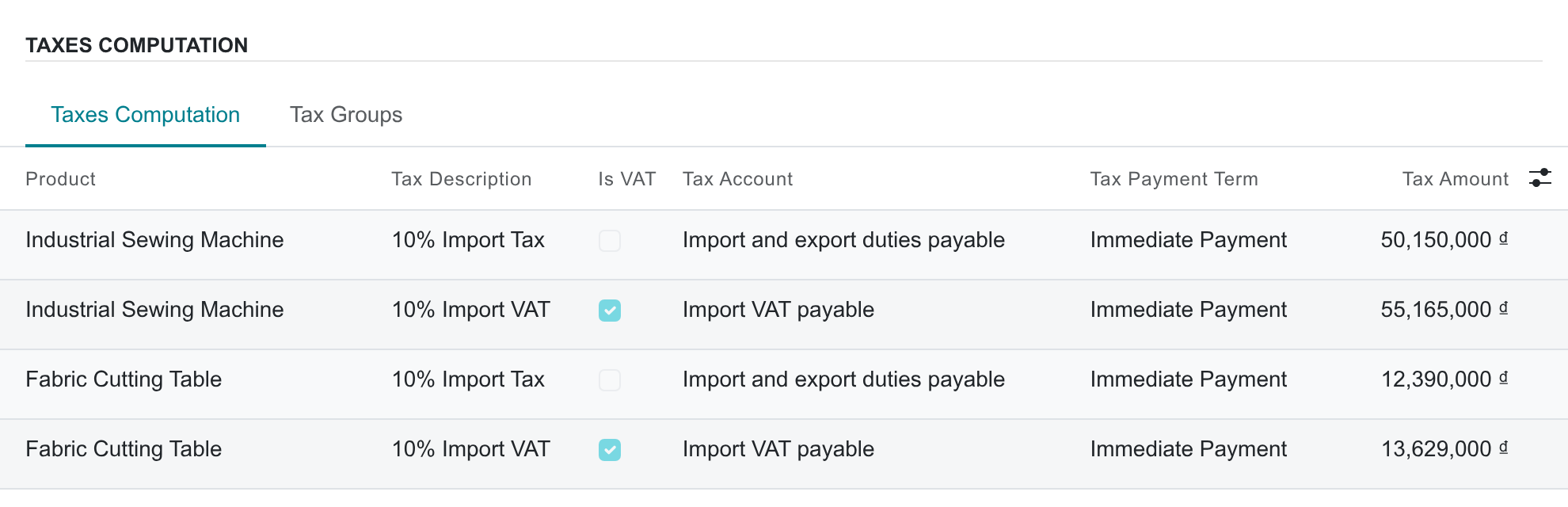
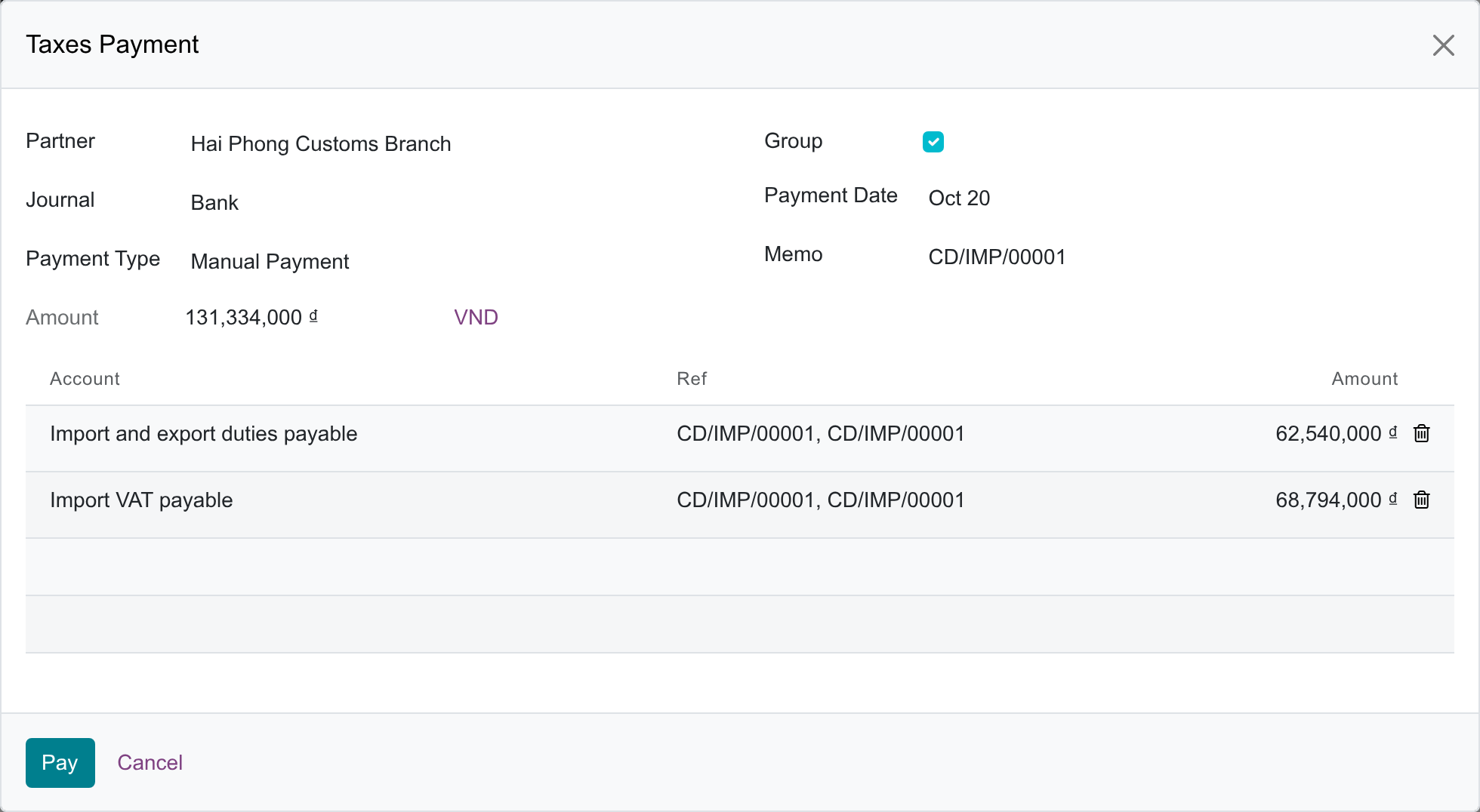
Sets Immediate Payment as the default import/export tax payment term of Vietnamese companies, because, as a rule, customs duties and taxes are paid before the goods are cleared (Law 107/2016/QH13, Art. 9; Law 38/2019/QH14, Art. 55.3).
Key Features
Built natively on Odoo/Viindoo to streamline real business operations:
Default Import/Export Tax Payment Term: Immediate Payment
- Presets Immediate Payment as the default import and export tax payment term.
- Follows Vietnamese law: as a rule, customs duties and taxes are paid before the goods are cleared (Law 107/2016/QH13, Art. 9; Law 38/2019/QH14, Art. 55.3).
- No manual configuration required from accountants.
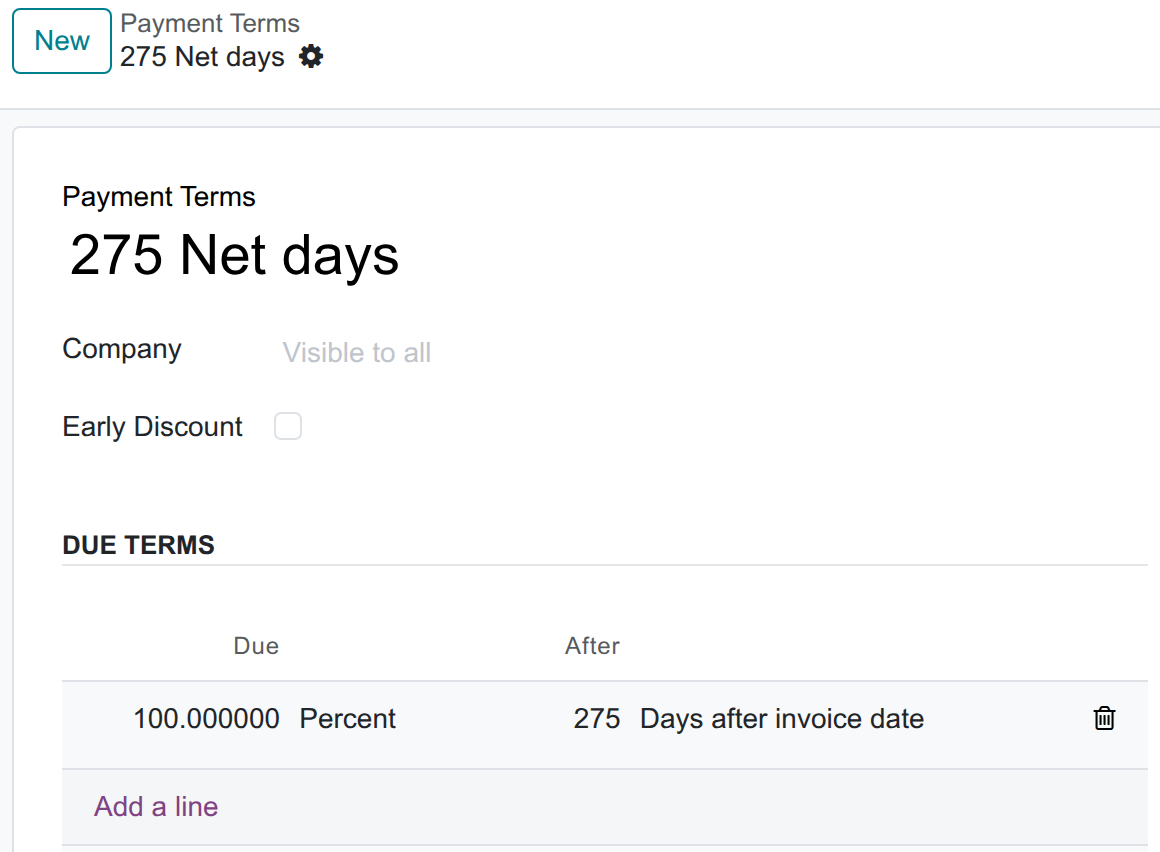
- Also keeps the optional "275 Net days" term (100% due 275 days after the clearance date) from the former 275-day rule (Law 78/2006/QH11 Art. 42.3, repealed on 2016-09-01); select it only when your case still qualifies.
Applied to Every New Vietnamese Company
- Applies to companies on the Vietnamese Chart of Accounts (Circular 99 or 133).
- Sets Immediate Payment on both the Import Tax and Export Tax payment term of each new company.
- Never changes a term already set on an existing company, at installation or when the chart is reloaded.
Zero-Config Installation
- The module installs itself automatically when prerequisites are met.
- No user action needed — no menus to find, no settings to configure.
- Triggers once the Foreign Trade & Logistics module and Vietnamese accounting modules are present.
- Eliminates onboarding effort for implementation partners.
Compatible with Both Circular 99 and Circular 133
- Works uniformly for large enterprises (Circular 99/2025/TT-BTC).
- Works uniformly for small-to-medium enterprises (Circular 133/2016/TT-BTC).
- Detects the chart template automatically — no separate setup per circular.
- Comes with bilingual support (Vietnamese and English).
Immediate Payment by Default

Optional 275 Net days Term
Immediate Payment on Customs Taxes
Taxes Payment
Customs Taxes on the Vietnamese Accounts
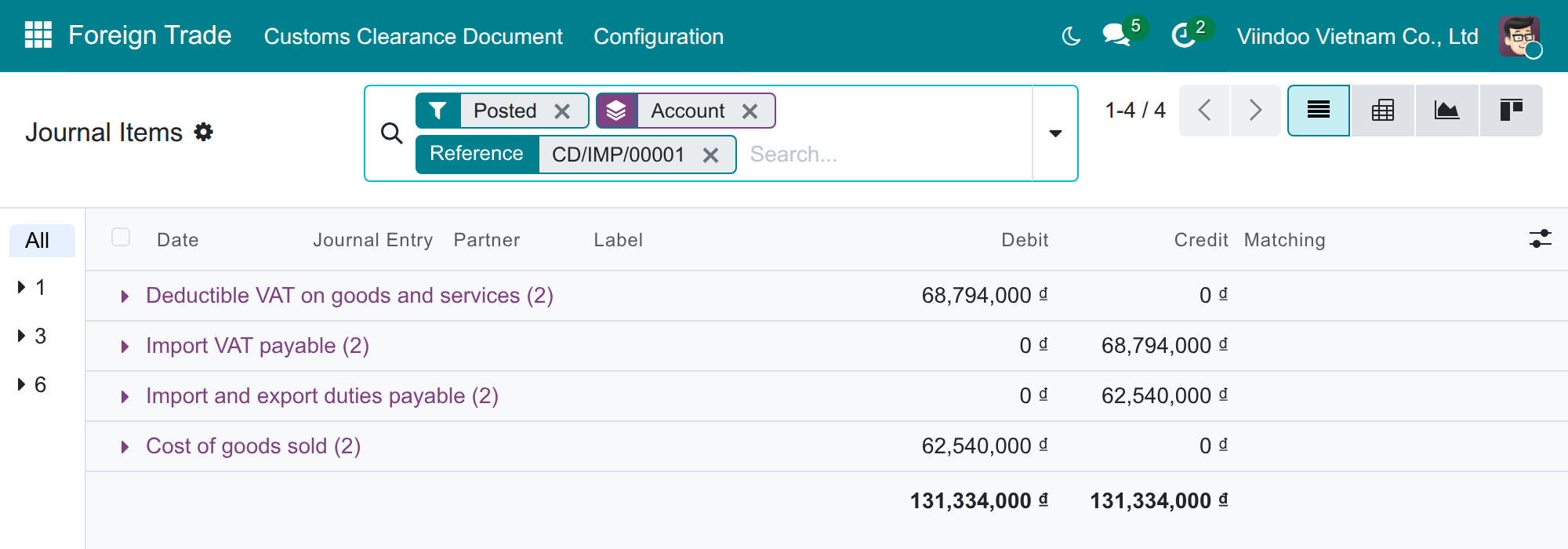
Customs Taxes Credited to Those Accounts
See Vietnam - Foreign Trade in Action
See how this module solves real business problems in a working Viindoo environment.
Need help with Vietnam - Foreign Trade?
For questions, implementation support, or consulting services, contact Viindoo.
Pre-Sales & Partnership
sales@viindoo.comWhen contacting us, please include:
- Odoo/Viindoo version (CE/EE).
- Number of users and business scope.
- Other modules currently in use.
Technical Support
apps.support@viindoo.comFor faster troubleshooting, please provide:
- Order number or app reference.
- Odoo/Viindoo version & edition.
- Steps to reproduce the issue.
- Screenshots/logs if available.
Technical Requirement
Who Should Use This Module?
Built for teams that need this capability fully integrated into their Odoo/Viindoo stack.
Executives & Business Owners
Need clear visibility into operations and a stack that scales without bespoke development.
Operations / Department Leaders
Want to streamline daily workflows, remove manual handoffs, and keep data consistent across teams.
Implementers & Odoo Partners
Looking for production-ready Viindoo modules to deliver projects faster and at lower risk.
Installation
- Navigate to Apps.
- Search with keyword l10n_vn_viin_foreign_trade.
- Press Install.
Instruction
Instruction video: Vietnam - Foreign Trade
Check Settings
As a rule, Vietnamese customs duties and taxes are paid before the goods are cleared (Law on Export and Import Duties 107/2016/QH13, Art. 9; Law on Tax Administration 38/2019/QH14, Art. 55.3), so a new Vietnamese company gets Immediate Payment as its default import and export tax payment term. A term already set on an existing company is never changed. It also keeps the optional 275 Net days term (due 275 days after the clearance date) from the former 275-day rule (Law 78/2006/QH11 Art. 42.3, repealed on 2016-09-01); select it only when your case still qualifies. Navigate to Accounting > Configuration > Payment Terms to view it and adjust it if necessary.
You navigate to Foreign Trade > Configuration > Settings, and in the Default Import/Export Tax Payment Term, you will see the default term; select 275 Net days there only when your case still qualifies.
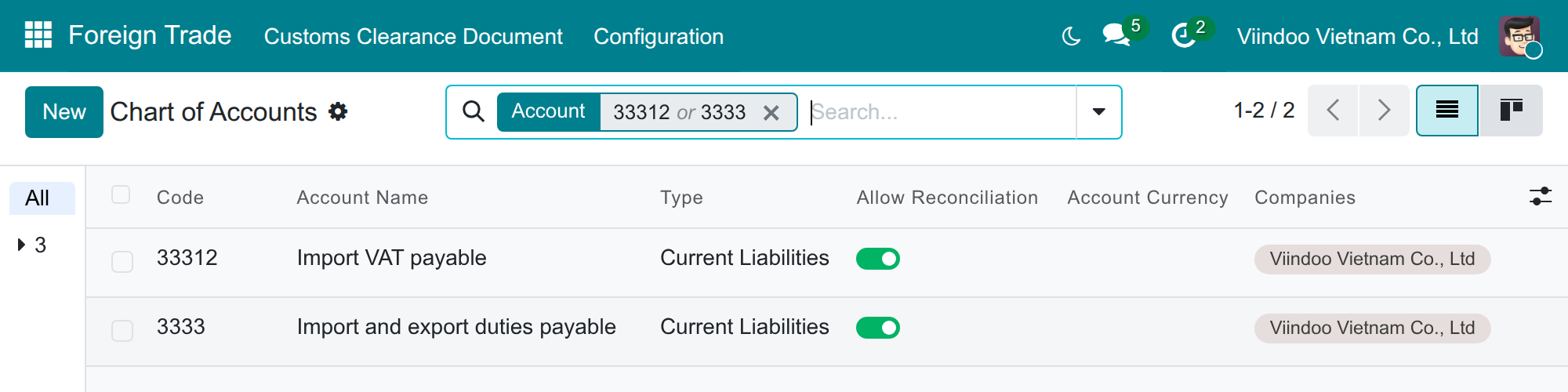
The customs taxes of the chart (import duty, import VAT and export duty) belong to the Customs Declarations fiscal position, which is never applied automatically: they are posted by customs declarations only, are not offered in the tax picker of vendor bills and customer invoices, and are never selected when an electronic order or invoice is imported. A customs tax you create yourself is treated the same way once you put it on a fiscal position marked Customs Declarations Position (Accounting > Configuration > Fiscal Positions).
Usage
You create a purchase order for Importation/Exportation then import customs clearance request/export customs clearance request. On the customs clearance request, you navigate to the Taxes Computation tab. Here, you will see Tax Payment Term is the default term you set up above.
You press Journal Entries to see the related entries. You will see the software automatically calculates Due Date on the lines of Tax Journal Items related to Import-Export activities from the selected term, counted from the clearance date (or the clearance request date before clearance): that date with Immediate Payment, or that date plus 275 days with 275 Net days.
Note: On the customs clearance request, you can choose a different Tax Payment Terms if you wish.
This software and associated files (the "Software") may only be used (executed, modified, executed after modifications) if you have purchased a valid license from the authors, typically via Odoo Apps, or if you have received a written agreement from the authors of the Software (see the COPYRIGHT file).
You may develop Odoo modules that use the Software as a library (typically by depending on it, importing it and using its resources), but without copying any source code or material from the Software. You may distribute those modules under the license of your choice, provided that this license is compatible with the terms of the Odoo Proprietary License (For example: LGPL, MIT, or proprietary licenses similar to this one).
It is forbidden to publish, distribute, sublicense, or sell copies of the Software or modified copies of the Software.
The above copyright notice and this permission notice must be included in all copies or substantial portions of the Software.
THE SOFTWARE IS PROVIDED "AS IS", WITHOUT WARRANTY OF ANY KIND, EXPRESS OR IMPLIED, INCLUDING BUT NOT LIMITED TO THE WARRANTIES OF MERCHANTABILITY, FITNESS FOR A PARTICULAR PURPOSE AND NONINFRINGEMENT. IN NO EVENT SHALL THE AUTHORS OR COPYRIGHT HOLDERS BE LIABLE FOR ANY CLAIM, DAMAGES OR OTHER LIABILITY, WHETHER IN AN ACTION OF CONTRACT, TORT OR OTHERWISE, ARISING FROM, OUT OF OR IN CONNECTION WITH THE SOFTWARE OR THE USE OR OTHER DEALINGS IN THE SOFTWARE.
