Knowledge linked to business records is the answer to a question many owners only ask after a resignation letter: when an experienced employee leaves, does the way they worked leave too? Often it does. Not the procedure on paper, but the small things that made the work go right.
The short answer: know-how stays when it is written where the work happens, on the quotation, the purchase order, the receipt or the invoice it is about. It also needs an owner who keeps it right, a review before it reaches the whole team, and access rights so each person sees what they should.
Below: why know-how ends up in heads and group chats, why a separate wiki rarely helps, four conditions for know-how that stays, and how Viindoo Brain, Viindoo's knowledge app, applies them.
What actually leaves when an employee resigns
A company rarely loses its procedures when someone leaves. They are in the handbook. What it loses is the layer underneath: the judgement that turned a procedure into a result.
Quoting a difficult customer
Which customer always asks for a second discount, who really decides there, which payment terms they accept. None of it is in the price list.
Buying from vendor X
Which vendor ships in fixed bundles, which one delivers late in the last week of the month, which certificate to ask for with every delivery.
Handling a receipt
What to check before confirming a receipt from a certain vendor, how to record damaged goods, who to call when quantities differ.
This know-how lives in two places. The first is people's heads, built over years of handling the same customers and vendors. The second is group chats, where a colleague asked once and got a good answer that scrolled away the next day. Neither place survives a resignation.
This is not a sign that people hoard what they know. Most experienced staff would gladly explain, if anyone asked at the right moment and if writing it down had an obvious place. The gap is in the design: the company never decided where operating know-how should live. The same pattern appears on the shop floor, described in operators and skills on the shop floor, and at every work handover.
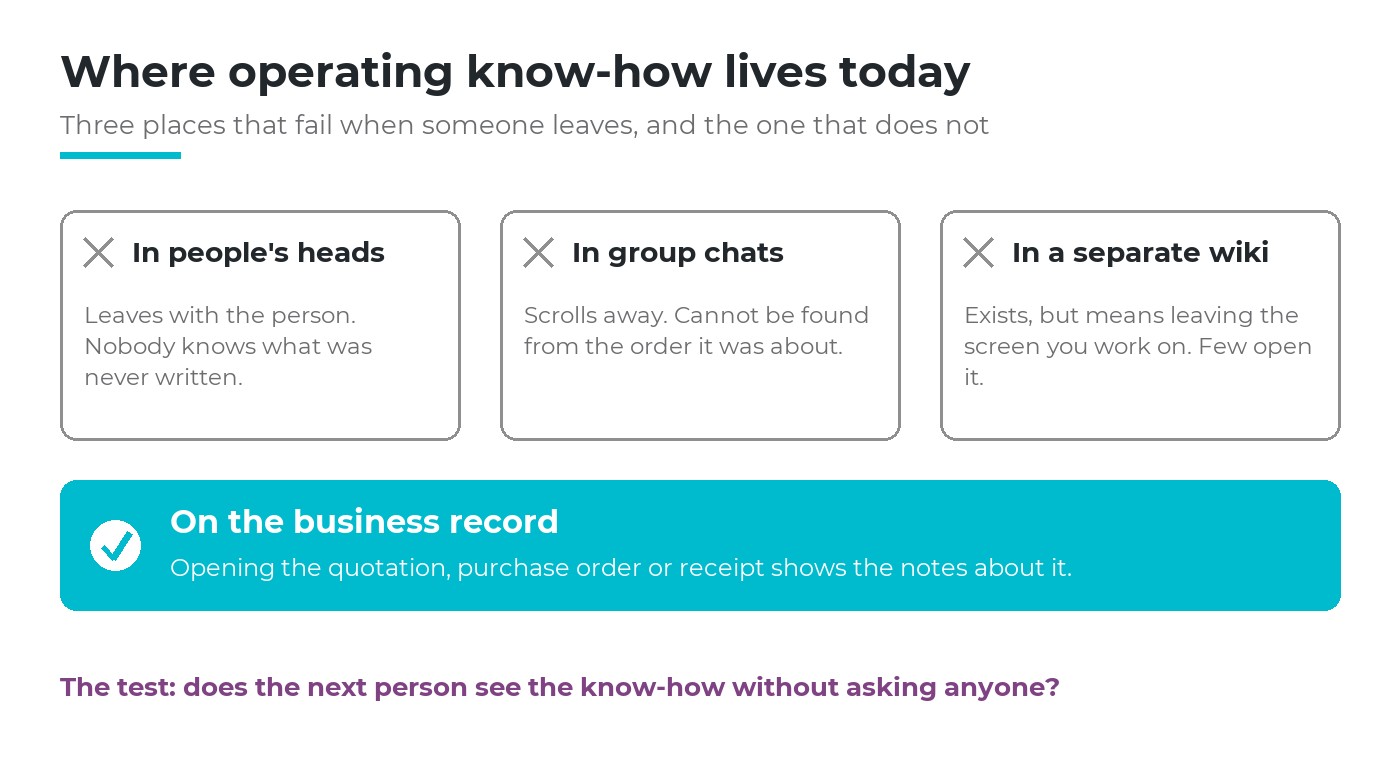
Three common places for operating know-how, and knowledge linked to business records, which still works after someone leaves.
Why a separate wiki is rarely opened
Many companies respond with a wiki of guides. It is sensible, and it often fades within months. The reason is timing, not laziness.
People need know-how at a precise moment: with a quotation open for a customer they have not served before, or a receipt in front of them that does not match the order. At that moment, a wiki asks them to leave the screen, guess a search word and hope that someone wrote the page. Most people ask a colleague instead, and the wiki loses another reader.
Far from the work
The guide lives in another tool, so nobody sees it while handling the document it is about.
Nobody owns a page
Pages are written once and never checked. After a few wrong answers, people stop trusting all of them.
Everyone sees everything, or nothing
Without access rules, sensitive notes about customers or pricing are either exposed or never written.
Knowledge linked to business records reverses the direction. Instead of sending people to the knowledge, it brings the knowledge to the document people already have open.
Four conditions for knowledge linked to business records
Knowledge management is a broad field. For a company of 20 to 300 people, four conditions decide whether operating know-how survives a resignation.
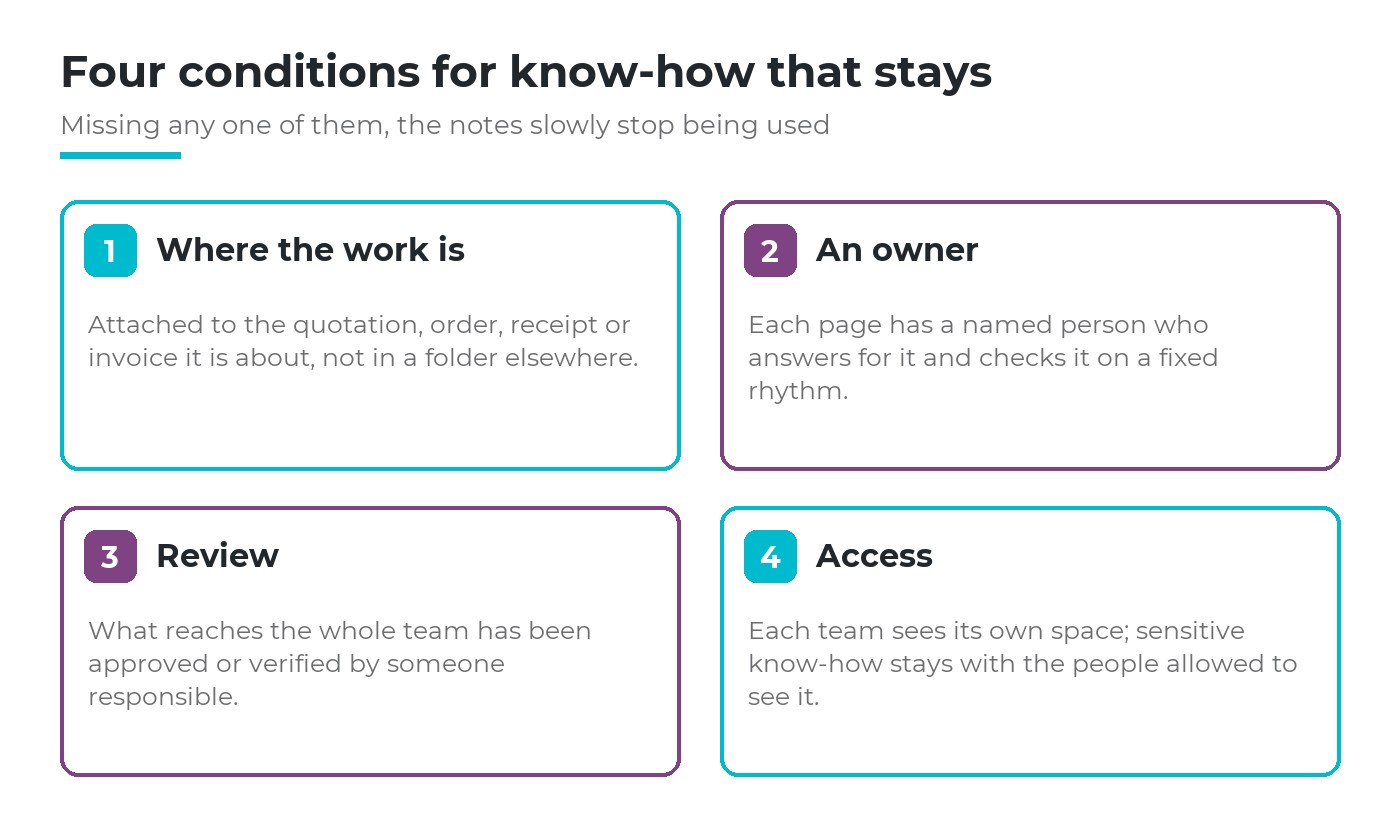
Where the work is, an owner, review and access: drop one and the notes slowly stop being used.
Where the work is. A note about a vendor belongs on the purchase order with that vendor, not in a folder named after a department. Whoever opens the order should see that a note exists.
An owner. Every page has a named person who answers for it and checks it on a fixed rhythm. Why owners and review dates matter even more once AI reads the pages is covered in if AI learns every process, do you still need your best people.
Review. A tip from one person becomes the team's way of working only after someone responsible has approved it. Without review, a wrong tip spreads as fast as a right one.
Access. Sales notes about a customer's negotiating habits should not be open to the whole company. When access follows roles, people dare to write what is actually useful.
Know-how stays when the next person meets it on the document they are working on, without having to ask anyone.
How Viindoo builds knowledge linked to business records
Viindoo Brain is the knowledge app that sits in the same system as sales, purchasing, inventory and accounting. It works on its own, without AI. When the AI assistant is added, it reads the same pages under the same access rights.
Notes on the document itself
Nine kinds of documents carry two buttons: quotations and sales orders, purchase orders, inventory transfers, invoices and journal entries, CRM opportunities, employees, job applicants, project tasks and helpdesk tickets. Brain Pages counts and opens the pages that mention or link that document, counting only pages the user may read. Brain Note creates a new page already linked to the document and opens it.
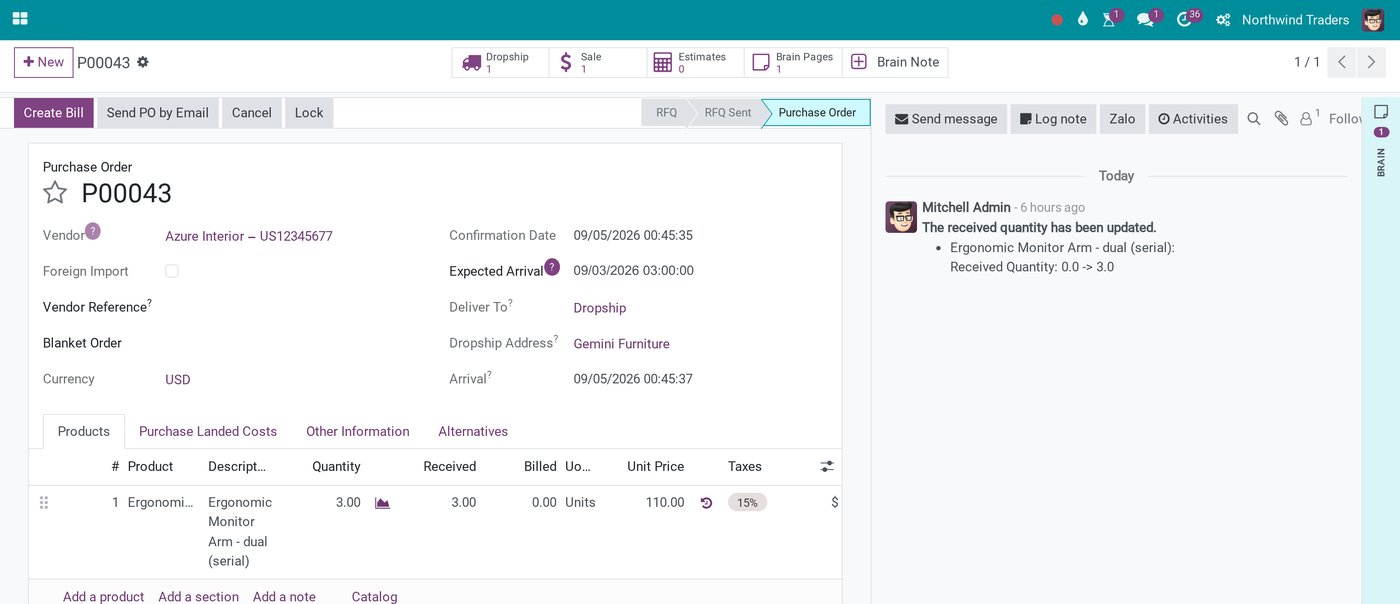
Example: knowledge linked to business records on a purchase order, with Brain Pages (one page about it) and Brain Note at the top.
Inside any page, typing [[ links any document the writer can read, so one note about a vendor can be linked to several orders with that vendor. The linked document always shows its current name, and the page shows a path back to it.
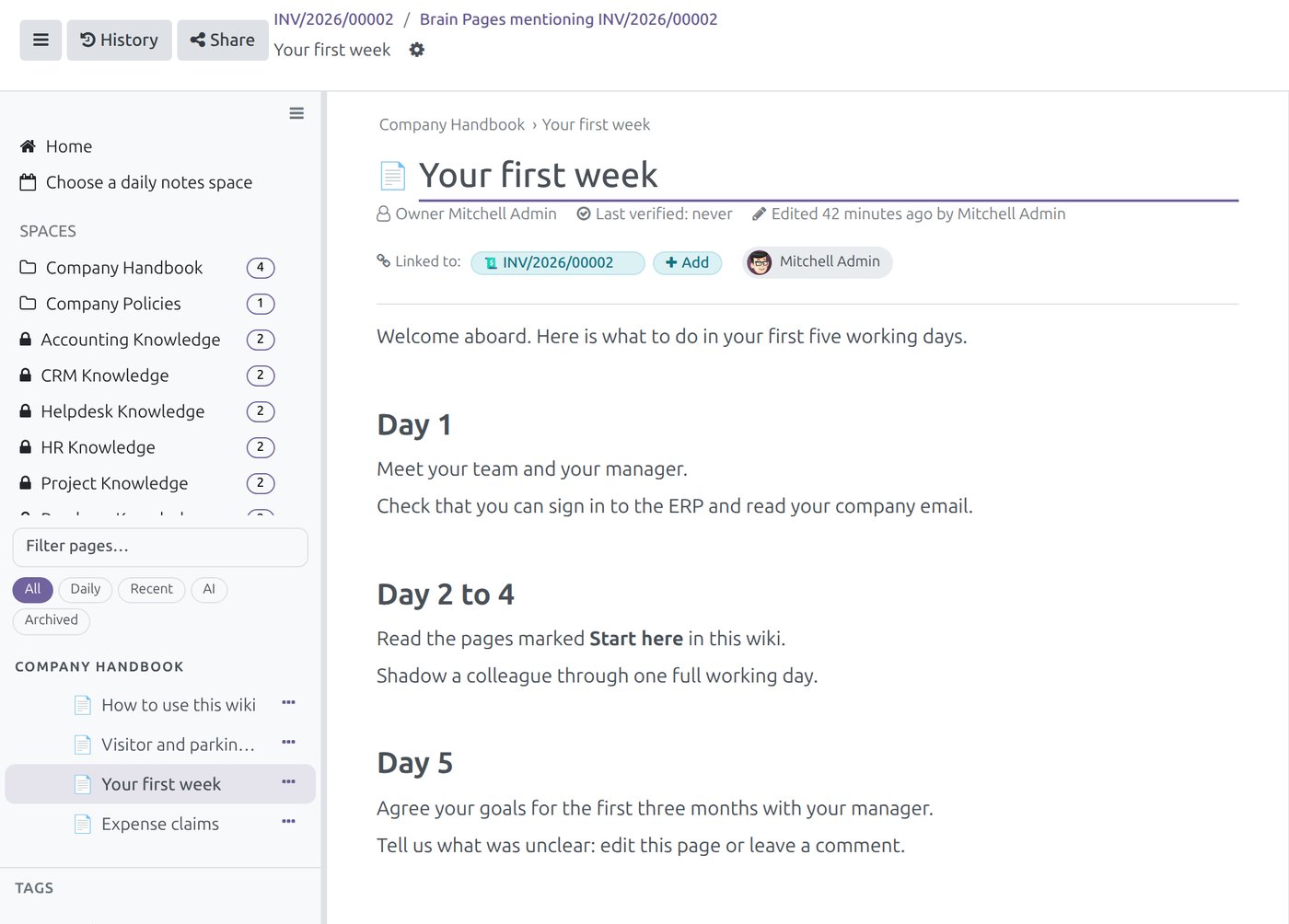
Example: a page opened from an invoice shows the invoice it is linked to and its owner.
From one person's note to the team's space
A Brain Note lands in the personal space of the person who clicked it, not in the department's space. That is deliberate: a first draft should not reach the whole team. To share it, someone with the editor role in the department's space moves the page there.
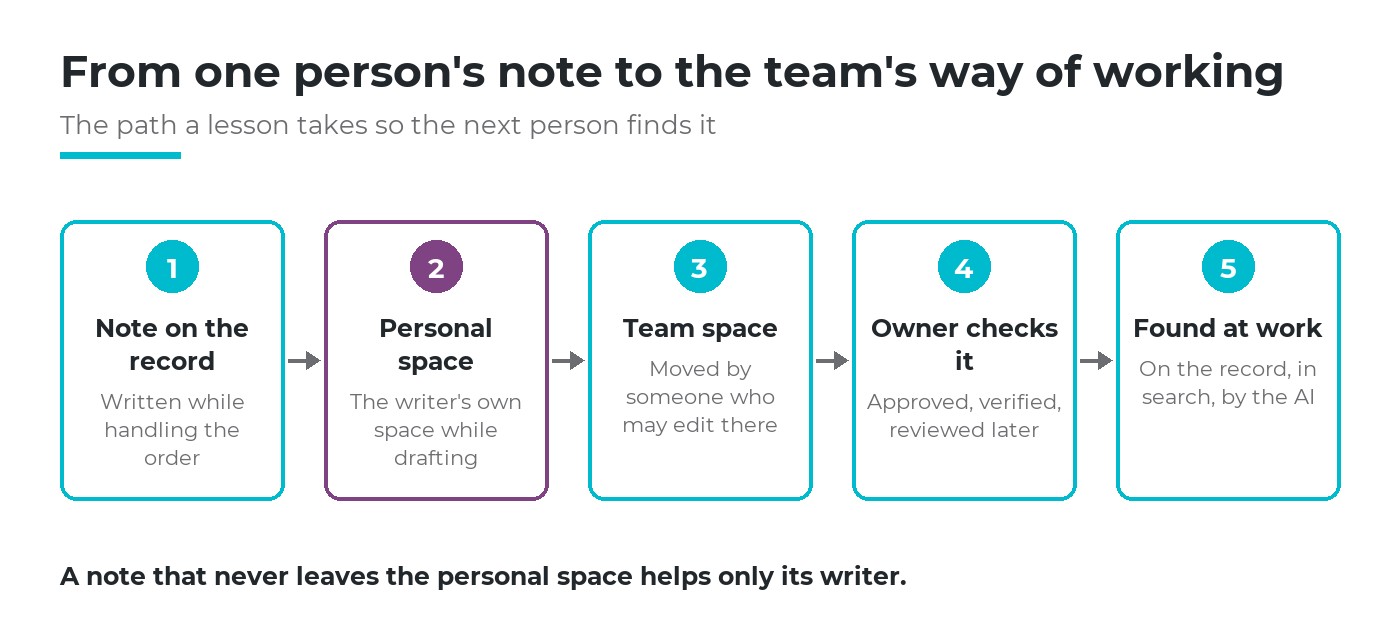
A note becomes the team's way of working only after it leaves the personal space and is checked.
This step is a management habit, not a software feature. Agree who moves notes into the team space and how often, for example at the weekly sales or purchasing meeting.
Spaces by role, with access that follows the role
Knowledge is grouped in spaces. Each member of a space has a role: Viewer, Commenter, Editor or Space admin. A space can also give a default role to a whole user group, so a department reads its own knowledge without anyone keeping a member list by hand. Each department app comes with its own space and starter pages, such as a sales playbook and a quotation guide, to fill in.
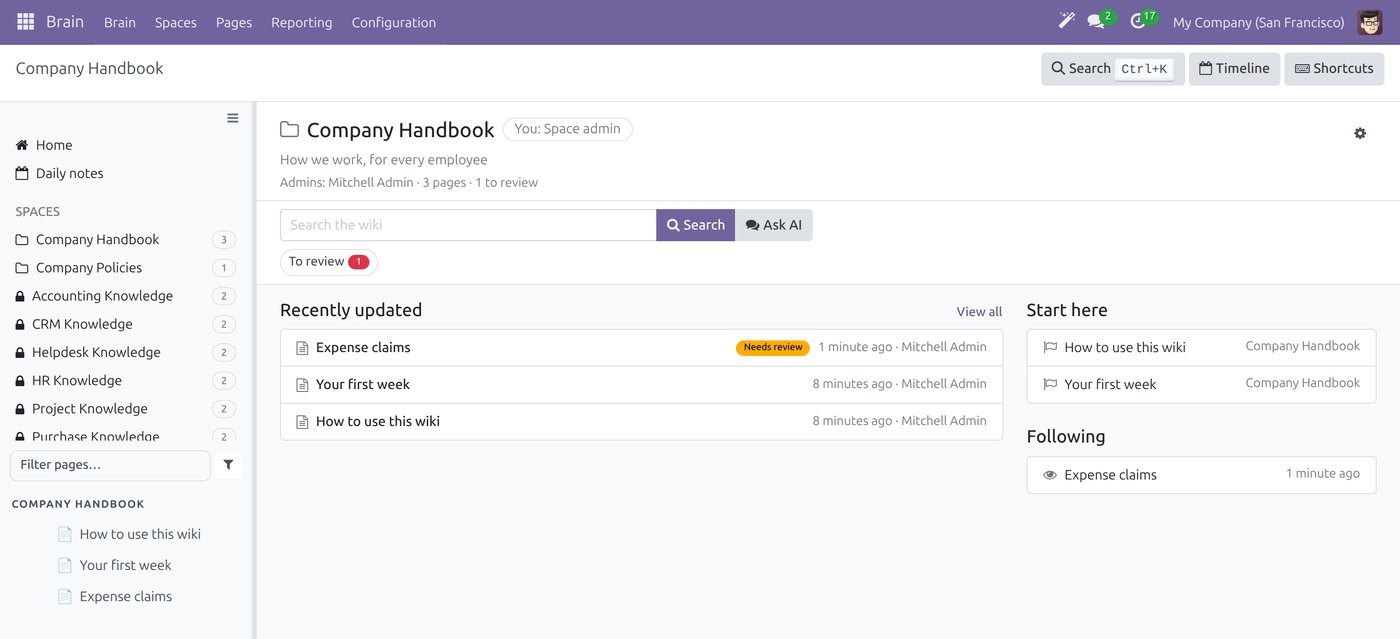
Example: the company handbook space with its admin, pages to review, and locked department spaces on the left.
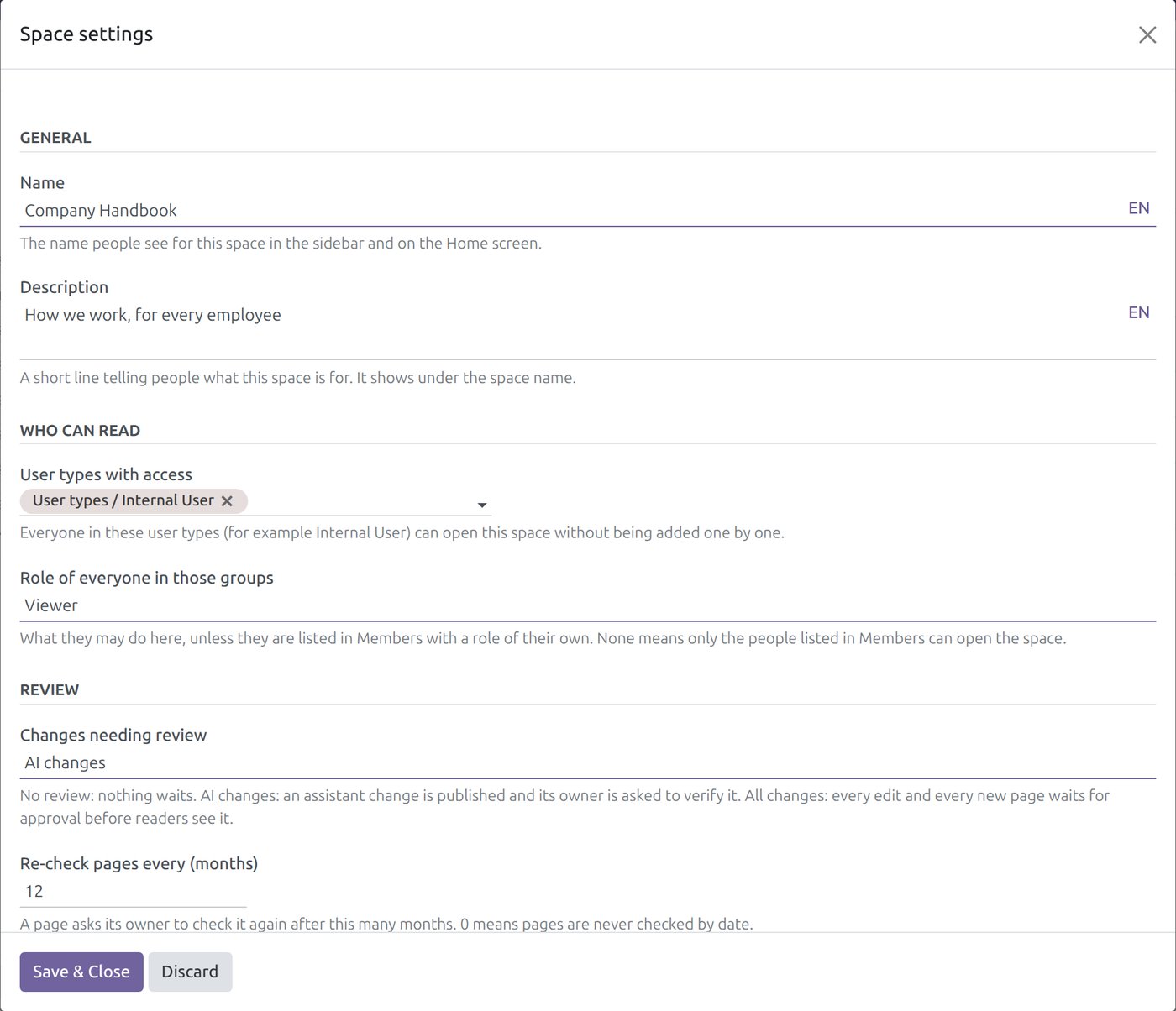
Example: space settings set who can open the space, which changes need review and how often pages are checked.
An owner and a review before the team sees it
Each space chooses which changes need review: no review, AI changes only (the default), or all changes. Under all changes, edited text and every new page wait as a draft until the page owner or a space admin approves or sends them back. Every page shows its owner and when it was last verified, asks its owner to check it again after a set number of months (12 by default), and keeps a version history that can be compared and restored.
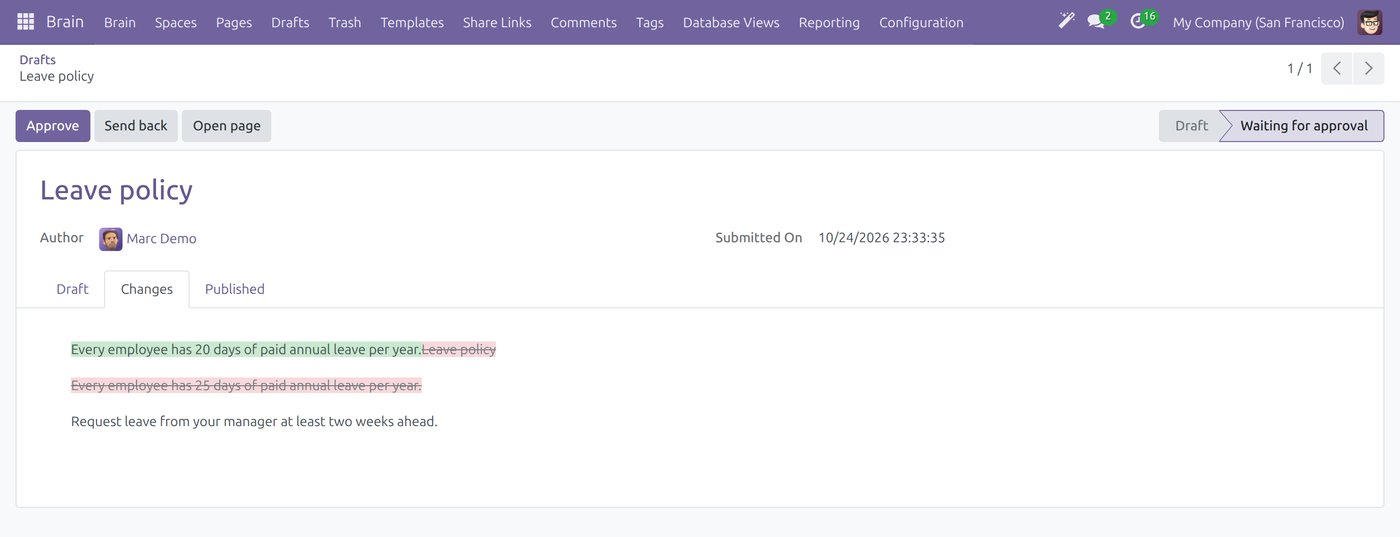
Example: a draft of the leave policy waits for approval; the reviewer can approve it or send it back.
Search that finds the page, and shows what is missing
Search covers titles and content. With the AI app installed it also lists pages related by meaning, so a question typed in everyday words still finds the right policy. When nothing matches, it offers to ask the AI or to create the page, and Brain administrators can see which searches found nothing: a ready list of the know-how still to be written.
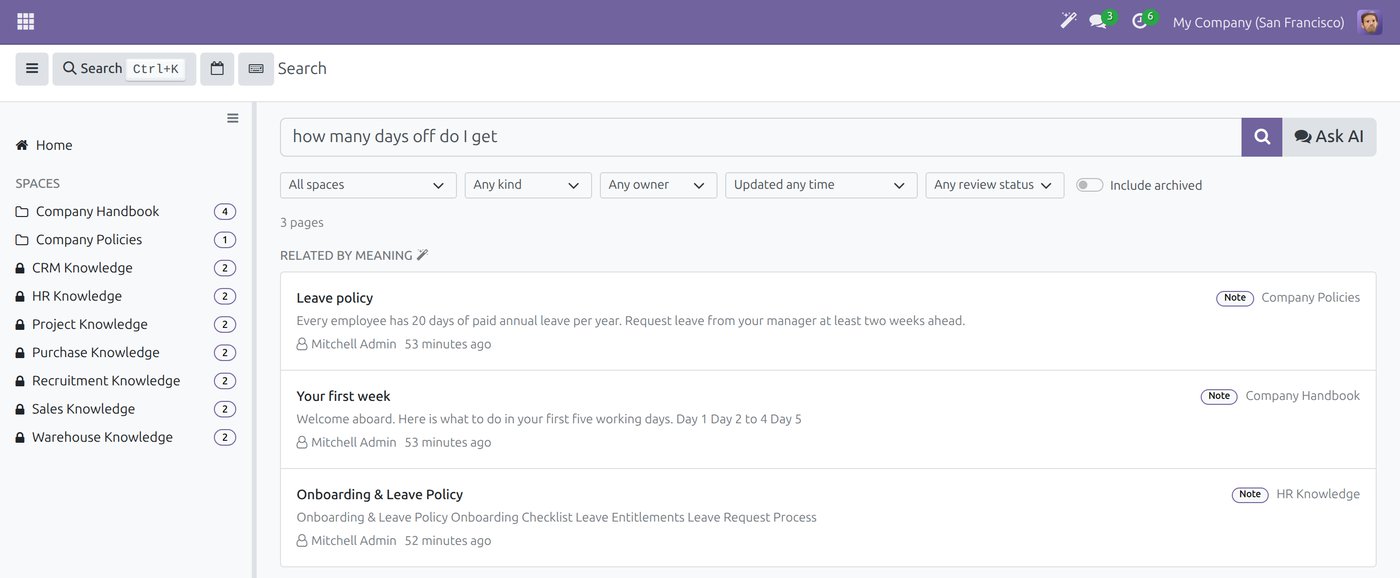
Example: asking how many days off you get finds the leave policy, though the words differ.
AI that answers with sources, within your rights
Asked a question in Vietnamese, the AI assistant searches the pages and records the person asking may read, and lists its sources under the answer so they can be opened and checked. The AI only sees what that person is allowed to see: a page they cannot open is one the AI cannot read for them.
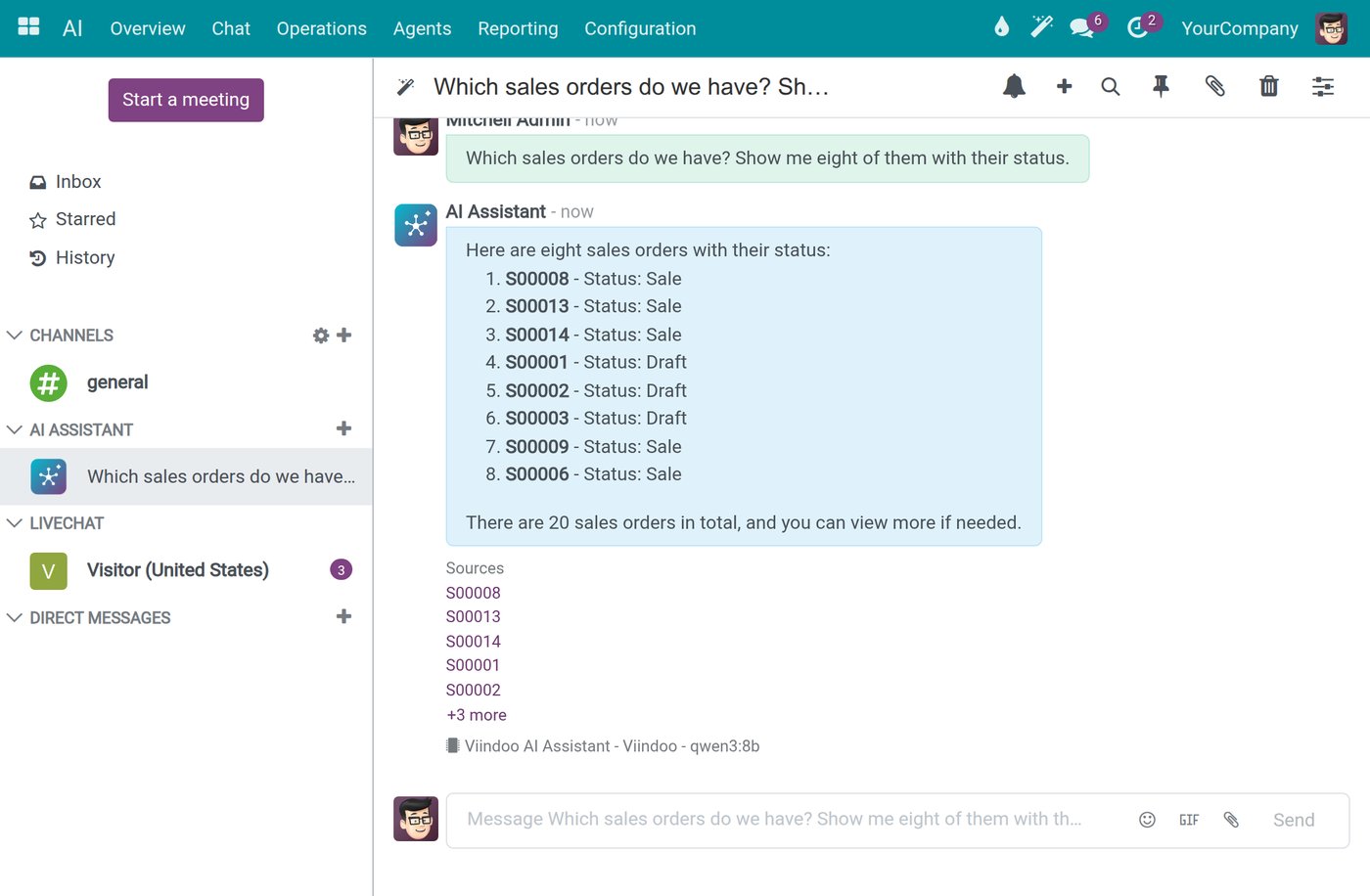
Example: under the answer, Sources lists the records it was built from.
The AI can also draft or extend a page, but creating or changing a page waits for the user's confirmation. A page the AI changed is marked, its owner is asked to verify it, and the AI's changes can be undone in one step. Knowledge stays a human responsibility.
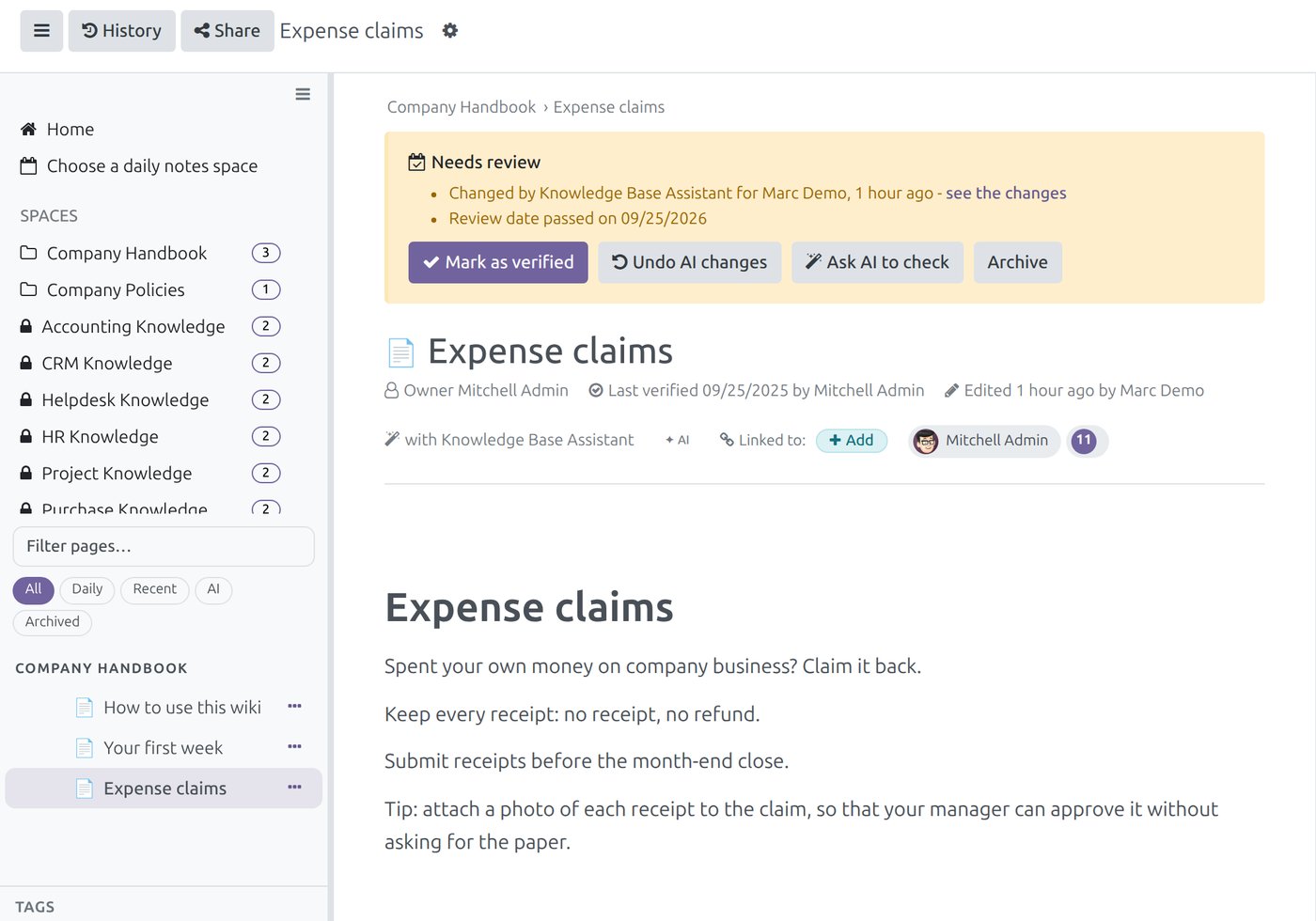
Example: a review banner shows who changed the page with the assistant, with Mark as verified and Undo AI changes.
Viindoo does not resell AI. You choose the AI provider and use your own key; the AI features are described in AI in Viindoo.
Starting knowledge linked to business records in one department
Writing down everything at once is the surest way to stop after a month. Start small, where a resignation would hurt most.
Pick one department
The one whose key person would be hardest to replace next month.
List the questions
The 15 to 20 questions new staff ask that person most often.
Write on the document
Answer each one on a real quotation, order or receipt when it next comes up.
Name an owner
One owner per page, and one person who moves notes into the team space each week.
Review on a rhythm
Check the searches that found nothing and turn them into the next pages.
After a few months, the measure of knowledge linked to business records is simple: when someone new handles a difficult customer or vendor, do they find the answer on the document, or do they still have to call the person who left?
Four questions to check your company's know-how
The resignation test
If your most experienced buyer resigned today, which vendor lessons would leave with them?
Where the answer is
When a salesperson opens a quotation for a difficult customer, can they see the notes about that customer?
Who owns it
For each guide your team relies on, can you name the person who keeps it right?
Who sees it
Are there notes nobody writes because they would be visible to the whole company?
Frequently asked questions
No. Spaces, roles, notes on documents, review and search work without AI. AI adds search by meaning, answers with sources and help with drafting, all within the user's access rights.
To the AI provider you choose, with your own key; each connection shows its data region, and a self-hosted model is also possible. The built-in Viindoo connection is for trying the features only and passes through Viindoo's AI gateway.
Only if they have a role in that space or belong to a user group the space opens to. The Brain Pages button and the AI count only the pages a person may read.
Daily notes are private to their writer, administrators included. A Brain Note starts in the writer's personal space and reaches others only when it is moved to a shared space.
Worried about what would leave with your most experienced people? Tell us where it hurts most. Book a consultation and we will look at one department's know-how with you, or see the costs first.