A manufacturing order gives a business owner control over three things: whether the right product is made in the right quantity by the date promised to the customer, whether materials are issued from the warehouse against a clear instruction, and whether the actual cost of each batch can be determined once production is complete.
A manufacturing order (MO), also called a production order, is an internal instruction to produce a specified quantity of a product by a specified date, using a defined bill of materials (BoM) and sequence of operations, with one named person responsible. The production planning department issues the order, and the person designated under the company's approval rules approves it where required. The workshop carries out the order, which is closed once the finished goods have been received into stock and actual consumption and time have been recorded.
The following sections cover the required fields, a sample order, the differences between a manufacturing order, a production plan and a work order, the roles involved, the process from sales order to finished goods, common mistakes and signs that spreadsheets can no longer keep up. The final section shows how Viindoo, a business management platform with built-in AI, handles manufacturing orders in version 18, using screenshots from a test company.
What a manufacturing order contains
A usable manufacturing order answers six questions: what to make, how many units to produce, when to finish, which materials to use, which operations to perform and who is responsible. All other information, such as progress, quality checks, scrap and cost, is recorded against the same order during production.
| Field | What it records | Why it matters |
|---|---|---|
| Order number | A unique reference, e.g. WH/MO/00059 | Material issue slips, finished goods receipts and the associated cost lines all refer to this number |
| Source | The sales order or plan that generated the demand | For made-to-order work, shows which customer is waiting and the promised delivery date |
| Product and quantity | Product code, variant, quantity and unit of measure | Prevents production of the wrong product variant or quantity |
| Bill of materials | The bill of materials (BoM) used for the order and its version if the company maintains several versions | Defines the component list and quantities required for the order |
| Components to be consumed | Each component and the quantity to issue | The basis for issuing materials and checking shortages |
| Operations | Steps, work centres and planned time | The basis for scheduling and calculating labour and machine costs |
| Dates | Planned start date, planned end date and deadline | Enables the planner to identify delays before the customer becomes aware of them |
| Responsible | One designated individual | Establishes accountability for the order from release to closure |
| Status and approval | Draft, confirmed, in progress, done; who approved and when | Distinguishes an intended action from a commitment |
| Actual results | Quantity produced, materials consumed, scrap, quality check results and actual time spent | The basis for comparing actual costs with planned costs |
The first eight fields are completed before production begins; the final field is updated during production. An order containing only the first group of fields is a request. Once actual results are recorded, the order provides the basis for measuring cost, loss and whether production was completed by the deadline.
A sample manufacturing order
The example below shows a manufacturing order for 20 electric motorbikes generated from a customer's sales order (an illustrative example using figures that match the test company shown in the screenshots). Copy the layout into a spreadsheet or printed form and replace the information in the rows with details of your own product.
| Order header | Value |
|---|---|
| Order number | WH/MO/00059 |
| Source | Sales order S00294, with delivery promised for 10 December 2026 |
| Product | EV-City electric motorbike |
| Quantity to produce | 20 units |
| Bill of materials | EVC-LR, for 1 unit |
| Planned start / end dates | 3 December 2026 / 7 December 2026 |
| Responsible | Nguyen Thu Ha, production planner |
| Status | Confirmed |
| Approval | Not required: the order is below the company's approval threshold (illustrative) |
| Component | Per unit | Quantity to consume | In stock at release | Shortage |
|---|---|---|---|---|
| Painted frame | 1 | 20 | 20 | 0 |
| Wiring harness | 1 | 20 | 8 | 12 |
| 2 kW electric motor | 1 | 20 | 0 | 20 |
| 72 V lithium battery | 1 | 20 | 0 | 20 |
| Operation | Work centre | Minutes per unit | Total planned minutes |
|---|---|---|---|
| Wire and fit battery | Assembly line 2 | 30 | 600 |
| Fit frame and motor | Assembly workshop | 45 | 900 |
| Fit body panels and finish | Assembly workshop | 20 | 400 |
Two points in this sample are worth noting. There is a shortage of 12 wiring harnesses, and neither the motor nor the battery is in stock. The operations that need these components cannot begin until they arrive, and the order cannot be completed on time without them. The order also carries the sales order number, so the planner can see which customer is affected if the parts are late.
The actual results (quantity produced, materials consumed, scrap, quality checks and time spent) are left blank when the order is released and are entered as the shop floor reports them.
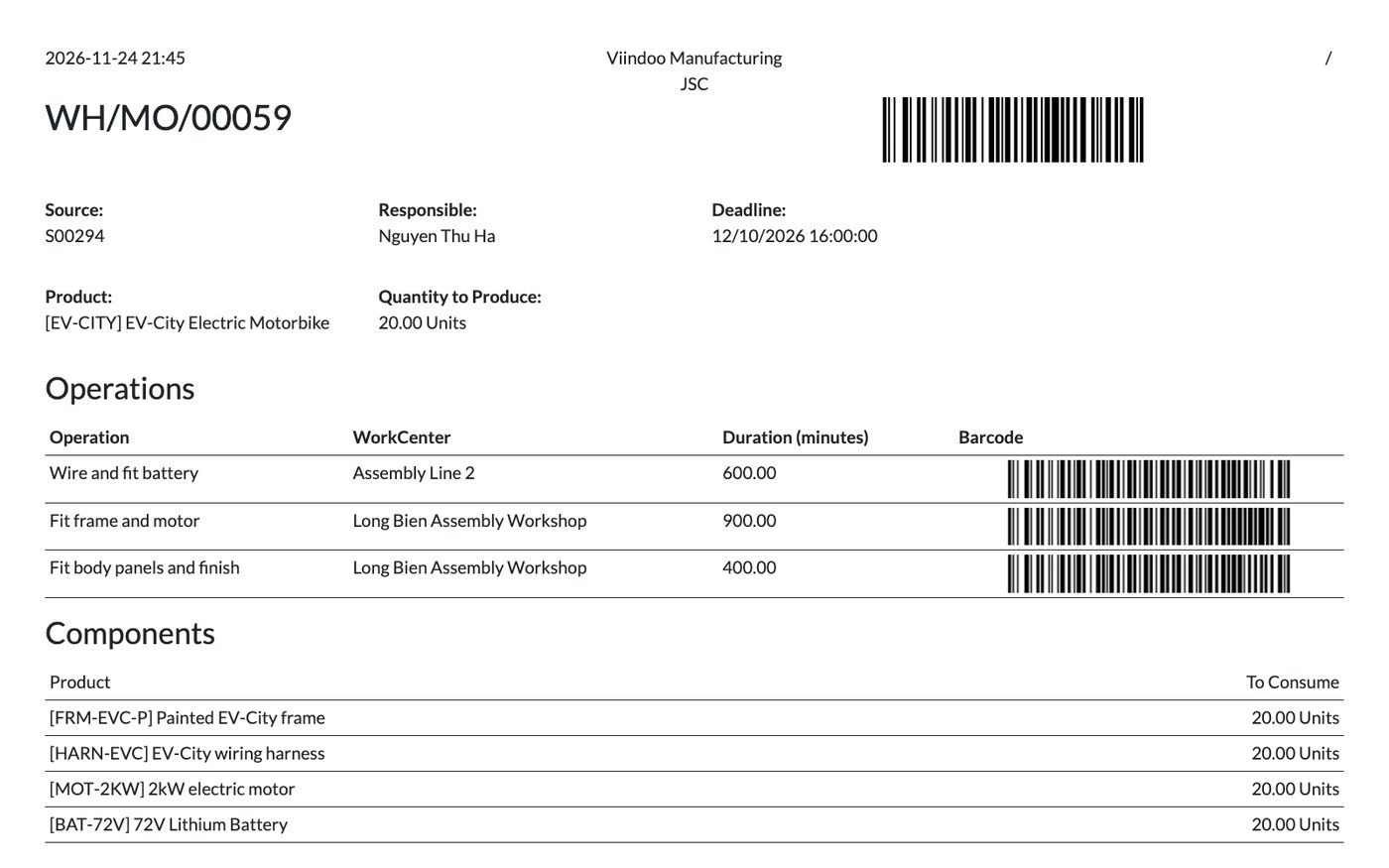
The same manufacturing order printed from Viindoo 18: the source sales order, person responsible, deadline, operations with barcodes and components to be consumed.
The differences between a manufacturing order, a production plan and a work order
A production plan sets out what the company intends to make over a given period. A manufacturing order commits to producing a specific quantity of a product by a specified date. A work order represents one step of that order at a particular work centre. Confusing these three concepts leads to a plan being treated as a promise or a workshop receiving a single sheet covering an entire week.
| Production plan | Manufacturing order | Work order | |
|---|---|---|---|
| Question answered | What to produce and in what quantities during the period | Produce this quantity of this product by this date | Perform this operation at this work centre |
| Scope | Multiple products over several weeks or months | One product, one batch | One operation of one order |
| Issued by | Production planning, together with sales and management | Production planner | Generated from the operations in the order |
| Used by | Management, purchasing | Warehouse, workshop, accounting | Operators, team leaders |
| Material commitment | No | Yes: components can be reserved for the order once it is confirmed | Uses materials allocated to the order |
In practice, a production plan generates several manufacturing orders, and each manufacturing order with defined operations generates one work order for each operation. The plan can change weekly, but a released order should only be changed through a documented decision.
Roles and responsibilities: who issues and approves a manufacturing order
The production planner issues the manufacturing order because the role requires visibility of demand, stock levels and production capacity together. The company's own approval rules determine who approves the order, usually the production manager or plant director. Approval is often required only above a specified quantity, value or priority threshold.
| Role | Responsibility for the order |
|---|---|
| Sales | Confirms the sales order and the delivery date promised to the customer |
| Production planner | Creates the order, checks material availability and production capacity, sets the dates and assigns the person responsible |
| Production manager or plant director | Approves orders requiring approval and determines priorities when orders compete |
| Warehouse | Reserves and issues components, receives finished goods |
| Workshop team leader | Carries out the operations, reports output, scrap and stoppages |
| Quality control | Checks the output before it is accepted |
| Accounting | Finalises the cost of the order and compares it with the standard cost |
In a small factory without a planning department, the owner or workshop manager often both issues and approves orders. This arrangement works only if the order is still documented with its source, quantity and deadline. Otherwise, it is difficult to trace a delay back to the decision that caused it.
How to create a manufacturing order from a sales order
A manufacturing order created from a sales order typically goes through six steps, from sales order confirmation to cost finalisation. The steps are much the same whether the process is managed on paper or in software. The difference is how much checking must be done manually.
1. Confirm the sales order
Confirm the product, quantity and delivery date promised to the customer.
2. Check finished goods inventory
Determine how many units to supply from stock and how many to manufacture.
3. Check materials against the BoM
List the material shortages and notify purchasing of the date by which the materials are required.
4. Issue and schedule the order
Set the dates, assign the person responsible and obtain approval if required.
5. Manufacture and record results
Issue materials, carry out the operations and record output, scrap, quality checks and time spent.
6. Receive finished goods and close the order
Receive the accepted finished goods into stock, check and close the order, and compare actual costs with planned costs.
Many delays originate in steps 2 and 3. If the planner releases an order without checking component availability, the workshop may not discover the shortage until the scheduled start date. The article Before Releasing an Order: Is the Shop Floor Really Ready? explains that check in detail.
Worked example: from sales order S00294 to a manufacturing order
The customer orders 20 EV-City motorbikes for delivery on 10 December 2026. There are no finished motorbikes in stock, so all 20 must be manufactured. Multiplying the quantities in the bill of materials by 20 and comparing the results with stock gives the shortage list the planner sends to purchasing, assuming the stock shown is not already reserved for other orders (illustrative example; figures from the test company).
| Component | Required (20 x 1) | Available | Shortage | Next step |
|---|---|---|---|---|
| Painted frame | 20 | 20 | 0 | Reserve for the order |
| Wiring harness | 20 | 8 | 12 | Purchase 12, required before the start date |
| 2 kW electric motor | 20 | 0 | 20 | Purchase 20 or follow up on an open purchase order |
| 72 V lithium battery | 20 | 0 | 20 | Purchase 20, required before the start date |
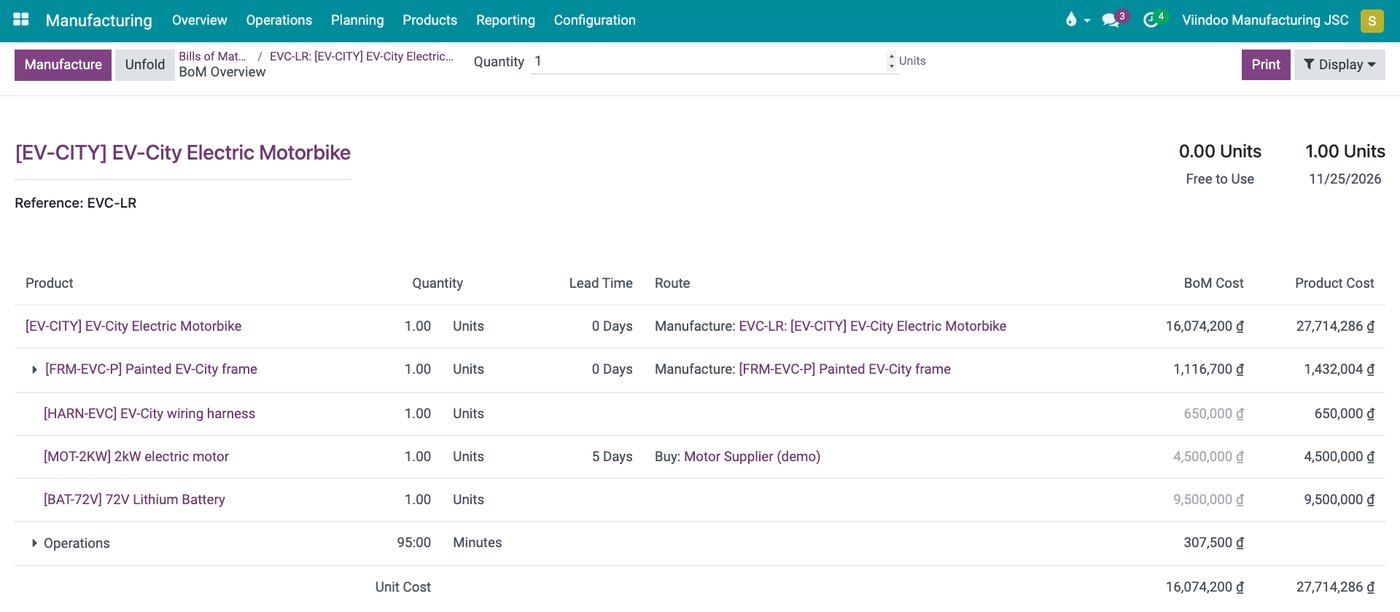
BoM Overview for one motorbike: each component is listed with its lead time, supply route and cost, providing the basis for calculating the requirements for 20 units.
The dates are worked out backwards. Delivery is promised for 10 December, and the order is planned to finish on 7 December, leaving time for inspection and dispatch. With 1,900 minutes of operations, it is planned to start on 3 December, a date that only holds if the harnesses, motors and batteries arrive before then, so the planner checks their expected arrival dates before confirming the start.
When components are short, the planner has several options, and each should be a deliberate decision rather than something that just happens: postpone the start date and wait, begin the operations that do not need the missing components, produce part of the quantity now and the rest later, or bring forward another order whose materials are ready. In the S00294 example, the planner first checks which operation consumes which component; if every operation needs one of the missing parts, nothing can start early. If the delivery date changes, the new date goes back to sales so the customer hears it before the delivery day.
If the customer then raises the order from 20 to 25 motorbikes, change the quantity on the manufacturing order itself rather than by phone. Five more of each component are then required, so the frames are also 5 short, and the planned operation time rises from 1,900 to 2,375 minutes, which may move the finish date. The warehouse, purchasing and accounting then work from the new quantity.
Before closing the order, check five things: the quantity produced and accepted against the quantity ordered, actual component consumption against the standard, actual operation time, scrap and rejected units with their reasons, and unused material returned to the warehouse. If 20 motorbikes are produced and one fails inspection, 19 are accepted into stock and the rejected unit is recorded with its reason.
A single sales order does not necessarily generate exactly one manufacturing order. Several small orders for the same product can be combined into one batch, and a large order can be split by production date or assembly line. For orders made for customers, what matters is that each manufacturing order still shows which sales orders it serves.
Common mistakes that weaken manufacturing orders
Many problems with manufacturing orders arise not from the form itself, but from information that is omitted or changed outside the order. Six mistakes occur repeatedly in small and medium-sized factories, and each has a straightforward preventive measure.
No link to the sales order
For made-to-order products, if an order is delayed, no one can identify which customer to contact. Prevention: record the sales order as the source of the order.
Outdated bill of materials
The order calls for components no longer used in the product, or misses new ones. Prevention: approve every BoM change and archive the version it replaces.
Orders released without checking material availability
The material shortage is discovered on the shop floor after the production line has already been scheduled. Prevention: check component status before release.
Changes made by phone
Changes to quantities or dates that are agreed verbally may never reach the warehouse or accounting. Prevention: update the order itself and record the reason.
Actual consumption not recorded
Without records of actual consumption, material loss against standard consumption cannot be measured. Prevention: record consumption by order rather than by month.
Orders never closed
Open orders can keep components reserved, and the batch cost remains provisional. Prevention: review and close orders each week after checking output and consumption.
When paper-based and spreadsheet-based manufacturing orders can no longer keep up
A manufacturing order managed on paper or in a spreadsheet is sufficient when one person plans production for a few products with simple bills of materials. This approach can no longer keep up when several people modify the same orders, when material availability must be checked for each order against current stock levels, or when the owner needs the cost of each batch rather than a monthly average.
| Situation | Spreadsheet or paper | Integrated system |
|---|---|---|
| Creating an order from a sales order | Information is usually re-entered from the sales order | Generated with a reference to the sales order number |
| Material availability check | Someone checks stock levels and calls the warehouse | Component status shown on each order |
| Changes | Often multiple versions of the same file with limited change history | One record with a change log |
| Progress | Checked by phone or during the morning production meeting | Updated as production output is reported |
| Cost per batch | Usually estimated at the end of the month | Calculated from actual consumption and time recorded for each order |
Here is a practical test: if production meetings take more time to establish the status of orders than to decide what to do about them, the orders have outgrown the spreadsheet. The same applies when the planner has to recreate the material shortage list manually whenever a rush order arrives.
How Viindoo 18 handles manufacturing orders
In Viindoo 18, a manufacturing order can be generated from a confirmed sales order and shows whether its components are available. Its operations, costs and approvals are held in a single record, and the order can be printed for the workshop. The screenshots below come from a test company that assembles electric motorbikes; the customer record is for demonstration purposes.
From sales order to manufacturing order
When a product uses both the Manufacture route and the Replenish on Order (MTO) route, confirming the sales order generates the manufacturing order. The sales order number appears in its Source field, and the delivery date becomes its deadline. The MTO route is archived in a new database and therefore needs to be activated once in the configuration. The procedure is explained in the make-to-order planning guide.
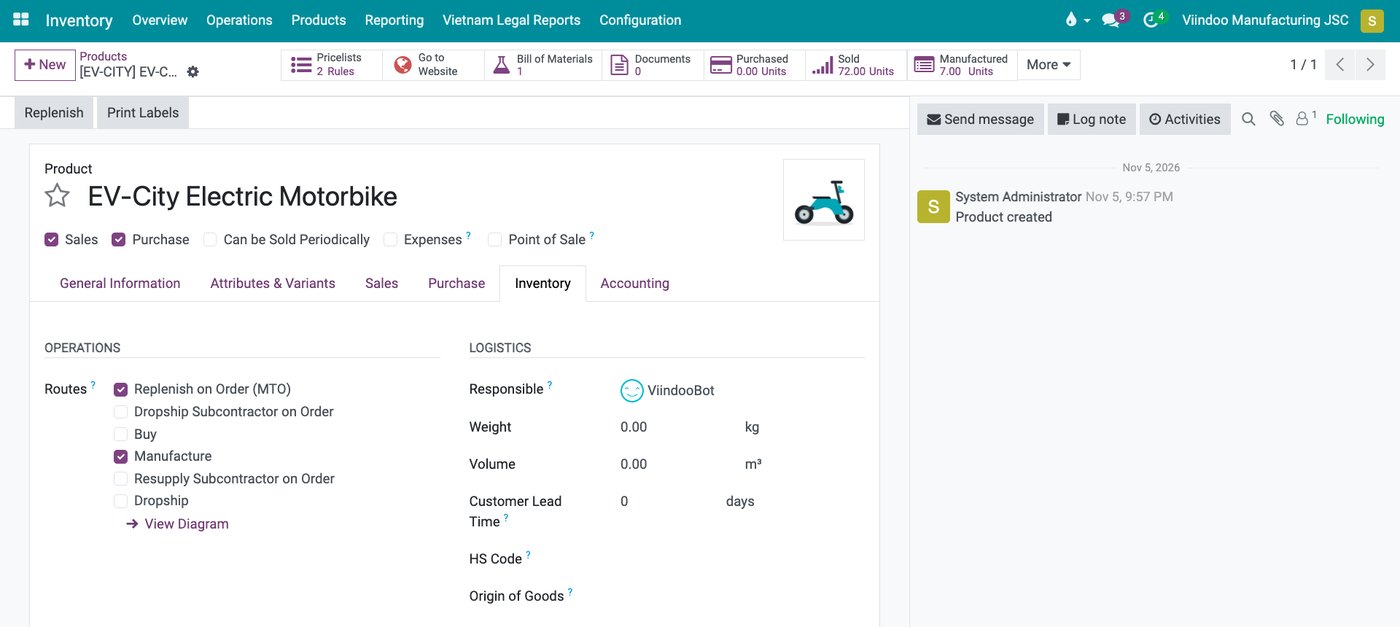
The motorbike's Inventory tab: the Manufacture and Replenish on Order (MTO) routes are selected, so each confirmed sales order generates a manufacturing order.
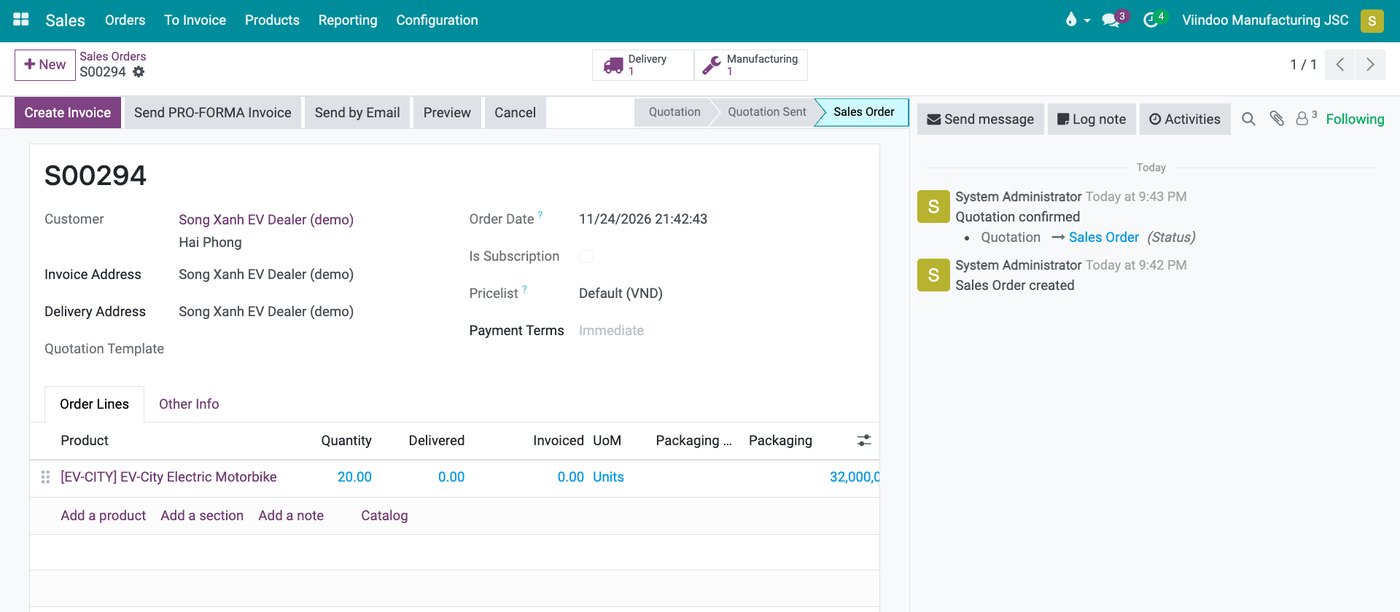
Sales order S00294: after confirmation, the Manufacturing button shows the single manufacturing order generated from this sales order.
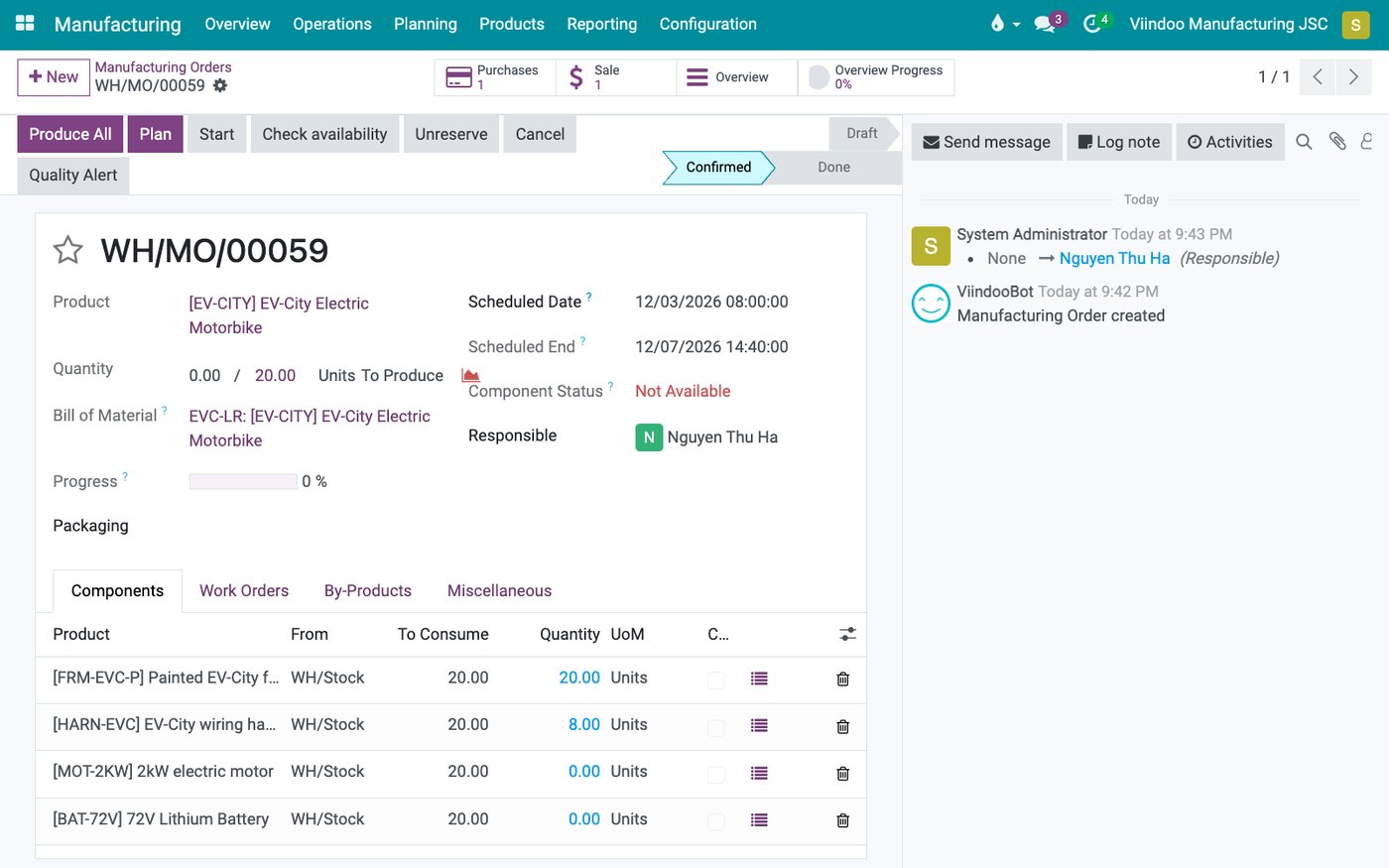
The manufacturing order WH/MO/00059 shows source S00294, the person responsible and the scheduled dates. Component Status shows Not Available because there are shortages of wiring harnesses, motors and batteries.
Component Status on each order shows Available, Not Available or the expected arrival date of missing components. This allows the planner to identify shortages for each order without recreating a shortage list. In the list of manufacturing orders, the same status appears alongside the start date and progress, giving the morning production meeting a single screen to start from.
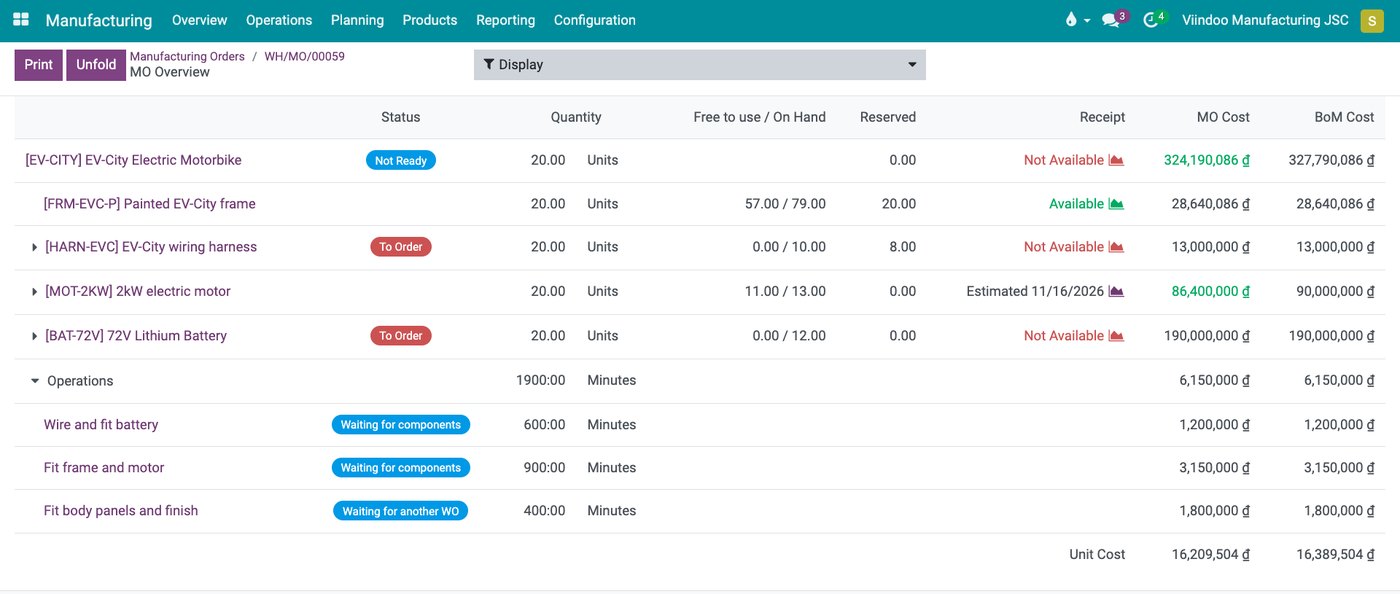
The MO Overview of WH/MO/00059 before production: the wiring harness and battery are flagged To Order, while the motor already has an expected receipt date. The order's expected cost is displayed alongside the cost calculated from the bill of materials.
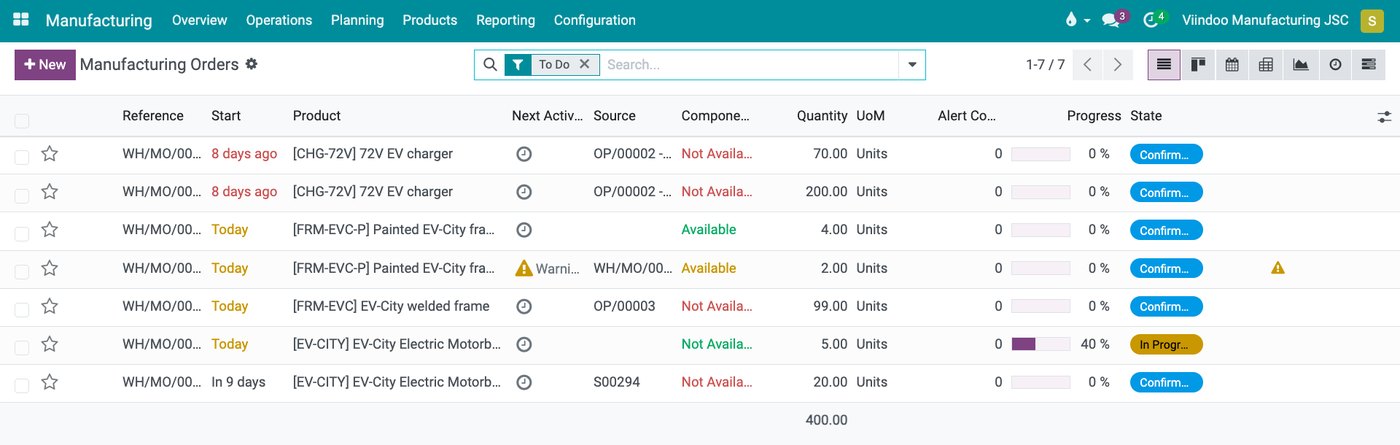
The list of manufacturing orders showing the source, component status, progress and state in adjacent columns.
Operations, progress and the shop floor
The operations defined in the bill of materials become work orders on the manufacturing order, each with its own work centre and expected duration. An order moves through Draft, Confirmed, In Progress, To Close and Done. While it is still in draft or confirmed, it can be split or merged with other orders for the same product and bill of materials. Part of the order quantity can also be produced, with the remaining quantity kept as a backorder.
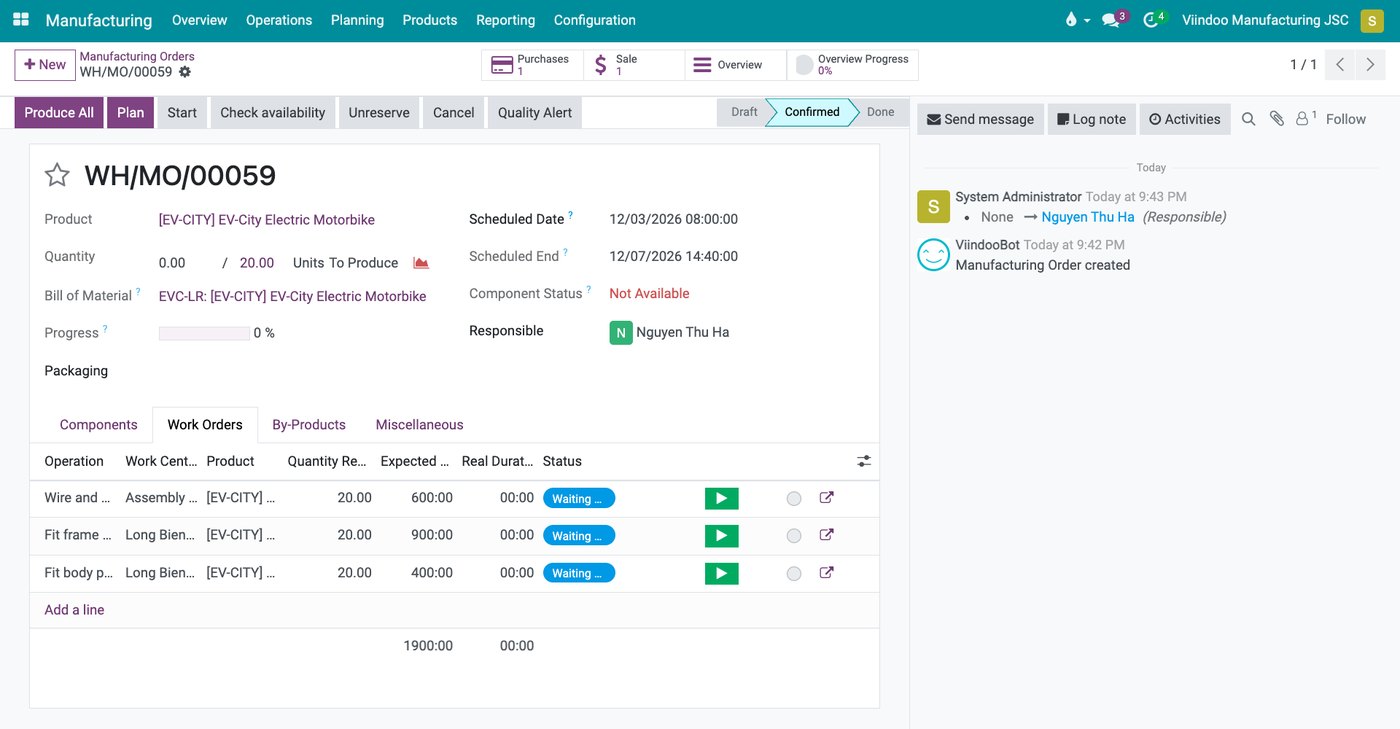
The Work Orders tab: three operations, their respective work centres and a total planned duration of 1,900 minutes for 20 units.
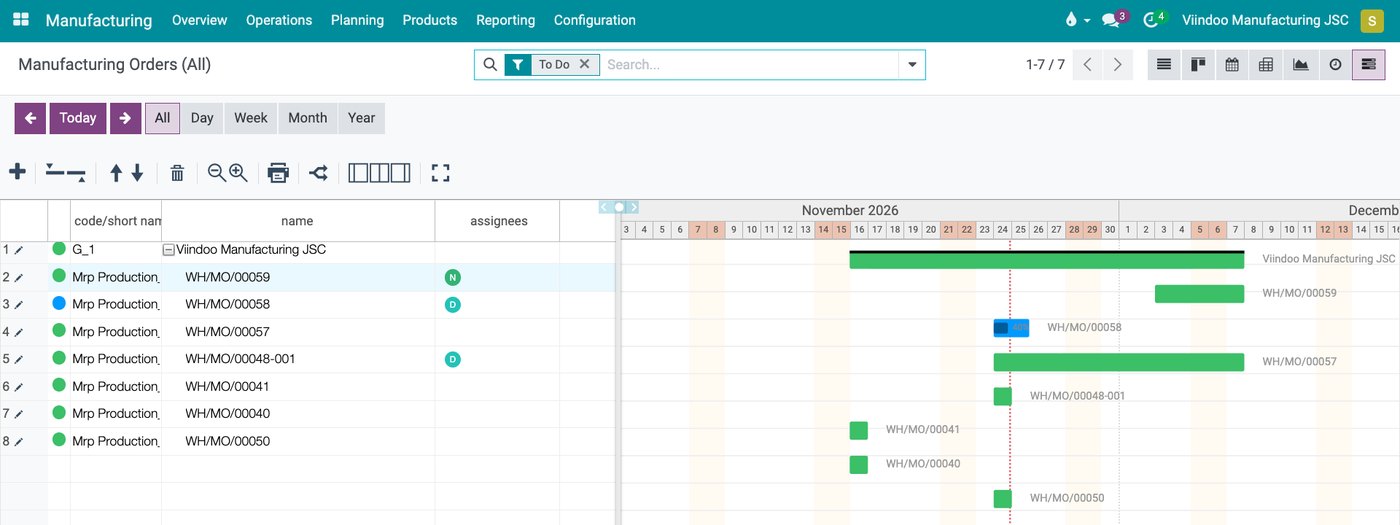
Manufacturing orders on the Gantt chart of Viindoo Manufacturing: each bar runs from the order's start to its scheduled end, and the order in progress shows its percentage.
Manufacturing Progress Management adds a progress indicator to each order, calculated by comparing actual production and consumption with planned quantities. It reports recorded progress rather than forecasting or rescheduling production. With Shop Floor Control, operators carry out their work orders using a tablet at the work centre. They record output, materials and machine stoppages, including the reasons for stoppages. Provided operators record these figures as they work, the order reflects the data recorded at the machine. How to interpret progress and handle rush orders is explained in the article on production progress.
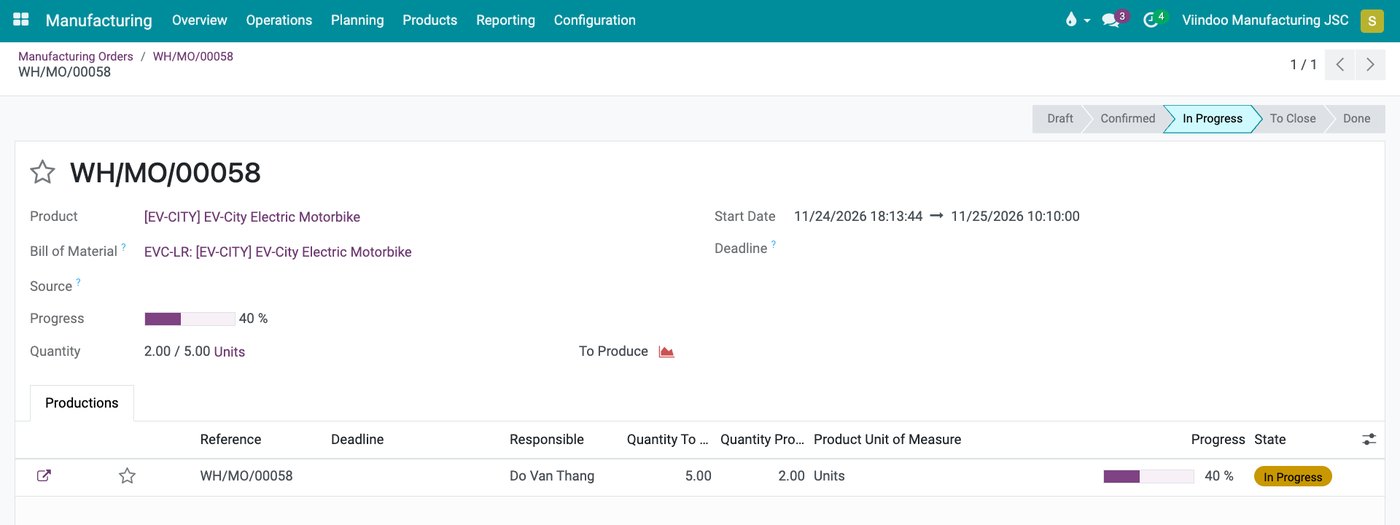
Overview Progress for an order in progress: 2 of 5 motorbikes produced, representing 40 percent.
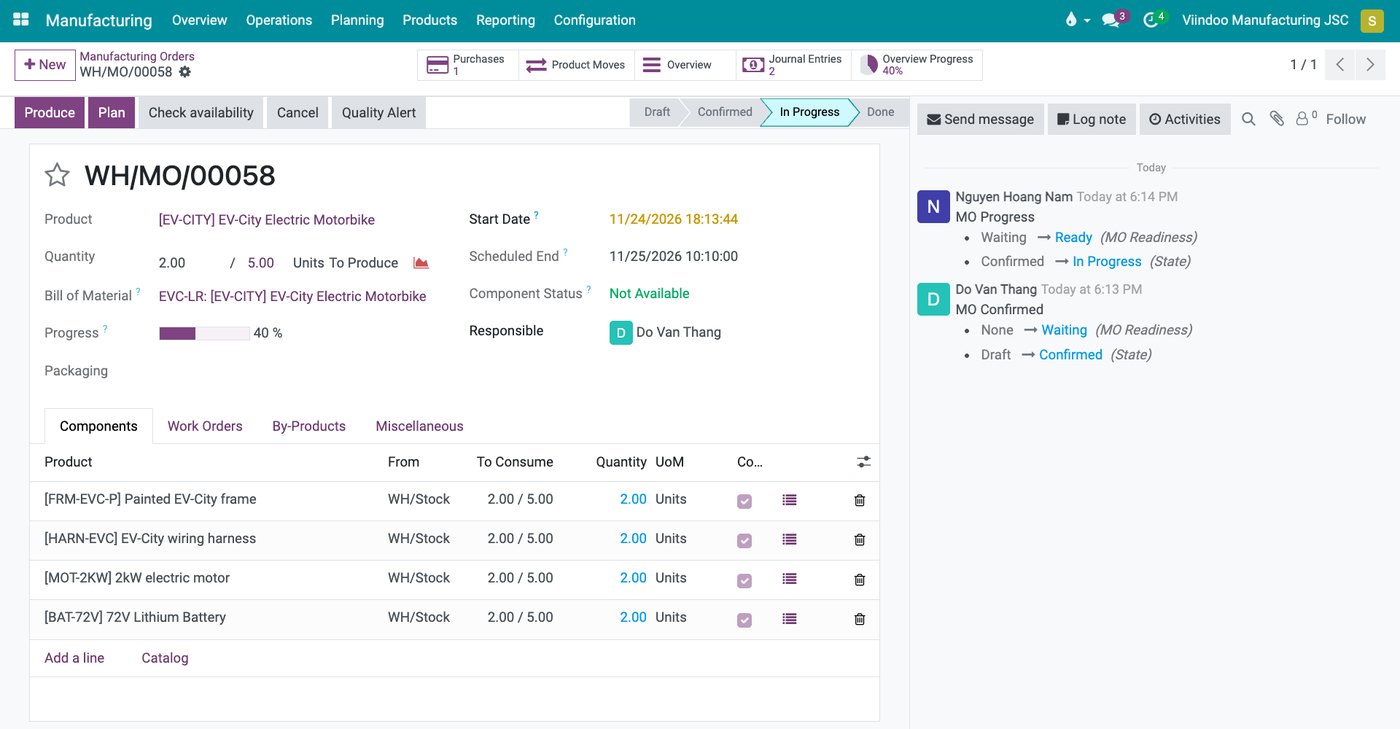
An order in progress: 2 of 5 motorbikes have been produced, 2 units of each component have been consumed so far, and the status change is recorded on the right.
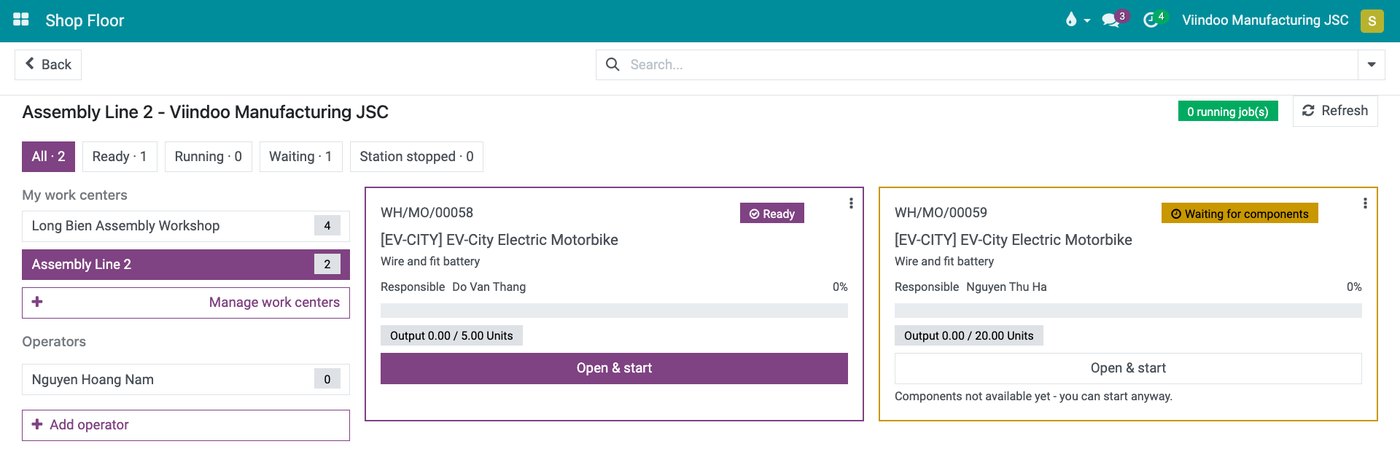
The Shop Floor job board: the work order associated with WH/MO/00059 is marked Waiting for components, and the operator is notified that not all required components are available yet.
Approval and printed orders
With the OmniApproval MRP Approvals module, a planner selects one or more manufacturing orders and submits them for approval in a single request. Each order appears as a line with its product, quantity, bill of materials, start date and person responsible, and the approvers approve or refuse the request. Bills of materials can be sent for approval in the same way, so a change of components is reviewed by a manager and the decision is recorded.
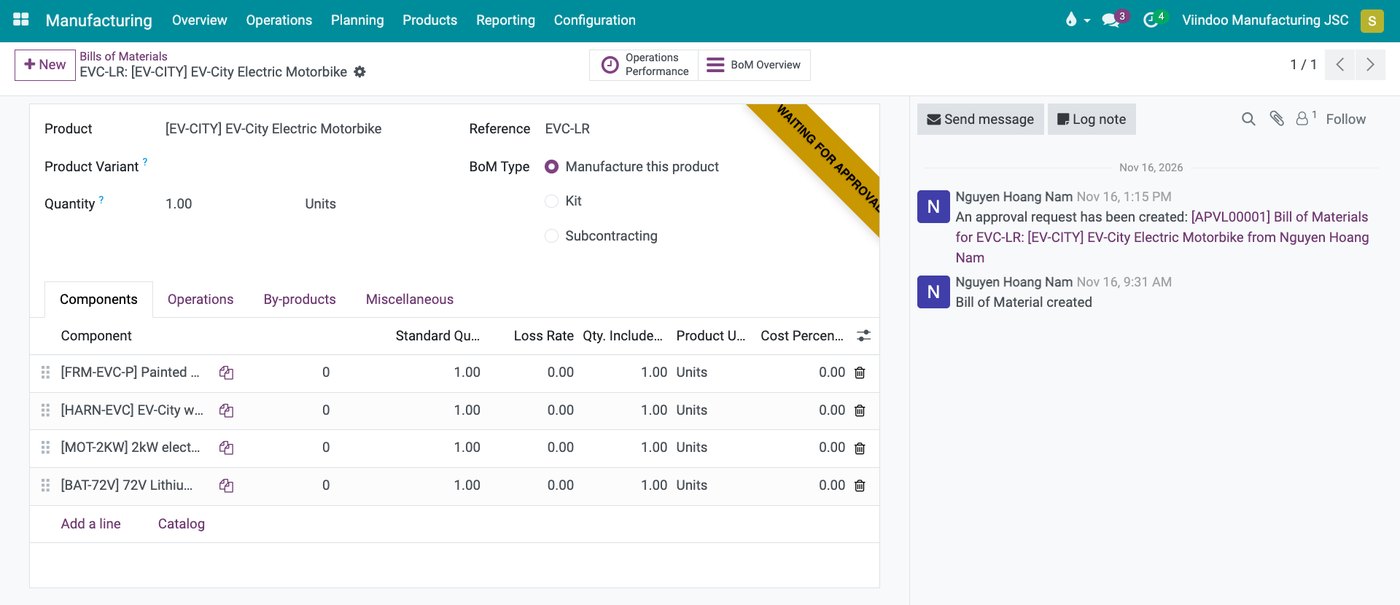
A bill of materials awaiting approval: the ribbon displays its status, and the chatter records the approval request.
The printed Production Order includes the source, person responsible, deadline, product and quantity, each operation with its work centre, duration and barcode, and all components to be consumed. It is printed from the same record held in the system, so the paper copy in the workshop matches the data in the office at the time of printing. Reprint the order after any change.
Actual consumption, loss and cost
The Flexible Consumption setting in each bill of materials determines how strictly consumption is controlled. The options are Allowed, Allowed with warning (the default, which summarises the differences when the order is closed), and Blocked. Under Blocked, only a manager can close an order whose consumption differs from the bill of materials. Viindoo Manufacturing also stores the standard quantity of each component when the order is confirmed. The Loss Components Analysis compares standard quantities, actual consumption and the differences by order, product, operation or date.
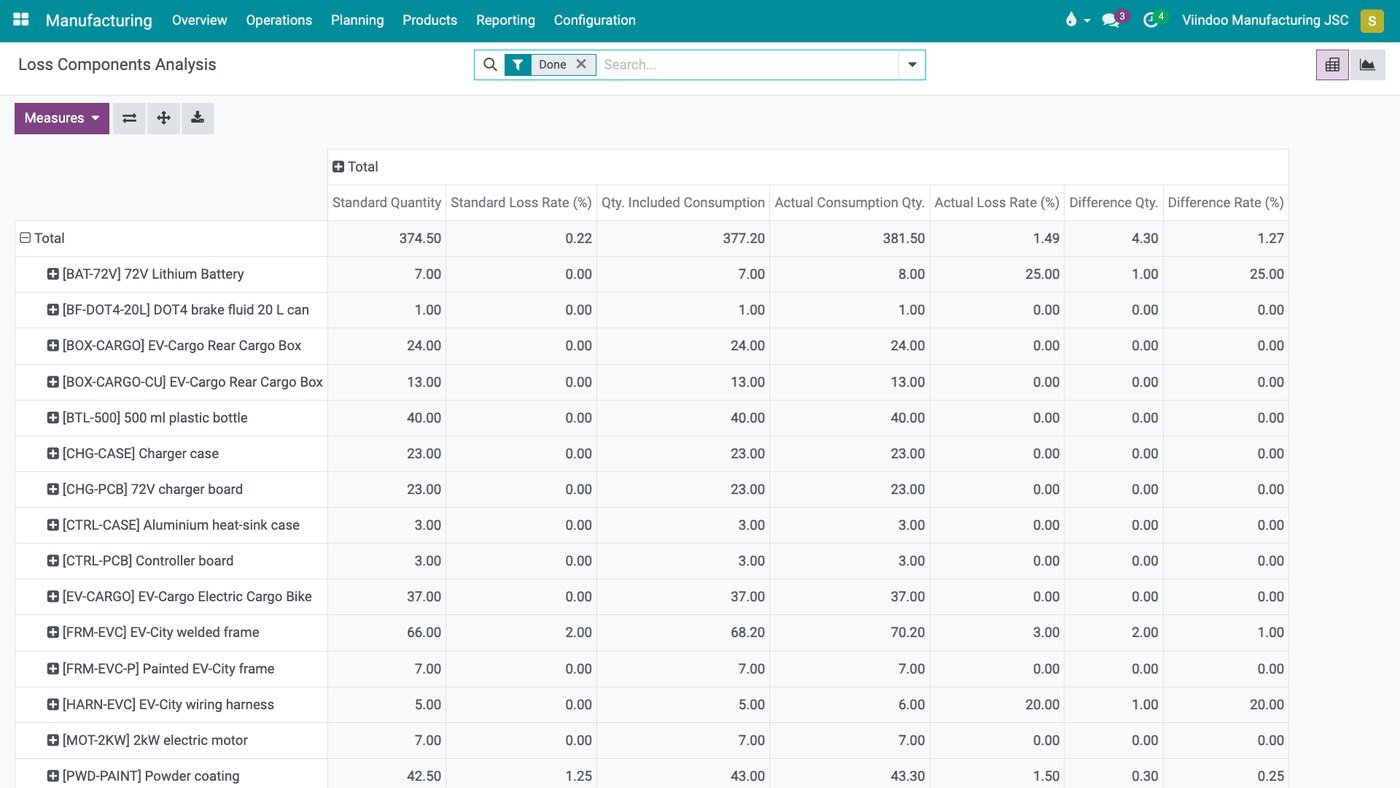
Loss Components Analysis for completed orders: in the test company, actual consumption of the 72 V battery is 8 units against a standard quantity of 7.
For a completed order, the MO Overview lists each component and operation, together with its quantity, unit cost and actual cost. It then shows the unit cost of the finished product. Accounting users of Advanced MRP Accounting can also access a Cost Analysis of the order once it is complete. How these figures feed into product cost is explained in the guide to calculating manufacturing cost. How to define the standard quantities is explained in the manufacturing BoM handbook.
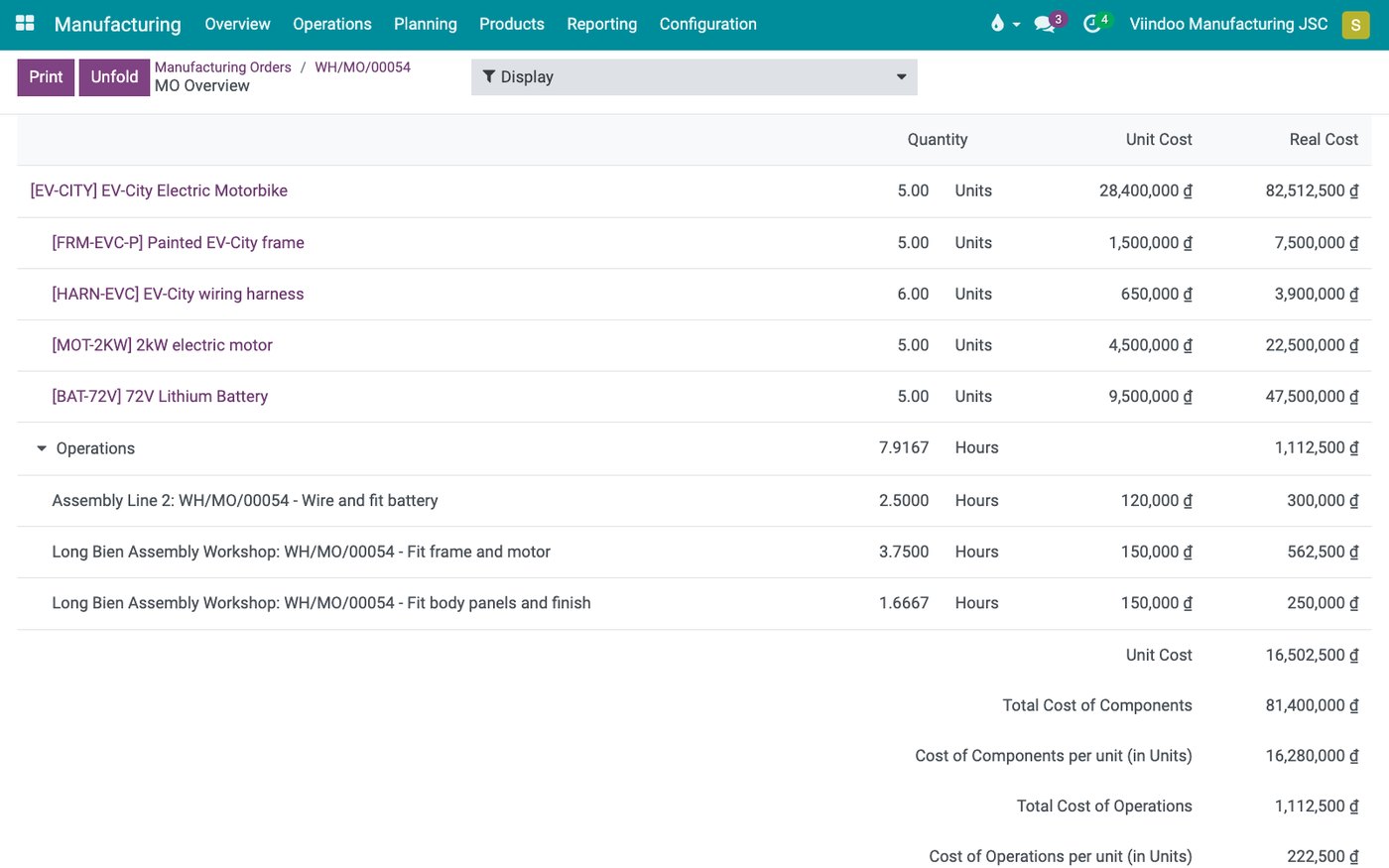
MO Overview of a completed order for 5 motorbikes: 6 wiring harnesses were consumed instead of 5. At 650,000 dong each, the additional wiring harness increases the batch cost by 650,000 dong, equivalent to 130,000 dong per motorbike.
Planning ahead of manufacturing orders using forecasts and safety stock falls within material requirements planning (MRP) and master production scheduling, rather than the manufacturing order itself. For an overview of all Viindoo manufacturing applications, visit the manufacturing features page.
Would you like to see how your own products move through the process from sales order to manufacturing order and cost calculation? Tell us where it hurts most. Book a consultation and bring a recent order with its bill of materials, or see the costs first.
Frequently asked questions about manufacturing orders
The person who decides what the workshop produces next, usually the workshop manager or business owner. More important than the job title is ensuring that the order documents its source, quantity, deadline and one person responsible, so that delays can be traced back to the relevant decision.
No. A manufacturing order covers the overall production requirement for a product and quantity. A work order covers one operation within that order at a specific work centre. An order for 20 motorbikes with three operations has three work orders.
Both approaches are used. Creating one order per sales order makes it easier to maintain the link to the customer for made-to-order products. Combining orders is suitable for standard products manufactured in batches. Either way, each order should still identify the sales orders it serves.
Yes, but changes should be made through a documented decision rather than a phone call. This may involve changing the quantity, splitting the order or producing part of the quantity now and the rest later. The warehouse and accounting departments then work from the same figures as the workshop.
Headcount matters less than the number of products, people involved and changes. If one person handles planning and orders rarely change, a spreadsheet works. If rush orders and shared editing are routine, the time spent reconciling files is usually the first sign that it is time to move on from spreadsheets.
A manufacturing order is an internal management document, so the company's own approval rules determine who signs it and when. Many companies require a signature only above a specified quantity or value threshold and record the approval in the system rather than on paper.
Related articles
- Before Releasing an Order: Is the Shop Floor Really Ready?
- Production Progress: Measure It Right, See Where It Slips, Handle Rush Orders
- Manufacturing BoM: A Handbook for Streamlined Manufacturing
- How to Calculate Manufacturing Cost: A Step-by-Step Guide
- Shop Floor Management: A Good Plan Is Not Enough to Run the Floor Right