AI in business operations does five kinds of work well: answering questions on the company's own figures, finding, summarising, drafting, and carrying out an action once a person confirms it. People keep three: deciding, approving and answering for the result.
Below, that line becomes a role table by type of work and by department, so each manager can name three tasks to hand to AI this month, each with a checker.
Why questions about AI in business operations get the wrong answer
Most answers arrive as a feature list or a demo on clean data. The manager then returns to a department where figures sit in several files and approval rules live in one person's head.
Two opposite mistakes follow. Some give AI too little: it polishes emails while the weekly report is still assembled by hand. Others give it too much: an AI answer about a discount goes into a quote nobody checked. Both come from one gap: the work was never split into tasks with an owner each.
Common signs: after months of trying AI, the head of sales still spends Monday morning collecting open quotes, and accounting still answers "who owes us most?" in a spreadsheet. Nobody is doing anything wrong; the task was simply never assigned.
AI changes tasks, not whole jobs
Research points the same way. A study by Eloundou and colleagues, published in Science in 2024 (DOI), went through the tasks of US occupations one by one and asked which a large language model could speed up substantially. Used on its own through a simple interface, it affected more than half the tasks in about 1.8% of jobs. With software built around it, that share rose to over 46%. AI pays off when it sits inside the tools and systems where the work is done.
For a manager, the unit of AI in business operations is therefore the task. "Can AI replace our accountant?" is the wrong question. "Can AI list the overdue invoices for our accountant every morning?" is one you can answer and test this week. Who benefits from the time saved is a separate decision, discussed in an earlier article on AI productivity gains.
A second finding explains why. In a 2023 field experiment with 758 consultants, AI clearly helped on tasks within its reach and made results worse on a task just outside it. That line is hard to see from outside, so the person who knows the work has to draw it, as argued in the article on AI and company know-how.
Neither study was done in Vietnam, and the first measures potential, not actual use. They support a way of working, not a forecast.
AI in business operations: five jobs for AI, three for people
Seen task by task, what AI in business operations can take on falls into five kinds of work. None of them ends with AI having the final word.
Answer questions on figures
Who owes most, which quotes are still open, what is below stock level. Answers come from the company's own records.
Find
A rule, a past note on a customer, the document a colleague wrote last year, without knowing where it is kept.
Summarise
Group, count, add up and rank: spend by supplier, overdue amounts by customer, stock by value.
Draft
A quotation, a request for quotation, an invoice or an email, prepared from data already in the system for a person to finish.
Act once confirmed
Create or change a record only after a person has seen the proposal and agreed.
People keep three things, and these are what make the five safe to hand over.
Decide
Price, discount, supplier, credit terms, exceptions. AI may supply the figures; the choice is a person's.
Approve
Within each person's limit and along the company's approval route. A proposal drafted by AI follows the same route as one drafted by a person.
Answer for the result
One named person per area, never the AI. Who answers when AI is wrong has to be settled before, not after.
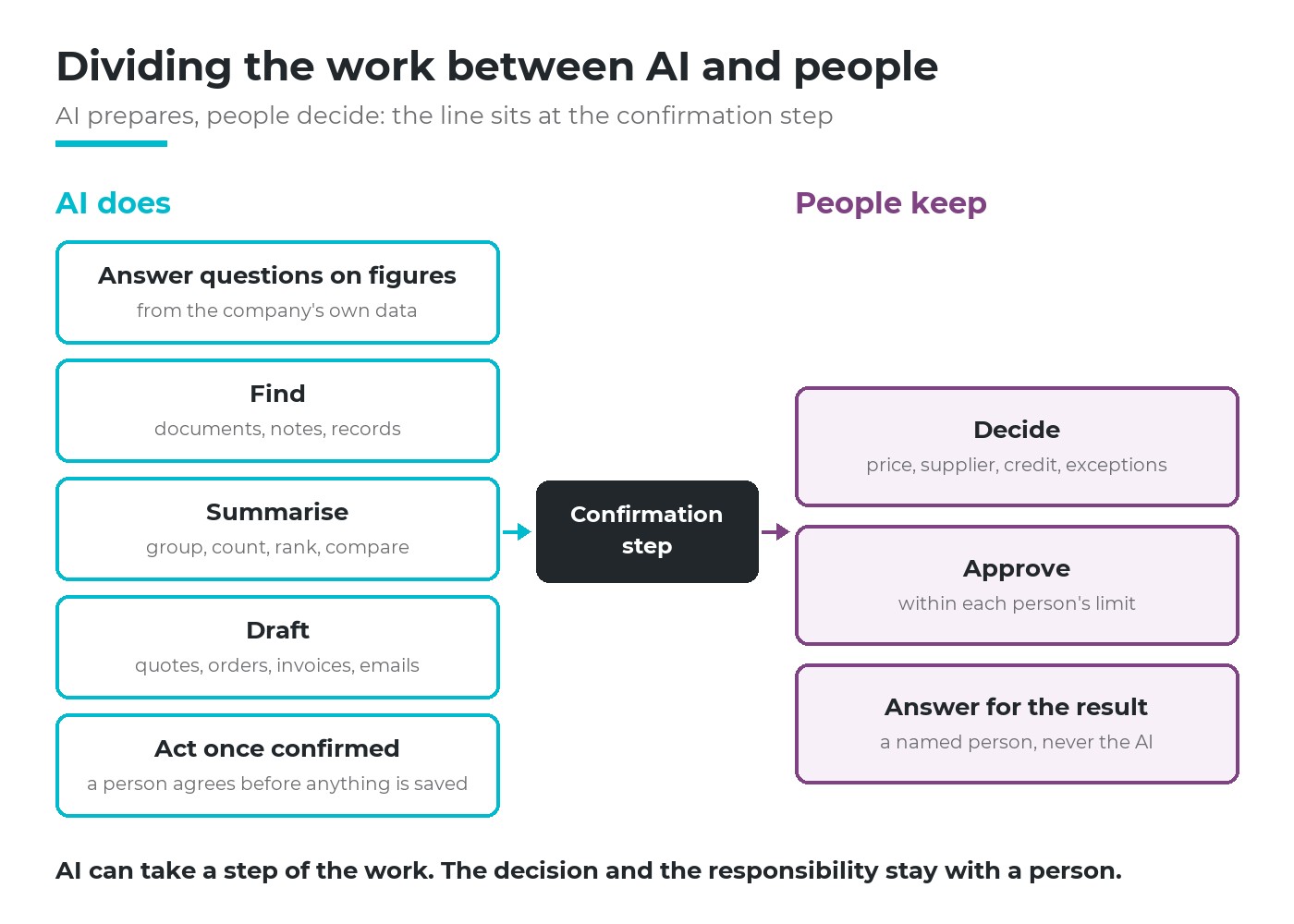
AI prepares, people decide. The line between the two sits at the confirmation step.
AI can take a step of the work. The decision and the responsibility stay with a person whose name is on it.
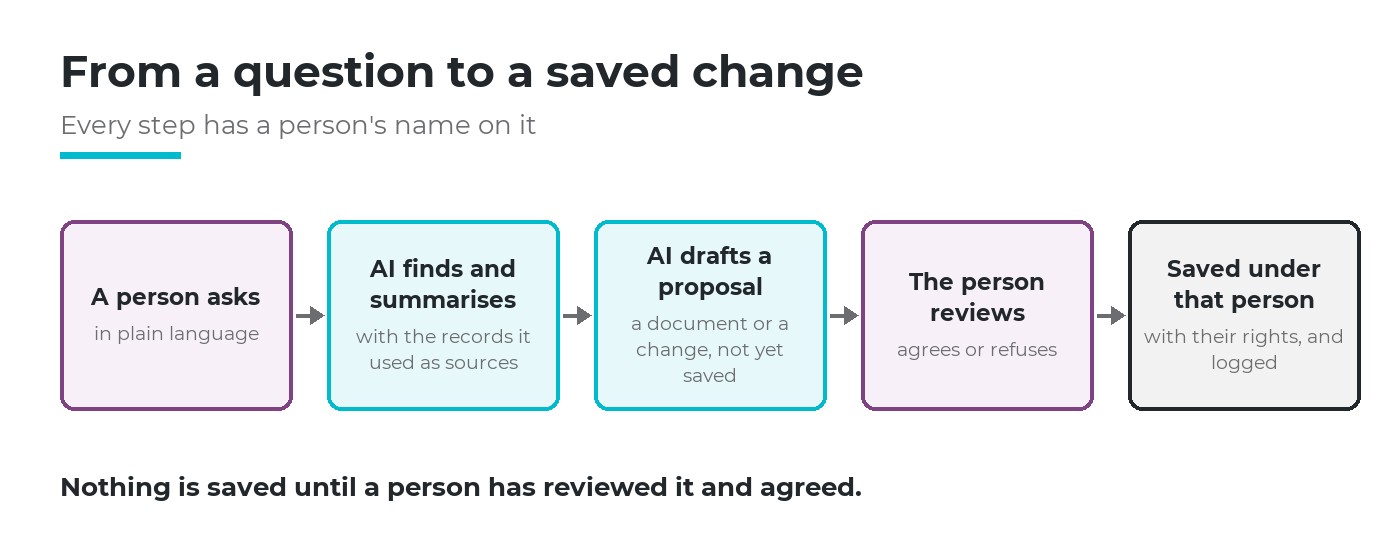
AI finds, summarises and drafts in the middle. A person starts the chain and closes it.
A role table by type of work
Read the right-hand column first: what the person keeps is the control point. If nobody is named for it, the row is not ready to hand over.
| Type of work | AI does | Person keeps |
|---|---|---|
| Looking up figures (receivables, stock, open orders) | Answers, with the records it used | Checks the source when the figure drives a decision |
| Finding documents, rules, past notes | Finds and quotes the relevant passage | Confirms the document is still valid |
| Recurring summaries | Groups, adds up and ranks on request | Reads it and decides what to do |
| Draft documents (quotes, RFQs, invoices) | Drafts from existing data | Edits, confirms, sends |
| Changes to records | Proposes the change with a reason | Agrees or refuses each proposal |
| Money or commitments leaving the company | Supplies figures only | Decides and does it |
By department: sales, accounting, warehouse, purchasing
The four departments that ask about AI in business operations most often, with example questions AI can answer from shared data.
| Department | Questions for AI | Drafts and summaries for AI | People keep |
|---|---|---|---|
| Sales | "Which quotes for customer X are still open, and when do they expire?" | A draft quotation from the customer's request | Price, discount, delivery promise, sending to the customer |
| Accounting and receivables | "Which customers owe the most?" "Which invoices are overdue and unpaid?" | A draft invoice to review | Posting, extending terms, payments |
| Warehouse | "Which items are below the level I set?" "Which locations show negative stock?" | A ranking of items by stock value | Counting, stock adjustments, write-offs |
| Purchasing | "Which supplier did we buy most from this month?" "What are supplier X's price and lead time for item Y?" | A draft request for quotation | Choosing the supplier, confirming the order through the approval route |
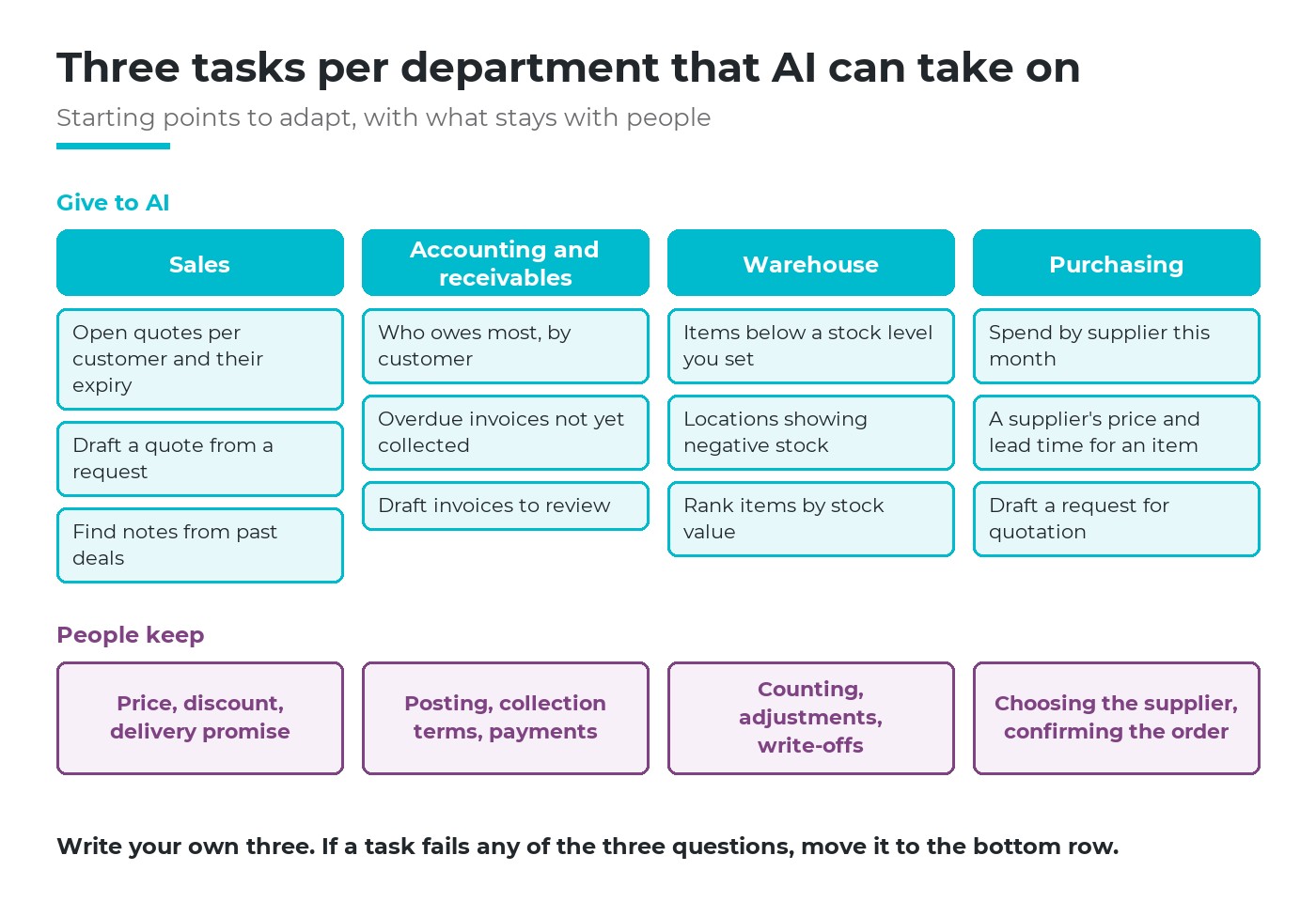
Starting points, not a standard. Each department writes its own three and names the checker.
Two things stand out. First, many useful questions cross departments: sales asking what a customer owes, purchasing asking what stock is left. They only work when departments share one set of data and it is clear who may see what.
Second, AI answers often expose a data problem rather than solve it. A location with negative stock is fixed by a person finding the unrecorded receipt. AI shows where to look; people fix the cause.
Three questions to choose a task
Whether a task belongs to AI in business operations depends on three questions about that task, not about the department.
Is the input in the company's data?
If the know-how lives only in one person's head, AI has nothing to work from.
Can a person check it quickly?
A figure with its source, or a draft that takes a minute to read.
Can a mistake be undone inside?
Nothing has reached a customer, a supplier or the bank yet.
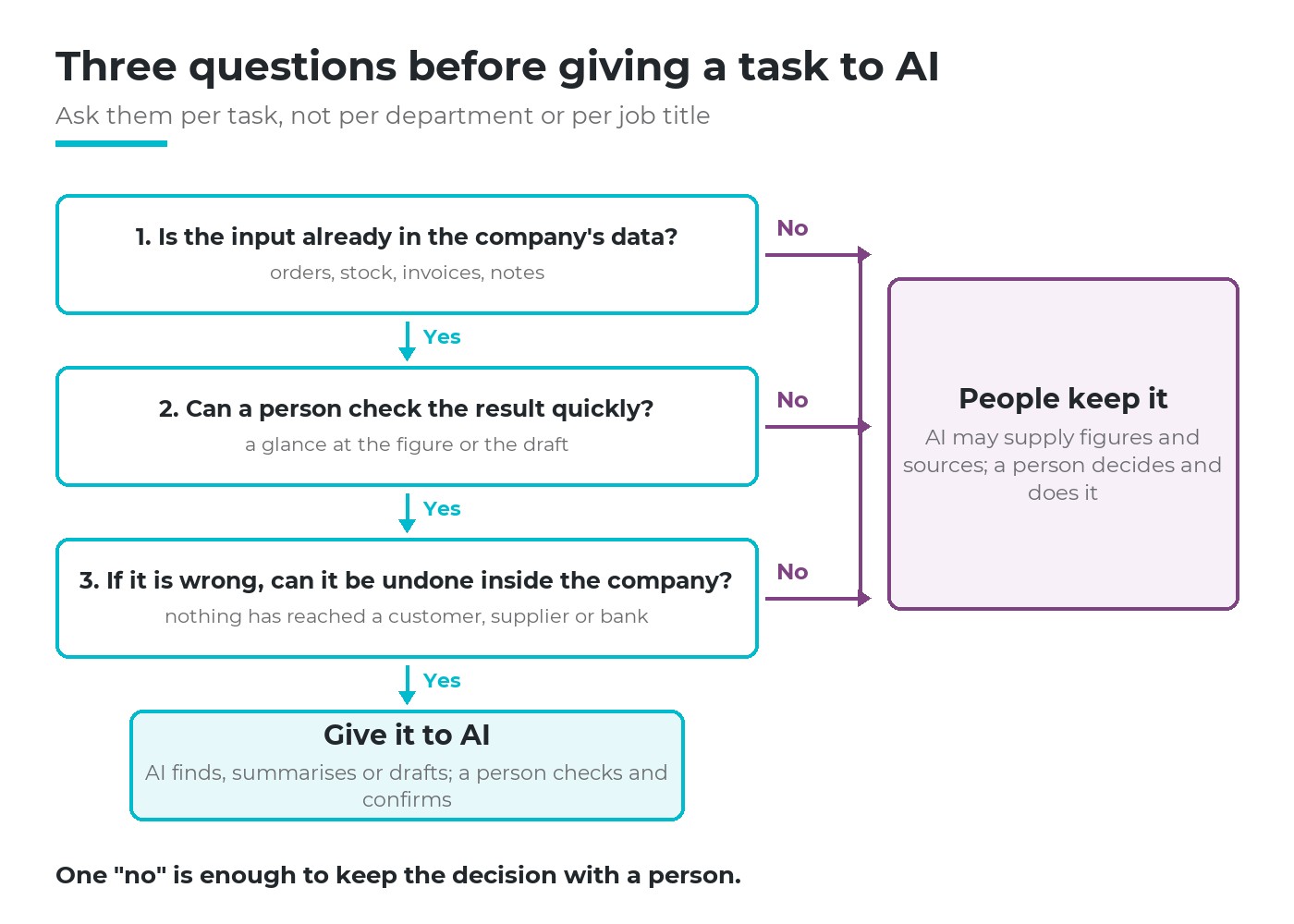
Three "yes" answers: AI drafts and a person confirms. One "no": the decision stays with a person.
Most real work splits. AI drafts the quote, which passes all three questions; the discount in it fails the third once sent, so the salesperson sets it before the quote leaves. Splitting tasks this way is most of the skill.
Work not to give AI yet
- Money or commitments leaving the company: payments, confirming a purchase order, sending a quote nobody has read.
- Decisions about people: hiring, appraisal, discipline.
- Exceptions and first times: a new supplier, a customer asking for more time to pay, a price below the floor.
- Work whose data is not in the system yet: AI cannot answer from files it has never seen.
- Work with no clear owner: if nobody knows who does it today, giving it to AI only makes the confusion faster. Write the process first.
"Not yet" is not "never". As data and approval routes settle, some of these move up. What does not work is banning AI without offering a controlled place to use it: staff then turn to AI tools outside the company's system, where nobody sees anything.
Self-check: three tasks in your department
Take one sheet. List ten tasks your department repeats every week. Run each through the three questions above, then use the prompts below to sharpen the list.
Repeated questions
Which figure does someone collect by hand more than once a week?
Documents rewritten
Which document is written almost the same way every time?
"Where is it?"
Who keeps asking colleagues where a rule or a note is kept?
Named checker
For each task, who checks AI's work, and how long does it take them?
Way back
If a draft is wrong, who notices and where is it fixed before it reaches anyone outside?
Right to see
Is the person asking allowed to see all the data the answer needs?
The result: three tasks that pass all three questions, each with a named checker. If three is hard to find, start with a question task such as overdue invoices: it changes no data. Those three tasks are your department's own answer on AI in business operations.
The direction Viindoo has chosen
Viindoo puts AI inside the management system, working like a team member within the authority the company gives. Staff ask in plain language and AI answers from the company's own sales, purchasing, inventory and accounting data, with sources they can click to open. AI only sees what the person asking is allowed to see: a warehouse clerk without accounting rights does not see accounting figures. AI drafts quotations, requests for quotation, leads and invoices, which are saved only when the user reviews the proposal card and agrees. Every change AI proposes runs under the name and rights of the person who agreed, and is logged; each request records who asked, which tools AI used and what it cost. The company sets daily AI spending caps per user and per company, beyond which requests are blocked, and chooses its own AI provider with its own key. That is AI in business operations as this article describes it: AI prepares, people decide.
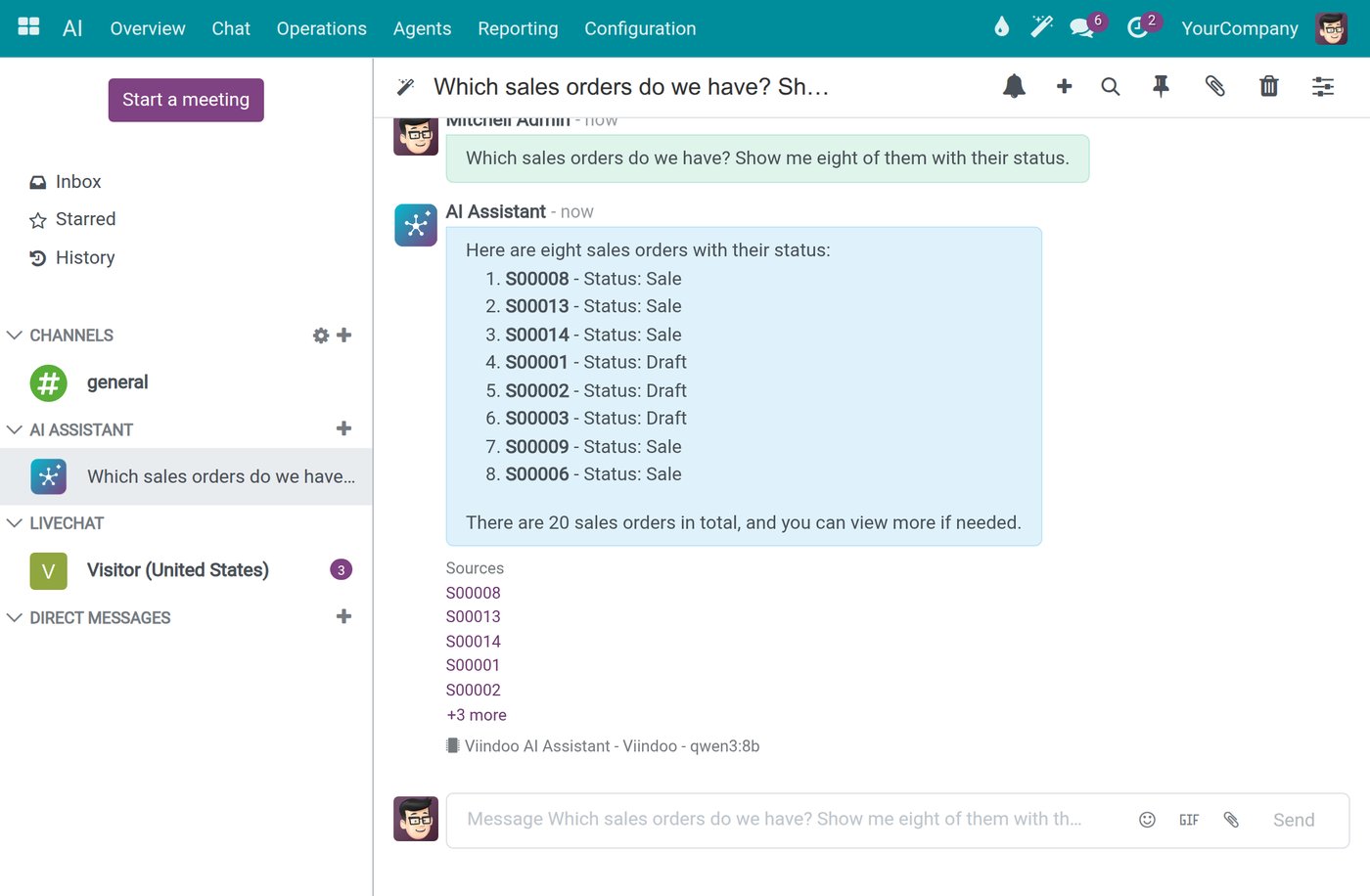
Example: asked for a list of sales orders, AI answers with a Sources list; each order number opens the record.
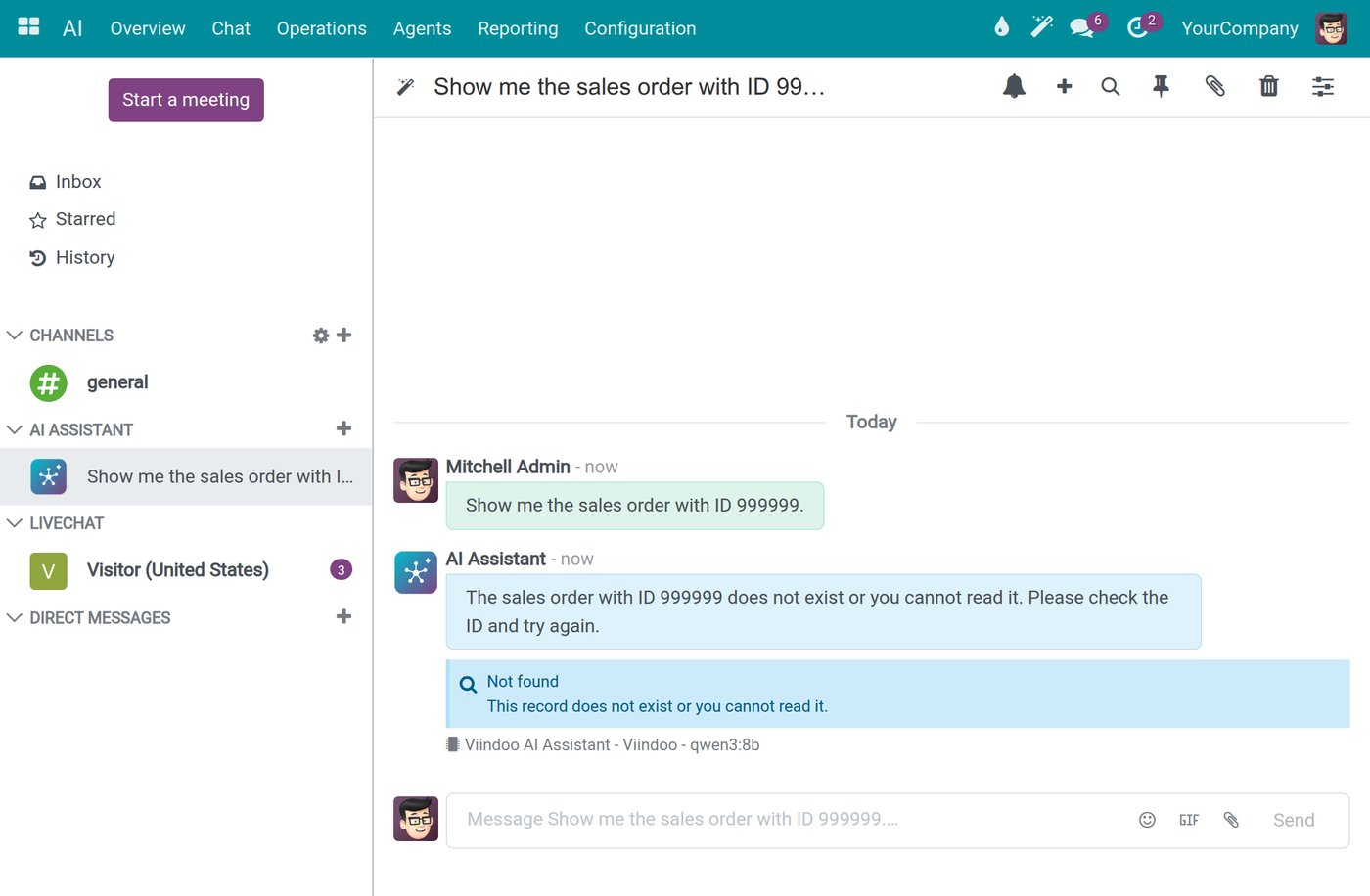
Example: asked about an order that does not exist or that the user may not read, AI replies "Not found" instead of guessing.
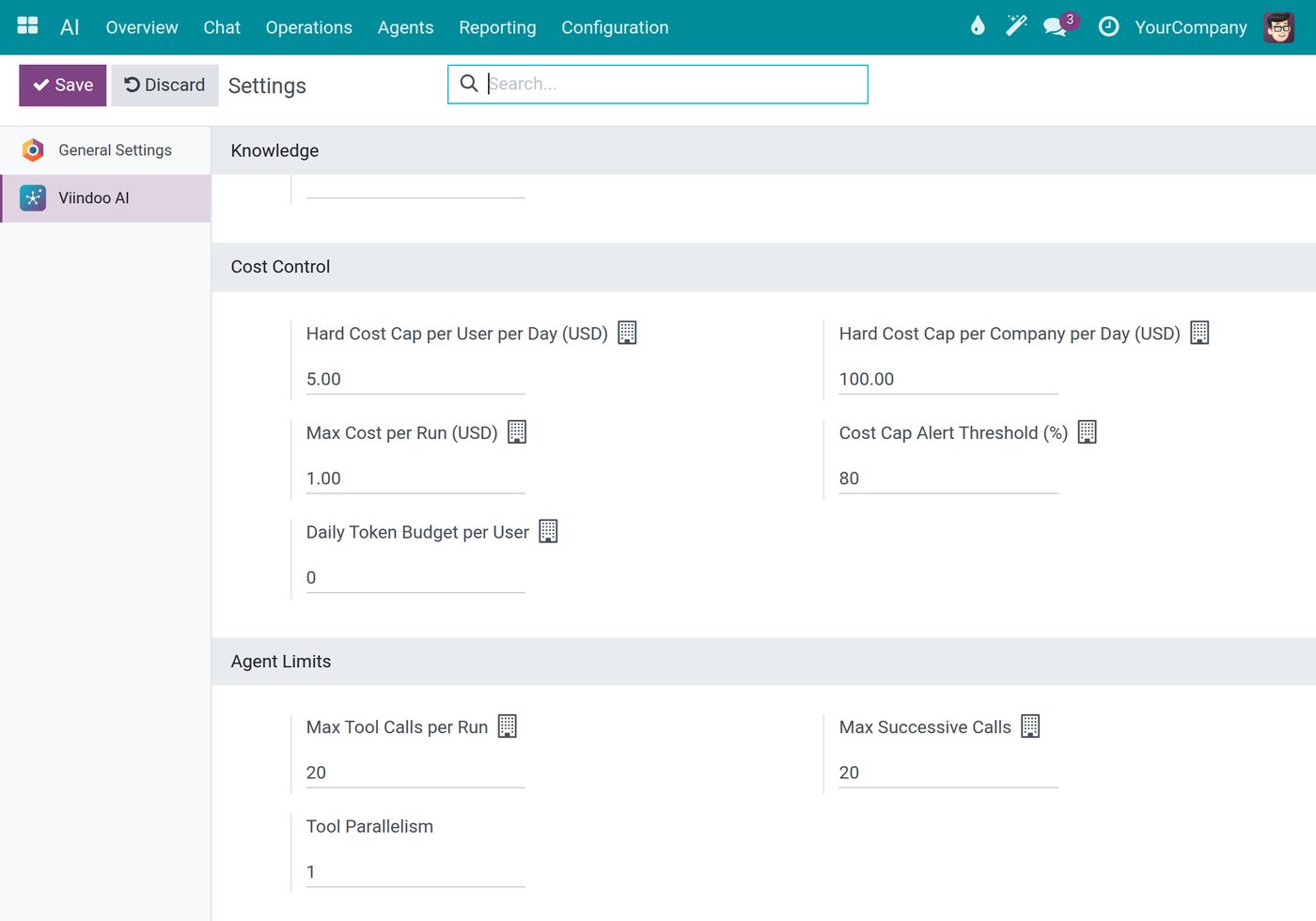
Example: daily AI spending caps per user and per company, set by the administrator.
Frequently asked questions
AI takes over steps such as collecting figures and drafting. Deciding, approving and answering for results remain people's work.
The one with the most repeated questions on figures that already sit in the system, often receivables or sales. Question tasks change no data, so they are the safest start.
No. Approval is one of the three things people keep. A proposal drafted by AI should go through the same approval route and limits as one drafted by a person.
Not sure which three tasks your department should hand to AI first? Tell us where it hurts most. Book a consultation and we will go through your list with you, or see the costs first.
Sources
- Eloundou, T., Manning, S., Mishkin, P., & Rock, D. (2024). GPTs are GPTs: Labor market impact potential of LLMs. Science (2024).
- Dell'Acqua, F., McFowland III, E., Mollick, E., et al. (2023). Navigating the Jagged Technological Frontier: Field Experimental Evidence of the Effects of AI on Knowledge Worker Productivity and Quality. Harvard Business School Working Paper 24-013. 758 consultants.