Managing customers on Zalo works well while the business is small. The salesperson replies quickly, sends a price list, and the customer orders. Then the team grows, the quotations move into Excel files, and something changes: customers who asked for a price simply disappear, and nobody can say when, or why.
The short answer: customers are rarely lost at the price. They are lost in the gaps between a chat message, a spreadsheet and one person's memory. Closing those gaps does not require banning Zalo or abandoning your quotation templates in Excel. It requires deciding who owns the conversation, and making every enquiry move through a few fixed checkpoints.
Why customers drop out midway
Follow one enquiry from start to finish and the drop-out points become visible. There are usually five, and each one has a cause in how the work is organised, not in how hard people try.
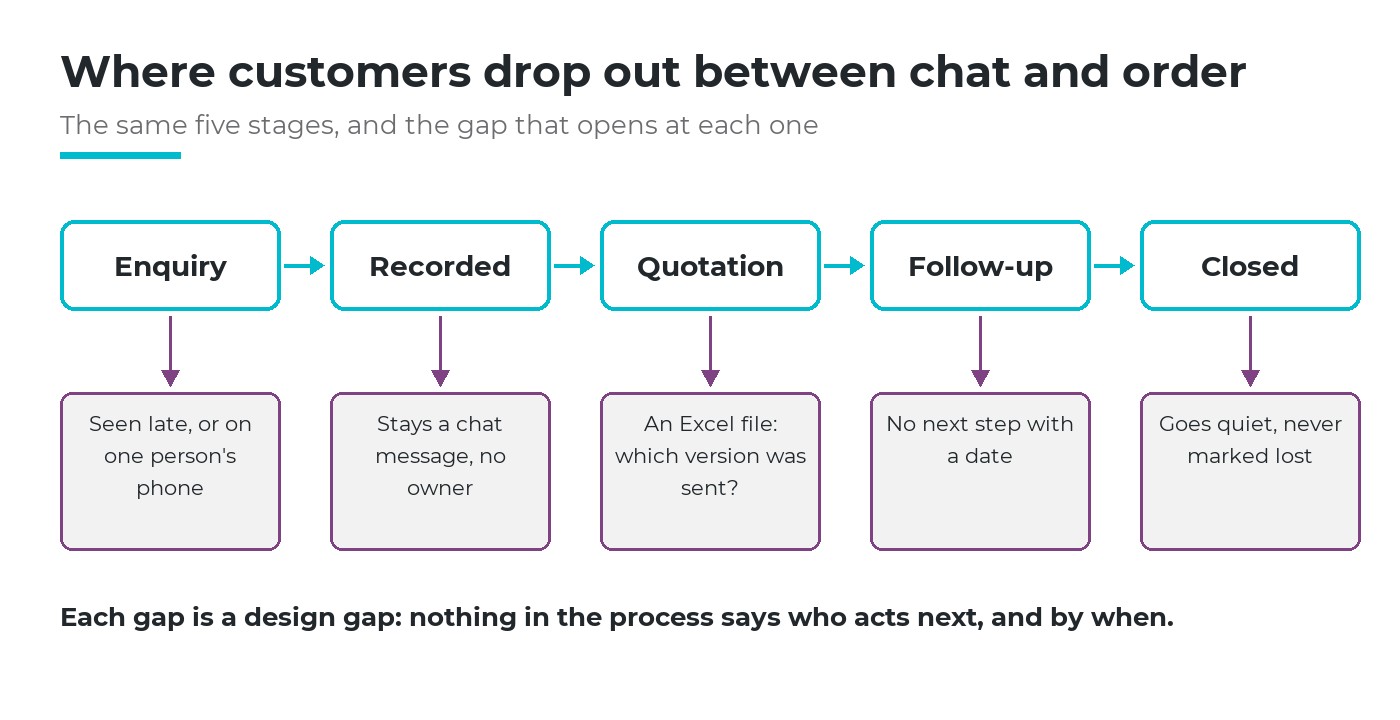
Five stages from enquiry to close, and the gap that opens at each one.
1. The conversation sits on one person's phone
When customers message a salesperson's personal Zalo, the company has no view of them. If the salesperson is busy, on leave or in a meeting, the message waits. The manager learns about the customer only when the salesperson mentions them.
2. An enquiry stays a message
A message is not a record. It has no owner, no estimated value, no stage and no next step. Ten conversations later, it has scrolled out of sight. This is why many teams cannot answer a basic question: how many open enquiries do we have right now?
3. The quotation is a loose file
An Excel quotation is easy to make and hard to manage. Which version did the customer receive? Is the price still valid? Did anyone change the discount? The file lives in a folder or a chat attachment, separate from the conversation that led to it.
4. No next step with a date
After the quotation is sent, follow-up depends on memory. Some customers get three calls, others none. Without a dated next step, there is nothing for anyone to check.
5. Silence is never recorded as a loss
A customer who stops replying is neither won nor lost; they simply fade. Because nothing is recorded, the business never learns the real reasons: price, delivery time, a competitor's offer, or no urgent need.
When salespeople skip steps, it is a symptom. The cause is a process that never said who acts next, and by when. Asking people to try harder does not fix a gap that the design left open.
The principle: a chat channel is a door, not a filing cabinet
Zalo is where Vietnamese customers already are, so it is the right door. The mistake is using the door as the filing cabinet, and it is the most common mistake in managing customers on Zalo. Good practice in customer relationship management separates the two: the channel receives the conversation, the customer record keeps it.
The customer should be talking to the company, not to one employee's phone.
Two decisions follow. First, the company owns the channel: customers message the company's Zalo Official Account (Zalo OA), and named people are assigned to answer. Second, every real enquiry becomes an opportunity with an owner, a value and a next step, and every quotation is created from that opportunity.
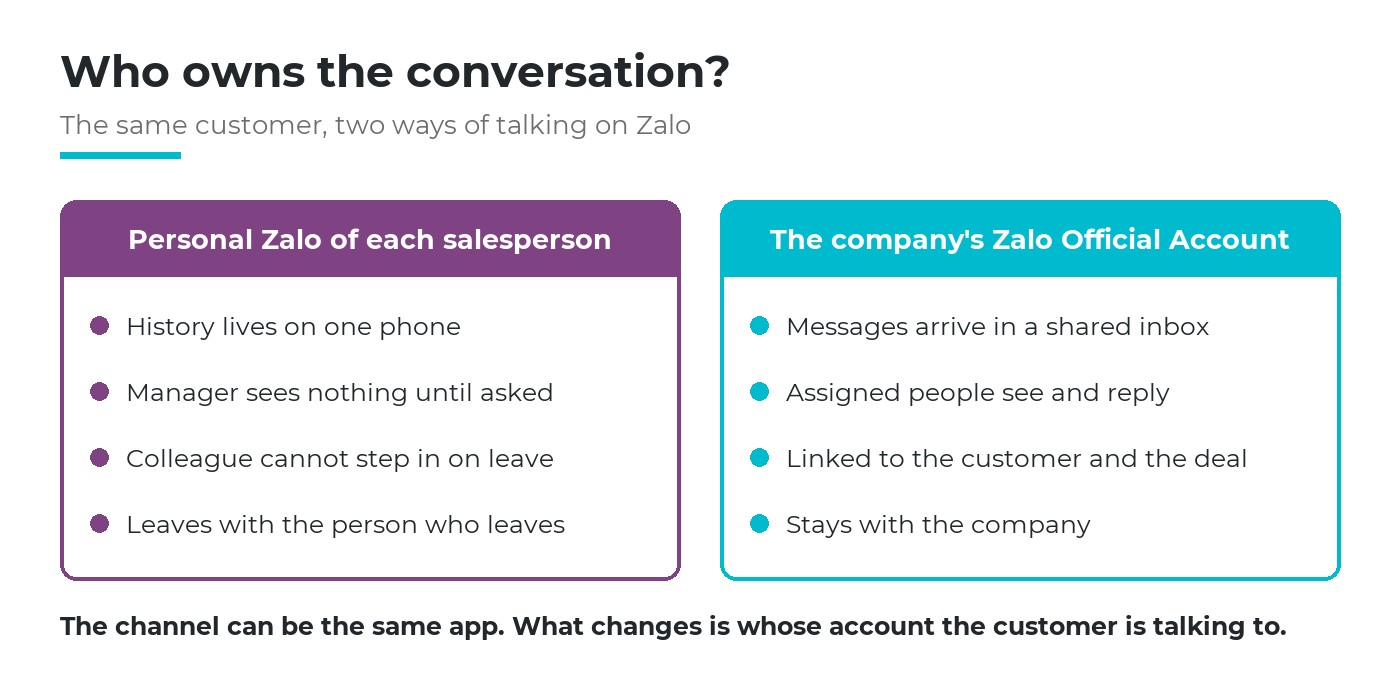
Same app, different owner: the customer talks to the company, not to one phone.
Five checkpoints for managing customers on Zalo
The work becomes manageable when each enquiry passes the same five checkpoints, from the first message to the final answer. Each one answers a question a manager would otherwise have to ask in person.
Checkpoint 1: one inbox, named people on duty
All customer messages arrive in a shared inbox that several people can see. The company decides who is on duty and how quickly a first reply is expected, for example within two working hours (illustrative example).
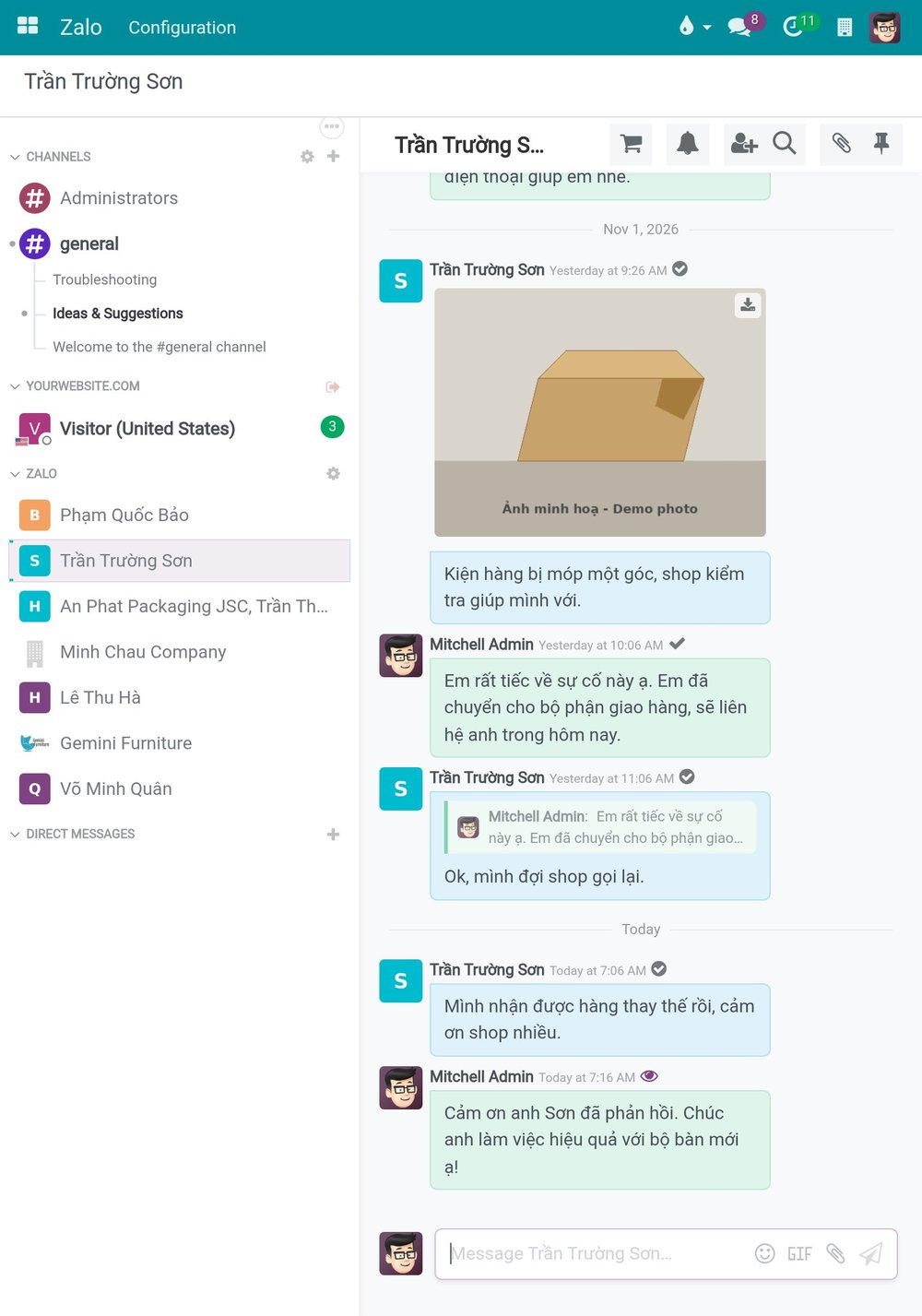
Example: customer conversations from the company's Zalo account, listed in a shared inbox where assigned staff read and reply.
Checkpoint 2: every real enquiry becomes an opportunity
Not every message is a sale. A question about opening hours is not. A request for a price, a sample or a delivery date is. The rule is simple: once a customer asks about buying, the person on duty creates an opportunity and an owner is assigned. Teams that already run a lead management process will recognise this as the qualification step.
Checkpoint 3: always a next step with a date
An open opportunity without a planned activity is a warning sign. The salesperson schedules the next action, such as a call, a meeting or a reminder to send samples, with a due date. The manager does not need to ask for news; overdue activities show up on their own.
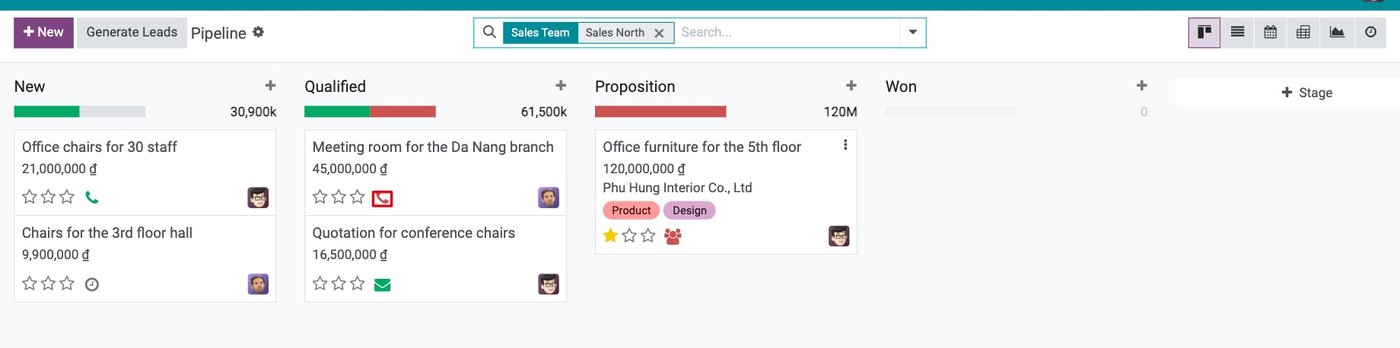
Example: each opportunity in the pipeline carries its next activity; the red icon marks one that is overdue.
Checkpoint 4: the quotation is created from the opportunity
The quotation is made inside the system, from the opportunity, using the company's price list. It gets a number and an expiry date. The customer can receive it as a link, and each sending leaves a trace on the quotation. Excel remains useful for analysis; it stops being the place where the official price lives.
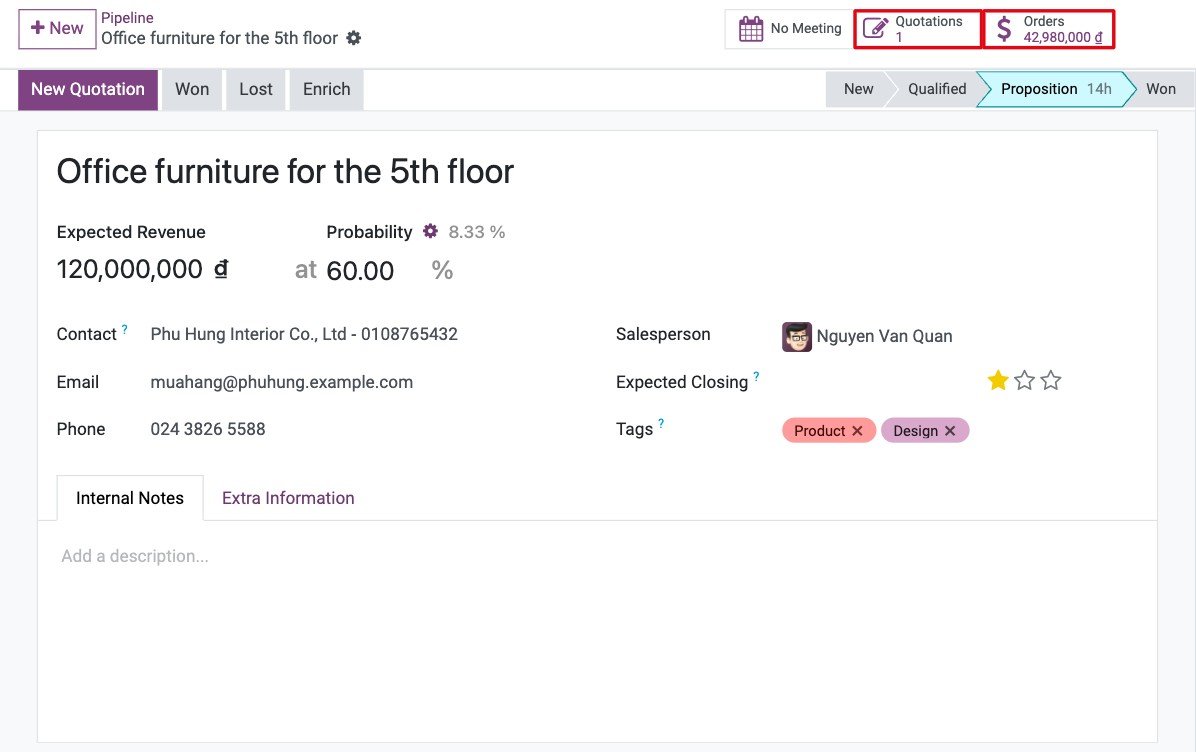
Example: the opportunity shows how many quotations were made from it and the value of confirmed orders, one click away.
Checkpoint 5: every opportunity ends, with a reason
An opportunity ends as won or lost. When it is lost, the salesperson picks a reason from a short list agreed in advance and adds a note. After a quarter, the list of reasons tells the director more than any meeting: whether the problem is price, delivery lead time or follow-up. It also makes sales pipeline analysis honest, because dead deals stop inflating the forecast.
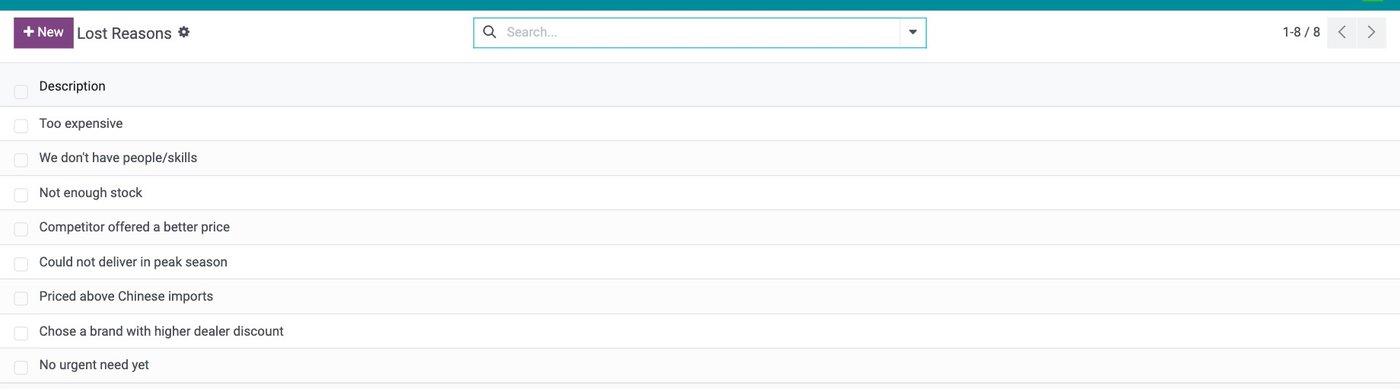
Example: a short list of lost reasons that every salesperson chooses from when closing a lost opportunity.
| Checkpoint | Who does it | Question it answers |
|---|---|---|
| Shared inbox | Staff on duty | Has every customer had a reply? |
| Opportunity | Staff on duty, sales manager assigns | How many open enquiries, worth how much? |
| Next activity | Opportunity owner | Who is following up, by when? |
| Quotation | Opportunity owner | What price did the customer receive? |
| Close and reason | Opportunity owner, reviewed by manager | Why do we win, why do we lose? |
When a salesperson leaves, the customers stay
This is the moment that tests the whole design. If conversations lived on a personal phone and quotations in a personal folder, the customer relationship leaves with the person. Managing customers on Zalo through a company account changes the handover into an administrative step.
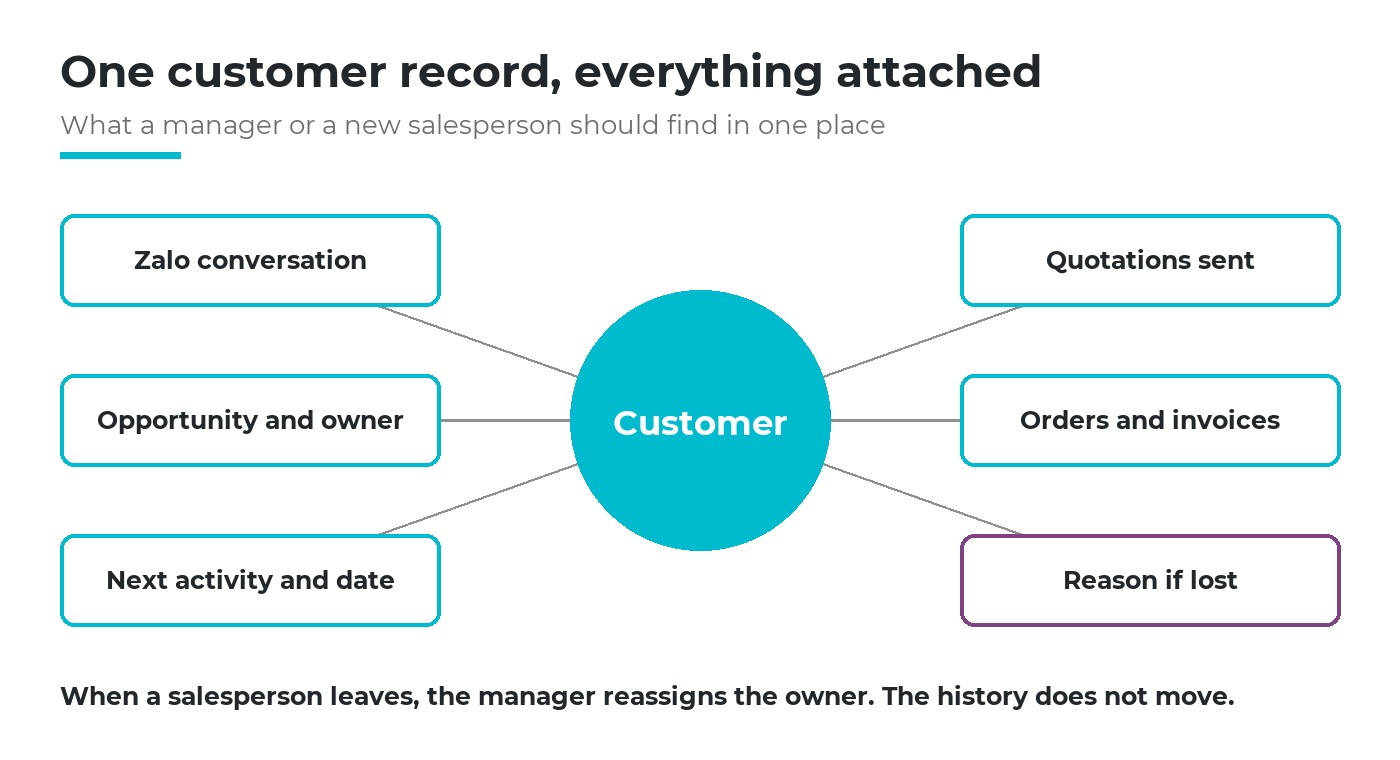
Everything about the customer is attached to one record, so a handover changes the owner, not the history.
- Reassign, do not re-collect. The manager filters the open opportunities of the person leaving and assigns them to colleagues in one go.
- History stays where it was. Messages, notes, activities and quotations remain on the opportunity and the customer record.
- The customer keeps the same contact point. They keep messaging the same company account; a new person simply answers.
A useful test: pick any active customer and ask a colleague who has never served them to explain the situation in five minutes. If that is impossible, the knowledge still lives in someone's head.
How software supports this
The checkpoints can be run on paper, but software makes them cheap to keep. When choosing a tool for managing customers on Zalo, look for these four things rather than a long feature list.
The channel arrives inside
Messages from the company's Zalo account land in the same system as opportunities and orders, not in a separate app.
From chat to record in one step
Turning a conversation into an opportunity or a quotation does not require retyping the customer's details.
History on the document
Open the quotation or order and the related messages are there, for anyone with access.
Reasons you can count
Lost reasons and overdue activities can be filtered and counted, so the review meeting starts from facts.
Example: how it works on Viindoo
On Viindoo, managing customers on Zalo starts when the company connects its Zalo Official Account, and customer messages arrive in Discuss for the staff assigned to that account. Anyone who messages the account gets a contact record. From the conversation, staff can create a lead, or build a quotation from the product list without leaving the chat. Leads created this way are tagged with the "Zalo OA" medium, so the team can see how many come from Zalo. More detail is on the Zalo integration page.
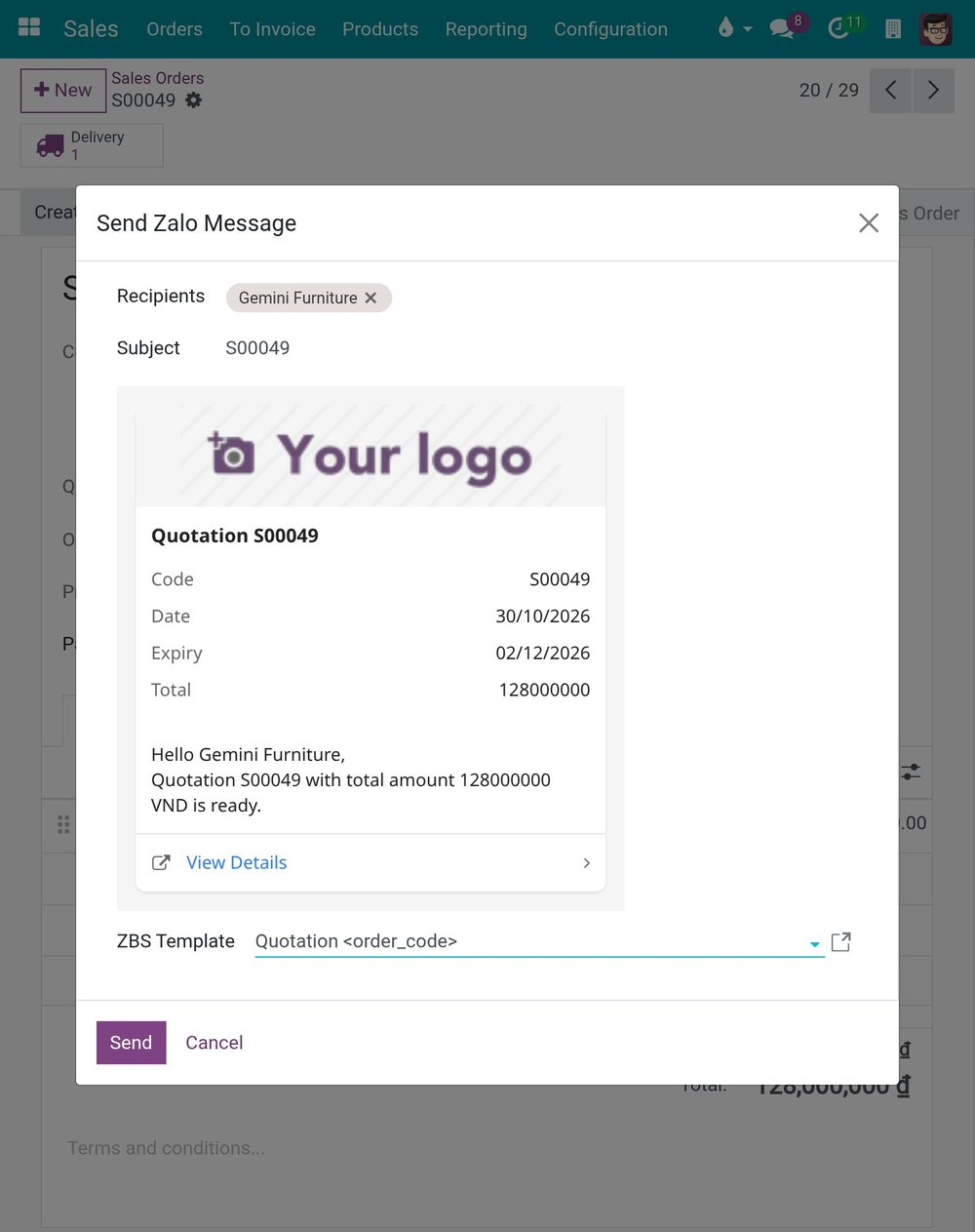
Example: from the quotation, staff send a Zalo template message with the quotation number, total and expiry date, and a link for the customer to view it.
Quotations are sent to the customer on Zalo as template messages approved by Zalo, with the quotation details and a link to view it. Once a template has been sent from a quotation or order, later messages in that conversation are also copied to the document's history, so whoever opens the order sees what the customer said. Opportunities, activities, quotations made from opportunities and lost reasons follow the standard CRM and Sales apps.
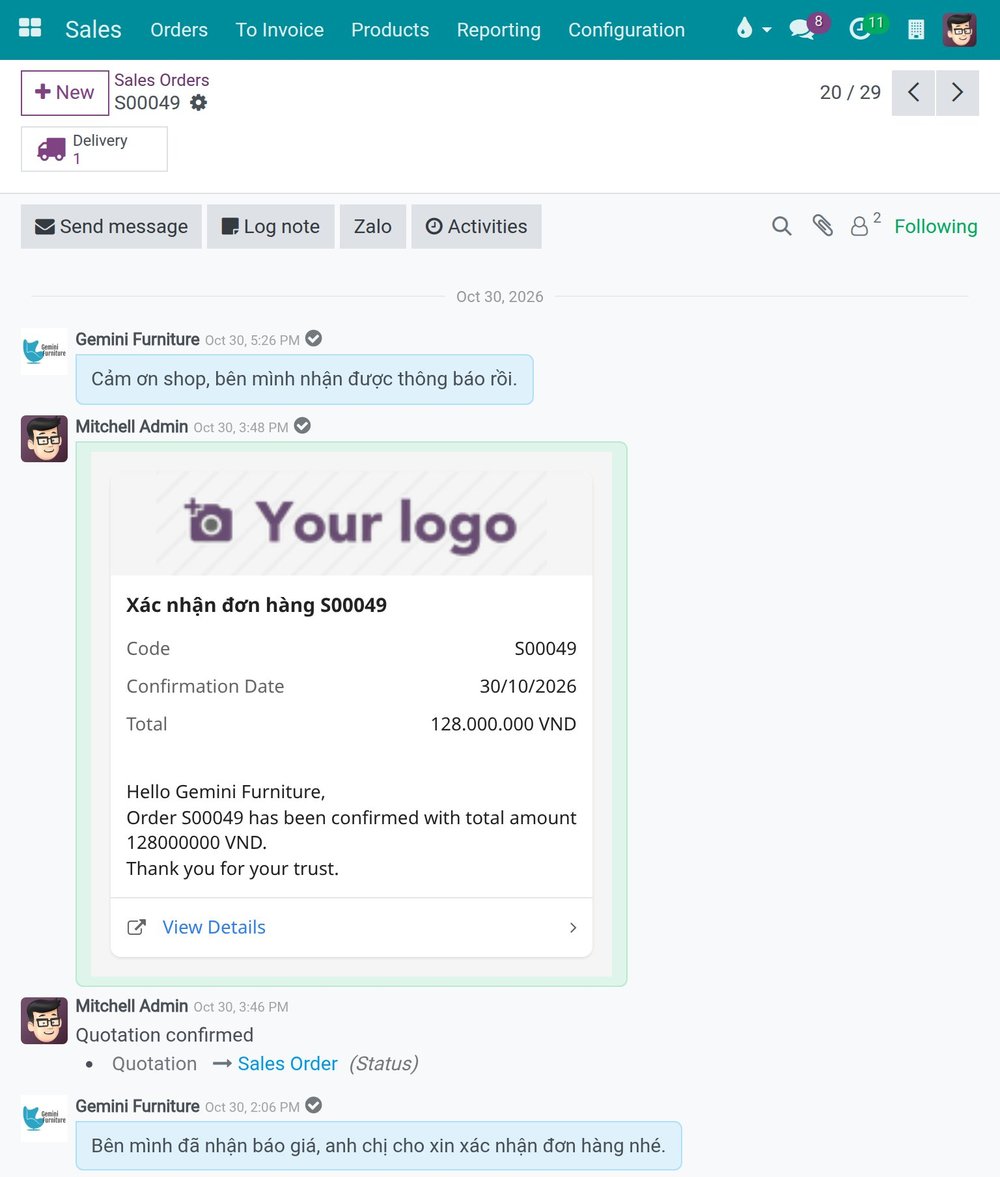
Example: the order's history shows the customer's Zalo replies alongside the confirmation sent to them.
What you can ask AI in this area
If the company uses Viindoo AI, sales managers can ask questions in Vietnamese and get answers from the company's own data, with sources to click open: "Which quotations for customer X are still open, and when do they expire?" or "What should I do next on this opportunity?". The AI only sees what the person asking is allowed to see.
AI can also draft a lead or a draft quotation; nothing is saved until the user reviews the proposal card and clicks to agree. On the website chat, AI answers visitors from the content you have published and hands over to staff when the customer needs it. Zalo conversations are answered by your staff.
Six questions to check your own team
Answer them honestly to see how far your team has come in managing customers on Zalo.
Whose account?
Do customers message the company, or individual salespeople?
How many open?
Can you say today how many enquiries are open, and their value?
Next step?
Does every open opportunity have a dated next activity?
Which price?
Can you find the exact quotation a customer received last month?
Why lost?
Do you know the top three reasons you lost deals last quarter?
If they leave?
Could a colleague take over a salesperson's customers tomorrow?
Frequently asked questions
A ban is hard to enforce and annoys customers who already have a salesperson's number. It works better to make the company account the official channel for prices, quotations and orders, and to record any deal agreed elsewhere as an opportunity the same day.
It can happen, because a new Zalo sender is given a new contact record. Agree who reviews new Zalo contacts each week and merges duplicates, so each customer keeps one history.
Your terms, notes and the product lines you quote most often can be moved into a quotation template in the system. What changes is where the official price is created and stored.
Managing customers on Zalo and still losing them midway? Tell us where it hurts most: we will look at one recent enquiry with you and show where it slipped. Book a consultation or see the first-year cost.
Related articles
- Lead management process: The importance and solutions for managing
- Sales Pipeline Analysis: Everything You Need to Know
- Download 5+ beautiful product quotation templates in Excel and Word
- 5 effective multi-channel customer care software
- The power of effective Customer Data Management: A Look at Viindoo Software