A discount approval workflow answers a question every sales director hears each month: a customer wants 12% off, the salesperson may give 5%, so who says yes, and where is that yes written down? In many companies the answer is a phone call, a chat message and a manager who approves from memory.
The short answer: write the rules before anyone asks. A price list sets the standard price, each role has a discount it may give alone, and anything above goes to a named approver, on the quotation itself, with the customer's current debt in view. The approval is recorded next to the order, not in a chat history.
A discount is part of pricing, not a favour. Every point given away comes straight out of margin, so who may give it is a management decision.
Why discounts leak: unwritten rules, not generous people
When margins shrink, the usual reaction is to blame salespeople for giving too much away. That misses the cause. A salesperson facing a customer who threatens to walk does what the system allows; the gaps are in how the rules were set up.
The limit lives in someone's head
Nobody wrote down how much each role may give, so every case goes to whoever is around.
Approval by chat
A yes on the phone leaves no trace. A month later nobody knows who agreed to 15%.
The approver sees half the picture
The request shows the discount, not the margin left or what the customer already owes.
Nobody adds it up
Each exception looks small. Over a quarter they add up to a price cut nobody decided.
Each gap is a design choice. A discount approval workflow closes them in order: a standard price, a limit per role, a named approver above it, the facts in front of the approver, and a record of every exception.
You set the rules: three layers that apply to everyone
A good discount approval workflow keeps most quotations away from approvers. Only exceptions should reach them; otherwise managers become a queue and approve without reading.
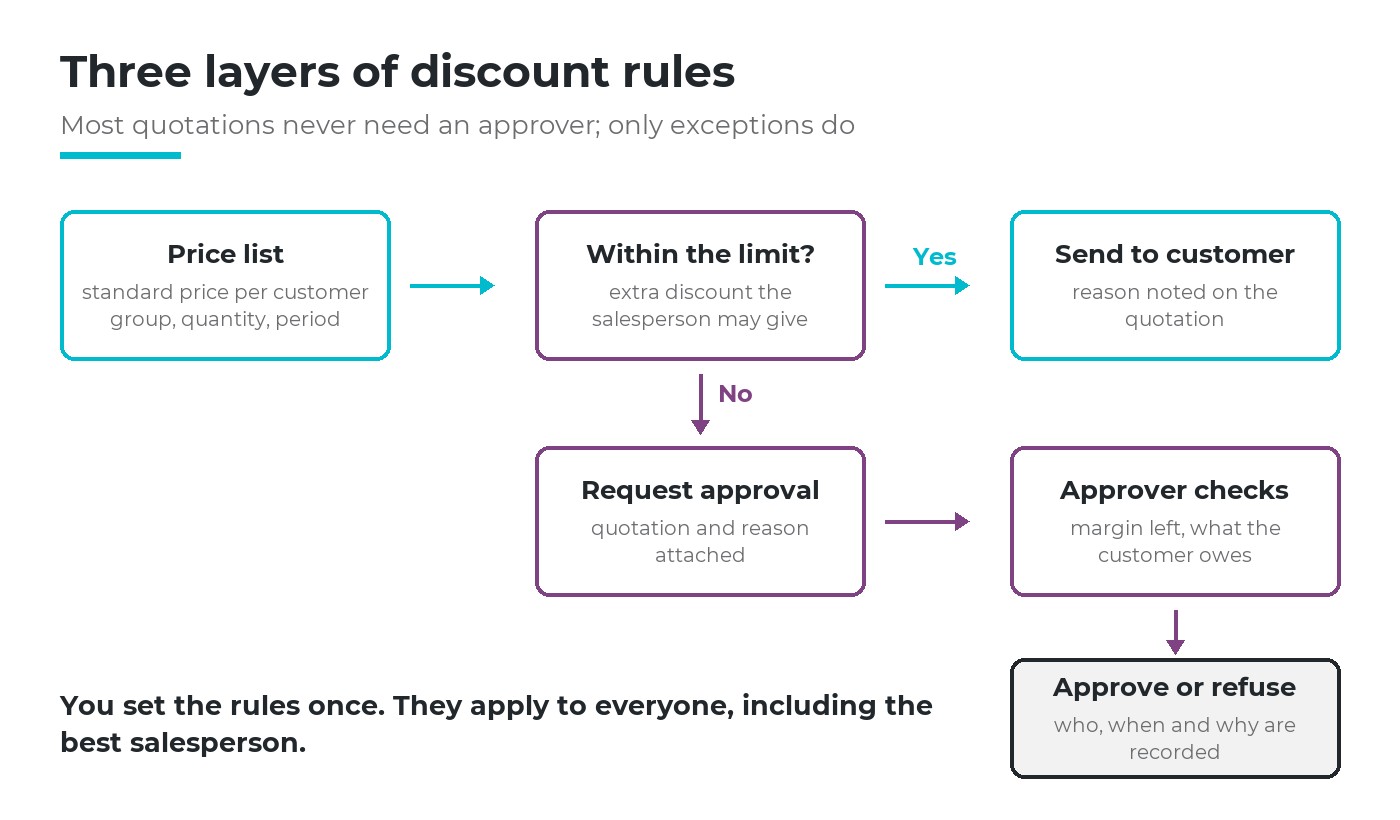
Three layers of rules. Most quotations stop at the first two; only exceptions reach an approver.
Price list
The standard price per customer group, quantity and period. Volume and loyal-customer prices belong here, not in ad hoc discounts.
Limit per role
The extra discount a salesperson may give alone, with a reason noted on the quotation.
Approval for exceptions
Above the limit, a named person approves or refuses, and the decision stays on record.
The first layer does more work than it seems. If a key account always gets 8%, put that in its price list instead of approving 8% every week. The pricing strategy decides the levels; the price list applies them without anyone asking.
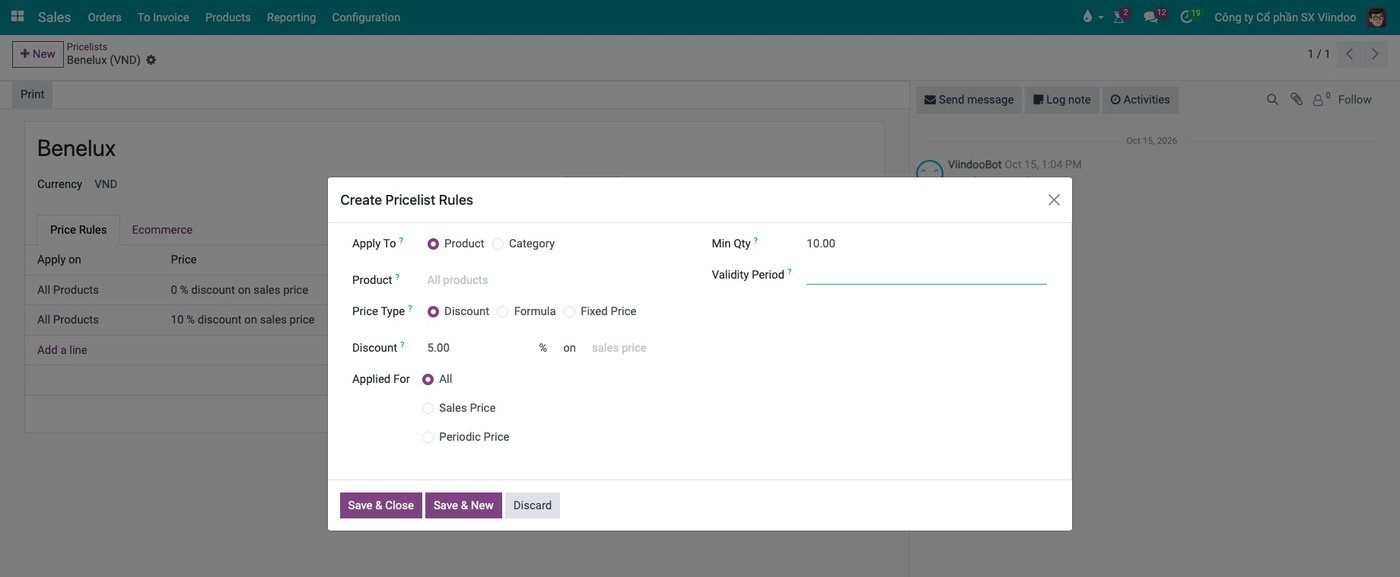
Example: a price list rule gives 5% off the sales price from a quantity of 10, so the salesperson does not need to ask.
The rule applies to everyone, including the best salesperson and the director's favourite customer. A rule with quiet exceptions is not a rule.
Who approves: an approval matrix on one page
Two measures decide who approves: the discount percentage and the order value. A small percentage on a large order can cost more than a large percentage on a small one, so a discount approval workflow that looks only at percent misses half the risk.
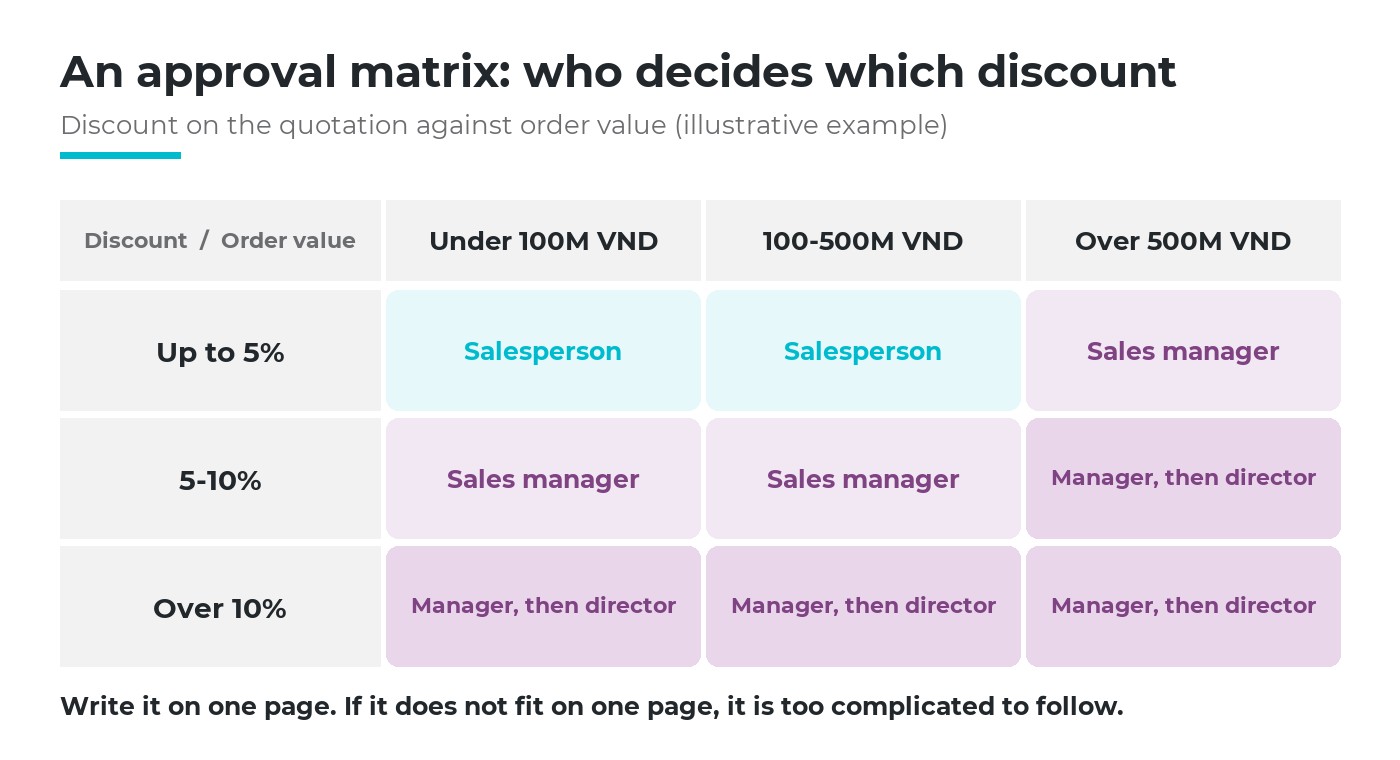
An approval matrix by discount and order value (illustrative example).
Four rules keep the matrix usable. Each level has a named role, not "management". Each step has a deadline, so a quotation does not wait a week while the customer cools down. Each approver has a stand-in for leave. And the matrix is reviewed every quarter against real exceptions.
A limit is also a form of trust. If salespeople come back to ask about every 2%, the limit is too low or unclear; the cost of delegating work without delegating authority shows up as a manager who cannot leave the phone.
Where to approve: on the quotation, not in a chat
An approval given in a chat window is detached from the document. The approver agrees to "12% for that order", the quotation is edited afterwards, and nobody can prove which version was approved.
A sound discount approval workflow ties the request to the quotation: the request carries the customer, the lines and the prices; the approver opens the quotation from it; and any change made after submission is visible. The same logic underpins a procurement approval process, on the buying side.
A reason, every time
Ask for the reason in a few words: competitor price, volume commitment, clearing old stock, a delivery complaint. Reasons turn exceptions into data. After a quarter, the director can see which reasons recur and fix the price list instead of approving the same case again.
See credit risk before approving
A discount is often requested by the customers who already pay late. Approving 10% off for a customer who is over their credit limit adds a second risk on top of the first. The approver should see four facts on one screen before deciding.
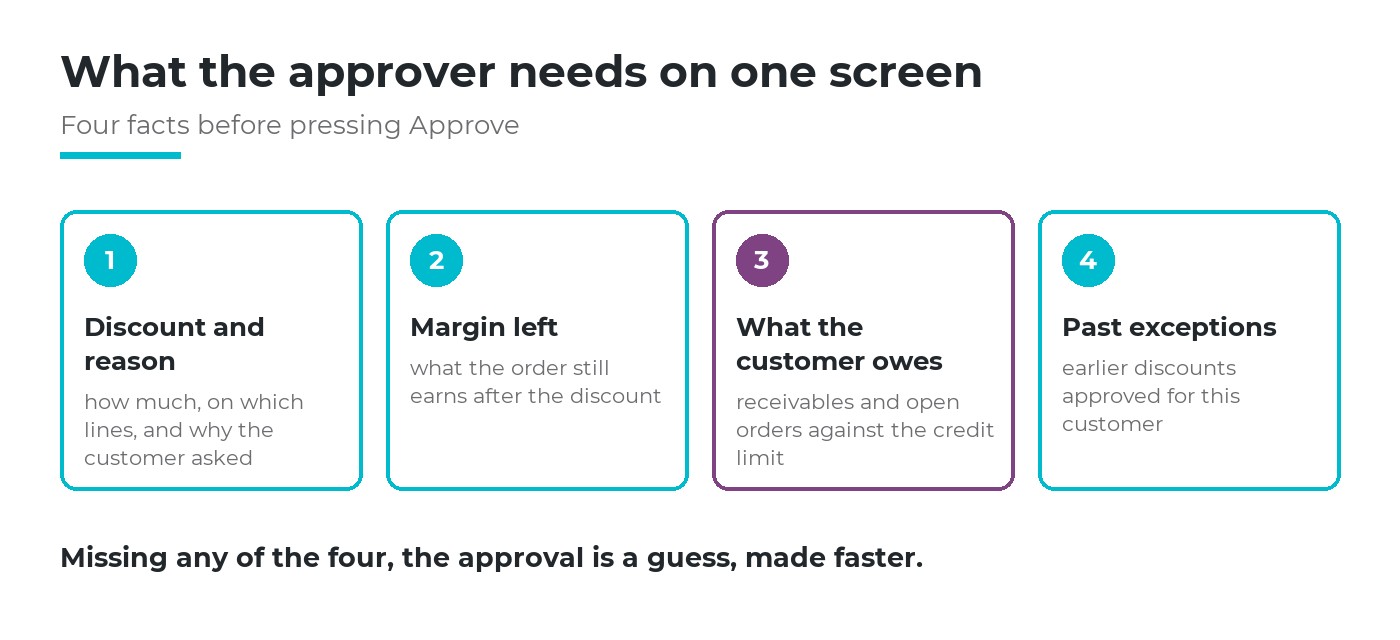
What the approver should see before pressing Approve.
The credit check here is a glance, not a debt-collection process: is this customer within their limit once this order is counted? If not, the approver can ask for a deposit or approve a smaller discount. How receivables are tracked and chased is a separate topic, covered with the rest of the sales and receivables flow.
Who approved what: a record you can review
The last layer is memory. For every exception the company should be able to answer, months later: who asked, who approved, when, for which lines, and why. That record protects the salesperson as much as the company.
Review the exceptions monthly, not one by one but as a list: by salesperson, by customer, by reason. Accounting also needs to know which reductions are trade discounts and which are price reductions after sale, as they are booked differently; see accounting for sales discounts.
How software helps, and where it stops
Software applies the price list without anyone remembering it, routes a request to the right person, keeps the request attached to the quotation and records each decision. It does not decide your limits, your matrix or when an exception is worth it. Write those down first; a discount approval workflow configured on unclear rules only makes unclear decisions faster.
A discount approval workflow in Viindoo
In Viindoo, quotations, price lists, approvals and receivables share one set of data. What it gives for each question in this article:
| Question | What Viindoo does |
|---|---|
| Standard prices? | Price lists with discount, formula or fixed-price rules by product or category, minimum quantity and validity period; a default price list per customer |
| Which quotations need approval? | The Quotation approval type carries a condition you write once on the quotation's fields, for example order total or the discount on a line; matching quotations show "Missing Approval" and can be filtered. The condition marks and tracks; it does not by itself stop the order from being confirmed |
| Who approves, how many levels? | Approval steps by named user, job position, department manager or employee tag; sequential or any-in-step, minimum approvals, days to approve; an extra step can apply only above a threshold, set up once by someone technical |
| Where? | "Get Approved" from the quotation creates a request carrying customer, lines and prices; approvers get a to-do with a deadline and open the quotation from the request |
| Credit risk? | When the sales credit limit is on, the quotation shows a warning once receivables, uninvoiced orders and this quotation pass the customer's limit; it warns, it does not block |
| Who approved what? | Each approver's status and time are recorded on the request; changes to the quotation after submission are posted field by field, and the approver decides whether the approval still stands |
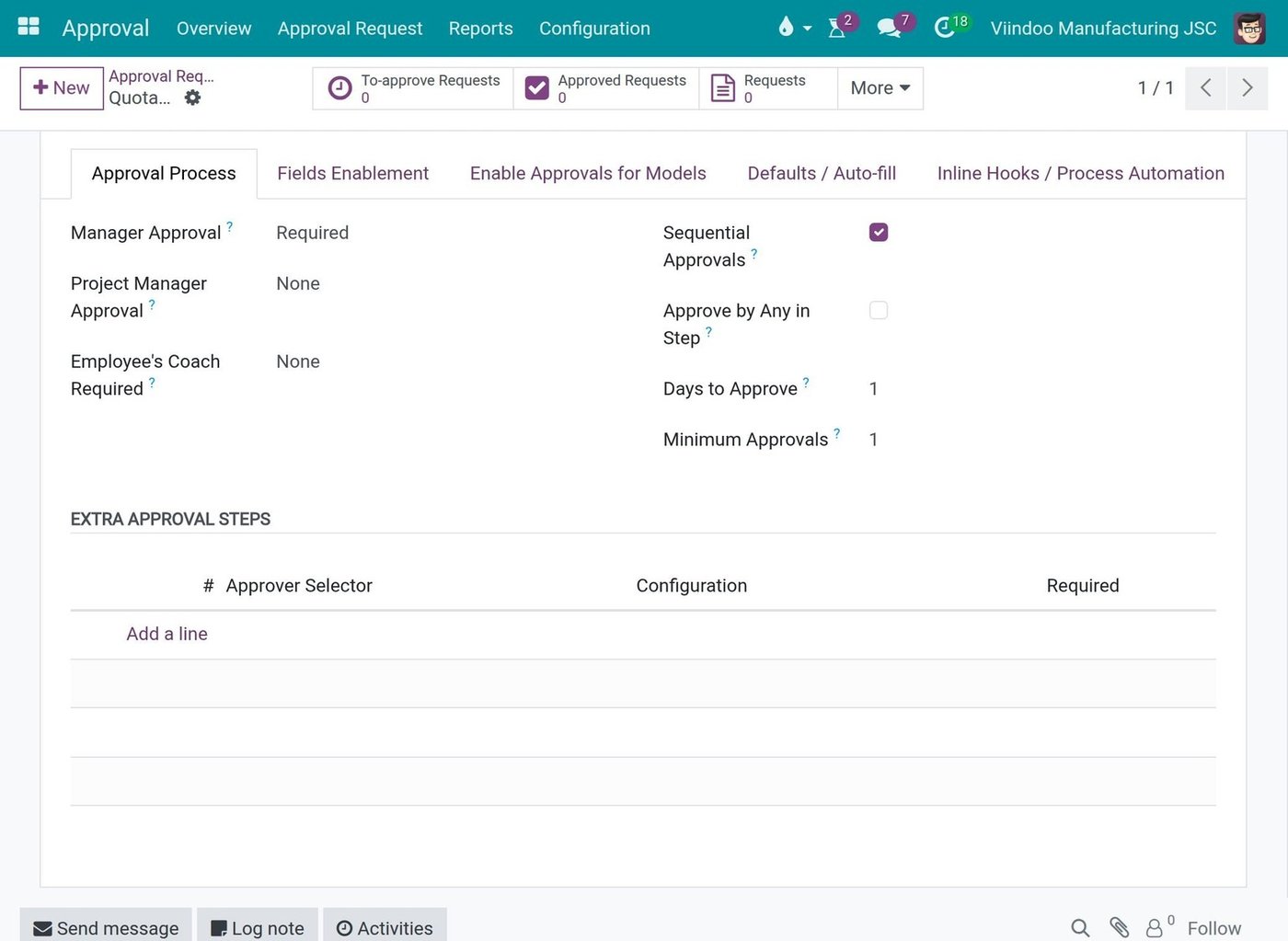
Example: the Quotation approval type sets the route: manager approval, sequential steps, days to approve and extra approval steps.
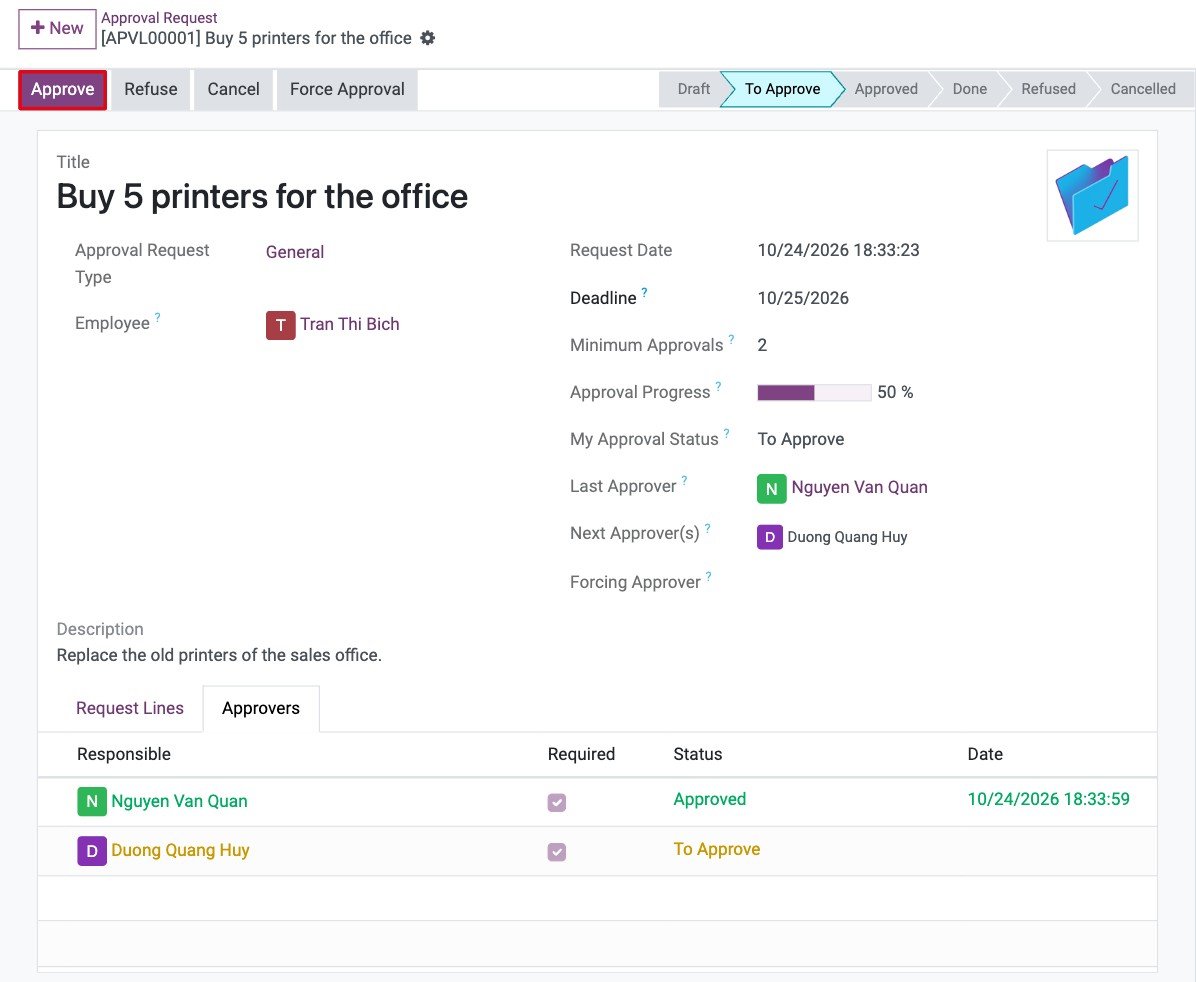
Example: on an approval request (here an office purchase), the Approvers tab shows who approved, when, and who is next.
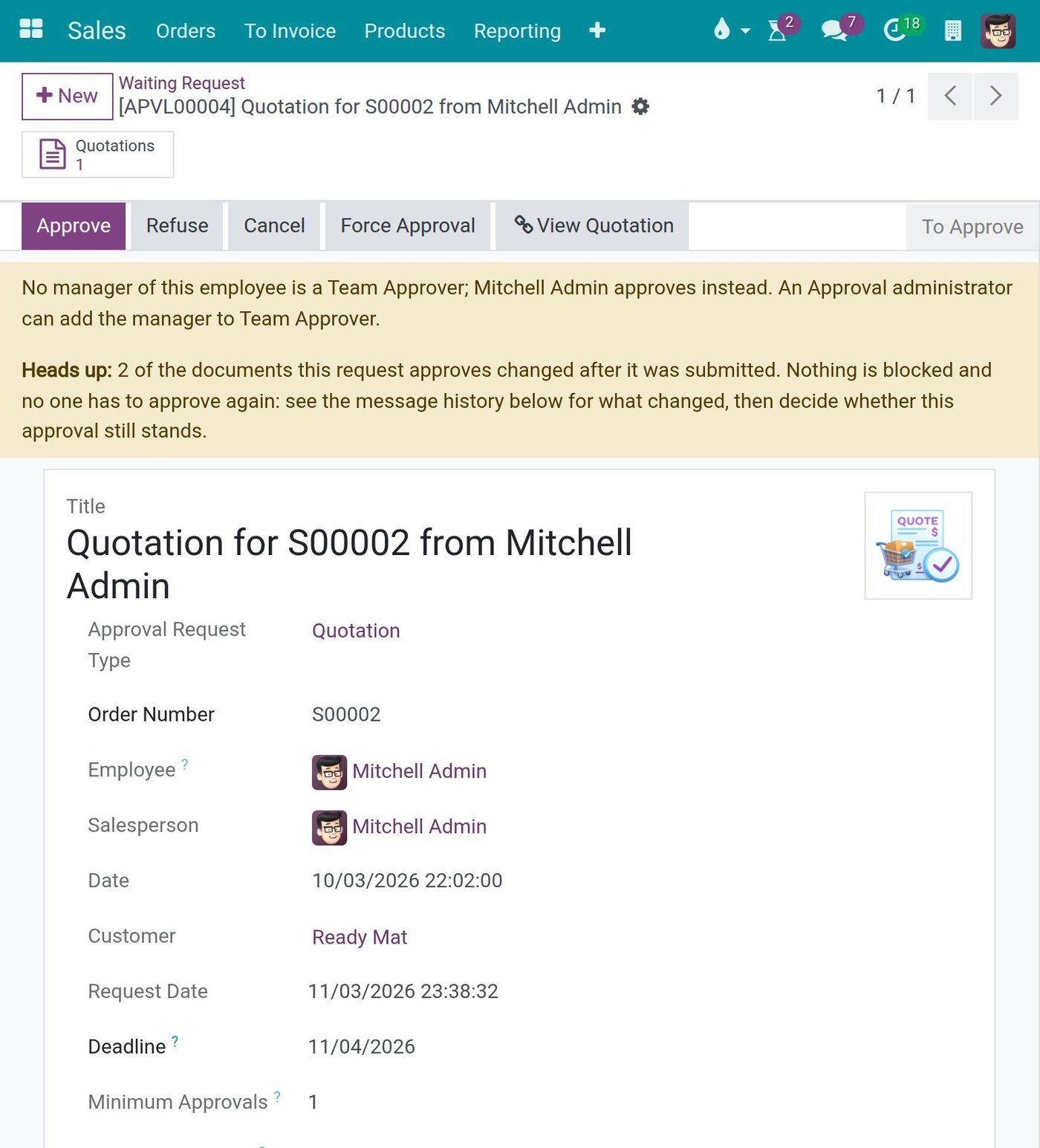
Example: the approval request for a quotation flags that the quotation changed after it was submitted and lists what changed.
With the Margins setting on, the quotation also shows its margin, so the approver sees what the order still earns after the discount. More on the sales side is on the Viindoo Sales page.
What you can ask the AI assistant
Viindoo's AI assistant answers questions in plain language from the company's own sales and accounting data, with links to the source records, for example "Which quotations for customer X are still open, and when do they expire?" or "Which customers owe us the most?". It only sees what the person asking is allowed to see. It can also draft a quotation; nothing is saved until the user reviews the proposal and clicks Agree. Approving a discount stays with the people named in your matrix.
Six questions to check your discount approval workflow
Written limits
Can every salesperson say, without asking, how much they may give alone?
Price list first
Are recurring discounts for key accounts in the price list, or approved again each time?
Named approver
For 12% on a large order, is it clear who approves today and who stands in?
On the document
Is each approval attached to the quotation, or scattered across chats?
Credit in view
Does the approver see what the customer owes before saying yes?
Monthly review
Does anyone review all exceptions together, by reason and by customer?
Two or more "no" answers usually point to the same first step: write the limits and the matrix on one page. Everything else in a discount approval workflow rests on it.
Frequently asked questions
Both. Percentage protects margin on each line; amount protects the company on large orders. A simple matrix with two or three levels of each is enough for most mid-sized companies.
Name a stand-in in advance and give each step a deadline. Approving on a phone is fine as long as the approval is recorded on the quotation, not only in a message.
Write the rule down: a change in price, discount or quantity usually needs a new look, a change in delivery address does not. What matters is that the change is visible to the approver.
Not sure where your discount rules leak margin? Tell us where it hurts most. Book a consultation and we will sketch your approval matrix with you on one page, or see the costs first.
Related articles