

Overtime Management With Attendance & Timesheets
by Viindoo
| Lines of Code | 309 |
| Technical name | viin_hr_overtime_timesheet_attendance |
| License | OPL-1 |
| Website | https://viindoo.com/apps/modules/19.0/viin_hr_overtime_timesheet_attendance |
| Read description for | v 13.0 v 14.0 v 15.0 v 16.0 v 17.0 v 18.0 |
| Required Apps | Attendances (hr_attendance) Time Off (hr_holidays) Project (project) Discuss (mail) Calendar (calendar) Employees (hr) |
| Included Dependencies | Viindoo Base Overtime Advanced HR Management HR Contracts (Viindoo) HR Timesheet Timer Work Entry Attendance Data Validation (HR) Work Entry - Contract Work Entry - Attendance Base Addendum Overtime Attendance Overtime Timesheet Viindoo Holiday & WorkDay Manager Safe IR Metadata Proxies Countup Timer Widget |

One overtime figure, backed by both check-ins and timesheets
For HR, payroll and team managers who collect attendance and timesheets
Comprehensive overtime management for attendance and timesheet data.
Builds on Overtime Attendance and Overtime Timesheet: both sources work together on the plans you already run in Overtime.
Is this you?
Employees both check in and log timesheets, and the two disagree on how long the overtime lasted.
Payroll has to decide, record by record, which source to believe.
Some teams are trusted on a check-in alone, others need a timesheet entry as proof, and one company-wide rule fits neither.
What changes
Two sources, two answers
Count a plan line once, from the source your policy trusts: attendance first with a timesheet fallback, or only the hours both sources confirm.
One rule for everybody
Set the source per company, per overtime reason, per plan or per employee version, so each group follows the policy that suits it.
Disputes at payroll time
Every recognised hour traces back to a check-in, a timesheet entry or both, so the figure explains itself.
Key Features
Attendance or Timesheet
Take the overtime from check-in and check-out records, and fall back to timesheets when nobody checked in.
Attendance and Timesheet
Count only the hours covered by a check-in and by a timesheet entry, for the strictest proof of overtime.
Set per employee version
Choose, for each employee version, which source proves its overtime. Left empty, it follows the company setting.
Reasons and plans can differ
An overtime reason or a plan can override the default and use either combined mode.
Smooth switch on install
Companies and employee versions that relied on Attendance move to Attendance or Timesheet automatically, with no manual migration.
A worked example
A plan covers 18:00 to 21:00. The employee checks in from 17:00 to 20:30 and logs a timesheet from 19:00 to 21:00.
Attendance or Timesheet
2.50 h
Attendance takes priority: the hours between 18:00 and 20:30.
Attendance and Timesheet
1.50 h
Only 19:00 to 20:30 is covered by both sources.
Who it is for
HR and payroll
Stop reconciling two sources by hand; get one recognised figure per plan line.
Team managers
Plan overtime as before; the chosen source decides which hours count.
Operations and finance
Pick the level of proof your policy demands, per company, group or employee.
Best for: organisations where staff both clock in and log project time, and overtime must be defensible.
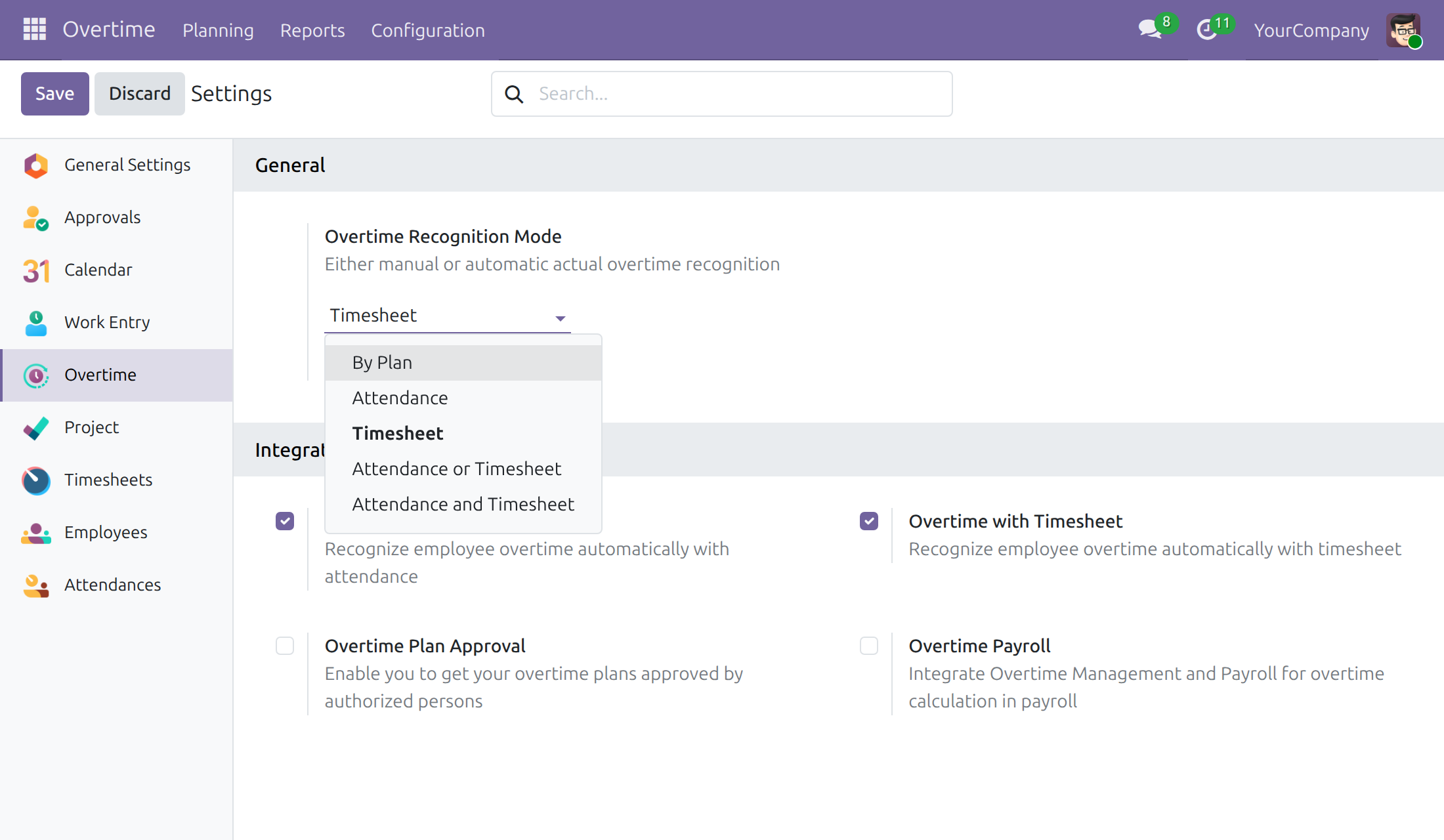
Choose the recognition source
Company setting with the combined modes in the list of options.
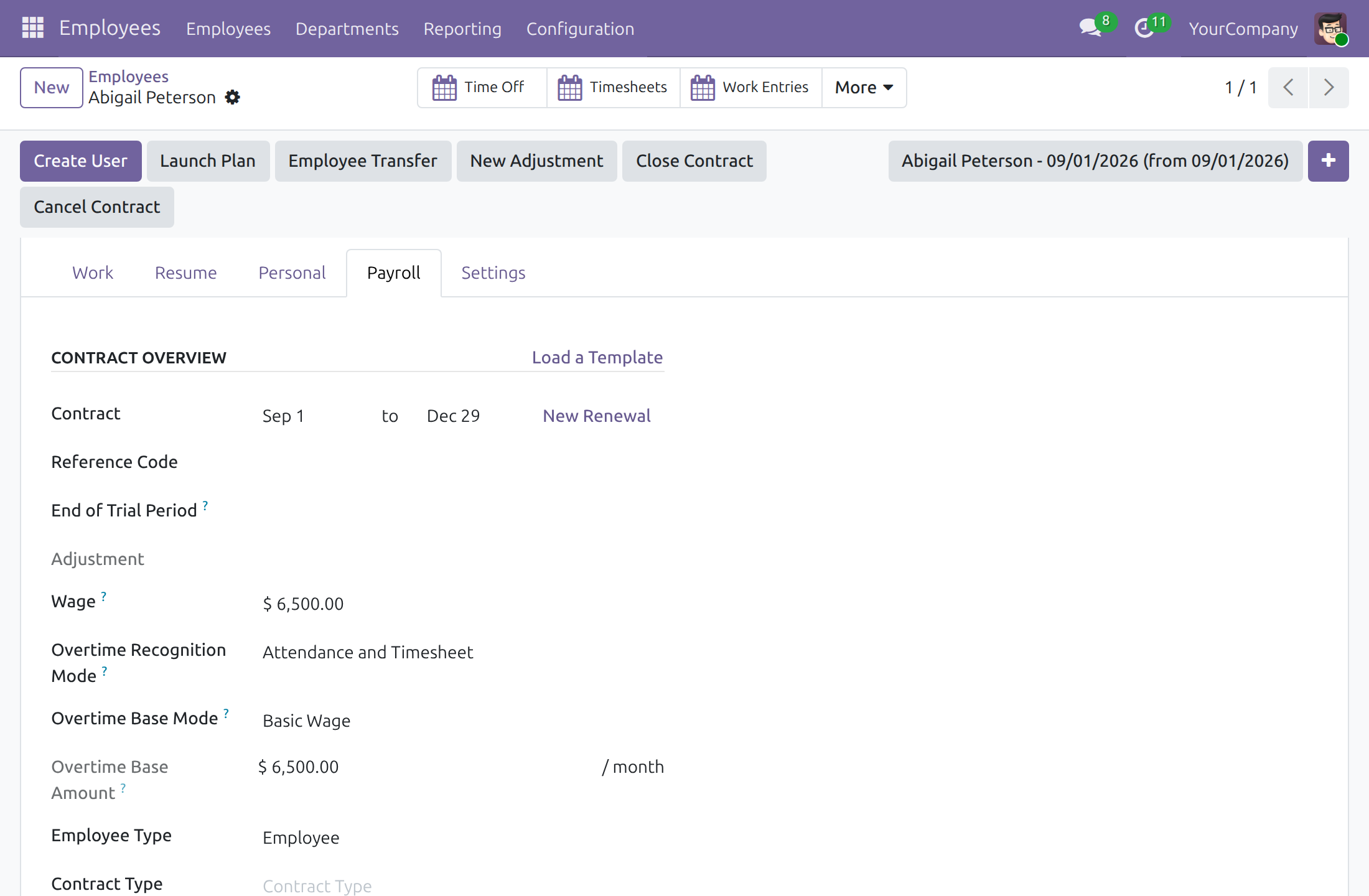
Set it for one employee version
Payroll tab of an employee, with the combined mode chosen.
Frequently Asked Questions
Does this module have to be set up separately?
It installs automatically when the attendance and timesheet overtime modules are both present. You then pick a combined mode where you need it.
What happens to the companies that already use Attendance?
Companies and employee versions (archived ones included) using Attendance move to Attendance or Timesheet at installation, so they also benefit from timesheets without any manual step.
Which setting wins when several are set?
A plan resolves its source from the overtime reason first, then the employee version, then the company.
Who can change the mode of an employee?
Users with the HR officer access, in the Payroll tab of the employee. The company default is changed in the Overtime settings by the overtime administrator.
Need help with Overtime Management With Attendance & Timesheets?
Pre-Sales & Partnership
https://viindoo.com/contactusTechnical Support
https://viindoo.com/ticketTechnical Requirement
- Odoo version: 19.0
- Editions: Odoo Community, Odoo Enterprise, Viindoo Cloud
- Required modules: Timesheets/attendances reporting, Overtime Timesheet, Overtime Attendance
- Installation: Installs itself automatically once its required modules are present; there is nothing to install by hand.
- License: OPL-1
This software and associated files (the "Software") may only be used (executed, modified, executed after modifications) if you have purchased a valid license from the authors, typically via Odoo Apps, or if you have received a written agreement from the authors of the Software (see the COPYRIGHT file).
You may develop Odoo modules that use the Software as a library (typically by depending on it, importing it and using its resources), but without copying any source code or material from the Software. You may distribute those modules under the license of your choice, provided that this license is compatible with the terms of the Odoo Proprietary License (For example: LGPL, MIT, or proprietary licenses similar to this one).
It is forbidden to publish, distribute, sublicense, or sell copies of the Software or modified copies of the Software.
The above copyright notice and this permission notice must be included in all copies or substantial portions of the Software.
THE SOFTWARE IS PROVIDED "AS IS", WITHOUT WARRANTY OF ANY KIND, EXPRESS OR IMPLIED, INCLUDING BUT NOT LIMITED TO THE WARRANTIES OF MERCHANTABILITY, FITNESS FOR A PARTICULAR PURPOSE AND NONINFRINGEMENT. IN NO EVENT SHALL THE AUTHORS OR COPYRIGHT HOLDERS BE LIABLE FOR ANY CLAIM, DAMAGES OR OTHER LIABILITY, WHETHER IN AN ACTION OF CONTRACT, TORT OR OTHERWISE, ARISING FROM, OUT OF OR IN CONNECTION WITH THE SOFTWARE OR THE USE OR OTHER DEALINGS IN THE SOFTWARE.
