


Paypal - Enhanced Currency Support
| Lines of Code | 318 |
| Technical name | to_paypal_unsupported_currencies |
| License | OPL-1 |
| Website | https://viindoo.com/apps/modules/19.0/to_paypal_unsupported_currencies |
| Read description for | v 12.0 v 13.0 v 14.0 v 15.0 v 16.0 v 17.0 v 18.0 |
| Required Apps | Invoicing (account) Discuss (mail) |
| Included Dependencies | Viindoo Base Accounting Foundation Payment Gateway Currency Conversion |
Let customers abroad pay your VND invoices with PayPal - charged in USD
For Vietnamese exporters and any business whose currency PayPal does not accept.
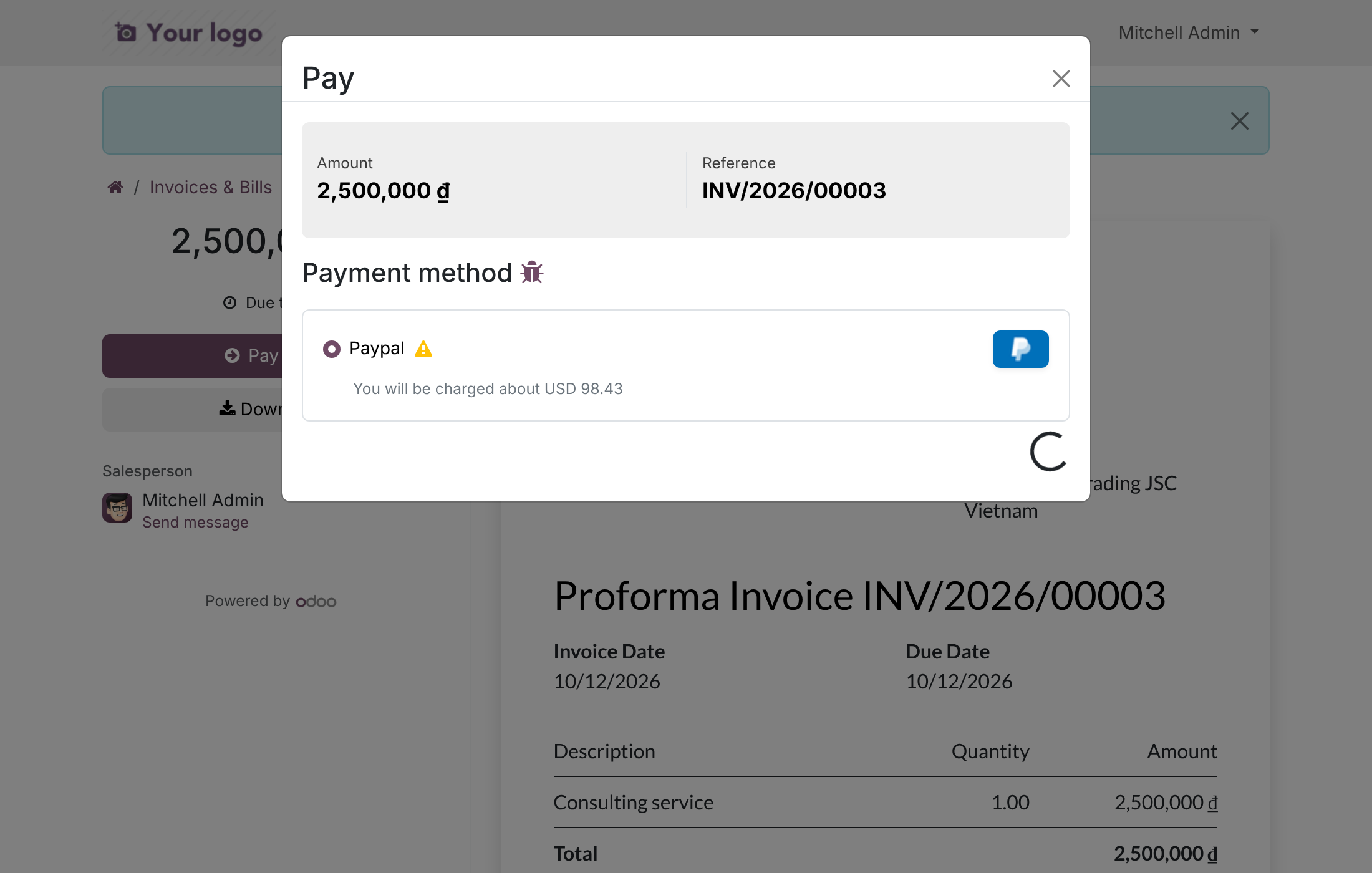
Pay documents in currencies PayPal does not accept: PayPal charges the converted amount.
Extends to_currency_conversion_diff - see its documentation.
Is this you?
Your customer abroad wants to pay by PayPal, but your VND invoice shows no PayPal option.
You end up asking for a bank wire, or issuing a second invoice in USD just to get paid.
When a USD receipt does arrive, you convert it to VND by hand and post the difference as a manual entry.
Your customer is unsure how much they will actually be charged.
You worry that a change to checkout could disturb the PayPal setup you already have.
What you get instead
No PayPal on a VND invoice
→ PayPal is offered on documents in a currency it does not accept; the button and the PayPal order use the converted currency, for example USD
Customer unsure of the charge
→ The payment page shows the amount that will be charged
Risk of a wrong charge
→ PayPal's capture is checked against the converted amount and currency; a mismatch puts the transaction in error
Manual conversion entries
→ The payment is recorded in the converted currency for exactly what PayPal captured, the document is paid, and the difference to the document amount at Odoo's rate is posted automatically to the conversion difference gain or loss account
Fear of breaking checkout
→ Companies whose currency PayPal accepts keep standard PayPal; uninstalling restores it
Worked example: a 2,500,000 VND invoice at Odoo's rate of 1 USD = 25,400 VND is charged as 98.43 USD. That payment is worth 2,500,122 VND, so the invoice is paid and the 122 VND difference is posted as conversion income.
How it works
Customer pays (Draft)
The Customer opens the invoice in the portal, chooses PayPal and sees the converted amount to be charged.
Customer approves (Pending)
The Customer approves the payment in PayPal, in the converted currency. Odoo confirms it when PayPal reports exactly that amount and currency, then records the payment and marks the invoice paid.
Setup is light. The System Administrator installs the module (it installs automatically together with PayPal and Payment Gateway Currency Conversion). On install, USD becomes the converted currency for PayPal providers of companies whose currency PayPal does not accept, provided USD is active and among the provider's currencies, the company's conversion setup (accounts, journal) is complete and Odoo has a USD exchange rate. Any other company can set the Default Converted Currency on the PayPal provider later.
Key Features
PayPal checkout for documents in an unsupported currency
Lets customers pay invoices in a currency PayPal does not accept, with the PayPal button loaded in the converted currency (for example USD).
PayPal order and capture in the converted amount
PayPal charges the converted amount, and its capture is checked against that amount and currency.
Automatic USD fallback on install and reset on uninstall
Companies whose currency PayPal rejects get PayPal in USD at install time when the conversion setup and an exchange rate exist; uninstalling restores standard PayPal.
Who it is for
Owner or director of an exporter
You want foreign customers to pay without re-issuing invoices. Gain: PayPal appears on your local-currency invoices.
Chief accountant or finance manager
You reconcile PayPal receipts against local-currency invoices. Gain: the payment equals what PayPal settles, and the conversion difference is booked for you.
Customer paying from abroad
You want to pay by PayPal and know the amount. Gain: a PayPal button and the charged amount shown on the payment page.
System Administrator
You keep checkout stable. Gain: automatic USD setup where needed, standard PayPal everywhere else, clean uninstall.
Best for: Vietnamese exporters, and businesses elsewhere whose currency PayPal does not accept, that invoice in local currency and collect from foreign customers in USD through PayPal.
See the amount before you pay
The customer sees the PayPal option on a VND invoice and the exact USD amount that will be charged.
Record the payment in USD
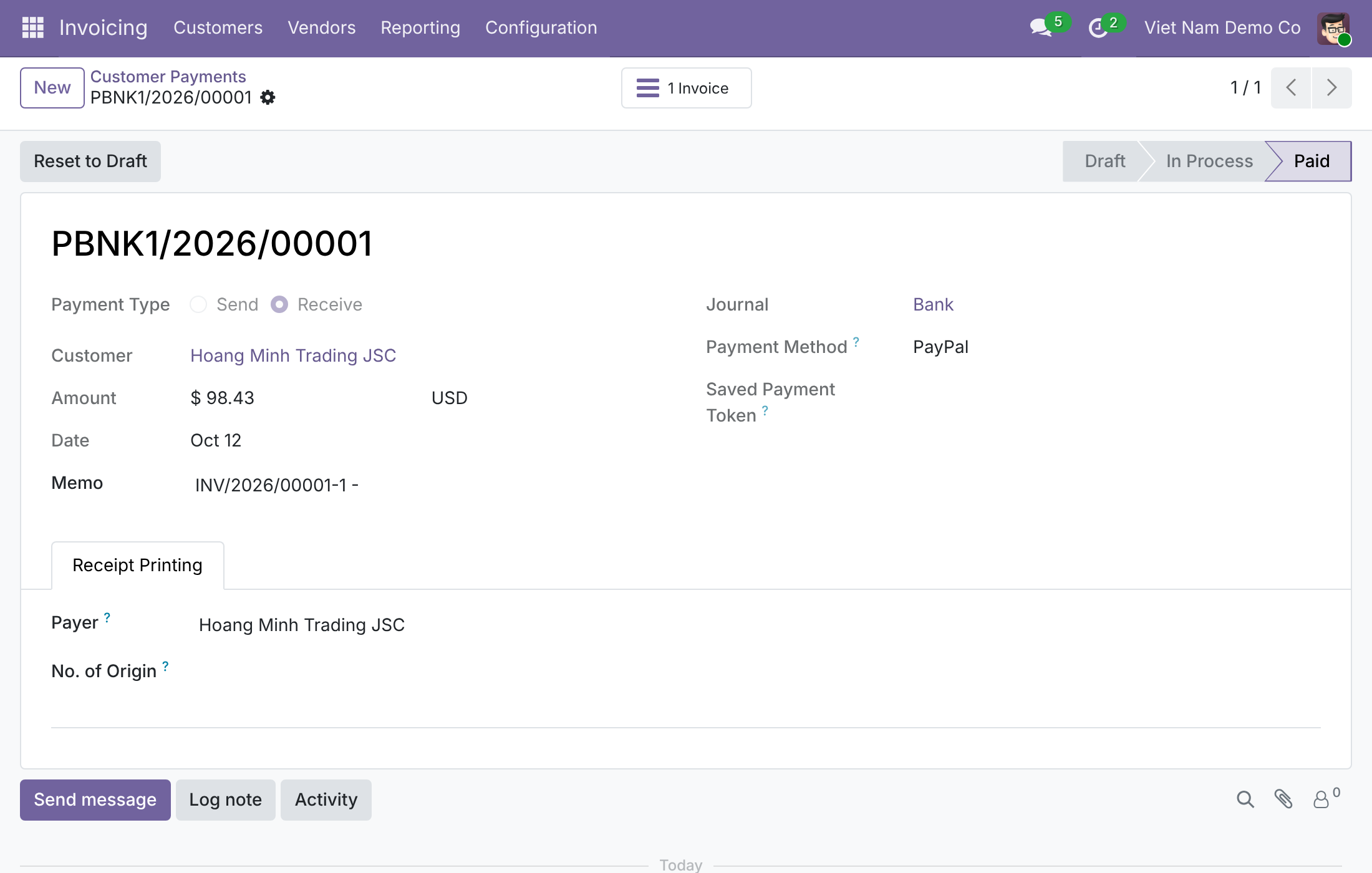
The invoice is paid by a payment in the converted currency for exactly what PayPal captured.
Choose the converted currency
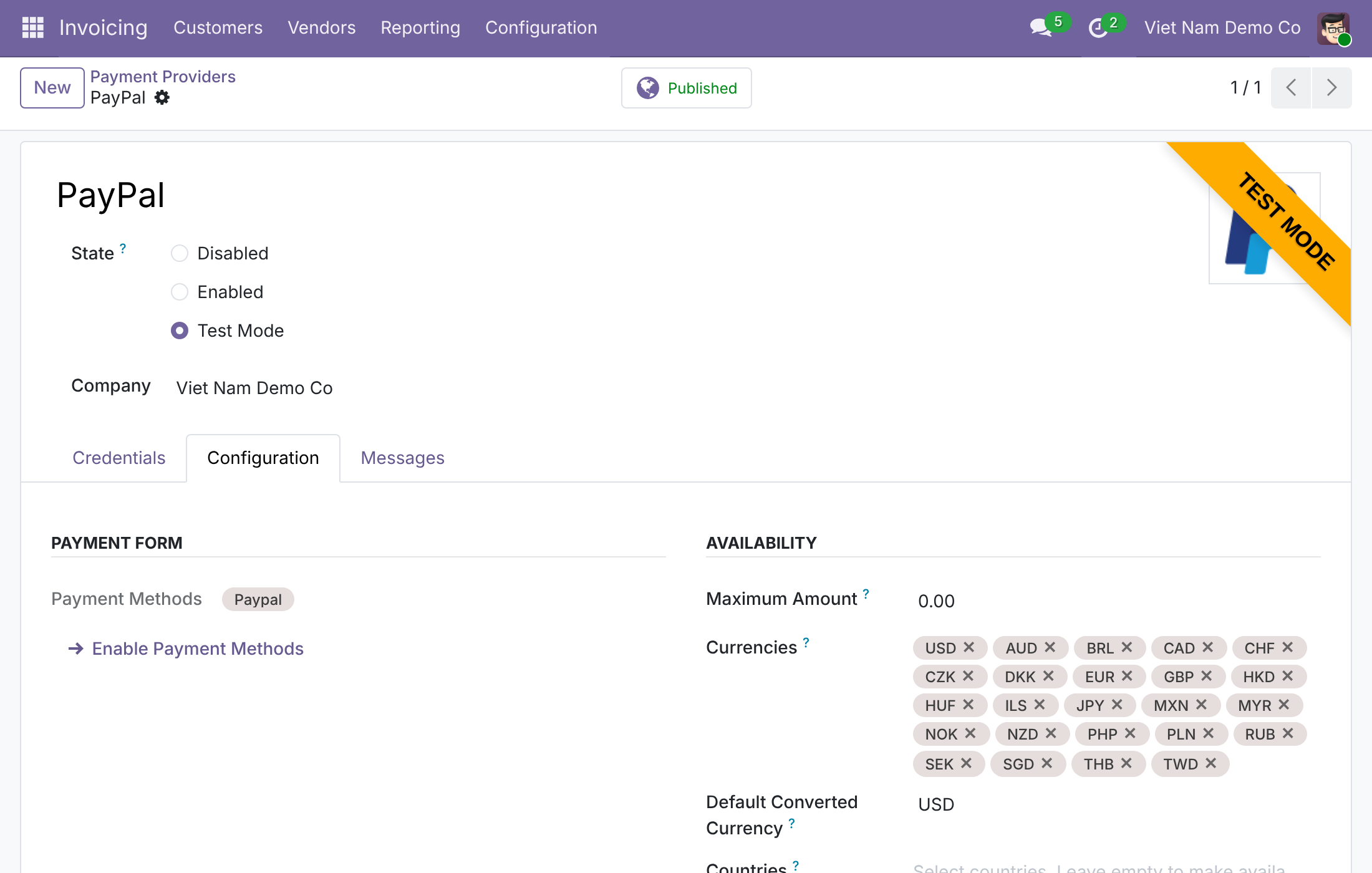
Set the Default Converted Currency on the PayPal provider; Test Mode shown with placeholder credentials.
See Paypal - Enhanced Currency Support in Action
Frequently Asked Questions
Which currencies does it cover?
Any currency PayPal does not accept, provided the document currency or the converted currency is the company currency. VND is the typical case.
Does the customer see what they will pay?
Yes. The payment page shows the amount that will be charged in the converted currency.
What if PayPal captures a different amount?
The transaction is put in error and no payment is recorded.
Where does the exchange difference go?
It is posted to the conversion difference gain or loss account set in Settings, under Payment gateway currency conversion.
Do I have to configure anything?
On install, USD is set automatically when the conditions above are met. Otherwise set the Default Converted Currency on the PayPal provider.
Will it change PayPal for companies that do not need it?
No. Companies whose currency PayPal accepts keep standard PayPal, and uninstalling restores standard PayPal.
Which editions are supported?
Community and Enterprise.
Need help with Paypal - Enhanced Currency Support?
Technical Support
Questions about the module, setup or your PayPal configuration:
apps.support@viindoo.comTechnical Requirement
- Odoo version: 19.0
- Editions: Community and Enterprise
- Required modules: Payment Provider: PayPal (
payment_paypal), Payment Gateway Currency Conversion - License: OPL-1
Paypal - Enhanced Currency Support
Note
Extends to_currency_conversion_diff - see its documentation.
Overview
PayPal accepts only a limited list of currencies. Without this module, PayPal disappears from checkout as soon as an invoice or a sales order is in any other currency, for example Vietnamese dong (VND). With this module, your customer can still pay that document with PayPal:
- PayPal is offered for the document, and the PayPal button and the PayPal order are in the converted currency (by default USD) for the converted amount.
- The customer sees the amount that will be charged before confirming, and is charged exactly that amount.
- PayPal's capture is checked against the converted amount in the converted currency. A capture of another amount or in another currency puts the transaction in the Error state and no payment is recorded.
- The payment is recorded in the converted currency for the amount PayPal captured, the invoice is paid, and the small difference to the document amount is booked on the conversion gain or loss account.
The module is installed automatically when Online Payments with PayPal and Payment Gateway Currency Conversion are installed. The conversion itself, the accounts and the accounting rules are described in the guide of to_currency_conversion_diff; this guide covers what is specific to PayPal.
How a payment flows through the people involved
- The System Administrator checks that PayPal has the right Default Converted Currency and enables the provider.
- The customer opens the invoice, clicks the payment button, sees a note such as "You will be charged about USD 98.43", and approves the payment in PayPal.
Who uses this module
| Role | What they do | Access right to assign |
|---|---|---|
| System Administrator | Installs the module and sets the Default Converted Currency, the credentials and the publication state of the PayPal provider. | Role / Administrator |
| Customer | Pays an invoice in a currency PayPal does not accept by paying the converted amount through PayPal. | Portal (no access right to assign: the customer uses the portal) |
Worked example: how the payment is booked
Your company works in VND. You issue invoice S-18 for VND 2,500,000, and the customer pays with PayPal. PayPal is set to charge in USD, and the exchange rate in Odoo is USD 1 = VND 25,400.
- The customer is charged 2,500,000 / 25,400 = USD 98.43.
- The payment of USD 98.43 is recorded on the day of the transaction. At the rate of that day it is worth VND 2,500,122, so the invoice is fully paid and the extra VND 122 is booked as conversion income on the Gain Account of Payment gateway currency conversion.
- If the payment is recorded a day later, when USD 1 = VND 25,300, the same USD 98.43 is worth only VND 2,490,279. The invoice is still fully paid, and the VND 9,721 shortfall is booked as conversion expense on the Loss Account.
- If the invoice has a 2% early payment discount and the customer pays inside the discount period, the amount to pay is VND 2,450,000 and the customer is charged 2,450,000 / 25,400 = USD 96.46. The payment entry contains the discount lines, all in USD, and the invoice is paid.
Because the company currency is the document currency, there is no foreign-currency receivable and so no exchange gain or loss: the whole difference is a conversion difference.
Setup (for the System Administrator)
Installation
- Open Apps.
- Remove the Apps filter if needed and search for Paypal - Enhanced Currency Support.
- Click Install.
The module is installed together with the apps it needs (PayPal and Payment Gateway Currency Conversion). Complete the account setup of Payment Gateway Currency Conversion first: follow the setup chapter of the guide of to_currency_conversion_diff (Gain Account, Loss Account and the exchange difference journal).
Configuration
Automatic setup on installation
When the module is installed, PayPal is set to charge in USD for a company only if all these conditions are met:
- the currency of the company is not one of the currencies PayPal accepts (VND, for example);
- USD is active and is among the currencies of the PayPal provider;
- the Payment gateway currency conversion setup of the company is complete (Gain Account, Loss Account and exchange difference journal);
- Odoo holds a USD exchange rate.
If any condition is not met, nothing changes and PayPal behaves as standard PayPal for that company. You can set the currency by hand at any time, as described below.
Set the Default Converted Currency by hand
- Open Invoicing ‣ Configuration ‣ Online Payments ‣ Payment Providers and open PayPal.
- Fill in the credentials of your PayPal account and set State (for example Test Mode while you try it out).
- Open the Configuration tab. In the Availability section, the Currencies field lists the currencies PayPal accepts.
- In Default Converted Currency, choose the currency PayPal will charge for documents in any other currency, for example USD. It must be one of the listed currencies.
- Click Save.
Rules to know:
- Leave Default Converted Currency empty to keep PayPal as standard Odoo: it is then hidden for documents in a currency it does not accept.
- The provider can be enabled only when the company has the Gain Account, the Loss Account and the exchange difference journal set. Odoo names the missing settings otherwise.
- PayPal is offered for a document only if the document currency or the converted currency is the currency of the company. A document in a third currency is not offered PayPal.
- PayPal must be published to appear to customers.
- A real payment needs the Client ID and the Client Secret of your PayPal account.
Assign the access rights
- Open Settings ‣ Users & Companies ‣ Users and open the user.
- Give the System Administrator the access right Role / Administrator.
- Click Save.
Customer: pays an invoice with PayPal
Pay an invoice in a currency PayPal does not accept
- Open the invoice from the link you received, or from the customer portal under Invoices & Bills.
- Click Pay Now.
- In the Pay window, PayPal is listed with a note such as You will be charged about USD 98.43. This is the amount that will be charged, fixed when you start the payment.
- Approve the payment in the PayPal window. PayPal charges exactly the amount shown.
When PayPal confirms the payment, the invoice is paid and the confirmation page shows the charged amount next to the invoice amount.
Note
The amount is shown as "about" because PayPal may apply its own rate. The small difference is booked by your company as the conversion difference described in the worked example.
What the company sees afterwards
The payment is recorded automatically. To review it, open Invoicing ‣ Customers ‣ Payments and open the payment: its Amount and currency are those PayPal charged (USD 98.43), and the invoice is paid. Click Journal Items on the payment entry to see the line holding the conversion difference.
For the transaction, the Charged Amount column and the transactions that were confirmed without a payment, see the guide of to_currency_conversion_diff.
Refunds
PayPal does not support refunds from Odoo: the Refund field of the provider shows Unsupported. Refund the customer in your PayPal account, then register the outgoing payment against the credit note in Odoo.
Uninstallation
Uninstalling the module clears the Default Converted Currency of the PayPal providers. PayPal then goes back to accepting only the currencies it supports, and it is hidden again for documents in other currencies. Payments already recorded are not changed.
Troubleshooting
- PayPal does not appear at checkout.
- Check that PayPal is in Test Mode or Enabled and published, that its Default Converted Currency is set (it stays empty when the automatic setup conditions were not met on installation), and that the currency of the company is either the document currency or the Default Converted Currency.
- Odoo refuses to enable PayPal.
- The message names the missing settings. Fill in the Gain Account and Loss Account of Payment gateway currency conversion and the exchange difference journal, or clear the Default Converted Currency.
- Odoo refuses to save the Default Converted Currency.
- The currency is not in the Currencies list of PayPal. Choose one of the listed currencies.
- The transaction ends in Error.
- PayPal reported a captured amount or currency that differs from the converted amount shown to the customer. No payment is recorded. Check the transaction in your PayPal account before asking the customer to pay again.
FAQ
- Which currency does the customer pay in?
- The Default Converted Currency of the PayPal provider, USD by default for a company working in VND.
- Does the customer pay a different amount from the invoice?
- The customer pays the invoice amount converted at the exchange rate stored in Odoo. The invoice is fully paid and the difference caused by the conversion is booked on your Gain or Loss account.
- Can I refund from Odoo?
- No. PayPal refunds are made in your PayPal account.
This software and associated files (the "Software") may only be used (executed, modified, executed after modifications) if you have purchased a valid license from the authors, typically via Odoo Apps, or if you have received a written agreement from the authors of the Software (see the COPYRIGHT file).
You may develop Odoo modules that use the Software as a library (typically by depending on it, importing it and using its resources), but without copying any source code or material from the Software. You may distribute those modules under the license of your choice, provided that this license is compatible with the terms of the Odoo Proprietary License (For example: LGPL, MIT, or proprietary licenses similar to this one).
It is forbidden to publish, distribute, sublicense, or sell copies of the Software or modified copies of the Software.
The above copyright notice and this permission notice must be included in all copies or substantial portions of the Software.
THE SOFTWARE IS PROVIDED "AS IS", WITHOUT WARRANTY OF ANY KIND, EXPRESS OR IMPLIED, INCLUDING BUT NOT LIMITED TO THE WARRANTIES OF MERCHANTABILITY, FITNESS FOR A PARTICULAR PURPOSE AND NONINFRINGEMENT. IN NO EVENT SHALL THE AUTHORS OR COPYRIGHT HOLDERS BE LIABLE FOR ANY CLAIM, DAMAGES OR OTHER LIABILITY, WHETHER IN AN ACTION OF CONTRACT, TORT OR OTHERWISE, ARISING FROM, OUT OF OR IN CONNECTION WITH THE SOFTWARE OR THE USE OR OTHER DEALINGS IN THE SOFTWARE.
