

Polar Payment Provider
| Lines of Code | 1791 |
| Technical name | payment_polar |
| License | OPL-1 |
| Website | https://viindoo.com/apps/modules/17.0/payment_polar |
| Read description for | v 18.0 v 19.0 |
| Required Apps | Invoicing (account) Discuss (mail) |

Polar.sh as merchant of record for online payments
A Polar provider with access token, webhook secret and product reference, a button that prepares the Polar product and one that creates the webhook, fee and clearing accounts so Polar's fee is booked, a cron reconciling recent orders, and the checkout and webhook routes.
Polar Payment Provider (technical name payment_polar) is an Odoo 17.0 app for Odoo Community and Odoo Enterprise and Viindoo Cloud, built for apps vendor.
At a Glance
The facts of Polar Payment Provider, version 0.1.1, in one place. Published by Viindoo.
How It Works
Paste the token; prepare the product; create the webhook.
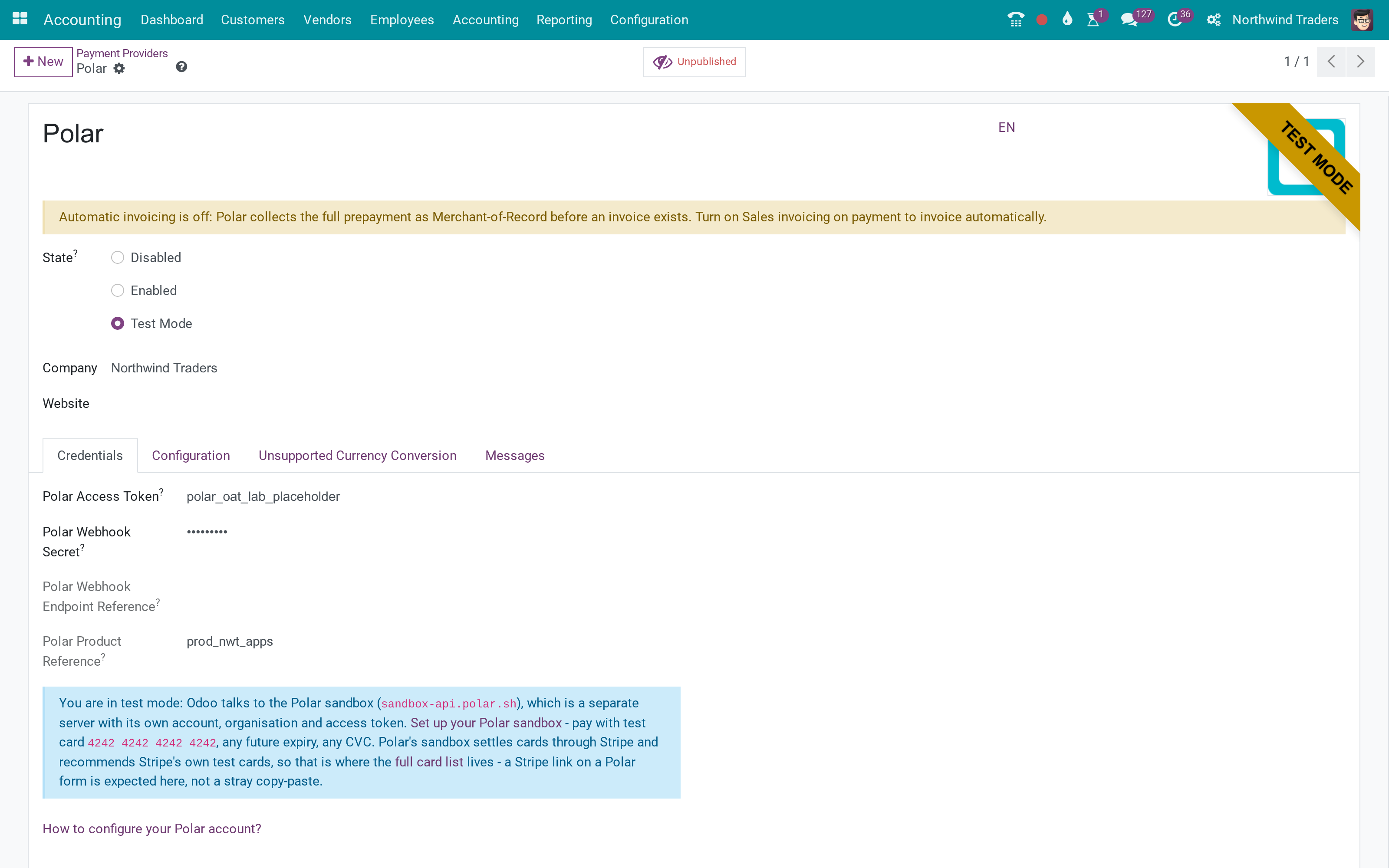
Provider
Test mode.
Credentials
Buttons.
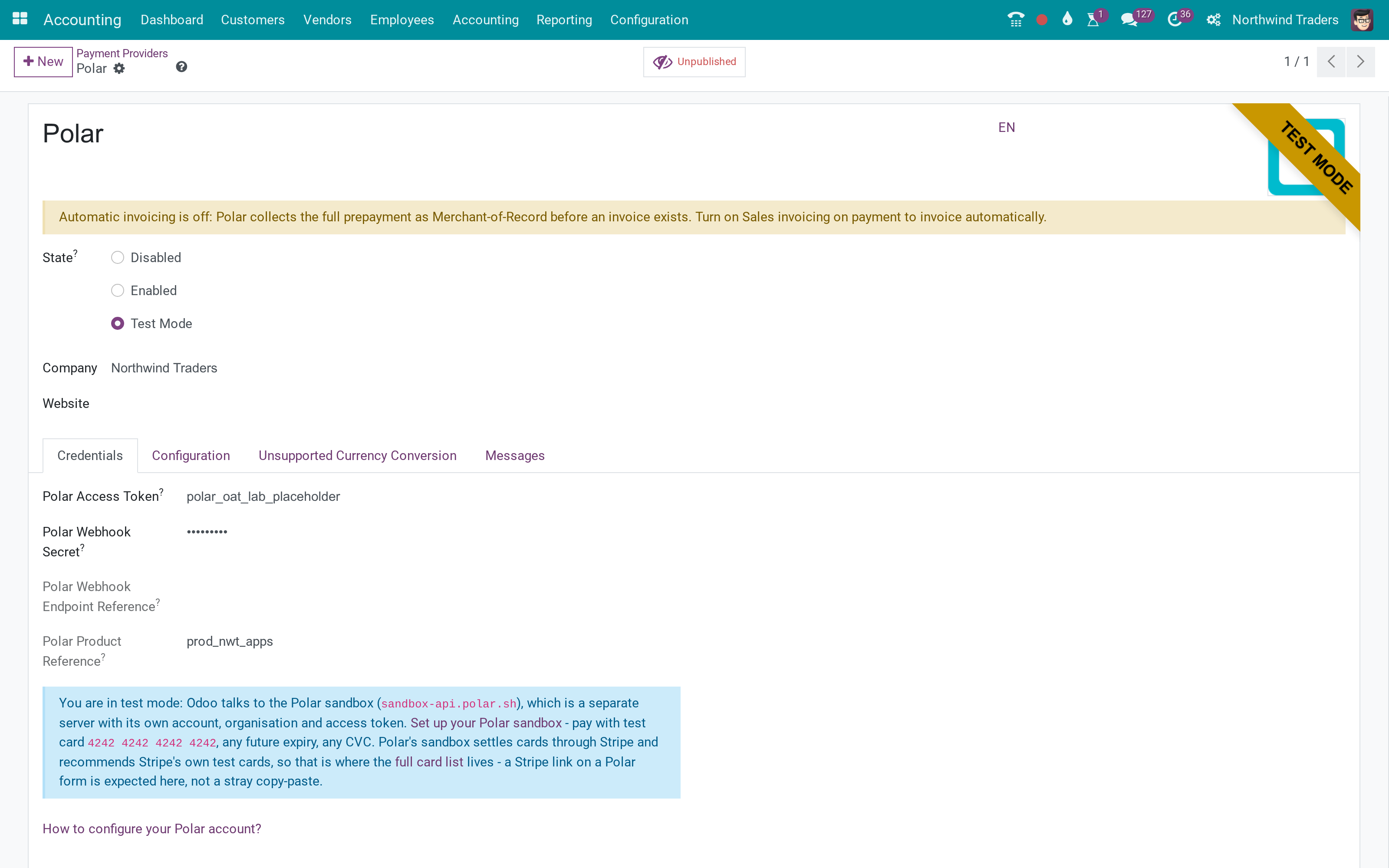
Accounts
Accounting settings.
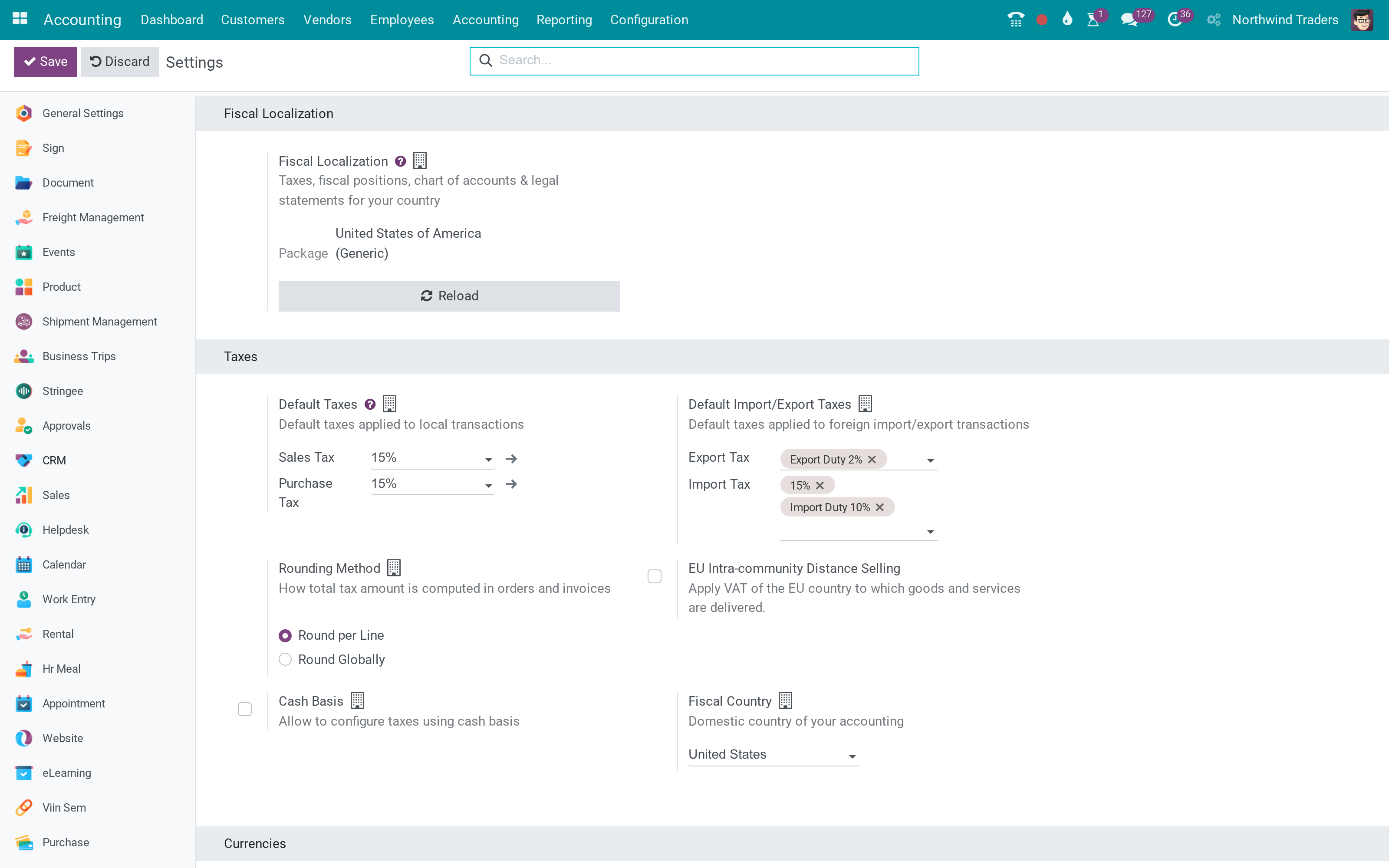
Cron
Scheduled.
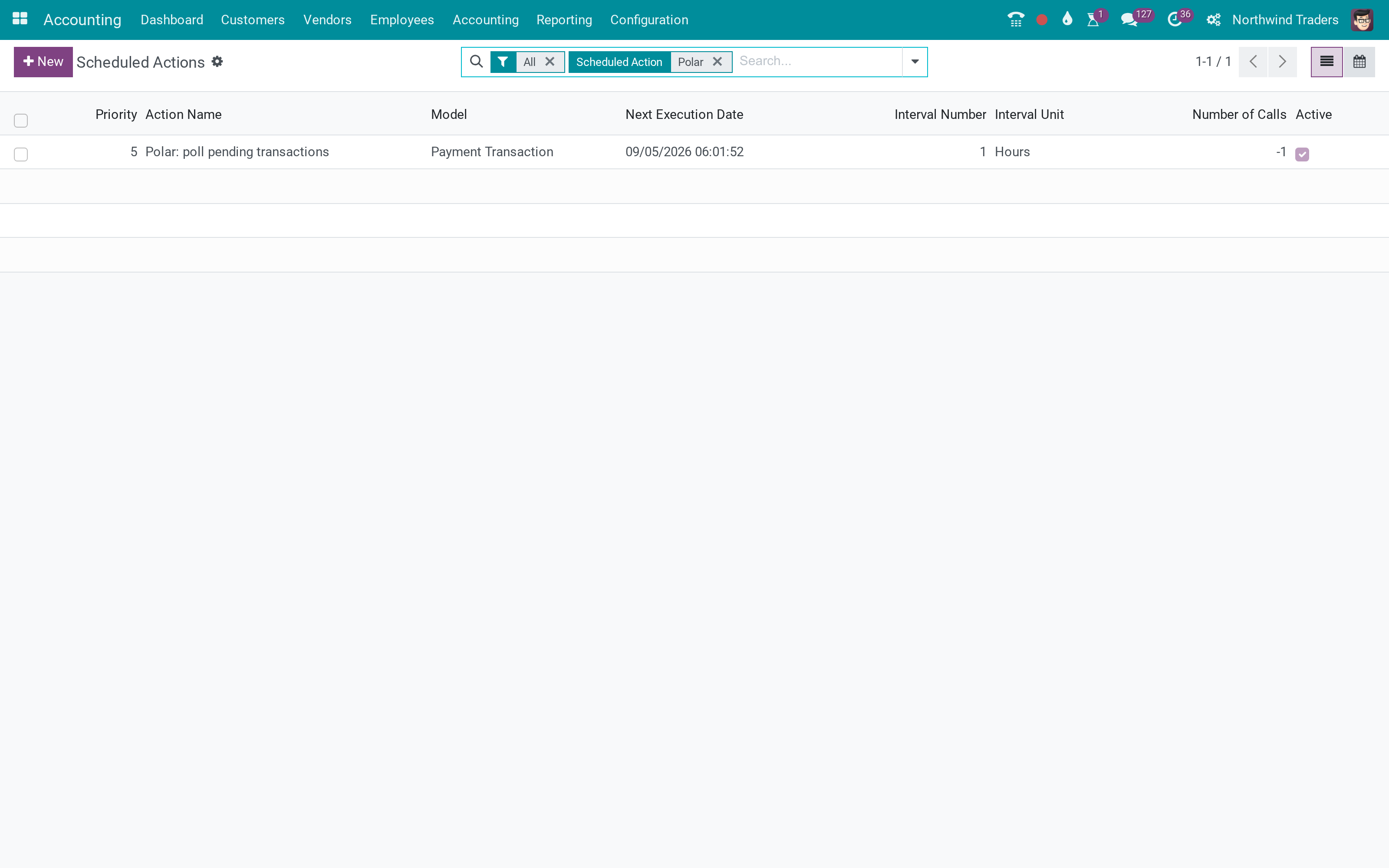
What You Get
Merchant-of-record checkout
Prepare product and webhook from Odoo
Fee booked to an expense account
Clearing account
Webhook reconciliation cron
What This App Does Not Do
Read this before you buy. Everything below is something the app deliberately leaves to another app or to you.
The lab token is a placeholder; product and webhook were not created.
Works Well With
Apps from the same stack, built to fit this one:
Who Should Use Polar Payment Provider?
Apps vendor
Global sales, taxes handled by Polar.
Frequently Asked Questions
What does Polar Payment Provider do?
A Polar provider with access token, webhook secret and product reference, a button that prepares the Polar product and one that creates the webhook, fee and clearing accounts so Polar's fee is booked, a cron reconciling recent orders, and the checkout and webhook routes.
What does Polar Payment Provider not do?
Needs a Polar organisation and token. The lab token is a placeholder; product and webhook were not created.
Who is Polar Payment Provider for?
Apps vendor: Global sales, taxes handled by Polar.
Which Odoo version and editions does it support?
Odoo 17.0 - Odoo Community, Odoo Enterprise, Viindoo Cloud. Upgrades to a newer Odoo series are a separate purchase for that series.
What does it depend on?
It installs on top of: payment, account_payment, account. Odoo installs them with it.
How do I set it up?
Paste the token; prepare the product; create the webhook.
What works well with it?
Invoice online payment (account_payment): Required.
Can I try it before buying?
Yes - the Live Preview button at the top of this page opens the module's own screen on a working database.
How do I get support?
Write to apps.support@viindoo.com with your Odoo version and the technical name payment_polar; pre-sales questions go to sales@viindoo.com.
See Polar Payment Provider in Action
Polar.sh as merchant of record for online payments
Need help with Polar Payment Provider?
For questions, implementation support, or consulting services, contact Viindoo.
Pre-Sales & Partnership
sales@viindoo.comWhen contacting us, please include:
- Odoo/Viindoo version (Odoo CE / Viindoo Editions).
- Number of users and business scope.
- Other modules currently in use.
Technical Support
apps.support@viindoo.comFor faster troubleshooting, please provide:
- Order number or app reference.
- Odoo/Viindoo version & edition.
- Steps to reproduce the issue.
- Screenshots/logs if available.
Upgrades to a newer Odoo series are a separate purchase for that series.
Technical Requirement
Changes log
0.1.1 - Latest on the 17.0 line
- Aligned with the 17.0 models and views.
User Guide: Polar Payment Provider
This guide explains how to configure and use the Polar Payment Provider module for online payments through Polar.sh.
Note
Polar acts as a Merchant of Record. Polar takes the buyer's card payment, computes and remits VAT itself, issues its own invoice to the buyer, deducts a platform fee, and pays you the net amount. Odoo never sees the buyer's card details and never calculates VAT on a Polar sale: its job is to record the payment against your ordinary accounts, check that each webhook really came from Polar, and let you refund from Odoo.
Installation
- Navigate to Apps.
- Search with the keyword payment_polar.
- Press Install.
Before You Enable Polar
Polar needs very little setting up before you switch it on. There are no dedicated Polar accounts to configure - Polar works with your standard payment accounts out of the box. What Odoo does insist on is a usable bank journal, and it is worth turning on Automatic Invoice as well. If Odoo refuses to switch the provider on, the message names the one thing to fix, so you can work through the points below in any order.
No dedicated account setup is needed
Unlike some integrations, Polar has no dedicated accounts to set up. Straight out of the box it uses the same standard accounts every other online payment provider uses: the cash a buyer pays lands in your company's Outstanding Receipts account, and Polar's platform fee is reconciled against your bank statement, exactly like a card processor's fee. Enabling Polar on a brand-new Chart of Accounts simply works - there is nothing to configure here first.
Check the company's bank journal
The company that owns the provider needs a usable bank journal, because that is what Odoo uses to record Polar's incoming cash. Odoo blocks activation otherwise, and tells you which of the two situations you are in:
- If the bank journal exists but is archived, Odoo names it and asks you to unarchive it. An archived journal is unusable, so a provider whose company has one can look correctly set up and still refuse to switch on. Do not build a second journal next to it - bring the existing one back.
- If the company has no active bank journal at all, Odoo asks you to create one, or to unarchive an existing one.
Turn on Automatic Invoice
Polar collects the full payment as Merchant of Record, which can happen before Odoo has an invoice for the sale. Go to the Sales ‣ Configuration ‣ Settings menu, open the Invoicing section, and turn on Automatic Invoice so every order paid online - including through Polar - is invoiced automatically as soon as the payment is confirmed.
Configure the provider
Polar ships Disabled, and you will find it under Invoicing ‣ Configuration ‣ Online Payments ‣ Payment Providers (Accounting ‣ Configuration ‣ Online Payments ‣ Payment Providers if you use the Accounting app).
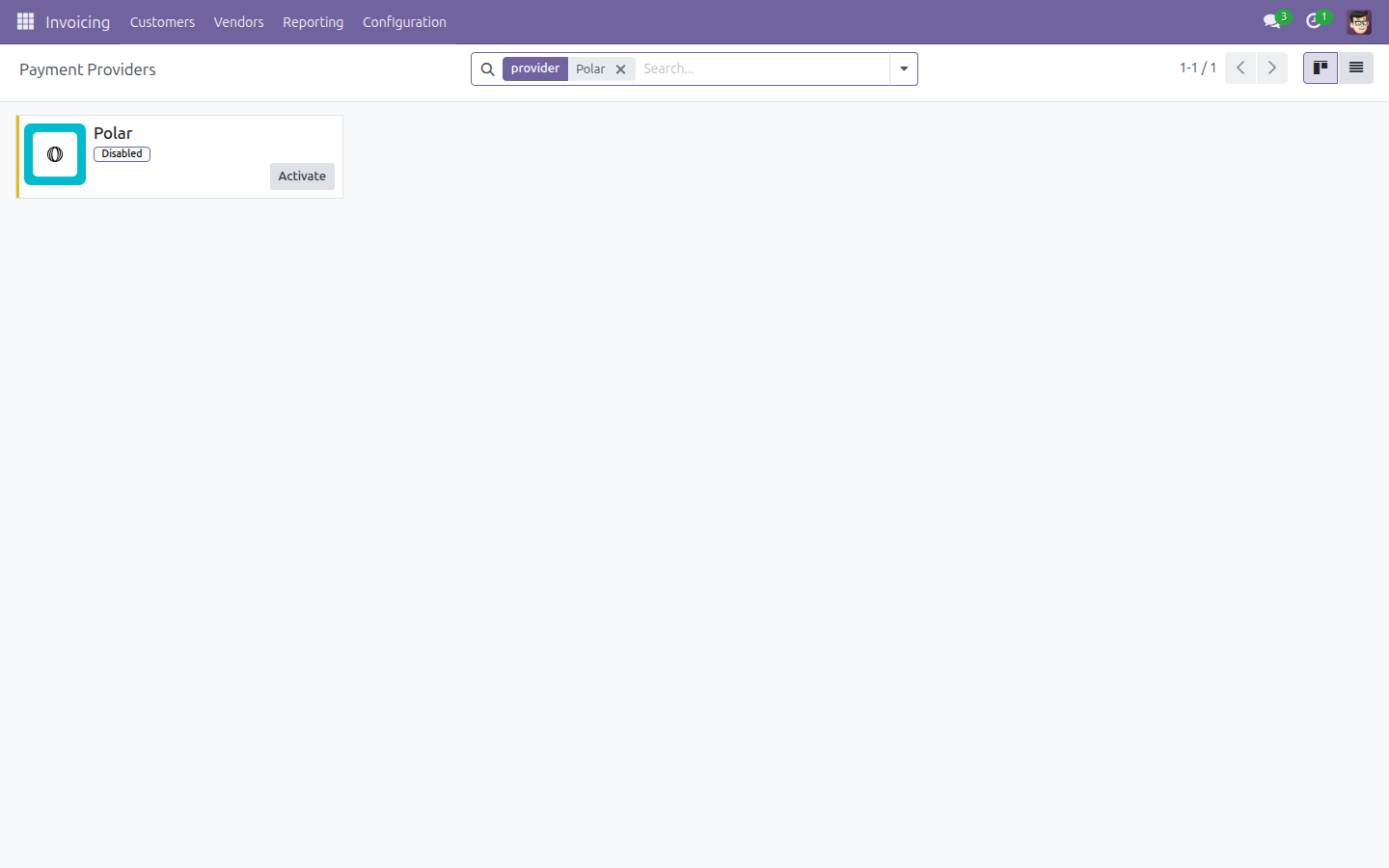
Open Polar, then work through these steps in order:
- Set the State to Test Mode or Enabled before anything else. This is the first step, not the last: while the provider is Disabled, Odoo cannot tell whether to talk to Polar's sandbox or to Polar's production service, so it refuses to create anything in Polar at all. The form says so, and both buttons below refuse with the same explanation if you press them too early. Choose Test Mode to work against Polar's sandbox, or Enabled to work against Polar production.
- On the Credentials tab, fill in the Polar Access Token: the Organization Access Token from your Polar dashboard, which authenticates every call Odoo makes. It must include the webhooks:write scope, or the next step fails. Sandbox and production each need their own token.
- Save, then press Generate your webhook. Odoo asks Polar to create
the webhook endpoint for this database and fills in both Polar Webhook
Secret and Polar Webhook Endpoint Reference for you. You no longer
register anything by hand in the Polar dashboard, and you never have to
find or copy your Odoo webhook address.
- The Polar Webhook Secret is what lets Odoo tell a real Polar message from a forged one: Odoo verifies each incoming webhook's Standard-Webhooks-style signature with it. If you ever paste it yourself instead of using the button, copy it exactly as Polar shows it, including the whsec_ prefix - Polar signs with the raw prefixed secret, not the stripped one the generic Standard-Webhooks spec expects.
- The Polar Webhook Endpoint Reference is filled in for you and cannot be typed by hand. Odoo uses it for the hourly endpoint health check, which reports in this provider's warning banner if Polar has disabled the endpoint.
- Leave Polar Product Reference alone. Odoo provisions the one shared, reusable Polar product that every checkout references the moment you save the provider in Test Mode or Enabled - you do not do this by hand. The Prepare Polar Product button is only there to retry if that automatic attempt did not go through.
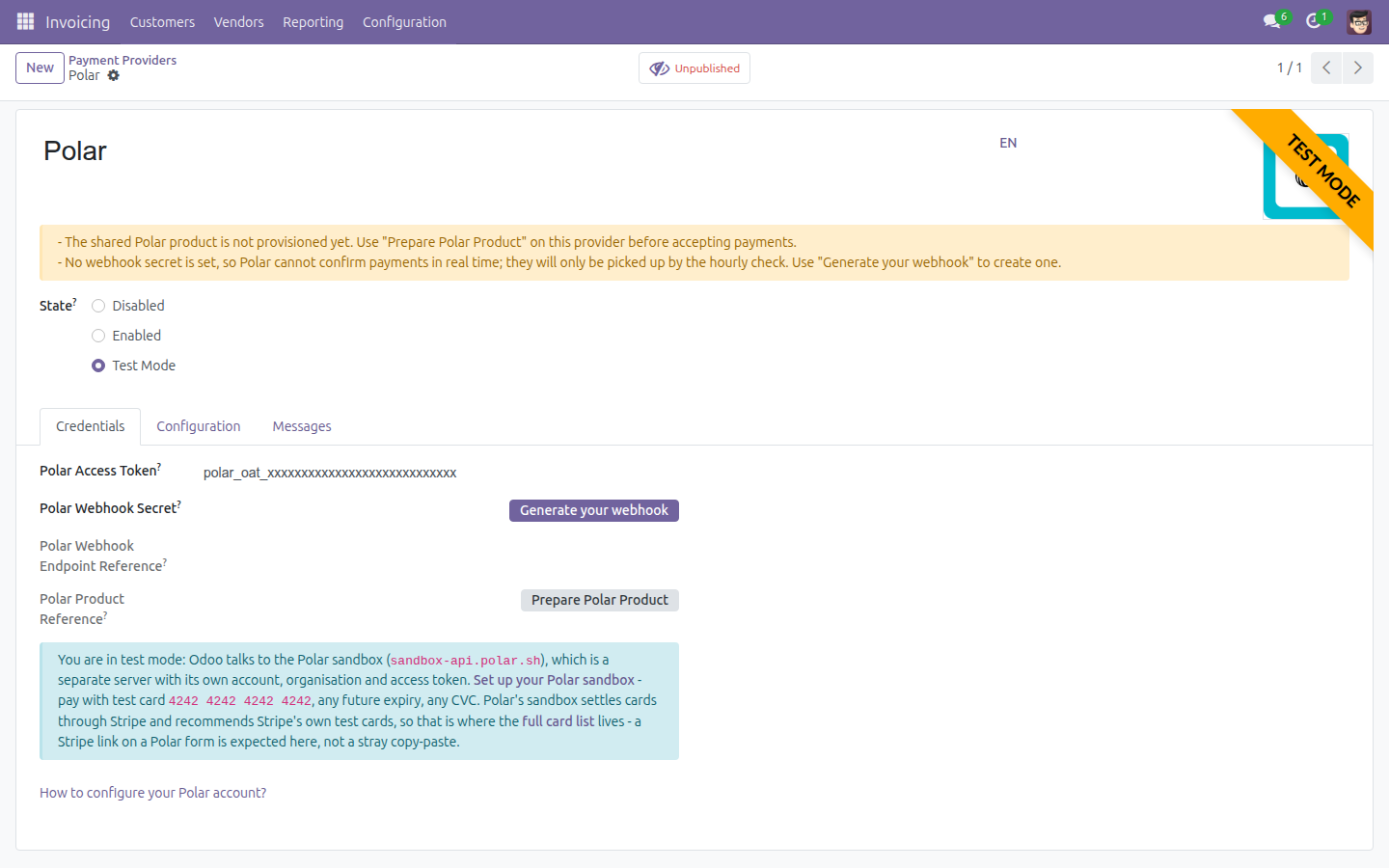
The yellow banner at the top of the provider lists anything still missing - the shared product, the webhook secret, the bank journal, or automatic invoicing - one problem per line, each naming its own fix. It is the fastest way to see what is left to do.
Trying Polar out in Test Mode
In Test Mode, Odoo talks to Polar's sandbox instead of the real thing. The sandbox is a separate server with its own account, organisation and access token - your production token will not work there, and nothing you do in it touches real money.
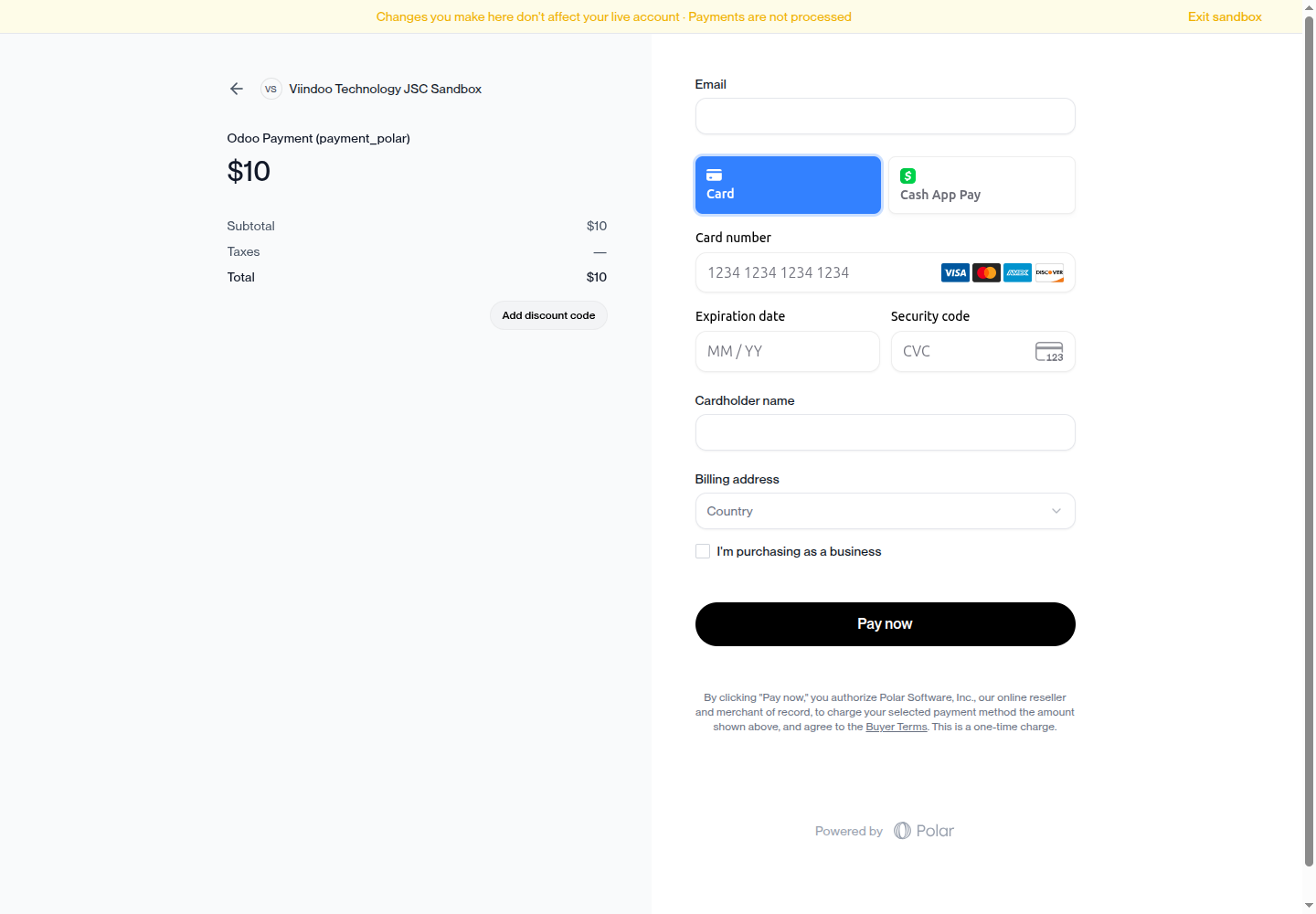
The provider form links straight to Polar's sandbox setup guide. Once you are set up, pay with the test card 4242 4242 4242 4242, any future expiry date and any CVC. Polar's sandbox settles cards through Stripe, so the full list of test cards lives in Stripe's documentation.
Changing the access token later
If you replace the Polar Access Token, Odoo clears the webhook secret, the webhook endpoint reference and the product reference, and provisions the product again with the new token.
This is deliberate, and it is worth understanding before you swap a token by mistake. A token belongs to exactly one Polar organization, and Polar's sandbox is a physically separate server from production - so everything the old token created is meaningless to the new one. After changing the token, press Generate your webhook again to create a fresh webhook endpoint.
How a Polar Checkout Works
When a buyer pays with Polar, Odoo creates a Polar checkout session for a single, tax-inclusive line item and redirects the buyer's browser to Polar's own hosted checkout page. Polar handles the card capture, the VAT calculation and its own buyer-facing invoice end to end; Odoo never collects or stores the card details.
A Polar checkout can present the buyer with, and charge them in, any of the 126 currencies Polar supports. As Merchant of Record, Polar computes and remits that jurisdiction's VAT itself - no currency-conversion configuration is needed for this, and none is allowed on a Polar provider. Before redirecting the buyer, Odoo also checks the amount against Polar's documented per-currency minimum charge and blocks with a clear message if it is too low, rather than letting the checkout fail on Polar's side.
When the buyer's browser returns from the hosted checkout, Odoo does not trust the returned parameters at face value: it re-fetches the authoritative checkout state directly from Polar's API before showing the buyer the payment status.
How Settlement Is Booked in Odoo
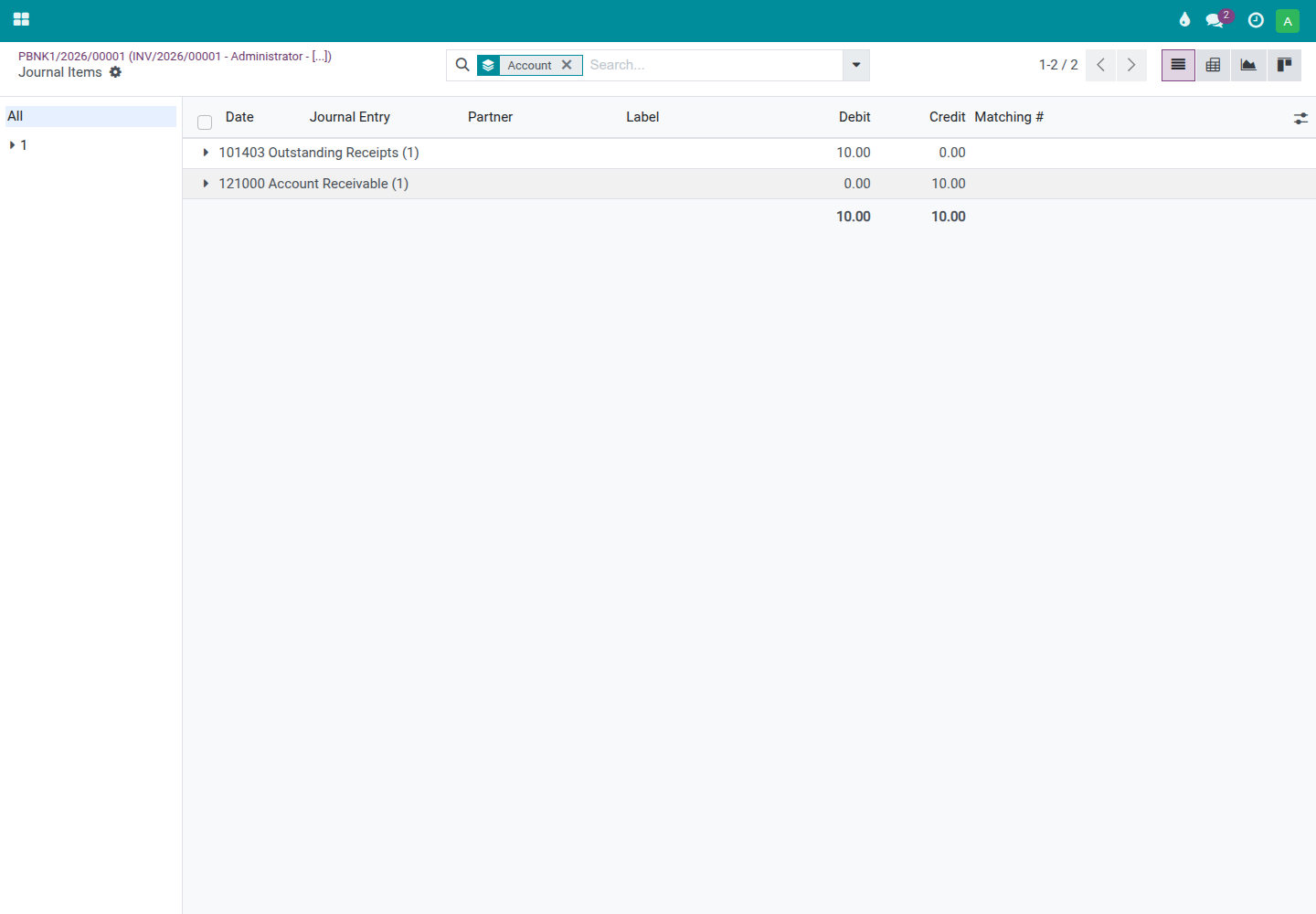
The moment Polar confirms an order is paid, Odoo books the payment automatically, with no manual journal work. Out of the box - with no dedicated Polar accounts set up - Polar settles exactly like any other online payment provider:
- The full gross amount clears the customer's receivable and lands in your company's standard Outstanding Receipts account.
- Polar's platform fee stays inside that payment. It is not booked as a separate expense; instead it surfaces later, when Polar's payout - the gross amount minus its fee - arrives in your bank and you reconcile that deposit against the payment, the same place any card processor's fee is reconciled (see Payout reconciliation is manual, by design, below).
Note
Advanced users can optionally isolate Polar's cash in a dedicated account and book each fee to its own expense account by setting the Polar Clearing Account and Polar Fee Expense Account fields on the company record through the developer tools; left unset - the normal case - the standard flow above applies.
Issuing a Refund
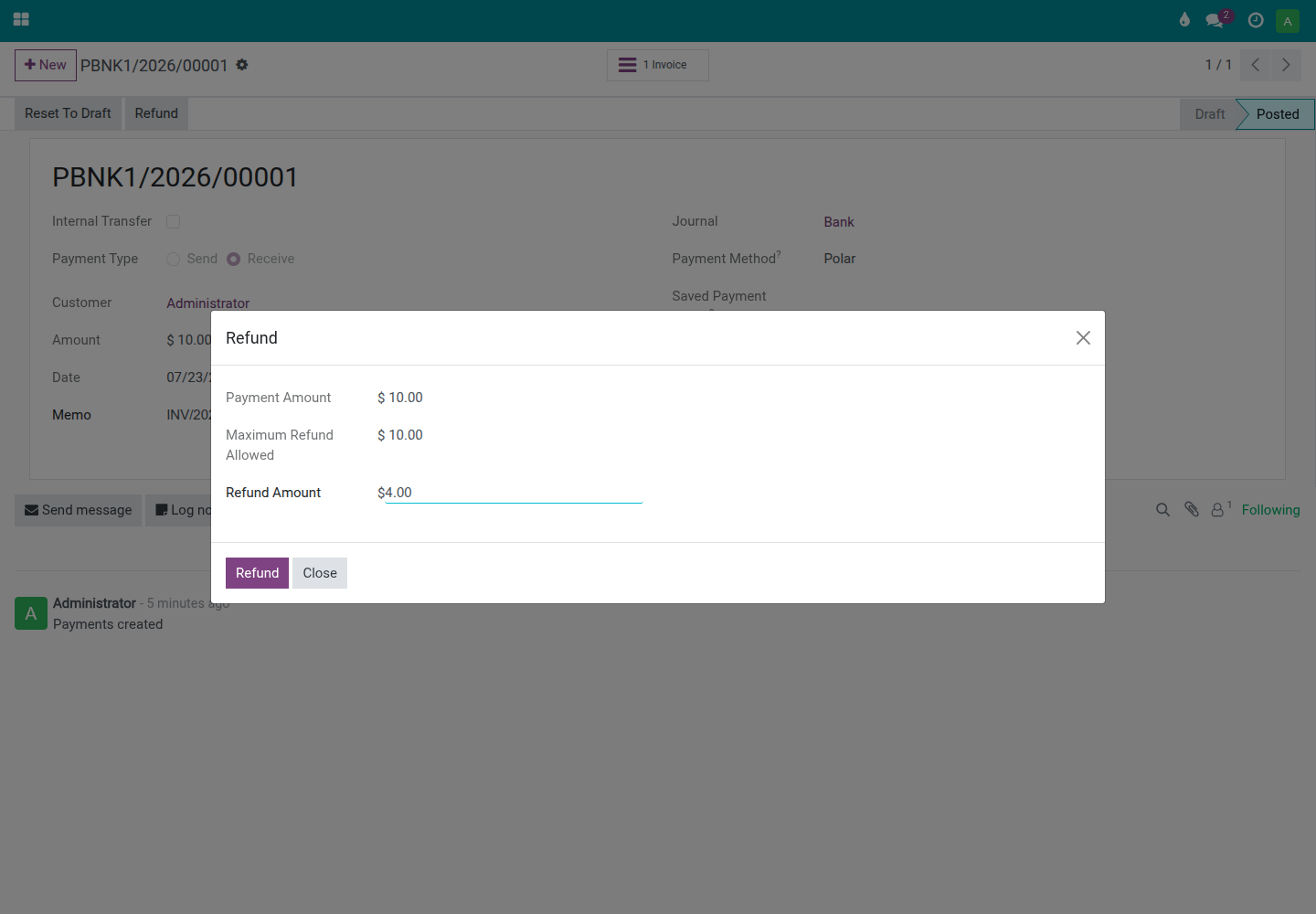
You can issue a full or partial refund of a settled Polar payment directly from the standard Odoo refund action on the transaction. Odoo calls Polar's refund API against the original Polar order and tracks the refund as its own transaction, staying pending until Polar confirms it succeeded.
The Hourly Poll Cron: Your Safety Net
Every hour, the Polar: poll pending transactions scheduled action re-checks every Polar transaction still in draft or pending from the last 7 days directly against Polar's API, and settles or updates it from that authoritative state.
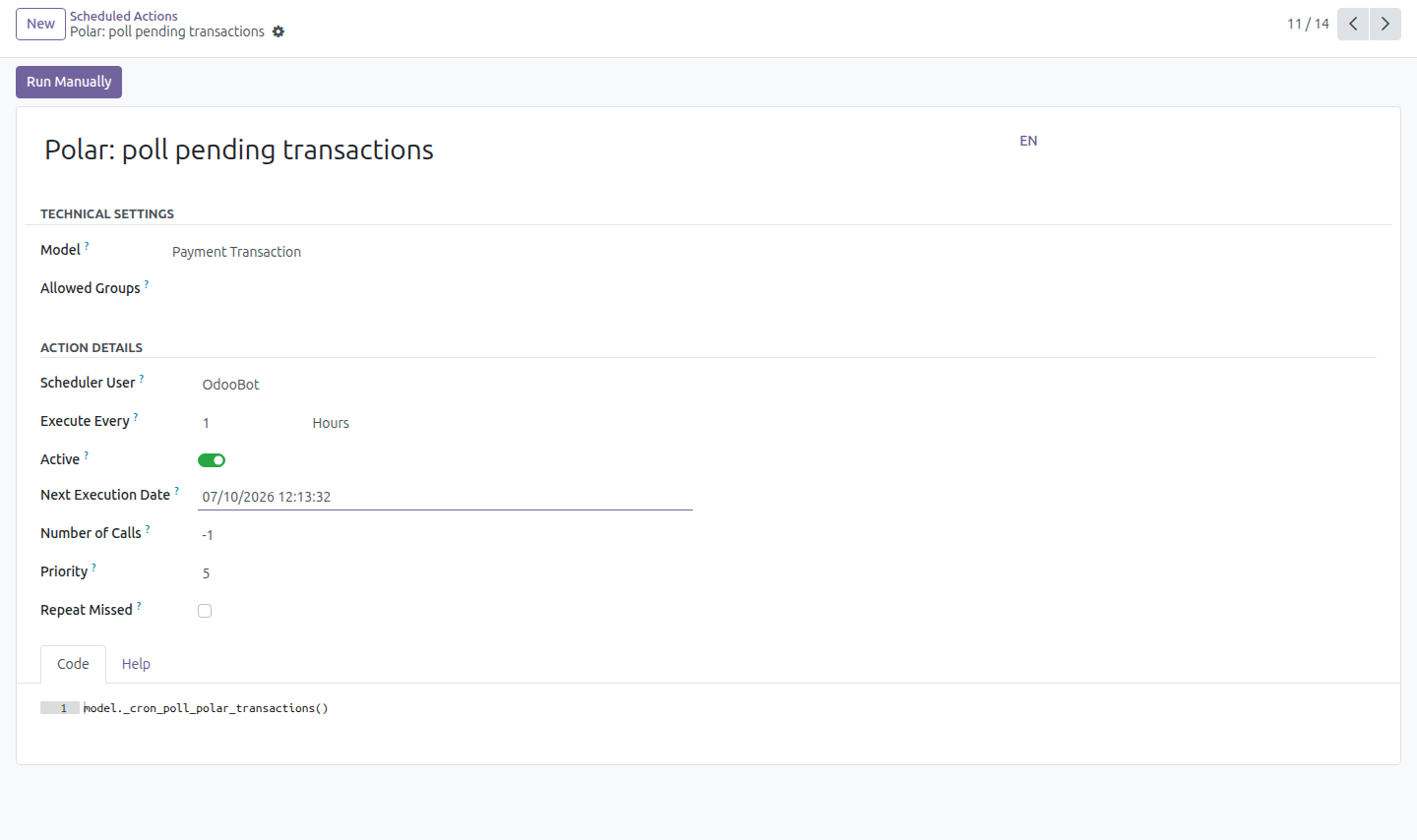
This is the safety net for a webhook delivery that never arrived - and, if Polar disables the endpoint after repeated delivery failures, the hourly poll keeps your transactions moving until you re-enable the endpoint from Polar's own dashboard.
Troubleshooting: Checkout Fails Right After Enabling
Odoo provisions the shared Polar product automatically the moment you enable the provider. If Polar was unreachable at that exact moment (for example, the access token was not valid yet), that automatic attempt is only logged as a warning - it never blocks saving the provider - and the product reference stays empty. The first checkout then fails with a clear error instead of charging anyone incorrectly.
To fix it, open the Polar provider and press Prepare Polar Product to retry. It is safe to press even if the product was already provisioned: the action does nothing if a product reference is already set.
Troubleshooting: Payments Only Confirm Once an Hour
If Polar payments reach Odoo late, in an hourly batch rather than within seconds, the webhook is not getting through and the poll cron is carrying the whole load. The provider's warning banner names the reason:
- No webhook secret is set. Press Generate your webhook to create one.
- Polar auto-disabled the webhook endpoint after repeated delivery failures. Re-enable it from the Polar dashboard; the banner clears by itself once Polar reports the endpoint healthy again.
What You Need to Know Before Going Live
Payout reconciliation is manual, by design
Polar's payouts API cannot be called with the access token an Odoo server holds, so Odoo can never learn which orders a given payout settled. This module does not try to guess. Polar's cash rides your standard Outstanding Receipts account, and when a Polar payout - the net amount, after the platform fee - lands in your bank, your accountant matches that deposit against the payments behind it in Odoo's own bank-reconciliation widget, using the amount and the date as the matching signal. The platform fee shows up right here, as the gap between the gross payments and the net deposit. This is a reconciliation heuristic, not an authoritative, order-by-order match - plan your reconciliation process accordingly.
Polar exposes no dispute or chargeback webhook
This module does not receive or process any dispute or chargeback event, because Polar does not emit a webhook for them. Disputes are handled entirely in Polar's own dashboard, and reach Odoo only indirectly, through the payout figures your accountant reconciles.
Turn on Automatic Invoice, or expect an uninvoiced prepayment
Polar collects the full payment as Merchant of Record before Odoo necessarily has an invoice for it. If Automatic Invoice (see the Turn on Automatic Invoice section above) is turned off, a Polar checkout lands in Odoo as an unreconciled customer prepayment until an invoice is created by hand. The Polar provider form warns about exactly this as long as the setting stays off; turn it on so every settled Polar payment is invoiced automatically.
This software and associated files (the "Software") may only be used (executed, modified, executed after modifications) if you have purchased a valid license from the authors, typically via Odoo Apps, or if you have received a written agreement from the authors of the Software (see the COPYRIGHT file).
You may develop Odoo modules that use the Software as a library (typically by depending on it, importing it and using its resources), but without copying any source code or material from the Software. You may distribute those modules under the license of your choice, provided that this license is compatible with the terms of the Odoo Proprietary License (For example: LGPL, MIT, or proprietary licenses similar to this one).
It is forbidden to publish, distribute, sublicense, or sell copies of the Software or modified copies of the Software.
The above copyright notice and this permission notice must be included in all copies or substantial portions of the Software.
THE SOFTWARE IS PROVIDED "AS IS", WITHOUT WARRANTY OF ANY KIND, EXPRESS OR IMPLIED, INCLUDING BUT NOT LIMITED TO THE WARRANTIES OF MERCHANTABILITY, FITNESS FOR A PARTICULAR PURPOSE AND NONINFRINGEMENT. IN NO EVENT SHALL THE AUTHORS OR COPYRIGHT HOLDERS BE LIABLE FOR ANY CLAIM, DAMAGES OR OTHER LIABILITY, WHETHER IN AN ACTION OF CONTRACT, TORT OR OTHERWISE, ARISING FROM, OUT OF OR IN CONNECTION WITH THE SOFTWARE OR THE USE OR OTHER DEALINGS IN THE SOFTWARE.
