Sales Target Management - Sales Management
| Lines of Code | 1427 |
| Technical name | to_sales_target_sale |
| License | OPL-1 |
| Website | https://viindoo.com/apps/modules/18.0/to_sales_target_sale |
| Read description for | v 10.0 v 11.0 v 12.0 v 13.0 v 14.0 v 15.0 v 16.0 v 17.0 |
| Required Apps | CRM (crm) Invoicing (account) Discuss (mail) Calendar (calendar) Contacts (contacts) |
| Included Dependencies | Sales Target Sales Teams Advanced Sales - Sales Teams Advanced |
| Extensions | Sales Target Management - Point of Sales |

The target, and what the team actually sold against it
Confirmed orders, invoiced revenue and an all-channel total, computed against the approved target and shown as four progress bars on the target itself.
Sales Target Management - Sales Management (technical name to_sales_target_sale) is an Odoo 18.0 app for Odoo Community and Odoo Enterprise and Viindoo Cloud, built for sales manager, salesperson, finance, director.
At a Glance
The facts of Sales Target Management - Sales Management, version 1.0.1, in one place. Published by Viindoo.
Key Features
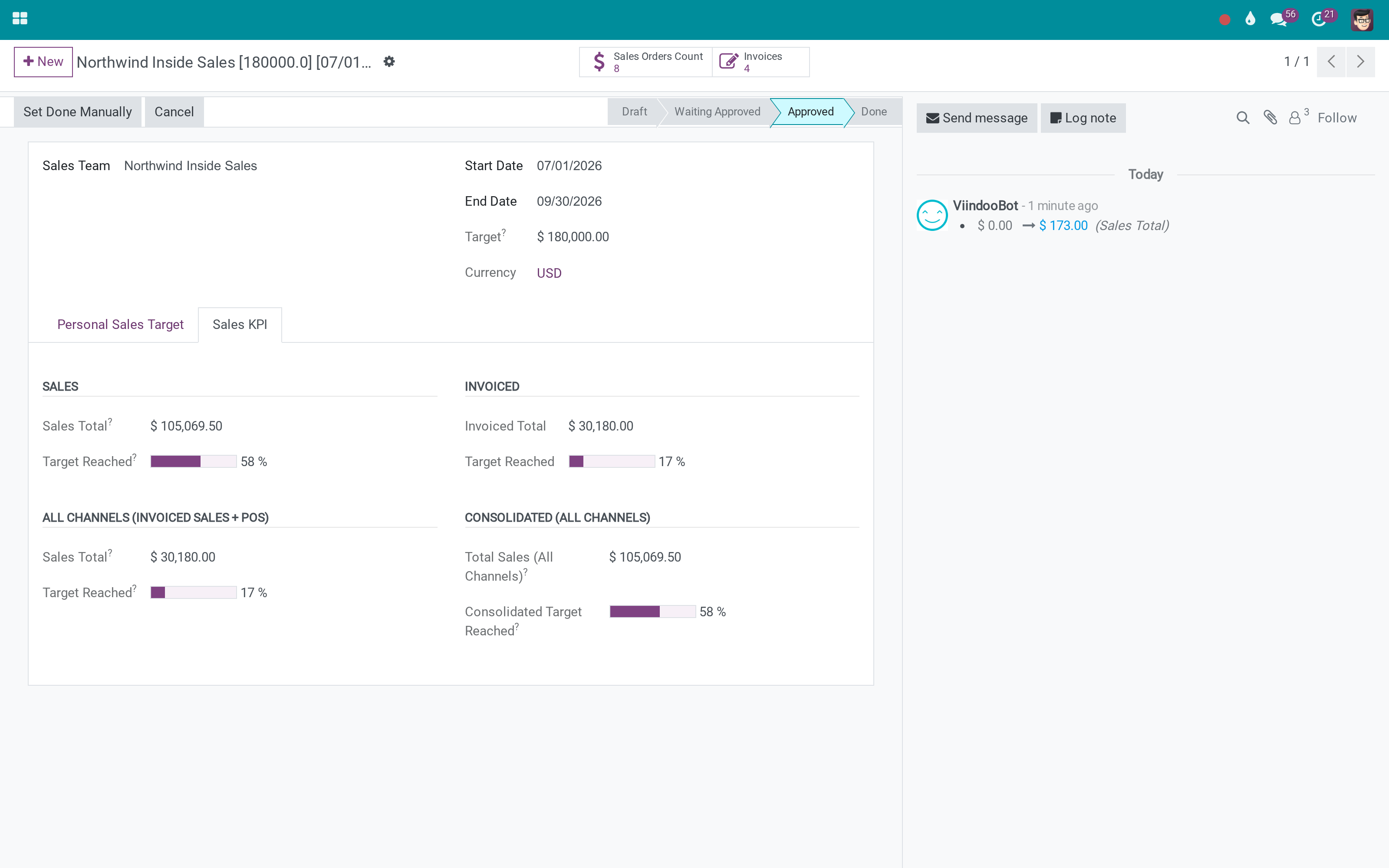
A sales target is only a number until something measures it. This bridge connects the Sales Target app to Sales Management: once a target is approved, it collects the confirmed orders and the customer invoices of that team - or that salesperson - inside its own period, and computes four figures from them. Sales Total is what was ordered; Invoiced Total is what was billed; All Channels adds the walk-in Point of Sale revenue; Consolidated counts each order once regardless of invoice status. Each has its own percentage against the target, so a quarter that looks strong on orders and thin on invoices says so on the screen instead of in an argument.
The same figures on a personal target
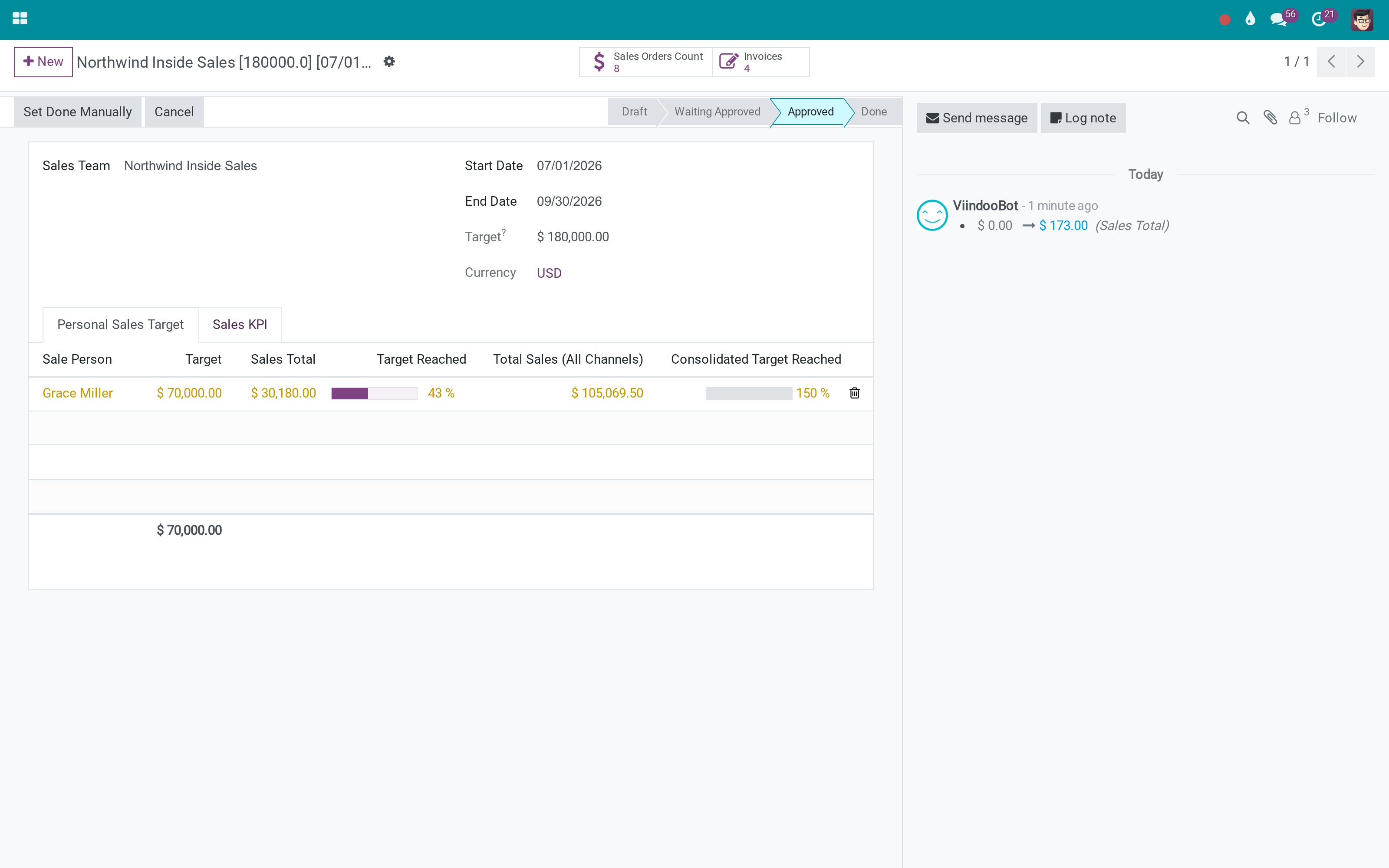
A salesperson's target computes from their own orders and the invoices they issued.
How It Works
The target already exists; this is what it starts to know.
Approve the target, and it starts collecting
Sales, Invoiced, All Channels and Consolidated - each with its own percentage. The gap between ordered and invoiced is usually the interesting part.
Every member on the same measure
The team target holds its members' targets, so the split of a team number between people is visible on one screen.
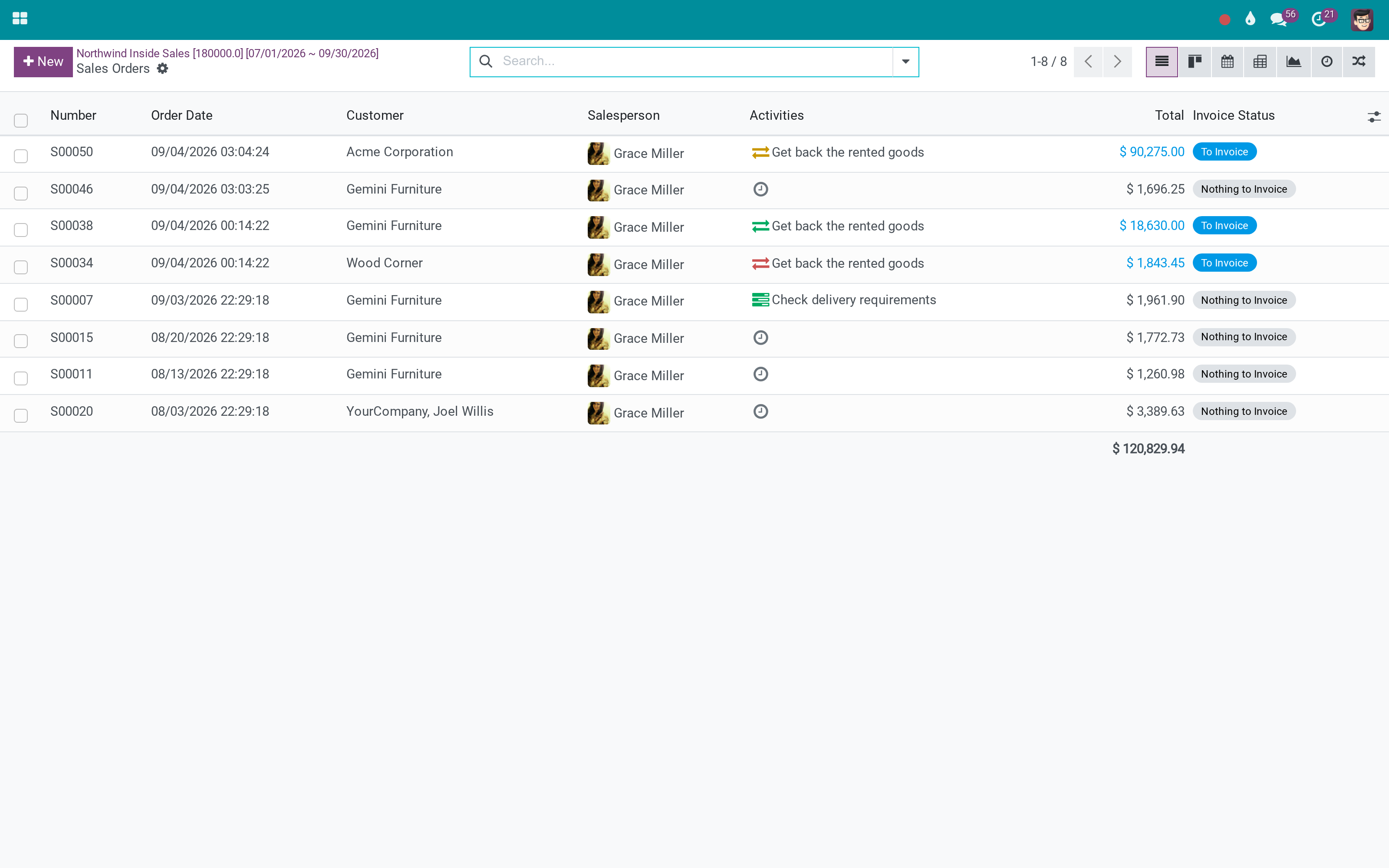
Open what the number is made of
The stat button opens exactly the orders the KPI counted - which is how a disputed figure gets settled in one click.
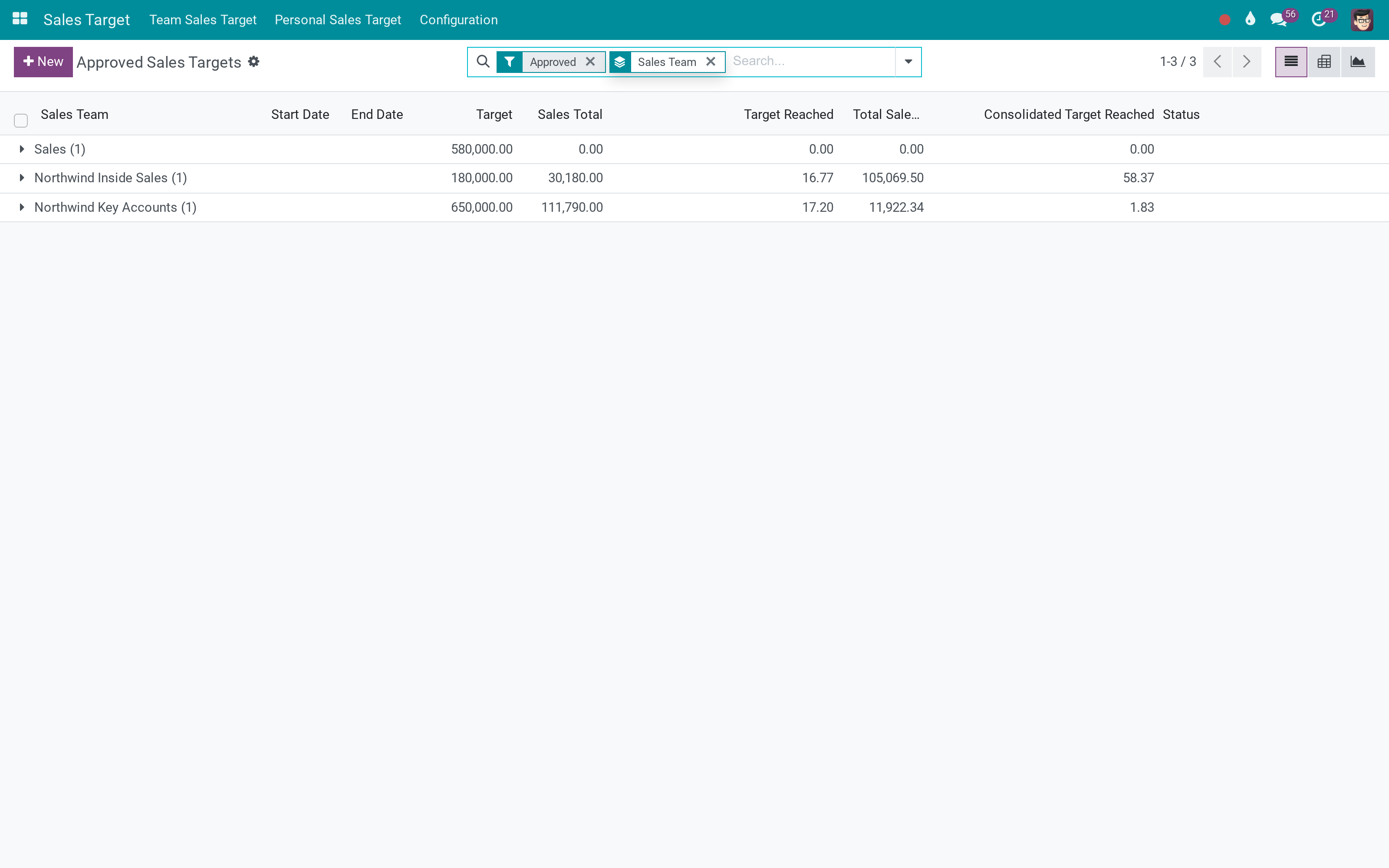
Read the quarter as a list
Because the figures are stored, the list sorts and groups by them without a custom report.
What You Get
Four KPI families on the target: ordered, invoiced, all channels, consolidated
Each with its own Target Reached percentage, drawn as a progress bar
Stat buttons to the orders and to the invoices behind the number
Personal targets carry the same figures, so a team's total and its members' totals agree
Figures are stored, so a target list can be sorted and grouped by what was reached
Only approved and done targets collect - a draft target reads zero on purpose
More Screens
Everything below was taken on a database seeded with real business data, on this series - not a mock-up and not a screenshot from an older version.
Approved targets
The orders behind a target
What This App Does Not Do
Read this before you buy. Everything below is something the app deliberately leaves to another app or to you.
Everything here comes from orders and invoices that exist.
Collection starts at approval, deliberately - an unapproved number is not a target.
Attainment is the input to a commission scheme, not the scheme itself.
Install Sales Target - Point of Sale for the walk-in channel to be included.
Works Well With
Apps from the same stack, built to fit this one:
Who Should Use Sales Target Management - Sales Management?
Sales manager
Sees the quarter as it stands, not as it was reported.
Salesperson
Opens their own target and finds the orders that count towards it.
Finance
Reads the invoiced line rather than the ordered one, which is the number that pays.
Director
Compares teams on the same measure across the same period.
Frequently Asked Questions
What does Sales Target Management - Sales Management do?
Confirmed orders, invoiced revenue and an all-channel total, computed against the approved target and shown as four progress bars on the target itself.
What does Sales Target Management - Sales Management not do?
It measures, it does not forecast. Everything here comes from orders and invoices that exist. A draft or refused target reads zero. Collection starts at approval, deliberately - an unapproved number is not a target. No commission calculation. Attainment is the input to a commission scheme, not the scheme itself. Point of Sale revenue needs the PoS bridge. Install Sales Target - Point of Sale for the walk-in channel to be included.
Who is Sales Target Management - Sales Management for?
Sales manager: Sees the quarter as it stands, not as it was reported. Salesperson: Opens their own target and finds the orders that count towards it. Finance: Reads the invoiced line rather than the ordered one, which is the number that pays. Director: Compares teams on the same measure across the same period.
Which Odoo version and editions does it support?
Odoo 18.0 - Odoo Community, Odoo Enterprise, Viindoo Cloud. Upgrades to a newer Odoo series are a separate purchase for that series.
What does it depend on?
It installs on top of: sale_crm, to_sales_target, to_sales_team_advanced_sale. Odoo installs them with it.
How do I set it up?
The target already exists; this is what it starts to know.
What works well with it?
Sales Target Management (to_sales_target): The target, its approval flow and its periods. Sales Target - Point of Sale (to_sales_target_pos): Adds the shop channel to the all-channel figure. Sales Teams Advanced (to_sales_team_advanced): Regions and team leaders to group attainment by.
Can I try it before buying?
Yes - the Live Preview button at the top of this page opens the module's own screen on a working database.
How do I get support?
Write to apps.support@viindoo.com with your Odoo version and the technical name to_sales_target_sale; pre-sales questions go to sales@viindoo.com.
See Sales Target Management - Sales Management in Action
Live demo: v18demo-int.viindoo.com/web#action=to_sales_target.team_sales_target_action_approved
Need help with Sales Target Management - Sales Management?
For questions, implementation support or a custom feature, contact Viindoo.
Pre-Sales & Partnership
sales@viindoo.comUpgrades to a newer Odoo series are a separate purchase for that series.
All Viindoo apps: apps.odoo.com/apps/modules/browse?author=Viindoo
Technical Requirement
Changes log
1.0.1 - Latest on the 17.0 line
- A consolidated all-channel figure counts each order once, whether or not it has been invoiced.
- Sales and invoice totals are converted into the target's own currency.
- The KPI fields are stored, so target lists sort and group by attainment.
Installation
- Navigate to Apps.
- Search with keyword to_sales_target_sale.
- Press Install.
Instruction
Instruction video: Sales Target Management - Sales Management
1. Automatically measuring sales target
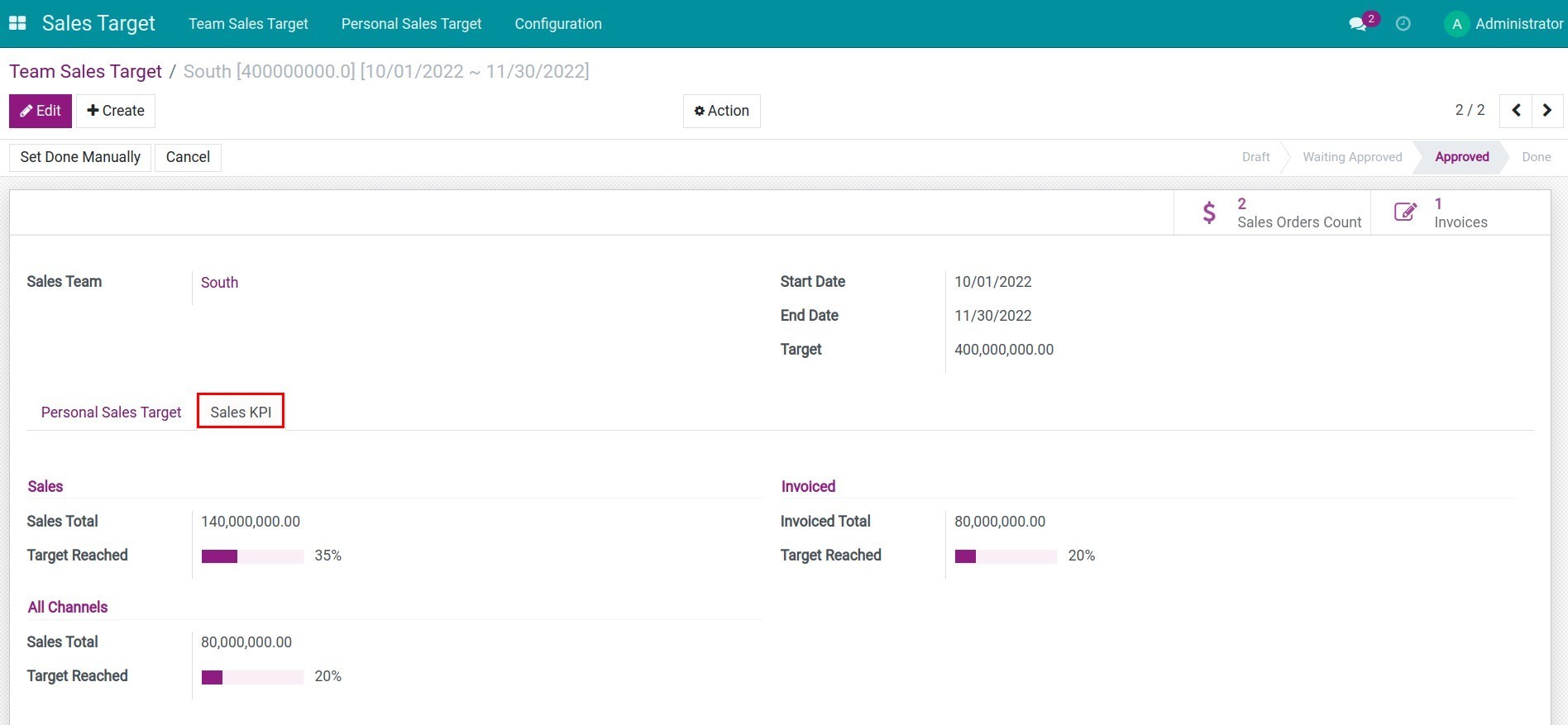
When the team's sales target is approved, the sales order revenue happened during the determined period will be automatically updated to the respective targets on the Sales KPI tab.
- Sales total: total pre-tax sales from sales orders.
- Invoiced total: total invoiced sales.
- Sales total of the channels: total sales from all channels (Sales, Point of Sale, Website, etc.). For the sales channel, this is the total value of the invoiced sales orders.
The above criteria will be automatically calculated the reached rate.
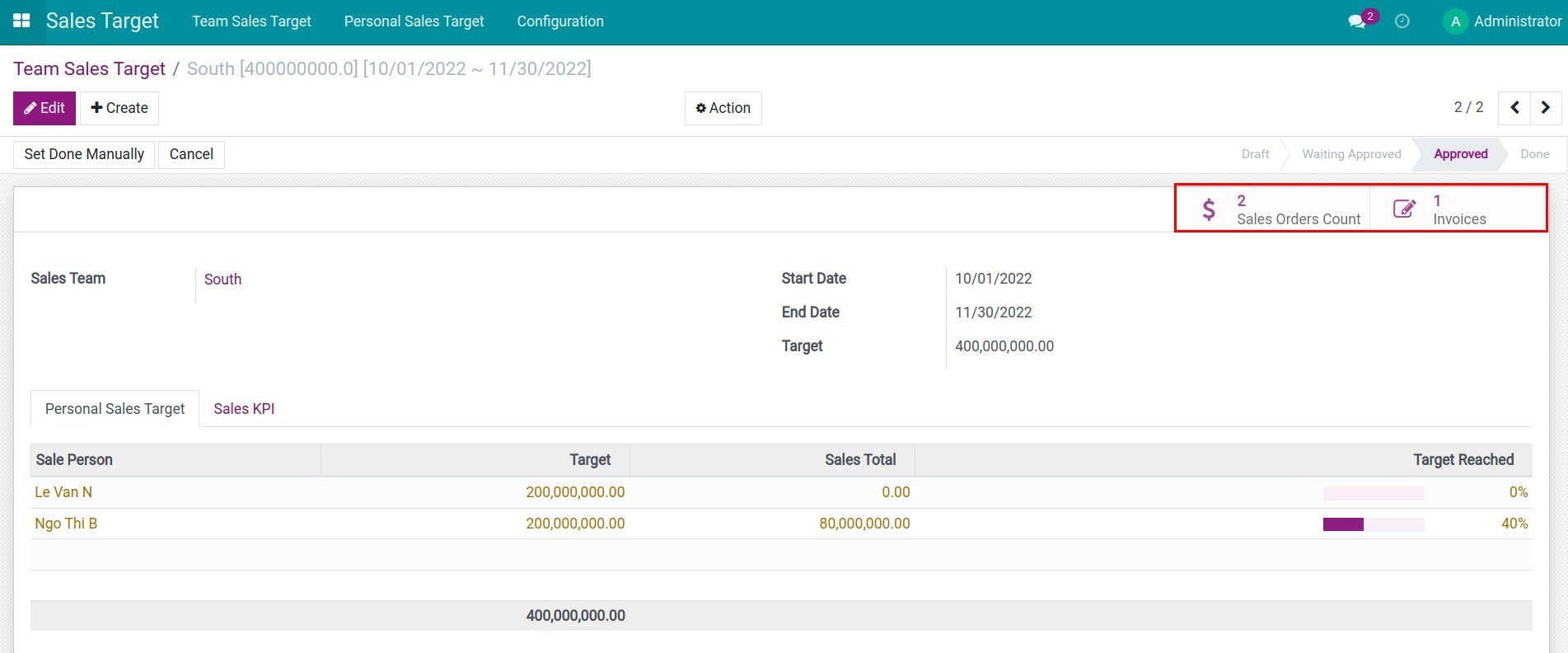
The related sales orders and invoices are also listed on the sales target detail.
2. Control the progress of the sales target
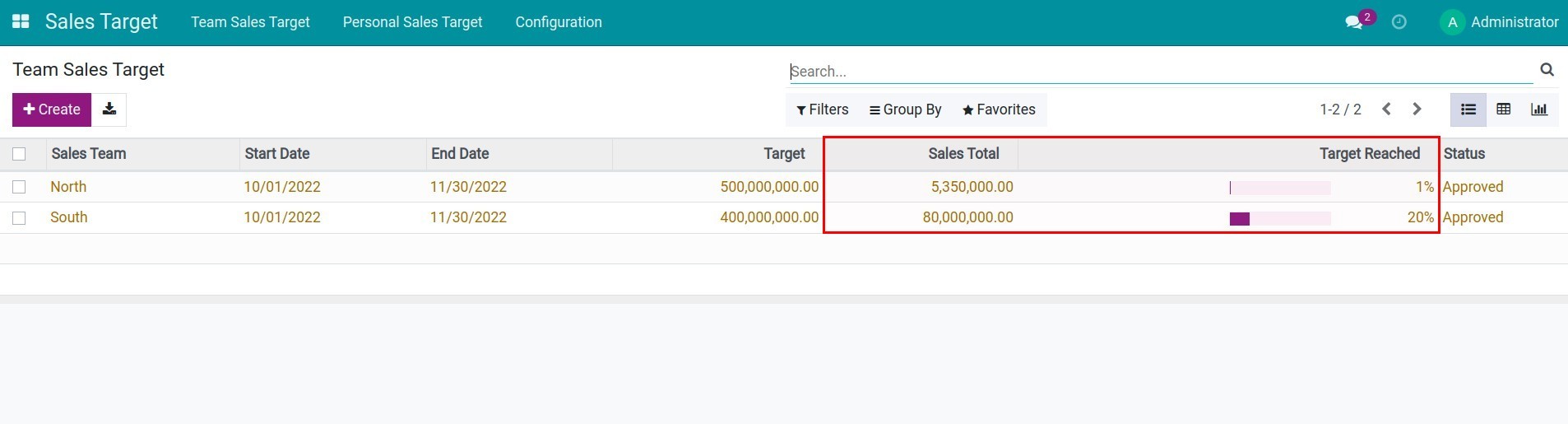
Sales teams track the progress of achieving sales targets with the total of recorded sales and percentage of sales target achieved to plan the strategies to increase sales.
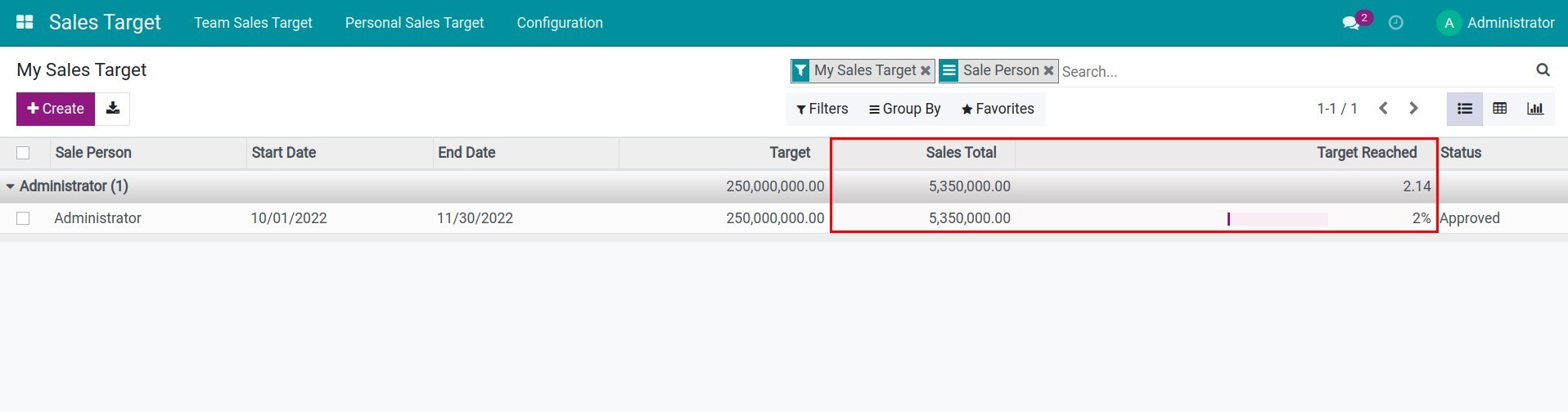
Similarly, sales employees can also control the progress of their sales target.
This software and associated files (the "Software") may only be used (executed, modified, executed after modifications) if you have purchased a valid license from the authors, typically via Odoo Apps, or if you have received a written agreement from the authors of the Software (see the COPYRIGHT file).
You may develop Odoo modules that use the Software as a library (typically by depending on it, importing it and using its resources), but without copying any source code or material from the Software. You may distribute those modules under the license of your choice, provided that this license is compatible with the terms of the Odoo Proprietary License (For example: LGPL, MIT, or proprietary licenses similar to this one).
It is forbidden to publish, distribute, sublicense, or sell copies of the Software or modified copies of the Software.
The above copyright notice and this permission notice must be included in all copies or substantial portions of the Software.
THE SOFTWARE IS PROVIDED "AS IS", WITHOUT WARRANTY OF ANY KIND, EXPRESS OR IMPLIED, INCLUDING BUT NOT LIMITED TO THE WARRANTIES OF MERCHANTABILITY, FITNESS FOR A PARTICULAR PURPOSE AND NONINFRINGEMENT. IN NO EVENT SHALL THE AUTHORS OR COPYRIGHT HOLDERS BE LIABLE FOR ANY CLAIM, DAMAGES OR OTHER LIABILITY, WHETHER IN AN ACTION OF CONTRACT, TORT OR OTHERWISE, ARISING FROM, OUT OF OR IN CONNECTION WITH THE SOFTWARE OR THE USE OR OTHER DEALINGS IN THE SOFTWARE.