Viindoo Unified Routing Framework
| Lines of Code | 4628 |
| Technical name | to_geo_routes |
| License | OPL-1 |
| Website | https://viindoo.com/apps/modules/19.0/to_geo_routes |
| Read description for | v 10.0 v 11.0 v 12.0 v 13.0 v 14.0 v 15.0 v 16.0 v 17.0 v 18.0 |
| Required Apps | Discuss (mail) |
| Included Dependencies | Viindoo Base API Request Logger |
| Extensions | Tracking Location Route Extension Freight Forwarder Management SeaRoutes Ocean Routing Integration Logistics Routes Integration Mapbox Matrix API Integration Google Maps Directions & Distance Matrix API Integration HERE Routing API Integration Route Cost & Revenue Accounting Vietmap Matrix & Routing API Integration |

One routing layer, any provider, any mode of transport
Routes built from waypoints, sections and segments, priced in distance and travel time per transport mode - road, rail, water or air - with the map provider behind an interface you can swap.
Viindoo Unified Routing Framework (technical name to_geo_routes) is an Odoo 19.0 app for Odoo Community and Odoo Enterprise and Viindoo Cloud, built for operations, planner, developer, administrator.
At a Glance
The facts of Viindoo Unified Routing Framework, version 1.0.5, in one place. Published by Viindoo.
Key Features
Anything that moves in an ERP needs the same three numbers: how far, how long, which way. Odoo has none of them, so every app that needs routing grows its own map integration, its own key and its own distance cache. This is the layer underneath: a route is an ordered list of waypoints; between two waypoints there is a section; a section is priced per transport mode - driving, cycling, truck, public transport, water, air, rail - each with its own average speed and its own provider. Providers are records, not code: manual input for the sections you know, a map API for the ones you do not, and the answer is cached against the section so the same pair is never billed twice. Ask a route for its distance and duration and you get them for the mode you asked about, whether the leg is a city street or a shipping lane.
Every route on one map
The routes in the database, drawn where they run.
Sections across routes
Each leg with its distance, speed and duration - the cache that stops repeat API calls.
Segments
The pieces a section is made of, per route and per mode.
Waypoints and areas
Addresses as routing points, grouped into areas by state or country.
How It Works
Three layers, and every app above stops reinventing them.
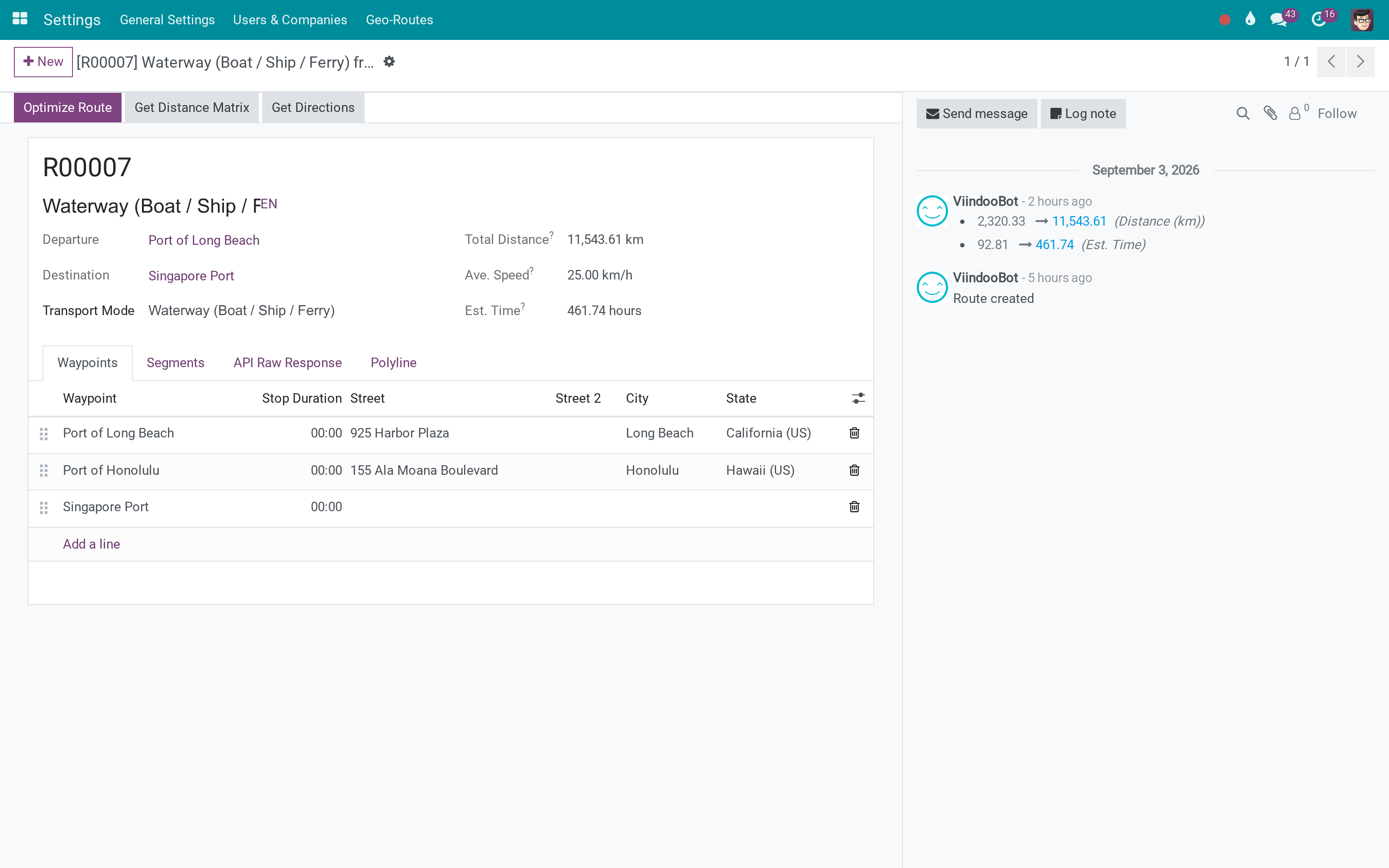
A route is waypoints in order
Waypoints are partners or addresses; the route carries the transport mode, the total distance, the average speed and the estimated time. The same structure holds a 9 km drive across Berlin and an 11,500 km shipping leg.
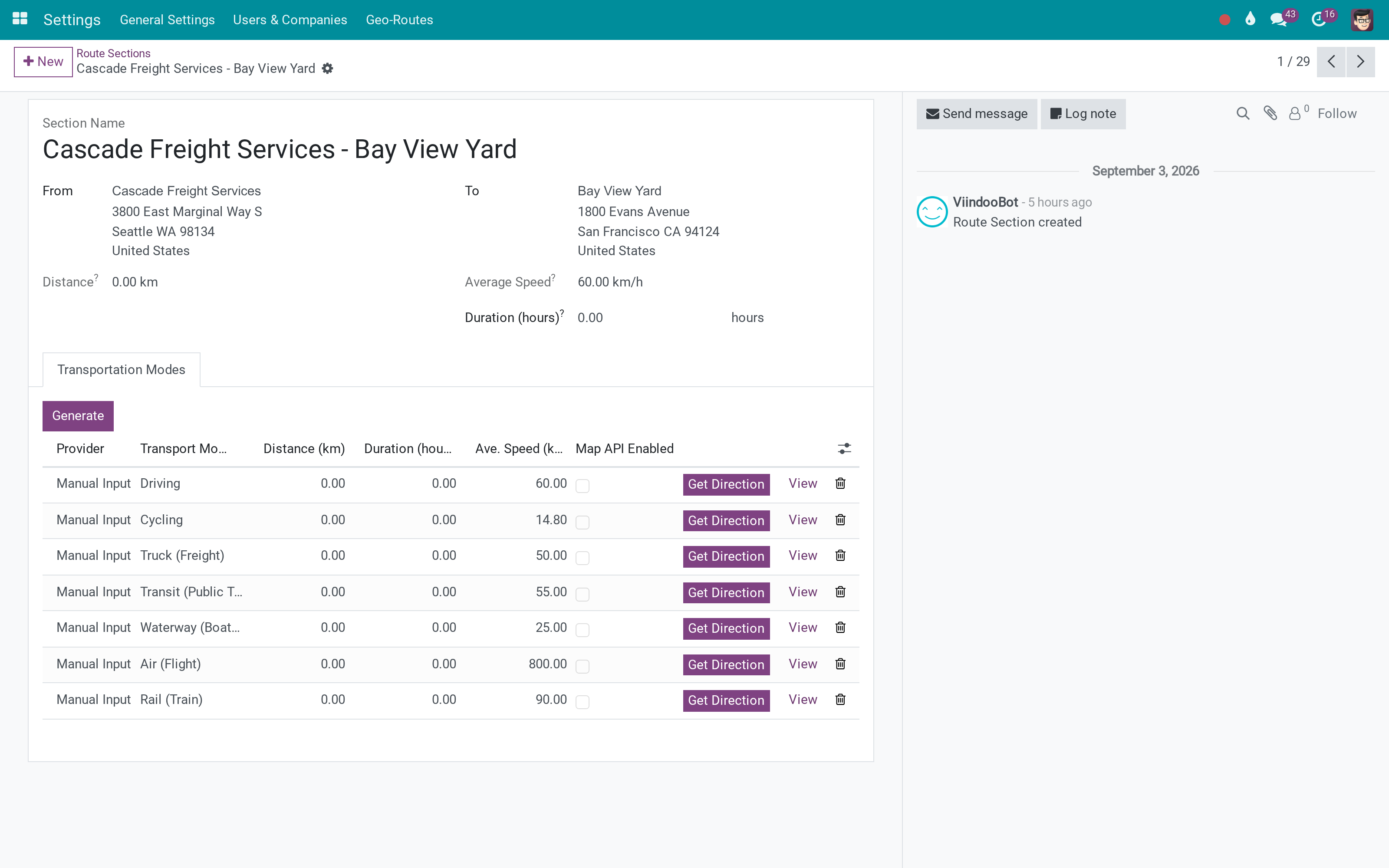
Sections are the legs, priced per mode
Between two waypoints, a section stores distance and duration for each mode - and Get Direction fills it from the provider you configured for that mode. Two routes crossing the same leg share the same section.
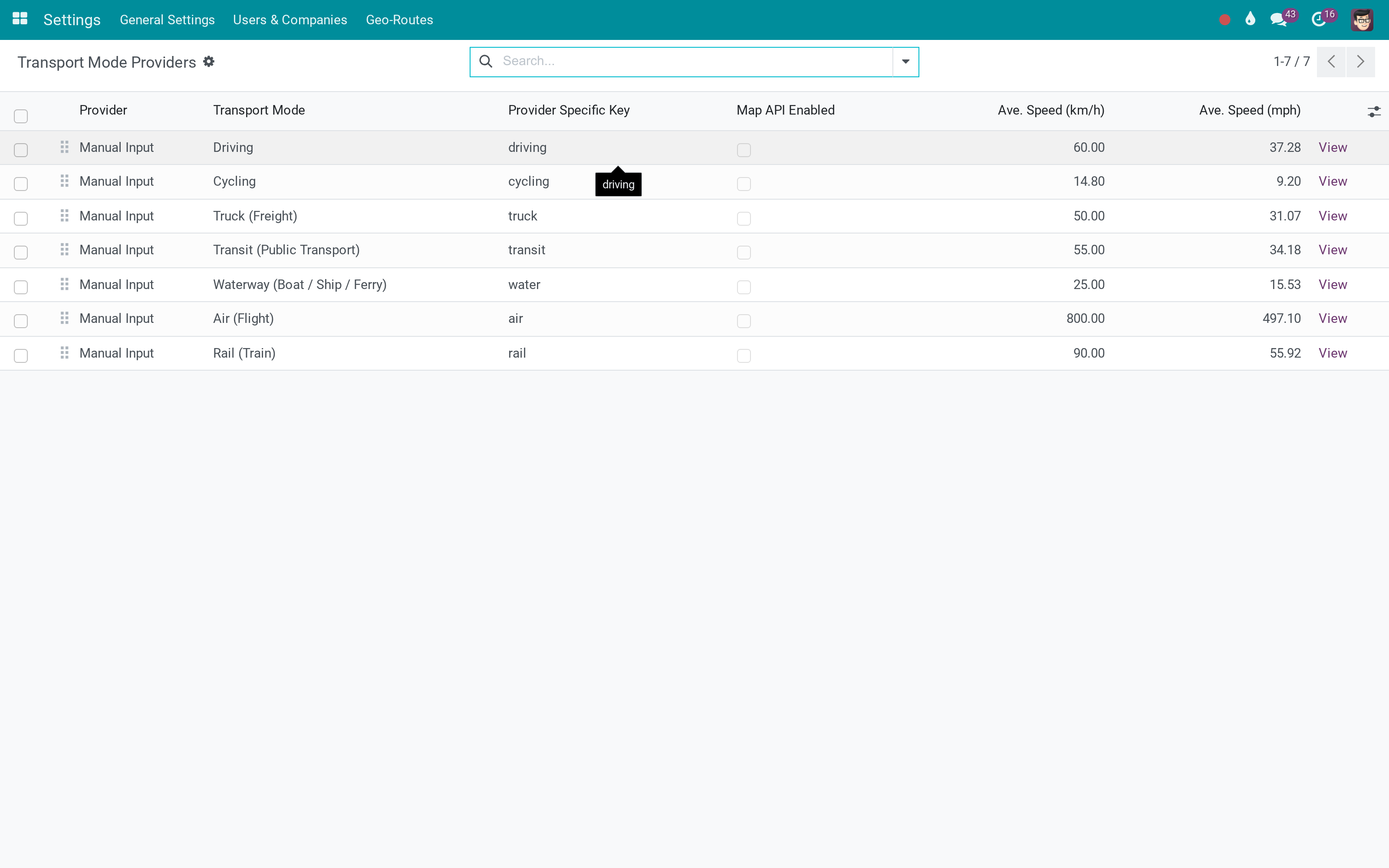
Providers are configuration, not code
Manual input where you already know the distance, a map API where you do not. Average speed per mode turns a distance into a time even without an API call.
What You Get
Route, section, segment and waypoint as four models - so a leg can be reused by another route
Transport modes with their own average speed: driving, cycling, truck, public transport, water, air, rail
Providers per mode: manual input or a map API, chosen per mode rather than globally
Distance and duration computed per mode, cached on the section so the API is called once
Waypoint areas to group destinations by state, country or a rule of your own
Optimise Route and Get Distance Matrix on the route itself, for the ordering problem behind a day's deliveries
More Screens
Everything below was taken on a database seeded with real business data, on this series - not a mock-up and not a screenshot from an older version.
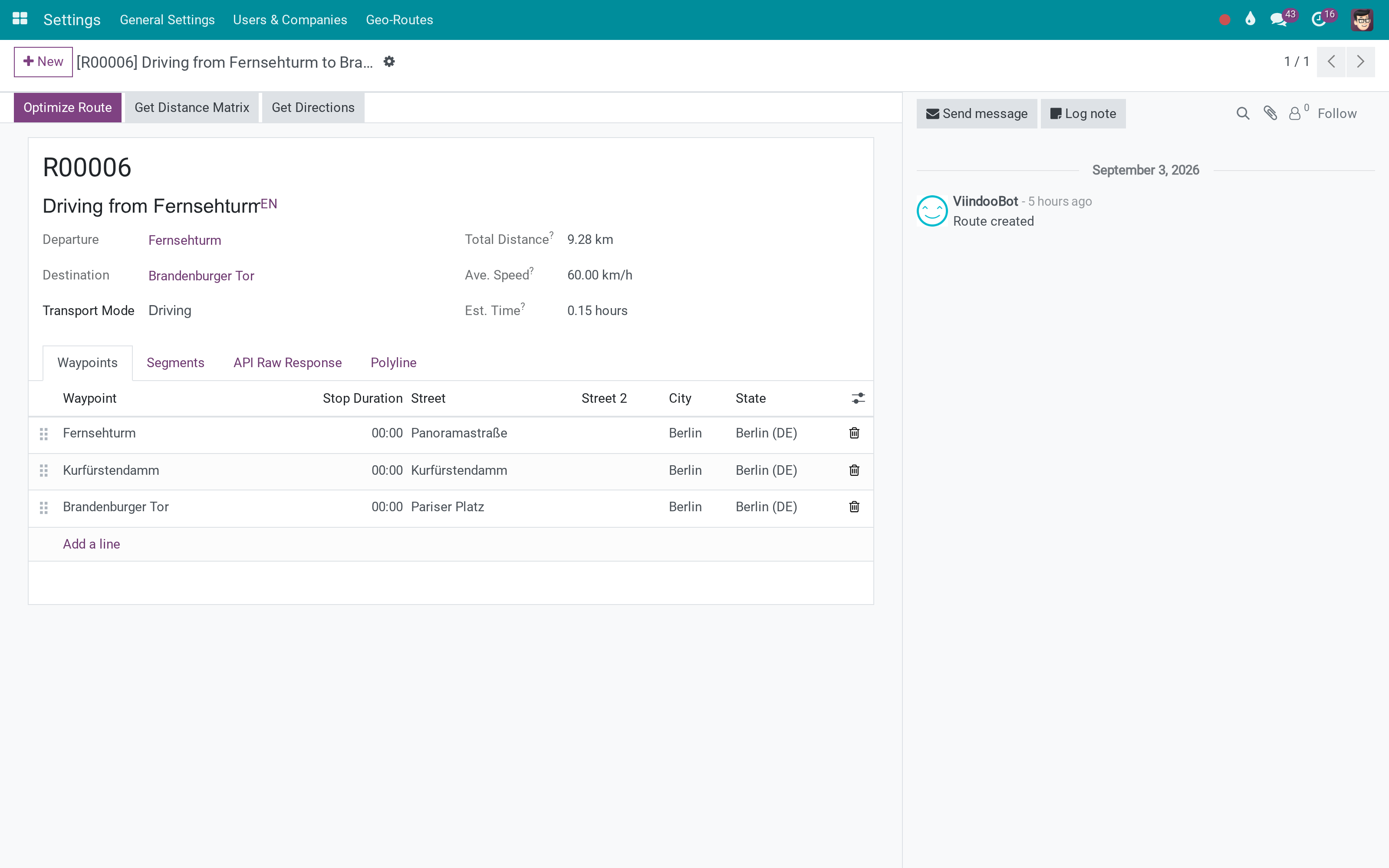
A city route with three waypoints
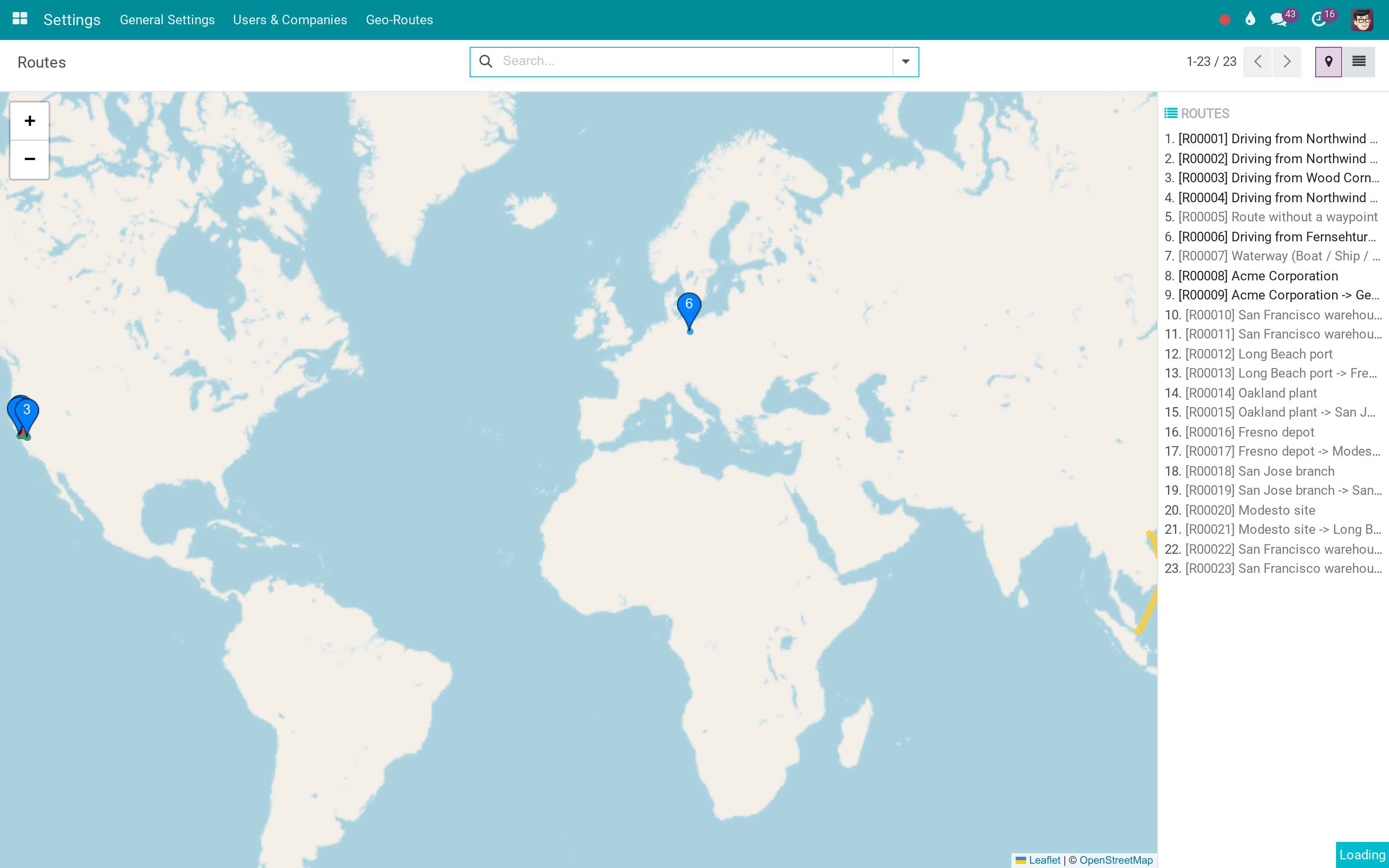
Routes on the map
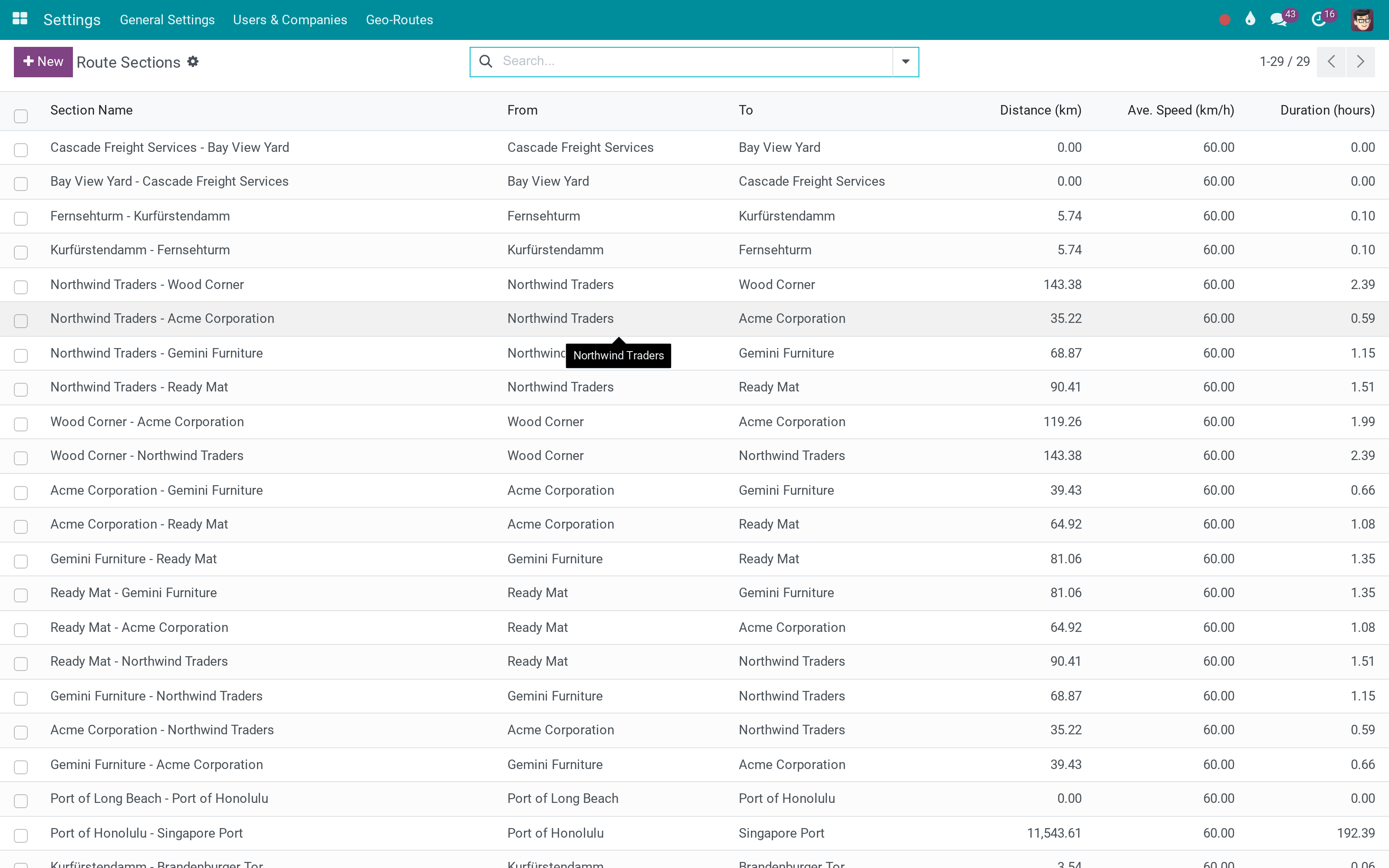
Sections with distance and duration
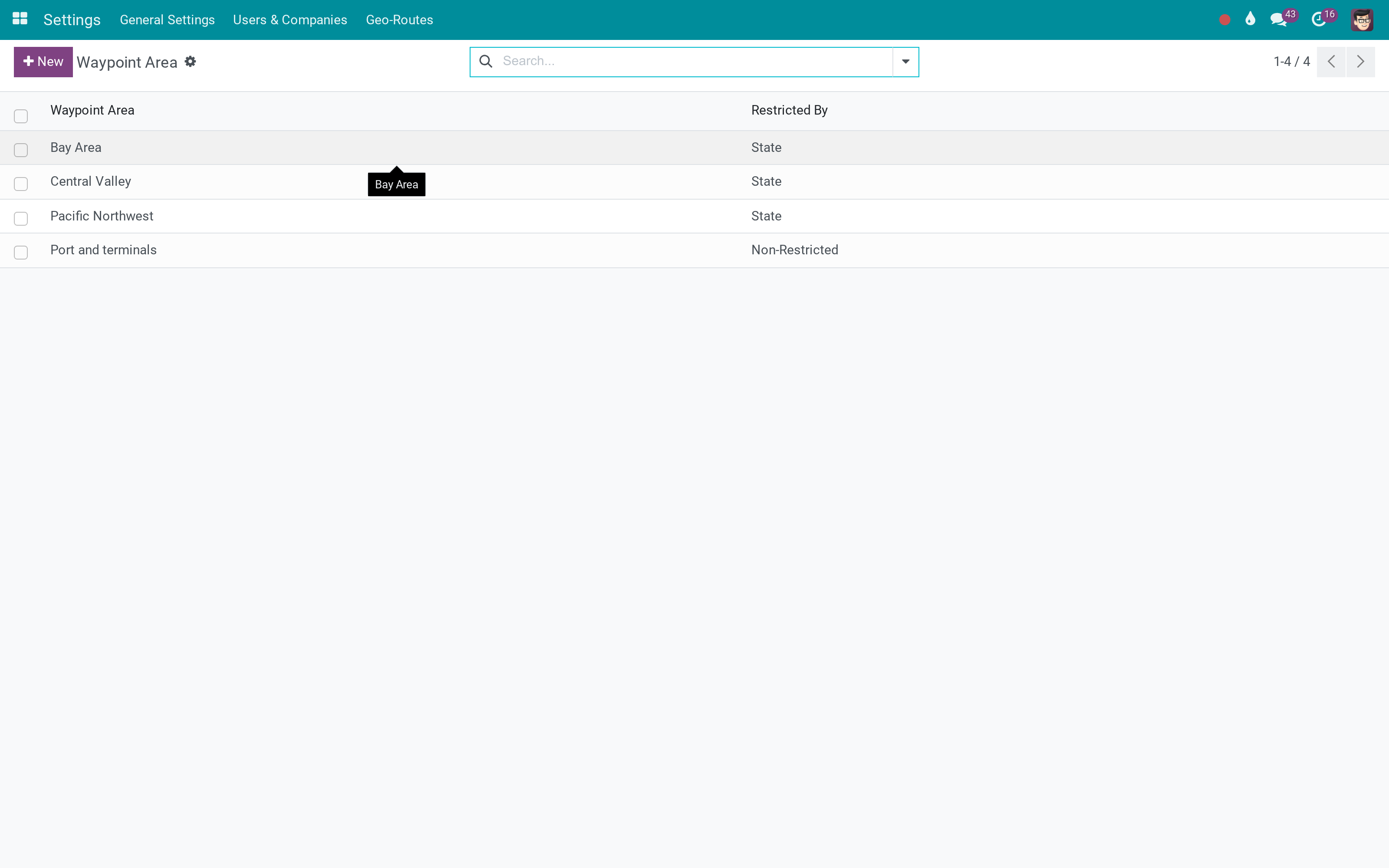
Waypoint areas
What This App Does Not Do
Read this before you buy. Everything below is something the app deliberately leaves to another app or to you.
Geolocation and the map tiles come from Odoo's base_geolocalize and the provider you configure; this is the routing layer above them.
Manual input works with no key at all; a map API needs an account with that provider.
Assigning a route to a vehicle and a driver is Fleet Trip Planning; this computes the route it will run.
The Python package is listed in the manifest; without it, routes still work but the optimiser does not.
Works Well With
Apps from the same stack, built to fit this one:
Fleet Trip Planning
The dispatch board that runs these routes with real vehicles.
viin_fleet_planningWho Should Use Viindoo Unified Routing Framework?
Operations
Builds the routes their fleet or freight actually runs, once.
Planner
Gets distance and travel time per mode without opening a map site.
Developer
Calls one interface instead of integrating a map provider in every app.
Administrator
Holds one API key in one place, and sees what it is being spent on.
Frequently Asked Questions
What does Viindoo Unified Routing Framework do?
Routes built from waypoints, sections and segments, priced in distance and travel time per transport mode - road, rail, water or air - with the map provider behind an interface you can swap.
What does Viindoo Unified Routing Framework not do?
It draws no map of its own. Geolocation and the map tiles come from Odoo's base_geolocalize and the provider you configure; this is the routing layer above them. A provider key is yours to supply. Manual input works with no key at all; a map API needs an account with that provider. It does not dispatch anything. Assigning a route to a vehicle and a driver is Fleet Trip Planning; this computes the route it will run. Optimisation needs ortools. The Python package is listed in the manifest; without it, routes still work but the optimiser does not.
Who is Viindoo Unified Routing Framework for?
Operations: Builds the routes their fleet or freight actually runs, once. Planner: Gets distance and travel time per mode without opening a map site. Developer: Calls one interface instead of integrating a map provider in every app. Administrator: Holds one API key in one place, and sees what it is being spent on.
Which Odoo version and editions does it support?
Odoo 19.0 - Odoo Community, Odoo Enterprise, Viindoo Cloud. Upgrades to a newer Odoo series are a separate purchase for that series.
What does it depend on?
It installs on top of: mail, to_base, base_geolocalize, viin_api_request_logger. Odoo installs them with it.
How do I set it up?
Three layers, and every app above stops reinventing them.
What works well with it?
Fleet Trip Planning (viin_fleet_planning): The dispatch board that runs these routes with real vehicles.Viindoo Base (to_base): The shared library underneath, installed with it.
Can I try it before buying?
Yes - the Live Preview button at the top of this page opens the module's own screen on a working database.
How do I get support?
Write to apps.support@viindoo.com with your Odoo version and the technical name to_geo_routes; pre-sales questions go to sales@viindoo.com.
See Viindoo Unified Routing Framework in Action
Live demo: v19demo-int.viindoo.com/web#action=to_geo_routes.geo_route_action
Need help with Viindoo Unified Routing Framework?
For questions, implementation support or a custom feature, contact Viindoo.
Pre-Sales & Partnership
sales@viindoo.comUpgrades to a newer Odoo series are a separate purchase for that series.
All Viindoo apps: apps.odoo.com/apps/modules/browse?author=Viindoo
Technical Requirement
Changes log
1.0.3 - Latest on the 17.0 line
- Transport modes carry their own provider and average speed, so distance and time are answered per mode.
- Sections cache the provider's answer, so the same leg is not requested twice.
- Route optimisation and distance matrix are available on the route itself.
- Waypoint areas group destinations by state, country or without restriction.
Installation
- Navigate to Apps.
- Find with keyword to_geo_routes.
- Install it as usual then you are done.
Concepts
- Route Section: is a section defined by two addresses where each Address (aka From and To) is a partner record. This design model to ensure short learning curve and easy to extend and fully integrated with existing features in the system.
- Waypoint: also known as Route Waypoint, is a model that presents an instance of an Address which creates a data link between a Route and an Address in the system.
- Segment: also known as Route Section, is a model that presents an instance of a Section which creates a data link between a Route and an Route Section in the system.
- Route: is a model to present a route that defined by Waypoints and Sections. Then the system will automatically find and link the related Sections and Addresses for the Route.
Instructions
- Without other modules that extending this module, you are required to be a system administrator to access the module's menu: Settings > Geo-Routes. If you have other modules that developed on top of this, there should be other ways to access the features. For example, if you have the module viin_fleet_planning installed, you may access the features through Fleet Booking > Routes & Waypoints which does not required administrator access rights. In this document, it is assumed that you have administration access rights.
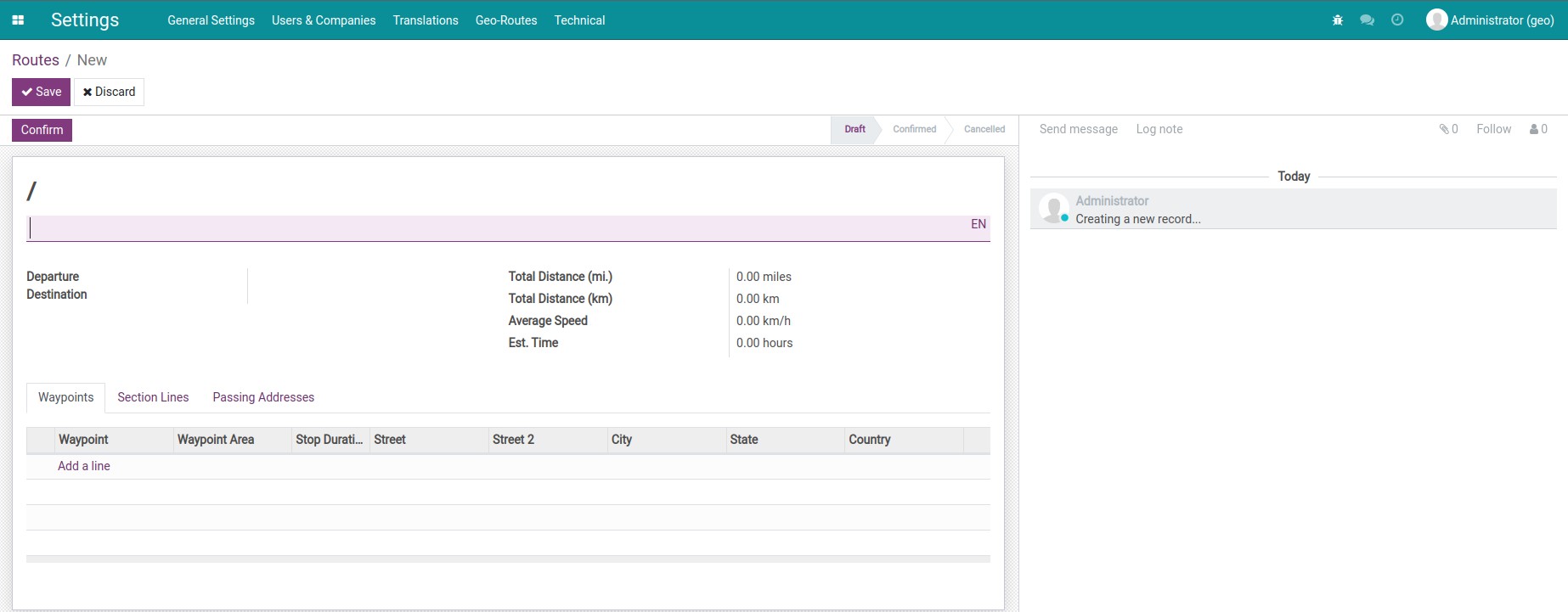
- Define a new Route:
- Navigate to Settings > Geo-Routes > Routes to see the routes list view.
- Press Create to open the route form view, on which you can input:
- The name of the route. For example: Hanoi to Ha Long Bay via Hai Phong City.
- In the Waypoint tab, press Add a line to add waypoints for your route.
- In the Segments tab, you can add information about distance and average speed, and the estimated time will be automatically computed. Note that the speed you type here is used only when no map provider is configured for the transport mode; when a provider (such as Google or Mapbox) is set up, the speed it reports takes precedence and your manually entered value acts as a fallback.
This software and associated files (the "Software") may only be used (executed, modified, executed after modifications) if you have purchased a valid license from the authors, typically via Odoo Apps, or if you have received a written agreement from the authors of the Software (see the COPYRIGHT file).
You may develop Odoo modules that use the Software as a library (typically by depending on it, importing it and using its resources), but without copying any source code or material from the Software. You may distribute those modules under the license of your choice, provided that this license is compatible with the terms of the Odoo Proprietary License (For example: LGPL, MIT, or proprietary licenses similar to this one).
It is forbidden to publish, distribute, sublicense, or sell copies of the Software or modified copies of the Software.
The above copyright notice and this permission notice must be included in all copies or substantial portions of the Software.
THE SOFTWARE IS PROVIDED "AS IS", WITHOUT WARRANTY OF ANY KIND, EXPRESS OR IMPLIED, INCLUDING BUT NOT LIMITED TO THE WARRANTIES OF MERCHANTABILITY, FITNESS FOR A PARTICULAR PURPOSE AND NONINFRINGEMENT. IN NO EVENT SHALL THE AUTHORS OR COPYRIGHT HOLDERS BE LIABLE FOR ANY CLAIM, DAMAGES OR OTHER LIABILITY, WHETHER IN AN ACTION OF CONTRACT, TORT OR OTHERWISE, ARISING FROM, OUT OF OR IN CONNECTION WITH THE SOFTWARE OR THE USE OR OTHER DEALINGS IN THE SOFTWARE.