Fleet Drivers Management
| Lines of Code | 1202 |
| Technical name | to_fleet_driver |
| License | OPL-1 |
| Website | https://viindoo.com/apps/modules/19.0/to_fleet_driver |
| Read description for | v 10.0 v 11.0 v 12.0 v 13.0 v 14.0 v 15.0 v 16.0 v 17.0 v 18.0 |
| Required Apps | Discuss (mail) Employees (hr) Fleet (fleet) |
| Included Dependencies | Employee Documents |

Who may drive what, and until when
Mark an employee or a contact as a driver, hold their licence as a document with a class, an issue date and an expiry, and let the system tell you before it runs out.
Fleet Drivers Management (technical name to_fleet_driver) is an Odoo 19.0 app for Odoo Community and Odoo Enterprise and Viindoo Cloud, built for fleet manager, hr, dispatcher, auditor.
At a Glance
The facts of Fleet Drivers Management, version 2.0.0, in one place. Published by Viindoo.
Key Features
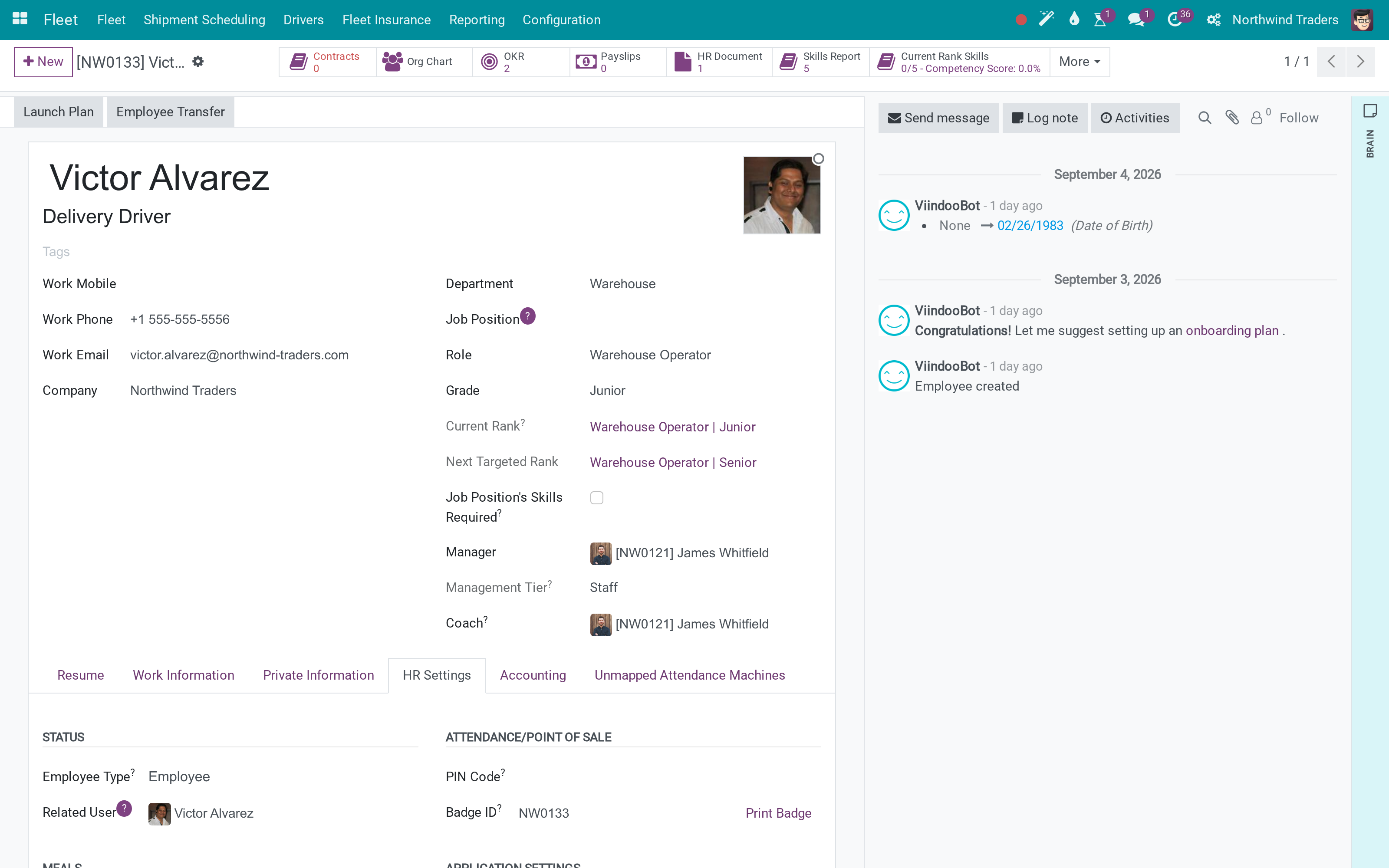
Odoo Fleet lets you put a driver on a vehicle, and that is all it knows about them. It does not know whether the licence is valid, what class it is, when it expires or who issued it - so the answer lives in a folder or in somebody's memory, and the first time anyone checks is after an incident. This app makes the driver a real record on both sides: a flag on the employee and on the contact, so an internal driver and a contracted one are handled the same way; the licence held as an employee document with its class, number, issue and expiry dates, place of issue and a notice period; and the current licence surfaced on the driver so the question "is this person allowed to take that truck out today" is answered where it is asked.
Drivers in one place
Every contact marked as a driver, with their contact details.
Licence classes
Document types, including the driving licence classes - configuration, not code.
The fleet itself
Odoo Fleet unchanged: the driver on the vehicle is now a record that carries its licence.
How It Works
Three steps, and the folder can go.
Mark the driver
An employee is a driver with one checkbox, and the current licence appears beside it. Contacts carry the same flag, so a contracted driver is not a second kind of record.
File the licence as a document
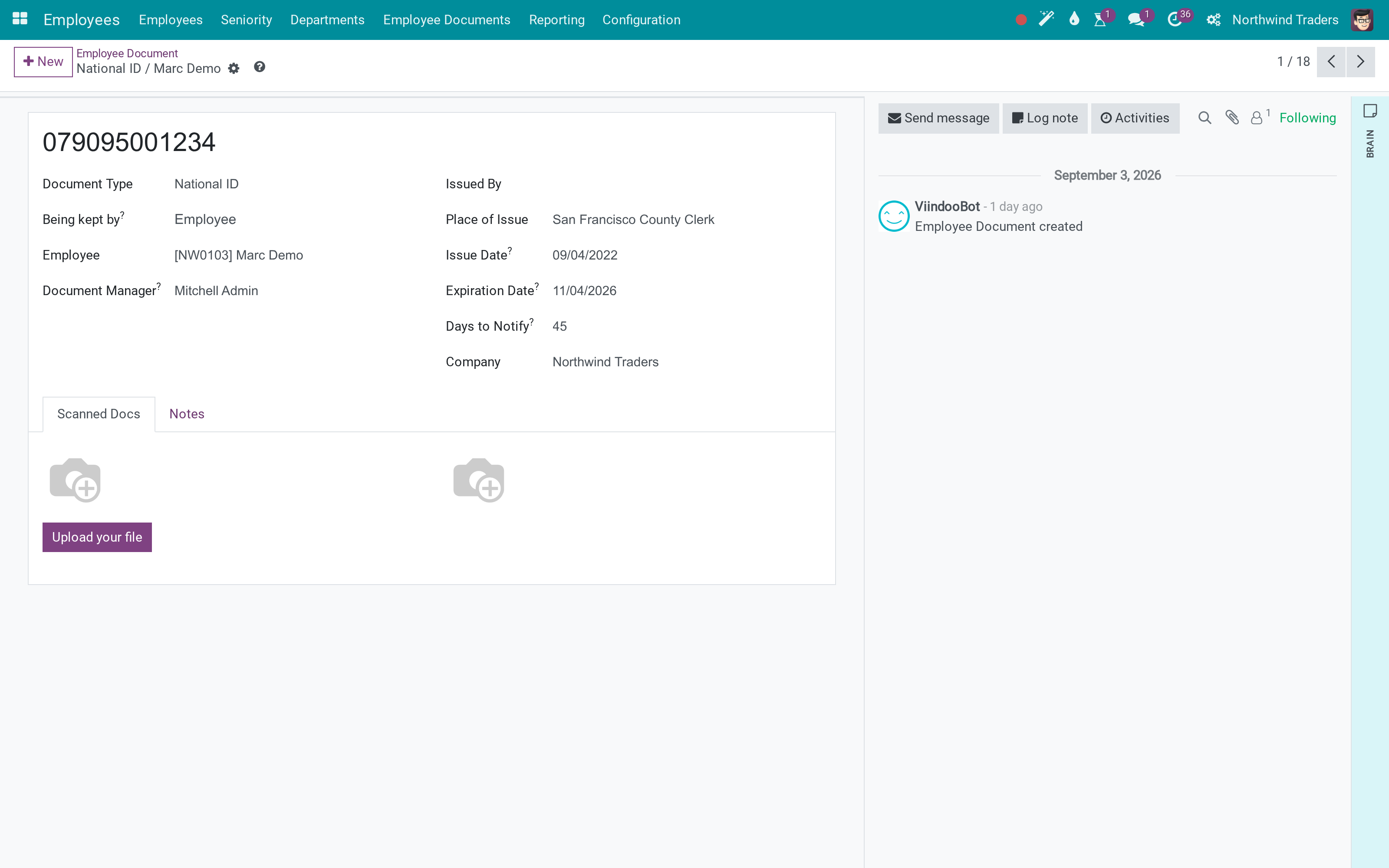
The licence is an employee document like a passport or a contract - with a class, a number, the dates and the office that issued it, plus how many days before expiry you want to be told.
Read them as a list
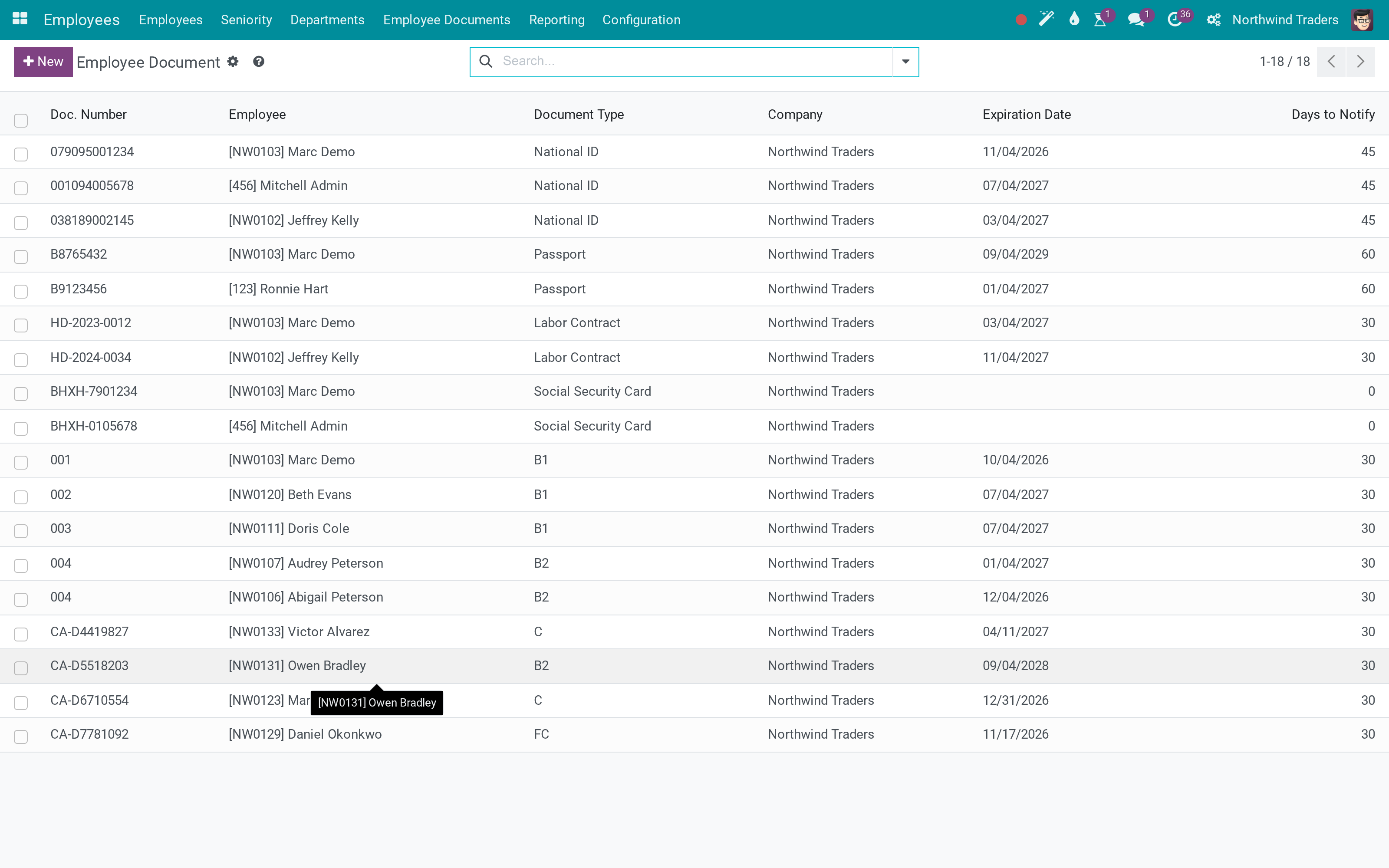
One list answers the fleet question and the HR question at once: what is on file, for whom, and what expires next.
What You Get
Driver flag on the employee and on the contact - staff drivers and contractors in one list
Licences held as employee documents: class, number, issued when, expires when, issued where
The current licence shown on the driver, so the expiry is visible without opening the folder
A notice period per document, for the reminder before it lapses
Licence classes are configuration records - add the classes your country uses
Works with Odoo Fleet as it is: the driver you assign to a vehicle is this record
More Screens
Everything below was taken on a database seeded with real business data, on this series - not a mock-up and not a screenshot from an older version.
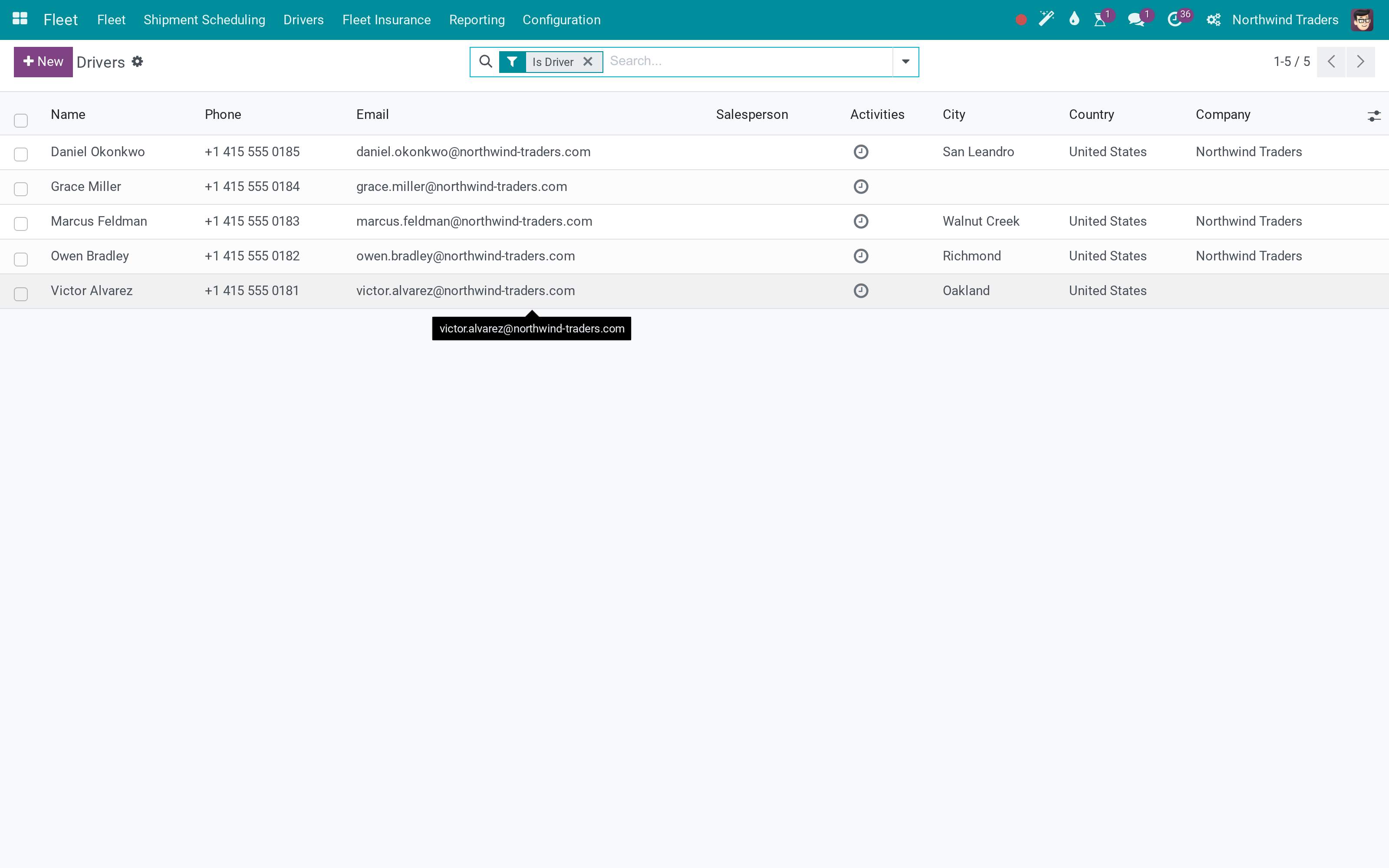
Drivers as contacts
Documents with their expiry dates
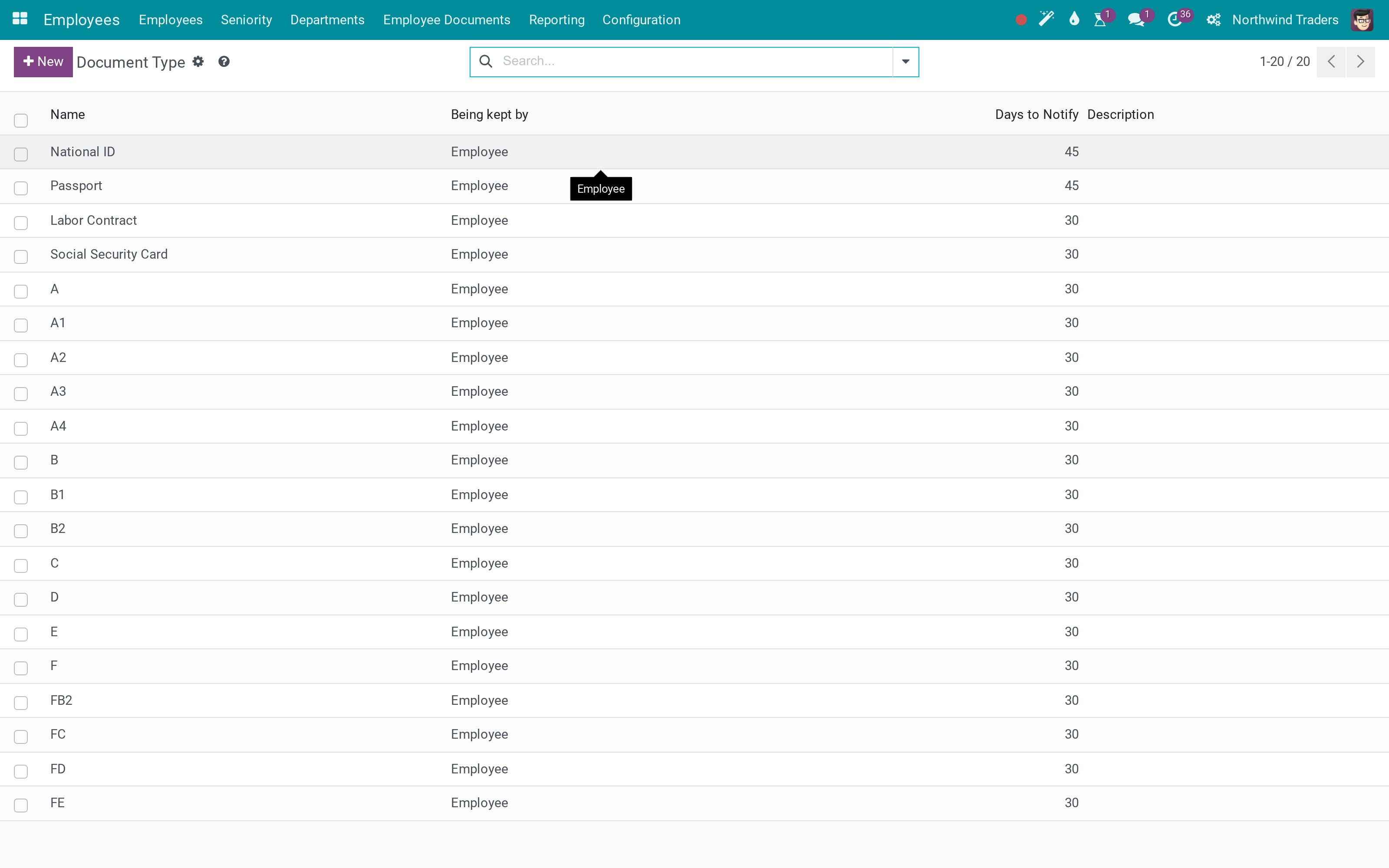
Document types and licence classes
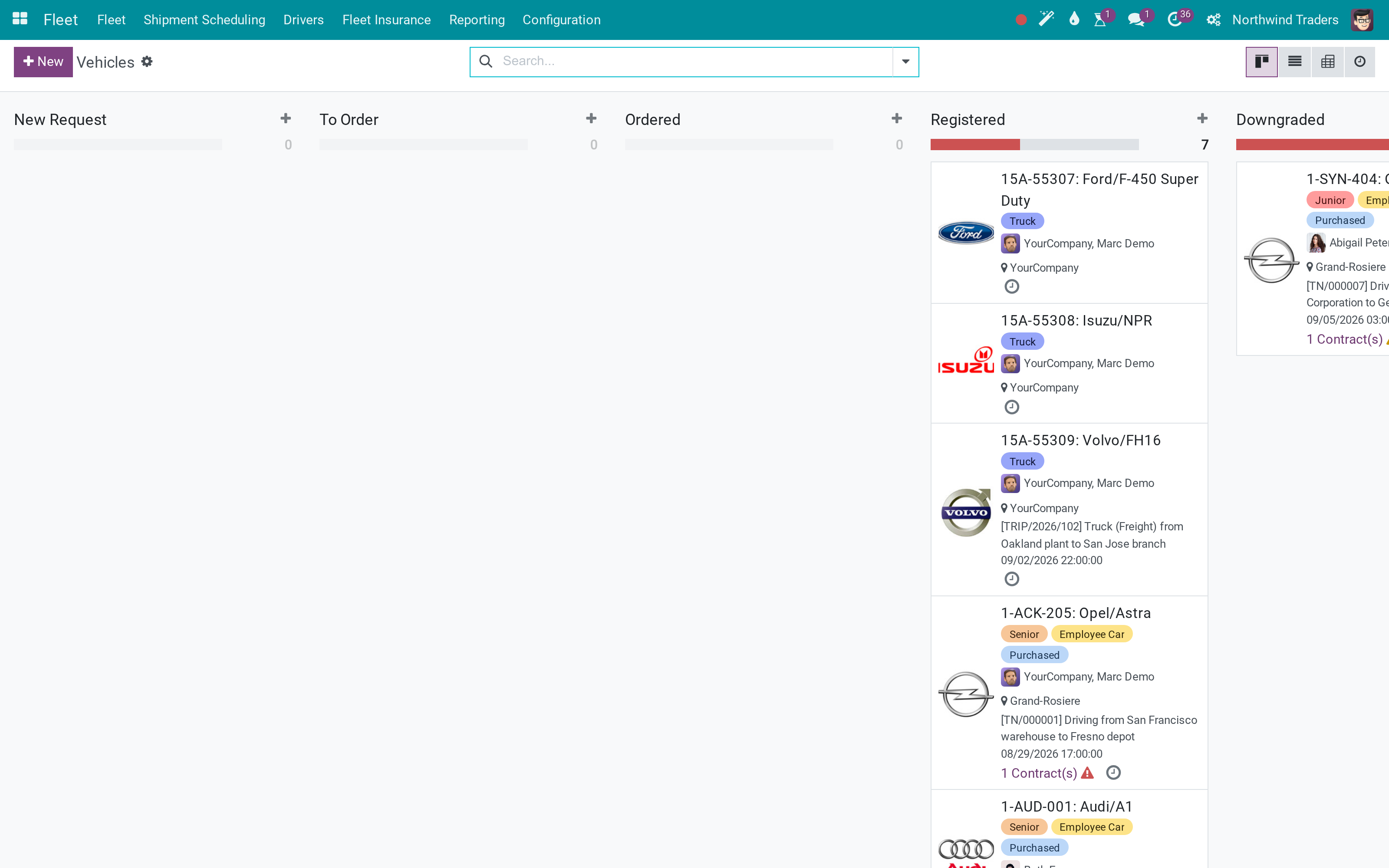
The fleet these drivers take out
What This App Does Not Do
Read this before you buy. Everything below is something the app deliberately leaves to another app or to you.
An expired licence is visible, not enforced - the app informs the dispatcher, it does not stop them.
A, B1, B2, C, D, E, FC and the rest are records you can rename, delete or replace with your own country's classes in Configuration.
Certificates and medicals can be added as document types; the app does not model their rules.
The notice period is a field; acting on it is a reminder, not a process.
Works Well With
Apps from the same stack, built to fit this one:
Biometric Attendance
For fleets where the driver clocks in at the depot.
Biometric Attendance Machines IntegrationWho Should Use Fleet Drivers Management?
Fleet manager
Sees who may drive, in which class, and what expires this quarter.
HR
Keeps the licence with the rest of the employee's documents, not in a separate binder.
Dispatcher
Assigns a vehicle to a driver whose licence is on file and current.
Auditor
Finds the licence, its number and its issuer against the trip that used it.
Frequently Asked Questions
What does Fleet Drivers Management do?
Mark an employee or a contact as a driver, hold their licence as a document with a class, an issue date and an expiry, and let the system tell you before it runs out.
What does Fleet Drivers Management not do?
It does not block a vehicle assignment. An expired licence is visible, not enforced - the app informs the dispatcher, it does not stop them. The shipped licence classes are Vietnamese. A, B1, B2, C, D, E, FC and the rest are records you can rename, delete or replace with your own country's classes in Configuration. It is not a training or medical register. Certificates and medicals can be added as document types; the app does not model their rules. No automatic renewal workflow. The notice period is a field; acting on it is a reminder, not a process.
Who is Fleet Drivers Management for?
Fleet manager: Sees who may drive, in which class, and what expires this quarter. HR: Keeps the licence with the rest of the employee's documents, not in a separate binder. Dispatcher: Assigns a vehicle to a driver whose licence is on file and current. Auditor: Finds the licence, its number and its issuer against the trip that used it.
Which Odoo version and editions does it support?
Odoo 19.0 - Odoo Community, Odoo Enterprise, Viindoo Cloud. Upgrades to a newer Odoo series are a separate purchase for that series.
What does it depend on?
It installs on top of: hr_fleet, to_employee_documents. Odoo installs them with it.
How do I set it up?
Three steps, and the folder can go.
What works well with it?
Fleet Trip Planning (viin_fleet_planning): Dispatch the trips these drivers run. Advanced HR Management (viin_hr): The employee layer their documents live on. Biometric Attendance (to_attendance_device): For fleets where the driver clocks in at the depot.
Can I try it before buying?
Yes - the Live Preview button at the top of this page opens the module's own screen on a working database.
How do I get support?
Write to apps.support@viindoo.com with your Odoo version and the technical name to_fleet_driver; pre-sales questions go to sales@viindoo.com.
See Fleet Drivers Management in Action
Live demo: v19demo-int.viindoo.com/web#action=to_fleet_driver.fleet_driver_action
Need help with Fleet Drivers Management?
For questions, implementation support or a custom feature, contact Viindoo.
Pre-Sales & Partnership
sales@viindoo.comUpgrades to a newer Odoo series are a separate purchase for that series.
All Viindoo apps: Viindoo Apps
Technical Requirement
Changes log
2.0.0 - Latest on the 17.0 line
- The driver flag is on both the employee and the contact, so contracted drivers are handled like staff.
- The current licence is shown on the driver, with its class and expiry.
- Licence classes are ordinary document types - add the ones your country issues.
Installation
- Navigate to Apps
- Find with keyword 'to_fleet_driver'
- Install it as usual then you are done
Instructions
- Manage Drivers
- Navigate to 'Fleet > Drivers > Drivers'
- Hit Create button to create a new driver. A dirver record comes with the following information
- Address: It is an odoo partner profile. When a partner is selected, Odoo will try to:
- Fill the Name field of the driver with the name of the selected partner
- Search Employee directory to see if the partner is also an employee of the company's. If yes, the found employee will be filled into the driver's Employee field.
- Employee:
- If the Employee field is left empty, Odoo will consider the driver is an external person who is not an employee.
- If Odoo found that the partner selected in the Address field is an employee, it will fill the associated employee to this field
- Date of Birth: this is a related field, which is related to the partner specified in the Address field.
- License: contain the list of driver licenses which can be created an monitored in the Licenses menu (Fleet > Drivers > Licenses)
- Manage Driver Licenses:
- Navigate to 'Fleet > Drivers > Licenses' to see all the licenses list. Here you have some predefined filters for your quick search:
- Expired in 30 days: show all the licenses that will be expired in 30 days
- Expired in 7 days: show all the licenses that will be expired in 7 days
- Expired: show all the licenses that is already expired
- Hit Create button to create a new driver license. A dirver license comes with the following information:
- Legal Number: the legal number of the driver license
- Class: the class of the license. For example, if you are in US, you can create classes according to the wiki page https://en.wikipedia.org/wiki/Driver%27s_licenses_in_the_United_States
- Driver: the driver who owns the license
- Date Issued: the date on which the license was issued
- Expiry: the date on which the license is considered as expired. Leave it empty for a non-expiring license
- Issued by: the entity that issued the license. It is an Odoo partner record.
This software and associated files (the "Software") may only be used (executed, modified, executed after modifications) if you have purchased a valid license from the authors, typically via Odoo Apps, or if you have received a written agreement from the authors of the Software (see the COPYRIGHT file).
You may develop Odoo modules that use the Software as a library (typically by depending on it, importing it and using its resources), but without copying any source code or material from the Software. You may distribute those modules under the license of your choice, provided that this license is compatible with the terms of the Odoo Proprietary License (For example: LGPL, MIT, or proprietary licenses similar to this one).
It is forbidden to publish, distribute, sublicense, or sell copies of the Software or modified copies of the Software.
The above copyright notice and this permission notice must be included in all copies or substantial portions of the Software.
THE SOFTWARE IS PROVIDED "AS IS", WITHOUT WARRANTY OF ANY KIND, EXPRESS OR IMPLIED, INCLUDING BUT NOT LIMITED TO THE WARRANTIES OF MERCHANTABILITY, FITNESS FOR A PARTICULAR PURPOSE AND NONINFRINGEMENT. IN NO EVENT SHALL THE AUTHORS OR COPYRIGHT HOLDERS BE LIABLE FOR ANY CLAIM, DAMAGES OR OTHER LIABILITY, WHETHER IN AN ACTION OF CONTRACT, TORT OR OTHERWISE, ARISING FROM, OUT OF OR IN CONNECTION WITH THE SOFTWARE OR THE USE OR OTHER DEALINGS IN THE SOFTWARE.