Why a message in a chat group does not become an obligation
In most small and mid-sized companies the daily flow of delegation runs through a chat group. The most common message format is a description of a situation followed by an open request - a customer reports a short delivery, somebody needs to check it. The message reaches every member, collects a few brief acknowledgements, and typically produces no action until the manager repeats it to one person by name.
The usual correction is a rule of thumb: always name the person. It works within a narrow range and does not scale, because it routes the entire coordination load through one individual. Direct supervision as a coordination mechanism reaches its ceiling at a few dozen staff.
This article does not treat delegation as a skill problem. It examines the structural reason: why a message in a conversation channel does not create an obligation, and which three properties a work record needs in order to create one.
"Could someone check it?" is not a request
In the study of speech acts, a request only becomes a request when it has an addressee. The people who hear a sentence do not all hold the same role: there is the person spoken to, the side participant who is legitimately present but is not the target of the sentence, and the bystander who merely overhears. The obligation lands on the first role only. The other two receive information, not duty.
A request posted to a group of forty creates forty side participants and no addressee. In form it is a question; in function it is a status update.
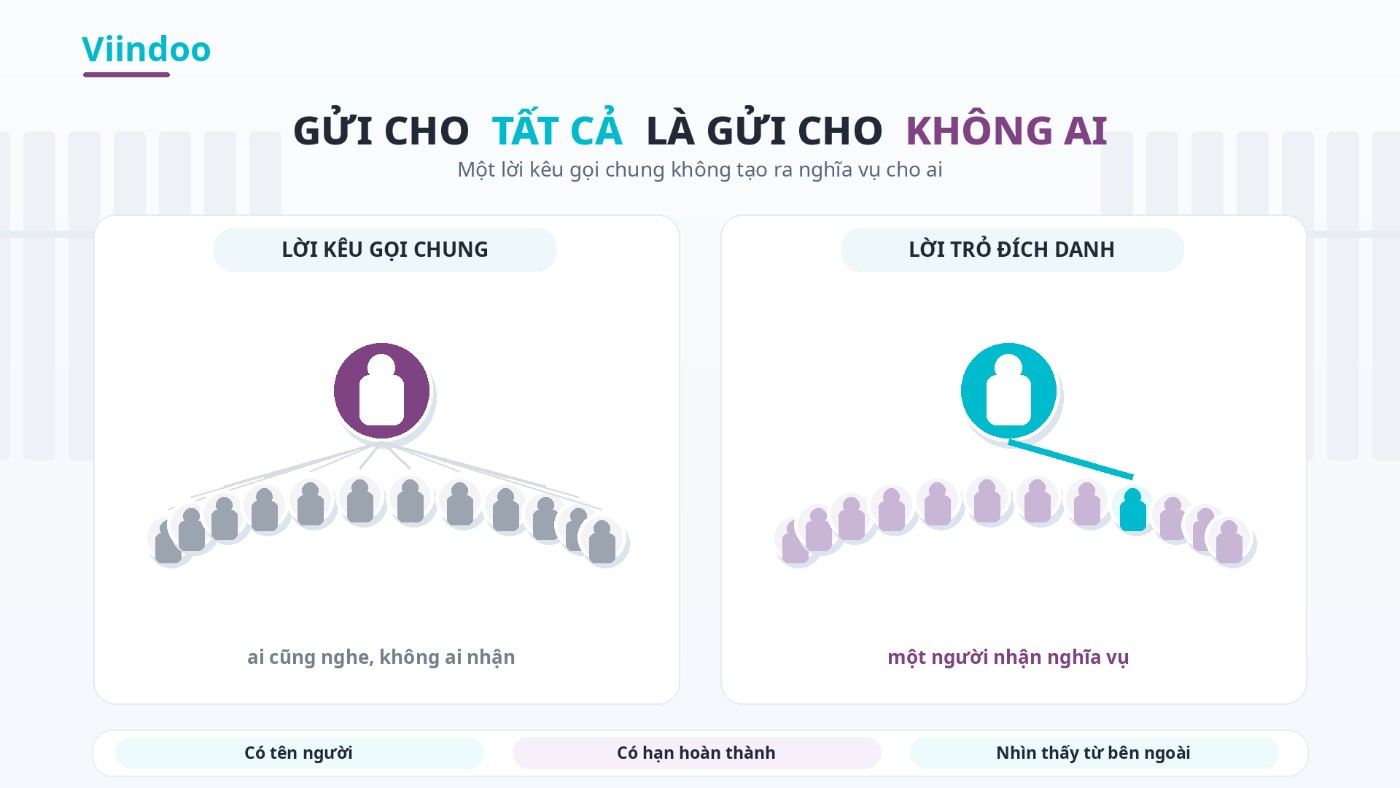
An open call creates side participants. An addressed request creates one owner.
Place that against the four beats from the first article in this series - request, agreement, performance, acceptance - and this is not a loop that broke halfway. It is a loop that never started: with no recipient at beat one, there is nobody to agree with at beat two.
The psychology that follows has been measured since the late 1960s. When a situation calls for action in front of a crowd, the probability that any specific person acts falls as the number of witnesses rises. The deciding variable is not individual morality but the number of other people each of them believes is also listening. The only known remedy sits exactly where the problem is created: turn an open call into a sentence addressed to one person. A chat group does the opposite - every request posted into it becomes an open call.
Even an explicitly addressed request runs into a constraint of the channel itself. The task layer bundled with Zalo carries a design condition worth reading twice: to assign work to each other, the two of you must already be Zalo friends. Which means that when you are delegating work over Zalo, the right to put someone's name on a task follows a personal relationship rather than that person's position in the company.
Four RACI roles squeezed into one list
The role framework managers use to avoid exactly this has four slots, not two. It is known by the initials RACI.
Responsible - who does the work
The person who puts in the effort. There can be several.
Accountable - who answers for it
The person who answers when it fails and who gets to say whether it is acceptable. The most important rule of the framework lives here: this slot takes exactly one person. Two accountable people means none.
Consulted - who is asked first
Must be consulted before the decision. Two-way.
Informed - who is told
Only needs to know the outcome. One-way, and carries no obligation at all.
Measured against those four roles, a chat group offers one list: the member list. Being on it means receiving everything, being off it means receiving nothing. Four different roles are squeezed into one slot, and by default everybody sits in the last one - the role with no obligation. Who does the work and who answers for it are left open, in the hope that somebody volunteers.
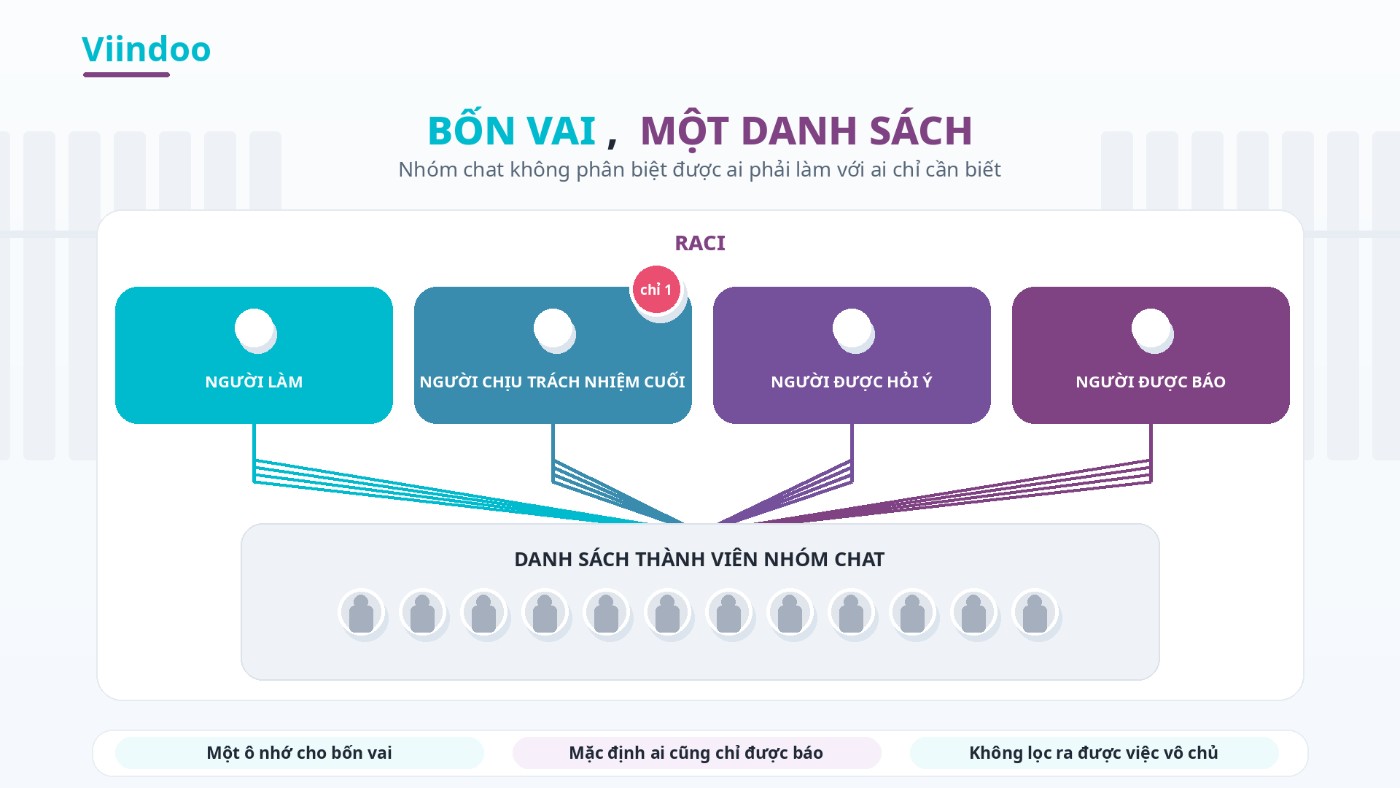
Four roles, one slot: the member list cannot tell them apart.
A second consequence follows from the same constraint: with only one list, keeping somebody informed forces you to show them everything. There is no way to let accounting know an order is stuck without also letting accounting read the entire traffic of the other forty people.
Three properties a channel needs before it can carry an obligation
Put both halves together and an obligation at work needs three things in order to exist at all. A chat group is missing all three, which is why it fails here while remaining excellent elsewhere.
The obligation has an address
It points at exactly one person, that person knows they are being pointed at, and the pointing is visible from outside. In a group the best address available is a mention - a convention, not a data field. Nothing turns red when you forget.
The record is fixed
Anything treated as a record has to satisfy three conditions: you know who wrote it, it cannot be edited or deleted quietly, and it can be retrieved later.
Rights follow the person's lifecycle
Joining, moving to another position, leaving. Rights are granted by role at the first milestone, changed at the second and revoked at the third.
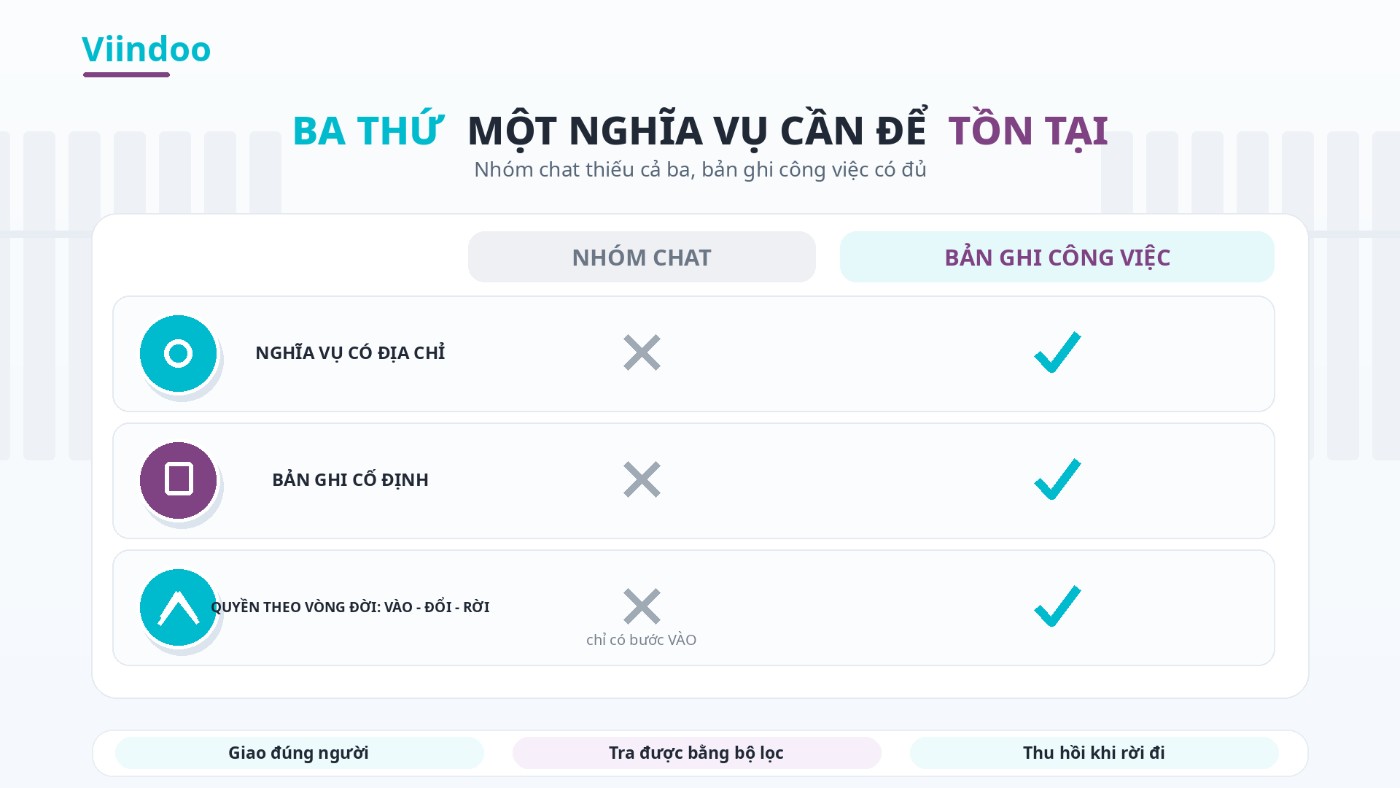
Three properties, side by side.
The three familiar pieces of evidence land precisely on the three conditions of the second property. Messages can be recalled and deleted - no protection against quiet editing. There is a Vietnamese labour judgment in which chat messages submitted as evidence were disputed, because the content was ambiguous and because it could not be established that the account really belonged to that person - no proof of authorship. And to find out whether a task is finished you have to scroll back rather than filter - no retrieval.
A record its own author can delete is not a record, whichever server it sits on.
The third property is the one nobody budgets for. A chat group only has the joining milestone, and even that is manual: somebody remembers, somebody adds. There is no leaving milestone at all - people who have left the company stay in the group until someone happens to recall it. On top of which, as above, rights inside that channel follow the graph of personal friendships rather than the organisation chart.
Seen through this lens, the four things you run into every day stop being four things: work posted to the group sits still (no address), you scroll back to find who promised what (no record), someone who left still reads today's quotation (no revocation), delegating to another department needs a phone number (rights by relationship). One cause, four symptoms.
Why chat group rules do not fix this
The familiar fix is a rule: name the person when you assign work, the named person confirms within two hours, report back in the group when it is done.
That rule survives about two weeks, and the reason is not a lack of discipline. A rule is a verbal agreement laid on top of a channel that is missing all three properties, and words add no property to infrastructure. A mention still does not create a field you can filter on; a commitment can still be deleted; someone who has left still does not leave the group. The rule lives in human memory, and memory runs out exactly in the busiest weeks - which is exactly when it is needed.
The clearest evidence comes from the platforms themselves: each has bolted a task list onto the side of the conversation. A channel able to carry delegation would not need that layer.
This is not a misuse of the tool. A conversation channel is built to carry speech and performs that function well, which is why teams stay in it and why replacing it is the wrong objective.
How Viindoo solves it
What changes is not the channel but where obligations are kept: discussion stays where it is, the obligation moves. Each of the three properties below corresponds to something observable in Viindoo.
An obligation with an address: Viindoo will not let you assign without a name and a date
The closest thing to a delegation on Viindoo is not a message. It is an Activity. On any document at all - a task, a sales order, an invoice, an employee record - you click Schedule Activity, and Viindoo requires two fields that cannot be left empty: Assigned to, which takes exactly one person, and Due Date.
Those two mandatory fields are what a chat group lacks. There is no way to create an activity with no recipient, and no way to create one with no deadline. An open call does not get through that form.
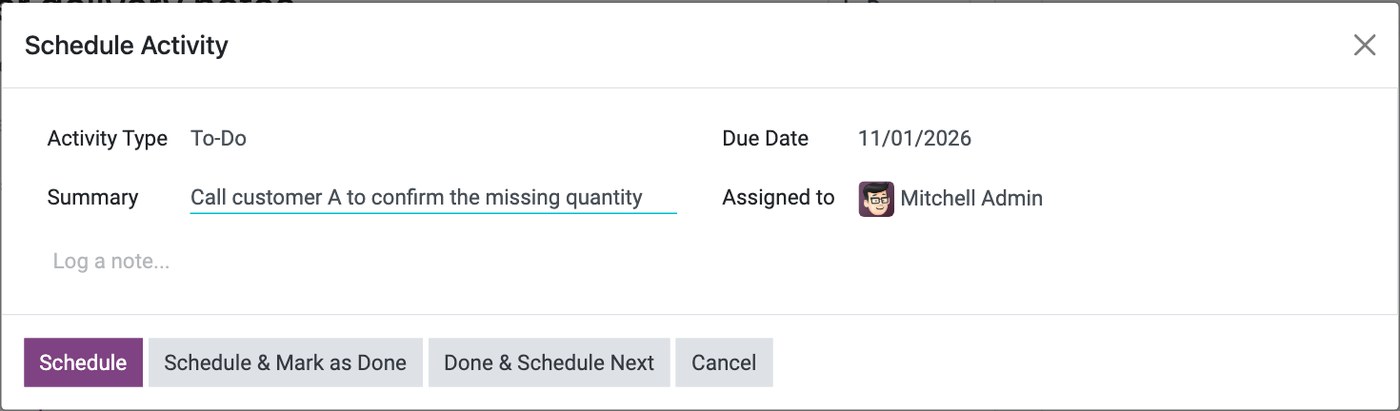
Schedule Activity: one assignee and one due date, both mandatory.
The assignee does not have to be watching the system. Viindoo counts their activities in a bell on the top bar and splits the count into Late and Today, grouped by which document each one sits on. The person who delegated does not have to chase either: every activity carries a state - overdue, today, planned - and the task list has ready-made filters for late activities.
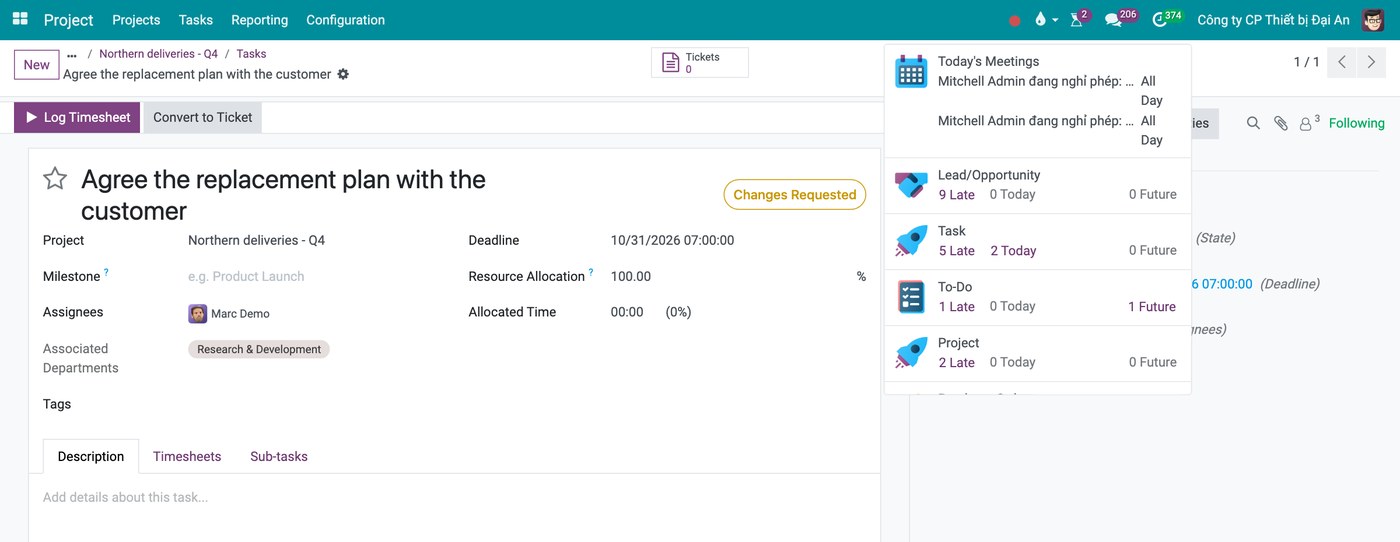
The bell splits the count into Late and Today, per document type.
When it is finished, the assignee clicks Mark Done and writes feedback. Viindoo closes the activity but writes it into the history of the document itself: who did it, what kind of work it was, what they said, which files they attached. For work that always has a next step, the activity type can be set so that finishing one creates the next one automatically, with its deadline counted either from the completion date or from the previous deadline.
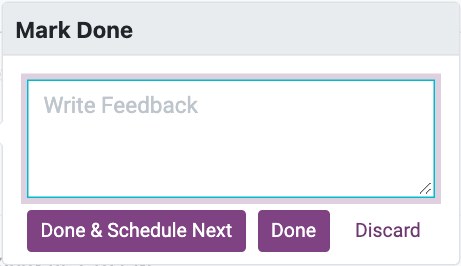
Finishing an activity leaves feedback on the document itself.
The same distinction applies inside Viindoo itself: mentioning someone with @ in a discussion thread is a notification and creates no obligation, exactly as in a chat group. The boundary is explicit - a mention informs, an activity or an entry in the assignee field obliges.
Who must act, kept apart from who is informed - and the work nobody has taken
Every task carries two lists that are kept strictly apart. Assignees is who must act. Followers is who is kept informed. Assign the task and Viindoo adds that person to the follower list automatically, with a separate notification telling them they have been given work. The reverse never happens: adding a follower does not assign anything. In a chat group those two gestures are the same gesture.
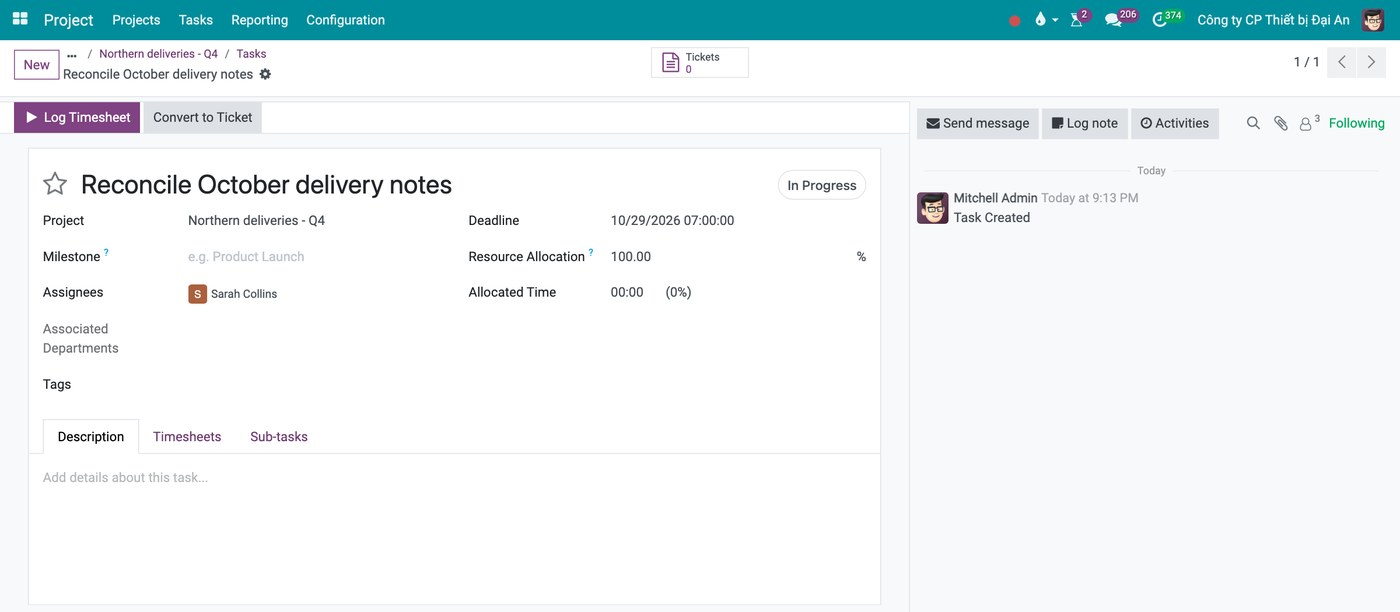
Two lists on one task: who must act, and who is kept informed.
Viindoo splits "being informed" into two levels on the same thread, too. Send message goes out to the followers. Log note stays internal and never reaches a customer reading the same document through the portal. One place to talk, two audiences, decided per message.
And because the obligation is a data field rather than a convention, the task screen ships with a filter called Unassigned - one click lists every task nobody has taken. Next to it sit Overdue, My Tasks and Followed. No chat group can produce any of those four lists.
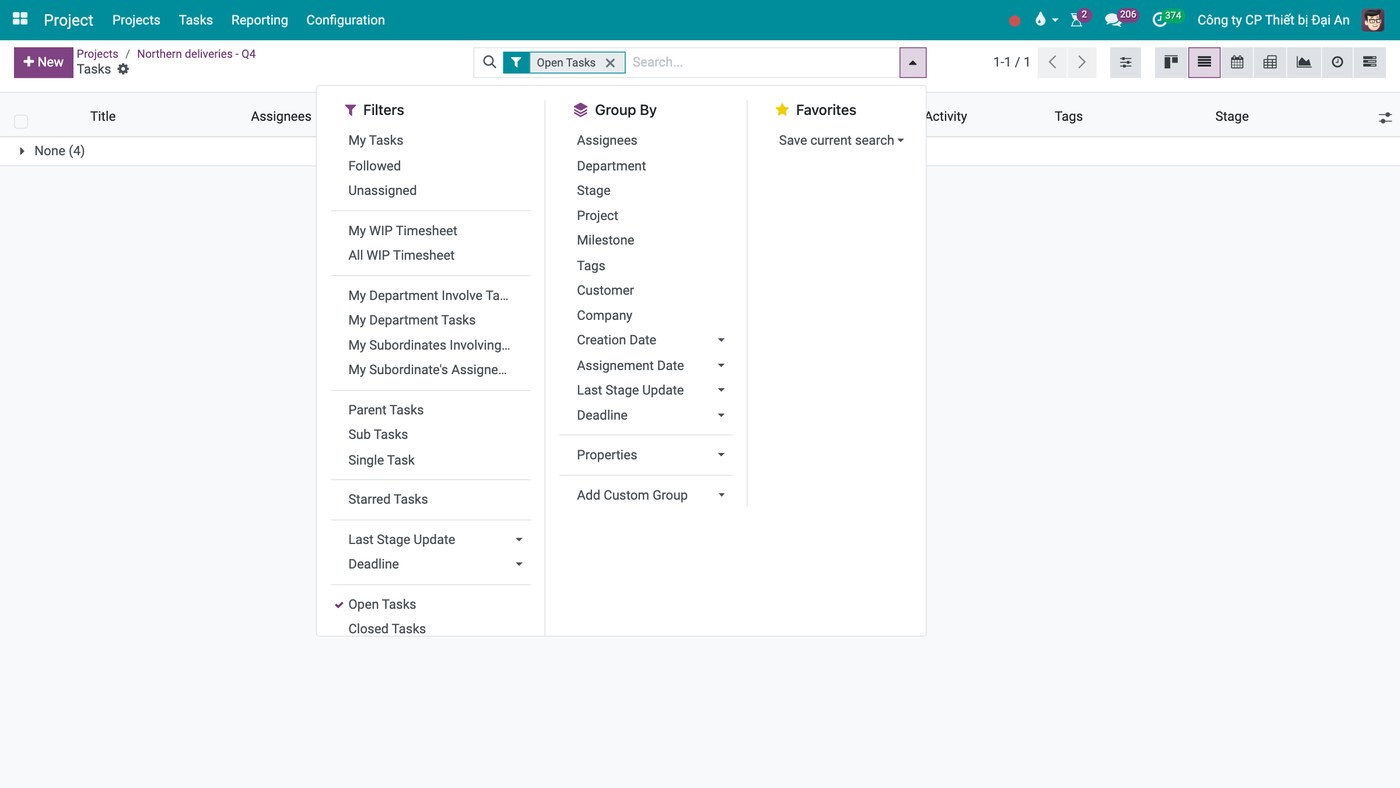
One click lists every task nobody has taken.
Around that core the task also records Assigning Date - when it was last handed over - a Deadline, a Blocked By list for work that waits on other work, and sub-tasks. The assignee field itself only accepts internal accounts that are still active: not a customer, not a supplier, not a locked account.
A fixed record: the trail sits on the document and cannot be edited
Every discussion in Viindoo is bolted to the document it belongs to - the thread stores which record it hangs on, and only an administrator can move it. Nothing drifts into a shared stream, and the thread has its own search box, so you look things up inside the document instead of scrolling a channel.
The part that is genuinely fixed is the change history. Every time the assignee, the deadline, the priority or the state changes, Viindoo writes the old value and the new one with the person and the timestamp - written by the system, not typed by anyone. And those entries are locked: Viindoo refuses to edit a message that carries tracked values, and the table holding them is readable only by system administrators.
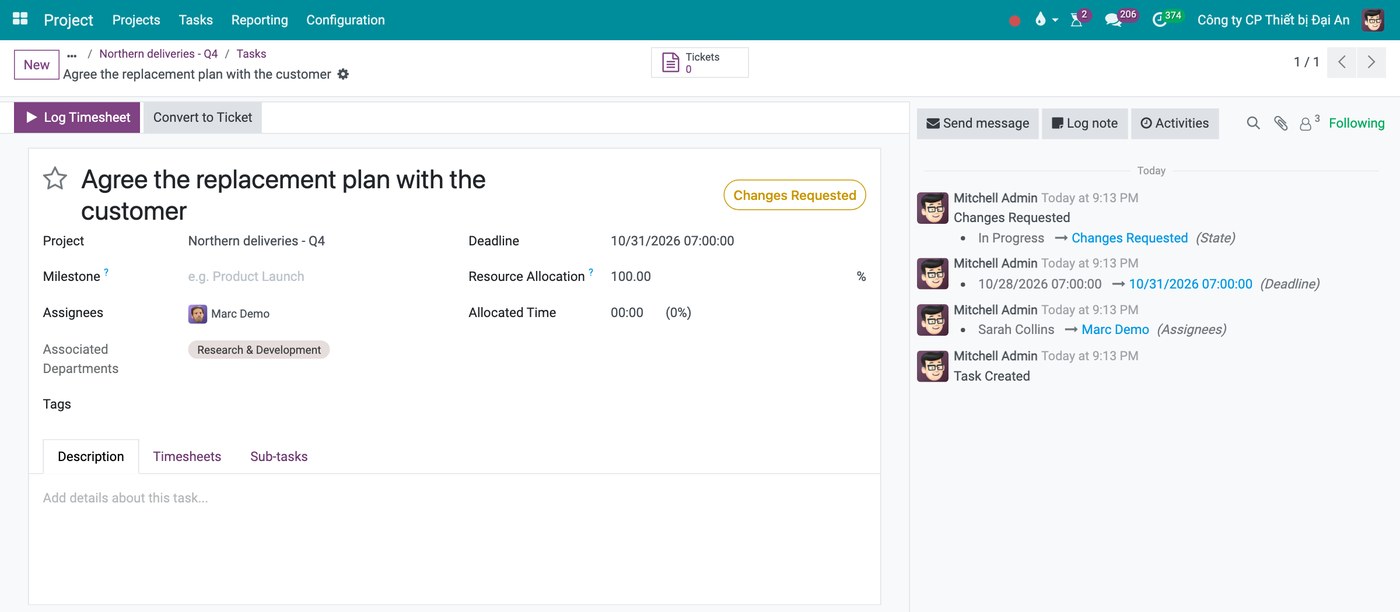
Each handover, each new deadline, each state change, with the person and the time.
So "who gave this task, when, how many times has the deadline moved, who sent it back" has an answer, and you reach it with a filter rather than by scrolling.
Rights that follow the lifecycle: what Viindoo does at the three milestones
On joining. Rights come from the role, not from who knows whom. Viindoo keeps a template user whose groups define Default Access Rights, so a new hire starts with the standard set instead of whatever somebody remembers to tick, and groups nest - an administrator automatically holds every right of the user group. The place people talk is attached the same way: a discussion channel can auto-subscribe a department or auto-subscribe an access group, and can be restricted to an Authorized Group. Nobody has to befriend anybody.
Each project then has a Visibility setting with three levels: invited internal users only, all internal users, or open to invited portal users as well. It is a real block, not a reminder - in the most restricted level, somebody who does not follow the project, does not follow the task and is not an assignee cannot read it even with the link. The default is the widest level, so set it when you open the project.
Customers are handled by the same lifecycle logic rather than by a side door. Share Project invites them at one of three levels - read, edit with limited access, or edit - and taking a customer off that list removes their collaborator record, unfollows them and drops the access link. Closing the door is one action, not a hope.
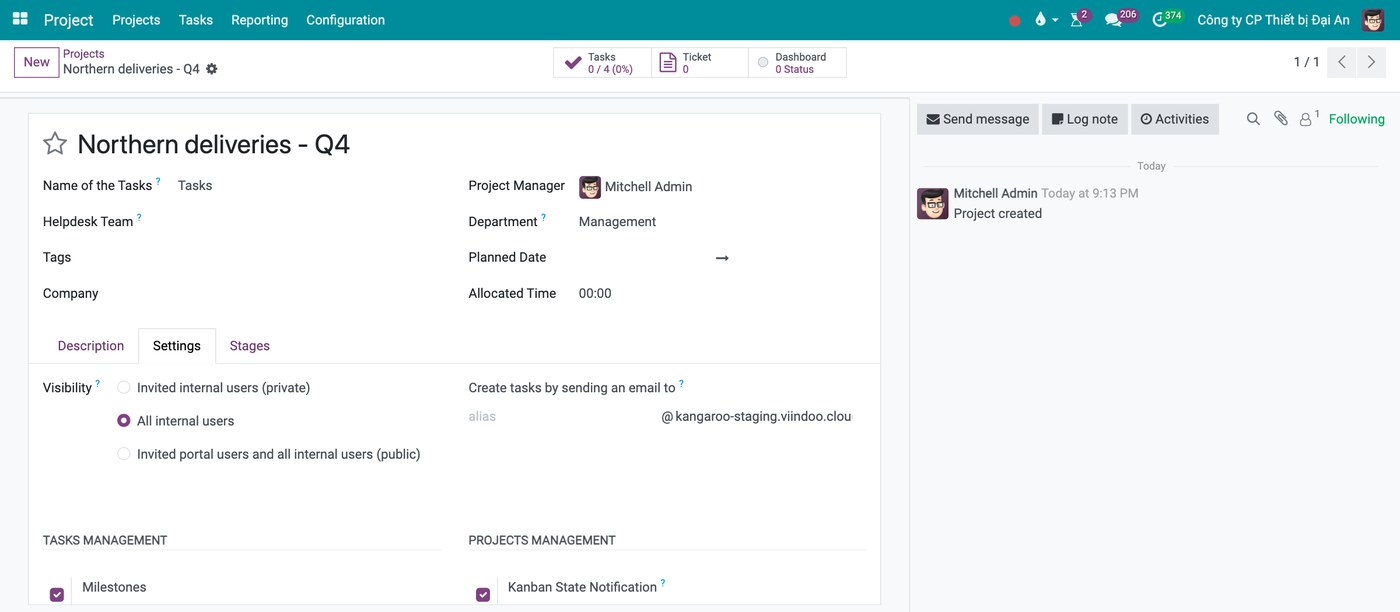
Who can see the project is a setting, not a matter of who knows whom.
On moving. Change an employee's department and Viindoo moves what hangs off it: the manager becomes the new department manager, the leave approver and the expense approver follow, and the person is subscribed to the new department's channel. For a real transfer there is an Employee Transfer wizard that updates the department and job position, drafts the contract addendum, notifies the receiving manager and files an activity for HR. Approvals keep pointing at the org chart rather than at names: an approval type takes its approvers from the job position, the department manager or the employee's own management chain, drops people who have been archived, and logs every extra approver added or revoked.
On leaving. Archiving the employee record opens Employee Termination, one dialog with several consequences: it records the departure reason and the contract end date, closes the running contract, takes back equipment and the company car, cancels leave that was not approved and trims the rest, and strips the person out of everyone else's manager, coach and approver fields. There is also an off-boarding activity plan whose steps include organising the knowledge handover. Then, when the account is locked, access really is gone: no login, open sessions stop working, Viindoo pulls them out of the channels restricted to a group, they cannot be picked as an assignee, and new approval flows skip them.
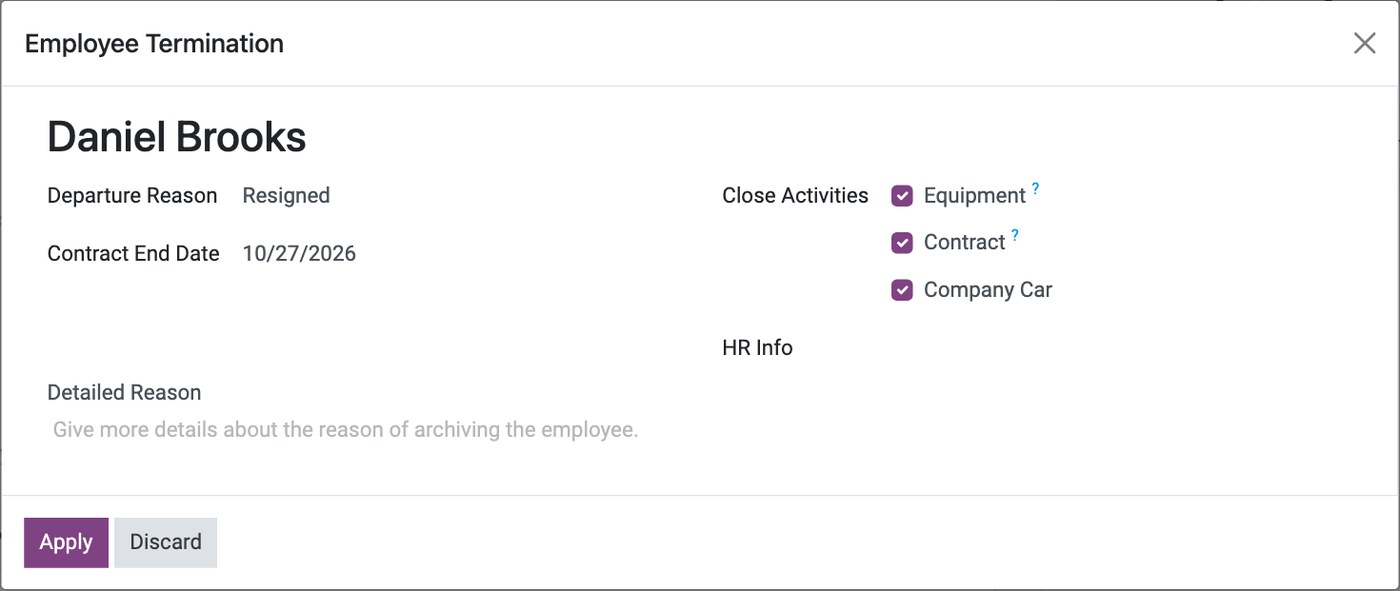
One dialog, several consequences at once.
Three steps remain manual and belong on the off-boarding checklist.
Locking the account is a separate action
Employee Termination archives the employee record; it does not lock the login. An administrator locks it under Users.
Their open work keeps their name
Tasks and activities already assigned stay assigned, and Viindoo has no bulk reassignment - you hand them over one by one.
Department channels add but never remove
Moving department or leaving does not take anyone out of the old channel, and old follower records remain.
Each of the three has a defined place, a definable end state and an audit trail afterwards. For a person who has left the company and remains in the chat groups, none of those exist: there is no list against which to check what they can still read.
Four questions to assess the current state
- Does the last task you posted to the group point at exactly one person, or is it an open call?
- The last thing that went wrong: who was accountable - and was it exactly one person?
- The person who left most recently: who revoked their access, and is that finished?
- To find out whether a task is done, do you filter or do you scroll?
Frequently asked questions
You do not drop Zalo. Discussion is human work and a chat group does that part very well; the agreement beat of the four-beat loop belongs to people in the first place. What has to move is the obligation and the record, not the conversation.
Do not make them move everything overnight. Make exactly two moments mandatory: accepting the work and reporting it done. Movements on a task still notify its followers, so someone who does not open the software all day still learns what changed on their own work.
Two ways: add them as followers of that task - as many as you like, and none of them is given the work; or set the project's visibility to all internal users, in which case anyone in the company can look it up without a single name being added anywhere.
The system accepts several assignees; RACI does not. The accountable slot takes one person. A task that seems to need two is usually a task that has not been split finely enough.
Not once the account is locked. The thing to remember is that locking it is a task somebody has to perform - it does not come bundled with registering the departure in HR.
Next in this series: when is a standalone task app enough, and when is it not? The answer has less to do with the size of the company than with whether the work is project work or operational work tied to documents.
See it on a real system
The three properties are easier to evaluate on a live record than on paper: which field holds the obligation, where the handover history sits, and who retains access after leaving. Book a walkthrough and we will open a project on a live system and go through all three.