Should you standardize before you automate, or automate first and fix the process later? Article 9 of the "From Data to Kaizen" series looks at the right order between standardization, Kaizen and automation in ERP.
Standardize before you automate: why the order matters
When a business starts to digitalize, a very common expectation is:
"Now that we have software, we should automate as much as possible."
It sounds very reasonable. Automation can help a business:
Fewer tasks
Less data entry and less dependence on individual people.
Faster processing
Work moves to the next step without waiting for someone to pass it on.
Fewer errors, lower cost
Calculations and repeated steps no longer depend on manual work.
But there is one very important catch:
If the current process is not good, automation may only make a bad process run faster.
That is why automation should not be treated as the starting point of digital transformation. In many cases, the more sensible order is:
See
Standardize
Kaizen
Automate
and not automate first, then see what goes wrong.
Automation does not create a good process by itself
Take a simple example. A business has a five-step purchase approval process: an employee creates the request, the team leader approves, the department head approves, the director approves, and accounting confirms. In reality, for small purchases, 3 of those 5 steps may add no value (illustrative example).
If the business puts this process into ERP and automates notifications, approvals and email reminders, the result is a process with too many steps that simply runs faster. The system may feel more modern, but the waste is still there. As the previous article showed, the level of control should match the level of risk, and that decision comes before any automation.
Picture a bad process as a pipe full of bends. A stronger pump makes the flow faster, but the pipe is still bent. The same happens in a business:
The structure is not right yet
Quotations with too many steps, approvals with too many layers, a BoM that is not standard, data entered twice, unclear responsibilities.
Only automation is added
Automatic emails, automatic tasks, automatic status changes, automatically generated documents.
The system is then only accelerating a structure that is not yet optimal. That is why Kaizen has to go hand in hand with automation.
When should you automate right away?
You do not always have to wait for a perfect process: to standardize before you automate does not mean waiting. Some jobs are clear enough to automate from day one:
Calculations
Totals, taxes, differences, stock, time. If a computer is more accurate than a person, let it calculate.
Copying data
If information is already on the Sales Order, users should not have to type it again on the delivery or the invoice.
Documents generated by rules
Confirming a Sales Order creates the delivery; an MTO demand creates a Manufacturing Order; stock falling below the minimum creates a draft purchase request.
Simple warnings
Overdue, missing materials, credit limit exceeded, late delivery.
These automations do not depend much on process quality, and they remove obvious waste. In Viindoo, several of them work out of the box once the product routes are set: confirming a Sales Order creates the delivery order, and a product with the Buy and MTO routes gets its own draft purchase order straight from the sales order.
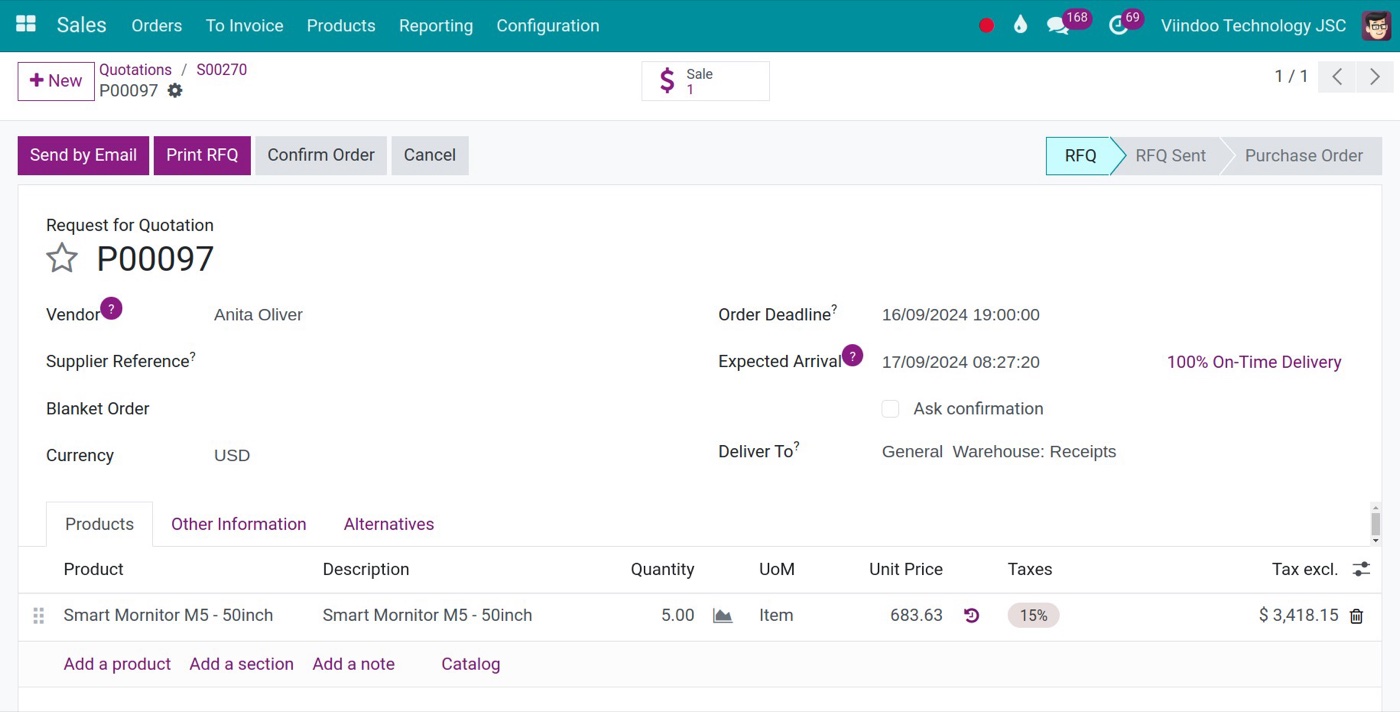
The request for quotation is created from the sales order and keeps a link back to it (the Sale button), so purchasing does not re-enter the demand.
When should you not automate too early?
Some areas call for more caution, and this is where the rule to standardize before you automate matters most:
The process still keeps changing
If the business has not agreed on who does what, when, and under which condition a step moves on, the automation will have to be rebuilt again and again.
There are too many exceptions
If 50% of transactions have to be handled outside the standard process (illustrative example), it is too early for deep automation.
Input data is not reliable
Automation built on wrong data just produces wrong results faster.
The management goal is unclear
If you do not know whether you want to cut lead time, cost, defects or tasks, it is easy to automate the wrong place.
Standardize before you automate does not mean a huge project
Another misunderstanding is: "To automate, we first need a full process consulting project." Not necessarily. For an SME, the practical way to standardize before you automate is to standardize at a minimum level, as the article on the minimum management backbone describes. It is enough to make clear:
- what the input is,
- who is responsible,
- what the output is,
- when the work moves to the next step,
- what the main exceptions are.
That is enough to start. Then the business runs, and real data keeps Kaizen going.
A sensible sequence: standardize, digitize, measure, improve, automate
A practical loop looks like this:
Standardize
Agree on a common way of working, so everyone understands the same process.
Digitize
Put the process into Viindoo to create one continuous flow of data.
Measure
Track time, status, deviations and defects to see where the problem is.
Improve
Remove extra steps, waiting, double entry and bottlenecks.
Automate
Automate only what is already clear, on a better process.
Then the loop starts again. It is the same improvement cycle that the article Does Kaizen Need ERP? describes, with automation as the last step, not the first.
Example from a mechanical workshop: from order to production
Suppose the business has this flow:
Sales Order
BoM
Purchase materials
Production
QC
Delivery
At first, sales send information over chat apps, engineering builds the BoM in its own file, purchasing asks again about materials, the warehouse checks Excel and the workshop receives paper orders. Automating too early, with automatic emails, automatic files and automatic task transfers, leaves the data just as fragmented. A better path:
Phase 1: Standardize
Products, configurations, BoMs and responsibilities.
Phase 2: Digitize
Run the main flow on Viindoo.
Phase 3: Measure
Which orders are late, which materials are missing, which operations are congested.
Phase 4: Kaizen
Improve the points the data has revealed.
Phase 5: Automate
Generate manufacturing orders, create material demand, flag missing components, update statuses and reports.
Only then does automation really create value: this is what it means to standardize before you automate in practice. With the MTO and Manufacture routes set on a product, confirming the Sales Order creates the Manufacturing Order automatically, and the two stay linked.
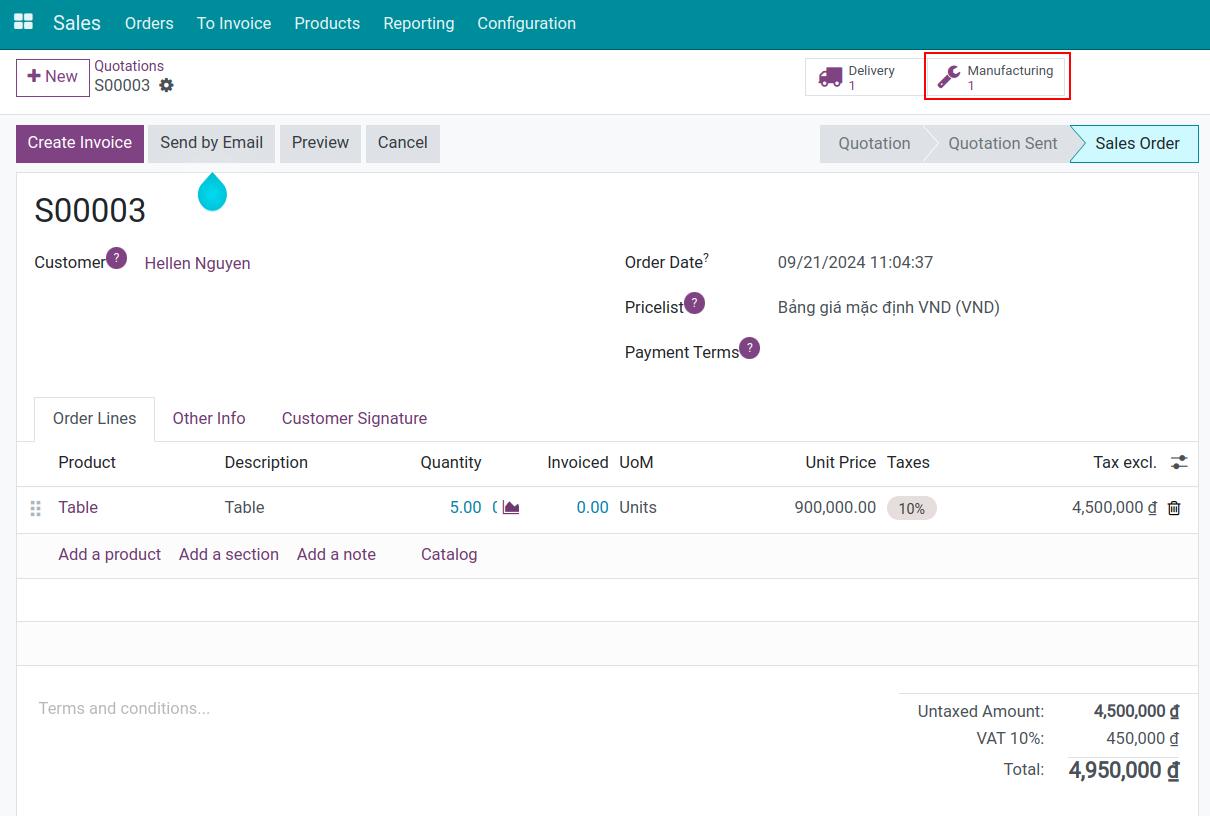
After confirmation, the sales order shows a Manufacturing button next to Delivery: the manufacturing order was generated from the order, with nobody re-entering it.
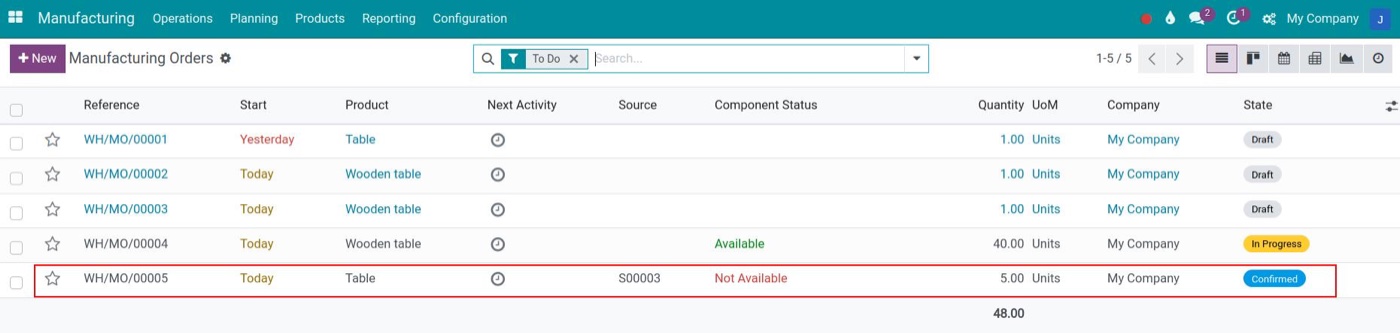
In the manufacturing order list, the Source column points back to the sales order, and the component status shows at a glance whether materials are available.
Automate simple decisions, not just tasks
A better level of automation is not only doing the work automatically, but handling decisions that follow clear rules. For example:
- stock below the minimum → create a draft purchase order;
- credit limit exceeded → warn the salesperson, or ask for approval;
- quality check failed → open a quality alert with corrective actions;
- lead time over the standard → alert the person in charge.
This is automation with management value. But do it only when the input data is reliable, the conditions are clear and the exceptions are understood.
In Viindoo, some of these rules are ready to use and some are configured. A reordering rule set to automatic creates draft purchase orders when the scheduler finds stock below the minimum. The credit limit shows as a warning on the sales order; turning it into an approval step, or actively alerting someone about a late lead time, is set up with Automation Rules.
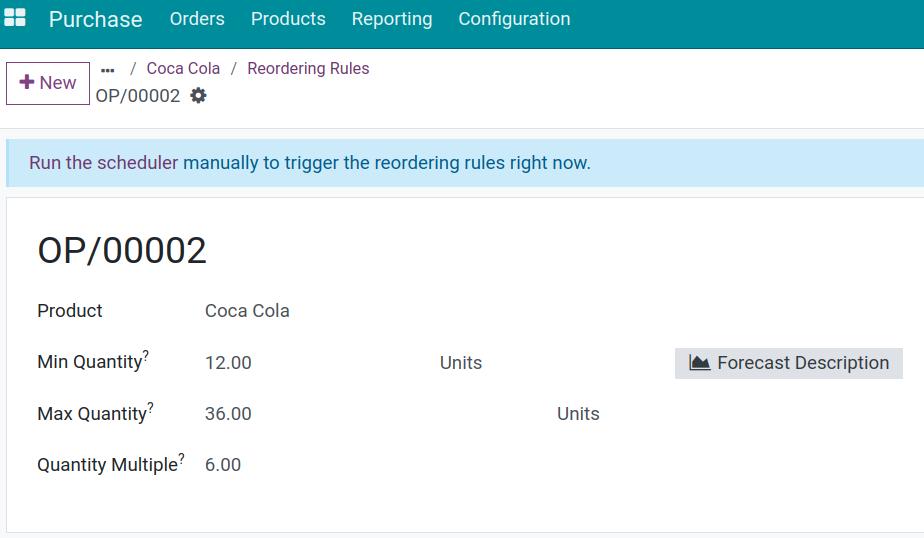
The rule itself is the standard: minimum and maximum stock and the order multiple. Automation only works well once these numbers reflect real consumption.
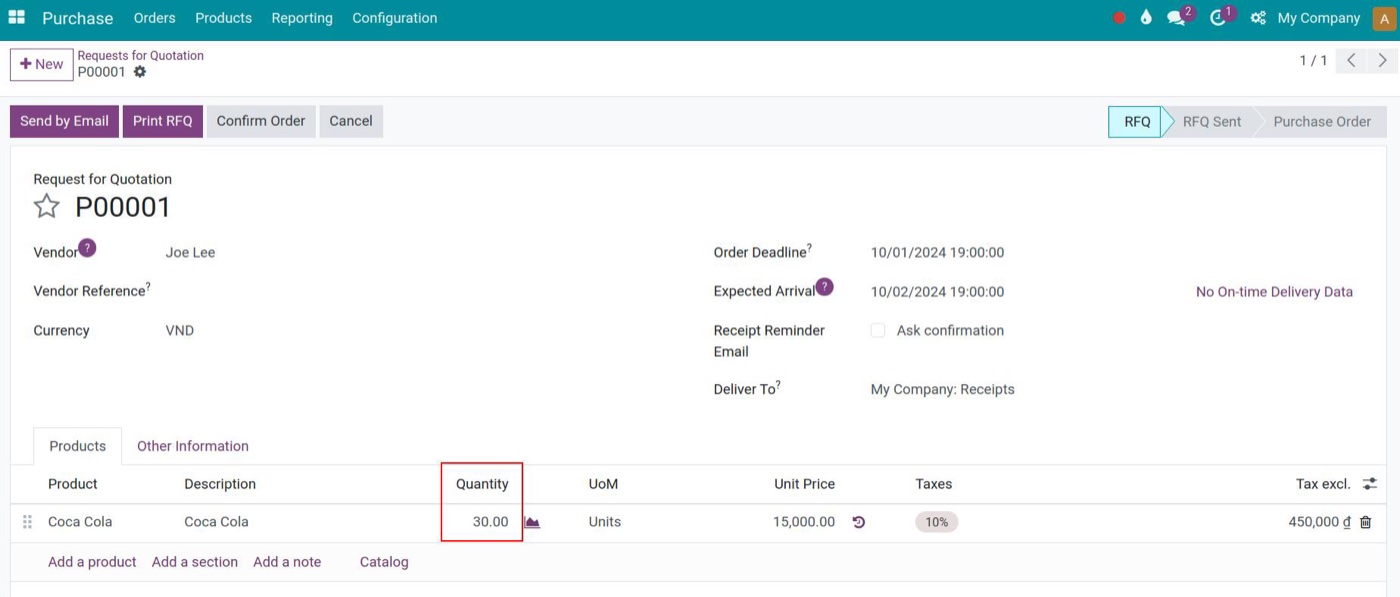
When stock drops below the minimum of the reordering rule, a draft request for quotation is created with the quantity needed to refill it.
Quality works the same way: when a quality check fails, the inspector creates a quality alert straight from the check, then records the root cause and assigns corrective and preventive actions with owners and deadlines.
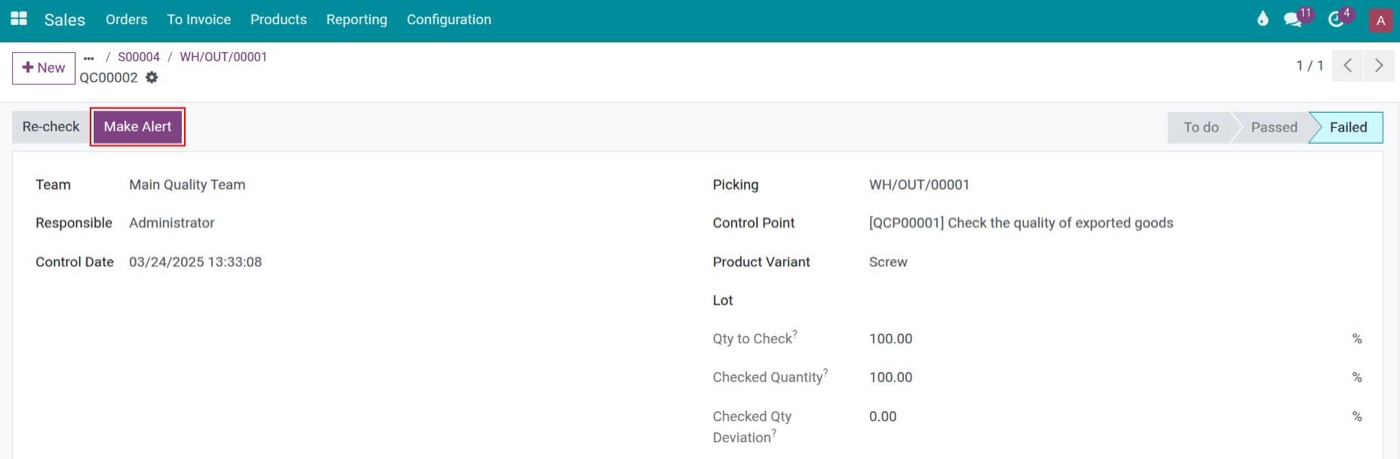
A failed check keeps the control point, product and inspected quantity, and the Make Alert button turns the defect into a quality alert.
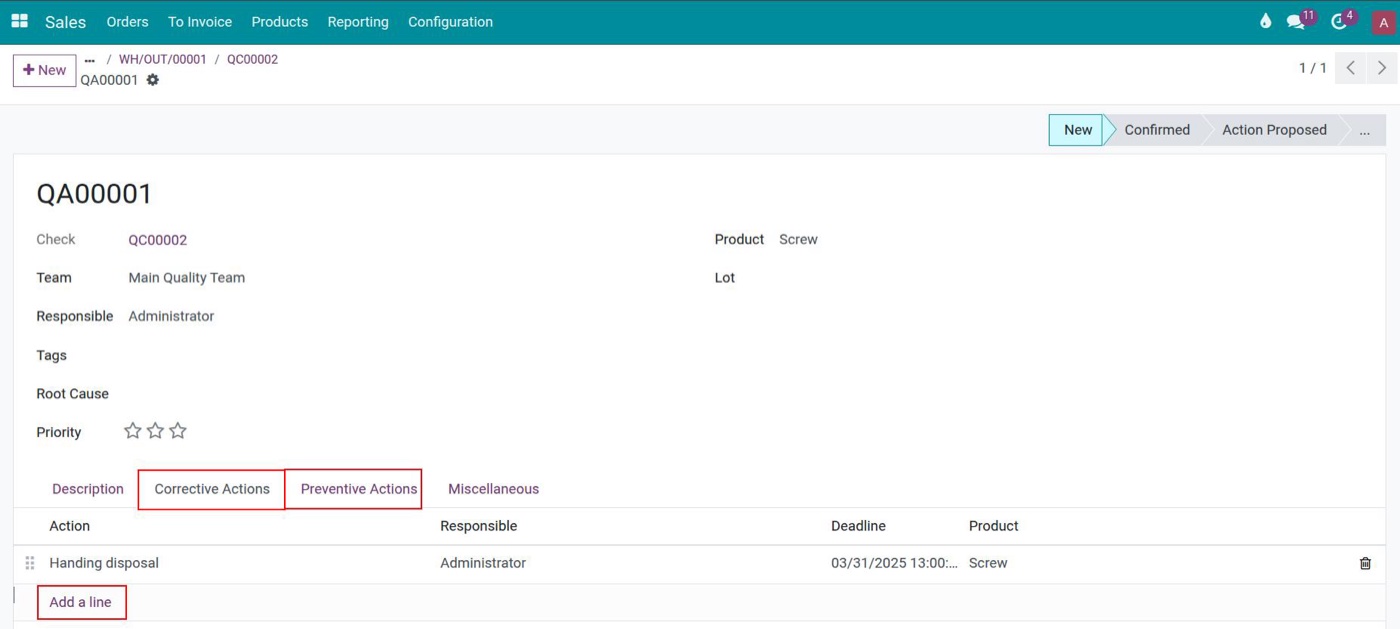
The quality alert records the root cause and lists corrective and preventive actions, each with a person in charge and a deadline: automation that leads to a management action.
Where does AI fit in this process?
AI makes businesses want to automate even earlier: AI reading emails, drafting quotations, suggesting purchases, analyzing defects, forecasting. But the principle does not change: AI cannot make up for a weak data foundation.
If product codes are not standard, BoMs are wrong and transaction history is incomplete, AI will struggle to give good results.
The more powerful AI becomes, the clearer the data and processes must be.
AI should be an acceleration layer on top of a good management backbone, which is another reason to standardize before you automate with AI.
How should you measure the ROI of automation?
Do not only ask "How many people does this automation save?" There are many other kinds of value:
Time saving
Shorter processing time.
Error reduction
Fewer mistakes.
Lead time reduction
A shorter end-to-end flow.
Control value
Lower risk.
Scalability
More transactions without a matching increase in staff.
Decision speed
Faster decisions.
This gives a fuller picture of ROI.
Good automation reduces tasks over time
One important principle, discussed in the article on why digitalization sometimes adds tasks: digitalization may add some tasks at first in order to create data. Automation must then gradually remove those tasks.
For example, at first workers confirm each work order by hand. Later, barcode scanning and connected devices can replace part of those clicks: Viindoo already supports barcode scanning on the work order tablet and devices connected through an IoT Box, while a direct link to CNC machines or sensors is not available out of the box.
Data is created first, so the business knows where automation is worth it.
Not every automation is worth doing
An automation can be technically clever but have a low ROI. A task that takes 20 seconds but happens only 10 times a month may not be worth automating, while a task that takes 30 seconds and happens 20,000 times a month can be a top priority (illustrative example). A simple way to rank them:
Frequency × Time × Error risk × Business impact
There is no need for an exact calculation; it is a frame for setting priorities.
Where should automation start?
A very practical order of priority, from easy to hard:
Double entry
Data exists but users type it again.
Manual calculation
Excel, calculators, copy and paste.
Status messages
Emails, chats and calls just to say "done".
Simple rules
If A, then B.
Warnings
Overdue, out of stock, defects.
Complex decisions
AI, predictive analytics.
Viindoo and automation
An integrated ERP platform has a big advantage: the data is already in one system. Automation should use the data that exists instead of creating more data entry work.
Documents from rules
Deliveries, manufacturing orders and draft purchase orders generated through routes and reordering rules.
Automation Rules
Triggers on field changes, dates, emails or webhooks; actions that update or create records, schedule activities, send emails or SMS.
Workflows and approvals
Workflow Automation for visual process design, OmniApproval for multi-step approvals, and approval actions on documents.
Reports are built directly on transaction data, so they update without anyone consolidating spreadsheets.
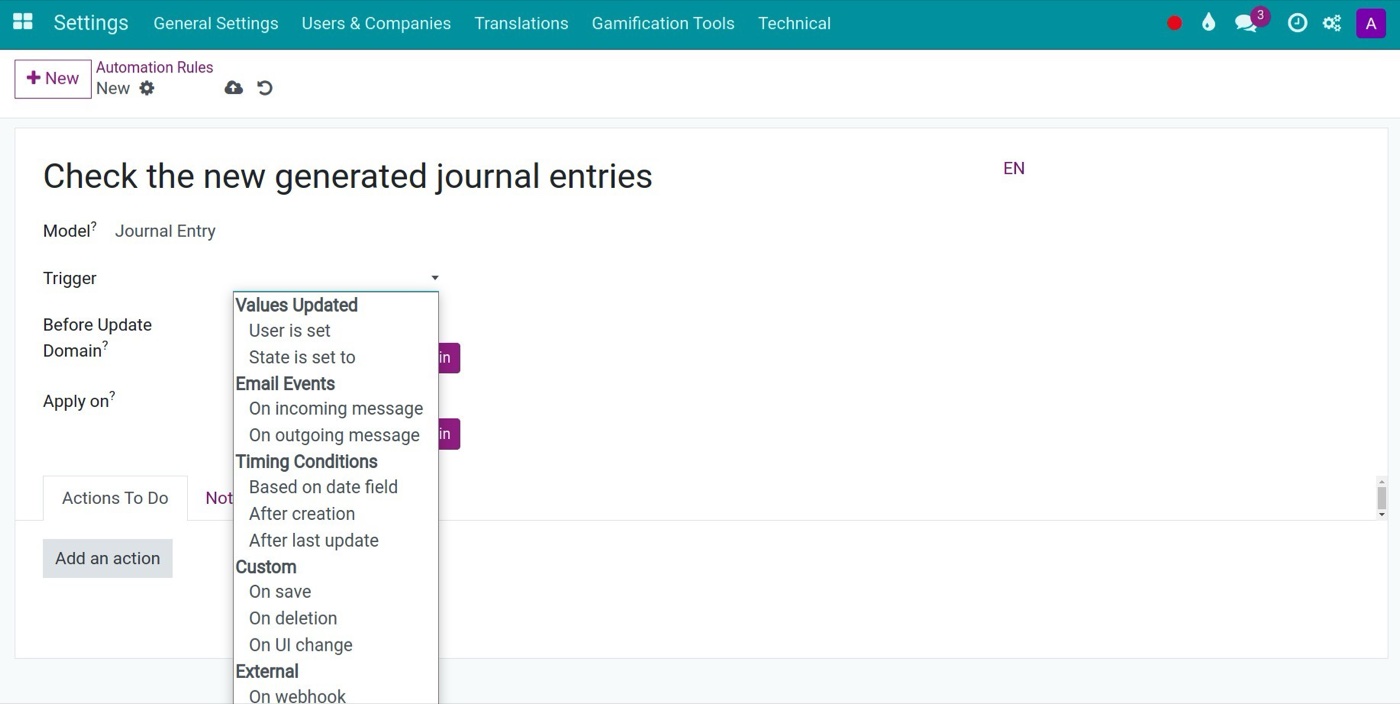
An automation rule only works when its trigger is specific: a value being updated, an email event, a time condition, a save or delete, or an external webhook.
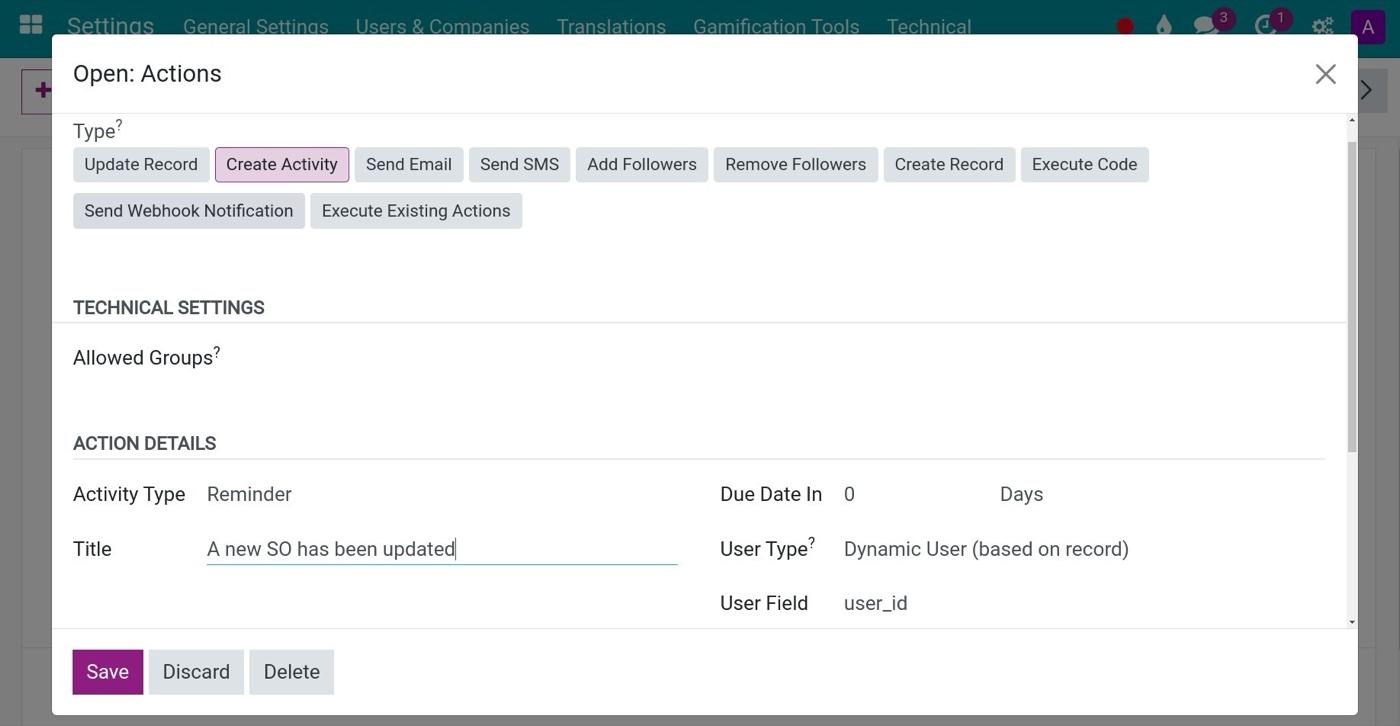
Once the rule is clear, the action is simple to set: here the rule schedules a reminder activity for the salesperson whenever a sales order is updated.
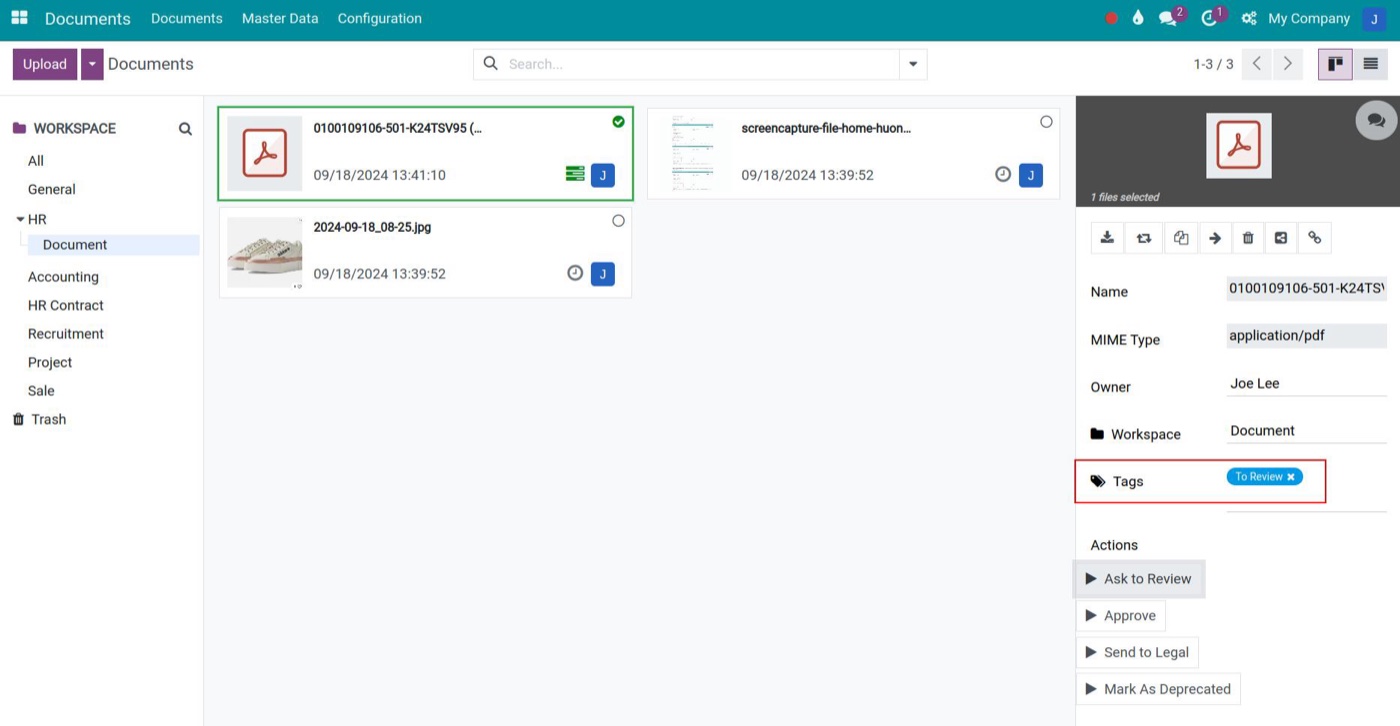
With document approval, clicking Ask to Review tags the document as awaiting approval and creates an activity for the reviewer; approving it updates the tag.
Kaizen must continue after automation
Another mistake is to consider the job done once it is automated. Automation can also turn into waste over time: old rules no longer fit, there are too many warnings, workflows create tasks nobody needs. So automation needs Kaizen too: to standardize before you automate is not a one-off task. Review regularly:
Rules
Which rules are no longer used?
Warnings
Which warnings are ignored?
Workflows
Which workflows are creating work instead of removing it?
Automations
Which automations should be removed?
One short principle: don't automate waste
Don't automate waste.
Before automating a step, ask in this order:
- Is this step necessary?
- Can it be removed?
- Can it be simpler?
- Only then: can it be automated?
That is the spirit of Kaizen, and it also applies to automation in manufacturing on the shop floor.
Conclusion: automation should be the result of understanding, not the starting point
Automation is a very important part of digital transformation, but automation cannot fix a bad process. The sensible order is to standardize enough, digitize, measure, run Kaizen and then automate: in short, standardize before you automate.
Not everything has to be perfect before you automate. But at least the business must understand what the process does, which data matters, which steps create value and which are waste. Only then does automation truly reduce work, speed things up, cut errors and deliver ROI.
Do not automate to impress with technology. Automate what has been proven necessary for the operating flow.
That is also how Viindoo should be implemented.
Frequently asked questions: standardize before you automate
Clear jobs such as calculations, copying data and rule-based documents can be automated from the start. Complex processes should be standardized and measured first.
Because automation only speeds up the current process. If it has extra steps or bottlenecks, the waste is still there, just faster.
It only needs to be clear about the input, the person responsible, the processing condition, the output and the main exceptions.
No. The more AI relies on historical and structured data, the more it needs a good data foundation.
Generating documents through routes and reordering rules, updating records, scheduling activities, sending emails or warnings through Automation Rules, and running approval flows, all on data already in the system.
Next in the series: When should AI be used in Kaizen and ERP?
Once a business has processes, data and automation, AI starts to play a new role. The question is: where should AI replace people, and where should it support them? The next article looks at using AI to detect anomalies, forecast, analyze root causes and suggest improvements, without turning AI into a decorative layer of technology.