Multi-Warehouse Access Control - SMS
by Viindoo
| Lines of Code | 370 |
| Technical name | viin_multi_warehouse_access_control_sms |
| License | OPL-1 |
| Website | https://viindoo.com/apps/modules/19.0/viin_multi_warehouse_access_control_sms |
| Read description for | v 16.0 v 17.0 v 18.0 |
| Required Apps | Invoicing (account) Discuss (mail) Inventory (stock) |
| Included Dependencies | Multi Warehouse Access Control Viindoo Base Viin Warehouse Viin Warehouse Accounting |

Warehouse operators finish their own deliveries, and the customer gets the text
For companies that text customers when goods leave, with each warehouse team limited to its own site
Let warehouse operators answer the SMS confirmation when they validate deliveries.
Odoo Community and Odoo Enterprise · Odoo Proprietary License v1.0 (OPL-1) · No text of its own to translate: screens follow your Inventory and SMS languages
Builds on Multi Warehouse Access Control: the access levels and the people listed on each warehouse come from there.
What changes for your team
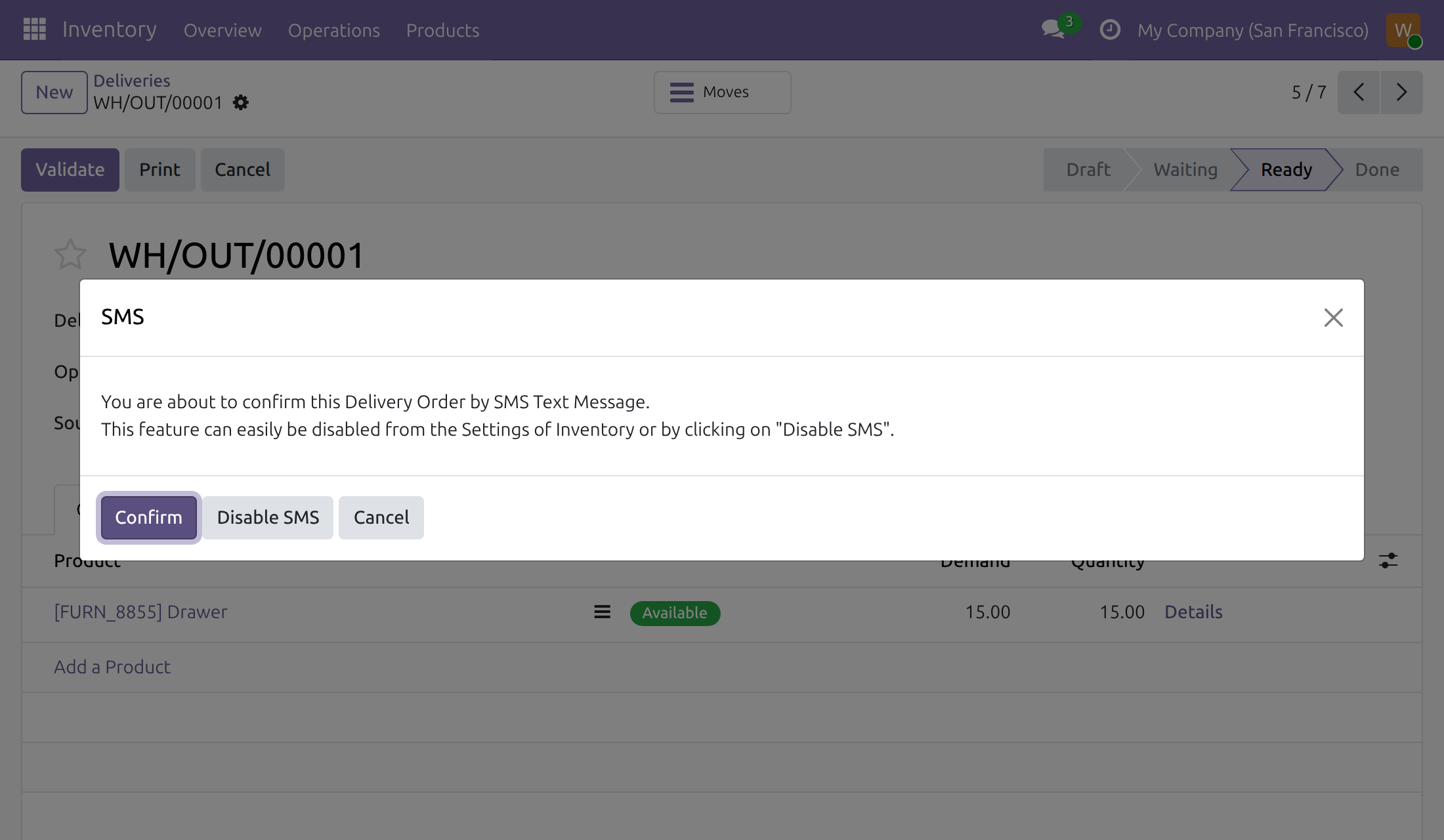
Operators close the deliveries of their own warehouses
Today, with text confirmation on, validating a delivery opens a confirmation dialog that a person limited to their warehouses has no access to, so a manager has to finish the order.
→ At the Users: Own Documents level, the operator answers the dialog and the delivery order is done, with no wider Inventory right.
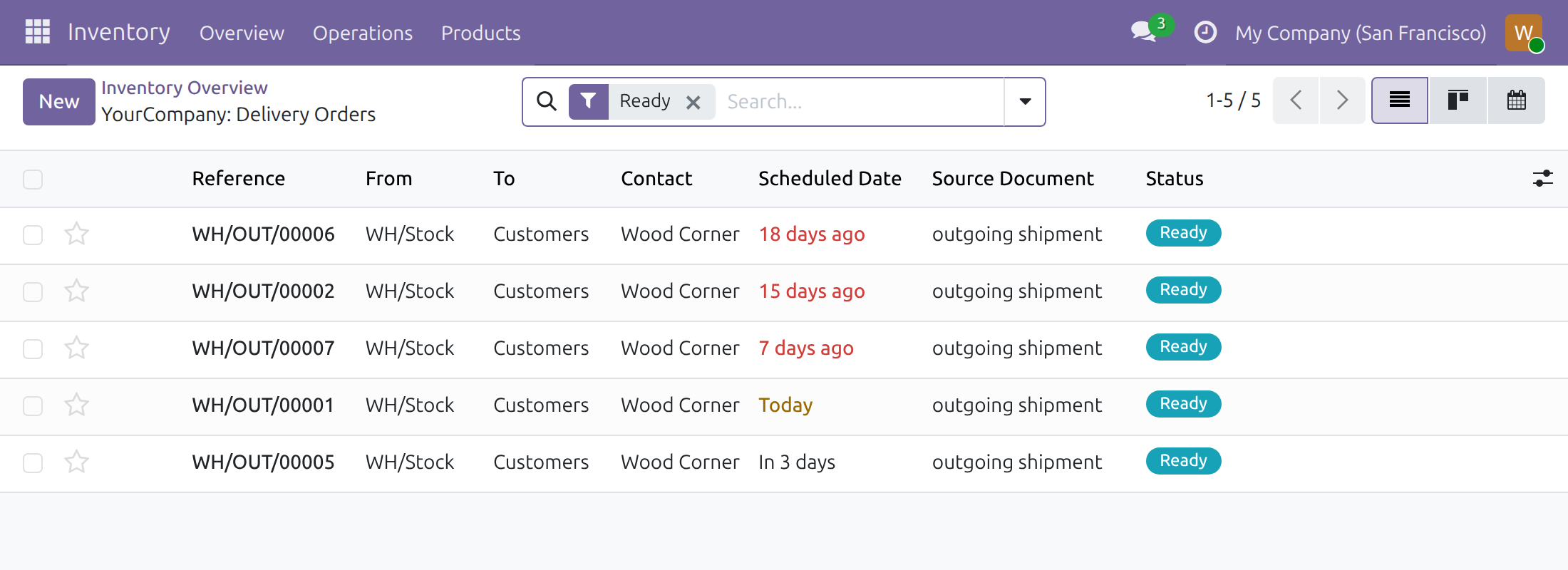
Customers hear about their delivery without a call
Today, someone phones or writes to the customer once the goods have left.
→ With Text Confirmation on and SMS chosen, an automatic text message goes to the customer when the delivery order is done, whoever validates it.
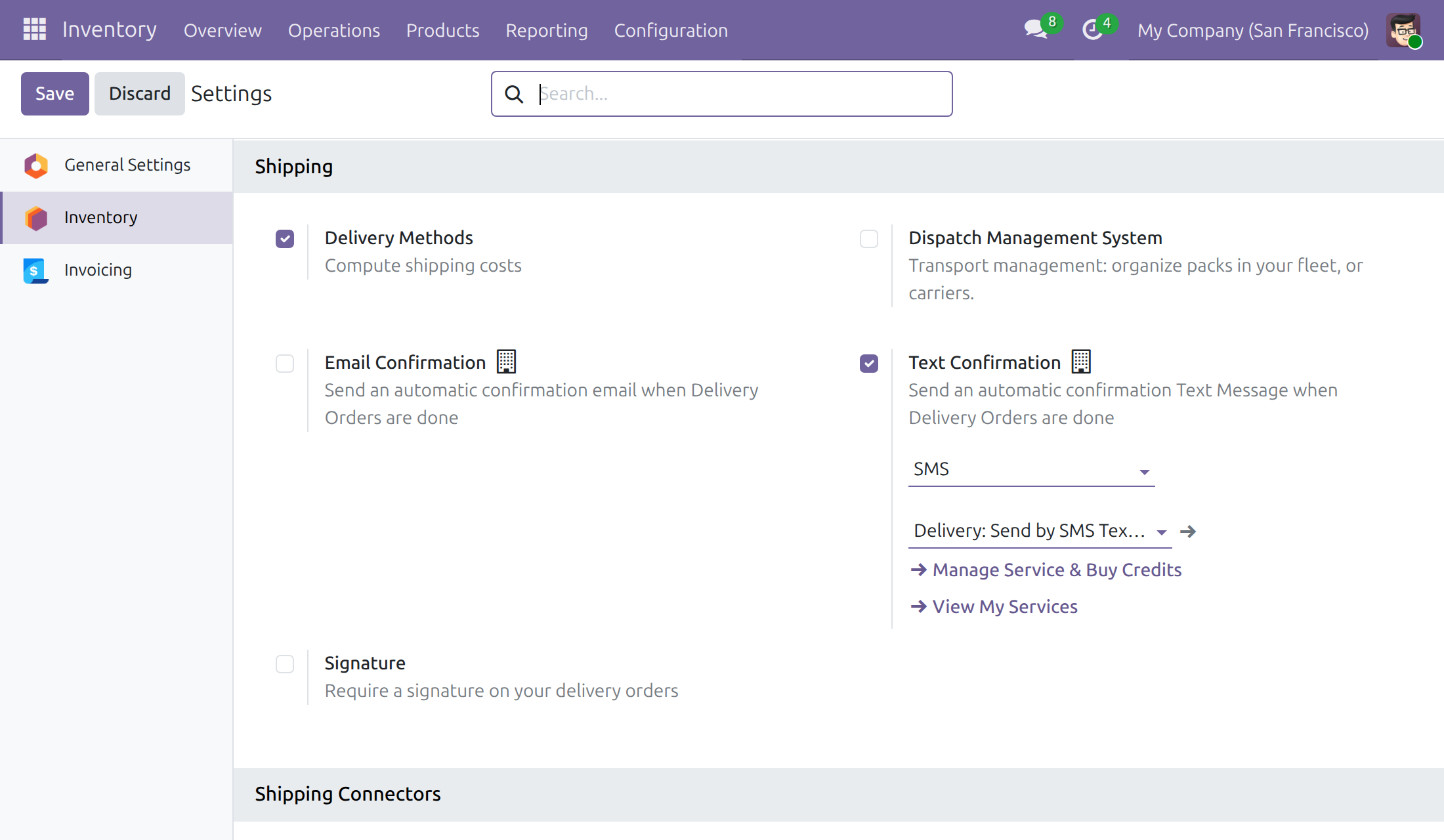
The message says what you want it to say
Today, each person words the shipping notice their own way.
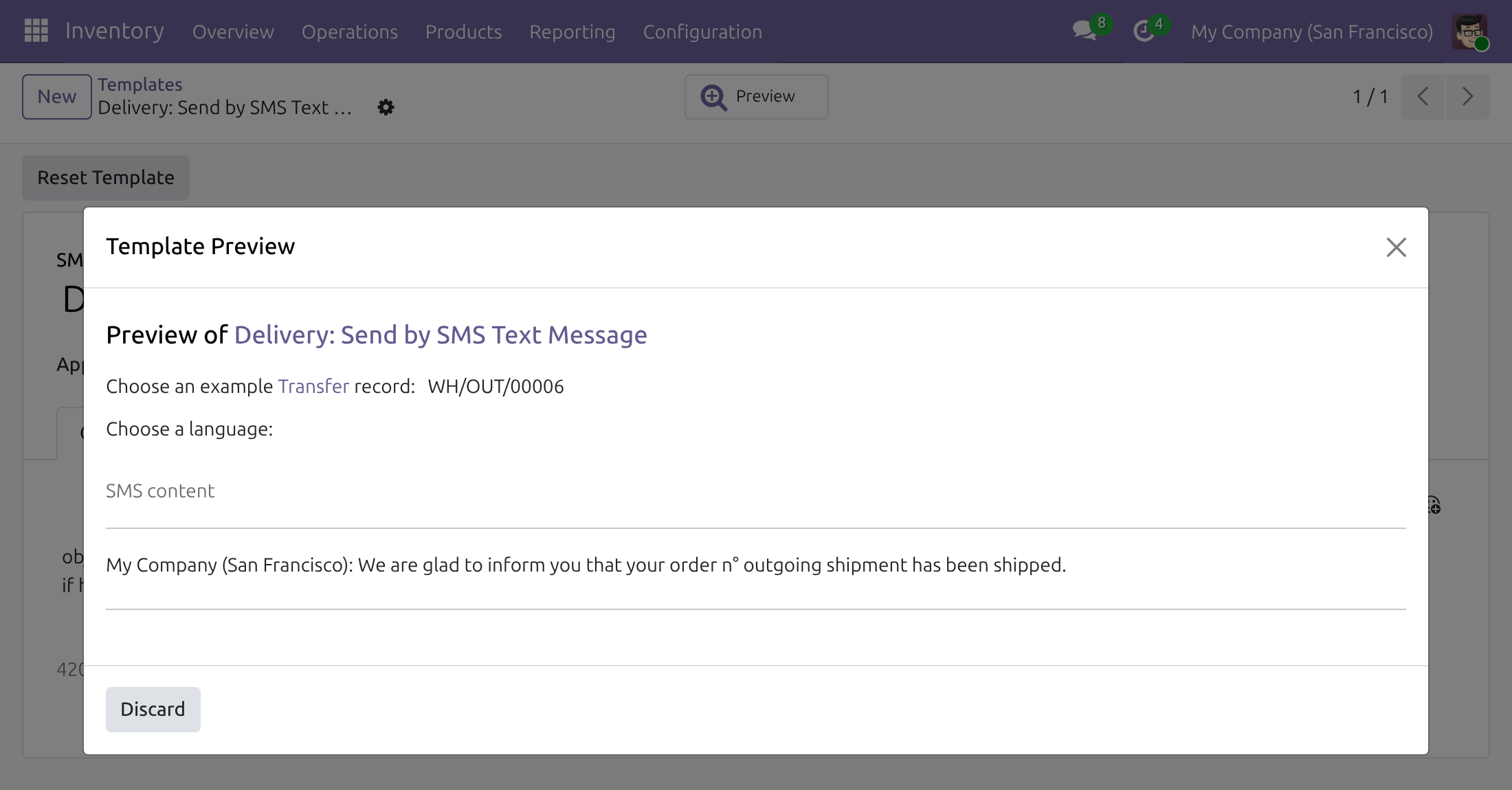
→ Every text comes from the SMS template chosen in the setting; Inventory administrators edit it and preview it on a real delivery order.
Features
Validating deliveries
- ✓ Users: Own Documents operators answer the SMS confirmation dialog
- ✓ Confirm validates the delivery order
- ✓ Disable SMS validates it and turns text confirmation off
- ✓ Cancel leaves the delivery order as it was
Telling the customer
- ✓ An automatic text message when a delivery order is done
- ✓ Sent for deliveries to customers with a phone number
- ✓ Message text from an SMS template you choose
Setting it up
- ✓ Text Confirmation in the Inventory settings, with SMS as the channel
- ✓ SMS templates edited by Inventory administrators
- ✓ SMS service and credits managed from the same setting
Built for daily use
- ✓ One access right on the dialog: the warehouse limits stay as they are
- ✓ Operators need no access to the SMS template
- ✓ The dialog opens once per company; later deliveries validate directly
- ✓ Installs by itself when the base module and Stock - SMS are present
Ready on day one
Access in place at install
Operators at the Users: Own Documents level can answer the dialog as soon as the module is installed.
A ready-made delivery message
Stock - SMS ships the template Delivery: Send by SMS Text Message, ready to use or to reword.
What the administrator sets first
Text Confirmation with SMS and its template, then an Inventory level for each person and the people of each warehouse, as for the base module.
Before you decide
Does an operator get access to other warehouses?
No. The module adds one access right, on the confirmation dialog. Which deliveries an operator sees and validates still follows the warehouse lists of the base module.
Can an operator switch the text messages off for everyone?
Yes, from the dialog: Disable SMS turns Text Confirmation off for the company. The dialog appears once per company, and an Inventory administrator turns the setting back on.
What do the text messages cost?
Messages go through the SMS service of Odoo, paid with credits you manage from the Text Confirmation setting. The module adds no service or charge of its own.
Where does the customer data go?
The customer's phone number and the message text go to that SMS service when a message is sent. The module itself calls no outside service.
What does it take to run, or to remove?
No Python package or system program beyond Odoo. It installs by itself once the base module and Stock - SMS are installed; uninstalling removes the access it adds.
Try it, then ask us
Open the live demo of this listing to see the transfers, and read the Documentation tab for each role.
Pre-sales & partnership
viindoo.com/contactusTechnical support
viindoo.com/ticketMulti-Warehouse Access Control - SMS
Who this guide is for: Inventory administrators who switch on the SMS confirmation of delivery orders, and the warehouse operators who validate those orders.
Note
Extends Multi Warehouse Access Control - see its documentation for the access levels and for listing the people who work in a warehouse.
Overview
When the company sends customers an SMS as soon as a delivery order is done, the first validation asks for a confirmation: a dialog explains that the order is about to be confirmed by text message. This module lets warehouse operators who hold the Users: Own Documents level in Inventory answer that dialog and finish their delivery orders, without any wider Inventory right.
| Role | What they do | Access right to assign |
|---|---|---|
| Inventory administrator | Turns on the text confirmation, chooses the SMS template and gives each person an Inventory level. | Inventory: Administrator |
| Warehouse operator | Validates the delivery orders of the assigned warehouses and confirms the SMS dialog. | Inventory: Users: Own Documents |
Setup (for the Inventory administrator)
Install the module
- Open Apps.
- Search for Multi-Warehouse Access Control - SMS.
- Press Install. It is installed together with Multi Warehouse Access Control and Stock - SMS when both are present.
Turn on the text confirmation
- Open Inventory > Configuration > Settings.
- In the Shipping section, tick Text Confirmation.
- Choose SMS and, below it, the SMS template to send.
- Press Save.
Give the operators their access
Give each warehouse operator Users: Own Documents in the Inventory field of the user, and list them in Accessing Users of their warehouses. Both steps are described in the guide of Multi Warehouse Access Control. Nothing else is configured here.
Warehouse operator: validate a delivery order that notifies the customer
Confirm the SMS dialog
- Open Inventory > Operations > Deliveries and open a delivery order of your warehouse whose customer has a phone number.
- Press Validate. The first time, the SMS dialog opens: You are about to confirm this Delivery Order by SMS Text Message.
- Press Confirm. The order is validated and the customer is notified by SMS. The dialog does not open again for the company.
The other two buttons of the dialog:
- Disable SMS validates the order and turns the text confirmation off for the company. Every operator then validates deliveries without a dialog and without an SMS. The administrator can switch it on again in the Inventory settings.
- Cancel closes the dialog and leaves the order as it was.
A delivery order whose customer has no phone number is validated at once, without a dialog.
Troubleshooting
- The SMS dialog does not open
- Either it was already confirmed once for the company, the text confirmation is off in the Inventory settings, or the customer of the order has no phone number.
- The operator does not find the delivery order
- The order belongs to a warehouse that lists accessing users and the operator is not one of them. Add the operator to the list on the warehouse.
FAQ
- Does the operator need a right on SMS?
- No. The Users: Own Documents level is enough to answer the dialog.
- Is the SMS sent when I validate in a test database?
- Sending depends on the SMS service of the database; the dialog itself works the same way.
This software and associated files (the "Software") may only be used (executed, modified, executed after modifications) if you have purchased a valid license from the authors, typically via Odoo Apps, or if you have received a written agreement from the authors of the Software (see the COPYRIGHT file).
You may develop Odoo modules that use the Software as a library (typically by depending on it, importing it and using its resources), but without copying any source code or material from the Software. You may distribute those modules under the license of your choice, provided that this license is compatible with the terms of the Odoo Proprietary License (For example: LGPL, MIT, or proprietary licenses similar to this one).
It is forbidden to publish, distribute, sublicense, or sell copies of the Software or modified copies of the Software.
The above copyright notice and this permission notice must be included in all copies or substantial portions of the Software.
THE SOFTWARE IS PROVIDED "AS IS", WITHOUT WARRANTY OF ANY KIND, EXPRESS OR IMPLIED, INCLUDING BUT NOT LIMITED TO THE WARRANTIES OF MERCHANTABILITY, FITNESS FOR A PARTICULAR PURPOSE AND NONINFRINGEMENT. IN NO EVENT SHALL THE AUTHORS OR COPYRIGHT HOLDERS BE LIABLE FOR ANY CLAIM, DAMAGES OR OTHER LIABILITY, WHETHER IN AN ACTION OF CONTRACT, TORT OR OTHERWISE, ARISING FROM, OUT OF OR IN CONNECTION WITH THE SOFTWARE OR THE USE OR OTHER DEALINGS IN THE SOFTWARE.