Multi-Warehouse Access Control - Purchase Requisition
by Viindoo
| Lines of Code | 408 |
| Technical name | viin_multi_warehouse_access_control_purchase_requisition |
| License | OPL-1 |
| Website | https://viindoo.com/apps/modules/19.0/viin_multi_warehouse_access_control_purchase_requisition |
| Read description for | v 13.0 v 14.0 v 15.0 v 16.0 v 17.0 v 18.0 |
| Required Apps | Invoicing (account) Purchase (purchase) Discuss (mail) Inventory (stock) |
| Included Dependencies | Multi Warehouse Access Control Viindoo Base Viin Warehouse Viin Warehouse Accounting Multi-Warehouse Access Control - Purchase |

Warehouse managers know what was agreed with the vendor, and agreements stay with purchasers
For companies that buy against purchase agreements and receive into several warehouses
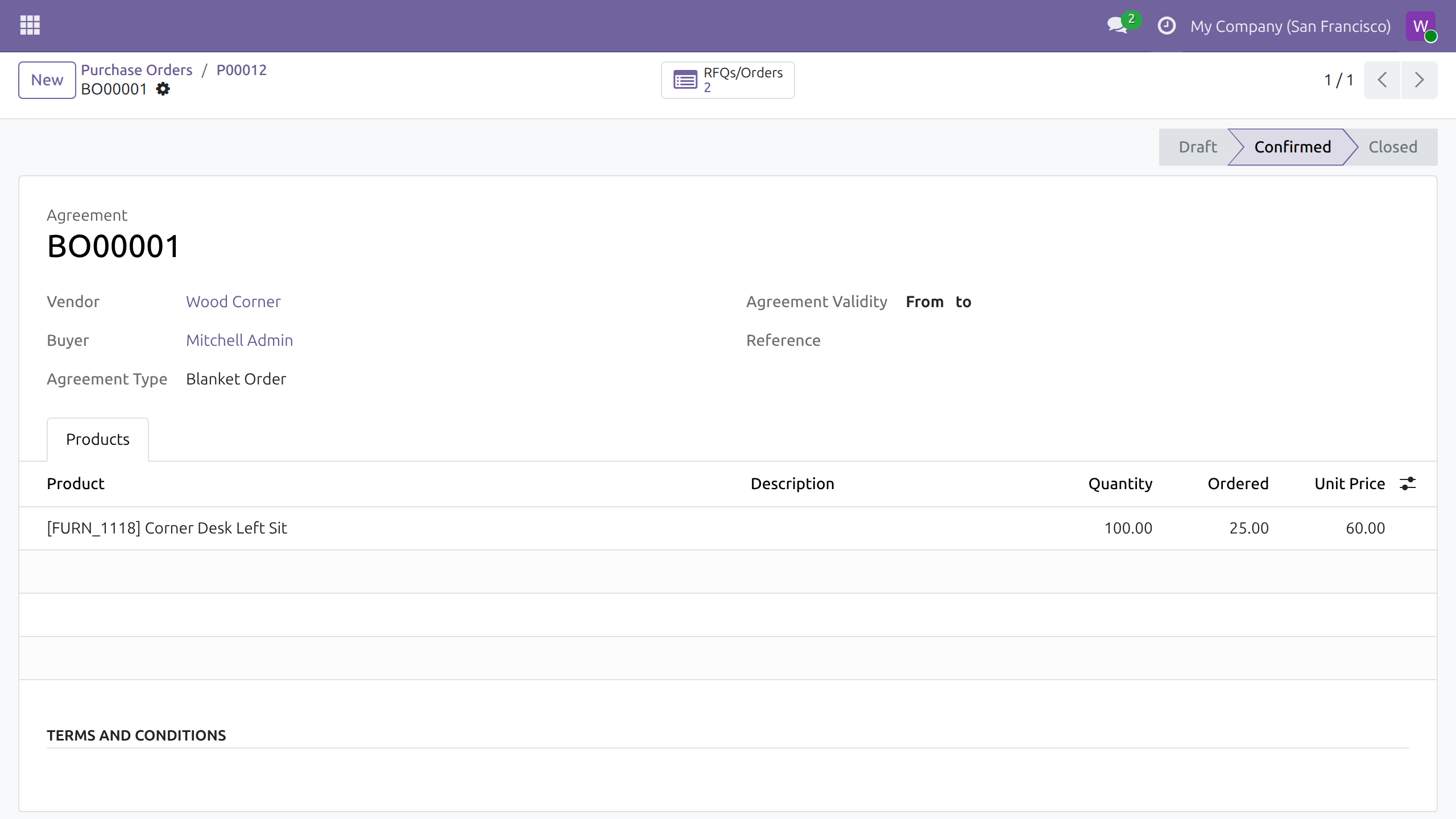
Let warehouse managers read and prepare purchase agreements.
Odoo Community and Odoo Enterprise · Odoo Proprietary License v1.0 (OPL-1) · No text of its own to translate: screens follow your Purchase and Inventory languages
Builds on Multi-Warehouse Access Control - Purchase: warehouse people read the purchase orders of their warehouses.
Builds on Multi Warehouse Access Control: the Inventory access levels come from there.
What changes for your team
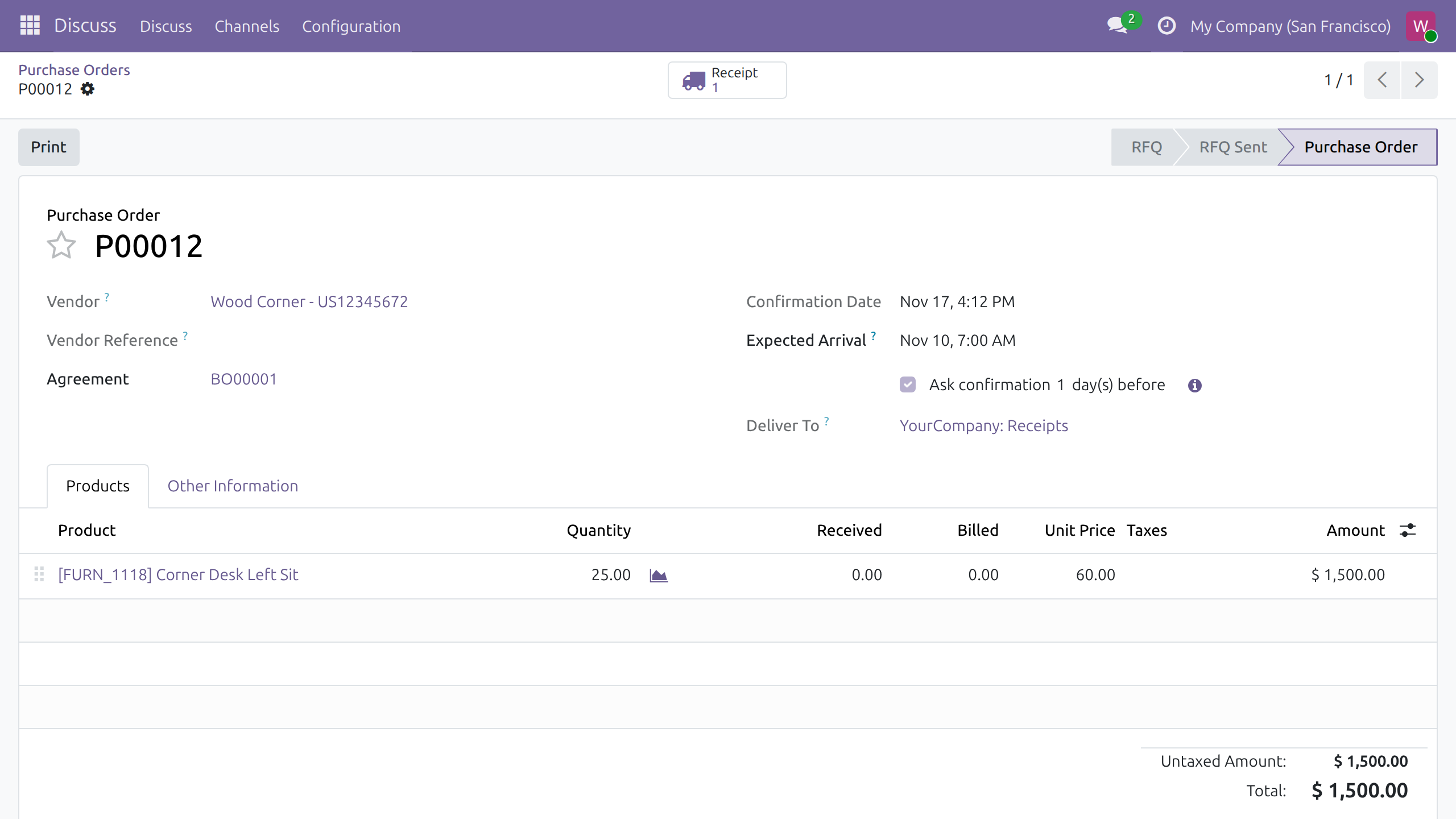
The agreement behind an order, one click away
Today, a warehouse manager who wants the agreed quantity or price asks the purchaser, or gets a purchase role.
→ The Agreement field of the order opens the agreement: vendor, type, every product line with its quantity, quantity ordered and unit price.
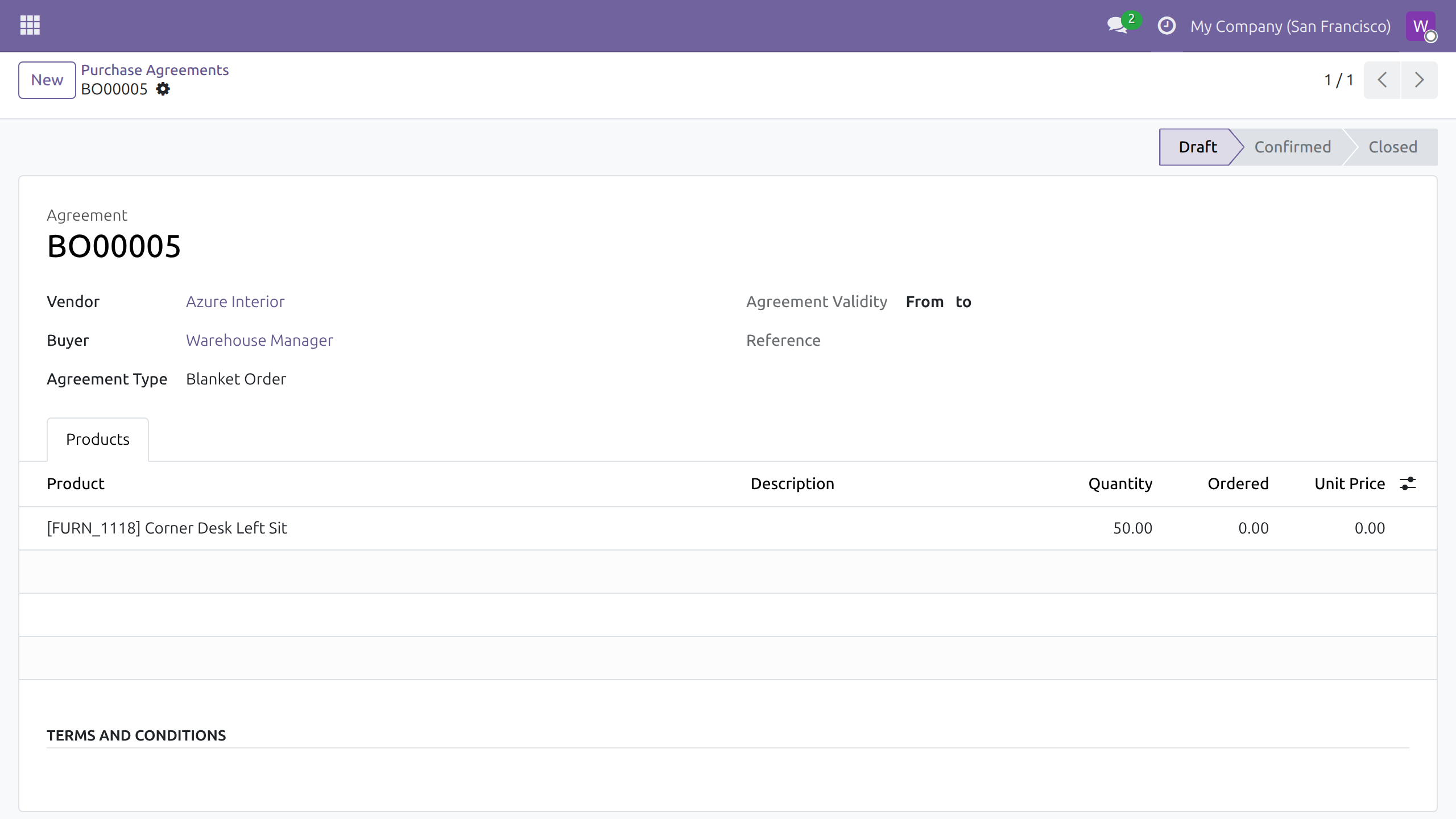
Needs seen in the warehouse become a draft agreement
Today, a need spotted in the warehouse reaches the purchaser as a message, then gets typed again.
→ The warehouse manager creates the agreement with its vendor and products; it is saved as a draft for the purchaser to complete.
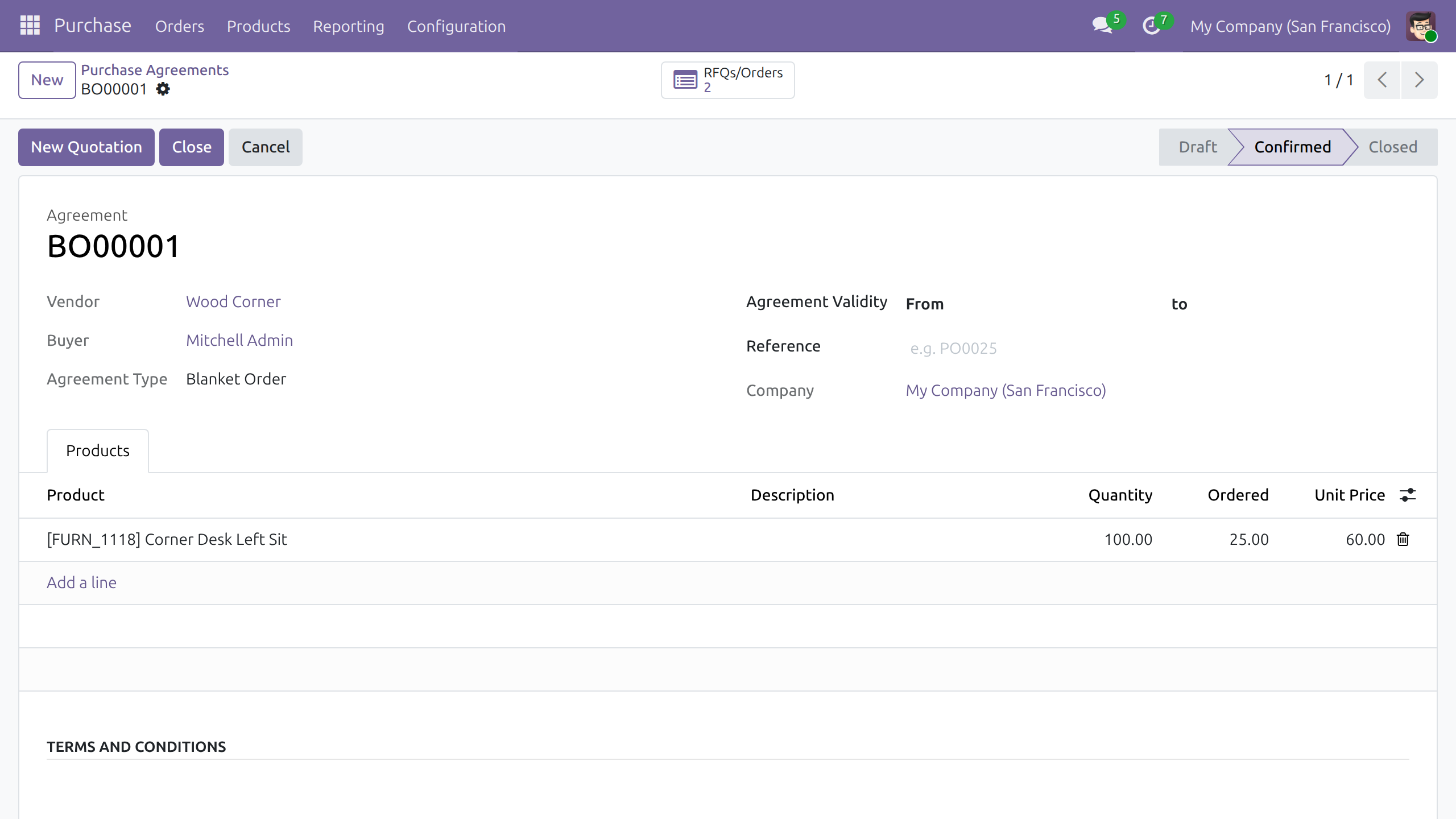
Agreements stay with purchasers
Today, a purchase role given to warehouse staff also lets them confirm, close and cancel agreements.
→ Confirm, Close, Cancel, Reset to Draft and New Quotation stay with Purchase users, whose screens are unchanged.
Features
Knowing what was agreed
- ✓ Purchase agreements and their product lines, read-only
- ✓ The agreement opens from the order created from it
- ✓ RFQs/Orders lists the quotations and orders of an agreement
Preparing agreements
- ✓ Warehouse managers create agreements with vendor and product lines
- ✓ A new agreement starts as a draft, with its creator as buyer
Purchasing stays with purchasers
- ✓ Confirm, close, cancel, reset and quote from agreements: purchasers only
- ✓ Creating alternative quotations: purchasers only
- ✓ Choosing lines when comparing alternatives: purchasers only
Built for daily use
- ✓ The server refuses any change or deletion by a warehouse manager
- ✓ A button another module adds to the agreement stays with purchasers
- ✓ Users: Own Documents does not read agreements
- ✓ Installs by itself when Purchase Agreements and the purchase bridge are present
Ready on day one
Access in place at install
Reading and creating agreements, and the purchaser-only buttons, work as soon as the module is installed.
Nothing to set per warehouse
Agreements belong to no warehouse, so access follows the Inventory level alone.
What the administrator sets first
The Warehouse Manager level in Inventory for each person who reads and prepares agreements.
Before you decide
Can a warehouse manager change or delete an agreement?
No, not even one they created. Once saved, it is read-only for them; the purchaser completes, confirms or removes it.
Who reads agreements, and which ones?
Warehouse Manager and All Warehouses User read every agreement of the company, whatever their warehouses: an agreement belongs to no warehouse. Users: Own Documents reads none.
Where does a warehouse manager find agreements?
From the Agreement field of a purchase order. The Purchase app is not in their menu, so there is no agreement list to browse.
Does anything change for purchasers?
No. A Purchase user keeps every agreement button and the whole flow, including drafts prepared by warehouse managers.
What does it take to run, or to remove?
No Python package or system program beyond Odoo, and no outside service: data stays in your database. Uninstalling removes the access it adds.
Try it, then ask us
Open the live demo of this listing to see a purchase agreement, and read the Documentation tab for each role.
Pre-sales & partnership
viindoo.com/contactusTechnical support
viindoo.com/ticketMulti-Warehouse Access Control - Purchase Requisition
Who this guide is for: Inventory administrators who give warehouse managers access to purchase agreements, the warehouse managers who read and prepare them, and the purchasers who keep running the agreements.
Note
Extends Multi Warehouse Access Control - see its documentation for the access levels and for listing the people who work in a warehouse. It also builds on Multi-Warehouse Access Control - Purchase, which lets warehouse people read purchase orders.
Overview
A purchase agreement fixes the vendor, the products and the quantities that later purchase orders draw from. The person who receives the goods often needs to check what was agreed, and sometimes prepares the agreement for the purchaser. This module lets people who hold the Warehouse Manager level in Inventory read purchase agreements and their product lines, and create new ones, without giving them any purchase role. They cannot change, confirm, cancel or delete an agreement: those actions stay with purchasers.
| Role | What they do | Access right to assign |
|---|---|---|
| Inventory administrator | Gives each person an Inventory level. | Inventory: Administrator |
| Warehouse manager | Reads the purchase agreements behind the orders they receive and prepares new agreements for the purchaser. | Inventory: Warehouse Manager |
| Purchaser | Confirms, changes, closes and cancels purchase agreements and creates quotations from them. | Purchase: User |
The Warehouse Manager level is also part of All Warehouses User, so people holding that level have the same access. A person holding only Users: Own Documents does not see purchase agreements.
Setup (for the Inventory administrator)
Install the module
- Open Apps.
- Search for Multi-Warehouse Access Control - Purchase Requisition.
- Press Install. It is installed together with Purchase Agreements and Multi-Warehouse Access Control - Purchase when both are present.
Give a person access
- Open Settings ‣ Users & Companies ‣ Users and open the user.
- In the Inventory field choose Warehouse Manager.
- Save.
Nothing else is configured here. Purchase agreements do not belong to a warehouse, so a warehouse manager reads every agreement of the company, whichever warehouses they are assigned to.
Warehouse manager: read and prepare purchase agreements
A warehouse manager does not need the Purchase app, and it does not appear in their menu. The agreement is reached from a purchase order.
Open the agreement of an order
- Open a purchase order, for example from the chatter of a receipt, as described in the guide of Multi-Warehouse Access Control - Purchase.
- In the Agreement field of the order, select the agreement reference.
The agreement opens for reading, with no button that would change it: vendor, buyer, agreement type, validity, and every product line with its quantity, the quantity already ordered and the unit price. The RFQs/Orders button lists the quotations and orders made from the agreement.
Create a purchase agreement
- On an open purchase agreement, press New.
- Choose the Vendor.
- In the Products tab, add a line, choose the Product and enter the Quantity.
- Leave the form. The agreement is saved as a draft, with you as the buyer.
Once saved, the agreement is read-only for you. The purchaser completes it, confirms it and creates the quotations.
What a warehouse manager cannot do
The buttons that change an agreement, Confirm, Close, Cancel, Reset to Draft and New Quotation, are not offered to a warehouse manager. Only the New button and the RFQs/Orders button are available, and the status bar shows the stage without moving it. The same holds for the purchase order opened from the agreement: only Print is offered.
Compare the alternatives of an order
When the Purchase Alternatives option is enabled in the Purchase settings, a purchase order has an Alternatives tab that lists the competing quotations for the same needs. A warehouse role reads that tab like the rest of the order:
- Open the purchase order and select the Alternatives tab.
- When the order has alternatives, press Compare Product Lines to see the lines of all the alternatives side by side: vendor, quantity, price and delivery date.
The Create Alternative button is not offered to a warehouse role, and the comparison shows no Choose, Clear or Clear Selected button, because they set the quantities to order. Purchasers keep all of them.
Purchaser: the agreement flow is unchanged
A person with Purchase: User keeps the whole flow, including Create Alternative and the choosing buttons of the comparison: they open Purchase ‣ Orders ‣ Purchase Agreements, edit the agreements prepared by warehouse managers, press Confirm, and create quotations with New Quotation.
Troubleshooting
- A warehouse manager does not find purchase agreements in any menu
- The Purchase app is not part of their access. Open the agreement from the Agreement field of a purchase order.
- The warehouse manager sees no agreement field on the order
- The order does not come from an agreement. Only orders created from a purchase agreement show it.
- A warehouse manager does not see Confirm, Cancel, New Quotation, Create Alternative or Choose
- This is by design. Agreements are changed by people holding Purchase: User.
- A person cannot open any agreement
- They hold only Users: Own Documents. Give them Warehouse Manager in the Inventory field of the user.
FAQ
- Can a warehouse manager delete an agreement they created?
- No. Deleting is reserved to purchasers; ask the purchaser to remove the draft.
- Do warehouse managers see the agreements of every warehouse?
- Yes. Agreements are not tied to a warehouse, so access follows the level, not the warehouse list.
This software and associated files (the "Software") may only be used (executed, modified, executed after modifications) if you have purchased a valid license from the authors, typically via Odoo Apps, or if you have received a written agreement from the authors of the Software (see the COPYRIGHT file).
You may develop Odoo modules that use the Software as a library (typically by depending on it, importing it and using its resources), but without copying any source code or material from the Software. You may distribute those modules under the license of your choice, provided that this license is compatible with the terms of the Odoo Proprietary License (For example: LGPL, MIT, or proprietary licenses similar to this one).
It is forbidden to publish, distribute, sublicense, or sell copies of the Software or modified copies of the Software.
The above copyright notice and this permission notice must be included in all copies or substantial portions of the Software.
THE SOFTWARE IS PROVIDED "AS IS", WITHOUT WARRANTY OF ANY KIND, EXPRESS OR IMPLIED, INCLUDING BUT NOT LIMITED TO THE WARRANTIES OF MERCHANTABILITY, FITNESS FOR A PARTICULAR PURPOSE AND NONINFRINGEMENT. IN NO EVENT SHALL THE AUTHORS OR COPYRIGHT HOLDERS BE LIABLE FOR ANY CLAIM, DAMAGES OR OTHER LIABILITY, WHETHER IN AN ACTION OF CONTRACT, TORT OR OTHERWISE, ARISING FROM, OUT OF OR IN CONNECTION WITH THE SOFTWARE OR THE USE OR OTHER DEALINGS IN THE SOFTWARE.